Output subsystem interfacing
Motapalukula Manoj
20951A0585
Input Output Subsystem
•So far, we’ve discussed the processor and the memory hierarchy, and we’ve looked
at how the two interact. Exclude, for a moment, the secondary memory that lies at
the bottom of the memory hierarchy.
• ❆ The time scale is uniformly fast, with transaction times ranging from
subnanosecond to a few hundred nano seconds.
•❆ Memory is random access. The time required for transactions is predictable, and
we’re dealing with one transaction model.
Interaction between the memory and the CPU is highly structured,
occurring in a very predictable way as the CPU fetches and executes instructions.
It’s also synchronized to the CPU clock.
❆ The CPU and the top levels of the memory hierarchy are very tightly integrated. As a user, you
cannot swap out one manufacturer’s L2 cache and replace it with another.
❆ The distances involved are small. L1 and L2 cache are often fabricated on the same IC as the CPU.
At worst, they may be a separate IC within the same hybrid package. Memory is a few inches away,
somewhere on the motherboard.
❅ Input-output, on the other hand, is very different.
❆ The data rate varies from gigabits/second (network interfaces, disks) to seconds/bit
(mouse or keyboard events). Meeting the bandwidth requirements is challenging for high-
speed i/o devices.
❆ The time required for a transaction is not predictable — most i/o devices are not
random-access, so the time required will vary depending on the data involved and the
response time of the device. Worse, human interaction may be involved.
❆ The occurrence of an i/o event is not predictable. When it occurs, the CPU may need to
respond very quickly (milli- or microseconds). Response time (latency) becomes an issue, in
addition to throughput.
❆ Some i/o events are just not as important as others. We may well
want to postpone handling an i/o event, or suspend the handling of
one event while we deal with another that is more important and/or
requires a faster response. ❆ Distance is greater, and the variation is
greater. Some peripherals will be within a few inches of the CPU,
others may be a few feet away.
Interfaces
❆ There’s an enormous variation in available i/o devices, and consumers expect to be able to
change the number and configuration of i/o devices with ease.
❅ As we’ll see, this requires some new capabilities and approaches.
❆ To get the attention of the CPU, we’ll introduce the idea of an interrupt (more generally, an
exception). This will allow us to force the CPU to suspend execution of the current instruction
stream and divert to another instruction stream to deal with the interrupt. We’ll also see how
this can be made invisible to the interrupted process.
❆ To move data between i/o devices and the CPU and memory, we’ll be using busses.
❆ To deal with the nearly infinite variety of access models embodied in i/o devices,
we’ll use a (relatively) limited number of communication conventions called bus protocols,
embedded in bus standards (PCI, USB, etc.). Manufacturers package their i/o devices with
standard interfaces that conform to some bus standard.
❆ Because of the range of distances involved, and the differing speeds of attached devices,
bus protocols will often use transaction models that require explicit acknowledgement by each
party. There will typically be provision to vary (usually, extend) a transaction in order to allow
one party time to respond.
❆ To accommodate the huge variation in data rates, some bus standards are designed to
support low-speed devices, others high-speed devices. One class of interface is a device which
acts as a time-division multiplexer, connecting several slow busses to a high-speed bus.
❅ At its most basic, the role of an interface is to transform the raw interface
provided by the i/o device into an interface that conforms to the conventions of digital
circuits.
❆ Translation between analog signal levels and digital 1’s and 0’s is a nearly universal
function in interfaces. I/O devices are a mixture of digital and analog electronic
components, optical components, and mechanical components. For example, a request to
read a disk block must be translated into a sequence of analog signals that will cause
motors to properly position the disk heads. Once the data begins to travel past the heads,
the analog signal generated by sensing the magnetic fields on the disk must be translated
into 1’s and 0’s for use by the CPU.
❆ Another nearly universal function is the provision of buffers for data transfer.
The basic function is to change the blocking of the data, but that’s not the
important idea. By providing buffers for data transfer, the interface can reduce the
amount of work the CPU must perform to transfer data. Buffers also give the CPU
more freedom to choose when to respond to an i/o event. For example, many
network protocols transmit data bit by bit over a single wire. If a Gigabit Ethernet
interface required the CPU to execute instructions to move each bit of data from
the interface to memory, no CPU could keep up. Instead, the interface provides a
fairly large data buffer. The CPU executes instructions to load data into this buffer
and then executes a few more instructions to tell the interface to transmit the
data. Dedicated logic within the interface processes the block of data one bit at a
time.
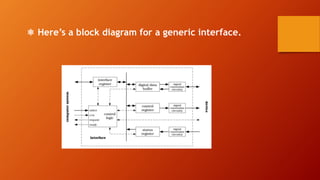
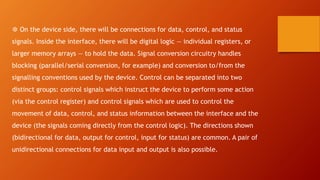
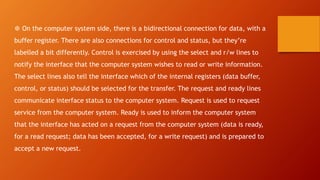
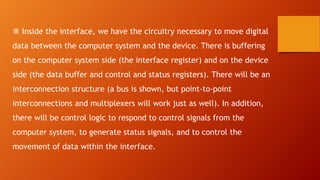
❅ Here’s a block diagram for a generic interface.
❆ On the device side, there will be connections for data, control, and status
signals. Inside the interface, there will be digital logic — individual registers, or
larger memory arrays — to hold the data. Signal conversion circuitry handles
blocking (parallel/serial conversion, for example) and conversion to/from the
signalling conventions used by the device. Control can be separated into two
distinct groups: control signals which instruct the device to perform some action
(via the control register) and control signals which are used to control the
movement of data, control, and status information between the interface and the
device (the signals coming directly from the control logic). The directions shown
(bidirectional for data, output for control, input for status) are common. A pair of
unidirectional connections for data input and output is also possible.
❆ On the computer system side, there is a bidirectional connection for data, with a
buffer register. There are also connections for control and status, but they’re
labelled a bit differently. Control is exercised by using the select and r/w lines to
notify the interface that the computer system wishes to read or write information.
The select lines also tell the interface which of the internal registers (data buffer,
control, or status) should be selected for the transfer. The request and ready lines
communicate interface status to the computer system. Request is used to request
service from the computer system. Ready is used to inform the computer system
that the interface has acted on a request from the computer system (data is ready,
for a read request; data has been accepted, for a write request) and is prepared to
accept a new request.
❆ Inside the interface, we have the circuitry necessary to move digital
data between the computer system and the device. There is buffering
on the computer system side (the interface register) and on the device
side (the data buffer and control and status registers). There will be an
interconnection structure (a bus is shown, but point-to-point
interconnections and multiplexers will work just as well). In addition,
there will be control logic to respond to control signals from the
computer system, to generate status signals, and to control the
movement of data within the interface.
❅ How does this work? What is the generic sequence of events to transfer data
between the computer system and the device? ❆ To read data, the computer system
will select the interface and ask for the contents of the status register. The
interface will transfer the contents of the status register to the interface register
and signal to the computer system that the information is ready. The computer
system will read the information from the interface register and examine it. If the
status indicates that the device has data ready, the computer system will select the
interface and ask it to write to the control register. The data transferred from the
computer system to the interface will be the proper control word to cause the
device to transfer data to the data buffer.
The interface control logic will coordinate transfer of the control word to the
device, and receipt of the data from the device. When the data is available, the
interface will use request and ready to notify the computer system. The computer
system will then select the interface and ask for the content of the data buffer.
The interface will move data into the interface register, signal that the data is
ready, and it will be read by the computer system. ❆ To write data, the sequence
is much the same: The computer system will check the status of the device, issue
the appropriate control word, and then send data to the interface for transfer to
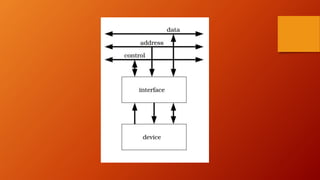
the device. ❅ Typically, an interface is not connected directly to a computer
system. Instead, multiple interfaces are connected to a bus.
Thank you
Manoj Motapalukula
❆ The bus provides data, address (select) and control lines that are connected to all interfaces.
❆ To communicate with an interface, the computer system sets the address lines to the proper
value to select the interface, sets the control signals for read or write, and then transfers data
using the data lines. ❆ Clearly, in order for this system to work correctly, we need to set things
up so that at most one interface recognizes any given address. All outputs from an interface must
be equipped with tristate buffers so that only the selected interface attempts to assert a value
on a given wire in the bus.

Output subsystem interfacing

  • 1.
  • 2.
    Input Output Subsystem •Sofar, we’ve discussed the processor and the memory hierarchy, and we’ve looked at how the two interact. Exclude, for a moment, the secondary memory that lies at the bottom of the memory hierarchy. • ❆ The time scale is uniformly fast, with transaction times ranging from subnanosecond to a few hundred nano seconds. •❆ Memory is random access. The time required for transactions is predictable, and we’re dealing with one transaction model.
  • 3.
    Interaction between thememory and the CPU is highly structured, occurring in a very predictable way as the CPU fetches and executes instructions. It’s also synchronized to the CPU clock. ❆ The CPU and the top levels of the memory hierarchy are very tightly integrated. As a user, you cannot swap out one manufacturer’s L2 cache and replace it with another. ❆ The distances involved are small. L1 and L2 cache are often fabricated on the same IC as the CPU. At worst, they may be a separate IC within the same hybrid package. Memory is a few inches away, somewhere on the motherboard.
  • 4.
    ❅ Input-output, onthe other hand, is very different. ❆ The data rate varies from gigabits/second (network interfaces, disks) to seconds/bit (mouse or keyboard events). Meeting the bandwidth requirements is challenging for high- speed i/o devices. ❆ The time required for a transaction is not predictable — most i/o devices are not random-access, so the time required will vary depending on the data involved and the response time of the device. Worse, human interaction may be involved. ❆ The occurrence of an i/o event is not predictable. When it occurs, the CPU may need to respond very quickly (milli- or microseconds). Response time (latency) becomes an issue, in addition to throughput.
  • 5.
    ❆ Some i/oevents are just not as important as others. We may well want to postpone handling an i/o event, or suspend the handling of one event while we deal with another that is more important and/or requires a faster response. ❆ Distance is greater, and the variation is greater. Some peripherals will be within a few inches of the CPU, others may be a few feet away.
  • 6.
    Interfaces ❆ There’s anenormous variation in available i/o devices, and consumers expect to be able to change the number and configuration of i/o devices with ease. ❅ As we’ll see, this requires some new capabilities and approaches. ❆ To get the attention of the CPU, we’ll introduce the idea of an interrupt (more generally, an exception). This will allow us to force the CPU to suspend execution of the current instruction stream and divert to another instruction stream to deal with the interrupt. We’ll also see how this can be made invisible to the interrupted process. ❆ To move data between i/o devices and the CPU and memory, we’ll be using busses.
  • 7.
    ❆ To dealwith the nearly infinite variety of access models embodied in i/o devices, we’ll use a (relatively) limited number of communication conventions called bus protocols, embedded in bus standards (PCI, USB, etc.). Manufacturers package their i/o devices with standard interfaces that conform to some bus standard. ❆ Because of the range of distances involved, and the differing speeds of attached devices, bus protocols will often use transaction models that require explicit acknowledgement by each party. There will typically be provision to vary (usually, extend) a transaction in order to allow one party time to respond. ❆ To accommodate the huge variation in data rates, some bus standards are designed to support low-speed devices, others high-speed devices. One class of interface is a device which acts as a time-division multiplexer, connecting several slow busses to a high-speed bus.
  • 8.
    ❅ At itsmost basic, the role of an interface is to transform the raw interface provided by the i/o device into an interface that conforms to the conventions of digital circuits. ❆ Translation between analog signal levels and digital 1’s and 0’s is a nearly universal function in interfaces. I/O devices are a mixture of digital and analog electronic components, optical components, and mechanical components. For example, a request to read a disk block must be translated into a sequence of analog signals that will cause motors to properly position the disk heads. Once the data begins to travel past the heads, the analog signal generated by sensing the magnetic fields on the disk must be translated into 1’s and 0’s for use by the CPU.
  • 9.
    ❆ Another nearlyuniversal function is the provision of buffers for data transfer. The basic function is to change the blocking of the data, but that’s not the important idea. By providing buffers for data transfer, the interface can reduce the amount of work the CPU must perform to transfer data. Buffers also give the CPU more freedom to choose when to respond to an i/o event. For example, many network protocols transmit data bit by bit over a single wire. If a Gigabit Ethernet interface required the CPU to execute instructions to move each bit of data from the interface to memory, no CPU could keep up. Instead, the interface provides a fairly large data buffer. The CPU executes instructions to load data into this buffer and then executes a few more instructions to tell the interface to transmit the data. Dedicated logic within the interface processes the block of data one bit at a time.
  • 10.
    ❅ Here’s ablock diagram for a generic interface.
  • 11.
    ❆ On thedevice side, there will be connections for data, control, and status signals. Inside the interface, there will be digital logic — individual registers, or larger memory arrays — to hold the data. Signal conversion circuitry handles blocking (parallel/serial conversion, for example) and conversion to/from the signalling conventions used by the device. Control can be separated into two distinct groups: control signals which instruct the device to perform some action (via the control register) and control signals which are used to control the movement of data, control, and status information between the interface and the device (the signals coming directly from the control logic). The directions shown (bidirectional for data, output for control, input for status) are common. A pair of unidirectional connections for data input and output is also possible.
  • 12.
    ❆ On thecomputer system side, there is a bidirectional connection for data, with a buffer register. There are also connections for control and status, but they’re labelled a bit differently. Control is exercised by using the select and r/w lines to notify the interface that the computer system wishes to read or write information. The select lines also tell the interface which of the internal registers (data buffer, control, or status) should be selected for the transfer. The request and ready lines communicate interface status to the computer system. Request is used to request service from the computer system. Ready is used to inform the computer system that the interface has acted on a request from the computer system (data is ready, for a read request; data has been accepted, for a write request) and is prepared to accept a new request.
  • 13.
    ❆ Inside theinterface, we have the circuitry necessary to move digital data between the computer system and the device. There is buffering on the computer system side (the interface register) and on the device side (the data buffer and control and status registers). There will be an interconnection structure (a bus is shown, but point-to-point interconnections and multiplexers will work just as well). In addition, there will be control logic to respond to control signals from the computer system, to generate status signals, and to control the movement of data within the interface.
  • 14.
    ❅ How doesthis work? What is the generic sequence of events to transfer data between the computer system and the device? ❆ To read data, the computer system will select the interface and ask for the contents of the status register. The interface will transfer the contents of the status register to the interface register and signal to the computer system that the information is ready. The computer system will read the information from the interface register and examine it. If the status indicates that the device has data ready, the computer system will select the interface and ask it to write to the control register. The data transferred from the computer system to the interface will be the proper control word to cause the device to transfer data to the data buffer.
  • 15.
    The interface controllogic will coordinate transfer of the control word to the device, and receipt of the data from the device. When the data is available, the interface will use request and ready to notify the computer system. The computer system will then select the interface and ask for the content of the data buffer. The interface will move data into the interface register, signal that the data is ready, and it will be read by the computer system. ❆ To write data, the sequence is much the same: The computer system will check the status of the device, issue the appropriate control word, and then send data to the interface for transfer to the device. ❅ Typically, an interface is not connected directly to a computer system. Instead, multiple interfaces are connected to a bus.
  • 17.
    Thank you Manoj Motapalukula ❆The bus provides data, address (select) and control lines that are connected to all interfaces. ❆ To communicate with an interface, the computer system sets the address lines to the proper value to select the interface, sets the control signals for read or write, and then transfers data using the data lines. ❆ Clearly, in order for this system to work correctly, we need to set things up so that at most one interface recognizes any given address. All outputs from an interface must be equipped with tristate buffers so that only the selected interface attempts to assert a value on a given wire in the bus.