OUR ARDUINO PROJECT
Patricia Brito
WHAT IS IT?
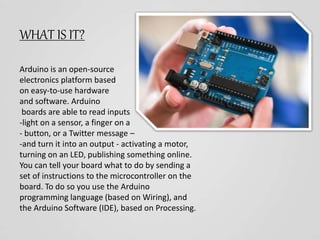
Arduino is an open-source
electronics platform based
on easy-to-use hardware
and software. Arduino
boards are able to read inputs
-light on a sensor, a finger on a
- button, or a Twitter message –
-and turn it into an output - activating a motor,
turning on an LED, publishing something online.
You can tell your board what to do by sending a
set of instructions to the microcontroller on the
board. To do so you use the Arduino
programming language (based on Wiring), and
the Arduino Software (IDE), based on Processing.
WHAT DOE IT DOES?
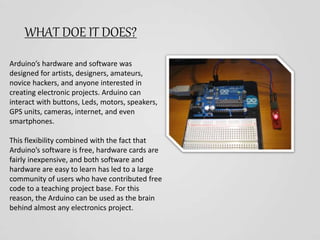
Arduino’s hardware and software was
designed for artists, designers, amateurs,
novice hackers, and anyone interested in
creating electronic projects. Arduino can
interact with buttons, Leds, motors, speakers,
GPS units, cameras, internet, and even
smartphones.
This flexibility combined with the fact that
Arduino’s software is free, hardware cards are
fairly inexpensive, and both software and
hardware are easy to learn has led to a large
community of users who have contributed free
code to a teaching project base. For this
reason, the Arduino can be used as the brain
behind almost any electronics project.
SOME ELEMENTS THAT ARE IN AN ARDUINO
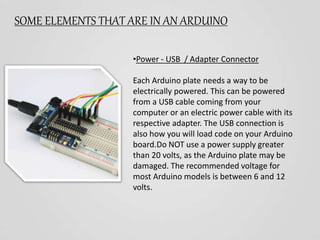
•Power - USB / Adapter Connector
Each Arduino plate needs a way to be
electrically powered. This can be powered
from a USB cable coming from your
computer or an electric power cable with its
respective adapter. The USB connection is
also how you will load code on your Arduino
board.Do NOT use a power supply greater
than 20 volts, as the Arduino plate may be
damaged. The recommended voltage for
most Arduino models is between 6 and 12
volts.
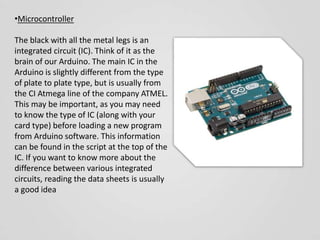
•Microcontroller
The black with all the metal legs is an
integrated circuit (IC). Think of it as the
brain of our Arduino. The main IC in the
Arduino is slightly different from the type
of plate to plate type, but is usually from
the CI Atmega line of the company ATMEL.
This may be important, as you may need
to know the type of IC (along with your
card type) before loading a new program
from Arduino software. This information
can be found in the script at the top of the
IC. If you want to know more about the
difference between various integrated
circuits, reading the data sheets is usually
a good idea
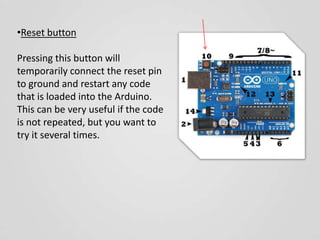
•Reset button
Pressing this button will
temporarily connect the reset pin
to ground and restart any code
that is loaded into the Arduino.
This can be very useful if the code
is not repeated, but you want to
try it several times.
EXAMPLES
Our arduino project

Our arduino project

  • 1.
  • 2.
    WHAT IS IT? Arduinois an open-source electronics platform based on easy-to-use hardware and software. Arduino boards are able to read inputs -light on a sensor, a finger on a - button, or a Twitter message – -and turn it into an output - activating a motor, turning on an LED, publishing something online. You can tell your board what to do by sending a set of instructions to the microcontroller on the board. To do so you use the Arduino programming language (based on Wiring), and the Arduino Software (IDE), based on Processing.
  • 3.
    WHAT DOE ITDOES? Arduino’s hardware and software was designed for artists, designers, amateurs, novice hackers, and anyone interested in creating electronic projects. Arduino can interact with buttons, Leds, motors, speakers, GPS units, cameras, internet, and even smartphones. This flexibility combined with the fact that Arduino’s software is free, hardware cards are fairly inexpensive, and both software and hardware are easy to learn has led to a large community of users who have contributed free code to a teaching project base. For this reason, the Arduino can be used as the brain behind almost any electronics project.
  • 4.
    SOME ELEMENTS THATARE IN AN ARDUINO •Power - USB / Adapter Connector Each Arduino plate needs a way to be electrically powered. This can be powered from a USB cable coming from your computer or an electric power cable with its respective adapter. The USB connection is also how you will load code on your Arduino board.Do NOT use a power supply greater than 20 volts, as the Arduino plate may be damaged. The recommended voltage for most Arduino models is between 6 and 12 volts.
  • 5.
    •Microcontroller The black withall the metal legs is an integrated circuit (IC). Think of it as the brain of our Arduino. The main IC in the Arduino is slightly different from the type of plate to plate type, but is usually from the CI Atmega line of the company ATMEL. This may be important, as you may need to know the type of IC (along with your card type) before loading a new program from Arduino software. This information can be found in the script at the top of the IC. If you want to know more about the difference between various integrated circuits, reading the data sheets is usually a good idea
  • 6.
    •Reset button Pressing thisbutton will temporarily connect the reset pin to ground and restart any code that is loaded into the Arduino. This can be very useful if the code is not repeated, but you want to try it several times.
  • 7.