ARDUINO
THE OPEN SOURCE ELECTRONICS PROTOTYPE PLATFORM
PRESENTED BY
-VIGNESH A
WHAT IS ARDUINO ?
CONTENTS
HISTORY OF ARDUINO
ARDUINO UNO
BOARD BREAKDOWN
MOST POPULAR ARDUINO BOARDS
FEATURES OF UNO
ARDUINO IDE
OTHER PROTOTYPING PLATFORMS
WHAT IS ARDUINO ?
 Arduino is an open source programmable circuit board that can be
integrated into a wide variety of makerspace projects both simple
and complex.
 This board contains a microcontroller which is able to be
programmed to sense and control objects in the physical world.
 By responding to sensors and inputs, the Arduino is able to
interact
with a large array of outputs such as LEDs, motors and displays.
 ‘Open source electronic prototype platform’-resources that can be
used, redistributed or rewritten free of charge. often software or
hardware
HISTORY OF ARDUINO
 It was in the year 2005 that the first ever Arduino board was born
in the classrooms of the Interactive Design Institute in Ivrea, Italy.
 It was in the Interactive Design Institute that a hardware thesis
was contributed for a wiring design by a Colombian student
named Hernando Barragan.
 The new prototype board, the Arduino, created by Massimo Banzi
and other founders
S
t
S
tep S
tep
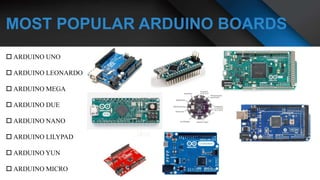
MOST POPULAR ARDUINO BOARDS
 ARDUINO UNO
 ARDUINO LEONARDO
 ARDUINO MEGA
 ARDUINO DUE
 ARDUINO NANO
 ARDUINO LILYPAD
 ARDUINO YUN
 ARDUINO MICRO
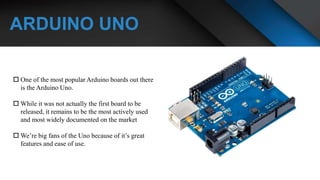
ARDUINO UNO
 One of the most popular Arduino boards out there
is the Arduino Uno.
 While it was not actually the first board to be
released, it remains to be the most actively used
and most widely documented on the market
 We’re big fans of the Uno because of it’s great
features and ease of use.
BOARD BREAKDOWN
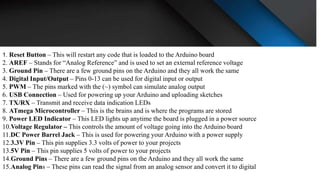
1. Reset Button – This will restart any code that is loaded to the Arduino board
2. AREF – Stands for “Analog Reference” and is used to set an external reference voltage
3. Ground Pin – There are a few ground pins on the Arduino and they all work the same
4. Digital Input/Output – Pins 0-13 can be used for digital input or output
5. PWM – The pins marked with the (~) symbol can simulate analog output
6. USB Connection – Used for powering up your Arduino and uploading sketches
7. TX/RX – Transmit and receive data indication LEDs
8. ATmega Microcontroller – This is the brains and is where the programs are stored
9. Power LED Indicator – This LED lights up anytime the board is plugged in a power source
10.Voltage Regulator – This controls the amount of voltage going into the Arduino board
11.DC Power Barrel Jack – This is used for powering your Arduino with a power supply
12.3.3V Pin – This pin supplies 3.3 volts of power to your projects
13.5V Pin – This pin supplies 5 volts of power to your projects
14.Ground Pins – There are a few ground pins on the Arduino and they all work the same
15.Analog Pins – These pins can read the signal from an analog sensor and convert it to digital
4
2
3
1
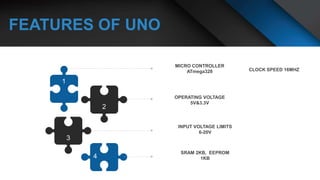
FEATURES OF UNO
ARDUINO IDE
 Arduino IDE where IDE stands for Integrated
Development Environment - An official software
introduced by Arduino.cc, that is mainly used for writing,
compiling and uploading the code in the Arduino Device.
Almost all Arduino modules are compatible with this
software that is an open source and is readily available to
install and start compiling the code on the go.
 This environment supports both C and C++ languages.
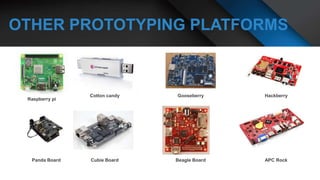
OTHER PROTOTYPING PLATFORMS
THANK YOU

Arduino

  • 1.
    ARDUINO THE OPEN SOURCEELECTRONICS PROTOTYPE PLATFORM PRESENTED BY -VIGNESH A
  • 2.
    WHAT IS ARDUINO? CONTENTS HISTORY OF ARDUINO ARDUINO UNO BOARD BREAKDOWN MOST POPULAR ARDUINO BOARDS FEATURES OF UNO ARDUINO IDE OTHER PROTOTYPING PLATFORMS
  • 3.
    WHAT IS ARDUINO?  Arduino is an open source programmable circuit board that can be integrated into a wide variety of makerspace projects both simple and complex.  This board contains a microcontroller which is able to be programmed to sense and control objects in the physical world.  By responding to sensors and inputs, the Arduino is able to interact with a large array of outputs such as LEDs, motors and displays.  ‘Open source electronic prototype platform’-resources that can be used, redistributed or rewritten free of charge. often software or hardware
  • 4.
    HISTORY OF ARDUINO It was in the year 2005 that the first ever Arduino board was born in the classrooms of the Interactive Design Institute in Ivrea, Italy.  It was in the Interactive Design Institute that a hardware thesis was contributed for a wiring design by a Colombian student named Hernando Barragan.  The new prototype board, the Arduino, created by Massimo Banzi and other founders
  • 5.
    S t S tep S tep MOST POPULARARDUINO BOARDS  ARDUINO UNO  ARDUINO LEONARDO  ARDUINO MEGA  ARDUINO DUE  ARDUINO NANO  ARDUINO LILYPAD  ARDUINO YUN  ARDUINO MICRO
  • 6.
    ARDUINO UNO  Oneof the most popular Arduino boards out there is the Arduino Uno.  While it was not actually the first board to be released, it remains to be the most actively used and most widely documented on the market  We’re big fans of the Uno because of it’s great features and ease of use.
  • 7.
  • 8.
    1. Reset Button– This will restart any code that is loaded to the Arduino board 2. AREF – Stands for “Analog Reference” and is used to set an external reference voltage 3. Ground Pin – There are a few ground pins on the Arduino and they all work the same 4. Digital Input/Output – Pins 0-13 can be used for digital input or output 5. PWM – The pins marked with the (~) symbol can simulate analog output 6. USB Connection – Used for powering up your Arduino and uploading sketches 7. TX/RX – Transmit and receive data indication LEDs 8. ATmega Microcontroller – This is the brains and is where the programs are stored 9. Power LED Indicator – This LED lights up anytime the board is plugged in a power source 10.Voltage Regulator – This controls the amount of voltage going into the Arduino board 11.DC Power Barrel Jack – This is used for powering your Arduino with a power supply 12.3.3V Pin – This pin supplies 3.3 volts of power to your projects 13.5V Pin – This pin supplies 5 volts of power to your projects 14.Ground Pins – There are a few ground pins on the Arduino and they all work the same 15.Analog Pins – These pins can read the signal from an analog sensor and convert it to digital
  • 9.
  • 10.
    ARDUINO IDE  ArduinoIDE where IDE stands for Integrated Development Environment - An official software introduced by Arduino.cc, that is mainly used for writing, compiling and uploading the code in the Arduino Device. Almost all Arduino modules are compatible with this software that is an open source and is readily available to install and start compiling the code on the go.  This environment supports both C and C++ languages.
  • 11.
  • 12.