
Gone Crazy  For Google Christine Archer Technology Coordinator Cherokee Trail High School
Ten True Things 1. Focus on the user and all else will follow. 2. It's best to do one thing really, really well. 3. Fast is better than slow. 4. Democracy on the web works. 5. You don't need to be at your desk to need an answer. 6. You can make money without doing evil. 7. There's always more information out there. 8. The need for information crosses all borders. 9. You can be serious without a suit.  10. Great just isn't good enough.
Press release “ We've been hearing stories from classrooms across the US where teachers at all grade levels are using Google products to bring assignments to life, shine light on new sources of information, and encourage sharing and collaboration. What we also heard loud and clear was teachers' desire for more information about our products and more connections to other educators who are using the web creatively. That's why we've launched a set of resources for K-12 educators today at www.google.com/educators.” October 2006
edu-google Google for Educators web site Google Teachers Academy The Infinite Thinking Machine Blog Partnership with WestEd and CUE
Familiar tools Google Search Google Earth Google Maps Blogger iGoogle Google Calendar Google Docs & Spreadsheets
Even more Google Reader Google Sites Google Groups Google News Google Video Google Image Search You Tube………………..and the list goes on.
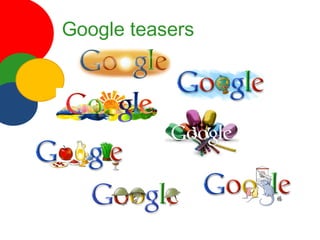
Google teasers
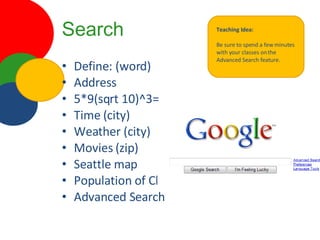
Search Define: (word) Address  5*9(sqrt 10)^3= Time (city) Weather (city) Movies (zip) Seattle map Population of China Advanced Search Teaching Idea: Be sure to spend a few minutes with your classes on the Advanced Search feature.
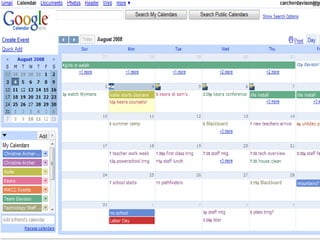
Google Calendar Share your calendar Search feature Gmail integration Quick add Invitations Public, private, friends and holiday Manage multiple calendars Teaching Idea: Use Google calendar to manage your project and homework deadlines
 
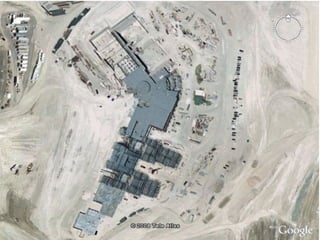
Google Earth Satellite imagery of the Earth Still pictures Share files Street view Sky Flyovers Google Earth Community Google Lit Trips Teaching Idea: Have students create a bio timeline of themselves. Show a few each day so you get to know students.
 
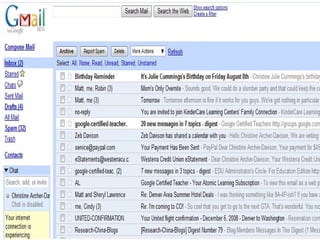
G-mail Browser based Doesn’t matter if you switch internet service providers Integrates with calendar Tons of storage Integrates Google talk Teaching Idea: Use this email to keep your personal and professional life separate.
 
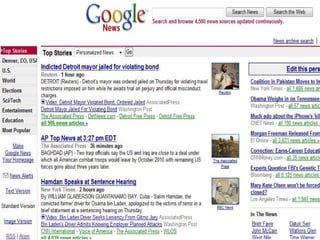
Google news News from thousands of different sources Quickly browse  top stories Search for specific interest stories News alerts sent to your email Can add to RSS reader Teaching Idea: Personalize the page to fit your classroom needs
 
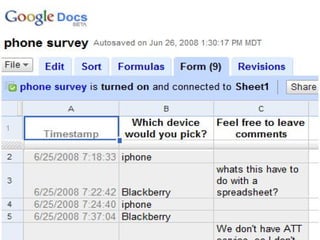
Google form Part of Google docs (which is awesome!) Easy to use Data input straight into spreadsheet Great for surveys Teaching Idea: Email a survey link to all your students for a pre-test outside of class
 
Olympic tools You Tube channel (news, recaps etc) www.youtube.com/ytsummergames Google Olympic News Google gadget Google maps Google Sketchup
Get started Now! Create a Google account Pick one application to try Explore the educators site Look for the Googlepalooza class in ERO for more guided Google exploration
What will  you do Today?

Gone Crazy for Google

  • 1.
    Gone Crazy For Google Christine Archer Technology Coordinator Cherokee Trail High School
  • 2.
    Ten True Things1. Focus on the user and all else will follow. 2. It's best to do one thing really, really well. 3. Fast is better than slow. 4. Democracy on the web works. 5. You don't need to be at your desk to need an answer. 6. You can make money without doing evil. 7. There's always more information out there. 8. The need for information crosses all borders. 9. You can be serious without a suit. 10. Great just isn't good enough.
  • 3.
    Press release “We've been hearing stories from classrooms across the US where teachers at all grade levels are using Google products to bring assignments to life, shine light on new sources of information, and encourage sharing and collaboration. What we also heard loud and clear was teachers' desire for more information about our products and more connections to other educators who are using the web creatively. That's why we've launched a set of resources for K-12 educators today at www.google.com/educators.” October 2006
  • 4.
    edu-google Google forEducators web site Google Teachers Academy The Infinite Thinking Machine Blog Partnership with WestEd and CUE
  • 5.
    Familiar tools GoogleSearch Google Earth Google Maps Blogger iGoogle Google Calendar Google Docs & Spreadsheets
  • 6.
    Even more GoogleReader Google Sites Google Groups Google News Google Video Google Image Search You Tube………………..and the list goes on.
  • 7.
  • 8.
    Search Define: (word)Address 5*9(sqrt 10)^3= Time (city) Weather (city) Movies (zip) Seattle map Population of China Advanced Search Teaching Idea: Be sure to spend a few minutes with your classes on the Advanced Search feature.
  • 9.
    Google Calendar Shareyour calendar Search feature Gmail integration Quick add Invitations Public, private, friends and holiday Manage multiple calendars Teaching Idea: Use Google calendar to manage your project and homework deadlines
  • 10.
  • 11.
    Google Earth Satelliteimagery of the Earth Still pictures Share files Street view Sky Flyovers Google Earth Community Google Lit Trips Teaching Idea: Have students create a bio timeline of themselves. Show a few each day so you get to know students.
  • 12.
  • 13.
    G-mail Browser basedDoesn’t matter if you switch internet service providers Integrates with calendar Tons of storage Integrates Google talk Teaching Idea: Use this email to keep your personal and professional life separate.
  • 14.
  • 15.
    Google news Newsfrom thousands of different sources Quickly browse top stories Search for specific interest stories News alerts sent to your email Can add to RSS reader Teaching Idea: Personalize the page to fit your classroom needs
  • 16.
  • 17.
    Google form Partof Google docs (which is awesome!) Easy to use Data input straight into spreadsheet Great for surveys Teaching Idea: Email a survey link to all your students for a pre-test outside of class
  • 18.
  • 19.
    Olympic tools YouTube channel (news, recaps etc) www.youtube.com/ytsummergames Google Olympic News Google gadget Google maps Google Sketchup
  • 20.
    Get started Now!Create a Google account Pick one application to try Explore the educators site Look for the Googlepalooza class in ERO for more guided Google exploration
  • 21.
    What will you do Today?