Copyright © 2016 Oracle and/or its affiliates. All rights reserved. |
Oracle Cloud
Patrik Plachý
Senior Sales Consultant
Oracle CEE Technology Sales Consulting
Oracle Cloud Infrastructure
2
Copyright © 2016, Oracle and/or its affiliates. All rights reserved. |
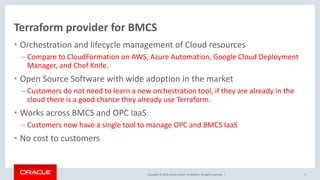
Terraform provider for BMCS
• Orchestration and lifecycle management of Cloud resources
– Compare to CloudFormation on AWS, Azure Automation, Google Cloud Deployment
Manager, and Chef Knife.
• Open Source Software with wide adoption in the market
– Customers do not need to learn a new orchestration tool, if they are already in the
cloud there is a good chance they already use Terraform.
• Works across BMCS and OPC IaaS
– Customers now have a single tool to manage OPC and BMCS IaaS
• No cost to customers
3
Copyright © 2016, Oracle and/or its affiliates. All rights reserved. | 4
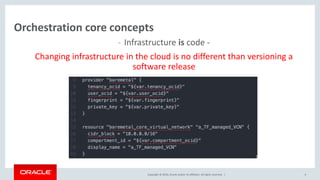
Orchestration core concepts
- Infrastructure is code -
Changing infrastructure in the cloud is no different than versioning a
software release
Copyright © 2016, Oracle and/or its affiliates. All rights reserved. |
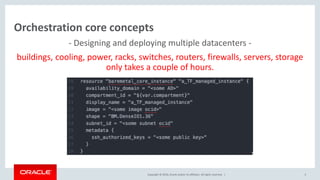
- Designing and deploying multiple datacenters -
buildings, cooling, power, racks, switches, routers, firewalls, servers, storage
only takes a couple of hours.
5
Orchestration core concepts
Copyright © 2016, Oracle and/or its affiliates. All rights reserved. | 6
Orchestration core concepts
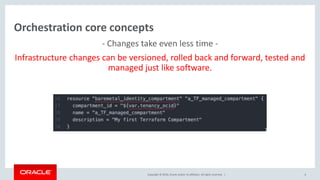
- Changes take even less time -
Infrastructure changes can be versioned, rolled back and forward, tested and
managed just like software.
Copyright © 2016, Oracle and/or its affiliates. All rights reserved. | 7
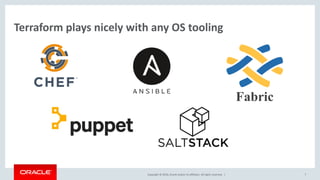
Terraform plays nicely with any OS tooling
Fabric
Copyright © 2016, Oracle and/or its affiliates. All rights reserved. |
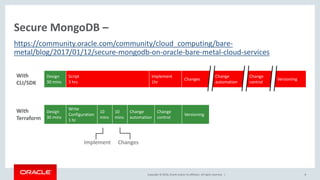
Secure MongoDB –
8
https://community.oracle.com/community/cloud_computing/bare-
metal/blog/2017/01/12/secure-mongodb-on-oracle-bare-metal-cloud-services
With
CLI/SDK
Design
30 mins
Script
3 hrs
Implement
1hr
Changes
Change
automation
Change
control
Versioning
With
Terraform
Design
30 mins
Write
Configuration
1 hr
10
mins
10
mins
Change
automation
Change
control
Versioning
Implement Changes
Copyright © 2016, Oracle and/or its affiliates. All rights reserved. |
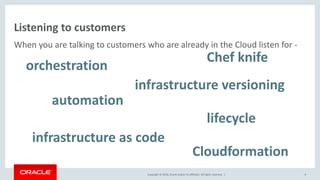
Listening to customers
When you are talking to customers who are already in the Cloud listen for -
9
orchestration
automation
infrastructure as code
infrastructure versioning
lifecycle
Cloudformation
Chef knife
Copyright © 2016, Oracle and/or its affiliates. All rights reserved. |
Talking to customers
Senior leaders:
“Oracle has a great IaaS automation solution that spans Bare Metal and OPC
Compute. It’s based on existing, market leading tools so your team is
probably already familiar with it, there is no learning curve or need to
implement new tooling. We are the first major IaaS provider to adopt a
provider independent orchestration tool as our own, we think this approach
is better for customers as it makes building Cloud agnostic solutions easier.”
10
Copyright © 2016, Oracle and/or its affiliates. All rights reserved. |
Talking to customers
IT management:
“Oracle has adopted the Terraform tooling to deliver a mature, enterprise
and developer friendly cloud orchestration tool. There is no charge for using
it, it’s feature complete and superior to any cloud specific, single cloud
orchestration tools. Your team can manage resources across any major IaaS
provider with Terraform, there is a good chance they are already using it.”
11
Copyright © 2016, Oracle and/or its affiliates. All rights reserved. |
Talking to customers
To ICs:
“We’ve got a great open-source orchestration tool, it’s on GitHub. Just
search for Oracle BareMetal Terraform.”
12
Copyright © 2016, Oracle and/or its affiliates. All rights reserved. |
What Is Infrastructure as Code?
• The idea behind infrastructure as code (IAC) is that you write and execute code to
define, deploy, and update your infrastructure. This represents an important shift in
mindset where you treat all aspects of operations as software — even those aspects
that represent hardware (e.g., setting up physical servers).
• In fact, a key insight of DevOps is that you can manage almost everything in code,
including servers, databases, networks, log files, application configuration,
documentation, automated tests, deployment processes, and so on.
Copyright © 2016, Oracle and/or its affiliates. All rights reserved. |
Bare Metal Cloud Services – Moving Fast
• Region Expansion
– US East, EMEA, APAC
• Double down on Database service
– 2-Node RAC and Exadata Support
• Block Storage V2.0
– High perf, Elastic, 60 IOPs/GB
• Compute Service expansion
– 1,2,4,8 and 16 core VMs; New shapes GPU/Memory intensive; Various OS support
• Compliance
– In process SOC1, SOC2 and ISO 27001
Copyright © 2016, Oracle and/or its affiliates. All rights reserved. |
Terraform – built by HashiCorp
• HashiCorp – builds various tools for Cloud Operations
• Goal for Overall Toolset – “Any Application” “Any Infrastructure”
• Provision
– Vagrant- Create and configure portable development environments
– Packer - Create platform specific machine images from a single source
– Terraform - Create, combine and manage infrastructure across multiple providers
• Secure
– Vault - Centrally store, secure and control access to distributed secrets
• RUN
– Nomad - Cluster manager and scheduler to deploy applications across any infrastructure
– Consul - Distributed highly available tool for service discovery, configuration and orchestration
Copyright © 2016, Oracle and/or its affiliates. All rights reserved. |
Cloud Orchestration & Infrastructure as Code (IaC)
• Infrastructure Lifecycle
– Provision
– Update
– Destroy
• The 4 Broad categories of IAC:
– Ad hoc scripts
– Configuration management tools (chef, puppet, …)
– Server templating tools (Packer, Vagrant, Docker, ….
– Server provisioning tools (Terraform, cloud formation, heat)
Copyright © 2016, Oracle and/or its affiliates. All rights reserved. |
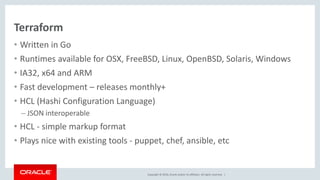
Terraform
• Written in Go
• Runtimes available for OSX, FreeBSD, Linux, OpenBSD, Solaris, Windows
• IA32, x64 and ARM
• Fast development – releases monthly+
• HCL (Hashi Configuration Language)
– JSON interoperable
• HCL - simple markup format
• Plays nice with existing tools - puppet, chef, ansible, etc
Copyright © 2016, Oracle and/or its affiliates. All rights reserved. |
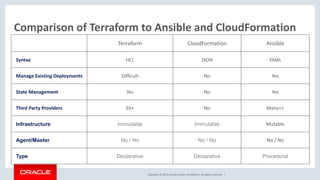
Comparison of Terraform to Ansible and CloudFormation
Terraform CloudFormation Ansible
Syntax HCL JSON YAML
Manage Existing Deployments Difficult No Yes
State Management Yes No Yes
Third Party Providers 65+ No Many++
Infrastructure Immutable Immutable Mutable
Agent/Master No / No No / No No / No
Type Declarative Declarative Procedural
Copyright © 2016, Oracle and/or its affiliates. All rights reserved. |
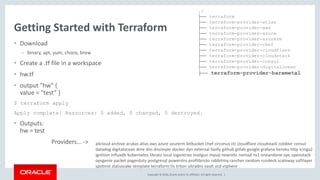
Getting Started with Terraform
• Download
– binary, apt, yum, choco, brew
• Create a .tf file in a workspace
• hw.tf
• output "hw" {
value = "test” }
$ terraform apply
Apply complete! Resources: 0 added, 0 changed, 0 destroyed.
• Outputs:
hw = test
Providers… ->
./
├── terraform
├── terraform-provider-atlas
├── terraform-provider-aws
├── terraform-provider-azure
├── terraform-provider-azurerm
├── terraform-provider-chef
├── terraform-provider-cloudflare
├── terraform-provider-cloudstack
├── terraform-provider-consul
├── terraform-provider-digitalocean
├── terraform-provider-baremetal
alicloud archive arukas atlas aws azure azurerm bitbucket chef circonus clc cloudflare cloudstack cobbler consul
datadog digitalocean dme dns dnsimple docker dyn external fastly github gitlab google grafana heroku http icinga2
ignition influxdb kubernetes librato local logentries mailgun mysql newrelic nomad ns1 oneandone opc openstack
opsgenie packet pagerduty postgresql powerdns profitbricks rabbitmq rancher random rundeck scaleway softlayer
spotinst statuscake template terraform tls triton ultradns vault vcd vsphere
Copyright © 2016, Oracle and/or its affiliates. All rights reserved. |
HCL – Basic Terraform .tf Format
• Terraform configuration is written into files named .tf files.
• It is based on the HashiCorp Configuration Language
(HCL) https://github.com/hashicorp/hcl
• JSON is supported for code generation purposes.
• Most of the configuration takes the form:
keyword1 "some_name" {
key = "value„
nested {
key = "value'
}
}
{
"keyword1": [
{
"some_name": [
{
"key": "value",
"nested": [
{
"key": "value"
}
]
}
]
}
]
}
Copyright © 2016, Oracle and/or its affiliates. All rights reserved. |
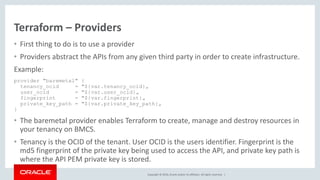
Terraform – Providers
• First thing to do is to use a provider
• Providers abstract the APIs from any given third party in order to create infrastructure.
Example:
provider "baremetal" {
tenancy_ocid = "${var.tenancy_ocid}„
user_ocid = "${var.user_ocid}„
fingerprint = "${var.fingerprint}„
private_key_path = "${var.private_key_path}„
}
• The baremetal provider enables Terraform to create, manage and destroy resources in
your tenancy on BMCS.
• Tenancy is the OCID of the tenant. User OCID is the users identifier. Fingerprint is the
md5 fingerprint of the private key being used to access the API, and private key path is
where the API PEM private key is stored.
Copyright © 2016, Oracle and/or its affiliates. All rights reserved. |
Terraform – Resources
Resources
Once a provider is configured we can start using that providers resources.
With the BMCS baremetal provider, we can start creating instances, block and object storage, networks, etc.
The following example starts an instance:
resource "baremetal_core_instance" "TFInstance" {
availability_domain = "${lookup(data.baremetal_identity_availability_domains.ADs.availability_domains[var.AD
- 1],"name")}"
compartment_id = "${var.compartment_ocid}"
display_name = "TFInstance"
hostname_label = "instance1"
image = "${lookup(data.baremetal_core_images.OLImageOCID.images[0], "id")}"
shape = "${var.InstanceShape}"
subnet_id = "${var.SubnetOCID}"
metadata {
ssh_authorized_keys = "${var.ssh_public_key}"
user_data = "${base64encode(file(var.BootStrapFile))}"
}
}
component provider type name
Copyright © 2016, Oracle and/or its affiliates. All rights reserved. |
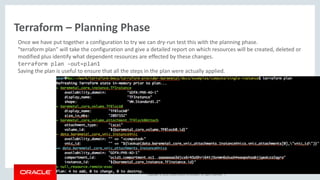
Terraform – Planning Phase
Once we have put together a configuration to try we can dry-run test this with the planning phase.
"terraform plan" will take the configuration and give a detailed report on which resources will be created, deleted or
modified plus identify what dependent resources are effected by these changes.
terraform plan -out=plan1
Saving the plan is useful to ensure that all the steps in the plan were actually applied.
Copyright © 2016, Oracle and/or its affiliates. All rights reserved. |
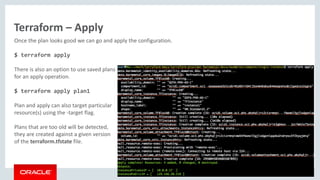
Terraform – Apply
Once the plan looks good we can go and apply the configuration.
$ terraform apply
There is also an option to use saved plans
for an apply operation.
$ terraform apply plan1
Plan and apply can also target particular
resource(s) using the -target flag.
Plans that are too old will be detected,
they are created against a given version
of the terraform.tfstate file.
Copyright © 2016, Oracle and/or its affiliates. All rights reserved. |
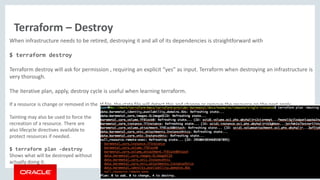
Terraform – Destroy
When infrastructure needs to be retired, destroying it and all of its dependencies is straightforward with
$ terraform destroy
Terraform destroy will ask for permission , requiring an explicit “yes” as input. Terraform when destroying an infrastructure is
very thorough.
The iterative plan, apply, destroy cycle is useful when learning terraform.
If a resource is change or removed in the .tf file, the state file will detect this and change or remove the resource on the next apply.
Tainting may also be used to force the
recreation of a resource. There are
also lifecycle directives available to
protect resources if needed.
$ terraform plan -destroy
Shows what will be destroyed without
actually doing it.
Copyright © 2016, Oracle and/or its affiliates. All rights reserved. |
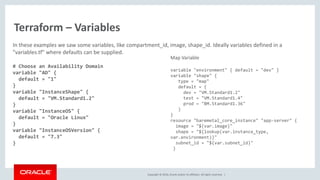
Terraform – Variables
In these examples we saw some variables, like compartment_id, image, shape_id. Ideally variables defined in a
"variables.tf" where defaults can be supplied.
# Choose an Availability Domain
variable "AD" {
default = "1"
}
variable "InstanceShape" {
default = "VM.Standard1.2"
}
variable "InstanceOS" {
default = "Oracle Linux"
}
variable "InstanceOSVersion" {
default = "7.3"
}
Map Variable
variable "environment" { default = "dev" }
variable "shape" {
type = "map"
default = {
dev = "VM.Standard1.2"
test = "VM.Standard1.4"
prod = "BM.Standard1.36"
}
}
resource "baremetal_core_instance" "app-server" {
image = "${var.image}"
shape = "${lookup(var.instance_type,
var.environment)}"
subnet_id = "${var.subnet_id}"
}
Copyright © 2016, Oracle and/or its affiliates. All rights reserved. |
Terraform – Assigning and Overriding Variables
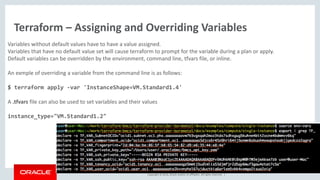
Variables without default values have to have a value assigned.
Variables that have no default value set will cause terraform to prompt for the variable during a plan or apply.
Default variables can be overridden by the environment, command line, tfvars file, or inline.
An exmple of overriding a variable from the command line is as follows:
$ terraform apply -var 'InstanceShape=VM.Standard1.4'
A .tfvars file can also be used to set variables and their values
instance_type="VM.Standard1.2"
Copyright © 2016, Oracle and/or its affiliates. All rights reserved. |
Terraform – Outputs
Terraform can be directed to display the variables that are generated dynamically as pat of the process of creating the
infrastructure.
For example, after a run we might want to see the public ip of the host:
$ cat outputs.tf
output "InstancePrivateIP" { value = ["${data.baremetal_core_vnic.InstanceVnic.private_ip_address}"]}
output "InstancePublicIP" { value = ["${data.baremetal_core_vnic.InstanceVnic.public_ip_address}"]}
After a terraform apply:
Apply complete! Resources: 4 added, 0 changed, 0 destroyed.
State path:
Outputs:
InstancePrivateIP = [ 10.0.0.10 ]
InstancePublicIP = [ 129.146.3.173]
Outputs are often used to facilitate interaction with other infrastructure tools. Terraform show (human readable) and
terraform.tfstate file also store these outputs.
Copyright © 2016, Oracle and/or its affiliates. All rights reserved. |
Terraform – Provisioners
Terraform can also integrate with provisioners like Chef, puppet, Ansible, shells scripts.
An example below is using a provisioner to remote-exec a command to touch a file.
$ cat remote-exec.tf
resource "null_resource" "remote-exec" {
depends_on = ["baremetal_core_instance.TFInstance"]
provisioner "remote-exec" {
connection {
agent = false
timeout = "10m"
host = "${data.baremetal_core_vnic.InstanceVnic.public_ip_address}"
user = "opc"
private_key = "${var.ssh_private_key}"
}
inline = [
"touch ~/IMadeAFile.Right.Here",
]
}
}
30
Internet
bastion
loadbalancer
webserver
TENANCY gsebmcs000xx
COMPARTMENT cXX
VCN cXX
AVAILABILITY DOMAIN 1
AVAILABILITY DOMAIN 2
SUBNET: loadbalancer01 SUBNET webserver01 SUBNET database01
SUBNET bastion01
SUBNET loadbalancer02 SUBNET webserver02
bastion-1
wp-1
wp-2
db-1
22
80/443
3306
database
Port
Security list
Copyright © 2016, Oracle and/or its affiliates. All rights reserved. |
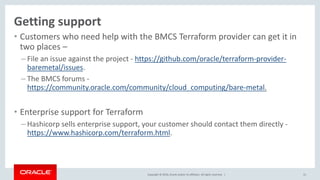
• Customers who need help with the BMCS Terraform provider can get it in
two places –
– File an issue against the project - https://github.com/oracle/terraform-provider-
baremetal/issues.
– The BMCS forums -
https://community.oracle.com/community/cloud_computing/bare-metal.
• Enterprise support for Terraform
– Hashicorp sells enterprise support, your customer should contact them directly -
https://www.hashicorp.com/terraform.html.
31
Getting support
Oracle Cloud - Infrastruktura jako kód

Oracle Cloud - Infrastruktura jako kód

  • 2.
    Copyright © 2016Oracle and/or its affiliates. All rights reserved. | Oracle Cloud Patrik Plachý Senior Sales Consultant Oracle CEE Technology Sales Consulting Oracle Cloud Infrastructure 2
  • 3.
    Copyright © 2016,Oracle and/or its affiliates. All rights reserved. | Terraform provider for BMCS • Orchestration and lifecycle management of Cloud resources – Compare to CloudFormation on AWS, Azure Automation, Google Cloud Deployment Manager, and Chef Knife. • Open Source Software with wide adoption in the market – Customers do not need to learn a new orchestration tool, if they are already in the cloud there is a good chance they already use Terraform. • Works across BMCS and OPC IaaS – Customers now have a single tool to manage OPC and BMCS IaaS • No cost to customers 3
  • 4.
    Copyright © 2016,Oracle and/or its affiliates. All rights reserved. | 4 Orchestration core concepts - Infrastructure is code - Changing infrastructure in the cloud is no different than versioning a software release
  • 5.
    Copyright © 2016,Oracle and/or its affiliates. All rights reserved. | - Designing and deploying multiple datacenters - buildings, cooling, power, racks, switches, routers, firewalls, servers, storage only takes a couple of hours. 5 Orchestration core concepts
  • 6.
    Copyright © 2016,Oracle and/or its affiliates. All rights reserved. | 6 Orchestration core concepts - Changes take even less time - Infrastructure changes can be versioned, rolled back and forward, tested and managed just like software.
  • 7.
    Copyright © 2016,Oracle and/or its affiliates. All rights reserved. | 7 Terraform plays nicely with any OS tooling Fabric
  • 8.
    Copyright © 2016,Oracle and/or its affiliates. All rights reserved. | Secure MongoDB – 8 https://community.oracle.com/community/cloud_computing/bare- metal/blog/2017/01/12/secure-mongodb-on-oracle-bare-metal-cloud-services With CLI/SDK Design 30 mins Script 3 hrs Implement 1hr Changes Change automation Change control Versioning With Terraform Design 30 mins Write Configuration 1 hr 10 mins 10 mins Change automation Change control Versioning Implement Changes
  • 9.
    Copyright © 2016,Oracle and/or its affiliates. All rights reserved. | Listening to customers When you are talking to customers who are already in the Cloud listen for - 9 orchestration automation infrastructure as code infrastructure versioning lifecycle Cloudformation Chef knife
  • 10.
    Copyright © 2016,Oracle and/or its affiliates. All rights reserved. | Talking to customers Senior leaders: “Oracle has a great IaaS automation solution that spans Bare Metal and OPC Compute. It’s based on existing, market leading tools so your team is probably already familiar with it, there is no learning curve or need to implement new tooling. We are the first major IaaS provider to adopt a provider independent orchestration tool as our own, we think this approach is better for customers as it makes building Cloud agnostic solutions easier.” 10
  • 11.
    Copyright © 2016,Oracle and/or its affiliates. All rights reserved. | Talking to customers IT management: “Oracle has adopted the Terraform tooling to deliver a mature, enterprise and developer friendly cloud orchestration tool. There is no charge for using it, it’s feature complete and superior to any cloud specific, single cloud orchestration tools. Your team can manage resources across any major IaaS provider with Terraform, there is a good chance they are already using it.” 11
  • 12.
    Copyright © 2016,Oracle and/or its affiliates. All rights reserved. | Talking to customers To ICs: “We’ve got a great open-source orchestration tool, it’s on GitHub. Just search for Oracle BareMetal Terraform.” 12
  • 13.
    Copyright © 2016,Oracle and/or its affiliates. All rights reserved. | What Is Infrastructure as Code? • The idea behind infrastructure as code (IAC) is that you write and execute code to define, deploy, and update your infrastructure. This represents an important shift in mindset where you treat all aspects of operations as software — even those aspects that represent hardware (e.g., setting up physical servers). • In fact, a key insight of DevOps is that you can manage almost everything in code, including servers, databases, networks, log files, application configuration, documentation, automated tests, deployment processes, and so on.
  • 14.
    Copyright © 2016,Oracle and/or its affiliates. All rights reserved. | Bare Metal Cloud Services – Moving Fast • Region Expansion – US East, EMEA, APAC • Double down on Database service – 2-Node RAC and Exadata Support • Block Storage V2.0 – High perf, Elastic, 60 IOPs/GB • Compute Service expansion – 1,2,4,8 and 16 core VMs; New shapes GPU/Memory intensive; Various OS support • Compliance – In process SOC1, SOC2 and ISO 27001
  • 15.
    Copyright © 2016,Oracle and/or its affiliates. All rights reserved. | Terraform – built by HashiCorp • HashiCorp – builds various tools for Cloud Operations • Goal for Overall Toolset – “Any Application” “Any Infrastructure” • Provision – Vagrant- Create and configure portable development environments – Packer - Create platform specific machine images from a single source – Terraform - Create, combine and manage infrastructure across multiple providers • Secure – Vault - Centrally store, secure and control access to distributed secrets • RUN – Nomad - Cluster manager and scheduler to deploy applications across any infrastructure – Consul - Distributed highly available tool for service discovery, configuration and orchestration
  • 16.
    Copyright © 2016,Oracle and/or its affiliates. All rights reserved. | Cloud Orchestration & Infrastructure as Code (IaC) • Infrastructure Lifecycle – Provision – Update – Destroy • The 4 Broad categories of IAC: – Ad hoc scripts – Configuration management tools (chef, puppet, …) – Server templating tools (Packer, Vagrant, Docker, …. – Server provisioning tools (Terraform, cloud formation, heat)
  • 17.
    Copyright © 2016,Oracle and/or its affiliates. All rights reserved. | Terraform • Written in Go • Runtimes available for OSX, FreeBSD, Linux, OpenBSD, Solaris, Windows • IA32, x64 and ARM • Fast development – releases monthly+ • HCL (Hashi Configuration Language) – JSON interoperable • HCL - simple markup format • Plays nice with existing tools - puppet, chef, ansible, etc
  • 18.
    Copyright © 2016,Oracle and/or its affiliates. All rights reserved. | Comparison of Terraform to Ansible and CloudFormation Terraform CloudFormation Ansible Syntax HCL JSON YAML Manage Existing Deployments Difficult No Yes State Management Yes No Yes Third Party Providers 65+ No Many++ Infrastructure Immutable Immutable Mutable Agent/Master No / No No / No No / No Type Declarative Declarative Procedural
  • 19.
    Copyright © 2016,Oracle and/or its affiliates. All rights reserved. | Getting Started with Terraform • Download – binary, apt, yum, choco, brew • Create a .tf file in a workspace • hw.tf • output "hw" { value = "test” } $ terraform apply Apply complete! Resources: 0 added, 0 changed, 0 destroyed. • Outputs: hw = test Providers… -> ./ ├── terraform ├── terraform-provider-atlas ├── terraform-provider-aws ├── terraform-provider-azure ├── terraform-provider-azurerm ├── terraform-provider-chef ├── terraform-provider-cloudflare ├── terraform-provider-cloudstack ├── terraform-provider-consul ├── terraform-provider-digitalocean ├── terraform-provider-baremetal alicloud archive arukas atlas aws azure azurerm bitbucket chef circonus clc cloudflare cloudstack cobbler consul datadog digitalocean dme dns dnsimple docker dyn external fastly github gitlab google grafana heroku http icinga2 ignition influxdb kubernetes librato local logentries mailgun mysql newrelic nomad ns1 oneandone opc openstack opsgenie packet pagerduty postgresql powerdns profitbricks rabbitmq rancher random rundeck scaleway softlayer spotinst statuscake template terraform tls triton ultradns vault vcd vsphere
  • 20.
    Copyright © 2016,Oracle and/or its affiliates. All rights reserved. | HCL – Basic Terraform .tf Format • Terraform configuration is written into files named .tf files. • It is based on the HashiCorp Configuration Language (HCL) https://github.com/hashicorp/hcl • JSON is supported for code generation purposes. • Most of the configuration takes the form: keyword1 "some_name" { key = "value„ nested { key = "value' } } { "keyword1": [ { "some_name": [ { "key": "value", "nested": [ { "key": "value" } ] } ] } ] }
  • 21.
    Copyright © 2016,Oracle and/or its affiliates. All rights reserved. | Terraform – Providers • First thing to do is to use a provider • Providers abstract the APIs from any given third party in order to create infrastructure. Example: provider "baremetal" { tenancy_ocid = "${var.tenancy_ocid}„ user_ocid = "${var.user_ocid}„ fingerprint = "${var.fingerprint}„ private_key_path = "${var.private_key_path}„ } • The baremetal provider enables Terraform to create, manage and destroy resources in your tenancy on BMCS. • Tenancy is the OCID of the tenant. User OCID is the users identifier. Fingerprint is the md5 fingerprint of the private key being used to access the API, and private key path is where the API PEM private key is stored.
  • 22.
    Copyright © 2016,Oracle and/or its affiliates. All rights reserved. | Terraform – Resources Resources Once a provider is configured we can start using that providers resources. With the BMCS baremetal provider, we can start creating instances, block and object storage, networks, etc. The following example starts an instance: resource "baremetal_core_instance" "TFInstance" { availability_domain = "${lookup(data.baremetal_identity_availability_domains.ADs.availability_domains[var.AD - 1],"name")}" compartment_id = "${var.compartment_ocid}" display_name = "TFInstance" hostname_label = "instance1" image = "${lookup(data.baremetal_core_images.OLImageOCID.images[0], "id")}" shape = "${var.InstanceShape}" subnet_id = "${var.SubnetOCID}" metadata { ssh_authorized_keys = "${var.ssh_public_key}" user_data = "${base64encode(file(var.BootStrapFile))}" } } component provider type name
  • 23.
    Copyright © 2016,Oracle and/or its affiliates. All rights reserved. | Terraform – Planning Phase Once we have put together a configuration to try we can dry-run test this with the planning phase. "terraform plan" will take the configuration and give a detailed report on which resources will be created, deleted or modified plus identify what dependent resources are effected by these changes. terraform plan -out=plan1 Saving the plan is useful to ensure that all the steps in the plan were actually applied.
  • 24.
    Copyright © 2016,Oracle and/or its affiliates. All rights reserved. | Terraform – Apply Once the plan looks good we can go and apply the configuration. $ terraform apply There is also an option to use saved plans for an apply operation. $ terraform apply plan1 Plan and apply can also target particular resource(s) using the -target flag. Plans that are too old will be detected, they are created against a given version of the terraform.tfstate file.
  • 25.
    Copyright © 2016,Oracle and/or its affiliates. All rights reserved. | Terraform – Destroy When infrastructure needs to be retired, destroying it and all of its dependencies is straightforward with $ terraform destroy Terraform destroy will ask for permission , requiring an explicit “yes” as input. Terraform when destroying an infrastructure is very thorough. The iterative plan, apply, destroy cycle is useful when learning terraform. If a resource is change or removed in the .tf file, the state file will detect this and change or remove the resource on the next apply. Tainting may also be used to force the recreation of a resource. There are also lifecycle directives available to protect resources if needed. $ terraform plan -destroy Shows what will be destroyed without actually doing it.
  • 26.
    Copyright © 2016,Oracle and/or its affiliates. All rights reserved. | Terraform – Variables In these examples we saw some variables, like compartment_id, image, shape_id. Ideally variables defined in a "variables.tf" where defaults can be supplied. # Choose an Availability Domain variable "AD" { default = "1" } variable "InstanceShape" { default = "VM.Standard1.2" } variable "InstanceOS" { default = "Oracle Linux" } variable "InstanceOSVersion" { default = "7.3" } Map Variable variable "environment" { default = "dev" } variable "shape" { type = "map" default = { dev = "VM.Standard1.2" test = "VM.Standard1.4" prod = "BM.Standard1.36" } } resource "baremetal_core_instance" "app-server" { image = "${var.image}" shape = "${lookup(var.instance_type, var.environment)}" subnet_id = "${var.subnet_id}" }
  • 27.
    Copyright © 2016,Oracle and/or its affiliates. All rights reserved. | Terraform – Assigning and Overriding Variables Variables without default values have to have a value assigned. Variables that have no default value set will cause terraform to prompt for the variable during a plan or apply. Default variables can be overridden by the environment, command line, tfvars file, or inline. An exmple of overriding a variable from the command line is as follows: $ terraform apply -var 'InstanceShape=VM.Standard1.4' A .tfvars file can also be used to set variables and their values instance_type="VM.Standard1.2"
  • 28.
    Copyright © 2016,Oracle and/or its affiliates. All rights reserved. | Terraform – Outputs Terraform can be directed to display the variables that are generated dynamically as pat of the process of creating the infrastructure. For example, after a run we might want to see the public ip of the host: $ cat outputs.tf output "InstancePrivateIP" { value = ["${data.baremetal_core_vnic.InstanceVnic.private_ip_address}"]} output "InstancePublicIP" { value = ["${data.baremetal_core_vnic.InstanceVnic.public_ip_address}"]} After a terraform apply: Apply complete! Resources: 4 added, 0 changed, 0 destroyed. State path: Outputs: InstancePrivateIP = [ 10.0.0.10 ] InstancePublicIP = [ 129.146.3.173] Outputs are often used to facilitate interaction with other infrastructure tools. Terraform show (human readable) and terraform.tfstate file also store these outputs.
  • 29.
    Copyright © 2016,Oracle and/or its affiliates. All rights reserved. | Terraform – Provisioners Terraform can also integrate with provisioners like Chef, puppet, Ansible, shells scripts. An example below is using a provisioner to remote-exec a command to touch a file. $ cat remote-exec.tf resource "null_resource" "remote-exec" { depends_on = ["baremetal_core_instance.TFInstance"] provisioner "remote-exec" { connection { agent = false timeout = "10m" host = "${data.baremetal_core_vnic.InstanceVnic.public_ip_address}" user = "opc" private_key = "${var.ssh_private_key}" } inline = [ "touch ~/IMadeAFile.Right.Here", ] } }
  • 30.
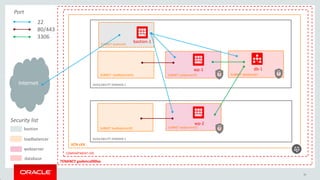
    30 Internet bastion loadbalancer webserver TENANCY gsebmcs000xx COMPARTMENT cXX VCNcXX AVAILABILITY DOMAIN 1 AVAILABILITY DOMAIN 2 SUBNET: loadbalancer01 SUBNET webserver01 SUBNET database01 SUBNET bastion01 SUBNET loadbalancer02 SUBNET webserver02 bastion-1 wp-1 wp-2 db-1 22 80/443 3306 database Port Security list
  • 31.
    Copyright © 2016,Oracle and/or its affiliates. All rights reserved. | • Customers who need help with the BMCS Terraform provider can get it in two places – – File an issue against the project - https://github.com/oracle/terraform-provider- baremetal/issues. – The BMCS forums - https://community.oracle.com/community/cloud_computing/bare-metal. • Enterprise support for Terraform – Hashicorp sells enterprise support, your customer should contact them directly - https://www.hashicorp.com/terraform.html. 31 Getting support