Oracle 数据库日志满导致错误
                              Zianed Hou
                            zianed@live.cn


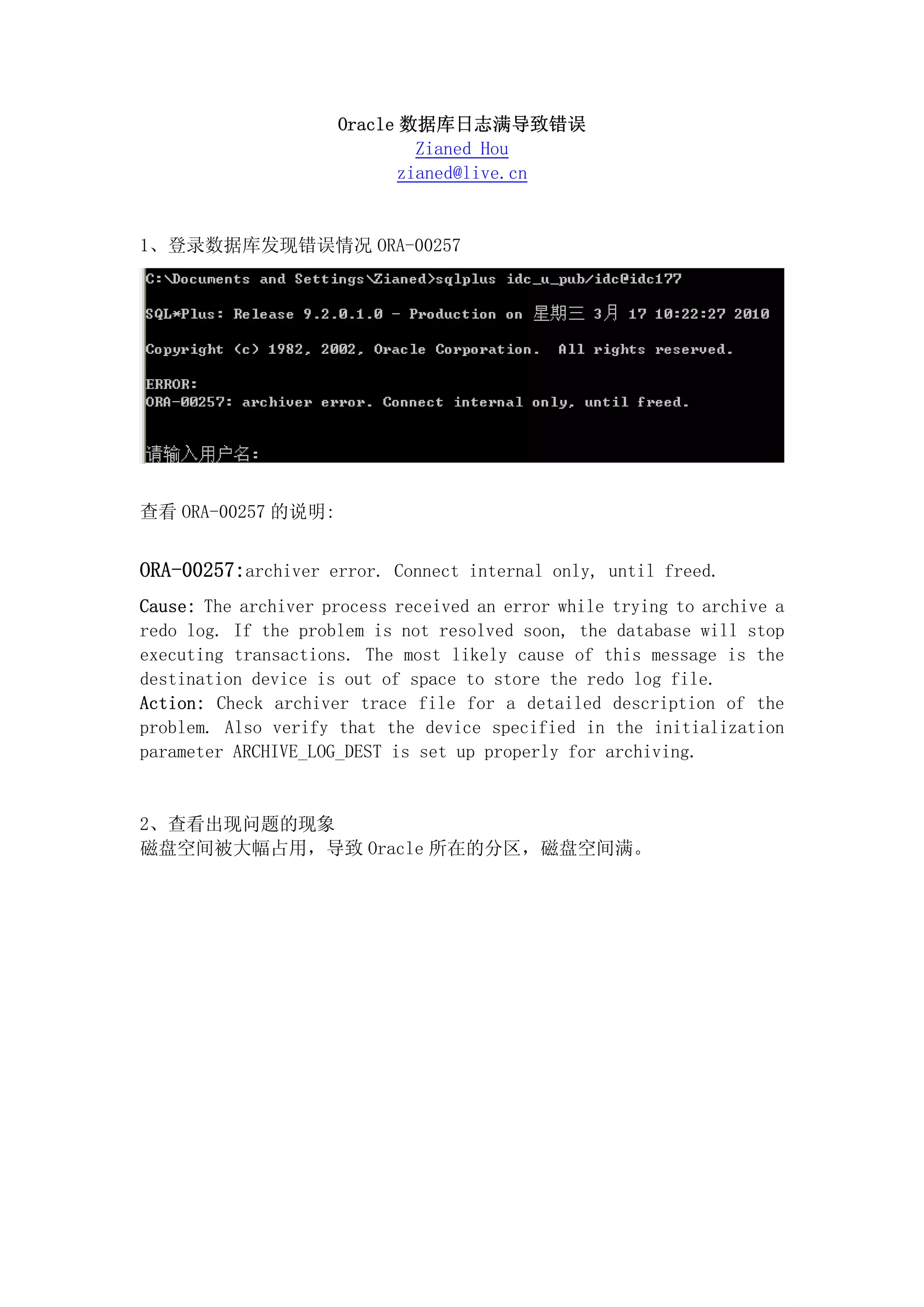
1、登录数据库发现错误情况 ORA-00257


查看 ORA-00257 的说明:


ORA-00257:archiver error. Connect internal only, until freed.
Cause: The archiver process received an error while trying to archive a
redo log. If the problem is not resolved soon, the database will stop
executing transactions. The most likely cause of this message is the
destination device is out of space to store the redo log file.
Action: Check archiver trace file for a detailed description of the
problem. Also verify that the device specified in the initialization
parameter ARCHIVE_LOG_DEST is set up properly for archiving.


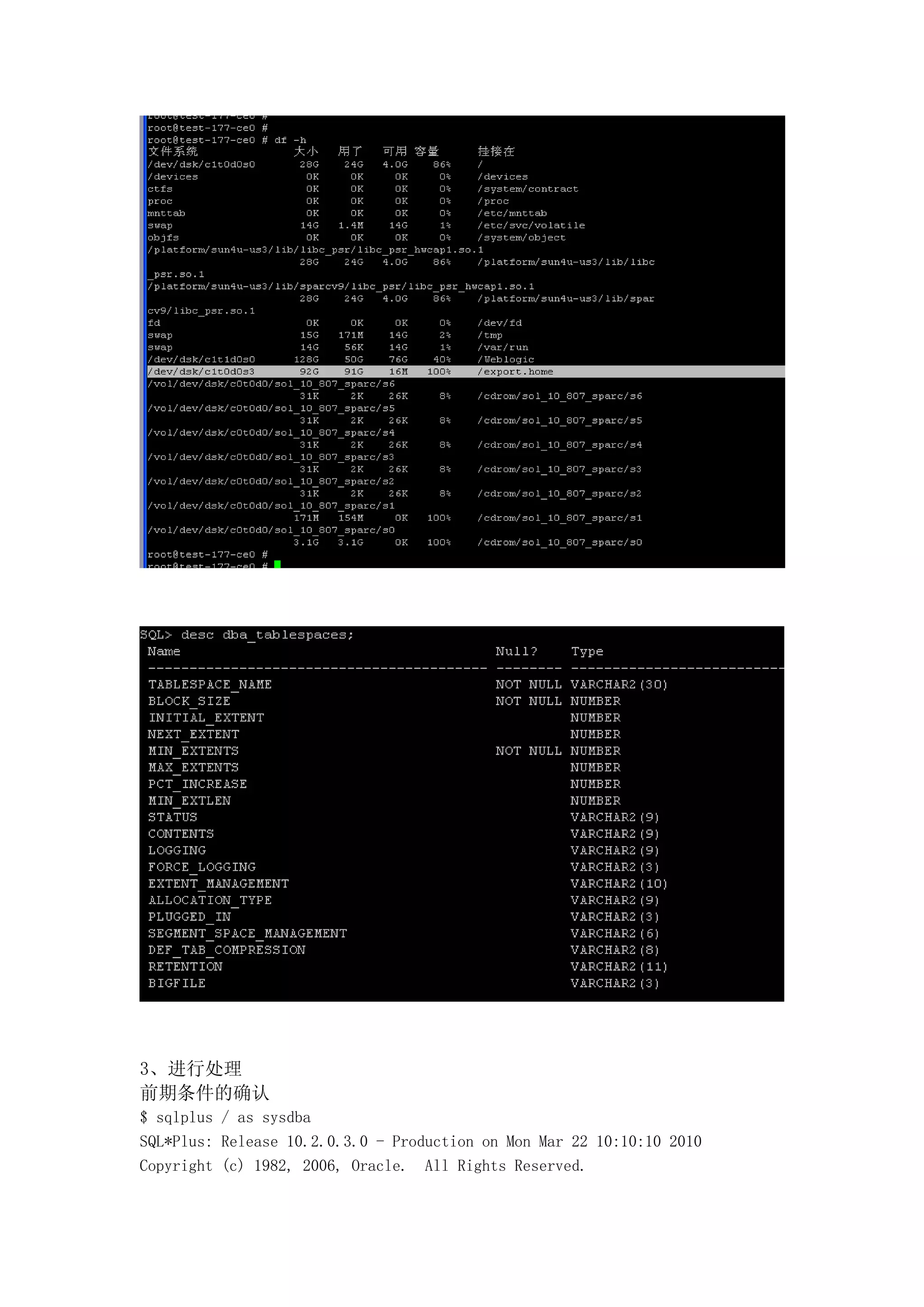
2、查看出现问题的现象
磁盘空间被大幅占用,导致 Oracle 所在的分区,磁盘空间满。
3、进行处理
前期条件的确认
$ sqlplus / as sysdba
SQL*Plus: Release 10.2.0.3.0 - Production on Mon Mar 22 10:10:10 2010
Copyright (c) 1982, 2006, Oracle. All Rights Reserved.
Connected to:
Oracle Database 10g Enterprise Edition Release 10.2.0.3.0 - 64bit Production
With the Partitioning, OLAP and Data Mining options

SQL> select * from V$FLASH_RECOVERY_AREA_USAGE;
FILE_TYPE    PERCENT_SPACE_USED PERCENT_SPACE_RECLAIMABLE NUMBER_OF_FILES
------------ ------------------ ------------------------- ---------------
CONTROLFILE                   0                         0               0
ONLINELOG                     0                         0               0
ARCHIVELOG                    0                         0               0
BACKUPPIECE               33.61                      16.8               2
IMAGECOPY                     0                         0               0
FLASHBACKLOG                  0                         0               0
6 rows selected.

SQL> select group#,sequence# from v$log;
    GROUP# SEQUENCE#
---------- ----------
         1       1721
         2       1722
         3       1720

SQL> archive log list;
Database log mode              No Archive Mode
Automatic archival             Disabled
Archive destination            /export.home/oradata/orcl
Oldest online log sequence     1720
Current log sequence           1722

SQL> show parameter log_archive_dest;
NAME                                 TYPE        VALUE
----------------------------- ----------- ------------------------------
log_archive_dest              string
log_archive_dest_1            string    location=/export.home/oradata/orcl
log_archive_dest_10                  string
log_archive_dest_2                   string
log_archive_dest_3                   string
log_archive_dest_4                   string
log_archive_dest_5                   string
log_archive_dest_6                   string
log_archive_dest_7                   string
log_archive_dest_8                   string
SQL>
进行日志删除处理
bash-3.00$ rman target /
Recovery Manager: Release 10.2.0.3.0 - Production on Mon Mar 22 09:52:18 2010
Copyright (c) 1982, 2005, Oracle. All rights reserved.
connected to target database: ORCL (DBID=1199752177)
RMAN> list archivelog all;
using target database control file instead of recovery catalog
List of Archived Log Copies
Key     Thrd Seq     S Low Time Name
------- ---- ------- - --------- ----
1695    1    1696    A 16-MAR-10 /export.home/oradata/orcl/1_1696_671971445.dbf
1698    1    1697    A 16-MAR-10 /export.home/oradata/orcl/1_1697_671971445.dbf
1696    1    1698    A 16-MAR-10 /export.home/oradata/orcl/1_1698_671971445.dbf
1697    1    1699    A 17-MAR-10 /export.home/oradata/orcl/1_1699_671971445.dbf
1699    1    1700    A 17-MAR-10 /export.home/oradata/orcl/1_1700_671971445.dbf
RMAN>


手工删除,oracle 并不释放空间,需要通过 rman 删除。

1、RMAN 数据连接
rman target system/manager@target_tnsname

2、查看归档日志文件的状态:
RMAN> list archivelog all;

3、 删除操作系统中的日志文件(到操作系统级进行手工删除);

4、 将归档日志信息进行更新;
RMAN> crosscheck archivelog all;
RMAN> delete expired archivelog all;                       (确认时键入"yes")
RMAN> exit

//
RMAN> delete expired archivelog all;      (确认时键入"yes")
如果你想省去敲这个 YES
delete noprompt expired archivelog all;


---------------------------------------------------------------------------------------
注意:
在删除归档日志后,必须用 RMAN 维护控制文件,否则空间显示仍然不释放。
---------------------------------------------------------------------------------------
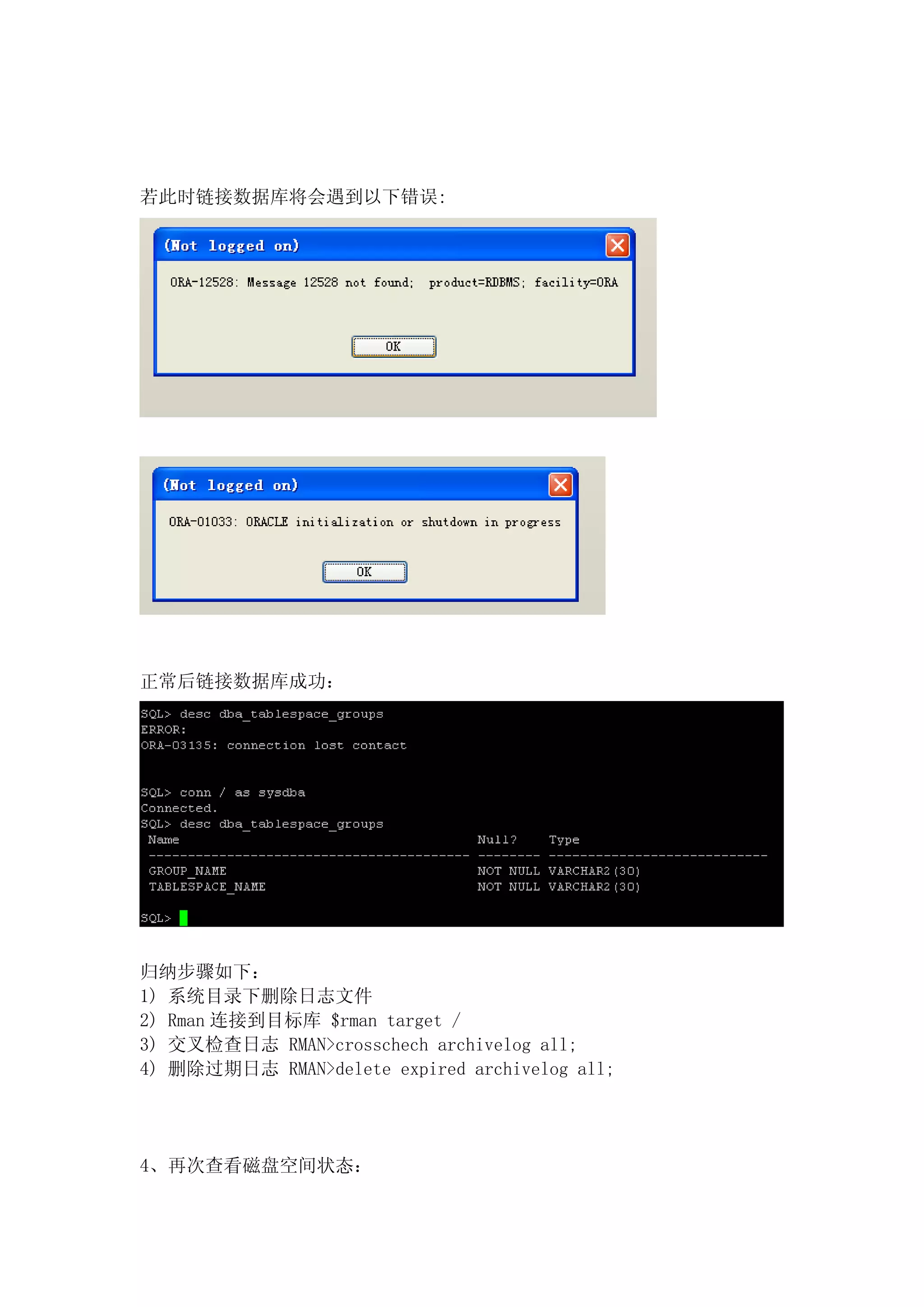
若此时链接数据库将会遇到以下错误:


正常后链接数据库成功:


归纳步骤如下:
1) 系统目录下删除日志文件
2) Rman 连接到目标库 $rman target /
3) 交叉检查日志 RMAN>crosschech archivelog all;
4) 删除过期日志 RMAN>delete expired archivelog all;


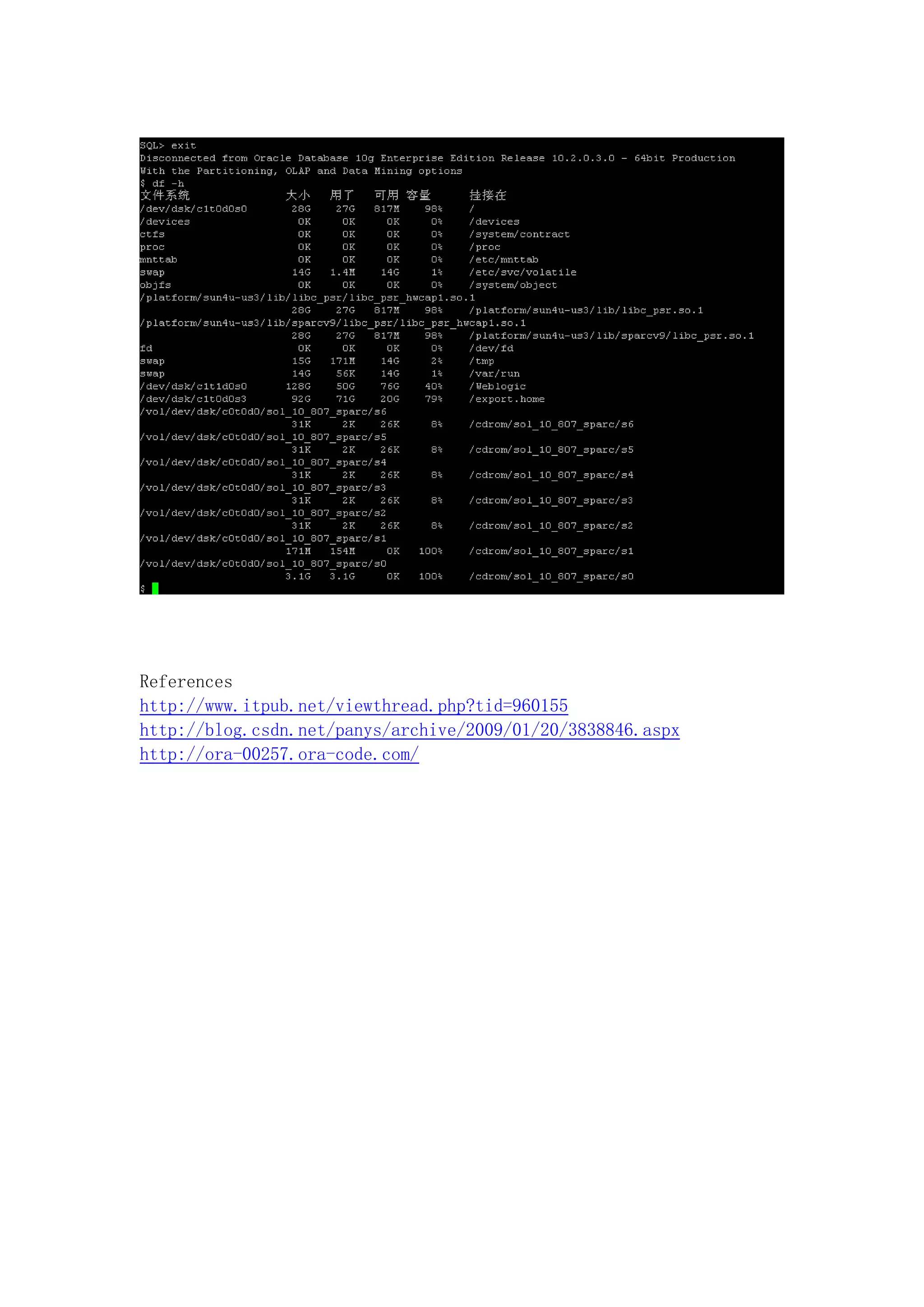
4、再次查看磁盘空间状态:
References
http://www.itpub.net/viewthread.php?tid=960155
http://blog.csdn.net/panys/archive/2009/01/20/3838846.aspx
http://ora-00257.ora-code.com/

Oracle数据库日志满导致错误

  • 1.
    Oracle 数据库日志满导致错误 Zianed Hou zianed@live.cn 1、登录数据库发现错误情况 ORA-00257 查看 ORA-00257 的说明: ORA-00257:archiver error. Connect internal only, until freed. Cause: The archiver process received an error while trying to archive a redo log. If the problem is not resolved soon, the database will stop executing transactions. The most likely cause of this message is the destination device is out of space to store the redo log file. Action: Check archiver trace file for a detailed description of the problem. Also verify that the device specified in the initialization parameter ARCHIVE_LOG_DEST is set up properly for archiving. 2、查看出现问题的现象 磁盘空间被大幅占用,导致 Oracle 所在的分区,磁盘空间满。
  • 2.
    3、进行处理 前期条件的确认 $ sqlplus /as sysdba SQL*Plus: Release 10.2.0.3.0 - Production on Mon Mar 22 10:10:10 2010 Copyright (c) 1982, 2006, Oracle. All Rights Reserved.
  • 3.
    Connected to: Oracle Database10g Enterprise Edition Release 10.2.0.3.0 - 64bit Production With the Partitioning, OLAP and Data Mining options SQL> select * from V$FLASH_RECOVERY_AREA_USAGE; FILE_TYPE PERCENT_SPACE_USED PERCENT_SPACE_RECLAIMABLE NUMBER_OF_FILES ------------ ------------------ ------------------------- --------------- CONTROLFILE 0 0 0 ONLINELOG 0 0 0 ARCHIVELOG 0 0 0 BACKUPPIECE 33.61 16.8 2 IMAGECOPY 0 0 0 FLASHBACKLOG 0 0 0 6 rows selected. SQL> select group#,sequence# from v$log; GROUP# SEQUENCE# ---------- ---------- 1 1721 2 1722 3 1720 SQL> archive log list; Database log mode No Archive Mode Automatic archival Disabled Archive destination /export.home/oradata/orcl Oldest online log sequence 1720 Current log sequence 1722 SQL> show parameter log_archive_dest; NAME TYPE VALUE ----------------------------- ----------- ------------------------------ log_archive_dest string log_archive_dest_1 string location=/export.home/oradata/orcl log_archive_dest_10 string log_archive_dest_2 string log_archive_dest_3 string log_archive_dest_4 string log_archive_dest_5 string log_archive_dest_6 string log_archive_dest_7 string log_archive_dest_8 string SQL>
  • 4.
    进行日志删除处理 bash-3.00$ rman target/ Recovery Manager: Release 10.2.0.3.0 - Production on Mon Mar 22 09:52:18 2010 Copyright (c) 1982, 2005, Oracle. All rights reserved. connected to target database: ORCL (DBID=1199752177) RMAN> list archivelog all; using target database control file instead of recovery catalog List of Archived Log Copies Key Thrd Seq S Low Time Name ------- ---- ------- - --------- ---- 1695 1 1696 A 16-MAR-10 /export.home/oradata/orcl/1_1696_671971445.dbf 1698 1 1697 A 16-MAR-10 /export.home/oradata/orcl/1_1697_671971445.dbf 1696 1 1698 A 16-MAR-10 /export.home/oradata/orcl/1_1698_671971445.dbf 1697 1 1699 A 17-MAR-10 /export.home/oradata/orcl/1_1699_671971445.dbf 1699 1 1700 A 17-MAR-10 /export.home/oradata/orcl/1_1700_671971445.dbf RMAN> 手工删除,oracle 并不释放空间,需要通过 rman 删除。 1、RMAN 数据连接 rman target system/manager@target_tnsname 2、查看归档日志文件的状态: RMAN> list archivelog all; 3、 删除操作系统中的日志文件(到操作系统级进行手工删除); 4、 将归档日志信息进行更新; RMAN> crosscheck archivelog all; RMAN> delete expired archivelog all; (确认时键入"yes") RMAN> exit // RMAN> delete expired archivelog all; (确认时键入"yes") 如果你想省去敲这个 YES delete noprompt expired archivelog all; --------------------------------------------------------------------------------------- 注意: 在删除归档日志后,必须用 RMAN 维护控制文件,否则空间显示仍然不释放。 ---------------------------------------------------------------------------------------
  • 5.
    若此时链接数据库将会遇到以下错误: 正常后链接数据库成功: 归纳步骤如下: 1) 系统目录下删除日志文件 2) Rman连接到目标库 $rman target / 3) 交叉检查日志 RMAN>crosschech archivelog all; 4) 删除过期日志 RMAN>delete expired archivelog all; 4、再次查看磁盘空间状态:
  • 6.