1
An Overview of GoldenGate
Replication
Muhammad Qasim
ORACLE
2
OUTLINE
Introduction
Overview of GoldenGate
Overview of the DEMO
DEMO Scenarios
3
INTRODUCTION
GoldenGate
4
GoldenGate Introduction
 The GoldenGate replication utility provides flexible and
powerful framework, for automatic propagation of data
changes
 This presentation will provide an overview of GoldenGate
replication; and it will display some examples of actually
using GoldenGate.
 In order to provide examples of using GoldenGate, a
DEMO environment, which uses GoldenGate, has been
set up.
5
Overview of GoldenGate Replication
GoldenGate replication consists of three basic utilities:
“extract”,”replicat” and “data pump”. In addition all three of these
utilities access “trail files”, which are flat files that contain formatted
GoldenGate data.
An extract group mines a database’s redo logs; and writes
information about the changes it find into trail files. Extract is
functionally similar to the Streams “capture” process.
A replicat group reads information from trail files; and then writes
those changes into database tables. Replicat is functionally similar to
the Streams “apply” process.
A data pump group copies information between trail files. Data is
functionally similar to Streams “propagate” process.
Overview of the DEMO
6
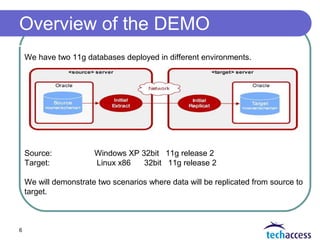
We have two 11g databases deployed in different environments.
Source: Windows XP 32bit 11g release 2
Target: Linux x86 32bit 11g release 2
We will demonstrate two scenarios where data will be replicated from source to
target.
7
 Scenario 1: One-to-One Configuration using Direct Load Method
 In this configuration, one Extract group sends captured data over
TCP/IP to a trail on the target system, where it is stored until
processed by one Replicat group.
 Scenario 2: One-to-One Configuration using File to Replicate
 This method uses an Extract process to extract source data into
flat files or trails on the target system.
 The initial load Replicat task then moves the data from
the intermediate file to the target database.
Demonstration Scenarios
8

Oracle Golden Gate

  • 1.
    1 An Overview ofGoldenGate Replication Muhammad Qasim ORACLE
  • 2.
  • 3.
  • 4.
    4 GoldenGate Introduction  TheGoldenGate replication utility provides flexible and powerful framework, for automatic propagation of data changes  This presentation will provide an overview of GoldenGate replication; and it will display some examples of actually using GoldenGate.  In order to provide examples of using GoldenGate, a DEMO environment, which uses GoldenGate, has been set up.
  • 5.
    5 Overview of GoldenGateReplication GoldenGate replication consists of three basic utilities: “extract”,”replicat” and “data pump”. In addition all three of these utilities access “trail files”, which are flat files that contain formatted GoldenGate data. An extract group mines a database’s redo logs; and writes information about the changes it find into trail files. Extract is functionally similar to the Streams “capture” process. A replicat group reads information from trail files; and then writes those changes into database tables. Replicat is functionally similar to the Streams “apply” process. A data pump group copies information between trail files. Data is functionally similar to Streams “propagate” process.
  • 6.
    Overview of theDEMO 6 We have two 11g databases deployed in different environments. Source: Windows XP 32bit 11g release 2 Target: Linux x86 32bit 11g release 2 We will demonstrate two scenarios where data will be replicated from source to target.
  • 7.
    7  Scenario 1:One-to-One Configuration using Direct Load Method  In this configuration, one Extract group sends captured data over TCP/IP to a trail on the target system, where it is stored until processed by one Replicat group.  Scenario 2: One-to-One Configuration using File to Replicate  This method uses an Extract process to extract source data into flat files or trails on the target system.  The initial load Replicat task then moves the data from the intermediate file to the target database. Demonstration Scenarios
  • 8.