![Install first instance (3306) by using rpm’s
Default installation directory will be/var/lib/mysql
And configuration file location will be/etc/my.cnf
Start the MySql server , it will initialize the database automatically
Service mysql start
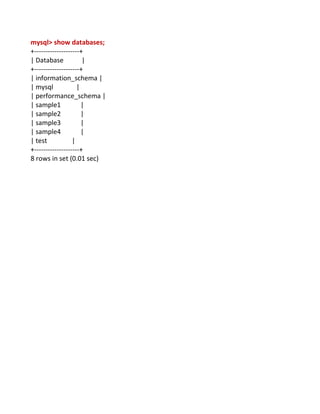
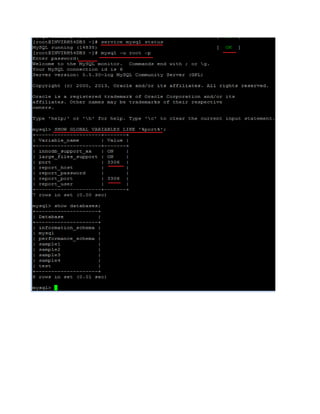
Here First instance is already running .i.e 3306
[root@INVIRH54DB3 ~]# service mysql status
MySQL running (14835) [ OK ]
[root@INVIRH54DB3 ~]# mysql -u root -p
Enter password: (mysql)
Welcome to the MySQL monitor. Commands end with ; or g.
Your MySQL connection id is 6
Server version: 5.5.30-log MySQL Community Server (GPL)
Copyright (c) 2000, 2013, Oracle and/or its affiliates. All rights reserved.Oracle is a
registered trademark of Oracle Corporation and/or itsaffiliates. Other names may be
trademarks of their respectiveowners.Type 'help;' or 'h' for help. Type 'c' to clear the
current input statement.
mysql> SHOW GLOBAL VARIABLES LIKE '%port%';
+---------------------+-------+
| Variable_name | Value |
+---------------------+-------+
| innodb_support_xa | ON |
| large_files_support | ON |
| port | 3306 |
| report_host | |
| report_password | |
| report_port | 3306 |
| report_user | |
+---------------------+-------+
7 rows in set (0.00 sec)](https://image.slidesharecdn.com/multipleinstancesonlinux-130613034234-phpapp02/85/Multiple-instances-on-linux-1-320.jpg)
![Install first instance (3306) by using rpm’s
Default installation directory will be/var/lib/mysql
And configuration file location will be/etc/my.cnf
Start the MySql server , it will initialize the database automatically
Service mysql start
Here First instance is already running .i.e 3306
[root@INVIRH54DB3 ~]# service mysql status
MySQL running (14835) [ OK ]
[root@INVIRH54DB3 ~]# mysql -u root -p
Enter password: (mysql)
Welcome to the MySQL monitor. Commands end with ; or g.
Your MySQL connection id is 6
Server version: 5.5.30-log MySQL Community Server (GPL)
Copyright (c) 2000, 2013, Oracle and/or its affiliates. All rights reserved.Oracle is a
registered trademark of Oracle Corporation and/or itsaffiliates. Other names may be
trademarks of their respectiveowners.Type 'help;' or 'h' for help. Type 'c' to clear the
current input statement.
mysql> SHOW GLOBAL VARIABLES LIKE '%port%';
+---------------------+-------+
| Variable_name | Value |
+---------------------+-------+
| innodb_support_xa | ON |
| large_files_support | ON |
| port | 3306 |
| report_host | |
| report_password | |
| report_port | 3306 |
| report_user | |
+---------------------+-------+
7 rows in set (0.00 sec)](https://image.slidesharecdn.com/multipleinstancesonlinux-130613034234-phpapp02/75/Multiple-instances-on-linux-1-2048.jpg)
![To run multiple instances using MySQL we need to have a couple of things separate from
the initial install on MySQL like data directory, init script and config file. It is quite that
simple and here is how we do it, I will subscript 2 for all the files/directories that I am
going to create to indicate this new second instance:
Step 1. Create a new data directory [/var/lib/Instances/INFA1] and
[/var/lib/Instances/INFA2] make mysql user own it.(3307,3308)
[root@INVIRH54DB3 ~]# mkdir /var/lib/Instances
[root@INVIRH54DB3 ~]# chown -R mysql:mysql /var/lib/Instances/
[root@INVIRH54DB3 ~]# mkdir /var/lib/Instances/INFA1
[root@INVIRH54DB3 ~]# mkdir /var/lib/Instances/INFA2
[root@INVIRH54DB3 ~]# chown -R mysql:mysql /var/lib/Instances/INFA1
[root@INVIRH54DB3 ~]# chown -R mysql:mysql /var/lib/Instances/INFA2
Step : 2. Create a new mysql configuration file
Next we need a separate configuration file. We can start by copying the existing one and
changing the needed values. We just copy this folder and modify it from there.
If you use a redhat variant package then your configuration file is under /etc/my.cnf by
default and you can just copy it directly:(or change the path appropriately for your
configuration file is in a different place).
Next, we need to edit our new configuration file and at least update the mysql
port (default to 3306), the pid and socket to be different than the default ones, and also
point the data and logfolders to the ones created before.
[root@INVIRH54DB3 ~]# cp /etc/my.cnf /etc/my3307.cnf
[root@INVIRH54DB3 ~]# cp /etc/my.cnf /etc/my3308.cnf](https://image.slidesharecdn.com/multipleinstancesonlinux-130613034234-phpapp02/85/Multiple-instances-on-linux-4-320.jpg)
![New Instances Directories should be like this:
[root@INVIRH54DB3 lib]# cd Instances/
[root@INVIRH54DB3 Instances]# ls –ltr
drwxr-xr-x 2 mysql mysql 4096 May 31 09:50 INFA1
drwxr-xr-x 2 mysql mysql 4096 May 31 09:50 INFA2
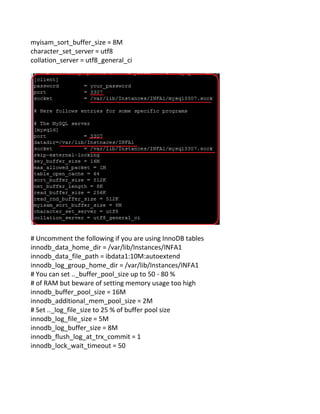
Step: 3Edit cnf file for port number 3307 (Sample 3307.cnf File)
[client]
password = your_password
port = 3307
socket = /var/lib/Instances/INFA1/mysql3307.sock
# Here follows entries for some specific programs
# The MySQL server
[mysqld]
port = 3307
datadir=/var/lib/Instnaces/INFA1
socket = /var/lib/Instances/INFA1/mysql3307.sock
skip-external-locking
key_buffer_size = 16M
max_allowed_packet = 1M
table_open_cache = 64
sort_buffer_size = 512K
net_buffer_length = 8K
read_buffer_size = 256K
read_rnd_buffer_size = 512K](https://image.slidesharecdn.com/multipleinstancesonlinux-130613034234-phpapp02/85/Multiple-instances-on-linux-5-320.jpg)
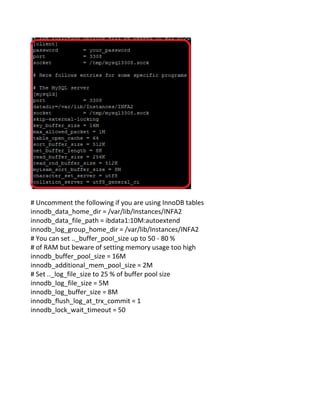
![Step: 4 Edit cnf file for port number 3308 (Sample 3308.cnf File)
[client]
password = your_password
port = 3308
socket = /tmp/mysql3308.sock
# Here follows entries for some specific programs
# The MySQL server
[mysqld]
port = 3308
datadir=/var/lib/Instances/INFA2
socket = /tmp/mysql3308.sock
skip-external-locking
key_buffer_size = 16M
max_allowed_packet = 1M
table_open_cache = 64
sort_buffer_size = 512K
net_buffer_length = 8K
read_buffer_size = 256K
read_rnd_buffer_size = 512K
myisam_sort_buffer_size = 8M
character_set_server = utf8
collation_server = utf8_general_ci](https://image.slidesharecdn.com/multipleinstancesonlinux-130613034234-phpapp02/85/Multiple-instances-on-linux-7-320.jpg)
![Step 5. Install default tables for this new database instance (3307)
[root@INVIRH54DB3 ~]# /usr/bin/mysql_install_db --basedir=/usr/ --
datadir=/var/lib/Instances/INFA1/
Installing MySQL system tables...
OK
Filling help tables...
OK
To start mysqld at boot time you have to copysupport-files/mysql.server to the right place
for your system
PLEASE REMEMBER TO SET A PASSWORD FOR THE MySQL root USER !
To do so, start the server, then issue the following commands:
/usr//bin/mysqladmin -u root password 'new-password'
/usr//bin/mysqladmin -u root -h INVIRH54DB3 password 'new-password'
Alternatively you can run:
/usr//bin/mysql_secure_installation
which will also give you the option of removing the testdatabases and anonymous user
created by default. This isstrongly recommended for production servers.
See the manual for more instructions.
You can start the MySQL daemon with:
cd /usr/ ; /usr//bin/mysqld_safe &
You can test the MySQL daemon with mysql-test-run.pl
cd /usr//mysql-test ; perl mysql-test-run.pl
Please report any problems with the /usr//scripts/mysqlbug script!](https://image.slidesharecdn.com/multipleinstancesonlinux-130613034234-phpapp02/85/Multiple-instances-on-linux-9-320.jpg)
![Step 6 : Install default tables for this new database instance (3308)
[root@INVIRH54DB3 ~]# /usr/bin/mysql_install_db --basedir=/usr/ --
datadir=/var/lib/Instances/INFA2/
Installing MySQL system tables...
OK
Filling help tables...
OK
To start mysqld at boot time you have to copysupport-files/mysql.server to the right place
for your systemPLEASE REMEMBER TO SET A PASSWORD FOR THE MySQL root USER !To
do so, start the server, then issue the following commands:
/usr//bin/mysqladmin -u root password 'new-password'
/usr//bin/mysqladmin -u root -h INVIRH54DB3 password 'new-password'
Alternatively you can run:
/usr//bin/mysql_secure_installation
which will also give you the option of removing the testdatabases and anonymous user
created by default. This isstrongly recommended for production servers.](https://image.slidesharecdn.com/multipleinstancesonlinux-130613034234-phpapp02/85/Multiple-instances-on-linux-10-320.jpg)
![See the manual for more instructions.
You can start the MySQL daemon with:
cd /usr/ ; /usr//bin/mysqld_safe &
You can test the MySQL daemon with mysql-test-run.pl
cd /usr//mysql-test ; perl mysql-test-run.pl
Please report any problems with the /usr//scripts/mysqlbug script!
Directory Checking :
[root@INVIRH54DB3 Instances]# chown -R mysql:mysql INFA1
[root@INVIRH54DB3 Instances]# chown -R mysql:mysql INFA2
[root@INVIRH54DB3 Instances]# cd INFA1
[root@INVIRH54DB3 INFA1]# ls -ltr
drwx------ 2 mysql mysql 4096 May 31 10:10 test
drwx------ 2 mysql mysql 4096 May 31 10:10 performance_schema
-rw-rw---- 1 mysql mysql 38 May 31 10:10 mysql-bin.index](https://image.slidesharecdn.com/multipleinstancesonlinux-130613034234-phpapp02/85/Multiple-instances-on-linux-11-320.jpg)
![-rw-rw---- 1 mysql mysql 27308 May 31 10:10 mysql-bin.000001
drwx------ 2 mysql mysql 4096 May 31 10:10 mysql
-rw-rw---- 1 mysql mysql 1036239 May 31 10:10 mysql-bin.000002
[root@INVIRH54DB3 Instances]# cd INFA2
[root@INVIRH54DB3 INFA2]# ls -ltr
drwx------ 2 mysql mysql 4096 May 31 10:13 test
drwx------ 2 mysql mysql 4096 May 31 10:13 performance_schema
-rw-rw---- 1 mysql mysql 27308 May 31 10:13 mysql-bin.000001
drwx------ 2 mysql mysql 4096 May 31 10:13 mysql
-rw-rw---- 1 mysql mysql 38 May 31 10:13 mysql-bin.index
-rw-rw---- 1 mysql mysql 1036239 May 31 10:13 mysql-bin.000002
Step :7 Finally we can start our new mysql instance with: (3307.cnf)
[root@INVIRH54DB3 ~]# /usr/bin/mysqld_safe --defaults-file=/etc/my3307.cnf --
basedir=/usr --datadir=/var/lib/Instances/INFA1 &](https://image.slidesharecdn.com/multipleinstancesonlinux-130613034234-phpapp02/85/Multiple-instances-on-linux-12-320.jpg)
![130531 10:21:58 mysqld_safe Logging to '/var/lib/Instances/INFA1/INVIRH54DB3.err'.
130531 10:21:59 mysqld_safe Starting mysqld daemon with databases from
/var/lib/Instances/INFA1
130531 10:22:17 mysqld_safe mysqld from pid file
/var/lib/Instances/INFA1/INVIRH54DB3.pid ended
Step :8Finally we can start our new mysql instance with: (3308.cnf)
[root@INVIRH54DB3 ~]# /usr/bin/mysqld_safe --defaults-file=/etc/my3308.cnf --
basedir=/usr --datadir=/var/lib/Instances/INFA2 &
[root@INVIRH54DB3 ~]# 130531 10:24:25 mysqld_safe Logging to
'/var/lib/Instances/INFA2/INVIRH54DB3.err'.
130531 10:24:26 mysqld_safe Starting mysqld daemon with databases from
/var/lib/Instances/INFA2
Step :9 Checking the Mysql new instances are running or not (3307 & 3308)
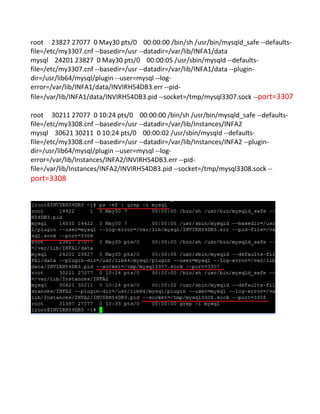
[root@INVIRH54DB3 ~]# ps -ef | grep -i mysql
root 14422 1 0 May30 ? 00:00:00 /bin/sh /usr/bin/mysqld_safe --
datadir=/var/lib/mysql --pid-file=/var/lib/mysql/INVIRH54DB3.pid
mysql 14835 14422 0 May30 ? 00:00:05 /usr/sbin/mysqld --basedir=/usr --
datadir=/var/lib/mysql --plugin-dir=/usr/lib64/mysql/plugin --user=mysql --log-
error=/var/lib/mysql/INVIRH54DB3.err --pid-file=/var/lib/mysql/INVIRH54DB3.pid --
socket=/var/lib/mysql/mysql.sock --port=3306](https://image.slidesharecdn.com/multipleinstancesonlinux-130613034234-phpapp02/85/Multiple-instances-on-linux-13-320.jpg)
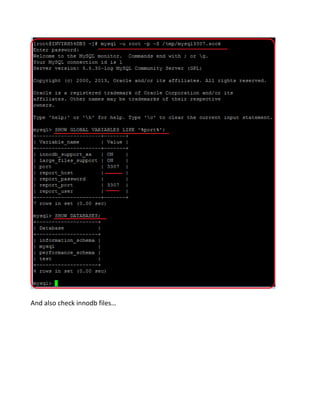
![Step: 10We can connect to our new instance using 3307
Make sure thehere password is empty, just press enter button ,it will connect mysql
prompt.
[root@INVIRH54DB3 ~]# mysql -u root -p -S /tmp/mysql3307.sock
Enter password: (Press Enter)
Welcome to the MySQL monitor. Commands end with ; or g.
Your MySQL connection id is 1
Server version: 5.5.30-log MySQL Community Server (GPL)Copyright (c) 2000, 2013,
Oracle and/or its affiliates. All rights reserved.Oracle is a registered trademark of Oracle
Corporation and/or itsaffiliates. Other names may be trademarks of their
respectiveowners.Type 'help;' or 'h' for help. Type 'c' to clear the current input
statement.
mysql> SHOW GLOBAL VARIABLES LIKE '%port%';
+---------------------+-------+
| Variable_name | Value |
+---------------------+-------+
| innodb_support_xa | ON |
| large_files_support | ON |
| port | 3307 |
| report_host | |
| report_password | |
| report_port | 3307 |
| report_user | |
+---------------------+-------+
7 rows in set (0.00 sec)](https://image.slidesharecdn.com/multipleinstancesonlinux-130613034234-phpapp02/85/Multiple-instances-on-linux-15-320.jpg)
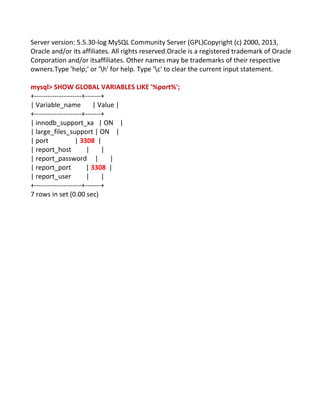
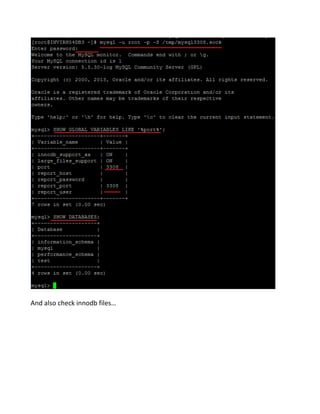
![Step :11We can connect to our new instance using 3308
Make sure the password is empty ,just press enter button ,it will connect mysql promt.
Later we update the password after connecting mysql prompt.
[root@INVIRH54DB3 ~]# mysql -u root -p -S /tmp/mysql3308.sock
Enter password: (empty)
Welcome to the MySQL monitor. Commands end with ; or g.
Your MySQL connection id is 1](https://image.slidesharecdn.com/multipleinstancesonlinux-130613034234-phpapp02/85/Multiple-instances-on-linux-17-320.jpg)
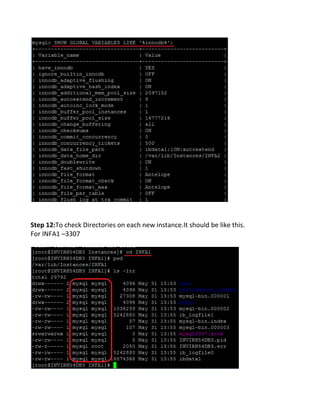
![Step 13: To check Directories on each new instance.It should be like this.
For INFA2 --- 3308
Step 14: To check /tmp Directory .It should be like this.
If you want to create log file on cnf file ,we can mention like this .
log-bin=/var/lib/INFA1/3307.log
Step 15 : If we no longer need it, stop it with the following command. (Shutdown
particular port instance 3307)
/usr/bin/mysqladmin -u root -S /tmp/mysql3307.sock shutdown -p
Enter password: (Here password is mysql)
130531 14:15:59 mysqld_safe mysqld from pid file
/var/lib/Instances/INFA1/INVIRH54DB3.pid ended[5] Done
/usr/bin/mysqld_safe --defaults-file=/etc/my3307.cnf --basedir=/usr --
datadir=/var/lib/Instances/INFA1](https://image.slidesharecdn.com/multipleinstancesonlinux-130613034234-phpapp02/85/Multiple-instances-on-linux-21-320.jpg)
![Here password is empty. Untill we set password on particular host
Step 16: Process checking after shutdown the port (3307)
After shut downing the particular port ,if you want to start again means, we can run this
command.
/usr/bin/mysqld_safe --defaults-file=/etc/my3307.cnf --basedir=/usr --
datadir=/var/lib/Instances/INFA1 &
Once the service is starts we can check process (3307),
[root@INVIRH54DB3 ~]# ps -ef | grep -i mysql
root 8286 1 0 13:48 pts/0 00:00:00 /bin/sh /usr/bin/mysqld_safe --
datadir=/var/lib/mysql --pid-file=/var/lib/mysql/INVIRH54DB3.pid
mysql 8699 8286 0 13:48 pts/0 00:00:00 /usr/sbin/mysqld --basedir=/usr --
datadir=/var/lib/mysql --plugin-dir=/usr/lib64/mysql/plugin --user=mysql --log-
error=/var/lib/mysql/INVIRH54DB3.err --pid-file=/var/lib/mysql/INVIRH54DB3.pid --
socket=/var/lib/mysql/mysql.sock --port=3306
root 10783 27077 0 14:21 pts/0 00:00:00 /bin/sh /usr/bin/mysqld_safe --defaults-
file=/etc/my3307.cnf --basedir=/usr --datadir=/var/lib/Instances/INFA1
mysql 11191 10783 0 14:21 pts/0 00:00:00 /usr/sbin/mysqld --defaults-
file=/etc/my3307.cnf --basedir=/usr --datadir=/var/lib/Instances/INFA1 --plugin-
dir=/usr/lib64/mysql/plugin --user=mysql --log-
error=/var/lib/Instances/INFA1/INVIRH54DB3.err --pid-](https://image.slidesharecdn.com/multipleinstancesonlinux-130613034234-phpapp02/85/Multiple-instances-on-linux-22-320.jpg)
![file=/var/lib/Instances/INFA1/INVIRH54DB3.pid --
socket=/var/lib/Instances/INFA1/mysql3307.sock --port=3307
root 11281 27077 0 14:23 pts/0 00:00:00 grep -i mysql
root 30211 27077 0 10:24 pts/0 00:00:00 /bin/sh /usr/bin/mysqld_safe --defaults-
file=/etc/my3308.cnf --basedir=/usr --datadir=/var/lib/Instances/INFA2
mysql 30621 30211 0 10:24 pts/0 00:00:03 /usr/sbin/mysqld --defaults-
file=/etc/my3308.cnf --basedir=/usr --datadir=/var/lib/Instances/INFA2 --plugin-
dir=/usr/lib64/mysql/plugin --user=mysql --log-
error=/var/lib/Instances/INFA2/INVIRH54DB3.err --pid-
file=/var/lib/Instances/INFA2/INVIRH54DB3.pid --socket=/tmp/mysql3308.sock --
port=3308
Step 17 : Check for the instances running on the machine.
[root@INVIRH54DB3 ~]# lsof -i :3306
COMMAND PID USER FD TYPE DEVICE SIZE NODE NAME
mysqld 8699 mysql 11u IPv4 385132 TCP *:mysql (LISTEN)
[root@INVIRH54DB3 ~]# lsof -i :3307
COMMAND PID USER FD TYPE DEVICE SIZE NODE NAME
mysqld 11191 mysql 11u IPv4 387891 TCP *:opsession-prxy (LISTEN)
[root@INVIRH54DB3 ~]# lsof -i :3308
COMMAND PID USER FD TYPE DEVICE SIZE NODE NAME
mysqld 30621 mysql 11u IPv4 373622 TCP *:tns-server (LISTEN)](https://image.slidesharecdn.com/multipleinstancesonlinux-130613034234-phpapp02/85/Multiple-instances-on-linux-23-320.jpg)
![Step 18 :UPDATE THE PASSSWORD after login mysql prompt (3307)
[root@INVIRH54DB3 ~]# mysql -u root -p -S /tmp/mysql3307.sock
Enter password: (Here password is empty)
Welcome to the MySQL monitor. Commands end with ; or g.
Your MySQL connection id is 4Server version: 5.5.30-log MySQL Community Server
(GPL)Copyright (c) 2000, 2013, Oracle and/or its affiliates. All rights reserved.Oracle is a
registered trademark of Oracle Corporation and/or itsaffiliates. Other names may be
trademarks of their respectiveowners.Type 'help;' or 'h' for help. Type 'c' to clear the
current input statement.
mysql> use mysql;
mysql> UPDATE user SET PASSWORD=PASSWORD('mysql') WHERE USER='root';
mysql> FLUSH PRIVILEGES;](https://image.slidesharecdn.com/multipleinstancesonlinux-130613034234-phpapp02/85/Multiple-instances-on-linux-24-320.jpg)
![Step 19 :UPDATE THE PASSSWORD after login mysql prompt (3308)
[root@INVIRH54DB3 ~]# mysql -u root -p -S /tmp/mysql3308.sock
Enter password:
Welcome to the MySQL monitor. Commands end with ; or g.
Your MySQL connection id is 3Server version: 5.5.30-log MySQL Community Server
(GPL)Copyright (c) 2000, 2013, Oracle and/or its affiliates. All rights reserved.
Oracle is a registered trademark of Oracle Corporation and/or itsaffiliates. Other names
may be trademarks of their respectiveowners.Type 'help;' or 'h' for help. Type 'c' to
clear the current input statement.
mysql> use mysql;
mysql> UPDATE user SET PASSWORD=PASSWORD('mysql') WHERE USER='root';
mysql> FLUSH PRIVILEGES;](https://image.slidesharecdn.com/multipleinstancesonlinux-130613034234-phpapp02/85/Multiple-instances-on-linux-25-320.jpg)


The document describes how to configure and run multiple MySQL database instances on a single server. It involves: 1. Creating separate data directories and configuration files for each instance, configured to use different ports; 2. Installing the database tables into each data directory; 3. Starting each MySQL instance using its customized configuration file. This allows running two instances on ports 3307 and 3308, each with its own isolated data and configuration. The server processes are started and the ports are verified to confirm the instances are running independently.


