


































Optimizing Queries with EXPLAIN


                    http://bit.ly/LTsbuJ

                         Sheeri Cabral
             Senior DB Admin/Architect, Mozilla
                     @sheeri www.sheeri.com
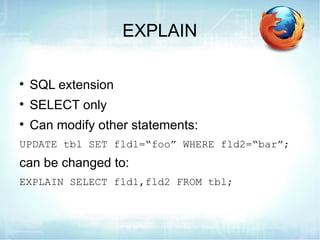
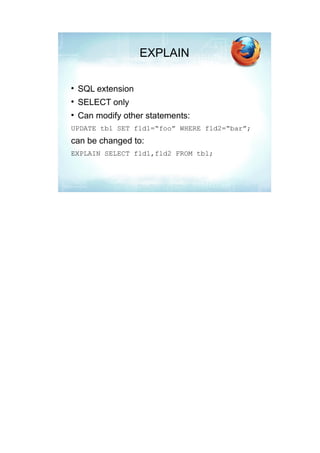
EXPLAIN


    SQL extension

    SELECT only

    Can modify other statements:
UPDATE tbl SET fld1=“foo” WHERE fld2=“bar”;
can be changed to:
EXPLAIN SELECT fld1,fld2 FROM tbl;
What EXPLAIN Shows

    How many tables


    How tables are joined


    How data is looked up


    If there are subqueries, unions, sorts
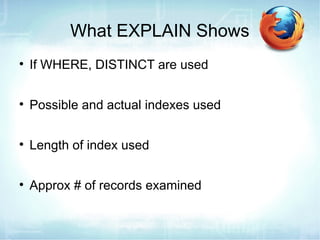
What EXPLAIN Shows

    If WHERE, DISTINCT are used


    Possible and actual indexes used


    Length of index used


    Approx # of records examined
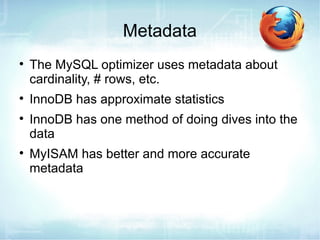
Metadata

    The MySQL optimizer uses metadata about
    cardinality, # rows, etc.

    InnoDB has approximate statistics

    InnoDB has one method of doing dives into the
    data

    MyISAM has better and more accurate
    metadata
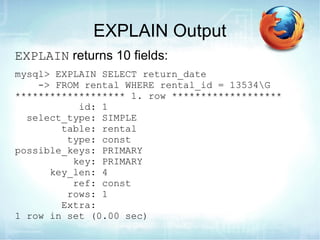
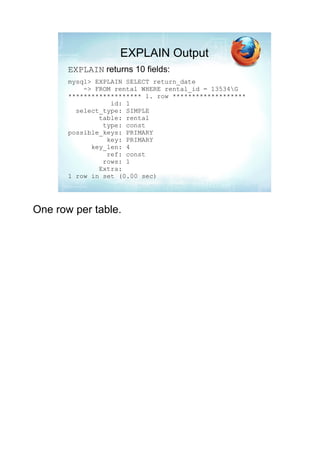
EXPLAIN Output
EXPLAIN returns 10 fields:
mysql> EXPLAIN SELECT return_date
    -> FROM rental WHERE rental_id = 13534G
******************* 1. row *******************
           id: 1
  select_type: SIMPLE
        table: rental
         type: const
possible_keys: PRIMARY
          key: PRIMARY
      key_len: 4
          ref: const
         rows: 1
        Extra:
1 row in set (0.00 sec)
Id
mysql> EXPLAIN SELECT return_date
    -> FROM rental WHERE rental_id = 13534G
******************* 1. row *******************
           id: 1


    Id = sequential identifier

    One per table, subquery, derived table

    No row returned for a view
        − Because it is virtual
        − Underlying tables are represented
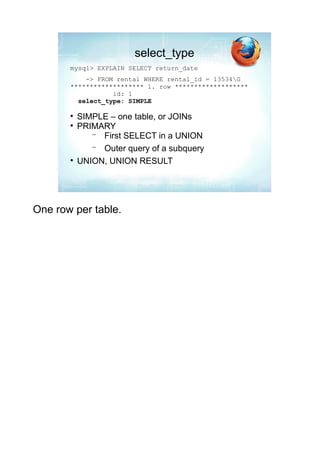
select_type
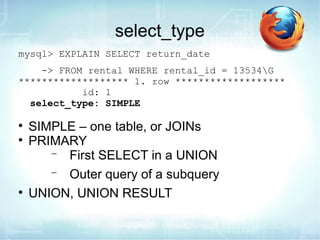
mysql> EXPLAIN SELECT return_date
    -> FROM rental WHERE rental_id = 13534G
******************* 1. row *******************
           id: 1
  select_type: SIMPLE


    SIMPLE – one table, or JOINs

    PRIMARY
       − First SELECT in a UNION
       − Outer query of a subquery

    UNION, UNION RESULT
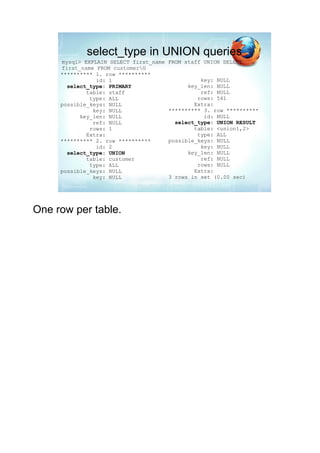
select_type in UNION queries
mysql> EXPLAIN SELECT first_name   FROM staff UNION SELECT
first_name FROM customerG
********** 1. row **********
           id: 1                             key: NULL
  select_type: PRIMARY                   key_len: NULL
        table: staff                         ref: NULL
         type: ALL                          rows: 541
possible_keys: NULL                        Extra:
          key: NULL                ********** 3. row **********
      key_len: NULL                           id: NULL
          ref: NULL                  select_type: UNION RESULT
         rows: 1                           table: <union1,2>
        Extra:                              type: ALL
********** 2. row **********       possible_keys: NULL
           id: 2                             key: NULL
  select_type: UNION                     key_len: NULL
        table: customer                      ref: NULL
         type: ALL                          rows: NULL
possible_keys: NULL                        Extra:
          key: NULL                3 rows in set (0.00 sec)
Other select_type output

    Used in subqueries
       −
       More on subqueries later
DEPENDENT UNION
DEPENDENT SUBQUERY
DERIVED
UNCACHEABLE SUBQUERY
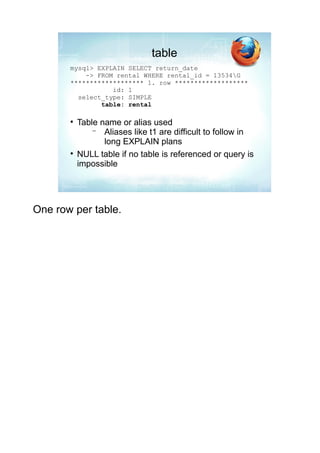
table
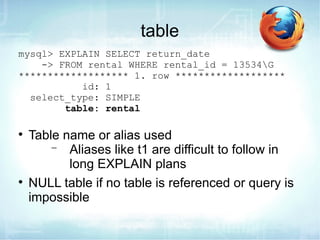
mysql> EXPLAIN SELECT return_date
    -> FROM rental WHERE rental_id = 13534G
******************* 1. row *******************
           id: 1
  select_type: SIMPLE
        table: rental


    Table name or alias used
        − Aliases like t1 are difficult to follow in
           long EXPLAIN plans

    NULL table if no table is referenced or query is
    impossible
NULL table
EXPLAIN SELECT 1+2G

EXPLAIN SELECT return_date FROM rental WHERE
  rental_id=0G
type
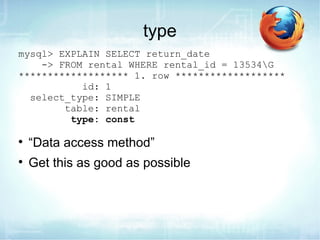
mysql> EXPLAIN SELECT return_date
    -> FROM rental WHERE rental_id = 13534G
******************* 1. row *******************
           id: 1
  select_type: SIMPLE
        table: rental
         type: const


    “Data access method”

    Get this as good as possible
type

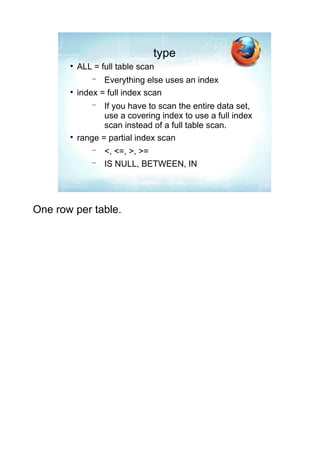
    ALL = full table scan
        −  Everything else uses an index

    index = full index scan
        −  If you have to scan the entire data set,
           use a covering index to use a full index
           scan instead of a full table scan.

    range = partial index scan
        −   <, <=, >, >=
        −   IS NULL, BETWEEN, IN
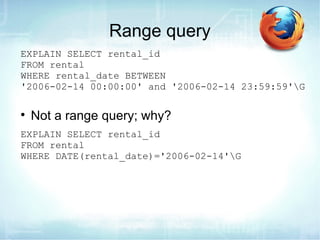
Range query
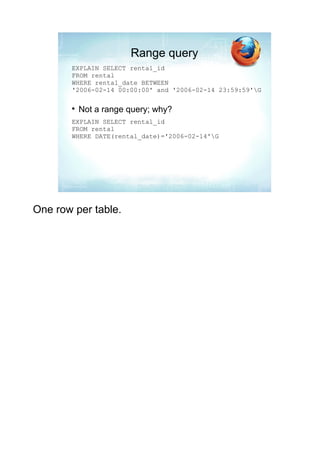
EXPLAIN SELECT rental_id
FROM rental
WHERE rental_date BETWEEN
'2006-02-14 00:00:00' and '2006-02-14 23:59:59'G


    Not a range query; why?
EXPLAIN SELECT rental_id
FROM rental
WHERE DATE(rental_date)='2006-02-14'G
type

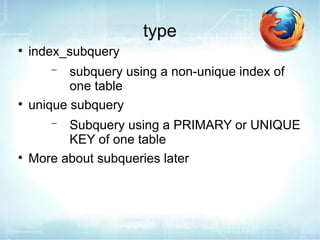
    index_subquery
       −   subquery using a non-unique index of
           one table

    unique subquery
       −  Subquery using a PRIMARY or UNIQUE
          KEY of one table

    More about subqueries later
type

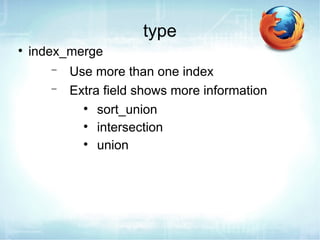
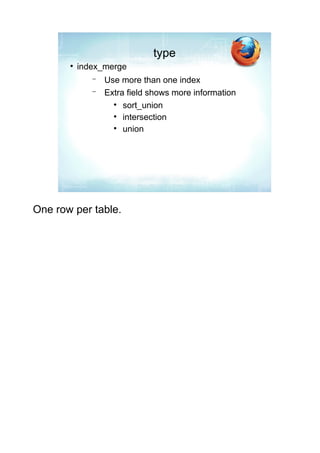
    index_merge
       −   Use more than one index
       −   Extra field shows more information
             
                sort_union
             
                intersection
             
                union
Index Merge
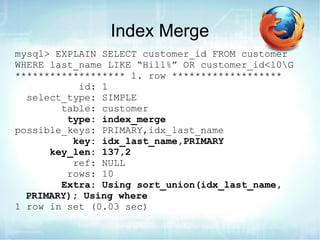
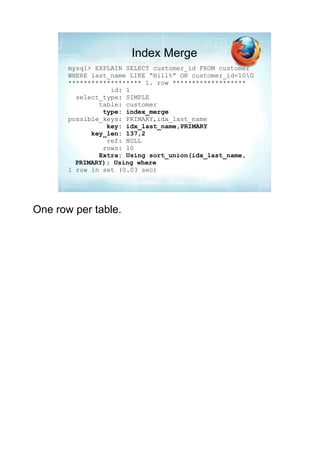
mysql> EXPLAIN SELECT customer_id FROM customer
WHERE last_name LIKE “Hill%” OR customer_id<10G
******************* 1. row *******************
           id: 1
  select_type: SIMPLE
        table: customer
         type: index_merge
possible_keys: PRIMARY,idx_last_name
          key: idx_last_name,PRIMARY
      key_len: 137,2
          ref: NULL
         rows: 10
        Extra: Using sort_union(idx_last_name,
  PRIMARY); Using where
1 row in set (0.03 sec)
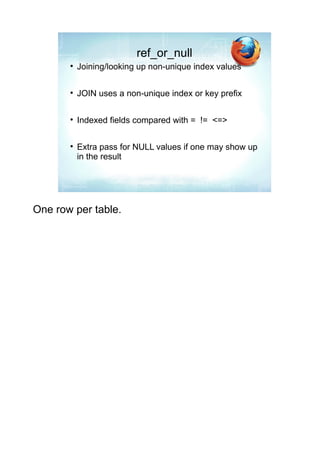
ref_or_null

    Joining/looking up non-unique index values


    JOIN uses a non-unique index or key prefix


    Indexed fields compared with = != <=>


    Extra pass for NULL values if one may show up
    in the result
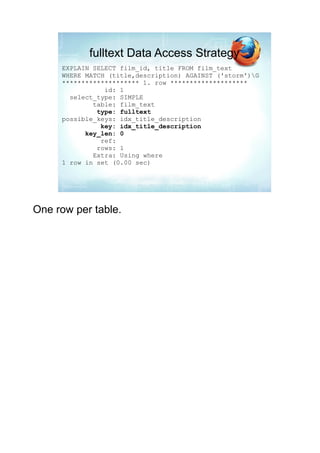
fulltext Data Access Strategy
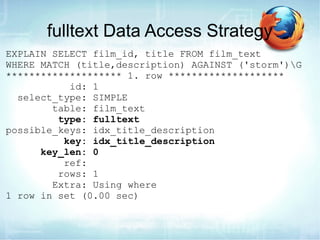
EXPLAIN SELECT film_id, title FROM film_text
WHERE MATCH (title,description) AGAINST ('storm')G
******************** 1. row ********************
           id: 1
  select_type: SIMPLE
        table: film_text
         type: fulltext
possible_keys: idx_title_description
          key: idx_title_description
      key_len: 0
          ref:
         rows: 1
        Extra: Using where
1 row in set (0.00 sec)
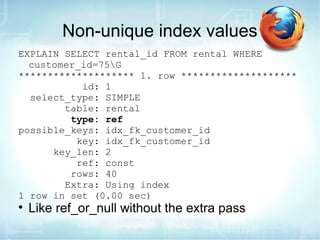
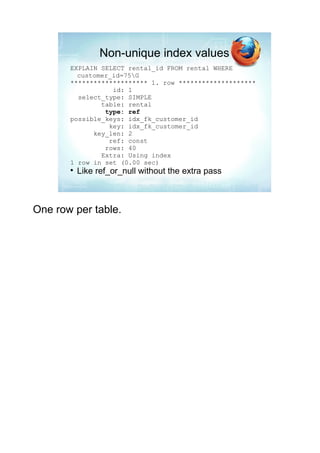
Non-unique index values
EXPLAIN SELECT rental_id FROM rental WHERE
  customer_id=75G
******************** 1. row ********************
           id: 1
  select_type: SIMPLE
        table: rental
         type: ref
possible_keys: idx_fk_customer_id
          key: idx_fk_customer_id
      key_len: 2
          ref: const
         rows: 40
        Extra: Using index
1 row in set (0.00 sec)

    Like ref_or_null without the extra pass
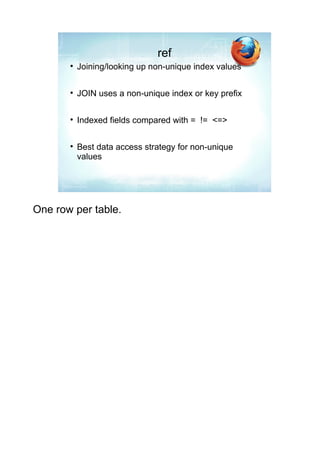
ref

    Joining/looking up non-unique index values


    JOIN uses a non-unique index or key prefix


    Indexed fields compared with = != <=>


    Best data access strategy for non-unique
    values
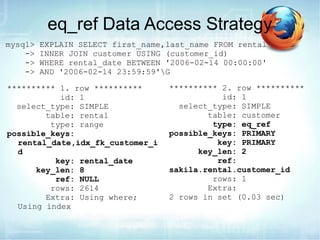
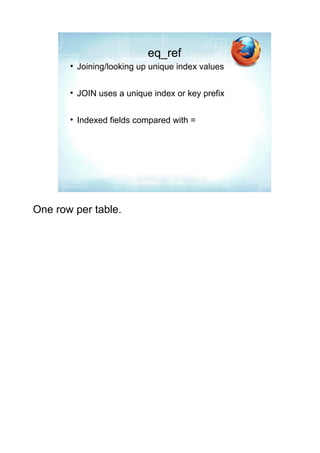
eq_ref

    Joining/looking up unique index values


    JOIN uses a unique index or key prefix


    Indexed fields compared with =
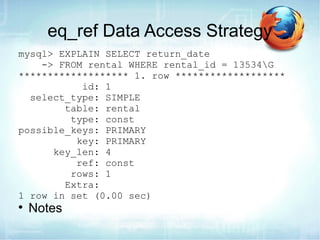
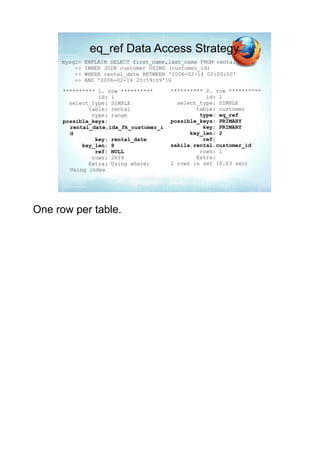
eq_ref Data Access Strategy
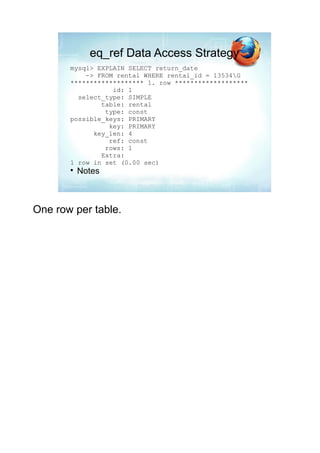
mysql> EXPLAIN SELECT return_date
    -> FROM rental WHERE rental_id = 13534G
******************* 1. row *******************
           id: 1
  select_type: SIMPLE
        table: rental
         type: const
possible_keys: PRIMARY
          key: PRIMARY
      key_len: 4
          ref: const
         rows: 1
        Extra:
1 row in set (0.00 sec)

    Notes
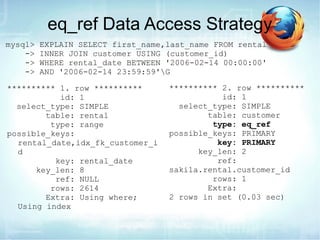
eq_ref Data Access Strategy
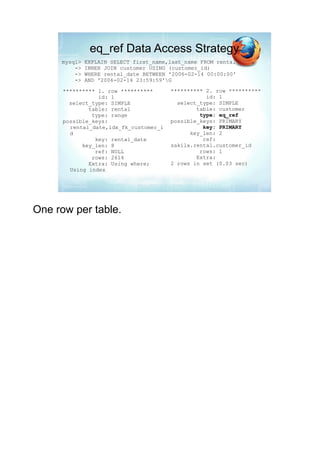
mysql>   EXPLAIN SELECT first_name,last_name FROM rental
    ->   INNER JOIN customer USING (customer_id)
    ->   WHERE rental_date BETWEEN '2006-02-14 00:00:00'
    ->   AND '2006-02-14 23:59:59'G

********** 1. row **********       ********** 2. row **********
           id: 1                              id: 1
  select_type: SIMPLE                select_type: SIMPLE
        table: rental                      table: customer
         type: range                        type: eq_ref
possible_keys:                     possible_keys: PRIMARY
  rental_date,idx_fk_customer_i              key: PRIMARY
  d                                      key_len: 2
          key: rental_date                   ref:
      key_len: 8                   sakila.rental.customer_id
          ref: NULL                         rows: 1
         rows: 2614                        Extra:
        Extra: Using where;        2 rows in set (0.03 sec)
  Using index
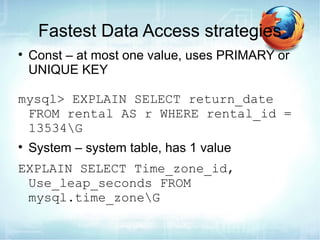
Fastest Data Access strategies
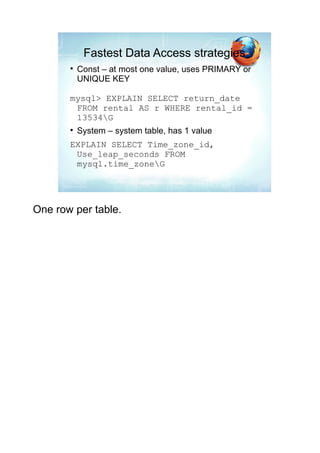

    Const – at most one value, uses PRIMARY or
    UNIQUE KEY

mysql> EXPLAIN SELECT return_date
 FROM rental AS r WHERE rental_id =
 13534G

    System – system table, has 1 value
EXPLAIN SELECT Time_zone_id,
 Use_leap_seconds FROM
 mysql.time_zoneG
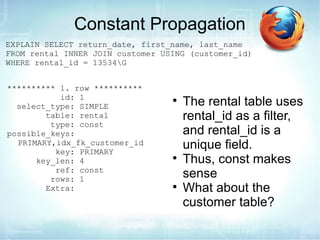
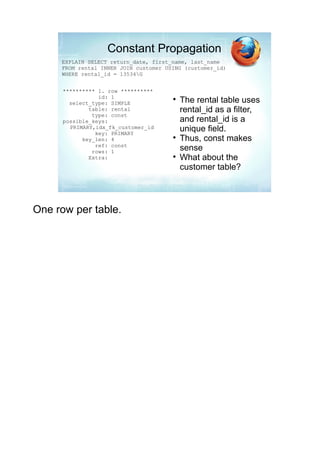
Constant Propagation
EXPLAIN SELECT return_date, first_name, last_name
FROM rental INNER JOIN customer USING (customer_id)
WHERE rental_id = 13534G


********** 1. row **********
           id: 1
  select_type: SIMPLE
                                  
                                      The rental table uses
        table: rental                 rental_id as a filter,
         type: const
possible_keys:                        and rental_id is a
  PRIMARY,idx_fk_customer_id
          key: PRIMARY
                                      unique field.
      key_len: 4                  
                                      Thus, const makes
          ref: const
         rows: 1                      sense
        Extra:                    
                                      What about the
                                      customer table?
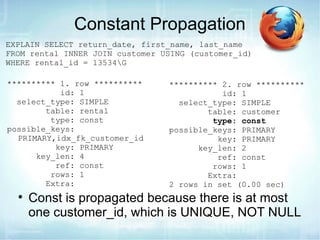
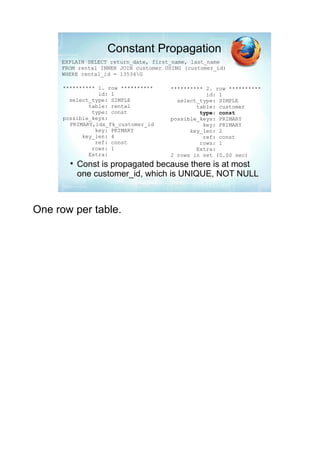
Constant Propagation
EXPLAIN SELECT return_date, first_name, last_name
FROM rental INNER JOIN customer USING (customer_id)
WHERE rental_id = 13534G

********** 1. row **********     ********** 2. row **********
           id: 1                            id: 1
  select_type: SIMPLE              select_type: SIMPLE
        table: rental                    table: customer
         type: const                      type: const
possible_keys:                   possible_keys: PRIMARY
  PRIMARY,idx_fk_customer_id               key: PRIMARY
          key: PRIMARY                 key_len: 2
      key_len: 4                           ref: const
          ref: const                      rows: 1
         rows: 1                         Extra:
        Extra:                   2 rows in set (0.00 sec)
  
      Const is propagated because there is at most
      one customer_id, which is UNIQUE, NOT NULL
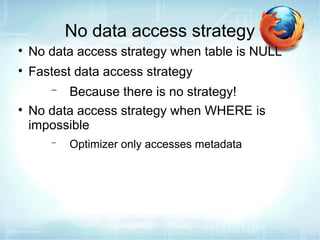
No data access strategy

    No data access strategy when table is NULL

    Fastest data access strategy
       −  Because there is no strategy!

    No data access strategy when WHERE is
    impossible
       −   Optimizer only accesses metadata
EXPLAIN Plan indexes

    possible_keys

    key

    key_len – longer keys take longer to look up
    and compare

    ref – shows what is compared, field or “const”

    Look closely if an index you think is possible is
    not considered
eq_ref Data Access Strategy
mysql>   EXPLAIN SELECT first_name,last_name FROM rental
    ->   INNER JOIN customer USING (customer_id)
    ->   WHERE rental_date BETWEEN '2006-02-14 00:00:00'
    ->   AND '2006-02-14 23:59:59'G

********** 1. row **********       ********** 2. row **********
           id: 1                              id: 1
  select_type: SIMPLE                select_type: SIMPLE
        table: rental                      table: customer
         type: range                        type: eq_ref
possible_keys:                     possible_keys: PRIMARY
  rental_date,idx_fk_customer_i              key: PRIMARY
  d                                      key_len: 2
          key: rental_date                   ref:
      key_len: 8                   sakila.rental.customer_id
          ref: NULL                         rows: 1
         rows: 2614                        Extra:
        Extra: Using where;        2 rows in set (0.03 sec)
  Using index
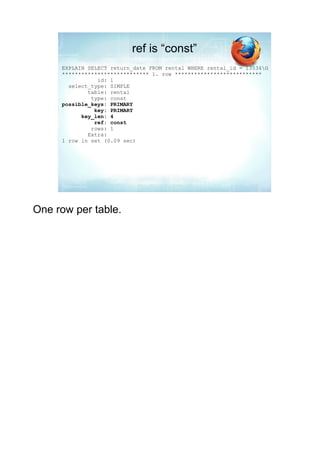
ref is “const”
EXPLAIN SELECT return_date FROM rental WHERE rental_id = 13534G
*************************** 1. row ***************************
           id: 1
  select_type: SIMPLE
        table: rental
         type: const
possible_keys: PRIMARY
          key: PRIMARY
      key_len: 4
          ref: const
         rows: 1
        Extra:
1 row in set (0.09 sec)
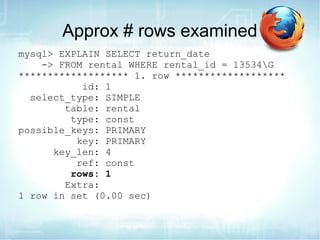
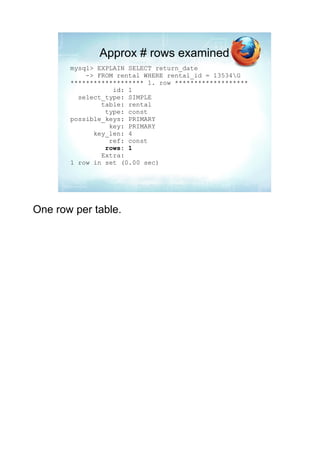
Approx # rows examined
mysql> EXPLAIN SELECT return_date
    -> FROM rental WHERE rental_id = 13534G
******************* 1. row *******************
           id: 1
  select_type: SIMPLE
        table: rental
         type: const
possible_keys: PRIMARY
          key: PRIMARY
      key_len: 4
          ref: const
         rows: 1
        Extra:
1 row in set (0.00 sec)
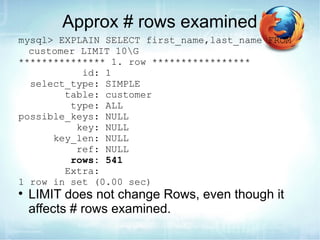
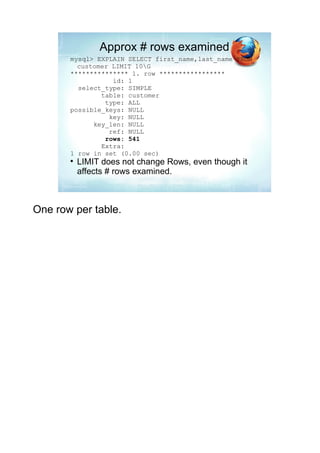
Approx # rows examined
mysql> EXPLAIN SELECT first_name,last_name FROM
  customer LIMIT 10G
*************** 1. row *****************
           id: 1
  select_type: SIMPLE
        table: customer
         type: ALL
possible_keys: NULL
          key: NULL
      key_len: NULL
          ref: NULL
         rows: 541
        Extra:
1 row in set (0.00 sec)

    LIMIT does not change Rows, even though it
    affects # rows examined.
Extra

    Can be good, bad, neutral
       − Sometimes you cannot avoid the bad



    Distinct – stops after first row match

    Full scan on NULL key – subquery lookup with
    no index (bad)

    Impossible WHERE noticed after reading const
    tables

    No tables used
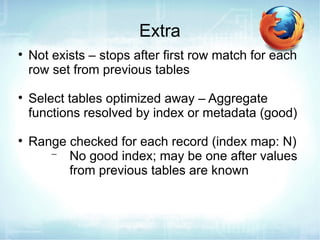
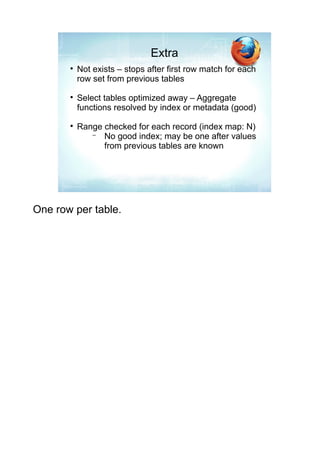
Extra

    Not exists – stops after first row match for each
    row set from previous tables

    Select tables optimized away – Aggregate
    functions resolved by index or metadata (good)

    Range checked for each record (index map: N)
       − No good index; may be one after values
          from previous tables are known
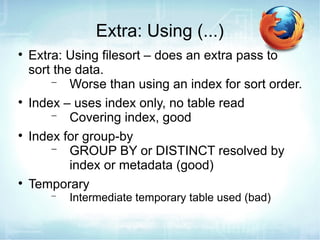
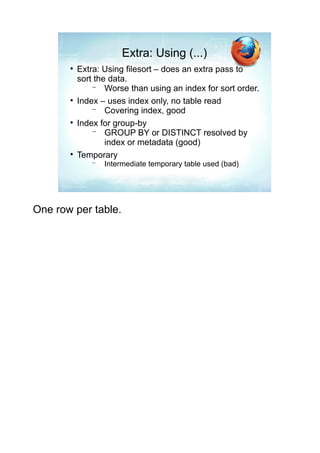
Extra: Using (...)

    Extra: Using filesort – does an extra pass to
    sort the data.
        − Worse than using an index for sort order.

    Index – uses index only, no table read
        − Covering index, good

    Index for group-by
        − GROUP BY or DISTINCT resolved by
            index or metadata (good)

    Temporary
       −   Intermediate temporary table used (bad)
Extra & INFORMATION_SCHEMA

    Scanned N databases
        − N is 0, 1 or all

    Skip_open_table
        − Fastest, no table files need to be opened

    Open_frm_only
        − Open the .frm file only

    Open_trigger_only

    Open_full_table
        − Open all the table files; slowest, can
          crash large systems
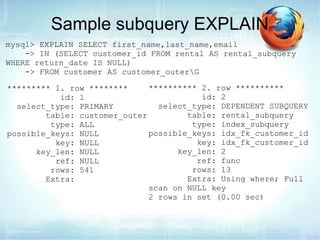
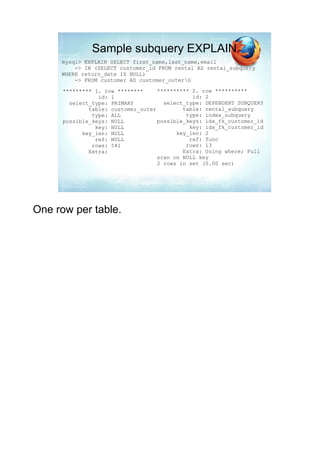
Sample subquery EXPLAIN
mysql> EXPLAIN SELECT first_name,last_name,email
    -> IN (SELECT customer_id FROM rental AS rental_subquery
WHERE return_date IS NULL)
    -> FROM customer AS customer_outerG

********* 1. row ********     ********** 2. row **********
           id: 1                         id: 2
  select_type: PRIMARY          select_type: DEPENDENT SUBQUERY
        table: customer_outer         table: rental_subquery
         type: ALL                     type: index_subquery
possible_keys: NULL           possible_keys: idx_fk_customer_id
          key: NULL                     key: idx_fk_customer_id
      key_len: NULL                 key_len: 2
          ref: NULL                     ref: func
         rows: 541                     rows: 13
        Extra:                        Extra: Using where; Full
                              scan on NULL key
                              2 rows in set (0.00 sec)
MySQL and Subqueries

    Avoid unoptimized subqueries
         − Not all subqueries, though that was true
           in earlier versions

    Derived tables may be turned into views or
    intermediate temporary tables

    Subqueries can be turned into joins in some
    cases

    Getting better all the time
         − Used to be that all subqueries were
           dependent subqueries.
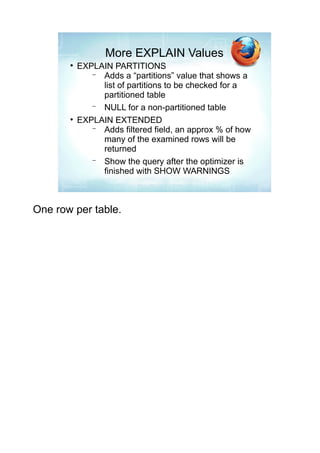
More EXPLAIN Values

    EXPLAIN PARTITIONS
       − Adds a “partitions” value that shows a
         list of partitions to be checked for a
         partitioned table
       − NULL for a non-partitioned table

    EXPLAIN EXTENDED
       − Adds filtered field, an approx % of how
         many of the examined rows will be
         returned
       − Show the query after the optimizer is
         finished with SHOW WARNINGS
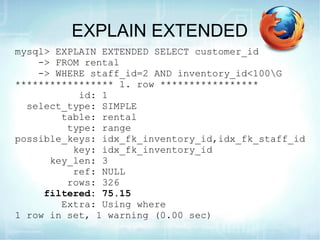
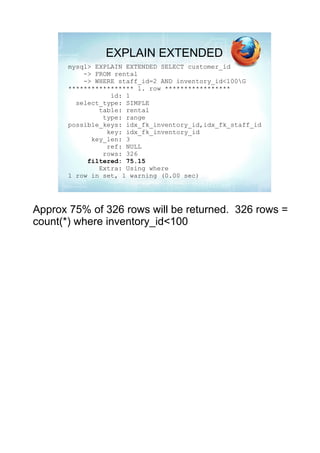
EXPLAIN EXTENDED
mysql> EXPLAIN EXTENDED SELECT customer_id
    -> FROM rental
    -> WHERE staff_id=2 AND inventory_id<100G
***************** 1. row *****************
           id: 1
  select_type: SIMPLE
        table: rental
         type: range
possible_keys: idx_fk_inventory_id,idx_fk_staff_id
          key: idx_fk_inventory_id
      key_len: 3
          ref: NULL
         rows: 326
     filtered: 75.15
        Extra: Using where
1 row in set, 1 warning (0.00 sec)
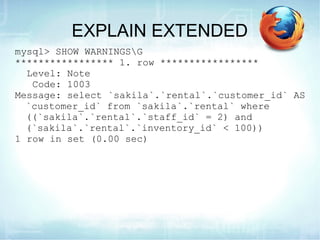
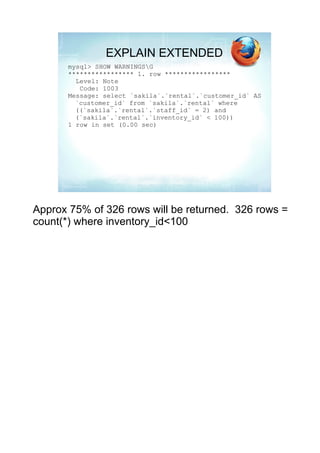
EXPLAIN EXTENDED
mysql> SHOW WARNINGSG
***************** 1. row *****************
  Level: Note
   Code: 1003
Message: select `sakila`.`rental`.`customer_id` AS
  `customer_id` from `sakila`.`rental` where
  ((`sakila`.`rental`.`staff_id` = 2) and
  (`sakila`.`rental`.`inventory_id` < 100))
1 row in set (0.00 sec)
More EXPLAIN Information
http://www.pythian.com/news/wp-content/uploads/explain-diagram.pdf


Pages 590 – 614 of the MySQL Administrator's Bible


Sakila sample database: http://dev.mysql.com/doc/index-other.html
Questions, comments, feedback?
Sheeri K. Cabral – MySQL DBA
www.oursql.com – MySQL podcast


scabral@mozilla.com
@sheeri
     – send me questions, I may be able to help!


Worked with MySQL since 2001
Full-time MySQL DBA as of 2005
Optimizing Queries with EXPLAIN


                    http://bit.ly/LTsbuJ

                         Sheeri Cabral
             Senior DB Admin/Architect, Mozilla
                     @sheeri www.sheeri.com
EXPLAIN


    SQL extension

    SELECT only

    Can modify other statements:
UPDATE tbl SET fld1=“foo” WHERE fld2=“bar”;
can be changed to:
EXPLAIN SELECT fld1,fld2 FROM tbl;
What EXPLAIN Shows

    How many tables


    How tables are joined


    How data is looked up


    If there are subqueries, unions, sorts
What EXPLAIN Shows

    If WHERE, DISTINCT are used


    Possible and actual indexes used


    Length of index used


    Approx # of records examined
Metadata

    The MySQL optimizer uses metadata about
    cardinality, # rows, etc.

    InnoDB has approximate statistics

    InnoDB has one method of doing dives into the
    data

    MyISAM has better and more accurate
    metadata
EXPLAIN Output
       EXPLAIN returns 10 fields:
       mysql> EXPLAIN SELECT return_date
           -> FROM rental WHERE rental_id = 13534G
       ******************* 1. row *******************
                  id: 1
         select_type: SIMPLE
               table: rental
                type: const
       possible_keys: PRIMARY
                 key: PRIMARY
             key_len: 4
                 ref: const
                rows: 1
               Extra:
       1 row in set (0.00 sec)


One row per table.
Id
       mysql> EXPLAIN SELECT return_date
           -> FROM rental WHERE rental_id = 13534G
       ******************* 1. row *******************
                  id: 1

       
           Id = sequential identifier
       
           One per table, subquery, derived table
       
           No row returned for a view
               − Because it is virtual
               − Underlying tables are represented


One row per table.
select_type
       mysql> EXPLAIN SELECT return_date
           -> FROM rental WHERE rental_id = 13534G
       ******************* 1. row *******************
                  id: 1
         select_type: SIMPLE

       
           SIMPLE – one table, or JOINs
       
           PRIMARY
              − First SELECT in a UNION
              − Outer query of a subquery
       
           UNION, UNION RESULT


One row per table.
select_type in UNION queries
     mysql> EXPLAIN SELECT first_name   FROM staff UNION SELECT
     first_name FROM customerG
     ********** 1. row **********
                id: 1                             key: NULL
       select_type: PRIMARY                   key_len: NULL
             table: staff                         ref: NULL
              type: ALL                          rows: 541
     possible_keys: NULL                        Extra:
               key: NULL                ********** 3. row **********
           key_len: NULL                           id: NULL
               ref: NULL                  select_type: UNION RESULT
              rows: 1                           table: <union1,2>
             Extra:                              type: ALL
     ********** 2. row **********       possible_keys: NULL
                id: 2                             key: NULL
       select_type: UNION                     key_len: NULL
             table: customer                      ref: NULL
              type: ALL                          rows: NULL
     possible_keys: NULL                        Extra:
               key: NULL                3 rows in set (0.00 sec)


One row per table.
Other select_type output
       
           Used in subqueries
              −
              More on subqueries later
       DEPENDENT UNION
       DEPENDENT SUBQUERY
       DERIVED
       UNCACHEABLE SUBQUERY


One row per table.
table
       mysql> EXPLAIN SELECT return_date
           -> FROM rental WHERE rental_id = 13534G
       ******************* 1. row *******************
                  id: 1
         select_type: SIMPLE
               table: rental

       
           Table name or alias used
               − Aliases like t1 are difficult to follow in
                  long EXPLAIN plans
       
           NULL table if no table is referenced or query is
           impossible


One row per table.
NULL table
       EXPLAIN SELECT 1+2G

       EXPLAIN SELECT return_date FROM rental WHERE
         rental_id=0G


One row per table.
type
       mysql> EXPLAIN SELECT return_date
           -> FROM rental WHERE rental_id = 13534G
       ******************* 1. row *******************
                  id: 1
         select_type: SIMPLE
               table: rental
                type: const

       
           “Data access method”
       
           Get this as good as possible


One row per table.
type
       
           ALL = full table scan
               −  Everything else uses an index
       
           index = full index scan
               −  If you have to scan the entire data set,
                  use a covering index to use a full index
                  scan instead of a full table scan.
       
           range = partial index scan
               −   <, <=, >, >=
               −   IS NULL, BETWEEN, IN


One row per table.
Range query
       EXPLAIN SELECT rental_id
       FROM rental
       WHERE rental_date BETWEEN
       '2006-02-14 00:00:00' and '2006-02-14 23:59:59'G

       
           Not a range query; why?
       EXPLAIN SELECT rental_id
       FROM rental
       WHERE DATE(rental_date)='2006-02-14'G


One row per table.
type
       
           index_subquery
              −   subquery using a non-unique index of
                  one table
       
           unique subquery
              −  Subquery using a PRIMARY or UNIQUE
                 KEY of one table
       
           More about subqueries later


One row per table.
type
       
           index_merge
              −   Use more than one index
              −   Extra field shows more information
                    
                       sort_union
                    
                       intersection
                    
                       union


One row per table.
Index Merge
       mysql> EXPLAIN SELECT customer_id FROM customer
       WHERE last_name LIKE “Hill%” OR customer_id<10G
       ******************* 1. row *******************
                  id: 1
         select_type: SIMPLE
               table: customer
                type: index_merge
       possible_keys: PRIMARY,idx_last_name
                 key: idx_last_name,PRIMARY
             key_len: 137,2
                 ref: NULL
                rows: 10
               Extra: Using sort_union(idx_last_name,
         PRIMARY); Using where
       1 row in set (0.03 sec)


One row per table.
ref_or_null
       
           Joining/looking up non-unique index values

       
           JOIN uses a non-unique index or key prefix

       
           Indexed fields compared with = != <=>

       
           Extra pass for NULL values if one may show up
           in the result


One row per table.
fulltext Data Access Strategy
     EXPLAIN SELECT film_id, title FROM film_text
     WHERE MATCH (title,description) AGAINST ('storm')G
     ******************** 1. row ********************
                id: 1
       select_type: SIMPLE
             table: film_text
              type: fulltext
     possible_keys: idx_title_description
               key: idx_title_description
           key_len: 0
               ref:
              rows: 1
             Extra: Using where
     1 row in set (0.00 sec)


One row per table.
Non-unique index values
       EXPLAIN SELECT rental_id FROM rental WHERE
         customer_id=75G
       ******************** 1. row ********************
                  id: 1
         select_type: SIMPLE
               table: rental
                type: ref
       possible_keys: idx_fk_customer_id
                 key: idx_fk_customer_id
             key_len: 2
                 ref: const
                rows: 40
               Extra: Using index
       1 row in set (0.00 sec)
       
           Like ref_or_null without the extra pass


One row per table.
ref
       
           Joining/looking up non-unique index values

       
           JOIN uses a non-unique index or key prefix

       
           Indexed fields compared with = != <=>

       
           Best data access strategy for non-unique
           values


One row per table.
eq_ref
       
           Joining/looking up unique index values

       
           JOIN uses a unique index or key prefix

       
           Indexed fields compared with =


One row per table.
eq_ref Data Access Strategy
       mysql> EXPLAIN SELECT return_date
           -> FROM rental WHERE rental_id = 13534G
       ******************* 1. row *******************
                  id: 1
         select_type: SIMPLE
               table: rental
                type: const
       possible_keys: PRIMARY
                 key: PRIMARY
             key_len: 4
                 ref: const
                rows: 1
               Extra:
       1 row in set (0.00 sec)
       
           Notes


One row per table.
eq_ref Data Access Strategy
     mysql>   EXPLAIN SELECT first_name,last_name FROM rental
         ->   INNER JOIN customer USING (customer_id)
         ->   WHERE rental_date BETWEEN '2006-02-14 00:00:00'
         ->   AND '2006-02-14 23:59:59'G

      ********** 1. row **********      ********** 2. row **********
                 id: 1                             id: 1
        select_type: SIMPLE               select_type: SIMPLE
              table: rental                     table: customer
               type: range                       type: eq_ref
      possible_keys:                    possible_keys: PRIMARY
        rental_date,idx_fk_customer_i             key: PRIMARY
        d                                     key_len: 2
                key: rental_date                  ref:
            key_len: 8                  sakila.rental.customer_id
                ref: NULL                        rows: 1
               rows: 2614                       Extra:
              Extra: Using where;       2 rows in set (0.03 sec)
        Using index


One row per table.
Fastest Data Access strategies
       
           Const – at most one value, uses PRIMARY or
           UNIQUE KEY

       mysql> EXPLAIN SELECT return_date
        FROM rental AS r WHERE rental_id =
        13534G
       
           System – system table, has 1 value
       EXPLAIN SELECT Time_zone_id,
        Use_leap_seconds FROM
        mysql.time_zoneG


One row per table.
Constant Propagation
     EXPLAIN SELECT return_date, first_name, last_name
     FROM rental INNER JOIN customer USING (customer_id)
     WHERE rental_id = 13534G


      ********** 1. row **********
                 id: 1
        select_type: SIMPLE
                                       
                                           The rental table uses
              table: rental                rental_id as a filter,
               type: const
      possible_keys:                       and rental_id is a
        PRIMARY,idx_fk_customer_id
                key: PRIMARY
                                           unique field.
            key_len: 4                 
                                           Thus, const makes
                ref: const
               rows: 1                     sense
              Extra:                   
                                           What about the
                                           customer table?


One row per table.
Constant Propagation
     EXPLAIN SELECT return_date, first_name, last_name
     FROM rental INNER JOIN customer USING (customer_id)
     WHERE rental_id = 13534G

      ********** 1. row **********    ********** 2. row **********
                 id: 1                           id: 1
        select_type: SIMPLE             select_type: SIMPLE
              table: rental                   table: customer
               type: const                     type: const
      possible_keys:                  possible_keys: PRIMARY
        PRIMARY,idx_fk_customer_id              key: PRIMARY
                key: PRIMARY                key_len: 2
            key_len: 4                          ref: const
                ref: const                     rows: 1
               rows: 1                        Extra:
              Extra:                  2 rows in set (0.00 sec)
        
            Const is propagated because there is at most
            one customer_id, which is UNIQUE, NOT NULL


One row per table.
No data access strategy
       
           No data access strategy when table is NULL
       
           Fastest data access strategy
              −  Because there is no strategy!
       
           No data access strategy when WHERE is
           impossible
              −   Optimizer only accesses metadata


One row per table.
EXPLAIN Plan indexes
       
           possible_keys
       
           key
       
           key_len – longer keys take longer to look up
           and compare
       
           ref – shows what is compared, field or “const”
       
           Look closely if an index you think is possible is
           not considered


One row per table.
eq_ref Data Access Strategy
     mysql>   EXPLAIN SELECT first_name,last_name FROM rental
         ->   INNER JOIN customer USING (customer_id)
         ->   WHERE rental_date BETWEEN '2006-02-14 00:00:00'
         ->   AND '2006-02-14 23:59:59'G

      ********** 1. row **********      ********** 2. row **********
                 id: 1                             id: 1
        select_type: SIMPLE               select_type: SIMPLE
              table: rental                     table: customer
               type: range                       type: eq_ref
      possible_keys:                    possible_keys: PRIMARY
        rental_date,idx_fk_customer_i             key: PRIMARY
        d                                     key_len: 2
                key: rental_date                  ref:
            key_len: 8                  sakila.rental.customer_id
                ref: NULL                        rows: 1
               rows: 2614                       Extra:
              Extra: Using where;       2 rows in set (0.03 sec)
        Using index


One row per table.
ref is “const”
     EXPLAIN SELECT return_date FROM rental WHERE rental_id = 13534G
     *************************** 1. row ***************************
                id: 1
       select_type: SIMPLE
             table: rental
              type: const
     possible_keys: PRIMARY
               key: PRIMARY
           key_len: 4
               ref: const
              rows: 1
             Extra:
     1 row in set (0.09 sec)


One row per table.
Approx # rows examined
       mysql> EXPLAIN SELECT return_date
           -> FROM rental WHERE rental_id = 13534G
       ******************* 1. row *******************
                  id: 1
         select_type: SIMPLE
               table: rental
                type: const
       possible_keys: PRIMARY
                 key: PRIMARY
             key_len: 4
                 ref: const
                rows: 1
               Extra:
       1 row in set (0.00 sec)


One row per table.
Approx # rows examined
       mysql> EXPLAIN SELECT first_name,last_name FROM
         customer LIMIT 10G
       *************** 1. row *****************
                  id: 1
         select_type: SIMPLE
               table: customer
                type: ALL
       possible_keys: NULL
                 key: NULL
             key_len: NULL
                 ref: NULL
                rows: 541
               Extra:
       1 row in set (0.00 sec)
       
           LIMIT does not change Rows, even though it
           affects # rows examined.


One row per table.
Extra
       
           Can be good, bad, neutral
              − Sometimes you cannot avoid the bad


       
           Distinct – stops after first row match
       
           Full scan on NULL key – subquery lookup with
           no index (bad)
       
           Impossible WHERE noticed after reading const
           tables
       
           No tables used


One row per table.
Extra
       
           Not exists – stops after first row match for each
           row set from previous tables
       
           Select tables optimized away – Aggregate
           functions resolved by index or metadata (good)
       
           Range checked for each record (index map: N)
              − No good index; may be one after values
                 from previous tables are known


One row per table.
Extra: Using (...)
       
           Extra: Using filesort – does an extra pass to
           sort the data.
               − Worse than using an index for sort order.
       
           Index – uses index only, no table read
               − Covering index, good
       
           Index for group-by
               − GROUP BY or DISTINCT resolved by
                   index or metadata (good)
       
           Temporary
              −   Intermediate temporary table used (bad)


One row per table.
Extra & INFORMATION_SCHEMA
       
           Scanned N databases
               − N is 0, 1 or all
       
           Skip_open_table
               − Fastest, no table files need to be opened
       
           Open_frm_only
               − Open the .frm file only
       
           Open_trigger_only
       
           Open_full_table
               − Open all the table files; slowest, can
                 crash large systems


One row per table.
Sample subquery EXPLAIN
     mysql> EXPLAIN SELECT first_name,last_name,email
         -> IN (SELECT customer_id FROM rental AS rental_subquery
     WHERE return_date IS NULL)
         -> FROM customer AS customer_outerG

      ********* 1. row ********     ********** 2. row **********
                 id: 1                         id: 2
        select_type: PRIMARY          select_type: DEPENDENT SUBQUERY
              table: customer_outer         table: rental_subquery
               type: ALL                     type: index_subquery
      possible_keys: NULL           possible_keys: idx_fk_customer_id
                key: NULL                     key: idx_fk_customer_id
            key_len: NULL                 key_len: 2
                ref: NULL                     ref: func
               rows: 541                     rows: 13
              Extra:                        Extra: Using where; Full
                                    scan on NULL key
                                    2 rows in set (0.00 sec)


One row per table.
MySQL and Subqueries
       
           Avoid unoptimized subqueries
                − Not all subqueries, though that was true
                  in earlier versions
       
           Derived tables may be turned into views or
           intermediate temporary tables
       
           Subqueries can be turned into joins in some
           cases
       
           Getting better all the time
                − Used to be that all subqueries were
                  dependent subqueries.


One row per table.
More EXPLAIN Values
       
           EXPLAIN PARTITIONS
              − Adds a “partitions” value that shows a
                list of partitions to be checked for a
                partitioned table
              − NULL for a non-partitioned table
       
           EXPLAIN EXTENDED
              − Adds filtered field, an approx % of how
                many of the examined rows will be
                returned
              − Show the query after the optimizer is
                finished with SHOW WARNINGS


One row per table.
EXPLAIN EXTENDED
       mysql> EXPLAIN EXTENDED SELECT customer_id
           -> FROM rental
           -> WHERE staff_id=2 AND inventory_id<100G
       ***************** 1. row *****************
                  id: 1
         select_type: SIMPLE
               table: rental
                type: range
       possible_keys: idx_fk_inventory_id,idx_fk_staff_id
                 key: idx_fk_inventory_id
             key_len: 3
                 ref: NULL
                rows: 326
            filtered: 75.15
               Extra: Using where
       1 row in set, 1 warning (0.00 sec)


Approx 75% of 326 rows will be returned. 326 rows =
count(*) where inventory_id<100
EXPLAIN EXTENDED
       mysql> SHOW WARNINGSG
       ***************** 1. row *****************
         Level: Note
          Code: 1003
       Message: select `sakila`.`rental`.`customer_id` AS
         `customer_id` from `sakila`.`rental` where
         ((`sakila`.`rental`.`staff_id` = 2) and
         (`sakila`.`rental`.`inventory_id` < 100))
       1 row in set (0.00 sec)


Approx 75% of 326 rows will be returned. 326 rows =
count(*) where inventory_id<100
More EXPLAIN Information
http://www.pythian.com/news/wp-content/uploads/explain-diagram.pdf


Pages 590 – 614 of the MySQL Administrator's Bible


Sakila sample database: http://dev.mysql.com/doc/index-other.html
Questions, comments, feedback?
Sheeri K. Cabral – MySQL DBA
www.oursql.com – MySQL podcast


scabral@mozilla.com
@sheeri
     – send me questions, I may be able to help!


Worked with MySQL since 2001
Full-time MySQL DBA as of 2005

Optimizing Queries with Explain

  • 1.
    Optimizing Queries withEXPLAIN http://bit.ly/LTsbuJ Sheeri Cabral Senior DB Admin/Architect, Mozilla @sheeri www.sheeri.com
  • 2.
    EXPLAIN  SQL extension  SELECT only  Can modify other statements: UPDATE tbl SET fld1=“foo” WHERE fld2=“bar”; can be changed to: EXPLAIN SELECT fld1,fld2 FROM tbl;
  • 3.
    What EXPLAIN Shows  How many tables  How tables are joined  How data is looked up  If there are subqueries, unions, sorts
  • 4.
    What EXPLAIN Shows  If WHERE, DISTINCT are used  Possible and actual indexes used  Length of index used  Approx # of records examined
  • 5.
    Metadata  The MySQL optimizer uses metadata about cardinality, # rows, etc.  InnoDB has approximate statistics  InnoDB has one method of doing dives into the data  MyISAM has better and more accurate metadata
  • 6.
    EXPLAIN Output EXPLAIN returns10 fields: mysql> EXPLAIN SELECT return_date -> FROM rental WHERE rental_id = 13534G ******************* 1. row ******************* id: 1 select_type: SIMPLE table: rental type: const possible_keys: PRIMARY key: PRIMARY key_len: 4 ref: const rows: 1 Extra: 1 row in set (0.00 sec)
  • 7.
    Id mysql> EXPLAIN SELECTreturn_date -> FROM rental WHERE rental_id = 13534G ******************* 1. row ******************* id: 1  Id = sequential identifier  One per table, subquery, derived table  No row returned for a view − Because it is virtual − Underlying tables are represented
  • 8.
    select_type mysql> EXPLAIN SELECTreturn_date -> FROM rental WHERE rental_id = 13534G ******************* 1. row ******************* id: 1 select_type: SIMPLE  SIMPLE – one table, or JOINs  PRIMARY − First SELECT in a UNION − Outer query of a subquery  UNION, UNION RESULT
  • 9.
    select_type in UNIONqueries mysql> EXPLAIN SELECT first_name FROM staff UNION SELECT first_name FROM customerG ********** 1. row ********** id: 1 key: NULL select_type: PRIMARY key_len: NULL table: staff ref: NULL type: ALL rows: 541 possible_keys: NULL Extra: key: NULL ********** 3. row ********** key_len: NULL id: NULL ref: NULL select_type: UNION RESULT rows: 1 table: <union1,2> Extra: type: ALL ********** 2. row ********** possible_keys: NULL id: 2 key: NULL select_type: UNION key_len: NULL table: customer ref: NULL type: ALL rows: NULL possible_keys: NULL Extra: key: NULL 3 rows in set (0.00 sec)
  • 10.
    Other select_type output  Used in subqueries − More on subqueries later DEPENDENT UNION DEPENDENT SUBQUERY DERIVED UNCACHEABLE SUBQUERY
  • 11.
    table mysql> EXPLAIN SELECTreturn_date -> FROM rental WHERE rental_id = 13534G ******************* 1. row ******************* id: 1 select_type: SIMPLE table: rental  Table name or alias used − Aliases like t1 are difficult to follow in long EXPLAIN plans  NULL table if no table is referenced or query is impossible
  • 12.
    NULL table EXPLAIN SELECT1+2G EXPLAIN SELECT return_date FROM rental WHERE rental_id=0G
  • 13.
    type mysql> EXPLAIN SELECTreturn_date -> FROM rental WHERE rental_id = 13534G ******************* 1. row ******************* id: 1 select_type: SIMPLE table: rental type: const  “Data access method”  Get this as good as possible
  • 14.
    type  ALL = full table scan − Everything else uses an index  index = full index scan − If you have to scan the entire data set, use a covering index to use a full index scan instead of a full table scan.  range = partial index scan − <, <=, >, >= − IS NULL, BETWEEN, IN
  • 15.
    Range query EXPLAIN SELECTrental_id FROM rental WHERE rental_date BETWEEN '2006-02-14 00:00:00' and '2006-02-14 23:59:59'G  Not a range query; why? EXPLAIN SELECT rental_id FROM rental WHERE DATE(rental_date)='2006-02-14'G
  • 16.
    type  index_subquery − subquery using a non-unique index of one table  unique subquery − Subquery using a PRIMARY or UNIQUE KEY of one table  More about subqueries later
  • 17.
    type  index_merge − Use more than one index − Extra field shows more information  sort_union  intersection  union
  • 18.
    Index Merge mysql> EXPLAINSELECT customer_id FROM customer WHERE last_name LIKE “Hill%” OR customer_id<10G ******************* 1. row ******************* id: 1 select_type: SIMPLE table: customer type: index_merge possible_keys: PRIMARY,idx_last_name key: idx_last_name,PRIMARY key_len: 137,2 ref: NULL rows: 10 Extra: Using sort_union(idx_last_name, PRIMARY); Using where 1 row in set (0.03 sec)
  • 19.
    ref_or_null  Joining/looking up non-unique index values  JOIN uses a non-unique index or key prefix  Indexed fields compared with = != <=>  Extra pass for NULL values if one may show up in the result
  • 20.
    fulltext Data AccessStrategy EXPLAIN SELECT film_id, title FROM film_text WHERE MATCH (title,description) AGAINST ('storm')G ******************** 1. row ******************** id: 1 select_type: SIMPLE table: film_text type: fulltext possible_keys: idx_title_description key: idx_title_description key_len: 0 ref: rows: 1 Extra: Using where 1 row in set (0.00 sec)
  • 21.
    Non-unique index values EXPLAINSELECT rental_id FROM rental WHERE customer_id=75G ******************** 1. row ******************** id: 1 select_type: SIMPLE table: rental type: ref possible_keys: idx_fk_customer_id key: idx_fk_customer_id key_len: 2 ref: const rows: 40 Extra: Using index 1 row in set (0.00 sec)  Like ref_or_null without the extra pass
  • 22.
    ref  Joining/looking up non-unique index values  JOIN uses a non-unique index or key prefix  Indexed fields compared with = != <=>  Best data access strategy for non-unique values
  • 23.
    eq_ref  Joining/looking up unique index values  JOIN uses a unique index or key prefix  Indexed fields compared with =
  • 24.
    eq_ref Data AccessStrategy mysql> EXPLAIN SELECT return_date -> FROM rental WHERE rental_id = 13534G ******************* 1. row ******************* id: 1 select_type: SIMPLE table: rental type: const possible_keys: PRIMARY key: PRIMARY key_len: 4 ref: const rows: 1 Extra: 1 row in set (0.00 sec)  Notes
  • 25.
    eq_ref Data AccessStrategy mysql> EXPLAIN SELECT first_name,last_name FROM rental -> INNER JOIN customer USING (customer_id) -> WHERE rental_date BETWEEN '2006-02-14 00:00:00' -> AND '2006-02-14 23:59:59'G ********** 1. row ********** ********** 2. row ********** id: 1 id: 1 select_type: SIMPLE select_type: SIMPLE table: rental table: customer type: range type: eq_ref possible_keys: possible_keys: PRIMARY rental_date,idx_fk_customer_i key: PRIMARY d key_len: 2 key: rental_date ref: key_len: 8 sakila.rental.customer_id ref: NULL rows: 1 rows: 2614 Extra: Extra: Using where; 2 rows in set (0.03 sec) Using index
  • 26.
    Fastest Data Accessstrategies  Const – at most one value, uses PRIMARY or UNIQUE KEY mysql> EXPLAIN SELECT return_date FROM rental AS r WHERE rental_id = 13534G  System – system table, has 1 value EXPLAIN SELECT Time_zone_id, Use_leap_seconds FROM mysql.time_zoneG
  • 27.
    Constant Propagation EXPLAIN SELECTreturn_date, first_name, last_name FROM rental INNER JOIN customer USING (customer_id) WHERE rental_id = 13534G ********** 1. row ********** id: 1 select_type: SIMPLE  The rental table uses table: rental rental_id as a filter, type: const possible_keys: and rental_id is a PRIMARY,idx_fk_customer_id key: PRIMARY unique field. key_len: 4  Thus, const makes ref: const rows: 1 sense Extra:  What about the customer table?
  • 28.
    Constant Propagation EXPLAIN SELECTreturn_date, first_name, last_name FROM rental INNER JOIN customer USING (customer_id) WHERE rental_id = 13534G ********** 1. row ********** ********** 2. row ********** id: 1 id: 1 select_type: SIMPLE select_type: SIMPLE table: rental table: customer type: const type: const possible_keys: possible_keys: PRIMARY PRIMARY,idx_fk_customer_id key: PRIMARY key: PRIMARY key_len: 2 key_len: 4 ref: const ref: const rows: 1 rows: 1 Extra: Extra: 2 rows in set (0.00 sec)  Const is propagated because there is at most one customer_id, which is UNIQUE, NOT NULL
  • 29.
    No data accessstrategy  No data access strategy when table is NULL  Fastest data access strategy − Because there is no strategy!  No data access strategy when WHERE is impossible − Optimizer only accesses metadata
  • 30.
    EXPLAIN Plan indexes  possible_keys  key  key_len – longer keys take longer to look up and compare  ref – shows what is compared, field or “const”  Look closely if an index you think is possible is not considered
  • 31.
    eq_ref Data AccessStrategy mysql> EXPLAIN SELECT first_name,last_name FROM rental -> INNER JOIN customer USING (customer_id) -> WHERE rental_date BETWEEN '2006-02-14 00:00:00' -> AND '2006-02-14 23:59:59'G ********** 1. row ********** ********** 2. row ********** id: 1 id: 1 select_type: SIMPLE select_type: SIMPLE table: rental table: customer type: range type: eq_ref possible_keys: possible_keys: PRIMARY rental_date,idx_fk_customer_i key: PRIMARY d key_len: 2 key: rental_date ref: key_len: 8 sakila.rental.customer_id ref: NULL rows: 1 rows: 2614 Extra: Extra: Using where; 2 rows in set (0.03 sec) Using index
  • 32.
    ref is “const” EXPLAINSELECT return_date FROM rental WHERE rental_id = 13534G *************************** 1. row *************************** id: 1 select_type: SIMPLE table: rental type: const possible_keys: PRIMARY key: PRIMARY key_len: 4 ref: const rows: 1 Extra: 1 row in set (0.09 sec)
  • 33.
    Approx # rowsexamined mysql> EXPLAIN SELECT return_date -> FROM rental WHERE rental_id = 13534G ******************* 1. row ******************* id: 1 select_type: SIMPLE table: rental type: const possible_keys: PRIMARY key: PRIMARY key_len: 4 ref: const rows: 1 Extra: 1 row in set (0.00 sec)
  • 34.
    Approx # rowsexamined mysql> EXPLAIN SELECT first_name,last_name FROM customer LIMIT 10G *************** 1. row ***************** id: 1 select_type: SIMPLE table: customer type: ALL possible_keys: NULL key: NULL key_len: NULL ref: NULL rows: 541 Extra: 1 row in set (0.00 sec)  LIMIT does not change Rows, even though it affects # rows examined.
  • 35.
    Extra  Can be good, bad, neutral − Sometimes you cannot avoid the bad  Distinct – stops after first row match  Full scan on NULL key – subquery lookup with no index (bad)  Impossible WHERE noticed after reading const tables  No tables used
  • 36.
    Extra  Not exists – stops after first row match for each row set from previous tables  Select tables optimized away – Aggregate functions resolved by index or metadata (good)  Range checked for each record (index map: N) − No good index; may be one after values from previous tables are known
  • 37.
    Extra: Using (...)  Extra: Using filesort – does an extra pass to sort the data. − Worse than using an index for sort order.  Index – uses index only, no table read − Covering index, good  Index for group-by − GROUP BY or DISTINCT resolved by index or metadata (good)  Temporary − Intermediate temporary table used (bad)
  • 38.
    Extra & INFORMATION_SCHEMA  Scanned N databases − N is 0, 1 or all  Skip_open_table − Fastest, no table files need to be opened  Open_frm_only − Open the .frm file only  Open_trigger_only  Open_full_table − Open all the table files; slowest, can crash large systems
  • 39.
    Sample subquery EXPLAIN mysql>EXPLAIN SELECT first_name,last_name,email -> IN (SELECT customer_id FROM rental AS rental_subquery WHERE return_date IS NULL) -> FROM customer AS customer_outerG ********* 1. row ******** ********** 2. row ********** id: 1 id: 2 select_type: PRIMARY select_type: DEPENDENT SUBQUERY table: customer_outer table: rental_subquery type: ALL type: index_subquery possible_keys: NULL possible_keys: idx_fk_customer_id key: NULL key: idx_fk_customer_id key_len: NULL key_len: 2 ref: NULL ref: func rows: 541 rows: 13 Extra: Extra: Using where; Full scan on NULL key 2 rows in set (0.00 sec)
  • 40.
    MySQL and Subqueries  Avoid unoptimized subqueries − Not all subqueries, though that was true in earlier versions  Derived tables may be turned into views or intermediate temporary tables  Subqueries can be turned into joins in some cases  Getting better all the time − Used to be that all subqueries were dependent subqueries.
  • 41.
    More EXPLAIN Values  EXPLAIN PARTITIONS − Adds a “partitions” value that shows a list of partitions to be checked for a partitioned table − NULL for a non-partitioned table  EXPLAIN EXTENDED − Adds filtered field, an approx % of how many of the examined rows will be returned − Show the query after the optimizer is finished with SHOW WARNINGS
  • 42.
    EXPLAIN EXTENDED mysql> EXPLAINEXTENDED SELECT customer_id -> FROM rental -> WHERE staff_id=2 AND inventory_id<100G ***************** 1. row ***************** id: 1 select_type: SIMPLE table: rental type: range possible_keys: idx_fk_inventory_id,idx_fk_staff_id key: idx_fk_inventory_id key_len: 3 ref: NULL rows: 326 filtered: 75.15 Extra: Using where 1 row in set, 1 warning (0.00 sec)
  • 43.
    EXPLAIN EXTENDED mysql> SHOWWARNINGSG ***************** 1. row ***************** Level: Note Code: 1003 Message: select `sakila`.`rental`.`customer_id` AS `customer_id` from `sakila`.`rental` where ((`sakila`.`rental`.`staff_id` = 2) and (`sakila`.`rental`.`inventory_id` < 100)) 1 row in set (0.00 sec)
  • 44.
    More EXPLAIN Information http://www.pythian.com/news/wp-content/uploads/explain-diagram.pdf Pages590 – 614 of the MySQL Administrator's Bible Sakila sample database: http://dev.mysql.com/doc/index-other.html
  • 45.
    Questions, comments, feedback? SheeriK. Cabral – MySQL DBA www.oursql.com – MySQL podcast scabral@mozilla.com @sheeri – send me questions, I may be able to help! Worked with MySQL since 2001 Full-time MySQL DBA as of 2005
  • 46.
    Optimizing Queries withEXPLAIN http://bit.ly/LTsbuJ Sheeri Cabral Senior DB Admin/Architect, Mozilla @sheeri www.sheeri.com
  • 47.
    EXPLAIN  SQL extension  SELECT only  Can modify other statements: UPDATE tbl SET fld1=“foo” WHERE fld2=“bar”; can be changed to: EXPLAIN SELECT fld1,fld2 FROM tbl;
  • 48.
    What EXPLAIN Shows  How many tables  How tables are joined  How data is looked up  If there are subqueries, unions, sorts
  • 49.
    What EXPLAIN Shows  If WHERE, DISTINCT are used  Possible and actual indexes used  Length of index used  Approx # of records examined
  • 50.
    Metadata  The MySQL optimizer uses metadata about cardinality, # rows, etc.  InnoDB has approximate statistics  InnoDB has one method of doing dives into the data  MyISAM has better and more accurate metadata
  • 51.
    EXPLAIN Output EXPLAIN returns 10 fields: mysql> EXPLAIN SELECT return_date -> FROM rental WHERE rental_id = 13534G ******************* 1. row ******************* id: 1 select_type: SIMPLE table: rental type: const possible_keys: PRIMARY key: PRIMARY key_len: 4 ref: const rows: 1 Extra: 1 row in set (0.00 sec) One row per table.
  • 52.
    Id mysql> EXPLAIN SELECT return_date -> FROM rental WHERE rental_id = 13534G ******************* 1. row ******************* id: 1  Id = sequential identifier  One per table, subquery, derived table  No row returned for a view − Because it is virtual − Underlying tables are represented One row per table.
  • 53.
    select_type mysql> EXPLAIN SELECT return_date -> FROM rental WHERE rental_id = 13534G ******************* 1. row ******************* id: 1 select_type: SIMPLE  SIMPLE – one table, or JOINs  PRIMARY − First SELECT in a UNION − Outer query of a subquery  UNION, UNION RESULT One row per table.
  • 54.
    select_type in UNIONqueries mysql> EXPLAIN SELECT first_name FROM staff UNION SELECT first_name FROM customerG ********** 1. row ********** id: 1 key: NULL select_type: PRIMARY key_len: NULL table: staff ref: NULL type: ALL rows: 541 possible_keys: NULL Extra: key: NULL ********** 3. row ********** key_len: NULL id: NULL ref: NULL select_type: UNION RESULT rows: 1 table: <union1,2> Extra: type: ALL ********** 2. row ********** possible_keys: NULL id: 2 key: NULL select_type: UNION key_len: NULL table: customer ref: NULL type: ALL rows: NULL possible_keys: NULL Extra: key: NULL 3 rows in set (0.00 sec) One row per table.
  • 55.
    Other select_type output  Used in subqueries − More on subqueries later DEPENDENT UNION DEPENDENT SUBQUERY DERIVED UNCACHEABLE SUBQUERY One row per table.
  • 56.
    table mysql> EXPLAIN SELECT return_date -> FROM rental WHERE rental_id = 13534G ******************* 1. row ******************* id: 1 select_type: SIMPLE table: rental  Table name or alias used − Aliases like t1 are difficult to follow in long EXPLAIN plans  NULL table if no table is referenced or query is impossible One row per table.
  • 57.
    NULL table EXPLAIN SELECT 1+2G EXPLAIN SELECT return_date FROM rental WHERE rental_id=0G One row per table.
  • 58.
    type mysql> EXPLAIN SELECT return_date -> FROM rental WHERE rental_id = 13534G ******************* 1. row ******************* id: 1 select_type: SIMPLE table: rental type: const  “Data access method”  Get this as good as possible One row per table.
  • 59.
    type  ALL = full table scan − Everything else uses an index  index = full index scan − If you have to scan the entire data set, use a covering index to use a full index scan instead of a full table scan.  range = partial index scan − <, <=, >, >= − IS NULL, BETWEEN, IN One row per table.
  • 60.
    Range query EXPLAIN SELECT rental_id FROM rental WHERE rental_date BETWEEN '2006-02-14 00:00:00' and '2006-02-14 23:59:59'G  Not a range query; why? EXPLAIN SELECT rental_id FROM rental WHERE DATE(rental_date)='2006-02-14'G One row per table.
  • 61.
    type  index_subquery − subquery using a non-unique index of one table  unique subquery − Subquery using a PRIMARY or UNIQUE KEY of one table  More about subqueries later One row per table.
  • 62.
    type  index_merge − Use more than one index − Extra field shows more information  sort_union  intersection  union One row per table.
  • 63.
    Index Merge mysql> EXPLAIN SELECT customer_id FROM customer WHERE last_name LIKE “Hill%” OR customer_id<10G ******************* 1. row ******************* id: 1 select_type: SIMPLE table: customer type: index_merge possible_keys: PRIMARY,idx_last_name key: idx_last_name,PRIMARY key_len: 137,2 ref: NULL rows: 10 Extra: Using sort_union(idx_last_name, PRIMARY); Using where 1 row in set (0.03 sec) One row per table.
  • 64.
    ref_or_null  Joining/looking up non-unique index values  JOIN uses a non-unique index or key prefix  Indexed fields compared with = != <=>  Extra pass for NULL values if one may show up in the result One row per table.
  • 65.
    fulltext Data AccessStrategy EXPLAIN SELECT film_id, title FROM film_text WHERE MATCH (title,description) AGAINST ('storm')G ******************** 1. row ******************** id: 1 select_type: SIMPLE table: film_text type: fulltext possible_keys: idx_title_description key: idx_title_description key_len: 0 ref: rows: 1 Extra: Using where 1 row in set (0.00 sec) One row per table.
  • 66.
    Non-unique index values EXPLAIN SELECT rental_id FROM rental WHERE customer_id=75G ******************** 1. row ******************** id: 1 select_type: SIMPLE table: rental type: ref possible_keys: idx_fk_customer_id key: idx_fk_customer_id key_len: 2 ref: const rows: 40 Extra: Using index 1 row in set (0.00 sec)  Like ref_or_null without the extra pass One row per table.
  • 67.
    ref  Joining/looking up non-unique index values  JOIN uses a non-unique index or key prefix  Indexed fields compared with = != <=>  Best data access strategy for non-unique values One row per table.
  • 68.
    eq_ref  Joining/looking up unique index values  JOIN uses a unique index or key prefix  Indexed fields compared with = One row per table.
  • 69.
    eq_ref Data AccessStrategy mysql> EXPLAIN SELECT return_date -> FROM rental WHERE rental_id = 13534G ******************* 1. row ******************* id: 1 select_type: SIMPLE table: rental type: const possible_keys: PRIMARY key: PRIMARY key_len: 4 ref: const rows: 1 Extra: 1 row in set (0.00 sec)  Notes One row per table.
  • 70.
    eq_ref Data AccessStrategy mysql> EXPLAIN SELECT first_name,last_name FROM rental -> INNER JOIN customer USING (customer_id) -> WHERE rental_date BETWEEN '2006-02-14 00:00:00' -> AND '2006-02-14 23:59:59'G ********** 1. row ********** ********** 2. row ********** id: 1 id: 1 select_type: SIMPLE select_type: SIMPLE table: rental table: customer type: range type: eq_ref possible_keys: possible_keys: PRIMARY rental_date,idx_fk_customer_i key: PRIMARY d key_len: 2 key: rental_date ref: key_len: 8 sakila.rental.customer_id ref: NULL rows: 1 rows: 2614 Extra: Extra: Using where; 2 rows in set (0.03 sec) Using index One row per table.
  • 71.
    Fastest Data Accessstrategies  Const – at most one value, uses PRIMARY or UNIQUE KEY mysql> EXPLAIN SELECT return_date FROM rental AS r WHERE rental_id = 13534G  System – system table, has 1 value EXPLAIN SELECT Time_zone_id, Use_leap_seconds FROM mysql.time_zoneG One row per table.
  • 72.
    Constant Propagation EXPLAIN SELECT return_date, first_name, last_name FROM rental INNER JOIN customer USING (customer_id) WHERE rental_id = 13534G ********** 1. row ********** id: 1 select_type: SIMPLE  The rental table uses table: rental rental_id as a filter, type: const possible_keys: and rental_id is a PRIMARY,idx_fk_customer_id key: PRIMARY unique field. key_len: 4  Thus, const makes ref: const rows: 1 sense Extra:  What about the customer table? One row per table.
  • 73.
    Constant Propagation EXPLAIN SELECT return_date, first_name, last_name FROM rental INNER JOIN customer USING (customer_id) WHERE rental_id = 13534G ********** 1. row ********** ********** 2. row ********** id: 1 id: 1 select_type: SIMPLE select_type: SIMPLE table: rental table: customer type: const type: const possible_keys: possible_keys: PRIMARY PRIMARY,idx_fk_customer_id key: PRIMARY key: PRIMARY key_len: 2 key_len: 4 ref: const ref: const rows: 1 rows: 1 Extra: Extra: 2 rows in set (0.00 sec)  Const is propagated because there is at most one customer_id, which is UNIQUE, NOT NULL One row per table.
  • 74.
    No data accessstrategy  No data access strategy when table is NULL  Fastest data access strategy − Because there is no strategy!  No data access strategy when WHERE is impossible − Optimizer only accesses metadata One row per table.
  • 75.
    EXPLAIN Plan indexes  possible_keys  key  key_len – longer keys take longer to look up and compare  ref – shows what is compared, field or “const”  Look closely if an index you think is possible is not considered One row per table.
  • 76.
    eq_ref Data AccessStrategy mysql> EXPLAIN SELECT first_name,last_name FROM rental -> INNER JOIN customer USING (customer_id) -> WHERE rental_date BETWEEN '2006-02-14 00:00:00' -> AND '2006-02-14 23:59:59'G ********** 1. row ********** ********** 2. row ********** id: 1 id: 1 select_type: SIMPLE select_type: SIMPLE table: rental table: customer type: range type: eq_ref possible_keys: possible_keys: PRIMARY rental_date,idx_fk_customer_i key: PRIMARY d key_len: 2 key: rental_date ref: key_len: 8 sakila.rental.customer_id ref: NULL rows: 1 rows: 2614 Extra: Extra: Using where; 2 rows in set (0.03 sec) Using index One row per table.
  • 77.
    ref is “const” EXPLAIN SELECT return_date FROM rental WHERE rental_id = 13534G *************************** 1. row *************************** id: 1 select_type: SIMPLE table: rental type: const possible_keys: PRIMARY key: PRIMARY key_len: 4 ref: const rows: 1 Extra: 1 row in set (0.09 sec) One row per table.
  • 78.
    Approx # rowsexamined mysql> EXPLAIN SELECT return_date -> FROM rental WHERE rental_id = 13534G ******************* 1. row ******************* id: 1 select_type: SIMPLE table: rental type: const possible_keys: PRIMARY key: PRIMARY key_len: 4 ref: const rows: 1 Extra: 1 row in set (0.00 sec) One row per table.
  • 79.
    Approx # rowsexamined mysql> EXPLAIN SELECT first_name,last_name FROM customer LIMIT 10G *************** 1. row ***************** id: 1 select_type: SIMPLE table: customer type: ALL possible_keys: NULL key: NULL key_len: NULL ref: NULL rows: 541 Extra: 1 row in set (0.00 sec)  LIMIT does not change Rows, even though it affects # rows examined. One row per table.
  • 80.
    Extra  Can be good, bad, neutral − Sometimes you cannot avoid the bad  Distinct – stops after first row match  Full scan on NULL key – subquery lookup with no index (bad)  Impossible WHERE noticed after reading const tables  No tables used One row per table.
  • 81.
    Extra  Not exists – stops after first row match for each row set from previous tables  Select tables optimized away – Aggregate functions resolved by index or metadata (good)  Range checked for each record (index map: N) − No good index; may be one after values from previous tables are known One row per table.
  • 82.
    Extra: Using (...)  Extra: Using filesort – does an extra pass to sort the data. − Worse than using an index for sort order.  Index – uses index only, no table read − Covering index, good  Index for group-by − GROUP BY or DISTINCT resolved by index or metadata (good)  Temporary − Intermediate temporary table used (bad) One row per table.
  • 83.
    Extra & INFORMATION_SCHEMA  Scanned N databases − N is 0, 1 or all  Skip_open_table − Fastest, no table files need to be opened  Open_frm_only − Open the .frm file only  Open_trigger_only  Open_full_table − Open all the table files; slowest, can crash large systems One row per table.
  • 84.
    Sample subquery EXPLAIN mysql> EXPLAIN SELECT first_name,last_name,email -> IN (SELECT customer_id FROM rental AS rental_subquery WHERE return_date IS NULL) -> FROM customer AS customer_outerG ********* 1. row ******** ********** 2. row ********** id: 1 id: 2 select_type: PRIMARY select_type: DEPENDENT SUBQUERY table: customer_outer table: rental_subquery type: ALL type: index_subquery possible_keys: NULL possible_keys: idx_fk_customer_id key: NULL key: idx_fk_customer_id key_len: NULL key_len: 2 ref: NULL ref: func rows: 541 rows: 13 Extra: Extra: Using where; Full scan on NULL key 2 rows in set (0.00 sec) One row per table.
  • 85.
    MySQL and Subqueries  Avoid unoptimized subqueries − Not all subqueries, though that was true in earlier versions  Derived tables may be turned into views or intermediate temporary tables  Subqueries can be turned into joins in some cases  Getting better all the time − Used to be that all subqueries were dependent subqueries. One row per table.
  • 86.
    More EXPLAIN Values  EXPLAIN PARTITIONS − Adds a “partitions” value that shows a list of partitions to be checked for a partitioned table − NULL for a non-partitioned table  EXPLAIN EXTENDED − Adds filtered field, an approx % of how many of the examined rows will be returned − Show the query after the optimizer is finished with SHOW WARNINGS One row per table.
  • 87.
    EXPLAIN EXTENDED mysql> EXPLAIN EXTENDED SELECT customer_id -> FROM rental -> WHERE staff_id=2 AND inventory_id<100G ***************** 1. row ***************** id: 1 select_type: SIMPLE table: rental type: range possible_keys: idx_fk_inventory_id,idx_fk_staff_id key: idx_fk_inventory_id key_len: 3 ref: NULL rows: 326 filtered: 75.15 Extra: Using where 1 row in set, 1 warning (0.00 sec) Approx 75% of 326 rows will be returned. 326 rows = count(*) where inventory_id<100
  • 88.
    EXPLAIN EXTENDED mysql> SHOW WARNINGSG ***************** 1. row ***************** Level: Note Code: 1003 Message: select `sakila`.`rental`.`customer_id` AS `customer_id` from `sakila`.`rental` where ((`sakila`.`rental`.`staff_id` = 2) and (`sakila`.`rental`.`inventory_id` < 100)) 1 row in set (0.00 sec) Approx 75% of 326 rows will be returned. 326 rows = count(*) where inventory_id<100
  • 89.
    More EXPLAIN Information http://www.pythian.com/news/wp-content/uploads/explain-diagram.pdf Pages590 – 614 of the MySQL Administrator's Bible Sakila sample database: http://dev.mysql.com/doc/index-other.html
  • 90.
    Questions, comments, feedback? SheeriK. Cabral – MySQL DBA www.oursql.com – MySQL podcast scabral@mozilla.com @sheeri – send me questions, I may be able to help! Worked with MySQL since 2001 Full-time MySQL DBA as of 2005