<Insert Picture Here>


Troubleshooting MySQL Performance: add-ons
Sveta Smirnova
Principal Technical MySQL Support Engineer
EXPLAIN


                                                                                               Which columns were compared with index
                  SELECT type              Possible keys           Length of the key                                                                                Additional information
                                                                                                                         Number of examined rows

    Number of SELECT      How data is accessed                 Key, which was actually used                                                           % of filtered rows
•   mysql> explain extended select * from t1 join t2;
                                                                                                  rows × filtered / 100 — number of rows, which will be joined with another table
•   +­­­­+­­­­­­­­­­­­­+­­­­­­­+­­­­­­­+­­­­­­­­­­­­­­­+­­­­­­­­­­­­­+­­­­­­­­­+­­­­­­+­­­­­­+­­­­­­­­­­+­­­­­­­­­­­­­­­­­­­­­­­­­­­­­­­­­­­­­­­­­­­­­­­­­­­­+

•   | id | select_type | table | type  | possible_keys | key         | key_len | ref  | rows | filtered | Extra                                              |

•   +­­­­+­­­­­­­­­­­­­+­­­­­­­+­­­­­­­+­­­­­­­­­­­­­­­+­­­­­­­­­­­­­+­­­­­­­­­+­­­­­­+­­­­­­+­­­­­­­­­­+­­­­­­­­­­­­­­­­­­­­­­­­­­­­­­­­­­­­­­­­­­­­­­­­­­­­+

•   |  1 | SIMPLE      | t1    | index | NULL          | col_int_key | 5       | NULL |    4 |   100.00 | Using index                                        |

•   |  1 | SIMPLE      | t2    | index | NULL          | col_int_key | 5       | NULL |    6 |   100.00 | Using index; Using join buffer (Block Nested Loop) |

•   +­­­­+­­­­­­­­­­­­­+­­­­­­­+­­­­­­­+­­­­­­­­­­­­­­­+­­­­­­­­­­­­­+­­­­­­­­­+­­­­­­+­­­­­­+­­­­­­­­­­+­­­­­­­­­­­­­­­­­­­­­­­­­­­­­­­­­­­­­­­­­­­­­­­­­­­­+

•   2 rows in set, 1 warning (0.00 sec)                                                Product of rows in this column: how many rows in all tables will be accessed

•           Table, for which information is printed
                                                                                                       For this example estimated value is 4*6 = 24
•   Note (Code 1003): /* select#1 */ select `test`.`t1`.`col_int_key` AS `col_int_key`,`test`.`t1`.`pk` AS `pk`,`test`.`t2`.`col_int_key` AS `col_int_key`,`test`.`t2`.`pk` 
    AS `pk` from `test`.`t1` join `test`.`t2`


            Actual (optimized) query as executed by MySQL Server
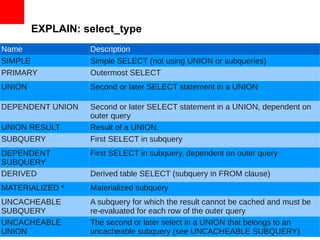
EXPLAIN: select_type
Name              Description
SIMPLE            Simple SELECT (not using UNION or subqueries)
PRIMARY           Outermost SELECT
UNION             Second or later SELECT statement in a UNION

DEPENDENT UNION   Second or later SELECT statement in a UNION, dependent on
                  outer query
UNION RESULT      Result of a UNION.
SUBQUERY          First SELECT in subquery
DEPENDENT         First SELECT in subquery, dependent on outer query
SUBQUERY
DERIVED           Derived table SELECT (subquery in FROM clause)
MATERIALIZED *    Materialized subquery
UNCACHEABLE       A subquery for which the result cannot be cached and must be
SUBQUERY          re-evaluated for each row of the outer query
UNCACHEABLE       The second or later select in a UNION that belongs to an
UNION             uncacheable subquery (see UNCACHEABLE SUBQUERY)
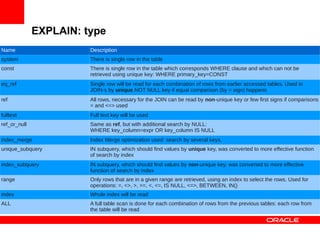
EXPLAIN: type
Name                    Description
system                  There is single row in the table
const                   There is single row in the table which corresponds WHERE clause and which can not be
                        retrieved using unique key: WHERE primary_key=CONST
eq_ref                  Single row will be read for each combination of rows from earlier accessed tables. Used in
                        JOIN-s by unique NOT NULL key if equal comparison (by = sign) happens
ref                     All rows, necessary for the JOIN can be read by non-unique key or few first signs if comparisons
                        = and <=> used
fulltext                Full text key will be used
ref_or_null             Same as ref, but with additional search by NULL:
                        WHERE key_column=expr OR key_column IS NULL
index_merge             Index Merge optimization used: search by several keys.
unique_subquery         IN subquery, which should find values by unique key, was converted to more effective function
                        of search by index
index_subquery          IN subquery, which should find values by non-unique key, was converted to more effective
                        function of search by index
range                   Only rows that are in a given range are retrieved, using an index to select the rows. Used for
                        operations: =, <>, >, >=, <, <=, IS NULL, <=>, BETWEEN, IN()
index                   Whole index will be read
ALL                     A full table scan is done for each combination of rows from the previous tables: each row from
                        the table will be read
EXPLAIN: Extra
Content                                               Description
const row not found                                   Empty table
Distinct                                              After first value found, search is stopped, because only distinct
                                                      values needed
Full scan on NULL key                                 Index can not be used to resolve this subquery
Impossible HAVING                                     The HAVING clause is always false and cannot select any rows.

Impossible WHERE                                      The WHERE clause is always false and cannot select any rows.
Impossible WHERE noticed after reading const tables   MySQL has read all const (and system) tables and notice that the
                                                      WHERE clause is always false.
No matching min/max row                               No row satisfies the condition for a query such as SELECT
                                                      MIN(...) FROM ... WHERE condition.
no matching row in const table                        For a query with a join, there was an empty table or a table with
                                                      no rows satisfying a unique index condition.
No tables used                                        The query has no FROM clause, or has a FROM DUAL clause.
Not exist                                             LEFT JOIN optimization: for every row from the left table only one
                                                      row from right one will be examined. This does not depend from
                                                      how many rows which satisfy the condition are in the right table.


Range checked for each record (index map: N)          MySQL found no good index to use, but found that the index can
                                                      be used after retrieving rows from preceding tables.
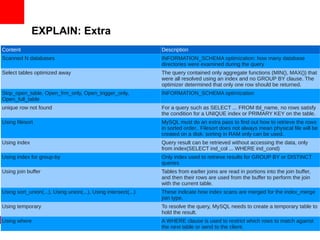
EXPLAIN: Extra
Content                                                         Description
Scanned N databases                                             INFORMATION_SCHEMA optimization: how many database
                                                                directories were examined during the query
Select tables optimized away                                    The query contained only aggregate functions (MIN(), MAX()) that
                                                                were all resolved using an index and no GROUP BY clause. The
                                                                optimizer determined that only one row should be returned.
Skip_open_table, Open_frm_only, Open_trigger_only,              INFORMATION_SCHEMA optimization
Open_full_table
unique row not found                                            For a query such as SELECT ... FROM tbl_name, no rows satisfy
                                                                the condition for a UNIQUE index or PRIMARY KEY on the table.
Using filesort                                                  MySQL must do an extra pass to find out how to retrieve the rows
                                                                in sorted order.. Filesort does not always mean physical file will be
                                                                created on a disk: sorting in RAM only can be used.
Using index                                                     Query result can be retrieved without accessing the data, only
                                                                from index(SELECT ind_col ... WHERE ind_cond)
Using index for group-by                                        Only index used to retrieve results for GROUP BY or DISTINCT
                                                                queries
Using join buffer                                               Tables from earlier joins are read in portions into the join buffer,
                                                                and then their rows are used from the buffer to perform the join
                                                                with the current table.
Using sort_union(...), Using union(...), Using intersect(...)   These indicate how index scans are merged for the index_merge
                                                                join type.
Using temporary                                                 To resolve the query, MySQL needs to create a temporary table to
                                                                hold the result.
Using where                                                     A WHERE clause is used to restrict which rows to match against
                                                                the next table or send to the client.
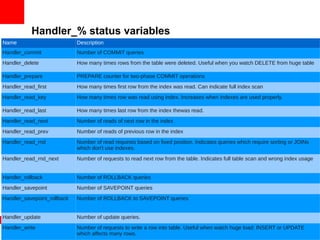
Handler_% status variables
Name                         Description
Handler_commit               Number of COMMIT queries
Handler_delete               How many times rows from the table were deleted. Useful when you watch DELETE from huge table

Handler_prepare              PREPARE counter for two-phase COMMIT operations
Handler_read_first           How many times first row from the index was read. Can indicate full index scan
Handler_read_key             How many times row was read using index. Increases when indexes are used properly.

Handler_read_last            How many times last row from the index thewas read.
Handler_read_next            Number of reads of next row in the index
Handler_read_prev            Number of reads of previous row in the index
Handler_read_rnd             Number of read requests based on fixed position. Indicates queries which require sorting or JOINs
                             which don't use indexes.
Handler_read_rnd_next        Number of requests to read next row from the table. Indicates full table scan and wrong index usage


Handler_rollback             Number of ROLLBACK queries
Handler_savepoint            Number of SAVEPOINT queries
Handler_savepoint_rollback   Number of ROLLBACK to SAVEPOINT queries


Handler_update               Number of update queries.
Handler_write                Number of requests to write a row into table. Useful when watch huge load: INSERT or UPDATE
                             which affects many rows.
SHOW [FULL] PROCESSLIST

      MySQL thread ID (connection id)


                    Full — show full query                            What happens. For example, executed query


                                                                 State
•   mysql> show full processlist;
•   +­­­­+­­­­­­+­­­­­­­­­­­­­­­­­+­­­­­­+­­­­­­­­­+­­­­­­+­­­­­­­­­­­­+­­­­­­­­­­­­­­­­­­­­­­­­­­­­­­­­­­­­+
•   | Id | User | Host            | db   | Command | Time | State      | Info                               |
•   +­­­­+­­­­­­+­­­­­­­­­­­­­­­­­+­­­­­­+­­­­­­­­­+­­­­­­+­­­­­­­­­­­­+­­­­­­­­­­­­­­­­­­­­­­­­­­­­­­­­­­­­+
•   |  3 | root | localhost       | test | Query   |    0 | init       | show full processlist              |
•   |  1 | root | localhost:51051 | test | Query   |    5 | User sleep | select * from t2 where sleep(10)=0 |
•   +­­­­+­­­­­­+­­­­­­­­­­­­­­­­­+­­­­­­+­­­­­­­­­+­­­­­­+­­­­­­­­­­­­+­­­­­­­­­­­­­­­­­­­­­­­­­­­­­­­­­­­­+
•   2 rows in set (0.00 sec)
                               Default database      Execution time
          User


                   Host             Operation type
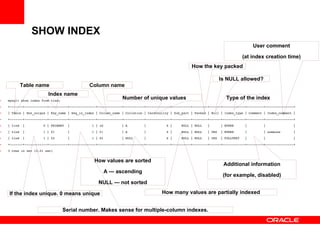
SHOW INDEX
                                                                                                                                       User comment

                                                                                                                                 (at index creation time)
                                                                                                      How the key packed

                                                                                                                     Is NULL allowed?
          Table name                           Column name
                         Index name
•   mysql> show index from tind;
                                                                 Number of unique values                                Type of the index
•   +­­­­­­­+­­­­­­­­­­­­+­­­­­­­­­­+­­­­­­­­­­­­­­+­­­­­­­­­­­­­+­­­­­­­­­­­+­­­­­­­­­­­­­+­­­­­­­­­­+­­­­­­­­+­­­­­­+­­­­­­­­­­­­+­­­­­­­­­+­­­­­­­­­­­­­­­+

•   | Table | Non_unique | Key_name | Seq_in_index | Column_name | Collation | Cardinality | Sub_part | Packed | Null | Index_type | Comment | Index_comment |

•   +­­­­­­­+­­­­­­­­­­­­+­­­­­­­­­­+­­­­­­­­­­­­­­+­­­­­­­­­­­­­+­­­­­­­­­­­+­­­­­­­­­­­­­+­­­­­­­­­­+­­­­­­­­+­­­­­­+­­­­­­­­­­­­+­­­­­­­­­+­­­­­­­­­­­­­­­+

•   | tind  |          0 | PRIMARY  |            1 | id          | A         |           6 |     NULL | NULL   |      | BTREE      |         |               |

•   | tind  |          1 | f1       |            1 | f1          | A         |           6 |     NULL | NULL   | YES  | BTREE      |         | someone       |

•   | tind  |          1 | f2       |            1 | f2          | NULL      |           6 |     NULL | NULL   | YES  | FULLTEXT   |         |               |

•   +­­­­­­­+­­­­­­­­­­­­+­­­­­­­­­­+­­­­­­­­­­­­­­+­­­­­­­­­­­­­+­­­­­­­­­­­+­­­­­­­­­­­­­+­­­­­­­­­­+­­­­­­­­+­­­­­­+­­­­­­­­­­­­+­­­­­­­­­+­­­­­­­­­­­­­­­+

•   3 rows in set (0.01 sec)


                                                  How values are sorted
                                                                                                                       Additional information
                                                       А — ascending
                                                                                                                       (for example, disabled)
                                                    NULL — not sorted

    If the index unique. 0 means unique                                               How many values are partially indexed


                                   Serial number. Makes sense for multiple-column indexes.
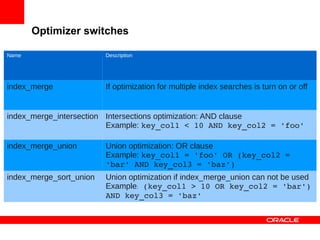
Optimizer switches

Name                     Description


index_merge              If optimization for multiple index searches is turn on or off


index_merge_intersection Intersections optimization: AND clause
                         Example: key_col1 < 10 AND key_col2 = 'foo'

index_merge_union        Union optimization: OR clause
                         Example: key_col1 = 'foo' OR (key_col2 = 
                         'bar' AND key_col3 = 'baz')
index_merge_sort_union   Union optimization if index_merge_union can not be used
                         Example: (key_col1 > 10 OR key_col2 = 'bar') 
                         AND key_col3 = 'baz'
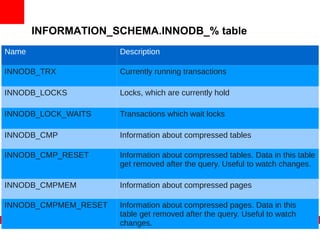
INFORMATION_SCHEMA.INNODB_% table
Name                  Description

INNODB_TRX            Currently running transactions

INNODB_LOCKS          Locks, which are currently hold

INNODB_LOCK_WAITS     Transactions which wait locks

INNODB_CMP            Information about compressed tables

INNODB_CMP_RESET      Information about compressed tables. Data in this table
                      get removed after the query. Useful to watch changes.

INNODB_CMPMEM         Information about compressed pages

INNODB_CMPMEM_RESET   Information about compressed pages. Data in this
                      table get removed after the query. Useful to watch
                      changes.
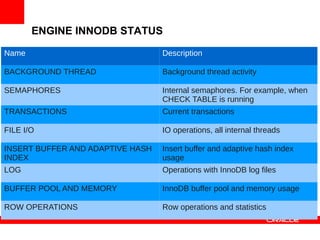
ENGINE INNODB STATUS

Name                              Description

BACKGROUND THREAD                 Background thread activity

SEMAPHORES                        Internal semaphores. For example, when
                                  CHECK TABLE is running
TRANSACTIONS                      Current transactions

FILE I/O                          IO operations, all internal threads

INSERT BUFFER AND ADAPTIVE HASH   Insert buffer and adaptive hash index
INDEX                             usage
LOG                               Operations with InnoDB log files

BUFFER POOL AND MEMORY            InnoDB buffer pool and memory usage

ROW OPERATIONS                    Row operations and statistics
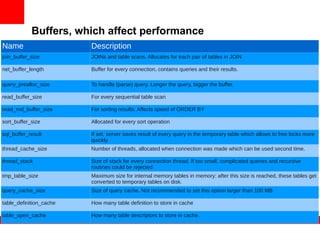
Buffers, which affect performance
Name                     Description
join_buffer_size         JOINs and table scans. Allocates for each pair of tables in JOIN

net_buffer_length        Buffer for every connection, contains queries and their results.

query_prealloc_size      To handle (parse) query. Longer the query, bigger the buffer.

read_buffer_size         For every sequential table scan

read_rnd_buffer_size     For sorting results. Affects speed of ORDER BY

sort_buffer_size         Allocated for every sort operation

sql_buffer_result        If set, server saves result of every query in the temporary table which allows to free locks more
                         quickly.
thread_cache_size        Number of threads, allocated when connection was made which can be used second time.

thread_stack             Size of stack for every connection thread. If too small, complicated queries and recursive
                         routines could be rejected
tmp_table_size           Maximum size for internal memory tables in memory: after this size is reached, these tables get
                         converted to temporary tables on disk.
query_cache_size         Size of query cache. Not recommended to set this option larger than 100 MB

table_definition_cache   How many table definition to store in cache

table_open_cache         How many table descriptors to store in cache.
SHOW GLOBAL STATUS: performance
Name                                                   Description
Aborted_clients, Aborted_connects                      Aborted clients and connections

Binlog_[stmt_]cache_use, Binlog_[stmt_]cache_disk_use Binlog cache usage activity

Bytes_received, Bytes_sent                             Data traffic

Com_*                                                  Statistics of queries and command (INIT DB when open connection, etc.)
                                                       usage
Created_tmp_[disk_]tables, Created_tmp_files           Temporary tables and files usage

Handler_*                                              See above

Innodb_*                                               InnoDB statistics: buffer pool, lor, i/o operations, other

Key_blocks_*                                           Key usage statistics

Open_*, Opened_*                                       Open files, tables, etc. Opened — since server started. If Open is equal to
                                                       corresponding buffer size and Opened high, consider to increase the
                                                       buffer
Qcache_*                                               Query cache usage statistics

Connections, Queries, Questions                        Number of connections and queries, Queries contain calls from stored
                                                       routines while Questions do not
Select_*, Sort_*                                       SELECT queries and sort statistics

Table_locks_*                                          Table lock statistics

Threads_*                                               Connection statistics
Performance Schema tables
Name                                           Description
cond_instances                                 State after server start (i.e., wait/synch/cond/sql/DEBUG_SYNC::cond)

events_waits_current                           Threads waiting locks

events_waits_history                           Last performance_schema_events_waits_history_size waits

events_waits_history_long                      Last performance_schema_events_waits_history_long_size waits

events_waits_summary_by_instance               Summary of waits by instance (i.e.,
                                               wait/synch/mutex/sql/LOCK_uuid_generator)
events_waits_summary_by_thread_by_event_name   Summary of waits by thereads and event names (i.e.,
                                               wait/synch/mutex/sql/PAGE::lock)
events_waits_summary_global_by_event_name      Global summary by events, not linked to threads.

file_instances                                 All files, which were opened since server startup

file_summary_by_event_name                     Summary of file operations by events ( wait/io/file/sql/map)

file_summary_by_instance                       Summary of file operations by file name

mutex_instances                                Mutex list. If LOCKED_BY_THREAD_IDis not NULL: current.

performance_timers                             Timer types.

rwlock_instances                               IO locks.

setup_consumers                                Settings: if output into corresponding table is ON or OFF.

setup_instruments                              Settings: which events to watch.

setup_timers                                   Settings:which timer to use.

threads                                        All server internal threads (don't mix with connections).
The preceding is intended to outline our general
product direction. It is intended for information
purposes only, and may not be incorporated into any
contract. It is not a commitment to deliver any
material, code, or functionality, and should not be
relied upon in making purchasing decisions.
The development, release, and timing of any
features or functionality described for Oracle’s
products remains at the sole discretion of Oracle.

Troubleshooting MySQL Performance add-ons

  • 1.
    <Insert Picture Here> TroubleshootingMySQL Performance: add-ons Sveta Smirnova Principal Technical MySQL Support Engineer
  • 2.
    EXPLAIN Which columns were compared with index SELECT type Possible keys Length of the key Additional information Number of examined rows Number of SELECT How data is accessed Key, which was actually used % of filtered rows • mysql> explain extended select * from t1 join t2; rows × filtered / 100 — number of rows, which will be joined with another table • +­­­­+­­­­­­­­­­­­­+­­­­­­­+­­­­­­­+­­­­­­­­­­­­­­­+­­­­­­­­­­­­­+­­­­­­­­­+­­­­­­+­­­­­­+­­­­­­­­­­+­­­­­­­­­­­­­­­­­­­­­­­­­­­­­­­­­­­­­­­­­­­­­­­­­­­­+ • | id | select_type | table | type  | possible_keys | key         | key_len | ref  | rows | filtered | Extra                                              | • +­­­­+­­­­­­­­­­­­­+­­­­­­­+­­­­­­­+­­­­­­­­­­­­­­­+­­­­­­­­­­­­­+­­­­­­­­­+­­­­­­+­­­­­­+­­­­­­­­­­+­­­­­­­­­­­­­­­­­­­­­­­­­­­­­­­­­­­­­­­­­­­­­­­­­­­­+ • |  1 | SIMPLE      | t1    | index | NULL          | col_int_key | 5       | NULL |    4 |   100.00 | Using index                                        | • |  1 | SIMPLE      | t2    | index | NULL          | col_int_key | 5       | NULL |    6 |   100.00 | Using index; Using join buffer (Block Nested Loop) | • +­­­­+­­­­­­­­­­­­­+­­­­­­­+­­­­­­­+­­­­­­­­­­­­­­­+­­­­­­­­­­­­­+­­­­­­­­­+­­­­­­+­­­­­­+­­­­­­­­­­+­­­­­­­­­­­­­­­­­­­­­­­­­­­­­­­­­­­­­­­­­­­­­­­­­­­­+ • 2 rows in set, 1 warning (0.00 sec) Product of rows in this column: how many rows in all tables will be accessed • Table, for which information is printed For this example estimated value is 4*6 = 24 • Note (Code 1003): /* select#1 */ select `test`.`t1`.`col_int_key` AS `col_int_key`,`test`.`t1`.`pk` AS `pk`,`test`.`t2`.`col_int_key` AS `col_int_key`,`test`.`t2`.`pk`  AS `pk` from `test`.`t1` join `test`.`t2` Actual (optimized) query as executed by MySQL Server
  • 3.
    EXPLAIN: select_type Name Description SIMPLE Simple SELECT (not using UNION or subqueries) PRIMARY Outermost SELECT UNION Second or later SELECT statement in a UNION DEPENDENT UNION Second or later SELECT statement in a UNION, dependent on outer query UNION RESULT Result of a UNION. SUBQUERY First SELECT in subquery DEPENDENT First SELECT in subquery, dependent on outer query SUBQUERY DERIVED Derived table SELECT (subquery in FROM clause) MATERIALIZED * Materialized subquery UNCACHEABLE A subquery for which the result cannot be cached and must be SUBQUERY re-evaluated for each row of the outer query UNCACHEABLE The second or later select in a UNION that belongs to an UNION uncacheable subquery (see UNCACHEABLE SUBQUERY)
  • 4.
    EXPLAIN: type Name Description system There is single row in the table const There is single row in the table which corresponds WHERE clause and which can not be retrieved using unique key: WHERE primary_key=CONST eq_ref Single row will be read for each combination of rows from earlier accessed tables. Used in JOIN-s by unique NOT NULL key if equal comparison (by = sign) happens ref All rows, necessary for the JOIN can be read by non-unique key or few first signs if comparisons = and <=> used fulltext Full text key will be used ref_or_null Same as ref, but with additional search by NULL: WHERE key_column=expr OR key_column IS NULL index_merge Index Merge optimization used: search by several keys. unique_subquery IN subquery, which should find values by unique key, was converted to more effective function of search by index index_subquery IN subquery, which should find values by non-unique key, was converted to more effective function of search by index range Only rows that are in a given range are retrieved, using an index to select the rows. Used for operations: =, <>, >, >=, <, <=, IS NULL, <=>, BETWEEN, IN() index Whole index will be read ALL A full table scan is done for each combination of rows from the previous tables: each row from the table will be read
  • 5.
    EXPLAIN: Extra Content Description const row not found Empty table Distinct After first value found, search is stopped, because only distinct values needed Full scan on NULL key Index can not be used to resolve this subquery Impossible HAVING The HAVING clause is always false and cannot select any rows. Impossible WHERE The WHERE clause is always false and cannot select any rows. Impossible WHERE noticed after reading const tables MySQL has read all const (and system) tables and notice that the WHERE clause is always false. No matching min/max row No row satisfies the condition for a query such as SELECT MIN(...) FROM ... WHERE condition. no matching row in const table For a query with a join, there was an empty table or a table with no rows satisfying a unique index condition. No tables used The query has no FROM clause, or has a FROM DUAL clause. Not exist LEFT JOIN optimization: for every row from the left table only one row from right one will be examined. This does not depend from how many rows which satisfy the condition are in the right table. Range checked for each record (index map: N) MySQL found no good index to use, but found that the index can be used after retrieving rows from preceding tables.
  • 6.
    EXPLAIN: Extra Content Description Scanned N databases INFORMATION_SCHEMA optimization: how many database directories were examined during the query Select tables optimized away The query contained only aggregate functions (MIN(), MAX()) that were all resolved using an index and no GROUP BY clause. The optimizer determined that only one row should be returned. Skip_open_table, Open_frm_only, Open_trigger_only, INFORMATION_SCHEMA optimization Open_full_table unique row not found For a query such as SELECT ... FROM tbl_name, no rows satisfy the condition for a UNIQUE index or PRIMARY KEY on the table. Using filesort MySQL must do an extra pass to find out how to retrieve the rows in sorted order.. Filesort does not always mean physical file will be created on a disk: sorting in RAM only can be used. Using index Query result can be retrieved without accessing the data, only from index(SELECT ind_col ... WHERE ind_cond) Using index for group-by Only index used to retrieve results for GROUP BY or DISTINCT queries Using join buffer Tables from earlier joins are read in portions into the join buffer, and then their rows are used from the buffer to perform the join with the current table. Using sort_union(...), Using union(...), Using intersect(...) These indicate how index scans are merged for the index_merge join type. Using temporary To resolve the query, MySQL needs to create a temporary table to hold the result. Using where A WHERE clause is used to restrict which rows to match against the next table or send to the client.
  • 7.
    Handler_% status variables Name Description Handler_commit Number of COMMIT queries Handler_delete How many times rows from the table were deleted. Useful when you watch DELETE from huge table Handler_prepare PREPARE counter for two-phase COMMIT operations Handler_read_first How many times first row from the index was read. Can indicate full index scan Handler_read_key How many times row was read using index. Increases when indexes are used properly. Handler_read_last How many times last row from the index thewas read. Handler_read_next Number of reads of next row in the index Handler_read_prev Number of reads of previous row in the index Handler_read_rnd Number of read requests based on fixed position. Indicates queries which require sorting or JOINs which don't use indexes. Handler_read_rnd_next Number of requests to read next row from the table. Indicates full table scan and wrong index usage Handler_rollback Number of ROLLBACK queries Handler_savepoint Number of SAVEPOINT queries Handler_savepoint_rollback Number of ROLLBACK to SAVEPOINT queries Handler_update Number of update queries. Handler_write Number of requests to write a row into table. Useful when watch huge load: INSERT or UPDATE which affects many rows.
  • 8.
    SHOW [FULL] PROCESSLIST MySQL thread ID (connection id) Full — show full query What happens. For example, executed query State • mysql> show full processlist; • +­­­­+­­­­­­+­­­­­­­­­­­­­­­­­+­­­­­­+­­­­­­­­­+­­­­­­+­­­­­­­­­­­­+­­­­­­­­­­­­­­­­­­­­­­­­­­­­­­­­­­­­+ • | Id | User | Host            | db   | Command | Time | State      | Info                               | • +­­­­+­­­­­­+­­­­­­­­­­­­­­­­­+­­­­­­+­­­­­­­­­+­­­­­­+­­­­­­­­­­­­+­­­­­­­­­­­­­­­­­­­­­­­­­­­­­­­­­­­­+ • |  3 | root | localhost       | test | Query   |    0 | init       | show full processlist              | • |  1 | root | localhost:51051 | test | Query   |    5 | User sleep | select * from t2 where sleep(10)=0 | • +­­­­+­­­­­­+­­­­­­­­­­­­­­­­­+­­­­­­+­­­­­­­­­+­­­­­­+­­­­­­­­­­­­+­­­­­­­­­­­­­­­­­­­­­­­­­­­­­­­­­­­­+ • 2 rows in set (0.00 sec) Default database Execution time User Host Operation type
  • 9.
    SHOW INDEX User comment (at index creation time) How the key packed Is NULL allowed? Table name Column name Index name • mysql> show index from tind; Number of unique values Type of the index • +­­­­­­­+­­­­­­­­­­­­+­­­­­­­­­­+­­­­­­­­­­­­­­+­­­­­­­­­­­­­+­­­­­­­­­­­+­­­­­­­­­­­­­+­­­­­­­­­­+­­­­­­­­+­­­­­­+­­­­­­­­­­­­+­­­­­­­­­+­­­­­­­­­­­­­­­+ • | Table | Non_unique | Key_name | Seq_in_index | Column_name | Collation | Cardinality | Sub_part | Packed | Null | Index_type | Comment | Index_comment | • +­­­­­­­+­­­­­­­­­­­­+­­­­­­­­­­+­­­­­­­­­­­­­­+­­­­­­­­­­­­­+­­­­­­­­­­­+­­­­­­­­­­­­­+­­­­­­­­­­+­­­­­­­­+­­­­­­+­­­­­­­­­­­­+­­­­­­­­­+­­­­­­­­­­­­­­­+ • | tind  |          0 | PRIMARY  |            1 | id          | A         |           6 |     NULL | NULL   |      | BTREE      |         |               | • | tind  |          1 | f1       |            1 | f1          | A         |           6 |     NULL | NULL   | YES  | BTREE      |         | someone       | • | tind  |          1 | f2       |            1 | f2          | NULL      |           6 |     NULL | NULL   | YES  | FULLTEXT   |         |               | • +­­­­­­­+­­­­­­­­­­­­+­­­­­­­­­­+­­­­­­­­­­­­­­+­­­­­­­­­­­­­+­­­­­­­­­­­+­­­­­­­­­­­­­+­­­­­­­­­­+­­­­­­­­+­­­­­­+­­­­­­­­­­­­+­­­­­­­­­+­­­­­­­­­­­­­­­+ • 3 rows in set (0.01 sec) How values are sorted Additional information А — ascending (for example, disabled) NULL — not sorted If the index unique. 0 means unique How many values are partially indexed Serial number. Makes sense for multiple-column indexes.
  • 10.
    Optimizer switches Name Description index_merge If optimization for multiple index searches is turn on or off index_merge_intersection Intersections optimization: AND clause Example: key_col1 < 10 AND key_col2 = 'foo' index_merge_union Union optimization: OR clause Example: key_col1 = 'foo' OR (key_col2 =  'bar' AND key_col3 = 'baz') index_merge_sort_union Union optimization if index_merge_union can not be used Example: (key_col1 > 10 OR key_col2 = 'bar')  AND key_col3 = 'baz'
  • 11.
    INFORMATION_SCHEMA.INNODB_% table Name Description INNODB_TRX Currently running transactions INNODB_LOCKS Locks, which are currently hold INNODB_LOCK_WAITS Transactions which wait locks INNODB_CMP Information about compressed tables INNODB_CMP_RESET Information about compressed tables. Data in this table get removed after the query. Useful to watch changes. INNODB_CMPMEM Information about compressed pages INNODB_CMPMEM_RESET Information about compressed pages. Data in this table get removed after the query. Useful to watch changes.
  • 12.
    ENGINE INNODB STATUS Name Description BACKGROUND THREAD Background thread activity SEMAPHORES Internal semaphores. For example, when CHECK TABLE is running TRANSACTIONS Current transactions FILE I/O IO operations, all internal threads INSERT BUFFER AND ADAPTIVE HASH Insert buffer and adaptive hash index INDEX usage LOG Operations with InnoDB log files BUFFER POOL AND MEMORY InnoDB buffer pool and memory usage ROW OPERATIONS Row operations and statistics
  • 13.
    Buffers, which affectperformance Name Description join_buffer_size JOINs and table scans. Allocates for each pair of tables in JOIN net_buffer_length Buffer for every connection, contains queries and their results. query_prealloc_size To handle (parse) query. Longer the query, bigger the buffer. read_buffer_size For every sequential table scan read_rnd_buffer_size For sorting results. Affects speed of ORDER BY sort_buffer_size Allocated for every sort operation sql_buffer_result If set, server saves result of every query in the temporary table which allows to free locks more quickly. thread_cache_size Number of threads, allocated when connection was made which can be used second time. thread_stack Size of stack for every connection thread. If too small, complicated queries and recursive routines could be rejected tmp_table_size Maximum size for internal memory tables in memory: after this size is reached, these tables get converted to temporary tables on disk. query_cache_size Size of query cache. Not recommended to set this option larger than 100 MB table_definition_cache How many table definition to store in cache table_open_cache How many table descriptors to store in cache.
  • 14.
    SHOW GLOBAL STATUS:performance Name Description Aborted_clients, Aborted_connects Aborted clients and connections Binlog_[stmt_]cache_use, Binlog_[stmt_]cache_disk_use Binlog cache usage activity Bytes_received, Bytes_sent Data traffic Com_* Statistics of queries and command (INIT DB when open connection, etc.) usage Created_tmp_[disk_]tables, Created_tmp_files Temporary tables and files usage Handler_* See above Innodb_* InnoDB statistics: buffer pool, lor, i/o operations, other Key_blocks_* Key usage statistics Open_*, Opened_* Open files, tables, etc. Opened — since server started. If Open is equal to corresponding buffer size and Opened high, consider to increase the buffer Qcache_* Query cache usage statistics Connections, Queries, Questions Number of connections and queries, Queries contain calls from stored routines while Questions do not Select_*, Sort_* SELECT queries and sort statistics Table_locks_* Table lock statistics Threads_* Connection statistics
  • 15.
    Performance Schema tables Name Description cond_instances State after server start (i.e., wait/synch/cond/sql/DEBUG_SYNC::cond) events_waits_current Threads waiting locks events_waits_history Last performance_schema_events_waits_history_size waits events_waits_history_long Last performance_schema_events_waits_history_long_size waits events_waits_summary_by_instance Summary of waits by instance (i.e., wait/synch/mutex/sql/LOCK_uuid_generator) events_waits_summary_by_thread_by_event_name Summary of waits by thereads and event names (i.e., wait/synch/mutex/sql/PAGE::lock) events_waits_summary_global_by_event_name Global summary by events, not linked to threads. file_instances All files, which were opened since server startup file_summary_by_event_name Summary of file operations by events ( wait/io/file/sql/map) file_summary_by_instance Summary of file operations by file name mutex_instances Mutex list. If LOCKED_BY_THREAD_IDis not NULL: current. performance_timers Timer types. rwlock_instances IO locks. setup_consumers Settings: if output into corresponding table is ON or OFF. setup_instruments Settings: which events to watch. setup_timers Settings:which timer to use. threads All server internal threads (don't mix with connections).
  • 16.
    The preceding isintended to outline our general product direction. It is intended for information purposes only, and may not be incorporated into any contract. It is not a commitment to deliver any material, code, or functionality, and should not be relied upon in making purchasing decisions. The development, release, and timing of any features or functionality described for Oracle’s products remains at the sole discretion of Oracle.