New SQL features in latest
MySQL releases
What SQL functionality was added in the past year or so
Who am I?
• Software Development Manager & Team Leader @ Codix
• Using MySQL since 3.23.x
• Building MySQL Server and related products for Slackware Linux
for more than 14 years (check SlackPack)
• Free and open source software enthusiast
• Formula 1 and Le Mans 24 fan
•gdsotirov @
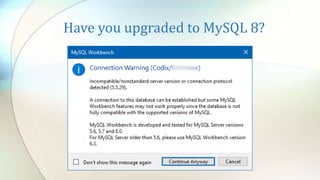
Have you upgraded to MySQL 8?
Agenda
• Function or expression as default column values
• Functional key pars
• Lateral derived tables
• CHECK constraints
• JSON improvements
• Spatial improvements
• Other new SQL and related features
• Other new features
Function or expression as default
column values 1/4
• Available since 8.0.13 (released 2018-10-22)
• Before only literal values were allowed as default values (except for
TIMESTAMP where using CURRENT_TIMESTAMP a.k.a. NOW was
possible)
• Now it’s possible to use function or expression as default column
values for other data types (e.g. UUID, spatial and JSON)
• literals, deterministic and nondeterministic built-in functions and operators
are permitted
• stored routines, UDFs, variables, query parameters and subqueries are not
permitted
• cannot depend on AUTO_INCREMENT columns
• The syntax requires engulfing the function or expression in
parentheses e.g. DEFAULT ([function|expression])
Function or expression as default
column values 2/4 Implications
• The removal of the restriction means that it’s now possible to:
• generate UUID values by default
• e.g. DEFAULT (UUID_TO_BIN(UUID()))
• generate default values for geometry data types
• e.g. by using DEFAULT (POINT(0,0))
• or DEFAULT (ST_PointFromText('POINT(42.69 23.32)’, 4326))
• generate default values for JSON columns
• e.g. by using DEFAULT (JSON_ARRAY())
• or DEFAULT ('[]')
• other complex values
• e.g. like DEFAULT (CURRENT_DATE + INTERVAL 1 DAY)
• or DEFAULT (PI() * POW(r, 2))
Function or expression as default
column values 3/4 Example
CREATE TABLE def_expr (
id INT NOT NULL AUTO_INCREMENT,
uuid_def BINARY(16) DEFAULT (UUID_TO_BIN(UUID())),
geo_def POINT DEFAULT (POINT(0,0)),
geo_def2 GEOMETRY DEFAULT (ST_PointFromText(
'POINT(42.69751 23.32415)', 4326)),
json_def JSON DEFAULT (JSON_ARRAY()),
json_def2 JSON DEFAULT ('[]') /* this works too */,
tomorrow DATE DEFAULT (CURDATE() + INTERVAL 1 DAY),
radius INT DEFAULT (FLOOR(1 + (RAND() * 10))),
area DECIMAL(10,3) DEFAULT (ROUND(PI() * POW(radius, 2), 3)),
PRIMARY KEY (id),
UNIQUE INDEX id_UNIQUE (id ASC) VISIBLE
);
Function or expression as default
column values 4/4 Example results
INSERT INTO def_expr VALUES (); /* x 2 */
SELECT id, BIN_TO_UUID(uuid_def) uuid_def,
ST_AsText(geo_def) geo_def,
ST_AsText(geo_def2) geo_def2,
json_def j1, json_def2 j2,
tomorrow, radius, area
FROM def_expr;
+----+----------+------------+--------------+----+----+------------+--------+---------+
| id | uuid_def | geo_def | geo_def2 | j1 | j2 | tomorrow | radius | area |
+----+----------+------------+--------------+----+----+------------+--------+---------+
| 1 | a2747... | POINT(0 0) | POINT(42.6.. | [] | [] | 2019-06-08 | 2 | 12.566 |
| 2 | a2ff9... | POINT(0 0) | POINT(42.6.. | [] | [] | 2019-06-08 | 10 | 314.159 |
+----+----------+------------+--------------+----+----+------------+--------+---------+
Functional key parts 1/2
• Available since 8.0.13 (released 2018-10-22)
• Before indexes could be build only on column values
• Now it’s possible to build indexes from expression values (i.e. values
not stored in a table)
• literals, deterministic built-in functions and operators are permitted
• subqueries, query parameters, variables, stored routines and UDFs are not
permitted
• Ordering of the index with ASC and DESC is possible
• Not permitted in foreign keys index specifications
• Functional and non-functional key parts could be mixed in composite
indexes
• Implemented as hidden virtual generated columns (av. since 5.7)
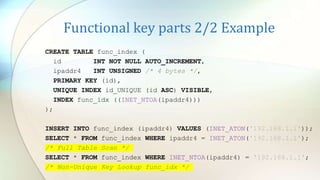
Functional key parts 2/2 Example
CREATE TABLE func_index (
id INT NOT NULL AUTO_INCREMENT,
ipaddr4 INT UNSIGNED /* 4 bytes */,
PRIMARY KEY (id),
UNIQUE INDEX id_UNIQUE (id ASC) VISIBLE,
INDEX func_idx ((INET_NTOA(ipaddr4)))
);
INSERT INTO func_index (ipaddr4) VALUES (INET_ATON('192.168.1.1'));
SELECT * FROM func_index WHERE ipaddr4 = INET_ATON('192.168.1.1');
/* Full Table Scan */
SELECT * FROM func_index WHERE INET_NTOA(ipaddr4) = '192.168.1.1';
/* Non-Unique Key Lookup func_idx */
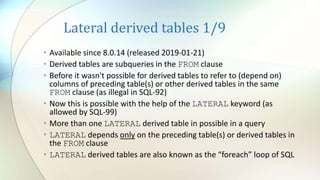
Lateral derived tables 1/9
• Available since 8.0.14 (released 2019-01-21)
• Derived tables are subqueries in the FROM clause
• Before it wasn't possible for derived tables to refer to (depend on)
columns of preceding table(s) or other derived tables in the same
FROM clause (as illegal in SQL-92)
• Now this is possible with the help of the LATERAL keyword (as
allowed by SQL-99)
• Мore than one LATERAL derived table in possible in a query
• LATERAL depends only on the preceding table(s) or derived tables in
the FROM clause
• LATERAL derived tables are also known as the “foreach” loop of SQL
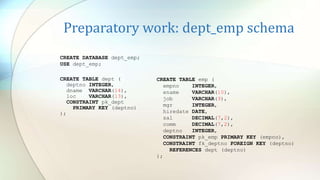
Preparatory work: dept_emp schema
CREATE TABLE dept (
deptno INTEGER,
dname VARCHAR(14),
loc VARCHAR(13),
CONSTRAINT pk_dept
PRIMARY KEY (deptno)
);
CREATE TABLE emp (
empno INTEGER,
ename VARCHAR(10),
job VARCHAR(9),
mgr INTEGER,
hiredate DATE,
sal DECIMAL(7,2),
comm DECIMAL(7,2),
deptno INTEGER,
CONSTRAINT pk_emp PRIMARY KEY (empno),
CONSTRAINT fk_deptno FOREIGN KEY (deptno)
REFERENCES dept (deptno)
);
CREATE DATABASE dept_emp;
USE dept_emp;
Preparatory work: dept_emp data
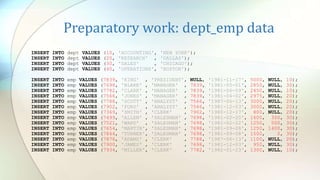
INSERT INTO dept VALUES (10, 'ACCOUNTING', 'NEW YORK');
INSERT INTO dept VALUES (20, 'RESEARCH' , 'DALLAS');
INSERT INTO dept VALUES (30, 'SALES' , 'CHICAGO');
INSERT INTO dept VALUES (40, 'OPERATIONS', 'BOSTON');
INSERT INTO emp VALUES (7839, 'KING' , 'PRESIDENT', NULL, '1981-11-17', 5000, NULL, 10);
INSERT INTO emp VALUES (7698, 'BLAKE' , 'MANAGER' , 7839, '1981-05-01', 2850, NULL, 30);
INSERT INTO emp VALUES (7782, 'CLARK' , 'MANAGER' , 7839, '1981-06-09', 2450, NULL, 10);
INSERT INTO emp VALUES (7566, 'JONES' , 'MANAGER' , 7839, '1981-04-02', 2975, NULL, 20);
INSERT INTO emp VALUES (7788, 'SCOTT' , 'ANALYST' , 7566, '1987-06-13', 3000, NULL, 20);
INSERT INTO emp VALUES (7902, 'FORD' , 'ANALYST' , 7566, '1981-12-03', 3000, NULL, 20);
INSERT INTO emp VALUES (7369, 'SMITH' , 'CLERK' , 7902, '1980-12-17', 800, NULL, 20);
INSERT INTO emp VALUES (7499, 'ALLEN' , 'SALESMAN' , 7698, '1981-02-20', 1600, 300, 30);
INSERT INTO emp VALUES (7521, 'WARD' , 'SALESMAN' , 7698, '1981-02-22', 1250, 500, 30);
INSERT INTO emp VALUES (7654, 'MARTIN', 'SALESMAN' , 7698, '1981-09-28', 1250, 1400, 30);
INSERT INTO emp VALUES (7844, 'TURNER', 'SALESMAN' , 7698, '1981-09-08', 1500, 0, 30);
INSERT INTO emp VALUES (7876, 'ADAMS' , 'CLERK' , 7788, '1987-06-13', 1100, NULL, 20);
INSERT INTO emp VALUES (7900, 'JAMES' , 'CLERK' , 7698, '1981-12-03', 950, NULL, 30);
INSERT INTO emp VALUES (7934, 'MILLER', 'CLERK' , 7782, '1982-01-23', 1300, NULL, 10);
Lateral derived tables 2/9 Example 1.1
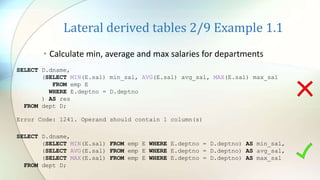
• Calculate min, average and max salaries for departments
SELECT D.dname,
(SELECT MIN(E.sal) min_sal, AVG(E.sal) avg_sal, MAX(E.sal) max_sal
FROM emp E
WHERE E.deptno = D.deptno
) AS res
FROM dept D;
Error Code: 1241. Operand should contain 1 column(s)
SELECT D.dname,
(SELECT MIN(E.sal) FROM emp E WHERE E.deptno = D.deptno) AS min_sal,
(SELECT AVG(E.sal) FROM emp E WHERE E.deptno = D.deptno) AS avg_sal,
(SELECT MAX(E.sal) FROM emp E WHERE E.deptno = D.deptno) AS max_sal
FROM dept D;
Lateral derived tables 3/9 Example 1.2
+----+--------------------+-------++------++-----------++-------------------+------+----------++
| id | select_type | table || type || key || ref | rows | filtered ||
+----+--------------------+-------++------++-----------++-------------------+------+----------++
| 1 | PRIMARY | D || ALL || NULL || NULL | 3 | 100 ||
| 4 | DEPENDENT SUBQUERY | E || ref || fk_deptno || dept_emp.D.deptno | 4 | 100 ||
| 3 | DEPENDENT SUBQUERY | E || ref || fk_deptno || dept_emp.D.deptno | 4 | 100 ||
| 2 | DEPENDENT SUBQUERY | E || ref || fk_deptno || dept_emp.D.deptno | 4 | 100 ||
+----+--------------------+-------++------++-----------++-------------------+------+----------++
4 rows in set, 4 warnings (0.0018 sec)
Note (code 1276): Field or reference 'dept_emp.D.deptno' of SELECT #2 was resolved in SELECT #1
Note (code 1276): Field or reference 'dept_emp.D.deptno' of SELECT #3 was resolved in SELECT #1
Note (code 1276): Field or reference 'dept_emp.D.deptno' of SELECT #4 was resolved in SELECT #1
Note (code 1003): /* select#1 */ select `dept_emp`.`d`.`dname` AS `dname`,(/* select#2 */ select min ...
Lateral derived tables 4/9 Example 1.3
Lateral derived tables 5/9 Example 2
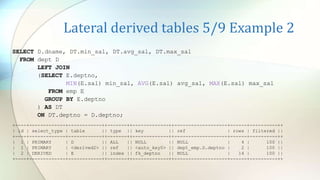
SELECT D.dname, DT.min_sal, DT.avg_sal, DT.max_sal
FROM dept D
LEFT JOIN
(SELECT E.deptno,
MIN(E.sal) min_sal, AVG(E.sal) avg_sal, MAX(E.sal) max_sal
FROM emp E
GROUP BY E.deptno
) AS DT
ON DT.deptno = D.deptno;
+----+-------------+------------++-------++-------------++-------------------+------+----------++
| id | select_type | table || type || key || ref | rows | filtered ||
+----+-------------+------------++-------++-------------++-------------------+------+----------++
| 1 | PRIMARY | D || ALL || NULL || NULL | 4 | 100 ||
| 1 | PRIMARY | <derived2> || ref || <auto_key0> || dept_emp.D.deptno | 2 | 100 ||
| 2 | DERIVED | E || index || fk_deptno || NULL | 14 | 100 ||
+----+-------------+------------++-------++-------------++-------------------+------+----------++
Lateral derived tables 6/9 Example 3
SELECT D.dname, LDT.min_sal, LDT.avg_sal, LDT.max_sal
FROM dept D,
LATERAL
(SELECT MIN(E.sal) min_sal, AVG(E.sal) avg_sal, MAX(E.sal) max_sal
FROM emp E
WHERE E.deptno = D.deptno
) AS LDT;
+----+-------------------+------------++------++-----------++-------------------+------+----------+-+
| id | select_type | table || type || key || ref | rows | filtered |E|
+----+-------------------+------------++------++-----------++-------------------+------+----------+-+
| 1 | PRIMARY | D || ALL || NULL || NULL | 4 | 100 |*|
| 1 | PRIMARY | <derived2> || ALL || NULL || NULL | 2 | 100 | |
| 2 | DEPENDENT DERIVED | E || ref || fk_deptno || dept_emp.D.deptno | 1 | 100 | |
+----+-------------------+------------++------++-----------++-------------------+------+----------+-+
* Extra - Rematerialize (<derived2>)
Note (code 1276): Field or reference 'dept_emp.D.deptno' of SELECT #2 was resolved in SELECT #1
Lateral derived tables 7/9
Examples 2 & 3 graphical explain plans
Lateral derived tables 8/9 Benchmark
...
WHERE D.deptno = 10;
Example 1 - Cost: 0.65 Time: 0.297 sec / 0.000 sec
Example 2 - Cost: 1398.72 Time: 0.109 sec / 0.000 sec
Example 3 - Cost: 3649.63 Time: 0.093 sec / 0.000 sec
All departments 100k employees
All departments 1m employees
Example 1 - Cost: 0.65 Time: 7.781 sec / 0.000 sec
Example 2 - Cost: 13951.97 Time: 2.110 sec / 0.000 sec
Example 3 - Cost: 6148.63 Time: 2.125 sec / 0.000 sec
Example 1 - Cost: 1.00 Time: 1.954 sec / 0.000 sec
Example 2 - Cost: 3.50 Time: 2.141 sec / 0.000 sec
Example 3 - Cost: 2.72 Time: 0.719 sec / 0.000 sec
One department 1m employees
Lateral derived tables 9/9
Example 3 results
8.0.14
+------------+---------+---------+---------+
| dname | min_sal | avg_sal | max_sal |
+------------+---------+---------+---------+
| ACCOUNTING | 1300.00 | 2916.67 | 5000.00 |
| RESEARCH | 800.00 | 2175.00 | 3000.00 |
| SALES | 950.00 | 1566.67 | 2850.00 |
| OPERATIONS | NULL | NULL | NULL |
+------------+---------+---------+---------+
4 rows in set (0.00 sec)
8.0.16
+------------+---------+---------+---------+
| dname | min_sal | avg_sal | max_sal |
+------------+---------+---------+---------+
| ACCOUNTING | 1300.00 | 2916.67 | 5000.00 |
| RESEARCH | 800.00 | 2175.00 | 3000.00 |
| SALES | 950.00 | 1566.67 | 2850.00 |
| OPERATIONS | 950.00 | 1566.67 | 2850.00 |
+------------+---------+---------+---------+
4 rows in set (0.00 sec)
Note: Average values rounded in result to save space. See bugs #94721 and #95411
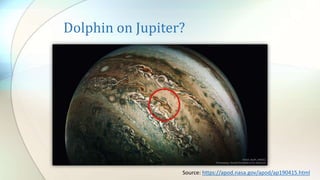
Dolphin on Jupiter?
Source: https://apod.nasa.gov/apod/ap190415.html
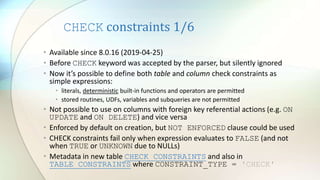
CHECK constraints 1/6
• Available since 8.0.16 (2019-04-25)
• Before CHECK keyword was accepted by the parser, but silently ignored
• Now it’s possible to define both table and column check constraints as
simple expressions:
• literals, deterministic built-in functions and operators are permitted
• stored routines, UDFs, variables and subqueries are not permitted
• Not possible to use on columns with foreign key referential actions (e.g. ON
UPDATE and ON DELETE) and vice versa
• Enforced by default on creation, but NOT ENFORCED clause could be used
• CHECK constraints fail only when expression evaluates to FALSE (and not
when TRUE or UNKNOWN due to NULLs)
• Metadata in new table CHECK_CONSTRAINTS and also in
TABLE_CONSTRAINTS where CONSTRAINT_TYPE = 'CHECK'
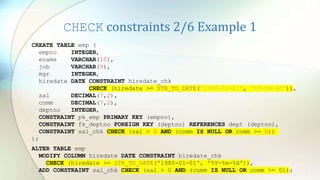
CHECK constraints 2/6 Example 1
CREATE TABLE emp (
empno INTEGER,
ename VARCHAR(10),
job VARCHAR(9),
mgr INTEGER,
hiredate DATE CONSTRAINT hiredate_chk
CHECK (hiredate >= STR_TO_DATE('1980-01-01', '%Y-%m-%d')),
sal DECIMAL(7,2),
comm DECIMAL(7,2),
deptno INTEGER,
CONSTRAINT pk_emp PRIMARY KEY (empno),
CONSTRAINT fk_deptno FOREIGN KEY (deptno) REFERENCES dept (deptno),
CONSTRAINT sal_chk CHECK (sal > 0 AND (comm IS NULL OR comm >= 0))
);
ALTER TABLE emp
MODIFY COLUMN hiredate DATE CONSTRAINT hiredate_chk
CHECK (hiredate >= STR_TO_DATE('1980-01-01', '%Y-%m-%d')),
ADD CONSTRAINT sal_chk CHECK (sal > 0 AND (comm IS NULL OR comm >= 0));
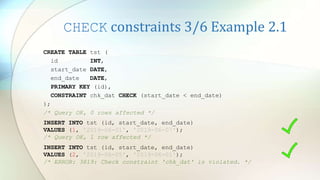
CHECK constraints 3/6 Example 2.1
CREATE TABLE tst (
id INT,
start_date DATE,
end_date DATE,
PRIMARY KEY (id),
CONSTRAINT chk_dat CHECK (start_date < end_date)
);
/* Query OK, 0 rows affected */
INSERT INTO tst (id, start_date, end_date)
VALUES (2, '2019-06-05', '2019-06-01');
/* ERROR: 3819: Check constraint 'chk_dat' is violated. */
INSERT INTO tst (id, start_date, end_date)
VALUES (1, '2019-06-01', '2019-06-07');
/* Query OK, 1 row affected */
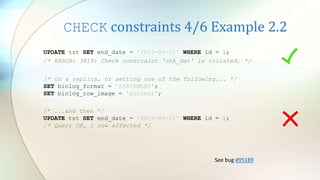
CHECK constraints 4/6 Example 2.2
UPDATE tst SET end_date = '2019-06-01' WHERE id = 1;
/* ERROR: 3819: Check constraint 'chk_dat' is violated. */
/* ...and then */
UPDATE tst SET end_date = '2019-06-01' WHERE id = 1;
/* Query OK, 1 row affected */
/* On a replica, or setting one of the following... */
SET binlog_format = 'STATEMENT';
SET binlog_row_image = 'minimal';
See bug #95189
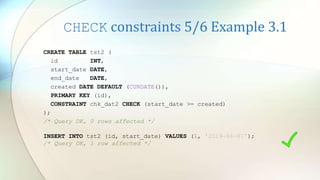
CHECK constraints 5/6 Example 3.1
CREATE TABLE tst2 (
id INT,
start_date DATE,
end_date DATE,
created DATE DEFAULT (CURDATE()),
PRIMARY KEY (id),
CONSTRAINT chk_dat2 CHECK (start_date >= created)
);
/* Query OK, 0 rows affected */
INSERT INTO tst2 (id, start_date) VALUES (1, '2019-06-07');
/* Query OK, 1 row affected */
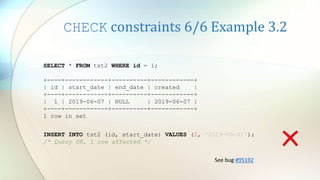
CHECK constraints 6/6 Example 3.2
INSERT INTO tst2 (id, start_date) VALUES (2, '2019-06-01');
/* Query OK, 1 row affected */
SELECT * FROM tst2 WHERE id = 1;
+----+------------+----------+------------+
| id | start_date | end_date | created |
+----+------------+----------+------------+
| 1 | 2019-06-07 | NULL | 2019-06-07 |
+----+------------+----------+------------+
1 row in set
See bug #95192
Emulating CHECK constraints
1. In MySQL >= 5.0.2, with triggers. Still necessary for complex
checks (e.g. by using stored procedures, UDFs, subqueries)
2. In MySQL >= 5.7.6, with generated columns (left)
3. In MySQL >= 8.0.13, with default expressions (right)
CREATE TABLE chk_w_gencol (
id INT AUTO_INCREMENT,
val INT,
val_check INT GENERATED ALWAYS AS
(IF(val > 0, val, NULL)) NOT NULL,
CONSTRAINT PRIMARY KEY (id)
);
INSERT INTO chk… (val) VALUES (-1);
CREATE TABLE chk_w_defexpr (
id INT AUTO_INCREMENT,
val INT,
val_check INT DEFAULT
(IF(val > 0, val, NULL)) NOT NULL,
CONSTRAINT PRIMARY KEY (id)
);
INSERT INTO chk… (val) VALUES (-1);
Error Code: 1048. Column 'val_check' cannot be null
JSON improvements 1/4
• Available since 8.0.14 (released 2019-01-21)
• Now JSON aggregation functions JSON_ARRAYAGG and
JSON_OBJECTAGG could be used as window functions (i.e.
using the OVER clause)
• MySQL does not permit duplicate keys in JSON and follows “last
duplicate key wins” behavior, so the result from a window
without ordering may not be deterministic
• Optimization for small changes to BLOBs (e.g. JSON) with LOB
indexes for more random access (since 8.0.12)
JSON Improvements 2/4:
JSON_ARRAYAGG Example
SELECT D.dname, E.hiredate,
JSON_ARRAYAGG(E.ename) OVER dw AS members
FROM emp E,
dept D
WHERE E.deptno = D.deptno
WINDOW dw AS (PARTITION BY D.deptno ORDER BY E.hiredate);
+------------+------------+---------------------------------------------------------+
| dname | hiredate | members |
+------------+------------+---------------------------------------------------------+
| ACCOUNTING | 1981-06-09 | ["CLARK"] |
| ACCOUNTING | 1981-11-17 | ["CLARK", "KING"] |
| ACCOUNTING | 1982-01-23 | ["CLARK", "KING", "MILLER"] |
| RESEARCH | 1980-12-17 | ["SMITH"] |
| RESEARCH | 1981-04-02 | ["SMITH", "JONES"] |
| RESEARCH | 1981-12-03 | ["SMITH", "JONES", "FORD"] |
| RESEARCH | 1987-06-13 | ["SMITH", "JONES", "FORD", "SCOTT", "ADAMS"] |
| RESEARCH | 1987-06-13 | ["SMITH", "JONES", "FORD", "SCOTT", "ADAMS"] |
...
+------------+------------+---------------------------------------------------------+
14 rows in set (0.0013 sec)
See bug #95658
JSON Improvements 3/4:
JSON_OBJECTAGG Example 1
SELECT E.ename, E.sal,
AVG(E.sal) OVER dw AS avg_sal,
JSON_OBJECTAGG(D.dname, E.sal) OVER dw AS dept_sal
FROM emp E,
dept D
WHERE E.deptno = D.deptno
WINDOW dw AS (PARTITION BY D.deptno);
+--------+---------+------------------------+
| ename | sal | dept_sal |
+--------+---------+------------------------+
| CLARK | 2450.00 | {"ACCOUNTING": 1300.0} |
| KING | 5000.00 | {"ACCOUNTING": 1300.0} |
| MILLER | 1300.00 | {"ACCOUNTING": 1300.0} |
| SMITH | 800.00 | {"RESEARCH": 3000.0} |
| JONES | 2975.00 | {"RESEARCH": 3000.0} |
| SCOTT | 3000.00 | {"RESEARCH": 3000.0} |
| ADAMS | 1100.00 | {"RESEARCH": 3000.0} |
| FORD | 3000.00 | {"RESEARCH": 3000.0} |
...
+--------+---------+------------------------+
14 rows in set (0.0008 sec)
JSON Improvements 4/4:
JSON_OBJECTAGG Example 2
SELECT E.ename, E.sal,
JSON_OBJECTAGG(E.ename, E.sal) OVER dw AS dept_sal
FROM emp E,
dept D
WHERE E.deptno = D.deptno
WINDOW dw AS (PARTITION BY D.deptno ORDER BY E.hiredate);
+--------+---------+--------------------------------------------------------------------+
| ename | sal | dept_sal |
+--------+---------+--------------------------------------------------------------------+
| CLARK | 2450.00 | {"CLARK": 2450.0} |
| KING | 5000.00 | {"KING": 5000.0, "CLARK": 2450.0} |
| MILLER | 1300.00 | {"KING": 5000.0, "CLARK": 2450.0, "MILLER": 1300.0} |
| SMITH | 800.00 | {"SMITH": 800.0} |
| JONES | 2975.00 | {"JONES": 2975.0, "SMITH": 800.0} |
| FORD | 3000.00 | {"FORD": 3000.0, "JONES": 2975.0, "SMITH": 800.0} |
...
+--------+---------+--------------------------------------------------------------------+
14 rows in set (0.0007 sec)
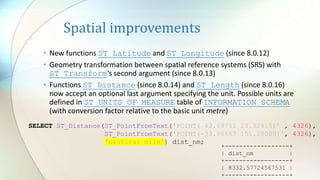
Spatial improvements
• New functions ST_Latitude and ST_Longitude (since 8.0.12)
• Geometry transformation between spatial reference systems (SRS) with
ST_Transform‘s second argument (since 8.0.13)
• Functions ST_Distance (since 8.0.14) and ST_Length (since 8.0.16)
now accept an optional last argument specifying the unit. Possible units are
defined in ST_UNITS_OF_MEASURE table of INFORMATION_SCHEMA
(with conversion factor relative to the basic unit metre)
SELECT ST_Distance(ST_PointFromText('POINT( 42.69751 23.32415)’ , 4326),
ST_PointFromText('POINT(-33.86667 151.20000)', 4326),
'nautical mile') dist_nm;
+------------------+
| dist_nm |
+------------------+
| 8332.57724567531 |
+------------------+
Other new SQL and related features
• Implicit and explicit sorting with ASC/DESC for GROUP BY
removed with 8.0.13. Explicit sorting now results in error 1064
(You have an error in your SQL syntax…)
• ROLLUP now possible with ORDER BY and DISTINCT (since
8.0.12). Previously caused error 1221 (Incorrect usage of
CUBE/ROLLUP and ORDER BY)
• Option to Disallow Tables without a Primary Key -
sql_require_primary_key (since 8.0.13)
• BIT_AND, BIT_OR and BIT_XOR could be used as window
functions (since 8.0.12)
• New explain plan format TREE (since 8.0.16)
Other new features
• Instant Add column (since 8.0.12)
• Multiple bind address support (since 8.0.13)
• Prepared statement execution in X Protocol (since 8.0.14)
• Admin Port for administrators for when server is busy (since
8.0.14)
• MySQL server could completely upgrade itself, so no need to run
mysql_upgrade after server upgrade anymore (since 8.0.16)
• System users and partial revokes (since 8.0.16)
• Support TLS 1.3 and switching SSL options without restart (since
8.0.16)
Conclusions
• MySQL is improving rapidly in the past 2-3 years
• Many new and long waited features are implemented (in SQL,
performance, security, replication, etc.)
• Unfortunately quality is not always good and there are
regressions even between maintenance releases
• It would be good if maintenance and feature releases are
separated (e.g. with the use of semantic versioning)
• I would be even better if preview releases are provided, so the
community could test before official releases
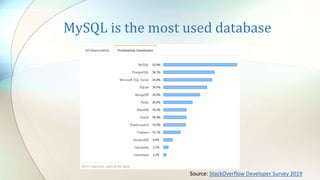
MySQL is the most used database
Source: StackOverflow Developer Survey 2019
References
• MySQL 8.0 Reference manual
• MySQL Server Blog:
• MySQL 8.0.16 Introducing CHECK constraint
• The MySQL 8.0.16 Maintenance Release is Generally Available
• Removal of implicit and explicit sorting for GROUP BY
• Improvements to ROLLUP in MySQL
• JSON specific window functions in MySQL 8.0
• The MySQL 8.0.14 Maintenance Release is Generally Available
• The MySQL 8.0.13 Maintenance Release is Generally Available
• The MySQL 8.0.12 Maintenance Release is Generally Available
• The Three-Valued Logic of SQL
• Georgi Sotirov’s blog posts on MySQL
Questions?
New SQL features in latest MySQL releases

New SQL features in latest MySQL releases

  • 1.
    New SQL featuresin latest MySQL releases What SQL functionality was added in the past year or so
  • 2.
    Who am I? •Software Development Manager & Team Leader @ Codix • Using MySQL since 3.23.x • Building MySQL Server and related products for Slackware Linux for more than 14 years (check SlackPack) • Free and open source software enthusiast • Formula 1 and Le Mans 24 fan •gdsotirov @
  • 3.
    Have you upgradedto MySQL 8?
  • 4.
    Agenda • Function orexpression as default column values • Functional key pars • Lateral derived tables • CHECK constraints • JSON improvements • Spatial improvements • Other new SQL and related features • Other new features
  • 5.
    Function or expressionas default column values 1/4 • Available since 8.0.13 (released 2018-10-22) • Before only literal values were allowed as default values (except for TIMESTAMP where using CURRENT_TIMESTAMP a.k.a. NOW was possible) • Now it’s possible to use function or expression as default column values for other data types (e.g. UUID, spatial and JSON) • literals, deterministic and nondeterministic built-in functions and operators are permitted • stored routines, UDFs, variables, query parameters and subqueries are not permitted • cannot depend on AUTO_INCREMENT columns • The syntax requires engulfing the function or expression in parentheses e.g. DEFAULT ([function|expression])
  • 6.
    Function or expressionas default column values 2/4 Implications • The removal of the restriction means that it’s now possible to: • generate UUID values by default • e.g. DEFAULT (UUID_TO_BIN(UUID())) • generate default values for geometry data types • e.g. by using DEFAULT (POINT(0,0)) • or DEFAULT (ST_PointFromText('POINT(42.69 23.32)’, 4326)) • generate default values for JSON columns • e.g. by using DEFAULT (JSON_ARRAY()) • or DEFAULT ('[]') • other complex values • e.g. like DEFAULT (CURRENT_DATE + INTERVAL 1 DAY) • or DEFAULT (PI() * POW(r, 2))
  • 7.
    Function or expressionas default column values 3/4 Example CREATE TABLE def_expr ( id INT NOT NULL AUTO_INCREMENT, uuid_def BINARY(16) DEFAULT (UUID_TO_BIN(UUID())), geo_def POINT DEFAULT (POINT(0,0)), geo_def2 GEOMETRY DEFAULT (ST_PointFromText( 'POINT(42.69751 23.32415)', 4326)), json_def JSON DEFAULT (JSON_ARRAY()), json_def2 JSON DEFAULT ('[]') /* this works too */, tomorrow DATE DEFAULT (CURDATE() + INTERVAL 1 DAY), radius INT DEFAULT (FLOOR(1 + (RAND() * 10))), area DECIMAL(10,3) DEFAULT (ROUND(PI() * POW(radius, 2), 3)), PRIMARY KEY (id), UNIQUE INDEX id_UNIQUE (id ASC) VISIBLE );
  • 8.
    Function or expressionas default column values 4/4 Example results INSERT INTO def_expr VALUES (); /* x 2 */ SELECT id, BIN_TO_UUID(uuid_def) uuid_def, ST_AsText(geo_def) geo_def, ST_AsText(geo_def2) geo_def2, json_def j1, json_def2 j2, tomorrow, radius, area FROM def_expr; +----+----------+------------+--------------+----+----+------------+--------+---------+ | id | uuid_def | geo_def | geo_def2 | j1 | j2 | tomorrow | radius | area | +----+----------+------------+--------------+----+----+------------+--------+---------+ | 1 | a2747... | POINT(0 0) | POINT(42.6.. | [] | [] | 2019-06-08 | 2 | 12.566 | | 2 | a2ff9... | POINT(0 0) | POINT(42.6.. | [] | [] | 2019-06-08 | 10 | 314.159 | +----+----------+------------+--------------+----+----+------------+--------+---------+
  • 9.
    Functional key parts1/2 • Available since 8.0.13 (released 2018-10-22) • Before indexes could be build only on column values • Now it’s possible to build indexes from expression values (i.e. values not stored in a table) • literals, deterministic built-in functions and operators are permitted • subqueries, query parameters, variables, stored routines and UDFs are not permitted • Ordering of the index with ASC and DESC is possible • Not permitted in foreign keys index specifications • Functional and non-functional key parts could be mixed in composite indexes • Implemented as hidden virtual generated columns (av. since 5.7)
  • 10.
    Functional key parts2/2 Example CREATE TABLE func_index ( id INT NOT NULL AUTO_INCREMENT, ipaddr4 INT UNSIGNED /* 4 bytes */, PRIMARY KEY (id), UNIQUE INDEX id_UNIQUE (id ASC) VISIBLE, INDEX func_idx ((INET_NTOA(ipaddr4))) ); INSERT INTO func_index (ipaddr4) VALUES (INET_ATON('192.168.1.1')); SELECT * FROM func_index WHERE ipaddr4 = INET_ATON('192.168.1.1'); /* Full Table Scan */ SELECT * FROM func_index WHERE INET_NTOA(ipaddr4) = '192.168.1.1'; /* Non-Unique Key Lookup func_idx */
  • 11.
    Lateral derived tables1/9 • Available since 8.0.14 (released 2019-01-21) • Derived tables are subqueries in the FROM clause • Before it wasn't possible for derived tables to refer to (depend on) columns of preceding table(s) or other derived tables in the same FROM clause (as illegal in SQL-92) • Now this is possible with the help of the LATERAL keyword (as allowed by SQL-99) • Мore than one LATERAL derived table in possible in a query • LATERAL depends only on the preceding table(s) or derived tables in the FROM clause • LATERAL derived tables are also known as the “foreach” loop of SQL
  • 12.
    Preparatory work: dept_empschema CREATE TABLE dept ( deptno INTEGER, dname VARCHAR(14), loc VARCHAR(13), CONSTRAINT pk_dept PRIMARY KEY (deptno) ); CREATE TABLE emp ( empno INTEGER, ename VARCHAR(10), job VARCHAR(9), mgr INTEGER, hiredate DATE, sal DECIMAL(7,2), comm DECIMAL(7,2), deptno INTEGER, CONSTRAINT pk_emp PRIMARY KEY (empno), CONSTRAINT fk_deptno FOREIGN KEY (deptno) REFERENCES dept (deptno) ); CREATE DATABASE dept_emp; USE dept_emp;
  • 13.
    Preparatory work: dept_empdata INSERT INTO dept VALUES (10, 'ACCOUNTING', 'NEW YORK'); INSERT INTO dept VALUES (20, 'RESEARCH' , 'DALLAS'); INSERT INTO dept VALUES (30, 'SALES' , 'CHICAGO'); INSERT INTO dept VALUES (40, 'OPERATIONS', 'BOSTON'); INSERT INTO emp VALUES (7839, 'KING' , 'PRESIDENT', NULL, '1981-11-17', 5000, NULL, 10); INSERT INTO emp VALUES (7698, 'BLAKE' , 'MANAGER' , 7839, '1981-05-01', 2850, NULL, 30); INSERT INTO emp VALUES (7782, 'CLARK' , 'MANAGER' , 7839, '1981-06-09', 2450, NULL, 10); INSERT INTO emp VALUES (7566, 'JONES' , 'MANAGER' , 7839, '1981-04-02', 2975, NULL, 20); INSERT INTO emp VALUES (7788, 'SCOTT' , 'ANALYST' , 7566, '1987-06-13', 3000, NULL, 20); INSERT INTO emp VALUES (7902, 'FORD' , 'ANALYST' , 7566, '1981-12-03', 3000, NULL, 20); INSERT INTO emp VALUES (7369, 'SMITH' , 'CLERK' , 7902, '1980-12-17', 800, NULL, 20); INSERT INTO emp VALUES (7499, 'ALLEN' , 'SALESMAN' , 7698, '1981-02-20', 1600, 300, 30); INSERT INTO emp VALUES (7521, 'WARD' , 'SALESMAN' , 7698, '1981-02-22', 1250, 500, 30); INSERT INTO emp VALUES (7654, 'MARTIN', 'SALESMAN' , 7698, '1981-09-28', 1250, 1400, 30); INSERT INTO emp VALUES (7844, 'TURNER', 'SALESMAN' , 7698, '1981-09-08', 1500, 0, 30); INSERT INTO emp VALUES (7876, 'ADAMS' , 'CLERK' , 7788, '1987-06-13', 1100, NULL, 20); INSERT INTO emp VALUES (7900, 'JAMES' , 'CLERK' , 7698, '1981-12-03', 950, NULL, 30); INSERT INTO emp VALUES (7934, 'MILLER', 'CLERK' , 7782, '1982-01-23', 1300, NULL, 10);
  • 14.
    Lateral derived tables2/9 Example 1.1 • Calculate min, average and max salaries for departments SELECT D.dname, (SELECT MIN(E.sal) min_sal, AVG(E.sal) avg_sal, MAX(E.sal) max_sal FROM emp E WHERE E.deptno = D.deptno ) AS res FROM dept D; Error Code: 1241. Operand should contain 1 column(s) SELECT D.dname, (SELECT MIN(E.sal) FROM emp E WHERE E.deptno = D.deptno) AS min_sal, (SELECT AVG(E.sal) FROM emp E WHERE E.deptno = D.deptno) AS avg_sal, (SELECT MAX(E.sal) FROM emp E WHERE E.deptno = D.deptno) AS max_sal FROM dept D;
  • 15.
    Lateral derived tables3/9 Example 1.2 +----+--------------------+-------++------++-----------++-------------------+------+----------++ | id | select_type | table || type || key || ref | rows | filtered || +----+--------------------+-------++------++-----------++-------------------+------+----------++ | 1 | PRIMARY | D || ALL || NULL || NULL | 3 | 100 || | 4 | DEPENDENT SUBQUERY | E || ref || fk_deptno || dept_emp.D.deptno | 4 | 100 || | 3 | DEPENDENT SUBQUERY | E || ref || fk_deptno || dept_emp.D.deptno | 4 | 100 || | 2 | DEPENDENT SUBQUERY | E || ref || fk_deptno || dept_emp.D.deptno | 4 | 100 || +----+--------------------+-------++------++-----------++-------------------+------+----------++ 4 rows in set, 4 warnings (0.0018 sec) Note (code 1276): Field or reference 'dept_emp.D.deptno' of SELECT #2 was resolved in SELECT #1 Note (code 1276): Field or reference 'dept_emp.D.deptno' of SELECT #3 was resolved in SELECT #1 Note (code 1276): Field or reference 'dept_emp.D.deptno' of SELECT #4 was resolved in SELECT #1 Note (code 1003): /* select#1 */ select `dept_emp`.`d`.`dname` AS `dname`,(/* select#2 */ select min ...
  • 16.
    Lateral derived tables4/9 Example 1.3
  • 17.
    Lateral derived tables5/9 Example 2 SELECT D.dname, DT.min_sal, DT.avg_sal, DT.max_sal FROM dept D LEFT JOIN (SELECT E.deptno, MIN(E.sal) min_sal, AVG(E.sal) avg_sal, MAX(E.sal) max_sal FROM emp E GROUP BY E.deptno ) AS DT ON DT.deptno = D.deptno; +----+-------------+------------++-------++-------------++-------------------+------+----------++ | id | select_type | table || type || key || ref | rows | filtered || +----+-------------+------------++-------++-------------++-------------------+------+----------++ | 1 | PRIMARY | D || ALL || NULL || NULL | 4 | 100 || | 1 | PRIMARY | <derived2> || ref || <auto_key0> || dept_emp.D.deptno | 2 | 100 || | 2 | DERIVED | E || index || fk_deptno || NULL | 14 | 100 || +----+-------------+------------++-------++-------------++-------------------+------+----------++
  • 18.
    Lateral derived tables6/9 Example 3 SELECT D.dname, LDT.min_sal, LDT.avg_sal, LDT.max_sal FROM dept D, LATERAL (SELECT MIN(E.sal) min_sal, AVG(E.sal) avg_sal, MAX(E.sal) max_sal FROM emp E WHERE E.deptno = D.deptno ) AS LDT; +----+-------------------+------------++------++-----------++-------------------+------+----------+-+ | id | select_type | table || type || key || ref | rows | filtered |E| +----+-------------------+------------++------++-----------++-------------------+------+----------+-+ | 1 | PRIMARY | D || ALL || NULL || NULL | 4 | 100 |*| | 1 | PRIMARY | <derived2> || ALL || NULL || NULL | 2 | 100 | | | 2 | DEPENDENT DERIVED | E || ref || fk_deptno || dept_emp.D.deptno | 1 | 100 | | +----+-------------------+------------++------++-----------++-------------------+------+----------+-+ * Extra - Rematerialize (<derived2>) Note (code 1276): Field or reference 'dept_emp.D.deptno' of SELECT #2 was resolved in SELECT #1
  • 19.
    Lateral derived tables7/9 Examples 2 & 3 graphical explain plans
  • 20.
    Lateral derived tables8/9 Benchmark ... WHERE D.deptno = 10; Example 1 - Cost: 0.65 Time: 0.297 sec / 0.000 sec Example 2 - Cost: 1398.72 Time: 0.109 sec / 0.000 sec Example 3 - Cost: 3649.63 Time: 0.093 sec / 0.000 sec All departments 100k employees All departments 1m employees Example 1 - Cost: 0.65 Time: 7.781 sec / 0.000 sec Example 2 - Cost: 13951.97 Time: 2.110 sec / 0.000 sec Example 3 - Cost: 6148.63 Time: 2.125 sec / 0.000 sec Example 1 - Cost: 1.00 Time: 1.954 sec / 0.000 sec Example 2 - Cost: 3.50 Time: 2.141 sec / 0.000 sec Example 3 - Cost: 2.72 Time: 0.719 sec / 0.000 sec One department 1m employees
  • 21.
    Lateral derived tables9/9 Example 3 results 8.0.14 +------------+---------+---------+---------+ | dname | min_sal | avg_sal | max_sal | +------------+---------+---------+---------+ | ACCOUNTING | 1300.00 | 2916.67 | 5000.00 | | RESEARCH | 800.00 | 2175.00 | 3000.00 | | SALES | 950.00 | 1566.67 | 2850.00 | | OPERATIONS | NULL | NULL | NULL | +------------+---------+---------+---------+ 4 rows in set (0.00 sec) 8.0.16 +------------+---------+---------+---------+ | dname | min_sal | avg_sal | max_sal | +------------+---------+---------+---------+ | ACCOUNTING | 1300.00 | 2916.67 | 5000.00 | | RESEARCH | 800.00 | 2175.00 | 3000.00 | | SALES | 950.00 | 1566.67 | 2850.00 | | OPERATIONS | 950.00 | 1566.67 | 2850.00 | +------------+---------+---------+---------+ 4 rows in set (0.00 sec) Note: Average values rounded in result to save space. See bugs #94721 and #95411
  • 22.
    Dolphin on Jupiter? Source:https://apod.nasa.gov/apod/ap190415.html
  • 23.
    CHECK constraints 1/6 •Available since 8.0.16 (2019-04-25) • Before CHECK keyword was accepted by the parser, but silently ignored • Now it’s possible to define both table and column check constraints as simple expressions: • literals, deterministic built-in functions and operators are permitted • stored routines, UDFs, variables and subqueries are not permitted • Not possible to use on columns with foreign key referential actions (e.g. ON UPDATE and ON DELETE) and vice versa • Enforced by default on creation, but NOT ENFORCED clause could be used • CHECK constraints fail only when expression evaluates to FALSE (and not when TRUE or UNKNOWN due to NULLs) • Metadata in new table CHECK_CONSTRAINTS and also in TABLE_CONSTRAINTS where CONSTRAINT_TYPE = 'CHECK'
  • 24.
    CHECK constraints 2/6Example 1 CREATE TABLE emp ( empno INTEGER, ename VARCHAR(10), job VARCHAR(9), mgr INTEGER, hiredate DATE CONSTRAINT hiredate_chk CHECK (hiredate >= STR_TO_DATE('1980-01-01', '%Y-%m-%d')), sal DECIMAL(7,2), comm DECIMAL(7,2), deptno INTEGER, CONSTRAINT pk_emp PRIMARY KEY (empno), CONSTRAINT fk_deptno FOREIGN KEY (deptno) REFERENCES dept (deptno), CONSTRAINT sal_chk CHECK (sal > 0 AND (comm IS NULL OR comm >= 0)) ); ALTER TABLE emp MODIFY COLUMN hiredate DATE CONSTRAINT hiredate_chk CHECK (hiredate >= STR_TO_DATE('1980-01-01', '%Y-%m-%d')), ADD CONSTRAINT sal_chk CHECK (sal > 0 AND (comm IS NULL OR comm >= 0));
  • 25.
    CHECK constraints 3/6Example 2.1 CREATE TABLE tst ( id INT, start_date DATE, end_date DATE, PRIMARY KEY (id), CONSTRAINT chk_dat CHECK (start_date < end_date) ); /* Query OK, 0 rows affected */ INSERT INTO tst (id, start_date, end_date) VALUES (2, '2019-06-05', '2019-06-01'); /* ERROR: 3819: Check constraint 'chk_dat' is violated. */ INSERT INTO tst (id, start_date, end_date) VALUES (1, '2019-06-01', '2019-06-07'); /* Query OK, 1 row affected */
  • 26.
    CHECK constraints 4/6Example 2.2 UPDATE tst SET end_date = '2019-06-01' WHERE id = 1; /* ERROR: 3819: Check constraint 'chk_dat' is violated. */ /* ...and then */ UPDATE tst SET end_date = '2019-06-01' WHERE id = 1; /* Query OK, 1 row affected */ /* On a replica, or setting one of the following... */ SET binlog_format = 'STATEMENT'; SET binlog_row_image = 'minimal'; See bug #95189
  • 27.
    CHECK constraints 5/6Example 3.1 CREATE TABLE tst2 ( id INT, start_date DATE, end_date DATE, created DATE DEFAULT (CURDATE()), PRIMARY KEY (id), CONSTRAINT chk_dat2 CHECK (start_date >= created) ); /* Query OK, 0 rows affected */ INSERT INTO tst2 (id, start_date) VALUES (1, '2019-06-07'); /* Query OK, 1 row affected */
  • 28.
    CHECK constraints 6/6Example 3.2 INSERT INTO tst2 (id, start_date) VALUES (2, '2019-06-01'); /* Query OK, 1 row affected */ SELECT * FROM tst2 WHERE id = 1; +----+------------+----------+------------+ | id | start_date | end_date | created | +----+------------+----------+------------+ | 1 | 2019-06-07 | NULL | 2019-06-07 | +----+------------+----------+------------+ 1 row in set See bug #95192
  • 29.
    Emulating CHECK constraints 1.In MySQL >= 5.0.2, with triggers. Still necessary for complex checks (e.g. by using stored procedures, UDFs, subqueries) 2. In MySQL >= 5.7.6, with generated columns (left) 3. In MySQL >= 8.0.13, with default expressions (right) CREATE TABLE chk_w_gencol ( id INT AUTO_INCREMENT, val INT, val_check INT GENERATED ALWAYS AS (IF(val > 0, val, NULL)) NOT NULL, CONSTRAINT PRIMARY KEY (id) ); INSERT INTO chk… (val) VALUES (-1); CREATE TABLE chk_w_defexpr ( id INT AUTO_INCREMENT, val INT, val_check INT DEFAULT (IF(val > 0, val, NULL)) NOT NULL, CONSTRAINT PRIMARY KEY (id) ); INSERT INTO chk… (val) VALUES (-1); Error Code: 1048. Column 'val_check' cannot be null
  • 30.
    JSON improvements 1/4 •Available since 8.0.14 (released 2019-01-21) • Now JSON aggregation functions JSON_ARRAYAGG and JSON_OBJECTAGG could be used as window functions (i.e. using the OVER clause) • MySQL does not permit duplicate keys in JSON and follows “last duplicate key wins” behavior, so the result from a window without ordering may not be deterministic • Optimization for small changes to BLOBs (e.g. JSON) with LOB indexes for more random access (since 8.0.12)
  • 31.
    JSON Improvements 2/4: JSON_ARRAYAGGExample SELECT D.dname, E.hiredate, JSON_ARRAYAGG(E.ename) OVER dw AS members FROM emp E, dept D WHERE E.deptno = D.deptno WINDOW dw AS (PARTITION BY D.deptno ORDER BY E.hiredate); +------------+------------+---------------------------------------------------------+ | dname | hiredate | members | +------------+------------+---------------------------------------------------------+ | ACCOUNTING | 1981-06-09 | ["CLARK"] | | ACCOUNTING | 1981-11-17 | ["CLARK", "KING"] | | ACCOUNTING | 1982-01-23 | ["CLARK", "KING", "MILLER"] | | RESEARCH | 1980-12-17 | ["SMITH"] | | RESEARCH | 1981-04-02 | ["SMITH", "JONES"] | | RESEARCH | 1981-12-03 | ["SMITH", "JONES", "FORD"] | | RESEARCH | 1987-06-13 | ["SMITH", "JONES", "FORD", "SCOTT", "ADAMS"] | | RESEARCH | 1987-06-13 | ["SMITH", "JONES", "FORD", "SCOTT", "ADAMS"] | ... +------------+------------+---------------------------------------------------------+ 14 rows in set (0.0013 sec) See bug #95658
  • 32.
    JSON Improvements 3/4: JSON_OBJECTAGGExample 1 SELECT E.ename, E.sal, AVG(E.sal) OVER dw AS avg_sal, JSON_OBJECTAGG(D.dname, E.sal) OVER dw AS dept_sal FROM emp E, dept D WHERE E.deptno = D.deptno WINDOW dw AS (PARTITION BY D.deptno); +--------+---------+------------------------+ | ename | sal | dept_sal | +--------+---------+------------------------+ | CLARK | 2450.00 | {"ACCOUNTING": 1300.0} | | KING | 5000.00 | {"ACCOUNTING": 1300.0} | | MILLER | 1300.00 | {"ACCOUNTING": 1300.0} | | SMITH | 800.00 | {"RESEARCH": 3000.0} | | JONES | 2975.00 | {"RESEARCH": 3000.0} | | SCOTT | 3000.00 | {"RESEARCH": 3000.0} | | ADAMS | 1100.00 | {"RESEARCH": 3000.0} | | FORD | 3000.00 | {"RESEARCH": 3000.0} | ... +--------+---------+------------------------+ 14 rows in set (0.0008 sec)
  • 33.
    JSON Improvements 4/4: JSON_OBJECTAGGExample 2 SELECT E.ename, E.sal, JSON_OBJECTAGG(E.ename, E.sal) OVER dw AS dept_sal FROM emp E, dept D WHERE E.deptno = D.deptno WINDOW dw AS (PARTITION BY D.deptno ORDER BY E.hiredate); +--------+---------+--------------------------------------------------------------------+ | ename | sal | dept_sal | +--------+---------+--------------------------------------------------------------------+ | CLARK | 2450.00 | {"CLARK": 2450.0} | | KING | 5000.00 | {"KING": 5000.0, "CLARK": 2450.0} | | MILLER | 1300.00 | {"KING": 5000.0, "CLARK": 2450.0, "MILLER": 1300.0} | | SMITH | 800.00 | {"SMITH": 800.0} | | JONES | 2975.00 | {"JONES": 2975.0, "SMITH": 800.0} | | FORD | 3000.00 | {"FORD": 3000.0, "JONES": 2975.0, "SMITH": 800.0} | ... +--------+---------+--------------------------------------------------------------------+ 14 rows in set (0.0007 sec)
  • 34.
    Spatial improvements • Newfunctions ST_Latitude and ST_Longitude (since 8.0.12) • Geometry transformation between spatial reference systems (SRS) with ST_Transform‘s second argument (since 8.0.13) • Functions ST_Distance (since 8.0.14) and ST_Length (since 8.0.16) now accept an optional last argument specifying the unit. Possible units are defined in ST_UNITS_OF_MEASURE table of INFORMATION_SCHEMA (with conversion factor relative to the basic unit metre) SELECT ST_Distance(ST_PointFromText('POINT( 42.69751 23.32415)’ , 4326), ST_PointFromText('POINT(-33.86667 151.20000)', 4326), 'nautical mile') dist_nm; +------------------+ | dist_nm | +------------------+ | 8332.57724567531 | +------------------+
  • 35.
    Other new SQLand related features • Implicit and explicit sorting with ASC/DESC for GROUP BY removed with 8.0.13. Explicit sorting now results in error 1064 (You have an error in your SQL syntax…) • ROLLUP now possible with ORDER BY and DISTINCT (since 8.0.12). Previously caused error 1221 (Incorrect usage of CUBE/ROLLUP and ORDER BY) • Option to Disallow Tables without a Primary Key - sql_require_primary_key (since 8.0.13) • BIT_AND, BIT_OR and BIT_XOR could be used as window functions (since 8.0.12) • New explain plan format TREE (since 8.0.16)
  • 36.
    Other new features •Instant Add column (since 8.0.12) • Multiple bind address support (since 8.0.13) • Prepared statement execution in X Protocol (since 8.0.14) • Admin Port for administrators for when server is busy (since 8.0.14) • MySQL server could completely upgrade itself, so no need to run mysql_upgrade after server upgrade anymore (since 8.0.16) • System users and partial revokes (since 8.0.16) • Support TLS 1.3 and switching SSL options without restart (since 8.0.16)
  • 37.
    Conclusions • MySQL isimproving rapidly in the past 2-3 years • Many new and long waited features are implemented (in SQL, performance, security, replication, etc.) • Unfortunately quality is not always good and there are regressions even between maintenance releases • It would be good if maintenance and feature releases are separated (e.g. with the use of semantic versioning) • I would be even better if preview releases are provided, so the community could test before official releases
  • 38.
    MySQL is themost used database Source: StackOverflow Developer Survey 2019
  • 39.
    References • MySQL 8.0Reference manual • MySQL Server Blog: • MySQL 8.0.16 Introducing CHECK constraint • The MySQL 8.0.16 Maintenance Release is Generally Available • Removal of implicit and explicit sorting for GROUP BY • Improvements to ROLLUP in MySQL • JSON specific window functions in MySQL 8.0 • The MySQL 8.0.14 Maintenance Release is Generally Available • The MySQL 8.0.13 Maintenance Release is Generally Available • The MySQL 8.0.12 Maintenance Release is Generally Available • The Three-Valued Logic of SQL • Georgi Sotirov’s blog posts on MySQL
  • 40.

Editor's Notes

  • #6 BLOB, TEXT, GEOMETRY, and JSON data types can be assigned a default value only if the value is written as an expression Parentheses are necessary to distinguish expressions from literal values Variables: Global, session and user-defined variables (see https://dev.mysql.com/doc/refman/8.0/en/user-variables.html)
  • #7 ri * r ^ 2 is circle’s area
  • #10 Variables: Global, session and user-defined variables (see https://dev.mysql.com/doc/refman/8.0/en/user-variables.html)
  • #12 A derived table is nothing but a subquery in the FROM clause, an inline view is nothing but a subquery in the WHERE clause. SQL:99 feature T491 “lateral derived tables” LATERAL means “of, at, towards, or from the side or sides” (страничен) Derived tables are materialized as temporary tables
  • #15 Select-list subqueries should be scalar! And should also return just one row or there would be runtime error.
  • #19 LATERL is breaking the usage of index
  • #21 LATERAL is great for Top-N queries per group
  • #24 Table constraints appear anywhere in CREATE TABLE outside column definitions and could refer to one or more columns even with forward references (i.e. for columns defined later in the statement). Column constraints appear within the definition of a column and could refer only to this column.
  • #31 This makes all (except COUNT(DISTINCT) and GROUP_CONCAT) of the aggregate functions possible for use as window functions after bitwise AND/OR/XOR functions were made so with MySQL 8.0.12 MySQL supports a native JSON data type defined by RFC 7159 (which suggests “last duplicate key wins” behavior)
  • #32 Bug #95658 Storing result of JSON_ARRAYAGG() in variable crashes the mysql service
  • #35 ST_Latitude and ST_Longitude could return or update latitude and longitude in geographic data (e.g. POINT)
  • #36 MySQL 5.7 always implicitly sorts the result ASC when GROUP BY is used. ROLLUP rows added at the very end to the result set MySQL 8.0 introduces post processing of data after ROLLUP to avoid blocking windowing.
  • #38 Improving from a pure relational SQL-92 database to a modern SQL database supporting latest SQL standard features