SHUBHAM KUMAR JHA
SYIF 2nd shift
Bharati vidyapeeth institute of technology.
EmailID:Shubham.s.jha98@gmail.com
Subject: Operating Systems (For EDUSA)
Subject:- ppo
Contents
 Today's Topic: Introduction to Operating Systems
 We will learn
1. What is Operating System?
2. What OS does?
3. Structure of OS
4. Evolution of OS
 Batch Processing, Multiprogramming, Time
sharing systems
5. Operating System Functions
6. Main Funtions of OS
7. Types of OS
 Single User, Multi User systems
What is OS?
 Operating System is a software, which makes a
computer to actually work.
 It is the software the enables all the programs we use.
 The OS organizes and controls the hardware.
 OS acts as an interface between the application
programs and the machine hardware.
 Examples: Windows, Linux, Unix and Mac OS, etc.,
What OS does?
An operating system performs basic tasks such as,
 controlling and allocating memory,
 prioritizing system requests,
 controlling input and output devices,
 facilitating networking and
 managing file systems.
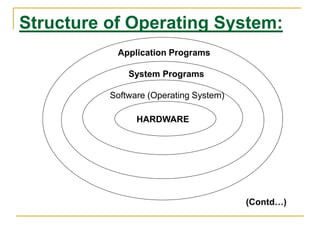
Structure of Operating System:
Application Programs
System Programs
Software (Operating System)
HARDWARE
(Contd…)
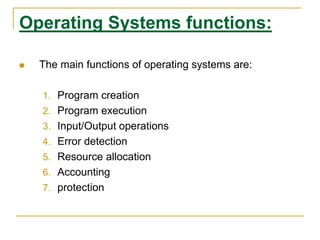
Operating Systems functions:
 The main functions of operating systems are:
1. Program creation
2. Program execution
3. Input/Output operations
4. Error detection
5. Resource allocation
6. Accounting
7. protection
Types of OS:
Operating System can also be classified as,-
 Single User Systems
 Multi User Systems
Single User Systems:
 Provides a platform for only one user at a
time.
 They are popularly associated with Desk Top
operating system which run on standalone
systems where no user accounts are
required.
 Example: DOS
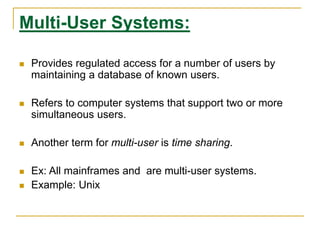
Multi-User Systems:
 Provides regulated access for a number of users by
maintaining a database of known users.
 Refers to computer systems that support two or more
simultaneous users.
 Another term for multi-user is time sharing.
 Ex: All mainframes and are multi-user systems.
 Example: Unix
Thank You!!

Operating system basic

  • 1.
    SHUBHAM KUMAR JHA SYIF2nd shift Bharati vidyapeeth institute of technology. EmailID:Shubham.s.jha98@gmail.com Subject: Operating Systems (For EDUSA) Subject:- ppo
  • 2.
    Contents  Today's Topic:Introduction to Operating Systems  We will learn 1. What is Operating System? 2. What OS does? 3. Structure of OS 4. Evolution of OS  Batch Processing, Multiprogramming, Time sharing systems 5. Operating System Functions 6. Main Funtions of OS 7. Types of OS  Single User, Multi User systems
  • 3.
    What is OS? Operating System is a software, which makes a computer to actually work.  It is the software the enables all the programs we use.  The OS organizes and controls the hardware.  OS acts as an interface between the application programs and the machine hardware.  Examples: Windows, Linux, Unix and Mac OS, etc.,
  • 4.
    What OS does? Anoperating system performs basic tasks such as,  controlling and allocating memory,  prioritizing system requests,  controlling input and output devices,  facilitating networking and  managing file systems.
  • 5.
    Structure of OperatingSystem: Application Programs System Programs Software (Operating System) HARDWARE (Contd…)
  • 6.
    Operating Systems functions: The main functions of operating systems are: 1. Program creation 2. Program execution 3. Input/Output operations 4. Error detection 5. Resource allocation 6. Accounting 7. protection
  • 7.
    Types of OS: OperatingSystem can also be classified as,-  Single User Systems  Multi User Systems
  • 8.
    Single User Systems: Provides a platform for only one user at a time.  They are popularly associated with Desk Top operating system which run on standalone systems where no user accounts are required.  Example: DOS
  • 9.
    Multi-User Systems:  Providesregulated access for a number of users by maintaining a database of known users.  Refers to computer systems that support two or more simultaneous users.  Another term for multi-user is time sharing.  Ex: All mainframes and are multi-user systems.  Example: Unix
  • 10.