Deploying Openstack
With RHEL OSP 7 and Director
Pablo Sanchez
Red Hat OpenStack Specialist
Amsterdam OpenStack Meetup, 2/12/2015
About me
Openstack Technical Specialist @ Red Hat
Working with Openstack since Folsom Release
Worked before for Rackspace in the public cloud Ops team
@openpabz
Agenda
● What is RHEL OSP-Director
● How we deploy Openstack using it in RH
● Demo
RHEL OSP Director
Red Hat's new installation, configuration, and monitoring toolset for RHEL
OSP deployments
Has mechanisms of the following
1. Installing the Installer
2. Identification of the target hosts - the one's we're installing onto
3. Content management for the software to be deployed
4. Defining the topology and configuration of the deployment
5. Bare metal provisioning via automated hardware control
6. Software rollout and configuration management
7. Making modifications to an already director-deployed environment
RHEL OSP Director
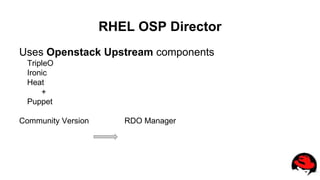
Uses Openstack Upstream components
TripleO
Ironic
Heat
+
Puppet
Community Version RDO Manager
6
7
1. One or more Management Nodes
“Undercloud”
8
2. Operator Dashboard & CLI interfaces
to configure the infrastructure
9
3. Optional introspection & benchmarking of hardware.
Hardware Discovery
1
0
4. Operator defines the OpenStack control services.
1
1
5. Operator defines the OpenStack resource nodes.
1
2
6. Control service and Resource nodes get provisioned.
“Overcloud”
(Heat -> Nova -> Ironic -> Hardware)
1
3
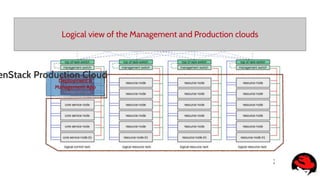
Logical view of the Management and Production clouds
Deployment &
Management App
enStack Production Cloud
1
4
Logical view of the Management and Production clouds
Deployment &
Management App
enStack Production Cloud
“Undercloud”
“Overcloud”
1
5
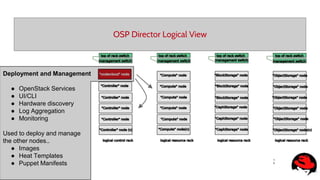
OSP Director Logical View
Deployment and Management
● OpenStack Services
● UI/CLI
● Hardware discovery
● Log Aggregation
● Monitoring
Used to deploy and manage
the other nodes..
● Images
● Heat Templates
● Puppet Manifests
1
6
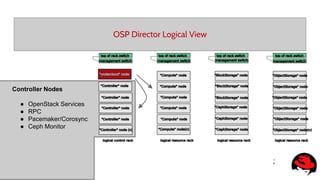
OSP Director Logical View
Controller Nodes
● OpenStack Services
● RPC
● Pacemaker/Corosync
● Ceph Monitor
1
7
OSP Director Logical View
Compute Nodes
● Nova Hypervisor services
● Ceilometer agents
1
8
OSP Director Logical View
CephStorage Nodes
● Ceph OSD
● Can be backend for:
○ Nova
○ Cinder
○ Glance
RHEL OSP Director
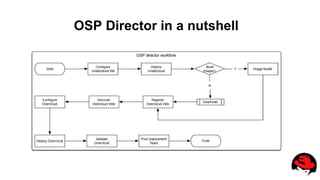
OSP Director in a nutshell
Undercloud Installation
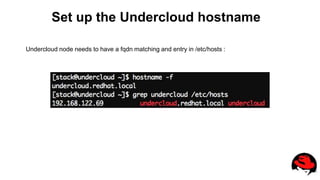
Set up the Undercloud hostname
Undercloud node needs to have a fqdn matching and entry in /etc/hosts :
Install the Undercloud package
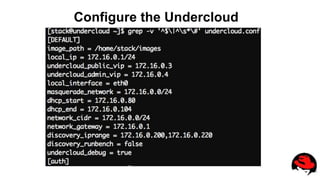
Configure the Undercloud
Install the Undercloud
Undercloud Video
Overcloud Installation
Download the Overcloud Images
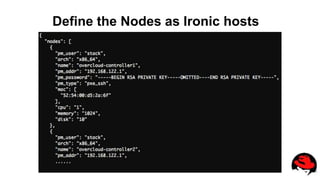
Define the Nodes as Ironic hosts
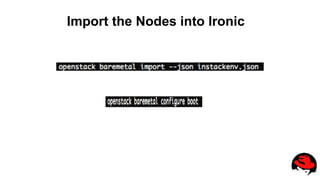
Import the Nodes into Ironic
Discover the HW of the Nodes
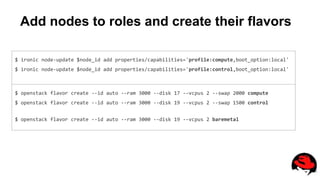
Add nodes to roles and create their flavors
$ ironic node-update $node_id add properties/capabilities='profile:compute,boot_option:local'
$ ironic node-update $node_id add properties/capabilities='profile:control,boot_option:local'
$ openstack flavor create --id auto --ram 3000 --disk 17 --vcpus 2 --swap 2000 compute
$ openstack flavor create --id auto --ram 3000 --disk 19 --vcpus 2 --swap 1500 control
$ openstack flavor create --id auto --ram 3000 --disk 19 --vcpus 2 baremetal
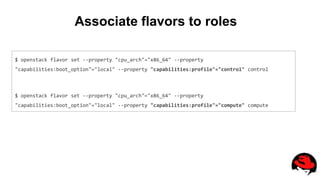
Associate flavors to roles
$ openstack flavor set --property "cpu_arch"="x86_64" --property
"capabilities:boot_option"="local" --property "capabilities:profile"="control" control
$ openstack flavor set --property "cpu_arch"="x86_64" --property
"capabilities:boot_option"="local" --property "capabilities:profile"="compute" compute
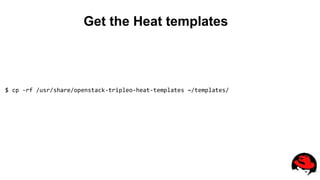
Get the Heat templates
$ cp -rf /usr/share/openstack-tripleo-heat-templates ~/templates/
Plan your network
Network Subnet VLAN
Provisioning 172.16.0.0/24 Native
Internal API 172.17.1.0/24 101
Tenant 172.17.2.0/24 201
Storage 172.17.3.0/24 301
Storage Management 172.17.4.0/25 401
External 192.168.122.0/24 Native
Adapt templates to the env
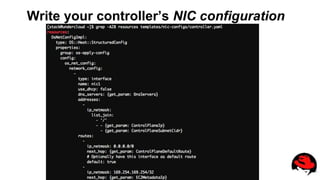
Write your controller’s NIC configuration
Heat templates
Summary before deploying
What we need
● Undercloud configured and ready
● Nodes discovered and available in Ironic
● Flavors created and nodes matched
● Images downloaded (or created)
● Heat Templates adapted for our environment
Let’s deploy the Overcloud
openstack overcloud deploy --templates ~/templates/ 
--ntp-server 192.168.122.1 
--control-flavor control --compute-flavor compute --ceph-storage-flavor ceph 
--control-scale 3 --compute-scale 2 --ceph-storage-scale 3 
--neutron-tunnel-types vxlan --neutron-network-type vxlan 
-e ~/templates/environments/storage-environment.yaml 
-e ~/templates/environment.yaml
Overcloud Video
More details...
● https://access.redhat.com/documentation/en/red-hat-enterprise-linux-openstack-
platform/
● http://docs.openstack.org/developer/tripleo-docs/
● https://www.rdoproject.org/rdo-manager
● psanchez@redhat.com
Dankjewel!!

Openstack meetup amsterdam (1)

  • 1.
    Deploying Openstack With RHELOSP 7 and Director Pablo Sanchez Red Hat OpenStack Specialist Amsterdam OpenStack Meetup, 2/12/2015
  • 2.
    About me Openstack TechnicalSpecialist @ Red Hat Working with Openstack since Folsom Release Worked before for Rackspace in the public cloud Ops team @openpabz
  • 3.
    Agenda ● What isRHEL OSP-Director ● How we deploy Openstack using it in RH ● Demo
  • 4.
    RHEL OSP Director RedHat's new installation, configuration, and monitoring toolset for RHEL OSP deployments Has mechanisms of the following 1. Installing the Installer 2. Identification of the target hosts - the one's we're installing onto 3. Content management for the software to be deployed 4. Defining the topology and configuration of the deployment 5. Bare metal provisioning via automated hardware control 6. Software rollout and configuration management 7. Making modifications to an already director-deployed environment
  • 5.
    RHEL OSP Director UsesOpenstack Upstream components TripleO Ironic Heat + Puppet Community Version RDO Manager
  • 6.
  • 7.
    7 1. One ormore Management Nodes “Undercloud”
  • 8.
    8 2. Operator Dashboard& CLI interfaces to configure the infrastructure
  • 9.
    9 3. Optional introspection& benchmarking of hardware. Hardware Discovery
  • 10.
    1 0 4. Operator definesthe OpenStack control services.
  • 11.
    1 1 5. Operator definesthe OpenStack resource nodes.
  • 12.
    1 2 6. Control serviceand Resource nodes get provisioned. “Overcloud” (Heat -> Nova -> Ironic -> Hardware)
  • 13.
    1 3 Logical view ofthe Management and Production clouds Deployment & Management App enStack Production Cloud
  • 14.
    1 4 Logical view ofthe Management and Production clouds Deployment & Management App enStack Production Cloud “Undercloud” “Overcloud”
  • 15.
    1 5 OSP Director LogicalView Deployment and Management ● OpenStack Services ● UI/CLI ● Hardware discovery ● Log Aggregation ● Monitoring Used to deploy and manage the other nodes.. ● Images ● Heat Templates ● Puppet Manifests
  • 16.
    1 6 OSP Director LogicalView Controller Nodes ● OpenStack Services ● RPC ● Pacemaker/Corosync ● Ceph Monitor
  • 17.
    1 7 OSP Director LogicalView Compute Nodes ● Nova Hypervisor services ● Ceilometer agents
  • 18.
    1 8 OSP Director LogicalView CephStorage Nodes ● Ceph OSD ● Can be backend for: ○ Nova ○ Cinder ○ Glance
  • 19.
  • 20.
    OSP Director ina nutshell
  • 22.
  • 23.
    Set up theUndercloud hostname Undercloud node needs to have a fqdn matching and entry in /etc/hosts :
  • 24.
  • 25.
  • 26.
  • 27.
  • 28.
  • 29.
  • 30.
    Define the Nodesas Ironic hosts
  • 31.
    Import the Nodesinto Ironic
  • 32.
    Discover the HWof the Nodes
  • 33.
    Add nodes toroles and create their flavors $ ironic node-update $node_id add properties/capabilities='profile:compute,boot_option:local' $ ironic node-update $node_id add properties/capabilities='profile:control,boot_option:local' $ openstack flavor create --id auto --ram 3000 --disk 17 --vcpus 2 --swap 2000 compute $ openstack flavor create --id auto --ram 3000 --disk 19 --vcpus 2 --swap 1500 control $ openstack flavor create --id auto --ram 3000 --disk 19 --vcpus 2 baremetal
  • 34.
    Associate flavors toroles $ openstack flavor set --property "cpu_arch"="x86_64" --property "capabilities:boot_option"="local" --property "capabilities:profile"="control" control $ openstack flavor set --property "cpu_arch"="x86_64" --property "capabilities:boot_option"="local" --property "capabilities:profile"="compute" compute
  • 35.
    Get the Heattemplates $ cp -rf /usr/share/openstack-tripleo-heat-templates ~/templates/
  • 36.
    Plan your network NetworkSubnet VLAN Provisioning 172.16.0.0/24 Native Internal API 172.17.1.0/24 101 Tenant 172.17.2.0/24 201 Storage 172.17.3.0/24 301 Storage Management 172.17.4.0/25 401 External 192.168.122.0/24 Native
  • 37.
  • 38.
    Write your controller’sNIC configuration Heat templates
  • 39.
    Summary before deploying Whatwe need ● Undercloud configured and ready ● Nodes discovered and available in Ironic ● Flavors created and nodes matched ● Images downloaded (or created) ● Heat Templates adapted for our environment
  • 40.
    Let’s deploy theOvercloud openstack overcloud deploy --templates ~/templates/ --ntp-server 192.168.122.1 --control-flavor control --compute-flavor compute --ceph-storage-flavor ceph --control-scale 3 --compute-scale 2 --ceph-storage-scale 3 --neutron-tunnel-types vxlan --neutron-network-type vxlan -e ~/templates/environments/storage-environment.yaml -e ~/templates/environment.yaml
  • 41.
  • 42.
    More details... ● https://access.redhat.com/documentation/en/red-hat-enterprise-linux-openstack- platform/ ●http://docs.openstack.org/developer/tripleo-docs/ ● https://www.rdoproject.org/rdo-manager ● psanchez@redhat.com
  • 43.