Beginner’s Guide to OOP
No oops in OOP
Introduction
Muzammil Nawaz Asad Ali
Contents
 Pointers
 Structures
 Objects and Classes
 Conversion between basic and user-defined data types
 Functions and Types
 Encapsulation
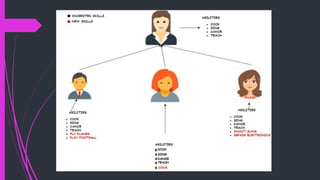
 Inheritance
 Polymorphism
 Unary and Binary Operator’s Overloading
 File Handling in C++
Clarification
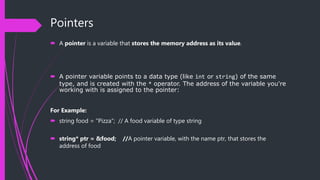
Pointers
 A pointer is a variable that stores the memory address as its value.
 A pointer variable points to a data type (like int or string) of the same
type, and is created with the * operator. The address of the variable you're
working with is assigned to the pointer:
For Example:
 string food = "Pizza"; // A food variable of type string
 string* ptr = &food; //A pointer variable, with the name ptr, that stores the
address of food
Why would one want to store Address?
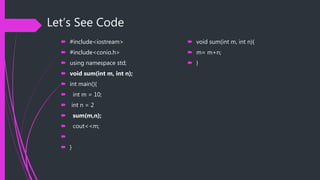
Let’s See Code
 #include<iostream>
 #include<conio.h>
 using namespace std;
 void sum(int m, int n);
 int main(){
 int m = 10;
 int n = 2
 sum(m,n);
 cout<<m;

 }
 void sum(int m, int n){
 m= m+n;
 }
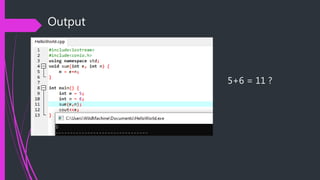
Output
5+6 = 11 ?
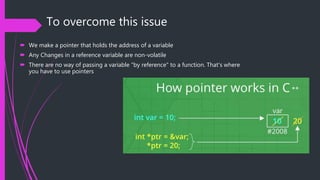
To overcome this issue
 We make a pointer that holds the address of a variable
 Any Changes in a reference variable are non-volatile
 There are no way of passing a variable "by reference" to a function. That's where
you have to use pointers
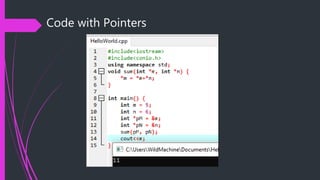
Code with Pointers
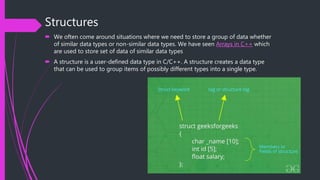
Structures
 We often come around situations where we need to store a group of data whether
of similar data types or non-similar data types. We have seen Arrays in C++ which
are used to store set of data of similar data types
 A structure is a user-defined data type in C/C++. A structure creates a data type
that can be used to group items of possibly different types into a single type.
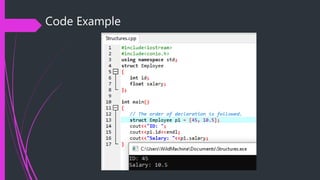
Code Example
OOP
 Class and Objects
 Encapsulation
 Polymorphism
 Inheritance
(OOP)
Objects and Classes
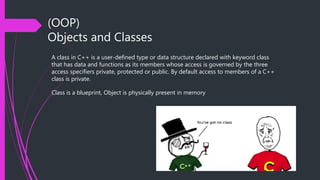
A class in C++ is a user-defined type or data structure declared with keyword class
that has data and functions as its members whose access is governed by the three
access specifiers private, protected or public. By default access to members of a C++
class is private.
Class is a blueprint, Object is physically present in memory
Everything_around_you == Object
Example
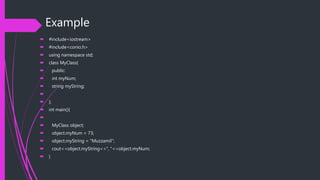
 #include<iostream>
 #include<conio.h>
 using namespace std;
 class MyClass{
 public:
 int myNum;
 string myString;

 };
 int main(){

 MyClass object;
 object.myNum = 73;
 object.myString = "Muzzamil";
 cout<<object.myString<<", "<<object.myNum;
 }
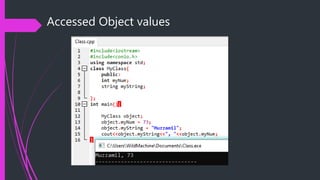
Accessed Object values
Functions and Types
 A function is a block of code which only runs when it is called.
 You can pass data, known as parameters, into a function
 C++ provides some pre-defined functions, such as main(), which is
used to execute code. But you can also create your own functions to
perform certain actions.
 Syntax
 void myFunction() {
// code to be executed
}
 void means that the function does not have a return value.
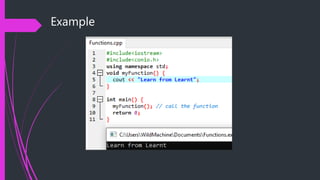
Example
Types of Function
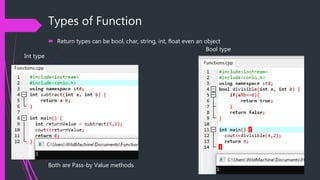
 Return types can be bool, char, string, int, float even an object
Int type
Bool type
Both are Pass-by Value methods
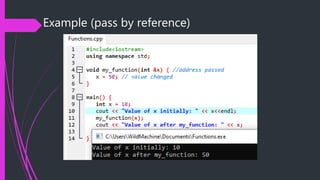
Pass by Value vs. Pass by Reference
 In call by reference the actual value that is passed as argument is changed after
performing some operation on it. When call by reference is used, it creates a copy
of the reference of that variable into the stack section in memory
 The call by reference is mainly used when we want to change the value of the
passed argument into the invoker function.
Example (pass by reference)
Encapsulation #include<iostream>
#include<conio.h>
using namespace std;
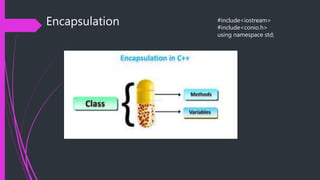
Why Encapsulation?
 Consider a real life example of encapsulation, in a company there are different
sections like the accounts section, finance section, sales section etc. The finance
section handles all the financial transactions and keep records of all the data
related to finance. Similarly the sales section handles all the sales related activities
and keep records of all the sales. Now there may arise a situation when for some
reason an official from finance section needs all the data about sales in a particular
month. In this case, he is not allowed to directly access the data of sales section. He
will first have to contact some other officer in the sales section and then request
him to give the particular data. This is what encapsulation is. Here the data of sales
section and the employees that can manipulate them are wrapped under a single
name “sales section”.
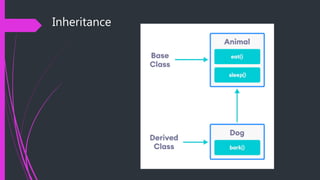
Inheritance
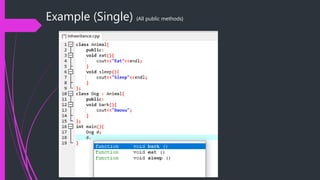
Example (Single) {All public methods}
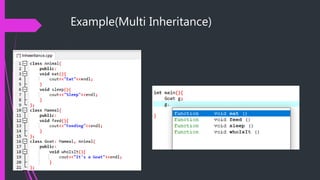
Example(Multi Inheritance)
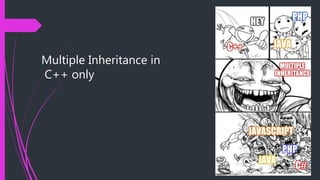
Multiple Inheritance in
C++ only
Polymorphism
 Many Shapes/Forms
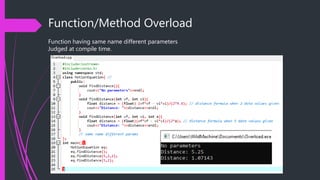
Function/Method Overload
Function having same name different parameters
Judged at compile time.
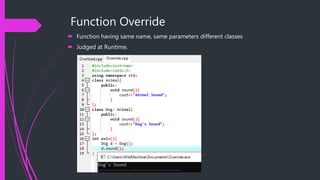
Function Override
 Function having same name, same parameters different classes
 Judged at Runtime.
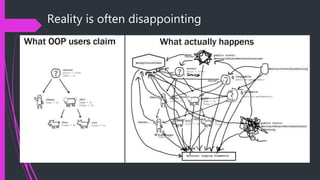
Now No oops in OOP
Reality is often disappointing
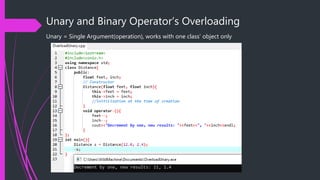
Unary and Binary Operator’s Overloading
Unary = Single Argument(operation), works with one class’ object only
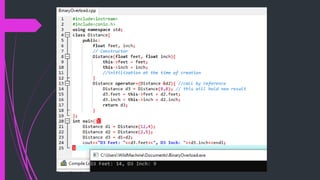
Binary Operator’s
 A single argument(Operator) but two objects as operands
File Handling
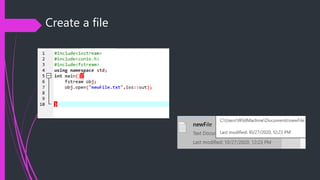
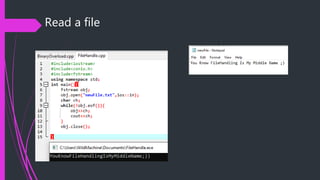
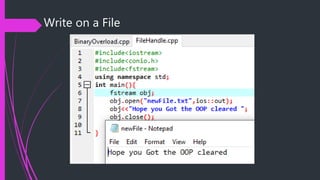
 Files are important as they store our data
 #include<fstream>
 Creating a file: open()
 Reading data: read()
 Writing new Data: write()
 Closing a file (crucial): close()
Create a file
Read a file
Write on a File
Thank You ;)
17sw73@students.muet.edu.pk 17sw45@students.muet.edu.pk

Oop

  • 1.
    Beginner’s Guide toOOP No oops in OOP
  • 2.
  • 3.
    Contents  Pointers  Structures Objects and Classes  Conversion between basic and user-defined data types  Functions and Types  Encapsulation  Inheritance  Polymorphism  Unary and Binary Operator’s Overloading  File Handling in C++
  • 4.
  • 5.
    Pointers  A pointeris a variable that stores the memory address as its value.  A pointer variable points to a data type (like int or string) of the same type, and is created with the * operator. The address of the variable you're working with is assigned to the pointer: For Example:  string food = "Pizza"; // A food variable of type string  string* ptr = &food; //A pointer variable, with the name ptr, that stores the address of food
  • 6.
    Why would onewant to store Address?
  • 7.
    Let’s See Code #include<iostream>  #include<conio.h>  using namespace std;  void sum(int m, int n);  int main(){  int m = 10;  int n = 2  sum(m,n);  cout<<m;   }  void sum(int m, int n){  m= m+n;  }
  • 8.
  • 9.
    To overcome thisissue  We make a pointer that holds the address of a variable  Any Changes in a reference variable are non-volatile  There are no way of passing a variable "by reference" to a function. That's where you have to use pointers
  • 10.
  • 11.
    Structures  We oftencome around situations where we need to store a group of data whether of similar data types or non-similar data types. We have seen Arrays in C++ which are used to store set of data of similar data types  A structure is a user-defined data type in C/C++. A structure creates a data type that can be used to group items of possibly different types into a single type.
  • 12.
  • 13.
    OOP  Class andObjects  Encapsulation  Polymorphism  Inheritance
  • 14.
    (OOP) Objects and Classes Aclass in C++ is a user-defined type or data structure declared with keyword class that has data and functions as its members whose access is governed by the three access specifiers private, protected or public. By default access to members of a C++ class is private. Class is a blueprint, Object is physically present in memory
  • 15.
  • 16.
    Example  #include<iostream>  #include<conio.h> using namespace std;  class MyClass{  public:  int myNum;  string myString;   };  int main(){   MyClass object;  object.myNum = 73;  object.myString = "Muzzamil";  cout<<object.myString<<", "<<object.myNum;  }
  • 17.
  • 18.
    Functions and Types A function is a block of code which only runs when it is called.  You can pass data, known as parameters, into a function  C++ provides some pre-defined functions, such as main(), which is used to execute code. But you can also create your own functions to perform certain actions.  Syntax  void myFunction() { // code to be executed }  void means that the function does not have a return value.
  • 19.
  • 20.
    Types of Function Return types can be bool, char, string, int, float even an object Int type Bool type Both are Pass-by Value methods
  • 21.
    Pass by Valuevs. Pass by Reference  In call by reference the actual value that is passed as argument is changed after performing some operation on it. When call by reference is used, it creates a copy of the reference of that variable into the stack section in memory  The call by reference is mainly used when we want to change the value of the passed argument into the invoker function.
  • 22.
    Example (pass byreference)
  • 23.
  • 24.
    Why Encapsulation?  Considera real life example of encapsulation, in a company there are different sections like the accounts section, finance section, sales section etc. The finance section handles all the financial transactions and keep records of all the data related to finance. Similarly the sales section handles all the sales related activities and keep records of all the sales. Now there may arise a situation when for some reason an official from finance section needs all the data about sales in a particular month. In this case, he is not allowed to directly access the data of sales section. He will first have to contact some other officer in the sales section and then request him to give the particular data. This is what encapsulation is. Here the data of sales section and the employees that can manipulate them are wrapped under a single name “sales section”.
  • 25.
  • 27.
    Example (Single) {Allpublic methods}
  • 28.
  • 29.
  • 30.
  • 31.
    Function/Method Overload Function havingsame name different parameters Judged at compile time.
  • 32.
    Function Override  Functionhaving same name, same parameters different classes  Judged at Runtime.
  • 34.
  • 35.
    Reality is oftendisappointing
  • 36.
    Unary and BinaryOperator’s Overloading Unary = Single Argument(operation), works with one class’ object only
  • 37.
    Binary Operator’s  Asingle argument(Operator) but two objects as operands
  • 39.
    File Handling  Filesare important as they store our data  #include<fstream>  Creating a file: open()  Reading data: read()  Writing new Data: write()  Closing a file (crucial): close()
  • 40.
  • 41.
  • 42.
  • 45.
    Thank You ;) 17sw73@students.muet.edu.pk17sw45@students.muet.edu.pk