
Uploaded byGautam Malik
Onsite Banners Process Chart
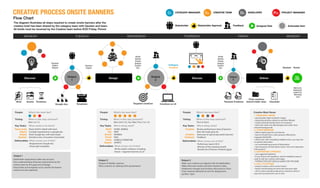
1. The document outlines the process for creating onsite banners after a creative brief is shared by the category team. 2. It involves analyzing the brief, creating requirements and visual style templates, designing creatives, reviewing past performance data, and finalizing banners for deployment. 3. Key deliverables at each stage include a requirements document, banner creatives, and a finalized set of banners shared with technical for deployment on the site.


Onsite Banners Process Chart
- 1. Discuss Flow Chart CATEGORY MANAGER StakeholderFeedback Assigned TaskStakeholder Approval Ct CREATIVE TEAMCa PROJECT MANAGERPmDEVELOPERDv Actionable Item Assets TimelinesBrief Timing: When is this step actioned? Mon 1st 1/2 Disect brief in detail with team Compile requirements in google doc Share Google doc with team leads Introduce new, innovative visual styles Key Tasks: What needs to be done? People: What’s the team like? Deliverables: Output 1 Timing: When is this step actioned? Mon (2nd 1/2), Tue, Wed, Thur (1st 1/2) What comes out of this? All the week’s creatives, including Home + Segment banners on UI What comes out of this? Requirements Google doc Visual style templates HOME, MOBILE MEN WOMEN KIDS HOME & FURNITURE SPORTS Rohit Om Srishti Preeti Rohit Saiyed Team leads Saiyed Gautam Anjani Saiyed Gautam Anjani Saiyed Gautam Key Tasks: Who’s doing what? People: What’s the team like? Deliverables: Output 2 Timing: When is this step actioned? Thur (4-5pm) Performace report (XLS) Minutes of the meeting (email) Revised set of banner creatives (jpgs) Make sure creatives are aligned with all stakeholders Make informed creative decisions based on data Implement changes and revisions discussed on Thurs Final creatives delivered to tech for deployment by Mon 12pm Banners deployed onsite by Monday 1pm Prepare hi-fidelity creatives Place creatives on Jabong UI for presentation What comes out of this? Review performance data of banners from the week gone by Showcase of upcoming week’s banners Feedback Creative Creative Category Key Tasks: Who’s doing what? People: What’s the team like? Creative Must Haves Deliverables: Output 3 Revised Creatives Final creatives shared folder-wise Checklist Output 1 Google-doc Templates Rohit Srishti Preeti Saiyed Surbhi Om Category Creative Gautam Rohit Srishti Preeti Saiyed Surbhi Om Karan Discover Design Deliver YADNOMYADIRFYADSRUHTYADSENDEWYADSEUTYADNOM The diagram illustrates all steps required to create onsite banners after the creative brief has been shared by the category team with Gautam and team. All briefs must be received by the Creative team before EOD Friday. Period. Stakeholder expectations taken into account Clear understanding of banner requirements by the creative team by the page and campaign Visual Styles and templates to be used for the banner creation are also explained GO LIVE Creatives on UITargeted creatives Output 2 1. ENGAGING IMAGE • good quality, high-resolution images • expressing positive, attractive and alive lifestyle • model showing friendly, fresh, fun emotions • Stick with clean and solid backgrounds rather than textured backgrounds 2. CLEAR MESSAGE • define explicit goal for each banner • banner should have a clear purpose reflected by engaging HEADLINE • attract user with compelling Headline texts, use copy text to specify information • no overwhelming amount of information • clear hierarchy of information (what ’s the most important information?) 3. SUPPORTING TYPEFACE • use suggested typefaces • if you choose new typefaces, only for headlines (easy to read, fit with the content and image) • TYPEFACE FOR COPY SHOULD ALWAYS STAY THE SAME 4. CALL-TO-ACTION • always include a call-to-action button • button should always be same size and same style • call-to-action should be placed as a element, which is easy and convenient for user to click Output 3