EMPOWERMENT TECHNOLOGIES
Online navigation is the manner of
collectively searching for and saving
requested information through the
computer from databanks that are online
is known as Online Navigation. Years
ago, the traditional way of obtaining
certain information is through books,
which is very different from the online
search on the internet.
Search engines are software systems that are
designed to search for information on the World
Wide Web. The search results are generally
presented in a line of results often referred to
as search engine results pages. Examples of
Search Engines are Baidu, Bing, Yahoo, DuckDuckGo
and the most recognized engine Google. Google is
the most known and most used search engine in the
world.
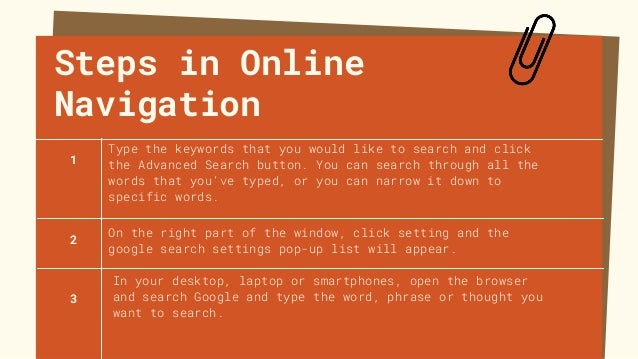
Steps in Online
Navigation
Type the keywords that you would like to search and click
the Advanced Search button. You can search through all the
words that you’ve typed, or you can narrow it down to
specific words.
In your desktop, laptop or smartphones, open the browser
and search Google and type the word, phrase or thought you
want to search.
1
2
3
On the right part of the window, click setting and the
google search settings pop-up list will appear.
Research Skills
In order to achieve or access what you are
looking for, you need to improve yourself. As the
old saying goes, “Practice Makes Perfect”.
Good research is a product of multiple and continuous
searches, here are some skills you can improve or adapt
to:
1. Critical Thinking – As you search through the web, you
must think very carefully about the information that you
have gathered.
2. Data Organizing – A good researcher can organize his/her
collected data.
3. Research Presenting – Part of your research is the actual
writing, be creative and reflective in writing your search,
explain every detail and step into achieving your objective.
Remember that not all searches are good ones, some are
considered as satirical or untrue. Here are some tips
in identifying good searches from satirical searches.
1. If the contents of the source are too impossible to
happen, or too good to be true, then there must be
something wrong.
2. If the site started as a false site for public
figures such as TV personalities or political figures,
then uploaded stories from different sources, it is a
satirical one.
3.If the site is unfamiliar and continuously popping
ads, then it is satirical.
Direction: As a learner, you can now gather specific details depending
on the situation presented to you. Yet always be reminded that not all
information is vital and not all information is a good one. As the
generic saying goes, “Think, before you Click!” Being an individual, you
must use these engines responsibly in order to achieve your objective.
Create a slogan or campaign regarding proper and responsible use of
internet. If you can, upload the slogan on your social media and use the
tag, “#ThinkBeforeYouClick!”. Please refer to the criteria below
Craftmanship - 10 pts
Creativity - 10 pts
Relevance - 15 pts
TOTAL - 35 pts
ACTIVITY

Online Navigation

  • 1.
  • 2.
    Online navigation isthe manner of collectively searching for and saving requested information through the computer from databanks that are online is known as Online Navigation. Years ago, the traditional way of obtaining certain information is through books, which is very different from the online search on the internet.
  • 3.
    Search engines aresoftware systems that are designed to search for information on the World Wide Web. The search results are generally presented in a line of results often referred to as search engine results pages. Examples of Search Engines are Baidu, Bing, Yahoo, DuckDuckGo and the most recognized engine Google. Google is the most known and most used search engine in the world.
  • 4.
    Steps in Online Navigation Typethe keywords that you would like to search and click the Advanced Search button. You can search through all the words that you’ve typed, or you can narrow it down to specific words. In your desktop, laptop or smartphones, open the browser and search Google and type the word, phrase or thought you want to search. 1 2 3 On the right part of the window, click setting and the google search settings pop-up list will appear.
  • 5.
    Research Skills In orderto achieve or access what you are looking for, you need to improve yourself. As the old saying goes, “Practice Makes Perfect”.
  • 6.
    Good research isa product of multiple and continuous searches, here are some skills you can improve or adapt to: 1. Critical Thinking – As you search through the web, you must think very carefully about the information that you have gathered. 2. Data Organizing – A good researcher can organize his/her collected data. 3. Research Presenting – Part of your research is the actual writing, be creative and reflective in writing your search, explain every detail and step into achieving your objective.
  • 7.
    Remember that notall searches are good ones, some are considered as satirical or untrue. Here are some tips in identifying good searches from satirical searches. 1. If the contents of the source are too impossible to happen, or too good to be true, then there must be something wrong. 2. If the site started as a false site for public figures such as TV personalities or political figures, then uploaded stories from different sources, it is a satirical one. 3.If the site is unfamiliar and continuously popping ads, then it is satirical.
  • 8.
    Direction: As alearner, you can now gather specific details depending on the situation presented to you. Yet always be reminded that not all information is vital and not all information is a good one. As the generic saying goes, “Think, before you Click!” Being an individual, you must use these engines responsibly in order to achieve your objective. Create a slogan or campaign regarding proper and responsible use of internet. If you can, upload the slogan on your social media and use the tag, “#ThinkBeforeYouClick!”. Please refer to the criteria below Craftmanship - 10 pts Creativity - 10 pts Relevance - 15 pts TOTAL - 35 pts ACTIVITY