Building Scalable And
Highly Available
Postgres Cluster
Postgres based High Availability Setup with Load Balancing
and no Single Point of Failure
A typical Cluster Setup
• Load Balancing between two or more nodes
• High Availability- If one of the nodes goes down the other
node Takes over the load
• The failover does not involve any configuration changes in
application
PostgreSQL – Worlds Most Advanced Open Source
Database
• Built on top of the same Relational Database Fundamentals that
is basis of all Modern day relational databases e.g. Oracle, DB2,
SQL Server
• Has advanced Streaming Replication features
• Point-in-Time Recovery capabilities
• Multi Version Concurrency control (conceptually similar Oracle’s
undo tablespace concept)
• ANSI-SQL Support
• noSQL datatypes support e.g. JSON, hstore, JSONB
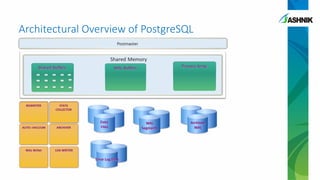
Architectural Overview of PostgreSQL
PostgreSQL – Postgres Plus Users
High Availability Options in Postgres
• OS level (shared-disk) Clustering – e.g. Red Hat Cluster Suite
• A drawback is only one of the nodes is active at a time
• Streaming Replication
• A drawback is that failovers/node promotion is not automated
• The replica can take up read load but the logic to distribute the
read queries has to be built into application
• Next few slides will show some popular architectures we
have seen and limitations which one ideally faces
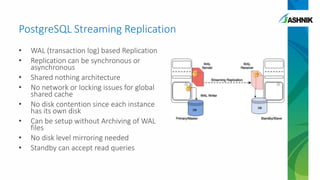
PostgreSQL Streaming Replication
• WAL (transaction log) based Replication
• Replication can be synchronous or
asynchronous
• Shared nothing architecture
• No network or locking issues for global
shared cache
• No disk contention since each instance
has its own disk
• Can be setup without Archiving of WAL
files
• No disk level mirroring needed
• Standby can accept read queries
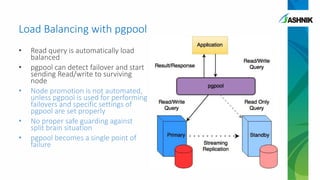
Load Balancing with pgpool
• Read query is automatically load
balanced
• pgpool can detect failover and start
sending Read/write to surviving
node
• Node promotion is not automated,
unless pgpool is used for performing
failovers and specific settings of
pgpool are set properly
• No proper safe guarding against
split brain situation
• pgpool becomes a single point of
failure
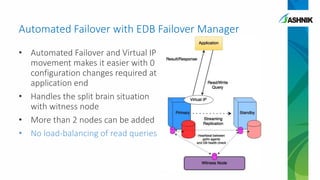
Automated Failover with EDB Failover Manager
• Automated Failover and Virtual IP
movement makes it easier with 0
configuration changes required at
application end
• Handles the split brain situation
with witness node
• More than 2 nodes can be added
• No load-balancing of read queries
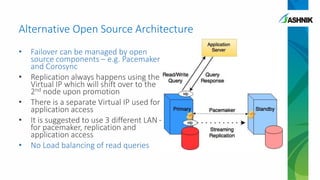
• Failover can be managed by open
source components – e.g. Pacemaker
and Corosync
• Replication always happens using the
Virtual IP which will shift over to the
2nd node upon promotion
• There is a separate Virtual IP used for
application access
• It is suggested to use 3 different LAN –
for pacemaker, replication and
application access
• No Load balancing of read queries
Alternative Open Source Architecture
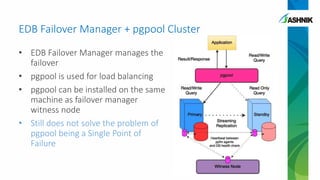
EDB Failover Manager + pgpool Cluster
• EDB Failover Manager manages the
failover
• pgpool is used for load balancing
• pgpool can be installed on the same
machine as failover manager
witness node
• Still does not solve the problem of
pgpool being a Single Point of
Failure
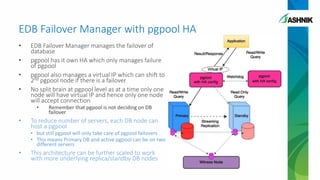
EDB Failover Manager with pgpool HA
• EDB Failover Manager manages the failover of
database
• pgpool has it own HA which only manages failure
of pgpool
• pgpool also manages a virtual IP which can shift to
2nd pgpool node if there is a failover
• No split brain at pgpool level as at a time only one
node will have virtual IP and hence only one node
will accept connection
• Remember that pgpool is not deciding on DB
failover
• To reduce number of servers, each DB node can
host a pgpool
• but still pgpool will only take care of pgpool failovers
• This means Primary DB and active pgpool can be on two
different servers
• This architecture can be further scaled to work
with more underlying replica/standby DB nodes
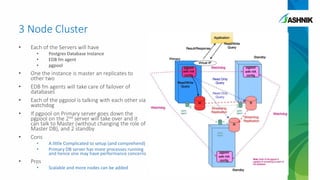
3 Node Cluster
• Each of the Servers will have
• Postgres Database Instance
• EDB fm agent
• pgpool
• One the instance is master an replicates to
other two
• EDB fm agents will take care of failover of
databases
• Each of the pgpool is talking with each other via
watchdog
• If pgpool on Primary server goes down the
pgpool on the 2nd server will take over and it
can talk to Master (without changing the role of
Master DB), and 2 standby
• Cons
• A little Complicated to setup (and comprehend)
• Primary DB server has more processes running
and hence one may have performance concerns
• Pros
• Scalable and more nodes can be added
Consideration of Application Clusters
• Today most of the applications have their own clusters for
both High Availability as well as Load Balancing
• 2 or 3 node JBOSS setup which is talking to a single
Database is very common
• Or a DB Cluster (the DB level Cluster is abstracted from
Application Layer)
• With this setup it makes more sense to have a pgpool server
installed on the application server itself so that each
Application server has its own pgpool
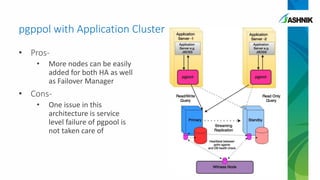
pgppol with Application Cluster
• Pros-
• More nodes can be easily
added for both HA as well
as Failover Manager
• Cons-
• One issue in this
architecture is service
level failure of pgpool is
not taken care of
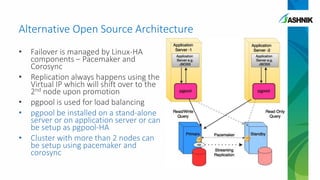
• Failover is managed by Linux-HA
components – Pacemaker and
Corosync
• Replication always happens using the
Virtual IP which will shift over to the
2nd node upon promotion
• pgpool is used for load balancing
• pgpool be installed on a stand-alone
server or on application server or can
be setup as pgpool-HA
• Cluster with more than 2 nodes can
be setup using pacemaker and
corosync
Alternative Open Source Architecture
Benefits of Postgres Cluster
• More stand-by servers can be added and pgpool can be
configured for load balancing across more nodes in runtime
• More stand-by being added can also be added to
synchronous standby list making sure data redundancy is
being maintained on at least one servers
• Standby servers being added can also be added to EDB FM
cluster without bringing down the cluster/switching roles
• Works in tandem with Virtualization and Provisioning on the
fly
Ashnik’s Approach
• To build enterprise class solutions
• Provide an alternative to clustering features which has
created a lock-in for Enterprise Customers
• Consulting services to help customers build architectures
tailored for organization specific requirements
• Consulting and implementation services helping customers
migrate their databases to Postgres without compromising
on Availability and Recoverability of the setup
Architecture for building scalable and highly available Postgres Cluster

Architecture for building scalable and highly available Postgres Cluster

  • 1.
    Building Scalable And HighlyAvailable Postgres Cluster Postgres based High Availability Setup with Load Balancing and no Single Point of Failure
  • 2.
    A typical ClusterSetup • Load Balancing between two or more nodes • High Availability- If one of the nodes goes down the other node Takes over the load • The failover does not involve any configuration changes in application
  • 3.
    PostgreSQL – WorldsMost Advanced Open Source Database • Built on top of the same Relational Database Fundamentals that is basis of all Modern day relational databases e.g. Oracle, DB2, SQL Server • Has advanced Streaming Replication features • Point-in-Time Recovery capabilities • Multi Version Concurrency control (conceptually similar Oracle’s undo tablespace concept) • ANSI-SQL Support • noSQL datatypes support e.g. JSON, hstore, JSONB
  • 4.
  • 5.
  • 6.
    High Availability Optionsin Postgres • OS level (shared-disk) Clustering – e.g. Red Hat Cluster Suite • A drawback is only one of the nodes is active at a time • Streaming Replication • A drawback is that failovers/node promotion is not automated • The replica can take up read load but the logic to distribute the read queries has to be built into application • Next few slides will show some popular architectures we have seen and limitations which one ideally faces
  • 7.
    PostgreSQL Streaming Replication •WAL (transaction log) based Replication • Replication can be synchronous or asynchronous • Shared nothing architecture • No network or locking issues for global shared cache • No disk contention since each instance has its own disk • Can be setup without Archiving of WAL files • No disk level mirroring needed • Standby can accept read queries
  • 8.
    Load Balancing withpgpool • Read query is automatically load balanced • pgpool can detect failover and start sending Read/write to surviving node • Node promotion is not automated, unless pgpool is used for performing failovers and specific settings of pgpool are set properly • No proper safe guarding against split brain situation • pgpool becomes a single point of failure
  • 9.
    Automated Failover withEDB Failover Manager • Automated Failover and Virtual IP movement makes it easier with 0 configuration changes required at application end • Handles the split brain situation with witness node • More than 2 nodes can be added • No load-balancing of read queries
  • 10.
    • Failover canbe managed by open source components – e.g. Pacemaker and Corosync • Replication always happens using the Virtual IP which will shift over to the 2nd node upon promotion • There is a separate Virtual IP used for application access • It is suggested to use 3 different LAN – for pacemaker, replication and application access • No Load balancing of read queries Alternative Open Source Architecture
  • 11.
    EDB Failover Manager+ pgpool Cluster • EDB Failover Manager manages the failover • pgpool is used for load balancing • pgpool can be installed on the same machine as failover manager witness node • Still does not solve the problem of pgpool being a Single Point of Failure
  • 12.
    EDB Failover Managerwith pgpool HA • EDB Failover Manager manages the failover of database • pgpool has it own HA which only manages failure of pgpool • pgpool also manages a virtual IP which can shift to 2nd pgpool node if there is a failover • No split brain at pgpool level as at a time only one node will have virtual IP and hence only one node will accept connection • Remember that pgpool is not deciding on DB failover • To reduce number of servers, each DB node can host a pgpool • but still pgpool will only take care of pgpool failovers • This means Primary DB and active pgpool can be on two different servers • This architecture can be further scaled to work with more underlying replica/standby DB nodes
  • 13.
    3 Node Cluster •Each of the Servers will have • Postgres Database Instance • EDB fm agent • pgpool • One the instance is master an replicates to other two • EDB fm agents will take care of failover of databases • Each of the pgpool is talking with each other via watchdog • If pgpool on Primary server goes down the pgpool on the 2nd server will take over and it can talk to Master (without changing the role of Master DB), and 2 standby • Cons • A little Complicated to setup (and comprehend) • Primary DB server has more processes running and hence one may have performance concerns • Pros • Scalable and more nodes can be added
  • 14.
    Consideration of ApplicationClusters • Today most of the applications have their own clusters for both High Availability as well as Load Balancing • 2 or 3 node JBOSS setup which is talking to a single Database is very common • Or a DB Cluster (the DB level Cluster is abstracted from Application Layer) • With this setup it makes more sense to have a pgpool server installed on the application server itself so that each Application server has its own pgpool
  • 15.
    pgppol with ApplicationCluster • Pros- • More nodes can be easily added for both HA as well as Failover Manager • Cons- • One issue in this architecture is service level failure of pgpool is not taken care of
  • 16.
    • Failover ismanaged by Linux-HA components – Pacemaker and Corosync • Replication always happens using the Virtual IP which will shift over to the 2nd node upon promotion • pgpool is used for load balancing • pgpool be installed on a stand-alone server or on application server or can be setup as pgpool-HA • Cluster with more than 2 nodes can be setup using pacemaker and corosync Alternative Open Source Architecture
  • 17.
    Benefits of PostgresCluster • More stand-by servers can be added and pgpool can be configured for load balancing across more nodes in runtime • More stand-by being added can also be added to synchronous standby list making sure data redundancy is being maintained on at least one servers • Standby servers being added can also be added to EDB FM cluster without bringing down the cluster/switching roles • Works in tandem with Virtualization and Provisioning on the fly
  • 18.
    Ashnik’s Approach • Tobuild enterprise class solutions • Provide an alternative to clustering features which has created a lock-in for Enterprise Customers • Consulting services to help customers build architectures tailored for organization specific requirements • Consulting and implementation services helping customers migrate their databases to Postgres without compromising on Availability and Recoverability of the setup