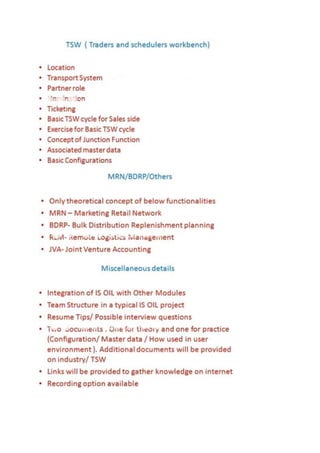
PORTUGUES
Workbench de Scheduler(TSW) daSAP Tradere é usado para monitorara atividade dacadeiade
abastecimento atual e futuro,incluindo todasasnegociações,inventário, e osmovimentos
programados.
1- TSW ajudaa geriro fornecimento,demandae asnecessidadesde transporte nomeiodocaminho
(embruto, matérias-primase de transporte de gás) e distribuiçãoprimária(produtos refinados)
sectoresde todosos transportesde massa. Ele tambémajudaa gerenciá-losdurante todoociclo de
vidado processo completo- de acordocom o caixa,incluindooplanejamento,programaçãoe
execução.
2- TSW integrainformaçõessobre ademanda domercado,osmovimentos emmassaplanejadase
nomeados,dadosde produção, previsõesde consumo,e asprevisões de reabastecimento. As
interfacesabertas permitemacomunicação nomeaçõese confirmações emambasasdireções com
parceiros externos,como osoperadoresde condutas e clientes.
3- SAP TSW incorporaumconjuntode ferramentasque trabalhamjuntose usamos mesmos dados
mestre.
4- Tecnicamente parte daSAP para a soluçãode Oil & Gas carteira, TSW é completamenteintegrado
com a solução mySAP ERP e SAP AdvancedPlanning &Optimization componente (SAP APO).Essa
integraçãosignificaque oseuplanejamento, processosde programaçãoe execuçãotodoscorremna
mesmapaisagem,garantindo aconfiabilidade dosdados,emtemporeal, de disponibilidade de
dados,a transparênciadosdados, e à ausênciade redundânciade dados.
5- Com TSW como uma plataformade comunicação para você e seus parceirosde negócios,você
cria uma fundação para a colaboração ao longode todaa cadeiade abastecimento.Muitastelas de
transações diferentes e funções permitemque programadores e outrosprofissionais envolvidos em
operações de cadeiade suprimentos paravisualizare gerenciartodasasatividades pertinentes.Eles
tambémpodem olharpara a frente paraconstruirplanospara o futuro e olharpara o passado para
analisara história. Este fornece recursos de apoioàdecisão-chave paraogerenciamentode
operaçõesfuturas.
6- TSW toca todosos aspectosdo fluxode trabalho doprogramador,e fornece
váriospontosde integração e de interface parase comunicarcom ambosos sistemasinternose
externos e festas.Todasasferramentas - de nomeaçãode agendamentoparacontratosde frete e
ticketing- sãointegrados unscom osoutros,assimvocê só temque digitardadosumavez. Devidoà
configuração intuitivade suasconfigurações de dadosmestre doSAP doTrader e Scheduler
Workbench e,algunsdados não temde ser inserido emtodos,porque pode-se inferirpelosoftware.
Alémdisso, todasasinformaçõessão totalmente transparentes e disponibilizadasem vários
formatos emtoda a gama de operações de agendamento e envio.
Descubrao que você precisasabersobre o SAP Traderda e do SchedulerWorkbench,que aSAP
oferece paraa indústriade petróleoe gás. Vejacomoessaferramentade planejamento ajudavocê a
serum diferencialnesse mundode grandesvolumes e margensbaixas.
Conceito-chave
IntegraWorkbench doScheduler(TSW) daSAP Trader e com o seu ERP SAP ou dosistemaR / 3. As
ferramentas de planejamentono SAP TSW ajudá-loamelhorarofluxo de caixa, reduziroseu
inventário,minimizarastransferências entre as localidades, e realizarreceitas maisrápido,
facilitandoacolaboração entre osoperadorese programadores.
Organizações de petróleoe gás oferecersuporte aosistemasignificativo paraumamelhor
negociação. Asmargens por comércio estãosempre emfocoe as empresas devemmelhorar
constantemente sobreestas margens. Poroutrolado,aprogramação depende de julgamentos
individuais e padrões históricose normalmente acontece de umamaneirapredeterminada. Em
geral,a programação nãotem a visibilidade financeiraparamaximizarosganhos dosacordos
comerciais.
A maioriadasorganizações avaliarnegociaçãoe agendamento separadamente,emvezde olharpara
toda a cadeiade eventos comoparte de uma atividade. Traderse programadores trabalharde forma
independente sobre asdecisõesde comprae vendaou de agendamento dodia-a-dia. Issolimitaa
capacidade da organização para percebere responderàsoportunidades e ameaças. Alémdisso,os
sistemasde TIdistintos reduziravisibilidade sobre asaçõesde planejamento e negociação. Emvez
disso,oscomerciantes e programadores compartilharconhecimentos apenasemdebatesou
reuniões interpessoais, umprocessoineficiente.
Para preencherestalacuna,a SAPoferece Workbench doScheduler(TSW) parao SAP Oil & Gas
indústriasoluçãodaSAP Trader e que permitiráaosoperadores e programadores atrabalhar juntos.
Disponível apartirdo R / 3 4.6C emdiante, SAP TSWgere demandaatual e futura,o fornecimento, e
informaçõessobre otransporte.Asdiferentes ferramentasemTSWoferecemvistas docockpitpara
o agendamento eficiente emdiferentescenários.
Eu vou levá-loatravésde umóleoe gáspaisagemtípicade TI para mostrar-lhe oque parece come
semSAP TSW. Então euvou explicaralgumasdasfuncionalidadesdo SAP TSW,comoatrelartrês vias
ea planilhade projeção estoque. Finalmente, voudestacaralgunsdosefeitos donegócio que você
pode conseguirquandosuaimplementaçãoSAP TSWé completa. Paramaisinformaçõessobre SAP
TSW, consulte o"InformaçõesAdicionais"barralateral abaixo.
INGLES
SAPTrader’sand Scheduler’sWorkbench(T.S.W) isusedtomonitorcurrentandfuture supplychain
activity,includingall trading,inventory,andscheduledmovements.
1- TSW helpsyoumanage the supply,demand,andtransportationrequirementsinthe midstream
(crude,feedstocks,andgastransmission) andprimarydistribution(refinedproducts)sectorsforall
bulktransports.Italso helpsyoumanage themthroughoutthe completeprocesslifecycle –from
deal to cash,includingplanning,scheduling,andexecution.
2- TSW integratesmarketdemandinformation,plannedandnominatedbulkmovements,
productiondata,consumptionforecasts,andreplenishmentforecasts.Openinterfacesallow youto
communicate nominationsandconfirmationsinbothdirectionswithexternalpartners,suchas
pipelineoperatorsandcustomers.
3- SAPTSW incorporatesasetof toolsthatwork togetheranduse the same masterdata.
4- Technicallypartof the SAP forOil & Gas solutionportfolio,TSWiscompletelyintegratedwiththe
mySAPERP solutionandthe SAPAdvancedPlanning&Optimization(SAPAPO) component.This
integrationmeansyourplanning,scheduling,andexecutionprocessesall runinthe same landscape,
guaranteeingdatareliability,real-time dataavailability,datatransparency,andthe absence of data
redundancy.
5- With TSW as a communicationplatformforyouandyourbusinesspartners,youcreate a
foundationforcollaborationall alongthe supplychain.Manydifferenttransactionscreensand
functionsenable schedulersandothersinvolvedinsupplychainoperationstoview andmanage all
relevantactivities.Theycanalsolookaheadtobuildplansforthe future andlookback intothe past
to analyze history.Thisprovideskeydecision-supportcapabilitiesformanagingfuture operations.
6- TSW touchesall aspectsof the scheduler’sworkflow,anditprovides
variousintegrationandinterface pointstocommunicate withbothinternal andexternal systems
and parties.All tools –fromnominationtoschedulingtofreightcontractsandticketing – are
integratedwithone another,soyouonlyhave toenterdata once.Because of the intuitive
configurationof SAPTrader’sandScheduler’sWorkbenchanditsmasterdata settings,some data
doesnothave to be enteredatall because itcan be inferredbythe software.Inaddition,all
informationisfullytransparentandmade available innumerousformatsacrossthe full range of
schedulingandshippingtransactions.
Findout whatyouneedto knowaboutSAPTrader’sand Scheduler’sWorkbench,whichSAPoffers
for the oil andgas industry.See howthisplanningtool helpsyoutobe a differentiatorinthisworld
of highvolumesandlowmargins.
KeyConcept
SAPTrader’sand Scheduler’sWorkbench(TSW) integrateswithyourSAPERPor R/3 system.The
schedulingtoolsinSAPTSWhelpyouimprove cashflow,loweryourinventory,minimize transfers
betweenlocations,andrealizerevenuesfasterbyfacilitatingcollaborationbetweentradersand
schedulers.
Oil and gas organizationsoffersignificantsystemsupportforbettertrading.The marginspertrade
are alwaysinfocusand companiesconstantlymustimproveonthese margins.Conversely,
schedulingdependsonindividual judgmentsandhistorical patternsandtypicallyhappensina
predeterminedmanner.Ingeneral,schedulinglacksthe financial visibilitytomaximize gainsfrom
the trade deals.
Most organizationsevaluatetradingandschedulingseparatelyinsteadof lookingatthe entire chain
of eventsaspart of one activity.Tradersand schedulersworkindependentlyonday-to-daytrading
or schedulingdecisions.Thislimitsanorganization’sabilitytosense andrespondtoopportunities
and threats.Furthermore,the disparateITsystemsreduce the visibilityonthe schedulingand
tradingactions.Instead,tradersandschedulersshare knowledge onlyininterpersonaldiscussionsor
meetings,aninefficientprocess.
To addressthisgap, SAPoffersSAPTrader’sandScheduler’sWorkbench(TSW) forthe SAPOil & Gas
industrysolutiontoallowtradersandschedulerstoworktogether.AvailablefromR/34.6C onward,
SAPTSW managescurrent andfuture demand,supply,andtransportationinformation.The different
toolsinTSW offercockpitviewsforefficientschedulingindifferentscenarios.
I’ll walkyouthrougha typical oil andgas IT landscape to show youwhatit lookslike withand
withoutSAPTSW.ThenI’ll explainsome of SAPTSW’sfeatures,suchasthree-waypeggingandthe
stock projectionworksheet.Finally,I’ll highlightsome of the businesseffectsyoucanachieve when
your SAPTSW implementationiscomplete.Formore informationaboutSAPTSW,refertothe
“Additional Information”sidebarbelow.
OG340
Trading & Scheduling with SAP for the Oil & Gas Industry
SAP for Industries
Course Outline
Course Version: 97
Course Duration: 3 Day(s)
Publication Date: 24-01-2014
Publication Time: 1539
Course Overview ....................................................................... v
Course Goals ......................................................................... v
Course Objectives ................................................................... v
Unit 1: Trading & Scheduling Overview .......................................... 1
Oil and Gas Industry and SAP for Oil and Gas Solution Overview............ 1
Supply and Distribution: Planning, Trading, and Scheduling (Roles and
Interactions)....................................................................... 1
TSW: Traders and Schedulers Workbench....................................... 1
Unit 2: TSW from SAP, Master Data and Transactions ........................ 3
TSW Master Data .................................................................... 3
SAP TSW Nomination and Ticket.................................................. 3
SAP TSW Planning and Reporting Tools ......................................... 3
SAP Dynamic Scheduling........................................................... 4
Unit 3: TSW Interfaces ................................................................ 5
Integration between SAP APO and SAP TSW................................... 5
Integration Concept between SAP ERP and TPT CSL ......................... 5
Unit 4: Pipeline and Rail Business Scenarios................................... 6
FCA Purchase Against a Term Contract from Vendor, and Transfer into Own
Stock at Terminal ................................................................. 6
FCA Purchase Against a Term Contract from Vendor, and Sale to a Customer
Against a Term Sales Contract ................................................. 6
Other Pipeline Business Functions ................................................ 7
Rail Scenario ......................................................................... 7
Unit 5: Marine Scenario .............................................................. 8
Planning and Reporting Tools in the Marine Scenario .......................... 8
Free-on-Board (FOB) Purchase at Vendor Locations (Veracruz and Tampico)
to Own Ship ....................................................................... 8
Berth Scheduling at Galveston and DES Sales to Customer at New York
Harbor ............................................................................. 9
Other Marine Scheduling Functions ............................................... 9
Unit 6: Customizing .................................................................. 10
TSW Basic Settings ............................................................... 10
TSW Master Data, Nomination, SPW, and Ticketing.......................... 10
Customizable Inbound Process .................................................. 10
Unit 7: TSW Roadmap ............................................................... 11
TSW Integration with Other SAP Applications .................................11
TSW Hub Concept ..................................................................11
SAP Enterprise SOA for Oil & Gas ...............................................11
TSW for Gas Operations and Enhancements.................................. 12
Enhancing TSW with Services from SAP Consulting ......................... 12
Course Overview
Trading, scheduling, and the distribution of crude oil and oil products play a major role in your
company. Inbound movements (purchasing), outbound movements (sales), and internal
transfers need to be planned and executed. This applies for both pipeline and marine means
of transport. Management needs to optimize business processes within its crude oil and oil
products operations and reduce costs.
Target Audience
This course is intended for the following audiences:
• Project team members participating and project team leaders responsible in the
implementation of the Trading and Scheduling Solution of SAP for Oil & Gas.
Course Prerequisites
Required Knowledge
• From SAP side: Good knowledge in Sales and Distribution and Materials Management;
IOG100 Primary and Secondary Distribution with SAP for Oil & Gas.
Course Goals
This course will prepare the participant to:
• Acquire the necessary knowledge of the SAP TSW (Trader’s and Scheduler’s Workbench)
solution for Oil & Gas, including Trading integration, to configure the system and be ready for
its implementation
• Get an overview of how SAP TSW is integrated with other SAP Applications, services, and
enhancements that enrich standard TSW
• Get an overview of the future of TSW
Course Objectives
After completing this course, the participant will be able to:
• Give an overview of SAP Supply Chain Management (SAP SCM) for the Oil and Gas
Industry, focusing on the Trader’s and Scheduler’s roles and tasks
• Understand and maintain TSW master data
• Understand the Nomination and Ticket concept and use Nomination and Ticketing functions
• Understand and use TSW Planning and reporting tools: SPW (Stock Projection Worksheet),
3way Pegging, Dynamic Scheduling, and the Worklist process and functionality
• Understand how TSW is integrated with SAP Advanced Planning and Optimization (APO)
and Triple Point Commodity SL
• Learn how to run Oil Pipeline Scenarios in the system using the functionality described above
• Understand how Rail Car business processes can be managed using TSW
• Learn how to run Oil Marine Scenarios using the functions described above
• Learn how to set up the system (Customizing) so that the corresponding Scenarios (Pipeline
and Marine) run the way you want
• Learn how TSW is integrated with other SAP Applications
• Give an introduction to the Gas Transportation Process
• Understand how TSW canbe enhanced with a Scheduling Cockpit and Pipeline Visualization
Tool (Services provided by SAP consulting)
• Outline the S&D business scenarios where Trading is important
Unit 1
Trading & Scheduling Overview
Unit Overview
This unit describes the fully integrated SAP for Oil & Gas solution for sourcing, selling,
trading, and transportation processing of commodities as well as how the Trader’s and
Scheduler’s Workbench supports schedulers with their daily work.
Lesson: Oil and Gas Industry and SAP for Oil and Gas Solution
Overview
Lesson Objectives
After completing this lesson, the participant will be able to:
• Outline the SAP for Oil and Gas Solution Map
• Describe the Oil & Gas Market Segmentation
• Outline the Oil & Gas System Landscape
Lesson: Supply and Distribution: Planning,Trading, and
Scheduling (Roles and Interactions)
Lesson Objectives
After completing this lesson, the participant will be able to:
• Describe the Sales & Distribution Organization of an International Oil Company
• Outline the S&D Trading interactions with other Departments in
an Oil & Gas company
• Explain the S&D Scheduling interactions with other Departments
in an Oil & Gas company
• Explain the S&D business scenarios where Scheduling is important
• Outline the S&D business scenarios where Trading is important
Lesson: TSW: Tradersand Schedulers Workbench
Lesson Objectives
After completing this lesson, the participant will be able to:
• Explain the TSW Functional environment focused on their functions and components
• Describe the Scheduler’s daily business in TSW of SAP
• Outline the Bulk Transportation Process
Unit 2
TSW from SAP, Master Data and
Transactions
Unit Overview
In this unit, you will learn about the necessary master data and the configuration that has to
be done before the system can be used in a productive manner. After master data creation
and required assignments you use different transactions to run the processes: nomination
and ticketing, Stock Projection Worksheet (SPW), 3way Pegging and Dynamic Scheduling.
Lesson: TSWMaster Data
Lesson Objectives
After completing this lesson, the participant will be able to:
• Describe the Marine and Pipeline Master Data Scenarios used in this course
• Outline the SAP TSW Master Data overview
• Create SAP TSW Master data: Location, Transport System, and Partner Roles
• Realize the SAP TSW Master data assignments
• Explain the Transport unit and Vehicle master data.
Lesson: SAP TSW Nomination and Ticket
Lesson Objectives
After completing this lesson, the participant will be able to:
• Explain what a Nomination is: Concept, Communication, and Maintenance Enhancements
• Describe what a Ticket is: Concept and Functions
Lesson: SAP TSW Planning and Reporting Tools
Lesson Objectives
After completing this lesson, the participant will be able to:
• Explain the SPW (Stock Projection Worksheet) functions
• Describe the 3way Pegging function
• Outline the Worklist tool
Lesson: SAP Dynamic Scheduling
Lesson Objectives
After completing this lesson, the participant will be able to:
• Determine how Dynamic Scheduling integrates SPW, 3WP, and the Nomination
transaction
• Outline the Dynamic scheduling roles, activities, and usability
• Describe the SPW within Dynamic Scheduling
• Practice how scheduling works with Dynamic Scheduling: Creating, validating, and
publishing a Distribution Schedule
Unit 3
TSW Interfaces
Unit Overview
This unit explains the specific related Interfaces of the TSW SAP solution.
Lesson: IntegrationbetweenSAP APO and SAP TSW
Lesson Objectives
After completing this lesson, the participant will be able to:
• Explain the SAP APO solution
• Outline the Integration between SAP APO and SAP TSW
Lesson: IntegrationConceptbetweenSAP ERP and TPT CSL
Lesson Objectives
After completing this lesson, the participant will be able to:
• Describe the Oil & Gas Commodity Trading Interface
• List the Components from the SAP / TPT Solution Landscape
• Understand how the integration between SAP ERP and TPT CSL works
Unit 4
Pipeline and Rail Business Scenarios
Unit Overview
Lesson: FCAPurchase Againsta Term Contractfrom
Vendor,and Transferinto Own Stock at Terminal
Lesson Objectives
After completing this lesson, the participant will be able to:
• Outline the SAP TSW Master Data used in this scenario
• Check purchase contracts for the vendor used in this scenario and describe features of TSW
details used in the contract
• Check stock in the terminal and the possible alerts based on which a decision is made to
replenish the terminal by creating a simulation of a stock movement into the terminal
• Publish simulations into a nomination, and do material balancing in the nomination to create
a real distribution schedule. Complete the nomination by providing the correct movement
scenario for loading the pipeline
• Confirm and actualize the nomination by posting tickets. Then, revisit Nomination to check
document flow, and revisit SPW to check stock situation after the posting of back office
documents.
Lesson: FCAPurchase againsta Term Contract from Vendor,and
Sale to a Customer against a TermSales Contract
Lesson Objectives
After completing this lesson, the participant will be able to:
• Check purchase contracts for the vendor and sales contract for customer used in this
scenario and describe features of TSW details used in the contracts
• Check stock in the terminal and the possible alerts, based on which a decision is made to
replenish the demand of a customer by means of a purchase from a vendor rather than from
a customer
• Create a nomination for the planned movement and map the sale and purchase in the
distribution schedule
• Confirm and actualize the nomination by posting tickets. Then, revisit the Nomination to
check document flow, and revisit SPW to check the stock situation after the posting of back
office documents.
Lesson: Other Pipeline Business Functions
Lesson Objectives
After completing this lesson, the participant will be able to:
• Explain the pipeline batching function
Lesson: Rail Scenario
Lesson Objectives
After completing this lesson, the participant will be able to:
• Give details of Rail Car movements being recorded in the system at the level of the individual
wagons and loads and discharges from them
• Give details of Rail Car movements being recorded in the system at the level of the whole
train and load and discharge from it
• Give details of possible extension of Rail car functionality at whole train level by use of
Nomination sub-items in order to provide better control to the users
Unit 5
Marine Scenario
Unit Overview
Schedulers in AOIL plan marine voyages weeks in advance to ensure that they can fulfill long-
term, contract-based demands for crude from different customers at various locations
worldwide. In case of overhead capacity on the chartered ship or to meet peek demands, spot
contracts are negotiated by the trader and provided to the scheduler. Incoterms on the contract
provide information on liability for the intransit stock and who of the involved business partners
is paying the cost related to the voyages (fees, freight, insurance, and so on). The scenario
covered in the Exercise is a combination of a FOB purchase at two different origins, a partial
transfer into own stock at one destination, and a DES sales to a customer at a second
destination location. Once a movement is executed, a ticket is created and the movement is
posted in the ERP System. To reflect the inventory situation as closely as possible in the
system,tickets are generated with preliminary volumes. As soon as the final value is received,
the ticket is corrected with the new quantity. This is done in the exercise in one example using
the ticket correction functionality.
Lesson: Planning and Reporting Tools in the
MarineScenario
Lesson Objectives
After completing this lesson, the participant will be able to:
• Explain the SPW and simulated schedules
• Learn to use the 3way Pegging function
• Explain the 3way Pegging and What-If functions
Lesson: Free-on-Board (FOB)Purchase at Vendor
Locations(Veracruz and Tampico)to Own Ship
Lesson Objectives
After completing this lesson, the participant will be able to:
• Check the Purchase Orders coming from TPT as a starting point for the scenario in SAP
• Publish a nomination in the SAP system to cover the corresponding scenario
• Use the SPW to describe changes
• Create tickets with preliminary volumes in the SAP system for
the loading items of the nomination
• Correct ticket with final volume
• Understand the difference between ticket correction and ticket reversal
Lesson: Berth Scheduling atGalveston and DES Sales
to Customerat New York Harbor
Lesson Objectives
After completing this lesson, the participant will be able to:
• Change the Sales contract in GTM as the starting point of the scenario in SAP
• Modify schedule via 3way Pegging
• Explain the Berth scheduling process
• Create Tickets in the SAP system for discharge into own stock and sales to customer
Lesson: Other MarineScheduling Functions
Lesson Objectives
After completing this lesson, the participant will be able to:
• Describe Freight Contracts
• Describe Fleet management
• Outline Marine Events
• Calculate Laytime & Demurrage
Unit 6
Customizing
Unit Overview
This unit explains the basic concept of TSW Customizing, including the Customizable
Inbound Process (CIP), the configuration of movement scenarios, and the setup for the
SPW, nominations, ticketing, and pegging.
Lesson: TSWBasic Settings
Lesson Objectives
After completing this lesson, the participant will be able to:
• Outline the basic control parameters
• Describe the basic pegging settings
• Determine the basic settings for generating the worklist
• Explain the TSW details settings.
Lesson: TSWMaster Data,Nomination,SPW, and Ticketing
Lesson Objectives
After completing this lesson, the participant will be able to:
• Describe the TSW Master Data settings
• Outline the Nomination basic and application settings
• Explain the Ticket settings
• Outline the basic SPW settings.
Lesson: CustomizableInboundProcess
Lesson Objectives
After completing this lesson, the participant will be able to:
• Customize the settings Overview of the Customizable Inbound Process
• Check the Junction functions settings
• Implement the Movements Scenarios settings
• Implement the Nomination Relevance settings
• Summarize the CIP settings
Unit 7
TSW Roadmap
Unit Overview
This unit explains the (consulting) services and enhancements that enrich standard TSW
with an outlook on the future of TSW.
Lesson: TSWIntegrationwith Other SAP Applications
Lesson Objectives
After completing this lesson, the participant will be able to:
• Explain Supply Chain Event Management (EM)
• Describe how Railcar Management can be integrated with TSW
• Describe how Transportation Management is aligned with TSW
• Explain Planning Optimization for TSW (via OpenTAS)
• Explain the approach of extending the TSW concept to a single scheduling
instance (communicating with other ERP systems)
Lesson: TSWHub Concept
Lesson Objectives
After completing this lesson, the participant will be able to:
• Explain the approach of extending the TSW concept to a single scheduling instance
(communicating with other ERP systems)
Lesson: SAP Enterprise SOA for Oil & Gas
Lesson Objectives
After completing this lesson, the participant will be able to:
• Describe SAP enterprise SOA for Oil & Gas
Lesson: TSWfor Gas Operations and Enhancements
Lesson Objectives
After completing this lesson, the participant will be able to:
• Explain how TSW will be enhanced to process Gas Operations
Lesson: EnhancingTSWwith Services fromSAP Consulting
Lesson Objectives
After completing this lesson, the participant will be able to:
• Explain the design of a Scheduling Cockpit
• Describe the Pipeline Visualization Tool
Sycor: Specialists for SAP TSW
(Trader's and Scheduler's Workbench)
With us and the SAP component TSW, you monitor your flow of goods at all time
The SAP componentTSW(Trader'sand Scheduler'sWorkbench)allowsyoutoanalyze your
inventoriesandtoplanand schedule the bulktransportationof materialsbasedonnominations.SAP
TSW containsthe masterdata requiredtomodel the logisticschain.The functionsforinventory
analysis,planningandthe processingof nominationsallow youtoplanthe bulktransportationof
materialswhiletakingintoaccountdemand,inventorylevelsandavailable transportationcapacities.
SAPTSW (Trader's andScheduler'sWorkbench) supportsthe entire process –deal tocash – from
planningandschedulingtoexecutionandmonitoring.We alsoensure thatyoucanuse all functions,
optimizedtosuityourprocesses.
Full Integration with SAP for Oil & Gas (SAP IS-OIL)
Seamlessintegrationwiththe SAPforOil & Gas (SAPIS-OIL) industrysolution isassured:the SAP
TSW userschedulesamovementof materialsandtherebytriggersthe documentflow thatunderlies
thisprocess.Withthe functionsof the TD (Transportand Distribution) component,the system
automaticallygeneratestransportsandcreatesall TD-relateddocumentsandsubsequentmaterial
movements.The functionalityforoil quantityconversionfromthe SAPOil &Gas industrysolutionis
integratedinthe SAPTSW componentaswell.
Functionality
TSW is basedonthe followingmasterdataobjects:
 Transport system(TS)
 Location(operatingsite) andmaterial
 Partnerfunction
Processes and Functions
The TSW applicationincludesthe followingplanningtools:
 Planning(replenishmentproposalsandcalculationof safety/nominal stocklevels)
 Interactive inventoryforecast
 Locationbalance sheet
 Work lists
Requirements planning is supported by the following documents
 Three-waypegging(3WP)
 Mooringplanningboard
 Transport planningnomination
 Ticketprocessing
 Work lists
Marine transport planning functions
 Mooringplanning
 Fleetadministration
 Loadingquantitychecks
 Calculationof laytime anddemurrage
 Work lists
SAP for Oil & Gas Transportation and Distribution
Beside the TSW component, you can also use the TD (Transportation and Distribution) component
tailored to meet the specific requirements of your industry:
SAPOil & Gas TransportationandDistribution(TD) isintendedforprocessingthe bulktransportation
of downstream materials (e.g. deliveries to gas stations). In particular, it takes into account meter
readings, temperature-dependent volume fluctuationsof the materials being transported, and the
compatibility of previous and new loads in tanks.
SAP Global Trade Management (SAP
GTM)
SAP GTM: the perfect solution to control your global trading business.
You operate worldwide andneedabusinesssolutionthatprovidesthe bestpossible supportfor
your global tradingbusiness.Youneedasolutionthatallowsyoutooptimize yourlogisticsand
supplychainprocessesbeyondyourcompanyboundaries,andtorespondtorequestsfrom
suppliers,partnersandcustomersquicklyandprecisely.
SAPGlobal Trade Management(SAPGTM) is tailoredtoyourneeds:SAPGTM ensurestransparent
logisticsandsupplychainprocessesingloballyactivecompanies.Thisalsoincludeswholesalers,raw
material distributors,importersandexportersaswell asthe procurementandsalesdepartmentsof
global players.
SAP GTM Functionality
Basedon a central document,SAPGlobal Trade Managementensuresprocesstransparency:the
tradingcontract recordsall data forback-to-backbusinessaswell asone-sidedpurchase andsale
transactions.Itintegratescustomerorders,purchase ordersandall additionalcosts.Bytakinginto
account all costs andallocatingthemtoone or more tradingcontracts, SAPGTM showsyouwhether
a transactionis profitable.
Withoptimizeddownstreamprocesses,SAPGlobal Trade Managementdecreasesthe numberof
processsteps,minimizesmanual effortandreducescosts.Youcan use preconfiguredprocessesor
implementyourownaccordingtoyour businessmodel.Downstreamtransactionssuchasreceiving,
inventorymanagement,shipping,invoice verificationandinvoicingare managedinstandardSAP
components:sales(SD) andmaterial management(MM).
The trading contract offers support for:
 Multiple quantityunits
 Multiple currencies
 Price calculationfortradingtransactions
 Partnerfunctions
 Portfolioassignment
 Control of openlogisticsdocuments
 Incompletenesschecks
 Statusand approval management
 Copycontrol
 Textmanagement
 Contracting
 Quantityverification
 Riskassessment
 Documentflow
 Central outputcontrol
 Supplierevaluation
SAPGTM also isthe central interface betweenSAPTradingcontractmanagementandthe trading
applicationsof third-partyproviders.
Wouldyou like tolearnmore?Please contactus.With usand our SAPGTM know-how,youcan
optimize yourtradingbusiness.Withusyouhave the rightpartnerby yourside.
Your advantages with SAP GTM:
 Full control of purchasing,sales,expendituresandother documentsinthe supplychain
 Transparenttradingprocesses
 Reductionof processsteps
 Control overthe profitabilityof yourtradingbusinessfromthe outset
 Riskminimization

Oil & gas downstream

  • 6.
    PORTUGUES Workbench de Scheduler(TSW)daSAP Tradere é usado para monitorara atividade dacadeiade abastecimento atual e futuro,incluindo todasasnegociações,inventário, e osmovimentos programados. 1- TSW ajudaa geriro fornecimento,demandae asnecessidadesde transporte nomeiodocaminho (embruto, matérias-primase de transporte de gás) e distribuiçãoprimária(produtos refinados) sectoresde todosos transportesde massa. Ele tambémajudaa gerenciá-losdurante todoociclo de vidado processo completo- de acordocom o caixa,incluindooplanejamento,programaçãoe execução. 2- TSW integrainformaçõessobre ademanda domercado,osmovimentos emmassaplanejadase nomeados,dadosde produção, previsõesde consumo,e asprevisões de reabastecimento. As interfacesabertas permitemacomunicação nomeaçõese confirmações emambasasdireções com parceiros externos,como osoperadoresde condutas e clientes. 3- SAP TSW incorporaumconjuntode ferramentasque trabalhamjuntose usamos mesmos dados mestre. 4- Tecnicamente parte daSAP para a soluçãode Oil & Gas carteira, TSW é completamenteintegrado com a solução mySAP ERP e SAP AdvancedPlanning &Optimization componente (SAP APO).Essa integraçãosignificaque oseuplanejamento, processosde programaçãoe execuçãotodoscorremna mesmapaisagem,garantindo aconfiabilidade dosdados,emtemporeal, de disponibilidade de dados,a transparênciadosdados, e à ausênciade redundânciade dados. 5- Com TSW como uma plataformade comunicação para você e seus parceirosde negócios,você cria uma fundação para a colaboração ao longode todaa cadeiade abastecimento.Muitastelas de transações diferentes e funções permitemque programadores e outrosprofissionais envolvidos em operações de cadeiade suprimentos paravisualizare gerenciartodasasatividades pertinentes.Eles tambémpodem olharpara a frente paraconstruirplanospara o futuro e olharpara o passado para analisara história. Este fornece recursos de apoioàdecisão-chave paraogerenciamentode operaçõesfuturas. 6- TSW toca todosos aspectosdo fluxode trabalho doprogramador,e fornece váriospontosde integração e de interface parase comunicarcom ambosos sistemasinternose externos e festas.Todasasferramentas - de nomeaçãode agendamentoparacontratosde frete e ticketing- sãointegrados unscom osoutros,assimvocê só temque digitardadosumavez. Devidoà configuração intuitivade suasconfigurações de dadosmestre doSAP doTrader e Scheduler Workbench e,algunsdados não temde ser inserido emtodos,porque pode-se inferirpelosoftware. Alémdisso, todasasinformaçõessão totalmente transparentes e disponibilizadasem vários formatos emtoda a gama de operações de agendamento e envio. Descubrao que você precisasabersobre o SAP Traderda e do SchedulerWorkbench,que aSAP oferece paraa indústriade petróleoe gás. Vejacomoessaferramentade planejamento ajudavocê a
  • 7.
    serum diferencialnesse mundodegrandesvolumes e margensbaixas. Conceito-chave IntegraWorkbench doScheduler(TSW) daSAP Trader e com o seu ERP SAP ou dosistemaR / 3. As ferramentas de planejamentono SAP TSW ajudá-loamelhorarofluxo de caixa, reduziroseu inventário,minimizarastransferências entre as localidades, e realizarreceitas maisrápido, facilitandoacolaboração entre osoperadorese programadores. Organizações de petróleoe gás oferecersuporte aosistemasignificativo paraumamelhor negociação. Asmargens por comércio estãosempre emfocoe as empresas devemmelhorar constantemente sobreestas margens. Poroutrolado,aprogramação depende de julgamentos individuais e padrões históricose normalmente acontece de umamaneirapredeterminada. Em geral,a programação nãotem a visibilidade financeiraparamaximizarosganhos dosacordos comerciais. A maioriadasorganizações avaliarnegociaçãoe agendamento separadamente,emvezde olharpara toda a cadeiade eventos comoparte de uma atividade. Traderse programadores trabalharde forma independente sobre asdecisõesde comprae vendaou de agendamento dodia-a-dia. Issolimitaa capacidade da organização para percebere responderàsoportunidades e ameaças. Alémdisso,os sistemasde TIdistintos reduziravisibilidade sobre asaçõesde planejamento e negociação. Emvez disso,oscomerciantes e programadores compartilharconhecimentos apenasemdebatesou reuniões interpessoais, umprocessoineficiente. Para preencherestalacuna,a SAPoferece Workbench doScheduler(TSW) parao SAP Oil & Gas indústriasoluçãodaSAP Trader e que permitiráaosoperadores e programadores atrabalhar juntos. Disponível apartirdo R / 3 4.6C emdiante, SAP TSWgere demandaatual e futura,o fornecimento, e informaçõessobre otransporte.Asdiferentes ferramentasemTSWoferecemvistas docockpitpara o agendamento eficiente emdiferentescenários. Eu vou levá-loatravésde umóleoe gáspaisagemtípicade TI para mostrar-lhe oque parece come semSAP TSW. Então euvou explicaralgumasdasfuncionalidadesdo SAP TSW,comoatrelartrês vias ea planilhade projeção estoque. Finalmente, voudestacaralgunsdosefeitos donegócio que você pode conseguirquandosuaimplementaçãoSAP TSWé completa. Paramaisinformaçõessobre SAP TSW, consulte o"InformaçõesAdicionais"barralateral abaixo. INGLES SAPTrader’sand Scheduler’sWorkbench(T.S.W) isusedtomonitorcurrentandfuture supplychain activity,includingall trading,inventory,andscheduledmovements. 1- TSW helpsyoumanage the supply,demand,andtransportationrequirementsinthe midstream (crude,feedstocks,andgastransmission) andprimarydistribution(refinedproducts)sectorsforall bulktransports.Italso helpsyoumanage themthroughoutthe completeprocesslifecycle –from deal to cash,includingplanning,scheduling,andexecution.
  • 8.
    2- TSW integratesmarketdemandinformation,plannedandnominatedbulkmovements, productiondata,consumptionforecasts,andreplenishmentforecasts.Openinterfacesallowyouto communicate nominationsandconfirmationsinbothdirectionswithexternalpartners,suchas pipelineoperatorsandcustomers. 3- SAPTSW incorporatesasetof toolsthatwork togetheranduse the same masterdata. 4- Technicallypartof the SAP forOil & Gas solutionportfolio,TSWiscompletelyintegratedwiththe mySAPERP solutionandthe SAPAdvancedPlanning&Optimization(SAPAPO) component.This integrationmeansyourplanning,scheduling,andexecutionprocessesall runinthe same landscape, guaranteeingdatareliability,real-time dataavailability,datatransparency,andthe absence of data redundancy. 5- With TSW as a communicationplatformforyouandyourbusinesspartners,youcreate a foundationforcollaborationall alongthe supplychain.Manydifferenttransactionscreensand functionsenable schedulersandothersinvolvedinsupplychainoperationstoview andmanage all relevantactivities.Theycanalsolookaheadtobuildplansforthe future andlookback intothe past to analyze history.Thisprovideskeydecision-supportcapabilitiesformanagingfuture operations. 6- TSW touchesall aspectsof the scheduler’sworkflow,anditprovides variousintegrationandinterface pointstocommunicate withbothinternal andexternal systems and parties.All tools –fromnominationtoschedulingtofreightcontractsandticketing – are integratedwithone another,soyouonlyhave toenterdata once.Because of the intuitive configurationof SAPTrader’sandScheduler’sWorkbenchanditsmasterdata settings,some data doesnothave to be enteredatall because itcan be inferredbythe software.Inaddition,all informationisfullytransparentandmade available innumerousformatsacrossthe full range of schedulingandshippingtransactions. Findout whatyouneedto knowaboutSAPTrader’sand Scheduler’sWorkbench,whichSAPoffers for the oil andgas industry.See howthisplanningtool helpsyoutobe a differentiatorinthisworld of highvolumesandlowmargins. KeyConcept SAPTrader’sand Scheduler’sWorkbench(TSW) integrateswithyourSAPERPor R/3 system.The schedulingtoolsinSAPTSWhelpyouimprove cashflow,loweryourinventory,minimize transfers betweenlocations,andrealizerevenuesfasterbyfacilitatingcollaborationbetweentradersand schedulers.
  • 9.
    Oil and gasorganizationsoffersignificantsystemsupportforbettertrading.The marginspertrade are alwaysinfocusand companiesconstantlymustimproveonthese margins.Conversely, schedulingdependsonindividual judgmentsandhistorical patternsandtypicallyhappensina predeterminedmanner.Ingeneral,schedulinglacksthe financial visibilitytomaximize gainsfrom the trade deals. Most organizationsevaluatetradingandschedulingseparatelyinsteadof lookingatthe entire chain of eventsaspart of one activity.Tradersand schedulersworkindependentlyonday-to-daytrading or schedulingdecisions.Thislimitsanorganization’sabilitytosense andrespondtoopportunities and threats.Furthermore,the disparateITsystemsreduce the visibilityonthe schedulingand tradingactions.Instead,tradersandschedulersshare knowledge onlyininterpersonaldiscussionsor meetings,aninefficientprocess. To addressthisgap, SAPoffersSAPTrader’sandScheduler’sWorkbench(TSW) forthe SAPOil & Gas industrysolutiontoallowtradersandschedulerstoworktogether.AvailablefromR/34.6C onward, SAPTSW managescurrent andfuture demand,supply,andtransportationinformation.The different toolsinTSW offercockpitviewsforefficientschedulingindifferentscenarios. I’ll walkyouthrougha typical oil andgas IT landscape to show youwhatit lookslike withand withoutSAPTSW.ThenI’ll explainsome of SAPTSW’sfeatures,suchasthree-waypeggingandthe stock projectionworksheet.Finally,I’ll highlightsome of the businesseffectsyoucanachieve when your SAPTSW implementationiscomplete.Formore informationaboutSAPTSW,refertothe “Additional Information”sidebarbelow.
  • 10.
    OG340 Trading & Schedulingwith SAP for the Oil & Gas Industry SAP for Industries Course Outline Course Version: 97 Course Duration: 3 Day(s) Publication Date: 24-01-2014 Publication Time: 1539 Course Overview ....................................................................... v Course Goals ......................................................................... v Course Objectives ................................................................... v Unit 1: Trading & Scheduling Overview .......................................... 1 Oil and Gas Industry and SAP for Oil and Gas Solution Overview............ 1 Supply and Distribution: Planning, Trading, and Scheduling (Roles and Interactions)....................................................................... 1 TSW: Traders and Schedulers Workbench....................................... 1 Unit 2: TSW from SAP, Master Data and Transactions ........................ 3 TSW Master Data .................................................................... 3 SAP TSW Nomination and Ticket.................................................. 3 SAP TSW Planning and Reporting Tools ......................................... 3 SAP Dynamic Scheduling........................................................... 4 Unit 3: TSW Interfaces ................................................................ 5 Integration between SAP APO and SAP TSW................................... 5 Integration Concept between SAP ERP and TPT CSL ......................... 5 Unit 4: Pipeline and Rail Business Scenarios................................... 6 FCA Purchase Against a Term Contract from Vendor, and Transfer into Own Stock at Terminal ................................................................. 6 FCA Purchase Against a Term Contract from Vendor, and Sale to a Customer Against a Term Sales Contract ................................................. 6 Other Pipeline Business Functions ................................................ 7 Rail Scenario ......................................................................... 7 Unit 5: Marine Scenario .............................................................. 8 Planning and Reporting Tools in the Marine Scenario .......................... 8 Free-on-Board (FOB) Purchase at Vendor Locations (Veracruz and Tampico) to Own Ship ....................................................................... 8 Berth Scheduling at Galveston and DES Sales to Customer at New York Harbor ............................................................................. 9 Other Marine Scheduling Functions ............................................... 9 Unit 6: Customizing .................................................................. 10 TSW Basic Settings ............................................................... 10 TSW Master Data, Nomination, SPW, and Ticketing.......................... 10 Customizable Inbound Process .................................................. 10 Unit 7: TSW Roadmap ............................................................... 11 TSW Integration with Other SAP Applications .................................11 TSW Hub Concept ..................................................................11 SAP Enterprise SOA for Oil & Gas ...............................................11 TSW for Gas Operations and Enhancements.................................. 12 Enhancing TSW with Services from SAP Consulting ......................... 12
  • 11.
    Course Overview Trading, scheduling,and the distribution of crude oil and oil products play a major role in your company. Inbound movements (purchasing), outbound movements (sales), and internal transfers need to be planned and executed. This applies for both pipeline and marine means of transport. Management needs to optimize business processes within its crude oil and oil products operations and reduce costs. Target Audience This course is intended for the following audiences: • Project team members participating and project team leaders responsible in the implementation of the Trading and Scheduling Solution of SAP for Oil & Gas. Course Prerequisites Required Knowledge • From SAP side: Good knowledge in Sales and Distribution and Materials Management; IOG100 Primary and Secondary Distribution with SAP for Oil & Gas. Course Goals This course will prepare the participant to: • Acquire the necessary knowledge of the SAP TSW (Trader’s and Scheduler’s Workbench) solution for Oil & Gas, including Trading integration, to configure the system and be ready for its implementation • Get an overview of how SAP TSW is integrated with other SAP Applications, services, and enhancements that enrich standard TSW • Get an overview of the future of TSW Course Objectives After completing this course, the participant will be able to: • Give an overview of SAP Supply Chain Management (SAP SCM) for the Oil and Gas Industry, focusing on the Trader’s and Scheduler’s roles and tasks • Understand and maintain TSW master data • Understand the Nomination and Ticket concept and use Nomination and Ticketing functions • Understand and use TSW Planning and reporting tools: SPW (Stock Projection Worksheet), 3way Pegging, Dynamic Scheduling, and the Worklist process and functionality • Understand how TSW is integrated with SAP Advanced Planning and Optimization (APO) and Triple Point Commodity SL • Learn how to run Oil Pipeline Scenarios in the system using the functionality described above • Understand how Rail Car business processes can be managed using TSW • Learn how to run Oil Marine Scenarios using the functions described above • Learn how to set up the system (Customizing) so that the corresponding Scenarios (Pipeline and Marine) run the way you want • Learn how TSW is integrated with other SAP Applications • Give an introduction to the Gas Transportation Process • Understand how TSW canbe enhanced with a Scheduling Cockpit and Pipeline Visualization Tool (Services provided by SAP consulting) • Outline the S&D business scenarios where Trading is important
  • 12.
    Unit 1 Trading &Scheduling Overview Unit Overview This unit describes the fully integrated SAP for Oil & Gas solution for sourcing, selling, trading, and transportation processing of commodities as well as how the Trader’s and Scheduler’s Workbench supports schedulers with their daily work. Lesson: Oil and Gas Industry and SAP for Oil and Gas Solution Overview Lesson Objectives After completing this lesson, the participant will be able to: • Outline the SAP for Oil and Gas Solution Map • Describe the Oil & Gas Market Segmentation • Outline the Oil & Gas System Landscape Lesson: Supply and Distribution: Planning,Trading, and Scheduling (Roles and Interactions) Lesson Objectives After completing this lesson, the participant will be able to: • Describe the Sales & Distribution Organization of an International Oil Company • Outline the S&D Trading interactions with other Departments in an Oil & Gas company • Explain the S&D Scheduling interactions with other Departments in an Oil & Gas company • Explain the S&D business scenarios where Scheduling is important • Outline the S&D business scenarios where Trading is important Lesson: TSW: Tradersand Schedulers Workbench Lesson Objectives After completing this lesson, the participant will be able to: • Explain the TSW Functional environment focused on their functions and components • Describe the Scheduler’s daily business in TSW of SAP • Outline the Bulk Transportation Process
  • 13.
    Unit 2 TSW fromSAP, Master Data and Transactions Unit Overview In this unit, you will learn about the necessary master data and the configuration that has to be done before the system can be used in a productive manner. After master data creation and required assignments you use different transactions to run the processes: nomination and ticketing, Stock Projection Worksheet (SPW), 3way Pegging and Dynamic Scheduling. Lesson: TSWMaster Data Lesson Objectives After completing this lesson, the participant will be able to: • Describe the Marine and Pipeline Master Data Scenarios used in this course • Outline the SAP TSW Master Data overview • Create SAP TSW Master data: Location, Transport System, and Partner Roles • Realize the SAP TSW Master data assignments • Explain the Transport unit and Vehicle master data. Lesson: SAP TSW Nomination and Ticket Lesson Objectives After completing this lesson, the participant will be able to: • Explain what a Nomination is: Concept, Communication, and Maintenance Enhancements • Describe what a Ticket is: Concept and Functions Lesson: SAP TSW Planning and Reporting Tools Lesson Objectives After completing this lesson, the participant will be able to: • Explain the SPW (Stock Projection Worksheet) functions • Describe the 3way Pegging function • Outline the Worklist tool Lesson: SAP Dynamic Scheduling Lesson Objectives After completing this lesson, the participant will be able to: • Determine how Dynamic Scheduling integrates SPW, 3WP, and the Nomination transaction • Outline the Dynamic scheduling roles, activities, and usability • Describe the SPW within Dynamic Scheduling • Practice how scheduling works with Dynamic Scheduling: Creating, validating, and publishing a Distribution Schedule
  • 14.
    Unit 3 TSW Interfaces UnitOverview This unit explains the specific related Interfaces of the TSW SAP solution. Lesson: IntegrationbetweenSAP APO and SAP TSW Lesson Objectives After completing this lesson, the participant will be able to: • Explain the SAP APO solution • Outline the Integration between SAP APO and SAP TSW Lesson: IntegrationConceptbetweenSAP ERP and TPT CSL Lesson Objectives After completing this lesson, the participant will be able to: • Describe the Oil & Gas Commodity Trading Interface • List the Components from the SAP / TPT Solution Landscape • Understand how the integration between SAP ERP and TPT CSL works
  • 15.
    Unit 4 Pipeline andRail Business Scenarios Unit Overview Lesson: FCAPurchase Againsta Term Contractfrom Vendor,and Transferinto Own Stock at Terminal Lesson Objectives After completing this lesson, the participant will be able to: • Outline the SAP TSW Master Data used in this scenario • Check purchase contracts for the vendor used in this scenario and describe features of TSW details used in the contract • Check stock in the terminal and the possible alerts based on which a decision is made to replenish the terminal by creating a simulation of a stock movement into the terminal • Publish simulations into a nomination, and do material balancing in the nomination to create a real distribution schedule. Complete the nomination by providing the correct movement scenario for loading the pipeline • Confirm and actualize the nomination by posting tickets. Then, revisit Nomination to check document flow, and revisit SPW to check stock situation after the posting of back office documents. Lesson: FCAPurchase againsta Term Contract from Vendor,and Sale to a Customer against a TermSales Contract Lesson Objectives After completing this lesson, the participant will be able to: • Check purchase contracts for the vendor and sales contract for customer used in this scenario and describe features of TSW details used in the contracts • Check stock in the terminal and the possible alerts, based on which a decision is made to replenish the demand of a customer by means of a purchase from a vendor rather than from a customer • Create a nomination for the planned movement and map the sale and purchase in the distribution schedule • Confirm and actualize the nomination by posting tickets. Then, revisit the Nomination to check document flow, and revisit SPW to check the stock situation after the posting of back office documents. Lesson: Other Pipeline Business Functions Lesson Objectives After completing this lesson, the participant will be able to: • Explain the pipeline batching function Lesson: Rail Scenario Lesson Objectives After completing this lesson, the participant will be able to: • Give details of Rail Car movements being recorded in the system at the level of the individual wagons and loads and discharges from them • Give details of Rail Car movements being recorded in the system at the level of the whole train and load and discharge from it
  • 16.
    • Give detailsof possible extension of Rail car functionality at whole train level by use of Nomination sub-items in order to provide better control to the users Unit 5 Marine Scenario Unit Overview Schedulers in AOIL plan marine voyages weeks in advance to ensure that they can fulfill long- term, contract-based demands for crude from different customers at various locations worldwide. In case of overhead capacity on the chartered ship or to meet peek demands, spot contracts are negotiated by the trader and provided to the scheduler. Incoterms on the contract provide information on liability for the intransit stock and who of the involved business partners is paying the cost related to the voyages (fees, freight, insurance, and so on). The scenario covered in the Exercise is a combination of a FOB purchase at two different origins, a partial transfer into own stock at one destination, and a DES sales to a customer at a second destination location. Once a movement is executed, a ticket is created and the movement is posted in the ERP System. To reflect the inventory situation as closely as possible in the system,tickets are generated with preliminary volumes. As soon as the final value is received, the ticket is corrected with the new quantity. This is done in the exercise in one example using the ticket correction functionality. Lesson: Planning and Reporting Tools in the MarineScenario Lesson Objectives After completing this lesson, the participant will be able to: • Explain the SPW and simulated schedules • Learn to use the 3way Pegging function • Explain the 3way Pegging and What-If functions Lesson: Free-on-Board (FOB)Purchase at Vendor Locations(Veracruz and Tampico)to Own Ship Lesson Objectives After completing this lesson, the participant will be able to: • Check the Purchase Orders coming from TPT as a starting point for the scenario in SAP • Publish a nomination in the SAP system to cover the corresponding scenario • Use the SPW to describe changes • Create tickets with preliminary volumes in the SAP system for the loading items of the nomination • Correct ticket with final volume • Understand the difference between ticket correction and ticket reversal Lesson: Berth Scheduling atGalveston and DES Sales to Customerat New York Harbor Lesson Objectives After completing this lesson, the participant will be able to: • Change the Sales contract in GTM as the starting point of the scenario in SAP • Modify schedule via 3way Pegging
  • 17.
    • Explain theBerth scheduling process • Create Tickets in the SAP system for discharge into own stock and sales to customer Lesson: Other MarineScheduling Functions Lesson Objectives After completing this lesson, the participant will be able to: • Describe Freight Contracts • Describe Fleet management • Outline Marine Events • Calculate Laytime & Demurrage Unit 6 Customizing Unit Overview This unit explains the basic concept of TSW Customizing, including the Customizable Inbound Process (CIP), the configuration of movement scenarios, and the setup for the SPW, nominations, ticketing, and pegging. Lesson: TSWBasic Settings Lesson Objectives After completing this lesson, the participant will be able to: • Outline the basic control parameters • Describe the basic pegging settings • Determine the basic settings for generating the worklist • Explain the TSW details settings. Lesson: TSWMaster Data,Nomination,SPW, and Ticketing Lesson Objectives After completing this lesson, the participant will be able to: • Describe the TSW Master Data settings • Outline the Nomination basic and application settings • Explain the Ticket settings • Outline the basic SPW settings. Lesson: CustomizableInboundProcess Lesson Objectives After completing this lesson, the participant will be able to: • Customize the settings Overview of the Customizable Inbound Process • Check the Junction functions settings • Implement the Movements Scenarios settings • Implement the Nomination Relevance settings • Summarize the CIP settings
  • 18.
    Unit 7 TSW Roadmap UnitOverview This unit explains the (consulting) services and enhancements that enrich standard TSW with an outlook on the future of TSW. Lesson: TSWIntegrationwith Other SAP Applications Lesson Objectives After completing this lesson, the participant will be able to: • Explain Supply Chain Event Management (EM) • Describe how Railcar Management can be integrated with TSW • Describe how Transportation Management is aligned with TSW • Explain Planning Optimization for TSW (via OpenTAS) • Explain the approach of extending the TSW concept to a single scheduling instance (communicating with other ERP systems) Lesson: TSWHub Concept Lesson Objectives After completing this lesson, the participant will be able to: • Explain the approach of extending the TSW concept to a single scheduling instance (communicating with other ERP systems) Lesson: SAP Enterprise SOA for Oil & Gas Lesson Objectives After completing this lesson, the participant will be able to: • Describe SAP enterprise SOA for Oil & Gas Lesson: TSWfor Gas Operations and Enhancements Lesson Objectives After completing this lesson, the participant will be able to: • Explain how TSW will be enhanced to process Gas Operations Lesson: EnhancingTSWwith Services fromSAP Consulting Lesson Objectives After completing this lesson, the participant will be able to: • Explain the design of a Scheduling Cockpit • Describe the Pipeline Visualization Tool
  • 19.
    Sycor: Specialists forSAP TSW (Trader's and Scheduler's Workbench) With us and the SAP component TSW, you monitor your flow of goods at all time The SAP componentTSW(Trader'sand Scheduler'sWorkbench)allowsyoutoanalyze your inventoriesandtoplanand schedule the bulktransportationof materialsbasedonnominations.SAP TSW containsthe masterdata requiredtomodel the logisticschain.The functionsforinventory analysis,planningandthe processingof nominationsallow youtoplanthe bulktransportationof materialswhiletakingintoaccountdemand,inventorylevelsandavailable transportationcapacities. SAPTSW (Trader's andScheduler'sWorkbench) supportsthe entire process –deal tocash – from planningandschedulingtoexecutionandmonitoring.We alsoensure thatyoucanuse all functions, optimizedtosuityourprocesses. Full Integration with SAP for Oil & Gas (SAP IS-OIL) Seamlessintegrationwiththe SAPforOil & Gas (SAPIS-OIL) industrysolution isassured:the SAP TSW userschedulesamovementof materialsandtherebytriggersthe documentflow thatunderlies thisprocess.Withthe functionsof the TD (Transportand Distribution) component,the system automaticallygeneratestransportsandcreatesall TD-relateddocumentsandsubsequentmaterial movements.The functionalityforoil quantityconversionfromthe SAPOil &Gas industrysolutionis integratedinthe SAPTSW componentaswell. Functionality TSW is basedonthe followingmasterdataobjects:  Transport system(TS)  Location(operatingsite) andmaterial  Partnerfunction Processes and Functions The TSW applicationincludesthe followingplanningtools:  Planning(replenishmentproposalsandcalculationof safety/nominal stocklevels)  Interactive inventoryforecast  Locationbalance sheet  Work lists Requirements planning is supported by the following documents  Three-waypegging(3WP)  Mooringplanningboard  Transport planningnomination
  • 20.
     Ticketprocessing  Worklists Marine transport planning functions  Mooringplanning  Fleetadministration  Loadingquantitychecks  Calculationof laytime anddemurrage  Work lists SAP for Oil & Gas Transportation and Distribution Beside the TSW component, you can also use the TD (Transportation and Distribution) component tailored to meet the specific requirements of your industry: SAPOil & Gas TransportationandDistribution(TD) isintendedforprocessingthe bulktransportation of downstream materials (e.g. deliveries to gas stations). In particular, it takes into account meter readings, temperature-dependent volume fluctuationsof the materials being transported, and the compatibility of previous and new loads in tanks.
  • 21.
    SAP Global TradeManagement (SAP GTM) SAP GTM: the perfect solution to control your global trading business. You operate worldwide andneedabusinesssolutionthatprovidesthe bestpossible supportfor your global tradingbusiness.Youneedasolutionthatallowsyoutooptimize yourlogisticsand supplychainprocessesbeyondyourcompanyboundaries,andtorespondtorequestsfrom suppliers,partnersandcustomersquicklyandprecisely. SAPGlobal Trade Management(SAPGTM) is tailoredtoyourneeds:SAPGTM ensurestransparent logisticsandsupplychainprocessesingloballyactivecompanies.Thisalsoincludeswholesalers,raw material distributors,importersandexportersaswell asthe procurementandsalesdepartmentsof global players. SAP GTM Functionality Basedon a central document,SAPGlobal Trade Managementensuresprocesstransparency:the tradingcontract recordsall data forback-to-backbusinessaswell asone-sidedpurchase andsale transactions.Itintegratescustomerorders,purchase ordersandall additionalcosts.Bytakinginto account all costs andallocatingthemtoone or more tradingcontracts, SAPGTM showsyouwhether a transactionis profitable. Withoptimizeddownstreamprocesses,SAPGlobal Trade Managementdecreasesthe numberof processsteps,minimizesmanual effortandreducescosts.Youcan use preconfiguredprocessesor implementyourownaccordingtoyour businessmodel.Downstreamtransactionssuchasreceiving,
  • 22.
    inventorymanagement,shipping,invoice verificationandinvoicingare managedinstandardSAP components:sales(SD)andmaterial management(MM). The trading contract offers support for:  Multiple quantityunits  Multiple currencies  Price calculationfortradingtransactions  Partnerfunctions  Portfolioassignment  Control of openlogisticsdocuments  Incompletenesschecks  Statusand approval management  Copycontrol  Textmanagement  Contracting  Quantityverification  Riskassessment  Documentflow  Central outputcontrol  Supplierevaluation SAPGTM also isthe central interface betweenSAPTradingcontractmanagementandthe trading applicationsof third-partyproviders. Wouldyou like tolearnmore?Please contactus.With usand our SAPGTM know-how,youcan optimize yourtradingbusiness.Withusyouhave the rightpartnerby yourside. Your advantages with SAP GTM:  Full control of purchasing,sales,expendituresandother documentsinthe supplychain  Transparenttradingprocesses  Reductionof processsteps  Control overthe profitabilityof yourtradingbusinessfromthe outset  Riskminimization