
EXCHANGE HYBRID INSIDE-OUT
Michael Van Horenbeeck
WHO AM I?
Michael “Van Hybrid” Van Horenbeeck
Director of Product Research @ ENow Software
• Exchange MVP
• Microsoft Certified Solutions Master for
Messaging (Exchange/Office 365)
Twitter: @mvanhorenbeeck
Blog: www.vanhybrid.com
Blog: blog.enowsoftware.com/solutions-engine
Email: michael@vanhorenbeeck.be
AGENDA
 Hybrid Basics
 Help! What version should I use?
 Hybrid Topologies
 Recipient Management Caveats
 Multi-Forest Hybrid Deployments
 Cross-forest migrations?
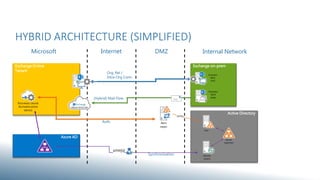
HYBRID ARCHITECTURE (SIMPLIFIED)
Exchange Online
Tenant
Azure AD
ONLINE PROTECTION
EXCHANGE ONLINE
AUTHENTICATION
SERVICE
Active Directory
ADFS
ACTIVE
DIRECTORY
DIRSYNC
SERVER
Exchange on-prem
HTTP(S)
EXCHANGE
2013
(MBX)
EXCHANGE
2013
(CAS)
Org. Rel /
Intra-Org Conn.
(Hybrid) Mail Flow
Auth.
Synchronization
Microsoft Internet DMZ Internal Network
ADFS
PROXY
HTTPS
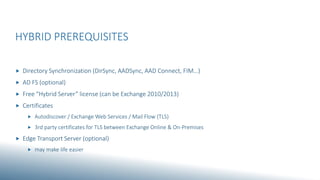
HYBRID PREREQUISITES
 Directory Synchronization (DirSync, AADSync, AAD Connect, FIM…)
 AD FS (optional)
 Free “Hybrid Server” license (can be Exchange 2010/2013)
 Certificates
 Autodiscover / Exchange Web Services / Mail Flow (TLS)
 3rd party certificates for TLS between Exchange Online & On-Premises
 Edge Transport Server (optional)
 may make life easier
“
”
THERE IS NO SUCH THING AS A HYBRID SERVER
Michael Van Horenbeeck (and many others too, I hope)…
Really, no joke. There is no hybrid server role. You just have CAS and MBX (and
Edge). And those can work together to do some hybrid stuff. But that’s as close to
a hybrid server you will get…
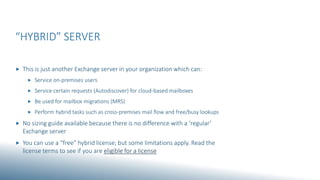
“HYBRID” SERVER
 This is just another Exchange server in your organization which can:
 Service on-premises users
 Service certain requests (Autodiscover) for cloud-based mailboxes
 Be used for mailbox migrations (MRS)
 Perform hybrid tasks such as cross-premises mail flow and free/busy lookups
 No sizing guide available because there is no difference with a ‘regular’
Exchange server
 You can use a “free” hybrid license; but some limitations apply. Read the
license terms to see if you are eligible for a license
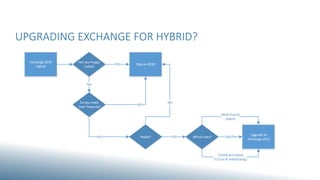
UPGRADING EXCHANGE FOR HYBRID?
Are you happy
today?
YES Stay on 2010
Exchange 2010
Hybrid
NO
Do you need
new features?
NO
Really?
NO
YES Which ones? OAUTH
Upgrade to
Exchange 2013
Certificate-based
TLS (no IP whitelisting)
YES
Multi-Forest
Hybrid
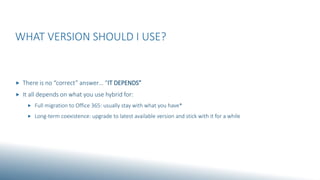
WHAT VERSION SHOULD I USE?
 There is no “correct” answer… “IT DEPENDS”
 It all depends on what you use hybrid for:
 Full migration to Office 365: usually stay with what you have*
 Long-term coexistence: upgrade to latest available version and stick with it for a while
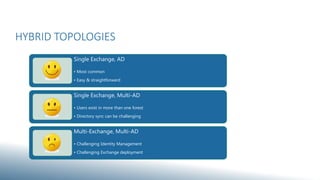
HYBRID TOPOLOGIES
Single Exchange, AD
• Most common
• Easy & straightforward
Single Exchange, Multi-AD
• Users exist in more than one forest
• Directory sync can be challenging
Multi-Exchange, Multi-AD
• Challenging Identity Management
• Challenging Exchange deployment
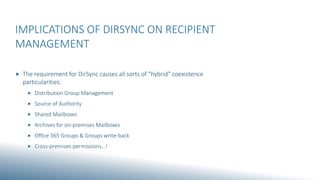
IMPLICATIONS OF DIRSYNC ON RECIPIENT
MANAGEMENT
 The requirement for DirSync causes all sorts of “hybrid” coexistence
particularities:
 Distribution Group Management
 Source of Authority
 Shared Mailboxes
 Archives for on-premises Mailboxes
 Office 365 Groups & Groups write-back
 Cross-premises permissions…!
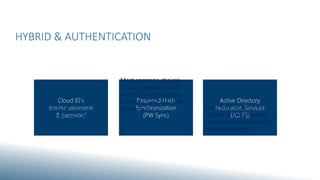
HYBRID & AUTHENTICATION
Active Directory
Federation Services
(AD FS)
Password Hash
Synchronization
(PW Sync)
Cloud ID’s
(online username
& password
Simple, but cumbersome
for the end users (two
sets of credentials to deal
with)
Most common choice!
Simple (especially with
AAD Connect); resilient,
but lacks “real” HA (if at
all needed) Most flexible; requires
additional infrastructure
and increases criticality of
on-prem systems…
ALTERNATE LOGIN ID & HYBRID
 Is now supported (again) for Hybrid deployments
 Strongly recommend against using it…
 Confusing for the end user
 Additional authentication prompts (e.g. setting up new profile)
 Need to manually configure profiles (i.e. for external connections like ActiveSync)
 Does not support certain scenarios like Hybrid Public Folders w/o “Modern Auth”
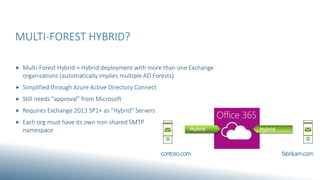
MULTI-FOREST HYBRID?
 Multi-Forest Hybrid = Hybrid deployment with more than one Exchange
organizations (automatically implies multiple AD Forests)
 Simplified through Azure Active Directory Connect
 Still needs “approval” from Microsoft
 Requires Exchange 2013 SP1+ as “Hybrid” Servers
 Each org must have its own non-shared SMTP
namespace
Office 365
Hybrid Hybrid
contoso.com fabrikam.com
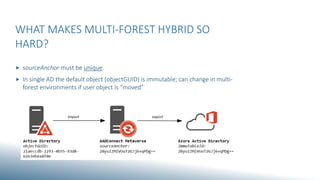
WHAT MAKES MULTI-FOREST HYBRID SO
HARD?
 sourceAnchor must be unique.
 In single AD the default object (objectGUID) is immutable; can change in multi-
forest environments if user object is “moved”
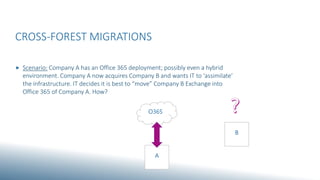
CROSS-FOREST MIGRATIONS
 Scenario: Company A has an Office 365 deployment; possibly even a hybrid
environment. Company A now acquires Company B and wants IT to ‘assimilate’
the infrastructure. IT decides it is best to “move” Company B Exchange into
Office 365 of Company A. How?
O365
A
B
CROSS-FOREST MIGRATIONS
 Multiple approaches possible:
 Consolidate on-premises into Company A first; then move mailboxes to Office 365
(double-hop)
 Create multi-forest hybrid deployment and move mailboxes from Company B into
Office 365
 Move mailboxes from Company B directly into Office 365 a.k.a. “Simple MRS
migration”
SIMPLE MRS MIGRATION
 In order to be able to move a mailbox using MRS, the recipient in O365 must
have Exchange attributes. In order to get attributes to Office 365, you can
either use Azure AD Connect (multi-forest) or…
 …use prepare-moverequest.ps1 to move attributes from Company B to Company A
 Sync objects from Company A to Azure Active Directory
 Launch a migration batch and points Office 365 to Company B
AM(A)A
Ask me (almost) anything…

CoLabora - Hybrid inside out - Nov 2015

  • 1.
  • 2.
    WHO AM I? Michael“Van Hybrid” Van Horenbeeck Director of Product Research @ ENow Software • Exchange MVP • Microsoft Certified Solutions Master for Messaging (Exchange/Office 365) Twitter: @mvanhorenbeeck Blog: www.vanhybrid.com Blog: blog.enowsoftware.com/solutions-engine Email: michael@vanhorenbeeck.be
  • 3.
    AGENDA  Hybrid Basics Help! What version should I use?  Hybrid Topologies  Recipient Management Caveats  Multi-Forest Hybrid Deployments  Cross-forest migrations?
  • 4.
    HYBRID ARCHITECTURE (SIMPLIFIED) ExchangeOnline Tenant Azure AD ONLINE PROTECTION EXCHANGE ONLINE AUTHENTICATION SERVICE Active Directory ADFS ACTIVE DIRECTORY DIRSYNC SERVER Exchange on-prem HTTP(S) EXCHANGE 2013 (MBX) EXCHANGE 2013 (CAS) Org. Rel / Intra-Org Conn. (Hybrid) Mail Flow Auth. Synchronization Microsoft Internet DMZ Internal Network ADFS PROXY HTTPS
  • 5.
    HYBRID PREREQUISITES  DirectorySynchronization (DirSync, AADSync, AAD Connect, FIM…)  AD FS (optional)  Free “Hybrid Server” license (can be Exchange 2010/2013)  Certificates  Autodiscover / Exchange Web Services / Mail Flow (TLS)  3rd party certificates for TLS between Exchange Online & On-Premises  Edge Transport Server (optional)  may make life easier
  • 6.
    “ ” THERE IS NOSUCH THING AS A HYBRID SERVER Michael Van Horenbeeck (and many others too, I hope)… Really, no joke. There is no hybrid server role. You just have CAS and MBX (and Edge). And those can work together to do some hybrid stuff. But that’s as close to a hybrid server you will get…
  • 7.
    “HYBRID” SERVER  Thisis just another Exchange server in your organization which can:  Service on-premises users  Service certain requests (Autodiscover) for cloud-based mailboxes  Be used for mailbox migrations (MRS)  Perform hybrid tasks such as cross-premises mail flow and free/busy lookups  No sizing guide available because there is no difference with a ‘regular’ Exchange server  You can use a “free” hybrid license; but some limitations apply. Read the license terms to see if you are eligible for a license
  • 8.
    UPGRADING EXCHANGE FORHYBRID? Are you happy today? YES Stay on 2010 Exchange 2010 Hybrid NO Do you need new features? NO Really? NO YES Which ones? OAUTH Upgrade to Exchange 2013 Certificate-based TLS (no IP whitelisting) YES Multi-Forest Hybrid
  • 9.
    WHAT VERSION SHOULDI USE?  There is no “correct” answer… “IT DEPENDS”  It all depends on what you use hybrid for:  Full migration to Office 365: usually stay with what you have*  Long-term coexistence: upgrade to latest available version and stick with it for a while
  • 10.
    HYBRID TOPOLOGIES Single Exchange,AD • Most common • Easy & straightforward Single Exchange, Multi-AD • Users exist in more than one forest • Directory sync can be challenging Multi-Exchange, Multi-AD • Challenging Identity Management • Challenging Exchange deployment
  • 11.
    IMPLICATIONS OF DIRSYNCON RECIPIENT MANAGEMENT  The requirement for DirSync causes all sorts of “hybrid” coexistence particularities:  Distribution Group Management  Source of Authority  Shared Mailboxes  Archives for on-premises Mailboxes  Office 365 Groups & Groups write-back  Cross-premises permissions…!
  • 12.
    HYBRID & AUTHENTICATION ActiveDirectory Federation Services (AD FS) Password Hash Synchronization (PW Sync) Cloud ID’s (online username & password Simple, but cumbersome for the end users (two sets of credentials to deal with) Most common choice! Simple (especially with AAD Connect); resilient, but lacks “real” HA (if at all needed) Most flexible; requires additional infrastructure and increases criticality of on-prem systems…
  • 13.
    ALTERNATE LOGIN ID& HYBRID  Is now supported (again) for Hybrid deployments  Strongly recommend against using it…  Confusing for the end user  Additional authentication prompts (e.g. setting up new profile)  Need to manually configure profiles (i.e. for external connections like ActiveSync)  Does not support certain scenarios like Hybrid Public Folders w/o “Modern Auth”
  • 14.
    MULTI-FOREST HYBRID?  Multi-ForestHybrid = Hybrid deployment with more than one Exchange organizations (automatically implies multiple AD Forests)  Simplified through Azure Active Directory Connect  Still needs “approval” from Microsoft  Requires Exchange 2013 SP1+ as “Hybrid” Servers  Each org must have its own non-shared SMTP namespace Office 365 Hybrid Hybrid contoso.com fabrikam.com
  • 15.
    WHAT MAKES MULTI-FORESTHYBRID SO HARD?  sourceAnchor must be unique.  In single AD the default object (objectGUID) is immutable; can change in multi- forest environments if user object is “moved”
  • 16.
    CROSS-FOREST MIGRATIONS  Scenario:Company A has an Office 365 deployment; possibly even a hybrid environment. Company A now acquires Company B and wants IT to ‘assimilate’ the infrastructure. IT decides it is best to “move” Company B Exchange into Office 365 of Company A. How? O365 A B
  • 17.
    CROSS-FOREST MIGRATIONS  Multipleapproaches possible:  Consolidate on-premises into Company A first; then move mailboxes to Office 365 (double-hop)  Create multi-forest hybrid deployment and move mailboxes from Company B into Office 365  Move mailboxes from Company B directly into Office 365 a.k.a. “Simple MRS migration”
  • 18.
    SIMPLE MRS MIGRATION In order to be able to move a mailbox using MRS, the recipient in O365 must have Exchange attributes. In order to get attributes to Office 365, you can either use Azure AD Connect (multi-forest) or…  …use prepare-moverequest.ps1 to move attributes from Company B to Company A  Sync objects from Company A to Azure Active Directory  Launch a migration batch and points Office 365 to Company B
  • 19.