More Related Content

PDF
coma - creator’s talk session: Code - openFrameworks 
PDF
デジタルアートセミナー#2 openFrameworksで学ぶ、 クリエイティブ・コーディング Session 1: openFrameworks入門 
PDF
BNN CAMP vol.3 インタラクションデザインの現在―プログラミング初心者のためのopenFrameworks入門 2 
PDF
デジタルアートセミナー#2 openFrameworksで学ぶ、 クリエイティブ・コーディング Session 3: アドオンを作ろう! 
PDF
openFrameworkとCityCompilerでバーチャルとリアルを結ぶ 
PDF
「クリエイティブ・ミュージック・コーディング」- オーディオ・ビジュアル作品のための、オープンソースなソフトウエア・フレームワークの現状と展望 
PDF
coma Creators session vol.2 
PDF
What's hot

PDF
griffon plugin を 実際に作ってみよう #jggug 
PPTX

PDF
Swift 2.0 で変わったところ「後編」 #cswift 
PDF
Webデザイン 第10回:HTML5実践 Three.jsで3Dプログラミング 
PPTX

PDF
Chromeでjavascriptデバッグ!まず半歩♪ 
PDF

PDF

PDF
Enpit bizapp_aiit_20130902_for_WindowsEnvironment 
PDF

PDF
Introduction for Browser Side MVC 
PDF
Visual Studio Codeで始めるTypeScript 
PDF

PDF
Clean Architectureで設計してRxJSを使った話 
PDF
20210515 cae linux_install_vb 
PDF

PDF
InterConnect2016 Report by BMXUG 
ODP
Mono at Microsoft Tech Days Japan 2009 
PDF
20210515 of4 wi&paraview 5.9.0_motorbike 
PDF
Similar to BNN CAMP vol.3 インタラクションデザインの現在―プログラミング初心者のためのopenFrameworks入門 1

PDF
メディア・アート II 第1回: ガイダンス openFrameworks入門 
PDF

PDF
openFrameworks Workshop in Kanazawa v001 
PDF
メディア・アートII 第3回 openFrameworks基礎 OOoF : オブジェクト指向 oF 
KEY

PDF

PPTX

PDF
Media Art II 2013 第5回:openFrameworks Addonを使用する 
PDF

KEY

PDF
オープンソースエコシステム #demodaytokyo 
KEY
軽量EvernoteクライアントSmartEverにおけるアプリ高速化の工夫と課題 
PPTX

PDF

PDF
PCD2019 TOKYO ワークショップ「2時間で!Processingでプログラミング入門」 
PPTX

PDF

PDF
openFrameworks基礎 たくさんの図形を動かす 静的配列と動的配列 - 芸大グラフィックスプログラミング演習B 
PDF
デジタルアートセミナー#2 openFrameworksで学ぶ、 クリエイティブ・コーディング Session 2: 構造をつくる 
PDF
yidev 第18回勉強会 「業務でSwiftで3ヶ月開発してきたので一旦振り返り」 More from Atsushi Tadokoro

PDF

PDF
Interactive Music II ProcessingとSuperColliderの連携 -2 
PDF
Interactive Music II ProcessingとSuperColliderの連携1 
PDF
Interactive Music II Processingによるアニメーション 
PDF
Interactive Music II Processing基本 
PDF
Interactive Music II SuperCollider応用 2 - SuperColliderとPure Dataの連携 
PDF
Media Art II openFrameworks アプリ間の通信とタンジブルなインターフェイス 
PDF
Interactive Music II SuperCollider応用 - SuperColliderと OSC (Open Sound Control) 
PDF
iTamabi 13 ARTSAT API 実践 5 - 衛星の軌道を描く 
PDF
メディア芸術基礎 II 第11回:HTML5実践 表現のための様々なJavaScriptライブラリ 
PDF
芸術情報演習デザイン(Web) 第8回: CSSフレームワークを使う 
PDF
Interactive Music II SuperCollider応用 JITLib - ライブコーディング 2 
PDF
iTamabi 13 第9回:ARTSAT API 実践 3 ジオコーディングで衛星の位置を取得 
PDF

PDF
Interactive Music II SuperCollider応用 JITLib - ライブコーディング 1 
PDF
iTamabi 13 第8回:ARTSAT API 実践 2 衛星アプリを企画する 
PDF
Media Art II openFrameworks 複数のシーンの管理・切替え 
PDF
Interactive Music II SuperCollider実習 オリジナルの楽器を作ろう! 
PDF

PDF
Interactive Music II SuperCollider入門 5 時間構造をつくる BNN CAMP vol.3 インタラクションデザインの現在―プログラミング初心者のためのopenFrameworks入門 1
- 1.
- 2.
- 3.
Workshop メンバー紹介
‣ BNNCAMP vol.3
‣ インタラクションデザインの現在―プログラミング初心者のた
めのopenFrameworks入門
‣ ワークショップの講師担当:田所 淳
‣ 主催: ビー・エヌ・エヌ新社
- 4.
- 5.
- 6.
- 7.
- 8.
- 9.
- 10.
- 11.
- 12.
- 13.
事前準備
‣ 以下のファイルが手元にあるか確認
‣ openFrameworksv.0.7.4 本体
‣ Mac: of_v0.7.4_osx_release
‣ Win: of_v0.7.4_vs2010_release
‣ 開発環境
‣ Mac: Xcode
‣ Win: Visual Studio Express 2010
‣ サンプルファイル
‣ openFrameworks_workshop13_v0.7.4-master
- 14.
- 15.
- 16.
- 17.
- 18.
- 19.
- 20.
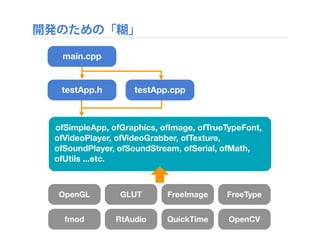
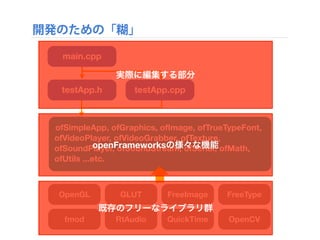
開発のための「糊」
OpenGL GLUT FreeImageFreeType
fmod RtAudio QuickTime OpenCV
main.cpp
testApp.h testApp.cpp
ofSimpleApp, ofGraphics, ofImage, ofTrueTypeFont,
ofVideoPlayer, ofVideoGrabber, ofTexture,
ofSoundPlayer, ofSoundStream, ofSerial, ofMath,
ofUtils ...etc.
- 21.
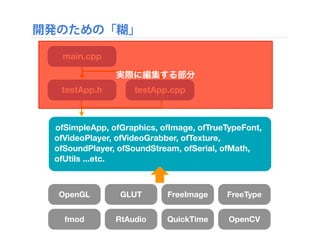
開発のための「糊」
OpenGL GLUT FreeImageFreeType
fmod RtAudio QuickTime OpenCV
main.cpp
testApp.h testApp.cpp
ofSimpleApp, ofGraphics, ofImage, ofTrueTypeFont,
ofVideoPlayer, ofVideoGrabber, ofTexture,
ofSoundPlayer, ofSoundStream, ofSerial, ofMath,
ofUtils ...etc.
実際に編集する部分
- 22.
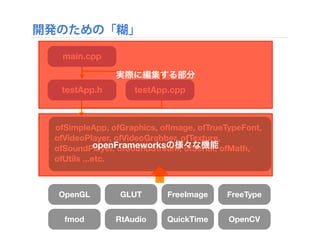
開発のための「糊」
OpenGL GLUT FreeImageFreeType
fmod RtAudio QuickTime OpenCV
main.cpp
testApp.h testApp.cpp
ofSimpleApp, ofGraphics, ofImage, ofTrueTypeFont,
ofVideoPlayer, ofVideoGrabber, ofTexture,
ofSoundPlayer, ofSoundStream, ofSerial, ofMath,
ofUtils ...etc.
実際に編集する部分
openFrameworksの様々な機能
- 23.
開発のための「糊」
OpenGL GLUT FreeImageFreeType
fmod RtAudio QuickTime OpenCV
main.cpp
testApp.h testApp.cpp
ofSimpleApp, ofGraphics, ofImage, ofTrueTypeFont,
ofVideoPlayer, ofVideoGrabber, ofTexture,
ofSoundPlayer, ofSoundStream, ofSerial, ofMath,
ofUtils ...etc.
実際に編集する部分
openFrameworksの様々な機能
既存のフリーなライブラリ群
- 24.
- 25.
- 26.
- 27.
- 28.
- 29.
- 30.
- 31.
- 32.
- 33.
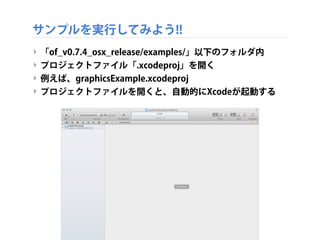
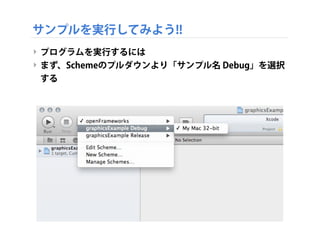
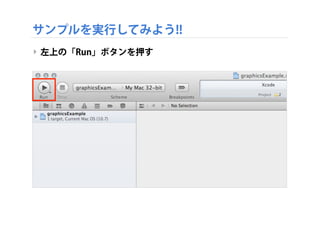
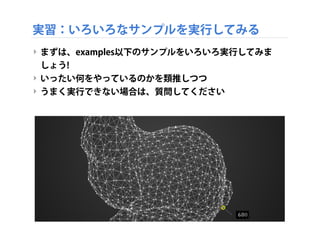
サンプルを実行してみよう!!
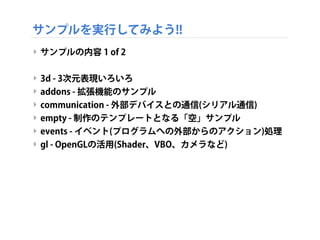
‣ サンプルの内容 1of 2
‣ 3d - 3次元表現いろいろ
‣ addons - 拡張機能のサンプル
‣ communication - 外部デバイスとの通信(シリアル通信)
‣ empty - 制作のテンプレートとなる「空」サンプル
‣ events - イベント(プログラムへの外部からのアクション)処理
‣ gl - OpenGLの活用(Shader、VBO、カメラなど)
- 34.
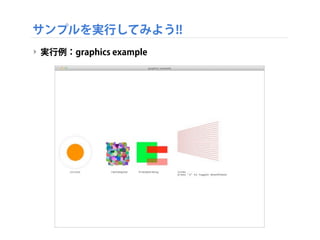
サンプルを実行してみよう!!
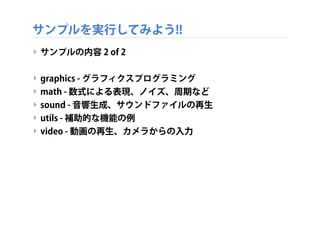
‣ サンプルの内容 2of 2
‣ graphics - グラフィクスプログラミング
‣ math - 数式による表現、ノイズ、周期など
‣ sound - 音響生成、サウンドファイルの再生
‣ utils - 補助的な機能の例
‣ video - 動画の再生、カメラからの入力
- 35.
- 36.
- 37.
- 38.
- 39.
- 40.
- 41.
- 42.
- 43.
- 44.
- 45.
- 46.
- 47.
- 48.
- 49.
- 50.
- 51.
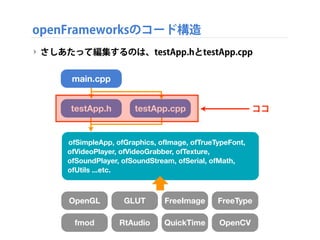
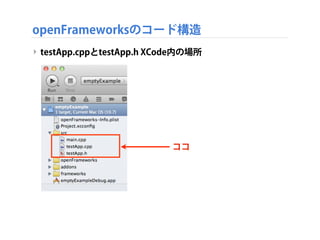
openFrameworksのコード構造
‣ さしあたって編集するのは、testApp.hとtestApp.cpp
OpenGL GLUTFreeImage FreeType
fmod RtAudio QuickTime OpenCV
main.cpp
testApp.h testApp.cpp
ofSimpleApp, ofGraphics, ofImage, ofTrueTypeFont,
ofVideoPlayer, ofVideoGrabber, ofTexture,
ofSoundPlayer, ofSoundStream, ofSerial, ofMath,
ofUtils ...etc.
ココ
- 52.
- 53.
- 54.
- 55.
- 56.
- 57.
- 58.
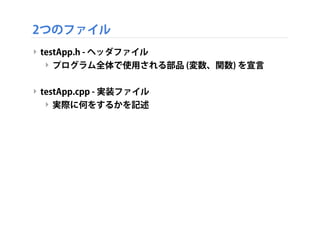
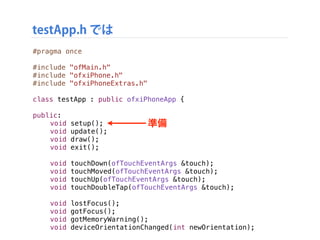
testApp.h では
準備
#pragma once
#include"ofMain.h"
#include "ofxiPhone.h"
#include "ofxiPhoneExtras.h"
class testApp : public ofxiPhoneApp {
!
public:
! void setup();
! void update();
! void draw();
! void exit();
!
! void touchDown(ofTouchEventArgs &touch);
! void touchMoved(ofTouchEventArgs &touch);
! void touchUp(ofTouchEventArgs &touch);
! void touchDoubleTap(ofTouchEventArgs &touch);
! void lostFocus();
! void gotFocus();
! void gotMemoryWarning();
! void deviceOrientationChanged(int newOrientation);
準備
- 59.
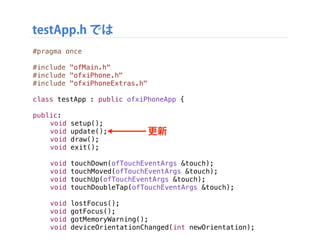
testApp.h では
準備
#pragma once
#include"ofMain.h"
#include "ofxiPhone.h"
#include "ofxiPhoneExtras.h"
class testApp : public ofxiPhoneApp {
!
public:
! void setup();
! void update();
! void draw();
! void exit();
!
! void touchDown(ofTouchEventArgs &touch);
! void touchMoved(ofTouchEventArgs &touch);
! void touchUp(ofTouchEventArgs &touch);
! void touchDoubleTap(ofTouchEventArgs &touch);
! void lostFocus();
! void gotFocus();
! void gotMemoryWarning();
! void deviceOrientationChanged(int newOrientation);
更新
- 60.
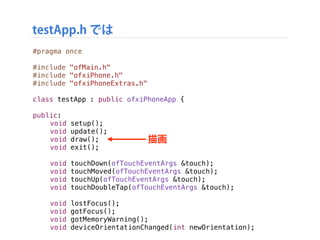
testApp.h では
準備
#pragma once
#include"ofMain.h"
#include "ofxiPhone.h"
#include "ofxiPhoneExtras.h"
class testApp : public ofxiPhoneApp {
!
public:
! void setup();
! void update();
! void draw();
! void exit();
!
! void touchDown(ofTouchEventArgs &touch);
! void touchMoved(ofTouchEventArgs &touch);
! void touchUp(ofTouchEventArgs &touch);
! void touchDoubleTap(ofTouchEventArgs &touch);
! void lostFocus();
! void gotFocus();
! void gotMemoryWarning();
! void deviceOrientationChanged(int newOrientation);
描画
- 61.
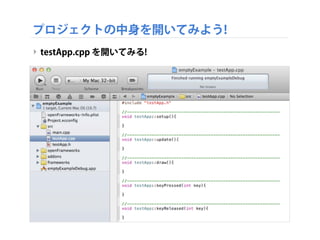
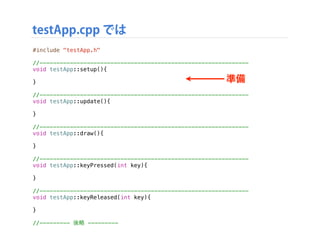
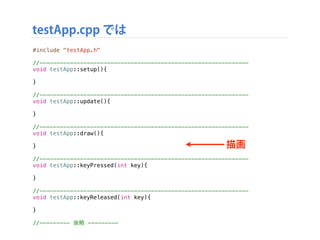
testApp.cpp では
準備
#include "testApp.h"
//--------------------------------------------------------------
voidtestApp::setup(){
}
//--------------------------------------------------------------
void testApp::update(){
}
//--------------------------------------------------------------
void testApp::draw(){
}
//--------------------------------------------------------------
void testApp::keyPressed(int key){
}
//--------------------------------------------------------------
void testApp::keyReleased(int key){
}
//--------- 後略 ---------
準備
- 62.
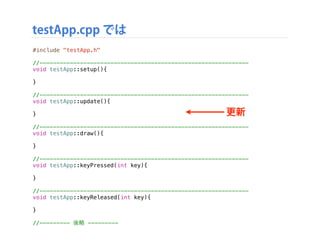
testApp.cpp では
準備
#include "testApp.h"
//--------------------------------------------------------------
voidtestApp::setup(){
}
//--------------------------------------------------------------
void testApp::update(){
}
//--------------------------------------------------------------
void testApp::draw(){
}
//--------------------------------------------------------------
void testApp::keyPressed(int key){
}
//--------------------------------------------------------------
void testApp::keyReleased(int key){
}
//--------- 後略 ---------
更新
- 63.
testApp.cpp では
準備
#include "testApp.h"
//--------------------------------------------------------------
voidtestApp::setup(){
}
//--------------------------------------------------------------
void testApp::update(){
}
//--------------------------------------------------------------
void testApp::draw(){
}
//--------------------------------------------------------------
void testApp::keyPressed(int key){
}
//--------------------------------------------------------------
void testApp::keyReleased(int key){
}
//--------- 後略 ---------
描画
- 64.
- 65.
- 66.
- 67.
- 68.
- 69.
- 70.
- 71.
- 72.
- 73.
- 74.
- 75.
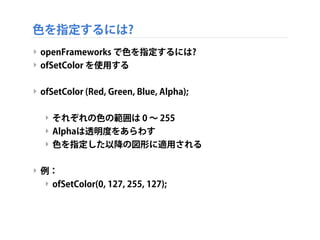
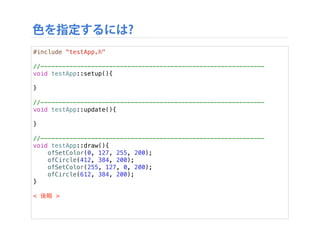
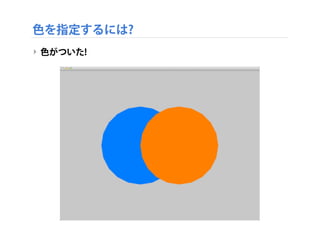
色を指定するには?
#include "testApp.h"
//--------------------------------------------------------------
void testApp::setup(){
}
//--------------------------------------------------------------
voidtestApp::update(){
}
//--------------------------------------------------------------
void testApp::draw(){
ofSetColor(0, 127, 255, 200);
ofCircle(412, 384, 200);
ofSetColor(255, 127, 0, 200);
ofCircle(612, 384, 200);
}
< 後略 >
- 76.
- 77.
- 78.
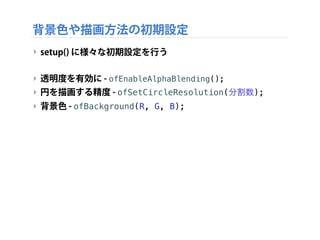
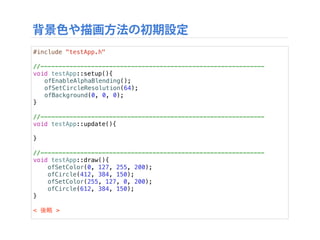
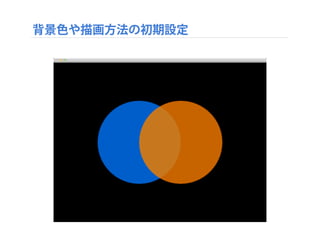
背景色や描画方法の初期設定
#include "testApp.h"
//--------------------------------------------------------------
void testApp::setup(){
!ofEnableAlphaBlending();
! ofSetCircleResolution(64);
! ofBackground(0, 0, 0);
}
//--------------------------------------------------------------
void testApp::update(){
!
}
//--------------------------------------------------------------
void testApp::draw(){
ofSetColor(0, 127, 255, 200);
ofCircle(412, 384, 150);
ofSetColor(255, 127, 0, 200);
ofCircle(612, 384, 150);!
}
< 後略 >
- 79.
- 80.
- 81.
- 82.
- 83.
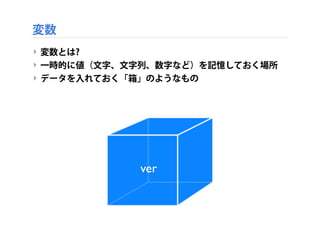
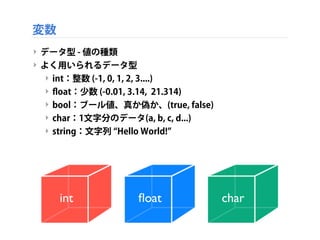
‣ データ型 -値の種類
‣ よく用いられるデータ型
‣ int:整数 (-1, 0, 1, 2, 3....)
‣ float:少数 (-0.01, 3.14, 21.314)
‣ bool:ブール値、真か偽か、(true, false)
‣ char:1文字分のデータ(a, b, c, d...)
‣ string:文字列 Hello World!
変数
int float char
- 84.
- 85.
- 86.
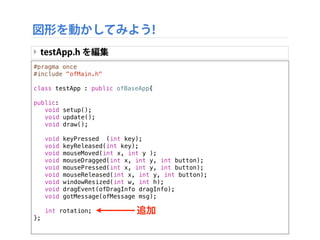
#pragma once
#include "ofMain.h"
classtestApp : public ofBaseApp{
!
public:
! void setup();
! void update();
! void draw();
!
! void keyPressed (int key);
! void keyReleased(int key);
! void mouseMoved(int x, int y );
! void mouseDragged(int x, int y, int button);
! void mousePressed(int x, int y, int button);
! void mouseReleased(int x, int y, int button);
! void windowResized(int w, int h);
! void dragEvent(ofDragInfo dragInfo);
! void gotMessage(ofMessage msg);
!
! int rotation;
};
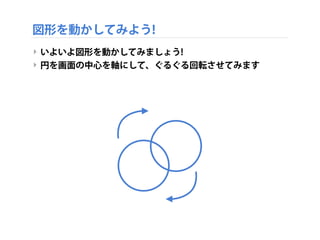
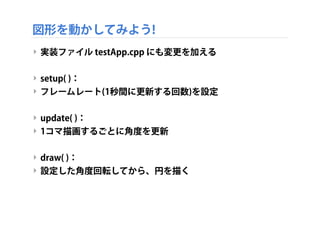
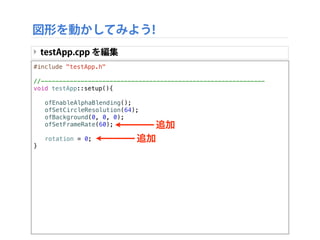
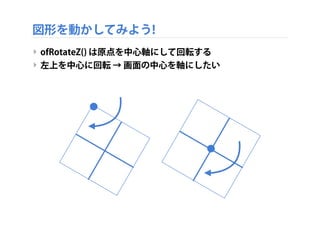
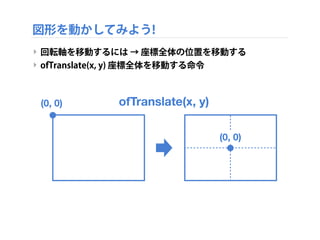
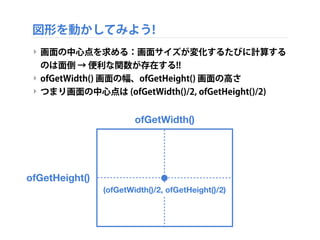
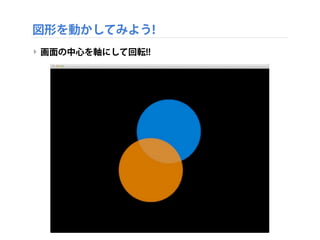
図形を動かしてみよう!
‣ testApp.h を編集
追加
- 87.
- 88.
- 89.
//--------------------------------------------------------------
void testApp::update(){
! rotation= rotation + 5;
}
//--------------------------------------------------------------
void testApp::draw(){
!
! ofRotateZ(rotation);
!
! ofSetColor(0, 127, 255, 200);
! ofCircle(412, 384, 150);
! ofSetColor(255, 127, 0, 200);
! ofCircle(612, 384, 150);
!
}
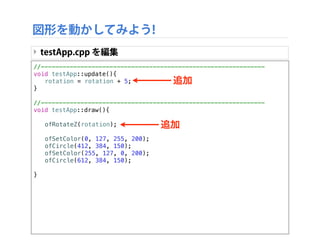
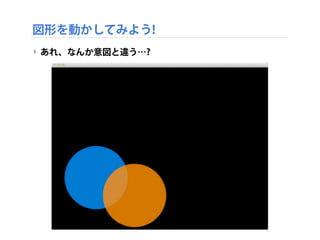
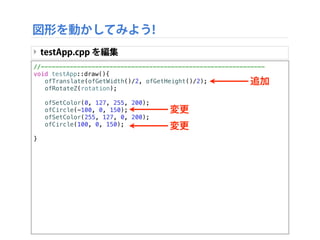
図形を動かしてみよう!
‣ testApp.cpp を編集
追加
追加
- 90.
- 91.
- 92.
- 93.
- 94.
//--------------------------------------------------------------
void testApp::draw(){
! ofTranslate(ofGetWidth()/2,ofGetHeight()/2);
! ofRotateZ(rotation);
!
! ofSetColor(0, 127, 255, 200);
! ofCircle(-100, 0, 150);
! ofSetColor(255, 127, 0, 200);
! ofCircle(100, 0, 150);
!
}
図形を動かしてみよう!
‣ testApp.cpp を編集
追加
変更
変更
- 95.
- 96.
- 97.
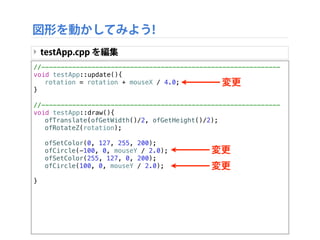
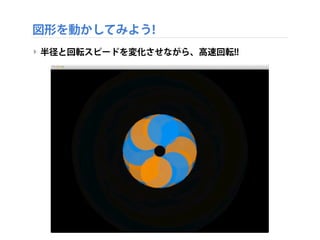
//--------------------------------------------------------------
void testApp::update(){
! rotation= rotation + mouseX / 4.0;
}
//--------------------------------------------------------------
void testApp::draw(){
! ofTranslate(ofGetWidth()/2, ofGetHeight()/2);
! ofRotateZ(rotation);
!
! ofSetColor(0, 127, 255, 200);
! ofCircle(-100, 0, mouseY / 2.0);
! ofSetColor(255, 127, 0, 200);
! ofCircle(100, 0, mouseY / 2.0);
!
}
図形を動かしてみよう!
‣ testApp.cpp を編集
変更
変更
変更
- 98.
- 99.


![講師、自己紹介
‣ 『Beyond Interaction[改訂第2版] -クリエイティブ・コーディ
ングのためのopenFrameworks実践ガイド』絶賛販売中!!
screenshot_679](https://image.slidesharecdn.com/ofhws01-130803125920-phpapp02/85/BNN-CAMP-vol-3-openFrameworks-1-6-320.jpg)