Database Security
https://www.oercommons.org/
Dr. Girija Narasimhan 1
OER- UNIT 4 Virtual Private Database
PART 1 – Row Level Security (RLS)
Dr. Girija Narasimhan 2
• The Virtual Private Database (VPD) is introduced in oracle 8i version.
• This is special feature which will control the database access. The purpose of VPD is whenever object
privilege and role is not sufficient to fulfill the requirement of the user security then VPD policy control the
access.
• In the VPD policy includes SELECT, INSERT, UPDATE, DELETE, INDEX statement.
• It controls user directly or indirectly accessing any schema objects such as views, tables or synonyms in the
database.
• Using Predicate to the view it will restrict the user to access the row, it is called Row Level security as RLS.
• The package name DBMS_RLS will support for implementing this feature.
• VPD is not supporting TRUNCATE OR ALTER statement i.e Data Definition Language statement.
• It is using Application context feature to control the user transaction views in the database.
4.1 Introduction
Dr. Girija Narasimhan 3
• There is two components, first to create function and then create policy.
• For Creating a Function to generate the Dynamic WHERE Clause (predicate).
• Using predicate define the restriction to apply for the policy.
• The function generally created in administration own schema. (i.e. SYS).
4.2 Components of an Oracle Virtual Private Database Policy
Dr. Girija Narasimhan 4
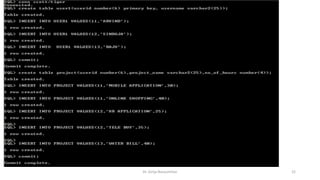
CREATE TABLE USER1(USERID NUMBER(4) PRIMARY KEY,USERNAME VARCHAR2(15));
INSERT INTO USER1 VALUES(11,'ARVIND');
INSERT INTO USER1 VALUES(12,'SINDUJA');
INSERT INTO USER1 VALUES(13,'RAJU');
CREATE TABLE PROJECT(USERID NUMBER(4),PROJECT_NAME
VARCHAR2(20),NO_OF_HOURS NUMBER(3));
INSERT INTO PROJECT VALUES(11,'MOBILE APPLICATION',30);
INSERT INTO PROJECT VALUES(11,'ONLINE SHOPPING',40);
INSERT INTO PROJECT VALUES(12,'HR APPLICATION',25);
INSERT INTO PROJECT VALUES(12,'TELE BUY',35);
Commit;
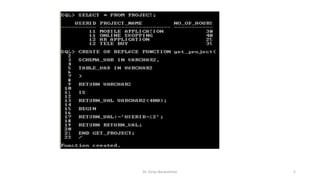
Before creating function create two tables in HR schema USER1 and PROJECT.
4.2.1. Create Function
Dr. Girija Narasimhan 5
Dr. Girija Narasimhan 6
1) It must take as arguments a schema name and an object (table, view, or synonym) name as inputs.
Define input parameters to hold this information, but do not specify the schema and object name themselves
within the function. The policy that you create with the DBMS_RLS package. You must create the parameter for
the schema first, followed by the parameter for the object.
2) It must provide a return value for the WHERE clause predicate that will be generated.
The return value for the WHERE clause is always a VARCHAR2 data type.
3) It must generate a valid WHERE clause., in that its WHERE clause is the same for all users who log on.
But in most cases, you may want to design the WHERE clause to be different for each user, each group of users,
or each application that accesses the objects you want to protect. For example, if a manager logs in, the
WHERE clause can be specific to the rights of that particular manager. You can do this by incorporating an
application context, which accesses user session information, into the WHERE clause generation code.
4) It must not select from a table within the associated policy function.
Although you can define a policy against a table, you cannot select that table from within the policy that was
defined against the table.
The function must have the following behavior
Dr. Girija Narasimhan 7
Creating a Policy to Attach the Function to the Objects You Want to Protect object.
To attach a policy to a table, view, or synonym, you use the DBMS_RLS.ADD_POLICY procedure.
You need to specify the table, view, or synonym to which you are adding a policy, and a name for the policy.
You can also specify other information, such as the types of statements the policy controls (SELECT, INSERT, UPDATE,
DELETE, CREATE INDEX, or ALTER INDEX).
You can enforce Oracle Virtual Private Database policies for SELECT, INSERT, UPDATE, INDEX, and DELETE statements.
If you do not specify a statement type, by default, Oracle Database specifies SELECT, INSERT, UPDATE, and DELETE but not
Index.
Enter any combination of these statement types by using the statement_types parameter in
the DBMS_RLS.ADD_POLICY procedure.
Enclose the list in a pair of single quotation marks.
In the Virtual Private Database policy, you must ensure that the statement_types parameter includes all three of
the INSERT, UPDATE, and DELETE statements for the policy to succeed.
Alternatively, you can omit the statement_types parameter.
You can enforce Oracle Virtual Private Database policies on index maintenance operations by specifying INDEX with the
statement_types parameter.
4.3 Creating a Policy to Attach the Function to the Objects
Dr. Girija Narasimhan 8
That is a reason it is showing only user 12 values.
After creating policy, login HR schema using PROJECT table, it
will show only USERID 12 records i.e 2 rows only.
It don‘t show all the records in the PROJECT table, once you
policy is attach with the function RETURN_VAL:='USERID=12'
this predicate WHERE condition is applied to the table.
Dr. Girija Narasimhan 9
4.4 Drop Function
For deleting the function, write drop function statement
DROP FUNCTION <FUNCTION_NAME>
DROP FUNCTION GET_PROJECT;
EXEC DBMS_RLS.DROP_POLICY ('schema name', 'object name', 'policy name');
EXEC DBMS_RLS.DROP_POLICY ('HR', 'PROJECT', 'PROB_project');
For example
HR-schema name
PROJECTobject name
PROB_project  policy name
All parameter should be enclosed by signal quotes.
4.5 Drop Policy
Database Security
https://www.oercommons.org/
Dr. Girija Narasimhan 10
OER- UNIT 4 Virtual Private Database
PART 2 – Column Masking
Dr. Girija Narasimhan 11
Set up a policy for each set of columns that has a different rule not for each user, for each set of columns.
The following considerations apply to column-masking:
* Column-masking applies only to SELECT statements.
* Column-masking conditions generated by the policy function must be simple Boolean expressions, unlike regular
Oracle Virtual Private Database predicates.
* For applications that perform calculations, or do not expect NULL values, use standard column-level Oracle Virtual
Private Database, specifying SEC_RELEVANT_COLS rather than the SEC_RELEVANT_COLS_OPT column-masking option.
* Do not include columns of the object data type (including the XMLtype) in the sec_relevant_cols setting. This
column type is not supported for the sec_relevant_cols setting.
* Column-masking used with UPDATE AS SELECT updates only the columns that users are allowed to see.
4.6 Column Masking
Dr. Girija Narasimhan 12
Dr. Girija Narasimhan 13
Column-level policies enforce row-level security when a query references a security-relevant column.
You can apply a column-level Oracle Virtual Private Database policy to tables and views, but not to synonyms.
To apply the policy to a column, specify the security-relevant column by using the SEC_RELEVANT_COLS parameter of
the DBMS_RLS.ADD_POLICY procedure.
This parameter applies the security policy whenever the column is referenced, explicitly or implicitly, in a query.
Dr. Girija Narasimhan 14
With column-masking behavior, all rows display, even those that reference sensitive columns.
The sensitive columns display as NULL values. To enable column-masking, set the SEC_RELEVANT_COLS_opt parameter of
the DBMS_RLS.ADD_POLICY procedure.
Dr. Girija Narasimhan 15
For some queries, column-masking may prevent some rows from displaying.
Because the column-masking option was set, this query may not return rows if the salary column returns a NULL
value.
This example deptno 20,10 values sal column values are NULL
Database Security
https://www.oercommons.org/
Dr. Girija Narasimhan 16
OER- UNIT 4 Virtual Private Database
PART 3 – Application Context
Dr. Girija Narasimhan 17
The following statement returns the name of the user who logged onto the database:
CONNECT OE/OE
SELECT SYS_CONTEXT ('USERENV', 'SESSION_USER') FROM DUAL;
SYS_CONTEXT ('USERENV', 'SESSION_USER')
------------------------------------------------------
OE
SELECT SYS_CONTEXT ('<name_space>','<parameter>', <length>) from DUAL;
SYS_CONTEXT function returns the value of parameter associated with the context namespace.
This function can be used in both SQL and PL/SQL statements.Context namespaces are always stored in the schema SYS .
If you omit schema , then Oracle Database uses the current schema. package.
To create a context namespace, you must have CREATE ANY CONTEXT system privilege.
The parameter name can be any string. It is not case sensitive, but it cannot exceed 30 bytes in length. Oracle provides a built-
in namespace called USERENV, which describes the current session.
4.7 SYS_CONTEXT
Dr. Girija Narasimhan 18
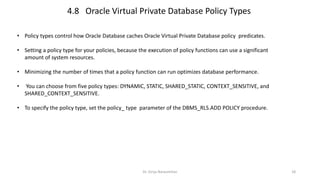
• Policy types control how Oracle Database caches Oracle Virtual Private Database policy predicates.
• Setting a policy type for your policies, because the execution of policy functions can use a significant
amount of system resources.
• Minimizing the number of times that a policy function can run optimizes database performance.
• You can choose from five policy types: DYNAMIC, STATIC, SHARED_STATIC, CONTEXT_SENSITIVE, and
SHARED_CONTEXT_SENSITIVE.
• To specify the policy type, set the policy_ type parameter of the DBMS_RLS.ADD POLICY procedure.
4.8 Oracle Virtual Private Database Policy Types
Dr. Girija Narasimhan 19
Dr. Girija Narasimhan 20
• Application context helps you apply fine-grained access control because you can link function-based security
policies with applications.
• Oracle provides a built-in application context namespace, USERENV, which provides access to predefined
attributes.
• These attributes are session primitives which is information that the database automatically captures about a
user session.
• For example, the IP address from which a user connects, the user name, and the proxy user name (in cases
where a user connection is proxies through a middle tier), are all available as predefined attributes through
the USERENV application context.
• Such usage removes the repeated overhead of querying the database each time access to application
attributes is needed.
4.9 Application Context
Dr. Girija Narasimhan 21
Dr. Girija Narasimhan 22
Dr. Girija Narasimhan 23
Dr. Girija Narasimhan 24
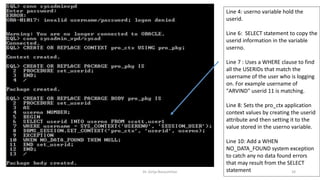
Line 4: userno variable hold the
userid.
Line 6: SELECT statement to copy the
userid information in the variable
userno.
Line 7 : Uses a WHERE clause to find
all the USERIDs that match the
username of the user who is logging
on. For example username of
"ARVIND" userid 11 is matching.
Line 8: Sets the pro_ctx application
context values by creating the userid
attribute and then setting it to the
value stored in the userno variable.
Line 10: Add a WHEN
NO_DATA_FOUND system exception
to catch any no data found errors
that may result from the SELECT
statement
Dr. Girija Narasimhan 25
Dr. Girija Narasimhan 26
Dr. Girija Narasimhan 27
Dr. Girija Narasimhan 28

OER Unit 4 Virtual Private Database

  • 1.
    Database Security https://www.oercommons.org/ Dr. GirijaNarasimhan 1 OER- UNIT 4 Virtual Private Database PART 1 – Row Level Security (RLS)
  • 2.
    Dr. Girija Narasimhan2 • The Virtual Private Database (VPD) is introduced in oracle 8i version. • This is special feature which will control the database access. The purpose of VPD is whenever object privilege and role is not sufficient to fulfill the requirement of the user security then VPD policy control the access. • In the VPD policy includes SELECT, INSERT, UPDATE, DELETE, INDEX statement. • It controls user directly or indirectly accessing any schema objects such as views, tables or synonyms in the database. • Using Predicate to the view it will restrict the user to access the row, it is called Row Level security as RLS. • The package name DBMS_RLS will support for implementing this feature. • VPD is not supporting TRUNCATE OR ALTER statement i.e Data Definition Language statement. • It is using Application context feature to control the user transaction views in the database. 4.1 Introduction
  • 3.
    Dr. Girija Narasimhan3 • There is two components, first to create function and then create policy. • For Creating a Function to generate the Dynamic WHERE Clause (predicate). • Using predicate define the restriction to apply for the policy. • The function generally created in administration own schema. (i.e. SYS). 4.2 Components of an Oracle Virtual Private Database Policy
  • 4.
    Dr. Girija Narasimhan4 CREATE TABLE USER1(USERID NUMBER(4) PRIMARY KEY,USERNAME VARCHAR2(15)); INSERT INTO USER1 VALUES(11,'ARVIND'); INSERT INTO USER1 VALUES(12,'SINDUJA'); INSERT INTO USER1 VALUES(13,'RAJU'); CREATE TABLE PROJECT(USERID NUMBER(4),PROJECT_NAME VARCHAR2(20),NO_OF_HOURS NUMBER(3)); INSERT INTO PROJECT VALUES(11,'MOBILE APPLICATION',30); INSERT INTO PROJECT VALUES(11,'ONLINE SHOPPING',40); INSERT INTO PROJECT VALUES(12,'HR APPLICATION',25); INSERT INTO PROJECT VALUES(12,'TELE BUY',35); Commit; Before creating function create two tables in HR schema USER1 and PROJECT. 4.2.1. Create Function
  • 5.
  • 6.
    Dr. Girija Narasimhan6 1) It must take as arguments a schema name and an object (table, view, or synonym) name as inputs. Define input parameters to hold this information, but do not specify the schema and object name themselves within the function. The policy that you create with the DBMS_RLS package. You must create the parameter for the schema first, followed by the parameter for the object. 2) It must provide a return value for the WHERE clause predicate that will be generated. The return value for the WHERE clause is always a VARCHAR2 data type. 3) It must generate a valid WHERE clause., in that its WHERE clause is the same for all users who log on. But in most cases, you may want to design the WHERE clause to be different for each user, each group of users, or each application that accesses the objects you want to protect. For example, if a manager logs in, the WHERE clause can be specific to the rights of that particular manager. You can do this by incorporating an application context, which accesses user session information, into the WHERE clause generation code. 4) It must not select from a table within the associated policy function. Although you can define a policy against a table, you cannot select that table from within the policy that was defined against the table. The function must have the following behavior
  • 7.
    Dr. Girija Narasimhan7 Creating a Policy to Attach the Function to the Objects You Want to Protect object. To attach a policy to a table, view, or synonym, you use the DBMS_RLS.ADD_POLICY procedure. You need to specify the table, view, or synonym to which you are adding a policy, and a name for the policy. You can also specify other information, such as the types of statements the policy controls (SELECT, INSERT, UPDATE, DELETE, CREATE INDEX, or ALTER INDEX). You can enforce Oracle Virtual Private Database policies for SELECT, INSERT, UPDATE, INDEX, and DELETE statements. If you do not specify a statement type, by default, Oracle Database specifies SELECT, INSERT, UPDATE, and DELETE but not Index. Enter any combination of these statement types by using the statement_types parameter in the DBMS_RLS.ADD_POLICY procedure. Enclose the list in a pair of single quotation marks. In the Virtual Private Database policy, you must ensure that the statement_types parameter includes all three of the INSERT, UPDATE, and DELETE statements for the policy to succeed. Alternatively, you can omit the statement_types parameter. You can enforce Oracle Virtual Private Database policies on index maintenance operations by specifying INDEX with the statement_types parameter. 4.3 Creating a Policy to Attach the Function to the Objects
  • 8.
    Dr. Girija Narasimhan8 That is a reason it is showing only user 12 values. After creating policy, login HR schema using PROJECT table, it will show only USERID 12 records i.e 2 rows only. It don‘t show all the records in the PROJECT table, once you policy is attach with the function RETURN_VAL:='USERID=12' this predicate WHERE condition is applied to the table.
  • 9.
    Dr. Girija Narasimhan9 4.4 Drop Function For deleting the function, write drop function statement DROP FUNCTION <FUNCTION_NAME> DROP FUNCTION GET_PROJECT; EXEC DBMS_RLS.DROP_POLICY ('schema name', 'object name', 'policy name'); EXEC DBMS_RLS.DROP_POLICY ('HR', 'PROJECT', 'PROB_project'); For example HR-schema name PROJECTobject name PROB_project  policy name All parameter should be enclosed by signal quotes. 4.5 Drop Policy
  • 10.
    Database Security https://www.oercommons.org/ Dr. GirijaNarasimhan 10 OER- UNIT 4 Virtual Private Database PART 2 – Column Masking
  • 11.
    Dr. Girija Narasimhan11 Set up a policy for each set of columns that has a different rule not for each user, for each set of columns. The following considerations apply to column-masking: * Column-masking applies only to SELECT statements. * Column-masking conditions generated by the policy function must be simple Boolean expressions, unlike regular Oracle Virtual Private Database predicates. * For applications that perform calculations, or do not expect NULL values, use standard column-level Oracle Virtual Private Database, specifying SEC_RELEVANT_COLS rather than the SEC_RELEVANT_COLS_OPT column-masking option. * Do not include columns of the object data type (including the XMLtype) in the sec_relevant_cols setting. This column type is not supported for the sec_relevant_cols setting. * Column-masking used with UPDATE AS SELECT updates only the columns that users are allowed to see. 4.6 Column Masking
  • 12.
  • 13.
    Dr. Girija Narasimhan13 Column-level policies enforce row-level security when a query references a security-relevant column. You can apply a column-level Oracle Virtual Private Database policy to tables and views, but not to synonyms. To apply the policy to a column, specify the security-relevant column by using the SEC_RELEVANT_COLS parameter of the DBMS_RLS.ADD_POLICY procedure. This parameter applies the security policy whenever the column is referenced, explicitly or implicitly, in a query.
  • 14.
    Dr. Girija Narasimhan14 With column-masking behavior, all rows display, even those that reference sensitive columns. The sensitive columns display as NULL values. To enable column-masking, set the SEC_RELEVANT_COLS_opt parameter of the DBMS_RLS.ADD_POLICY procedure.
  • 15.
    Dr. Girija Narasimhan15 For some queries, column-masking may prevent some rows from displaying. Because the column-masking option was set, this query may not return rows if the salary column returns a NULL value. This example deptno 20,10 values sal column values are NULL
  • 16.
    Database Security https://www.oercommons.org/ Dr. GirijaNarasimhan 16 OER- UNIT 4 Virtual Private Database PART 3 – Application Context
  • 17.
    Dr. Girija Narasimhan17 The following statement returns the name of the user who logged onto the database: CONNECT OE/OE SELECT SYS_CONTEXT ('USERENV', 'SESSION_USER') FROM DUAL; SYS_CONTEXT ('USERENV', 'SESSION_USER') ------------------------------------------------------ OE SELECT SYS_CONTEXT ('<name_space>','<parameter>', <length>) from DUAL; SYS_CONTEXT function returns the value of parameter associated with the context namespace. This function can be used in both SQL and PL/SQL statements.Context namespaces are always stored in the schema SYS . If you omit schema , then Oracle Database uses the current schema. package. To create a context namespace, you must have CREATE ANY CONTEXT system privilege. The parameter name can be any string. It is not case sensitive, but it cannot exceed 30 bytes in length. Oracle provides a built- in namespace called USERENV, which describes the current session. 4.7 SYS_CONTEXT
  • 18.
    Dr. Girija Narasimhan18 • Policy types control how Oracle Database caches Oracle Virtual Private Database policy predicates. • Setting a policy type for your policies, because the execution of policy functions can use a significant amount of system resources. • Minimizing the number of times that a policy function can run optimizes database performance. • You can choose from five policy types: DYNAMIC, STATIC, SHARED_STATIC, CONTEXT_SENSITIVE, and SHARED_CONTEXT_SENSITIVE. • To specify the policy type, set the policy_ type parameter of the DBMS_RLS.ADD POLICY procedure. 4.8 Oracle Virtual Private Database Policy Types
  • 19.
  • 20.
    Dr. Girija Narasimhan20 • Application context helps you apply fine-grained access control because you can link function-based security policies with applications. • Oracle provides a built-in application context namespace, USERENV, which provides access to predefined attributes. • These attributes are session primitives which is information that the database automatically captures about a user session. • For example, the IP address from which a user connects, the user name, and the proxy user name (in cases where a user connection is proxies through a middle tier), are all available as predefined attributes through the USERENV application context. • Such usage removes the repeated overhead of querying the database each time access to application attributes is needed. 4.9 Application Context
  • 21.
  • 22.
  • 23.
  • 24.
    Dr. Girija Narasimhan24 Line 4: userno variable hold the userid. Line 6: SELECT statement to copy the userid information in the variable userno. Line 7 : Uses a WHERE clause to find all the USERIDs that match the username of the user who is logging on. For example username of "ARVIND" userid 11 is matching. Line 8: Sets the pro_ctx application context values by creating the userid attribute and then setting it to the value stored in the userno variable. Line 10: Add a WHEN NO_DATA_FOUND system exception to catch any no data found errors that may result from the SELECT statement
  • 25.
  • 26.
  • 27.
  • 28.