• Communities of Practice 1
Key insights, ideas
and issues
—
22 January 2016
Key insights
and ideas
—
22 january 2016
Table of contents
—
3 … Zoom out: 10 insights and ideas
4 … Decide
8 … Onboard
13 … Grow
23 … Zoom in: 30 usability issues
25 … Critical
27 … High
33 … Medium
46 … Low
• Communities of Practice 3
Key insights
and ideas
—
22 january 2016
10 Insights and ideas
ZOOM OUT
—
This section is divided into the three phases of a community journey:
Decide, Onboard and Grow.
• Communities of Practice 4
Key insights
and ideas
—
22 january 2016
Decide
Zoom out: 10 insights and ideas
—
• Communities of Practice
Zoom out: 10 insights and ideas
—
5
IDEA #1
« OECD Communities is like an iceberg:
there’s depth that’s not being utilized at all
or exploited. »
« It’s just being used in a very basic way - Is
it ok to just use it as a document
repository? »
It should be easy to navigate, easy to understand, and offers your personas
information on what they are searching for. In essence, your homepage
should answer the question, “Can I help you find what you’re looking for?”
right away before Maureen or anyone else on the team has to.
Recommendations:
A product page containing the key components:
1. Clear value proposition. It should answer two basic questions: What
does this do and why does it matter? Examples inspired by other networks
include: « Create a home for collaborating seamlessly on projects » or «
Harness the knowledge and power of our collective group »
2. Persona-focused copy. Define your personas’ pain points based on
previous research and offer solutions.
3. Navigation. Keep things user-friendly for our potential community
creator.
4. Call to action. Examples could be « Set up a One-on-one Session » or «
Create an OECD Community Site »
Set up a product
page that answers
the most important
questions in under a
minute.
• Communities of Practice
Zoom out: 10 insights and ideas
—
6
IDEA #2
« It would help to see how others are doing
this. »
« People were skeptical - we had to
conduct a pilot just to prove that people
could use it. »
Tools are dull and boring if taken on their own - a hammer isn’t as
interesting as the treehouse someone built with it. It’s when it’s taken in
the context of a project that a tool’s usefulness quickly comes to life.
Community Stories are meant to be a kind of show-and-tell of people’s
projects and how these came to life with the help of Jive. There is power
in recognizing the success of others. By highlighting Jive’s various uses in
these stories, site creators can begin to imagine how Jive can be used on
their projects, encouraging them to get creative with these available tools.
Recommendations:
Three community stories based on the real projects of employees,
emphasizing different ways that Jive can be used. They would include
testimonies, portraits and screen shots (if possible) showcasing their
current sites and how they are being used.
Special features on communities every 3 months narrated and published
on the blog by the Product Manager. This would mean continuing to shout-
out and feature users that are leading the way, recognizing good practice
and sharing the contacts of champions who could be helpful to other
colleagues.
Showcase the
success of others
through community
stories.
• Communities of Practice
Zoom out: 10 insights and ideas
—
7
IDEA #3
« Is there a way to see how this might work
before committing? »
Using an unfamiliar product can be overwhelming, especially when it has
many facets and features. Some people at the OECD sometimes associate
using aspects of OECD Communities with necessary « skills or expertise »
that they do not necessarily believe they have. To avoid driving people
away, it’s important to help them find their bearings. This doesn’t
necessarily mean holding their hand through the whole process.
More than a feature showcase but less extensive than a full tutorial, the
Tour Video is exactly what it sounds like: a tour that shows site creators
the different directions they can go with Jive’s basic features and that
helps them navigate their way confidently through the product all by
themselves.
Recommendations:
A 90 - 120sec video that walks site creators through Jive’s most important
basic tools and functions. (See https://slack.com/is for an example).
Give new users a
quick intro through
a short tour-video.
• Communities of Practice 8
Key insights
and ideas
—
22 january 2016
Onboard
Zoom out: 10 insights and ideas
—
• Communities of Practice
Zoom out: 10 insights and ideas
—
9
IDEA #4
« The site owner can be quite hands-off,
and it isn’t part of our job description, so it
doesn’t get done. »
« We just had someone’s administrative
assistant take over and, well, pretty much
fend for themselves. »
Launching a community site successfullly asks for a committed team of
individuals, that represent a cross-section of your organization, to execute
tasks effectively and on time. While there are no hard and fast rules for
this, as a starting point, it’s helpful to identify:
• The three most common community types by use case scenarios:
Community of Practice, Formal Work Group and Project Team
(description, goals and links to real-world examples).
• The diverse roles within a community (ex. community manager, system
administrator, content supplier, etc.) and what these roles entail (ex.
description of role, desired experience/expertise, responsibilities and
estimated time commitment).
It’s important to note that these roles may overlap. The specifics of your
own community - its size and composition, to start with - determines
whether a team member can fulfill multiple roles or if you need several
members fulfilling a single role.
Recommendations:
A section in the « Learning Corner » (see Idea #6) dedicated to the above.
Outline community
types and
recommended roles.
• Communities of Practice
Zoom out: 10 insights and ideas
—
10
IDEA #5
« I didn’t know how to do this. I just looked
at what everyone else was doing and
copied what I could. »
« What’s the point of reinventing the
wheel? »
« I wish we had something more, well,
modern-looking. »
« I would love to make it look good, but I
just don’t have the time. »
Most site creators don’t have the time, skill or budget to customize
templates for their communities. Many need their sites to be up-and-
running quickly. And, without having to hire a professional, they would like
to have a well-designed interface. Currently, site creators informally ask
around and look at other community sites to develop an idea of what
direction to go with their own site. Unfortunately, even if this speeds up
their own design process, the sites they copy don’t necessarily contain the
best functionalities, navigation or design for their purposes.
Recommendations:
To help people get started, we could produce new default templates that
come with standard functionalities and navigation frameworks, each based
on the three specific community types’ identified needs. A new default
theme, with a refreshed color scheme, typography and banner would work
hand-in-hand with the templates to improve the user experience and
bring it in line with other OECD websites.
These templates should have their content and layouts validated through
user testing to ensure that each one is well-adapted to type of community
it serves straight out of the box. User testing of templates should be done
in collaboration with OECD site creators and administrators.
Give site creators a
head start through
customizable
themed templates.
• Communities of Practice
Zoom out: 10 insights and ideas
—
11
IDEA #6
« The training showed us the basics of
OECD communities but it didn’t cover the
things I really wanted to know: how to
make the site look good, how to get people
to use it. »

« The training didn’t really apply to people
like me. »
Because your users have different goals, preferred learning styles as well
as levels of understanding, tech-savviness, a cookie-cutter approach is not
enough. It would be beneficial to provide personalized support to site
creators/administrators.
Recommendations:
Allow members to schedule One-on-one Workshops that function more
like personalized consultancy sessions rather than one-size-fits all
training. During the 1-hour sessions, the creator/administrator will be
paired with a member of the Ambassadors network, Product Manager or
other expert within the OECD Communities Team. Based on a
questionnaire, they can advise him/her on several topics including: using
specific platform tools, translating their ideas into their community site for
the first time, troubleshooting, engagement strategy, etc. Prior to the
meeting, the expert could also assess their current environment, and
determine any areas that should be changed to ensure a better experience.
At the end of the session, will provide you with a checklist and plan to
remediate any issues that were surfaced during assessment.
Create a well-identified « Learning Corner » to store training resources
such as an Onboarding Guide as well tips & tricks identified during this
study and/or sourced from the larger community. This space can also be
used to introduce product updates, event invitations, success stories and
other curated content.
…
Provide flexible
training and
support.
• Communities of Practice
Zoom out: 10 insights and ideas
—
12
IDEA #6 …continued
…
Give community managers access to more specialized training to support
those interested in taking a step further: Engaging instead of just
administrating. This can be done in the form of a hands-on workshop that:
1. Serves as a crash course on the essentials of Community Management in
2016.
2. Showcases interesting cases and best practices.
3. Goes beyond theory, allowing community managers to learn-by-doing:
producing compelling content, conversation-seeding tactics,
understanding analytics, etc.
Through the champions network, we can encourage Peer Learning (see
Idea #7).
« It’s so easy—I don’t see why I would need
a basic training at all! »

« We had hoped for active discussions in
the forums but it fell flat and we aren’t
sure why. Since then we’ve dropped the
idea of online collaboration. »
• Communities of Practice 13
Key insights
and ideas
—
22 january 2016
Grow
Zoom out: 10 insights and ideas
—
• Communities of Practice
Zoom out: 10 insights and ideas
—
14
IDEA #7
« Until people start taking ownership—and
stop thinking of the site’s as just ‘the
secretary’s space—we’re not going to see
any real change. »

« Seeing leaders use the site is a big deal,
especially in some of the more conservative
communities. »
The most efficient and effective way for people to learn is through the
people around them - this is why it’s important to establish a community
of champions who are excited about the platform. With their influence,
champions help build enthusiasm and competency from within their
teams, and promote the adoption of new and improved ways of working.
These champions can help lessen the strain on the core project team and
drive engagement throughout the community by helping their peers
create, manage, and use community sites more effectively. At the same
time, internal champions can help identify challenges and potential
solutions on the ground, bringing vital feedback to the project team and
sponsor.
It’s also important to have clear validation from the leadership within
OECD. Their influence on company culture puts them in the best position
to communicate the value and benefit of the platform across the
organization, even if the platform was driven by employee demand to
begin with.
…
Build (and grow) a
community of
champions.
• Communities of Practice
Zoom out: 10 insights and ideas
—
15
IDEA #7 …continued
« I’d like to gain different perspectives from
other people’s experiences, and at the same
time, promote my own department’s work
in the field. »
« I found many best practices, but not
much discussion about them. Usually on
other sites people ask questions or suggest
improvements on what the author wrote,
but I felt like people were self-censoring on
this site. »
Recommendations:
Design a program that engages and recognizes the efforts of champions.
For example, giving them privileged access at relevant events, or
highlighting their expertise of the platform by engaging them as speakers
in conferences. We could also consider publishing an internal directory
showcasing their profiles, which would be particularly useful in the case of
Peer Learning (see Idea #6)
Maintain a regular rhythm for discussions with the champions on what’s
working and what’s not. This could fall under the work of the Head of
Community (see Idea #10) who can then push the content back to the
communities via blog posts, events or during training.
Personally encourage well-established leaders to engage on the platform,
in order to pull in others. The goal is to have someone high up on OECD’s
command chain to start a relevant and meaningful open dialogue on the
Communities platform about a decision that would affect them. This would
highlight the platform’s value and usefulness, giving it additional
legitimacy and encouraging its adoption. It would also have the added
benefit of sending a strong signal about how serious OECD is about
employee feedback.
• Communities of Practice
Zoom out: 10 insights and ideas
—
16
IDEA #8
« I think there is a great interest in best
practices, but people seem reluctant to
have an open discussion about them. »
« We’re not sure what’s holding people
back in the forum. »

« The forums have to be organic, people
shouldn’t feel like they’re being judged. »
Regular events could help build a community, keep them engaged around
digital practices around the future of work, create spaces for the informal
sharing of best practices both within and beyond the OECD, and of course,
give everyone a chance to relax and have a great time.
Recommendations:
A speaker series or happy hour, tentatively entitled « The Future of
Collaboration at Work. » This could be set up in partnership with the
Community Champions, who could be engaged as speakers, co-organizers,
content curators or ambassadors.
Here’s a short blurb to give you an idea of the concept:
« Forget about flying cars. Let's start imagining something more relevant
about our future: Work. »
A lot of different ingredients are being tossed into the pot: improved
robotics and the rise of automation, holacracy, the surge of working from
home, absolute transparency through information sharing, the growing
role of the « Employee Experience Officers »...and these are just a few that
are worth mentioning.
Get a taste of what's to come, and join us for a happy hour series with a
variety of experts, OECD Community members, and friends from other
organizations all sharing their take about the future of work. »
Engage the
community through
events.
• Communities of Practice
Zoom out: 10 insights and ideas
—
17
IDEA #9
« Jive's lack of native capabilities to
support work that requires process or
structure increasingly puts it at a
disadvantage. » (Gartner, 2015)
« There’s no way to easily share to Twitter
or LinkedIn. »
Jive is not a one-stop shop—and it doesn’t have to be. The platform makes
it possible to extend functionality via software integrations and add-ons.
Recommendations:
It would be interesting to begin experimenting with integrations around
one aspect that community administrators often use: content sharing.
Social media. Specifically, Linkedin and Twitter--both of which are already
used by communities in the context of their work together.
…
Explore and curate
integrations
complimentary to
Jive’s core
functionalities
• Communities of Practice
Zoom out: 10 insights and ideas
—
18
IDEA #9 …continued
« We don’t end up with one long
discussion, because some people embed
their comments in a document, and attach
that to the discussion thread. »
« We might need filters in the forum to see
comments by country, by theme, and by
document. »
Recommendations:
Google doc. Jive has a connector that enables access to Google Docs. This
can help communities create, edit and store documents directly from Jive
and save them in Google Drive. Functionalities of particular interest to the
communities may include:
• Rendering Google Docs within Jive in editing mode, to support full
Google Doc capabilities, including concurrent authoring of content.
• Get push notifications on new Google Docs and document changes
in the connected place activity feed.
• Search for Google docs within Jive, utilizing full indexed search of
document content.
« I signed up to notifications, but it was all
or nothing - I couldn’t choose what I was
interested in, so I turned them off. »
• Communities of Practice
Zoom out: 10 insights and ideas
—
19
IDEA #9 …continued
Recommendations:
Box. Integration with Box would enable Jive users to share files of any size
with robust security and drag-and-drop simplicity. Some of Box’s user
benefits that may tackle current pain points of Project Teams are:
• Easy file sharing using shared links with passwords, expiration
dates and restricted download access.
• The ability to control what content is available to users with
scheduled file deletion and link deactivation features (to minimize
risks that come with a Project Team’s versioning, such as out-of-
date files)
• Instant file activity alerts for important edits/comments via email,
real-time alerts, or the Box updates tab.
• All content and comments are synchronized across Jive and Box,
and across all devices.
• Communities of Practice
Zoom out: 10 insights and ideas
—
20
IDEA #10
« I feel like my hands are partially tied
here. It will be difficult to manage the
community without the tools that I’m used
to. »
« I don’t think that I’m qualified to build
the community online because I’m not
good at social media. »
With everything in constant motion in a growing community, it’s time to
recruit a full-time Product Manager to keep up and stay proactive. It’s
important that this role is not structured as that of an “administrator” or
“plumbers for community-related issues” but as an almost entrepreneurial
role, with someone genuinely passionate about empowering community
members.
Recommendations:
We might write a complete job description and interview process for Phase
2, but for now, here’s an idea of what the Product Manager role would
entail:
40%
Content production, curation and sharing
The Product Manager is a wordsmith, able to craft clear and appealing
messages to fit any medium: blog posts, guest articles, emails, proposals,
social content, etc. He or she should also have a discerning and organized
mind - sifting through the content coming out of communities and
determining what to share, how to share, and when to share it.
Recruit a full-time
Product Manager.
« We don’t know if we should dictate how
people send comments on drafts - we’re
still learning. »
• Communities of Practice
Zoom out: 10 insights and ideas
—
21
IDEA #10 …continued
30%
Connecting with, supporting and training community members,
Whether in the one-on-one support sessions, through the online platform,
organized events or informal cups of coffee throughout the day, the
community manager will have to be in many ways one of the faces of the
new OECD Communities, and be able to effectively engage with the
audience.
15%
Researching and analyzing efforts that best drive adoption and
engagement and finding creative ways to implement them across the
OECD. Like a startup founder, this professional must understand how
communities are currently responding to efforts to engage them and
determine what’s working and what’s not, incorporating this information
effectively into the overall product+community strategy.
15%
Project management. There will be launch campaigns, system updates,
happy hours, speaker series...the Product Manager needs to keep a birds-
eye view of everything happening while making sure each task is
completed on-time and with great production value.
« Who is monitoring the comments for
ideas? How do we reference them when we
find good ones? »
• Communities of Practice 22
Key insights
and ideas
—
22 january 2016
30 Usability issues
Zoom out
—
This is not a formal and comprehensive usability review - these are the usability
issues noticed during the normal use of the system and brought up by people
during the interviews. They are collected here for convenience, and do not
include recommendations. They can serve as a basis for future investigation.
Some will need to be replicated and confirmed.
• Communities of Practice 23
Usability Issues
—
30usability issues were noted:
1critical issue
6 high severity issues
12 medium severity issues
11 low severity issues
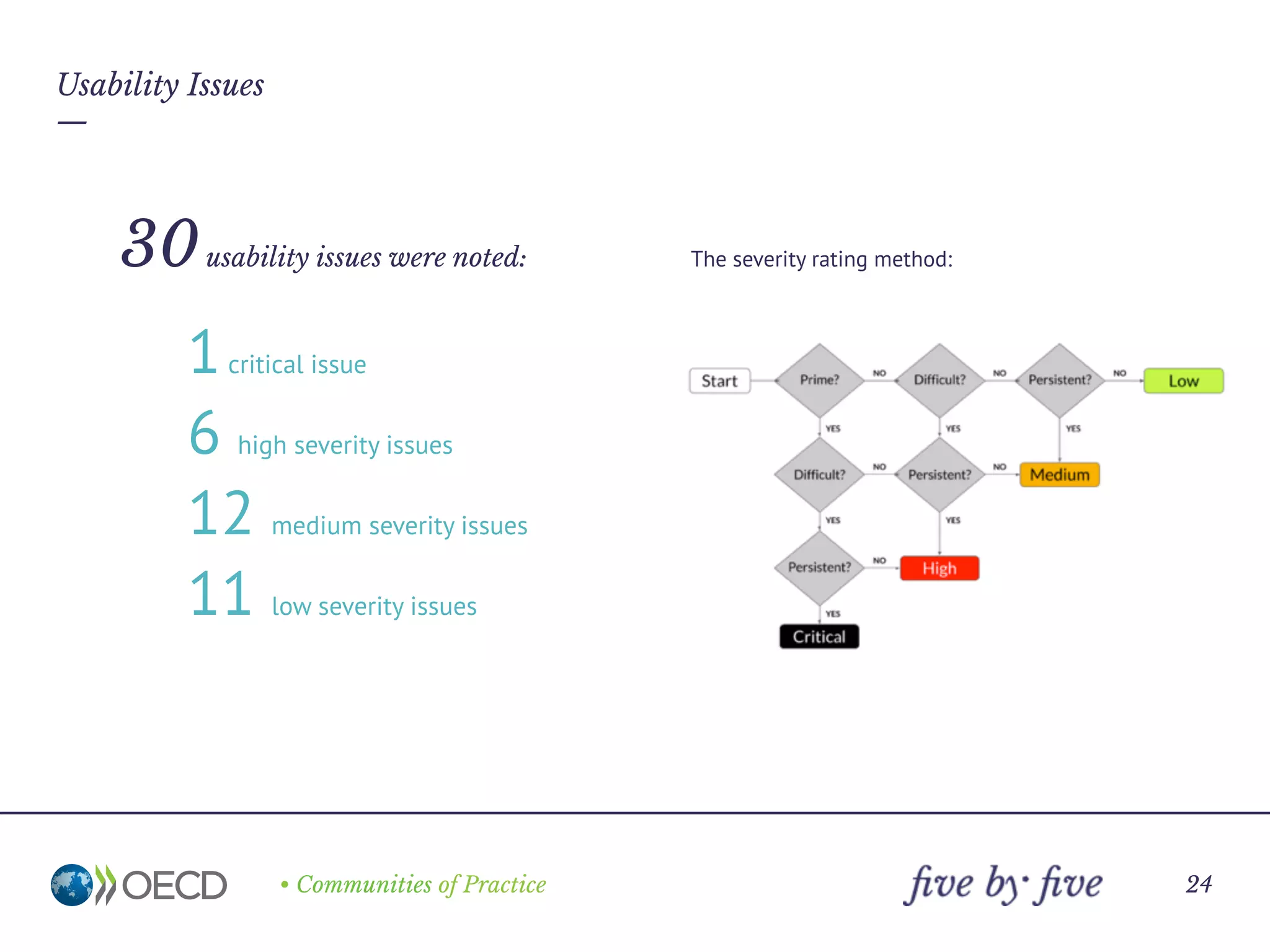
The severity rating method:
—
• Communities of Practice
Key insights and ideas
24
Critical
Usability issues
—
An emergency condition that causes the customer’s system to fail or causes
customer data to be lost or destroyed. A showstopper usability bug can also be
one that is likely to cause frequent data integrity errors. There is no workaround to
these problems. A key feature needed by many customers is not in the system.
—
• Communities of Practice
Key insights and ideas
25
Usability Issues / Critical
—
Essential functionality missing
around category filters
• People can’t choose to receive
notifications filtered by category, which
can defeat the purpose of notifications on
some large sites.
• Access rights and other permissions can’t
be set on specific categories, either for
viewing, or for admin functions.
—
• Communities of Practice
Key insights and ideas
26
High
Usability issues
—
A serious condition that impairs the operation, or continued operation, of one or
more product functions and cannot be easily circumvented or avoided. The
software does not prevent the user from making a serious mistake. The usability
problem is frequent, persistent, and affects many users. There is a serious violation
of standards.
—
• Communities of Practice
Key insights and ideas
27
Usability Issues / High
—
• There is no action displayed to assign
documents to a category when you make a
selection in a content list.
• There is no function in the manage categories
dialog box itself to assign documents to
categories (although upon creating a category it
does ask you if you want to "Apply this new
category to all content using the suggested
tags?“, which seems to conflate the concept of
tags and categories).
• The help system shows nothing about the topic
(with the search term "adding documents to
categories”).
• It appears that you have to "edit" each individual
document in order to assign it to a category.
Adding documents to a category
—
• Communities of Practice
Key insights and ideas
28
Usability Issues / High
—
• Sharing the site to another person who doesn't
already have access doesn't appear to work.
• The site informs you when you enter a non-
member’s email address that they're not a
member of the community, but it doesn't explain
the consequences of this, or any extra steps you
need to take to give them access.
• You go through a lengthy registration form over
3 pages, but it looks like you are registering on
the main website, not the community portal.
• After an apparently successful registration, you
confirm your request via email, but you may still
not have access.
• Login help is not very relevant or helpful.
Getting access to a community site
—
• Communities of Practice
Key insights and ideas
29
Usability Issues / High
—
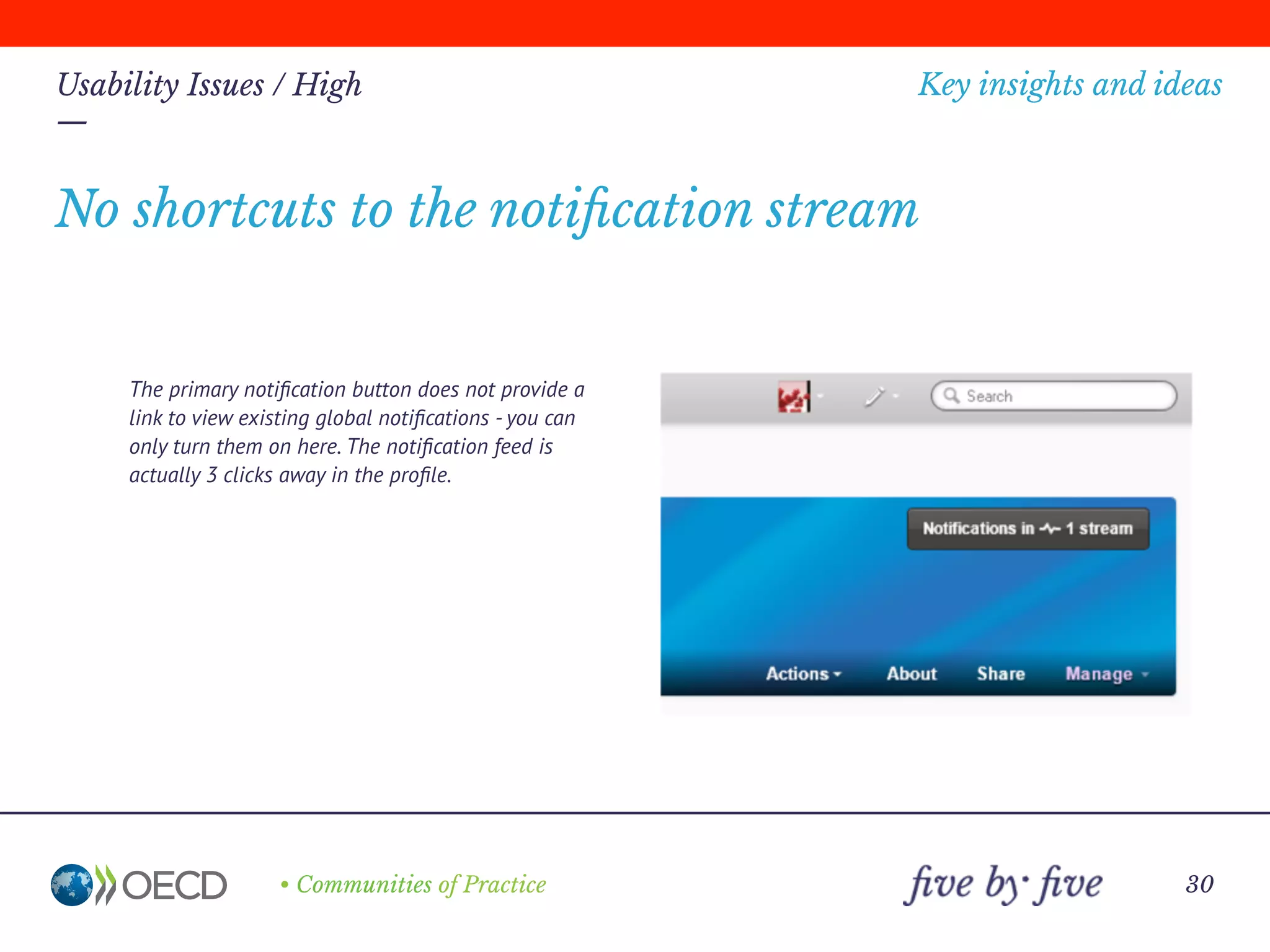
The primary notification button does not provide a
link to view existing global notifications - you can
only turn them on here. The notification feed is
actually 3 clicks away in the profile.
No shortcuts to the notification stream
—
• Communities of Practice
Key insights and ideas
30
Usability Issues / High
—
The banner space concatenates site names at
around 40 chars (4 words), despite there being
plenty of room for even the longest titles,
meaning that some sites - eg Joint Meeting -
have to waste central homepage space for the
site name and also don't have the site name
prominently displayed on other pages, only in
breadcrumbs.
The banner title is concatenated
—
• Communities of Practice
Key insights and ideas
31
Usability Issues / High
—
• The member list or member count on the site
doesn’t always tally with EMS, and not many
people are aware of the issue.
• Many people don’t know how to obtain a
member count within their site.
Member list inconsistency
—
• Communities of Practice
Key insights and ideas
32
Medium
Usability issues
—
A non-critical, limited problem (no data lost or system failure). It does not hinder
operation and can be temporarily circumvented or avoided. The problem causes
users moderate confusion or irritation.
—
• Communities of Practice
Key insights and ideas
33
Usability Issues / Medium
—
• It is not clear what the difference is between
categories and tags in terms of their impact
on publishing or navigation.
• In this dialog box you can add many tags, but
if you fail to enter a category, it deletes all
your tags after the error message “no
categories found”.
• Elsewhere, upon creating a category you are
asked if you want to "Apply this new category
to all content using the suggested tags?“,
which seems to conflate the concept of tags
and categories.
Categories vs. tags
—
• Communities of Practice
Key insights and ideas
34
Usability Issues / Medium
—
• There is no distinction between editing the
document itself, or modifying the meta data
in terms of participation or authorship
indicators.
• Eg. When assigning a document to a category
or tag, you are shown as the document author
in the main overview and document page
(although not in the person profile view, even
if "minor edit“ is selected.
Authorship vs. participation vs. housekeeping
—
• Communities of Practice
Key insights and ideas
35
Usability Issues / Medium
—
• Checkboxes to select documents can be
very far away from document name.
• There is no shift-select function available
on the checkboxes to select multiple
items.
Selecting items
—
• Communities of Practice
Key insights and ideas
36
Usability Issues / Medium
—
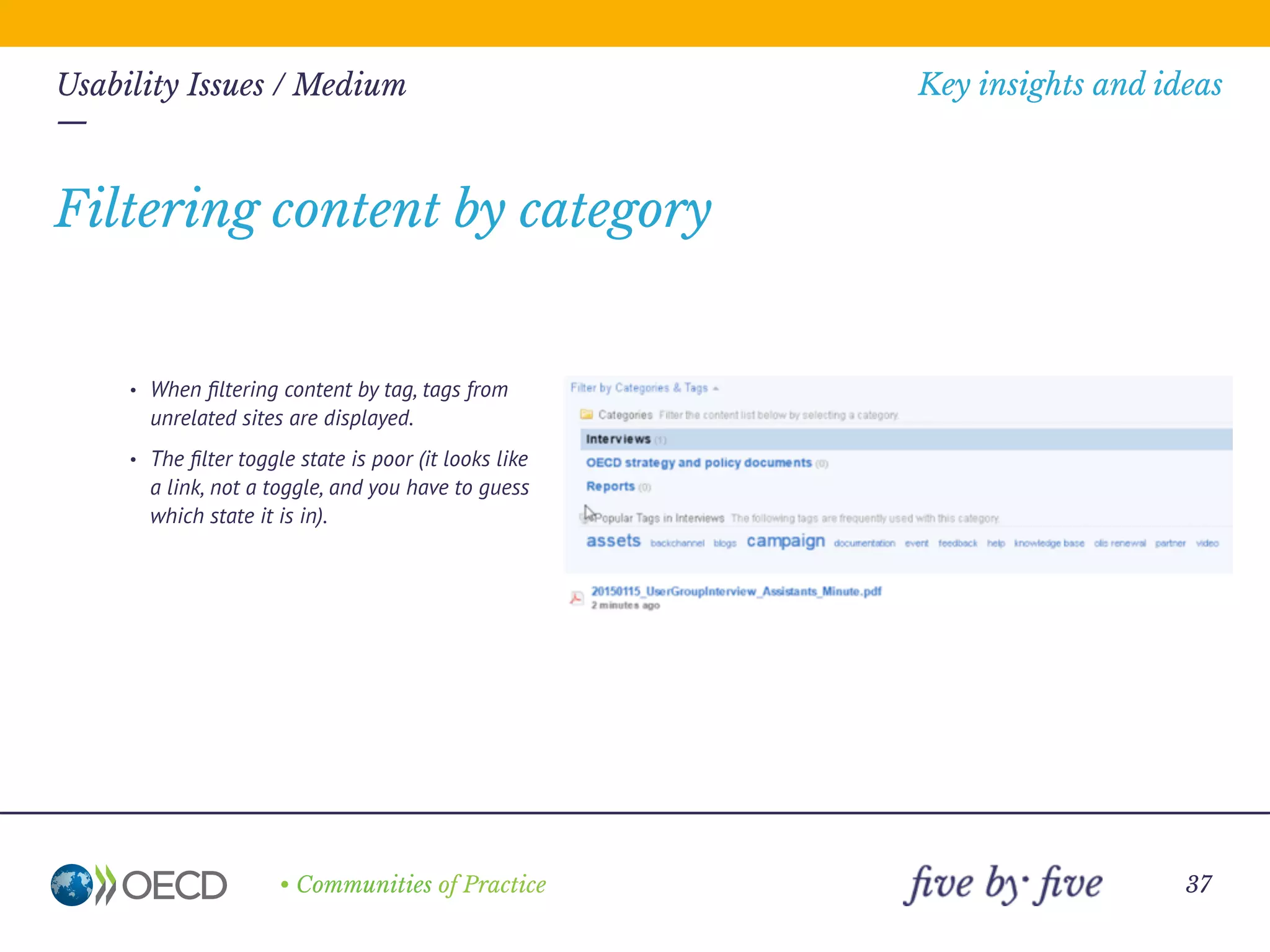
• When filtering content by tag, tags from
unrelated sites are displayed.
• The filter toggle state is poor (it looks like
a link, not a toggle, and you have to guess
which state it is in).
Filtering content by category
—
• Communities of Practice
Key insights and ideas
37
Usability Issues / Medium
—
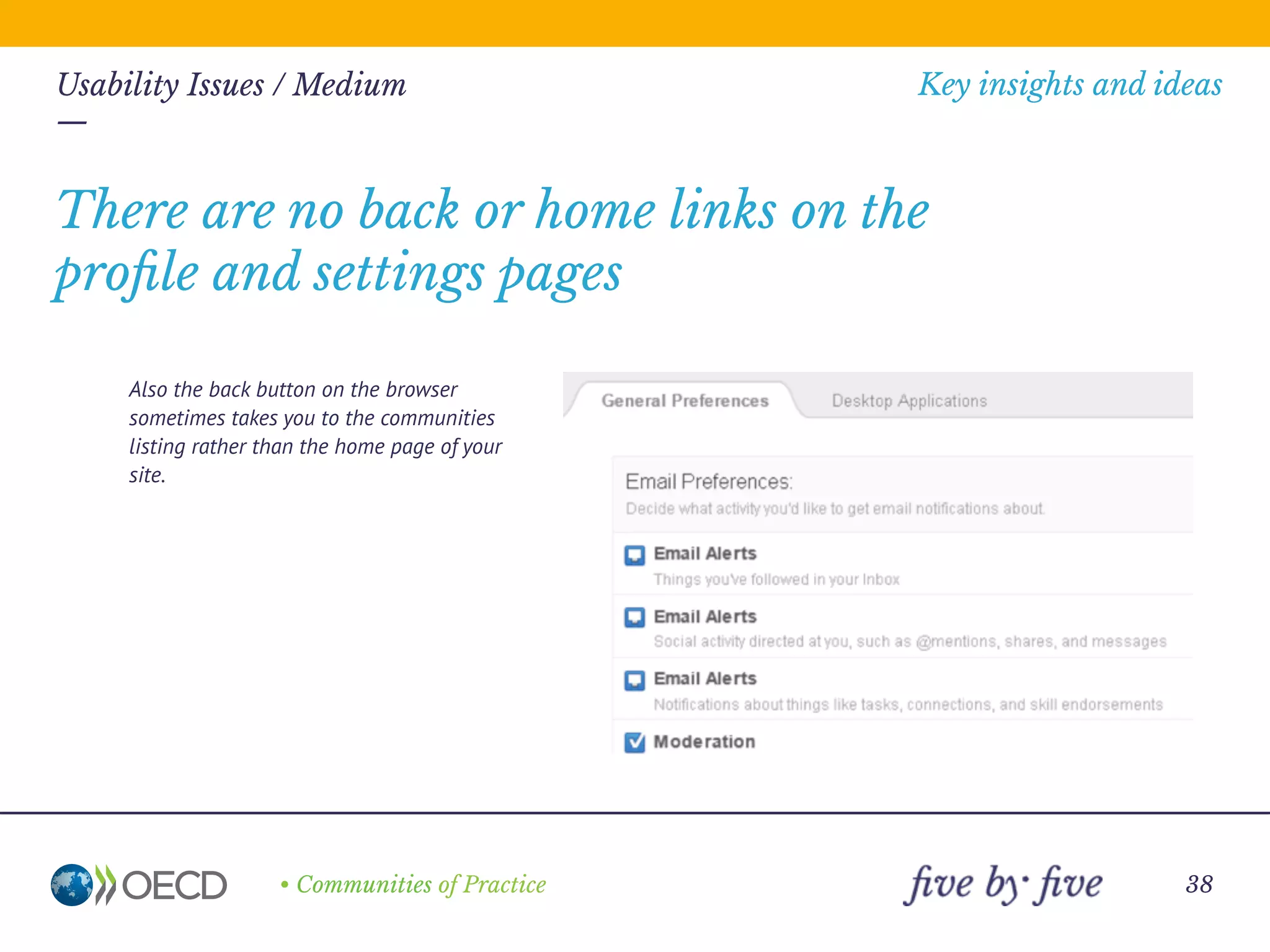
Also the back button on the browser
sometimes takes you to the communities
listing rather than the home page of your
site.
There are no back or home links on the
profile and settings pages
—
• Communities of Practice
Key insights and ideas
38
Usability Issues / Medium
—
• There are several different places to
customise the site.
• The profile, alert, settings and other
pages seems to be separate from the
main site (although this may be logical if
you are a member of more than one site,
it could be displayed more clearly).
Inconsistent navigation
—
• Communities of Practice
Key insights and ideas
39
Usability Issues / Medium
—
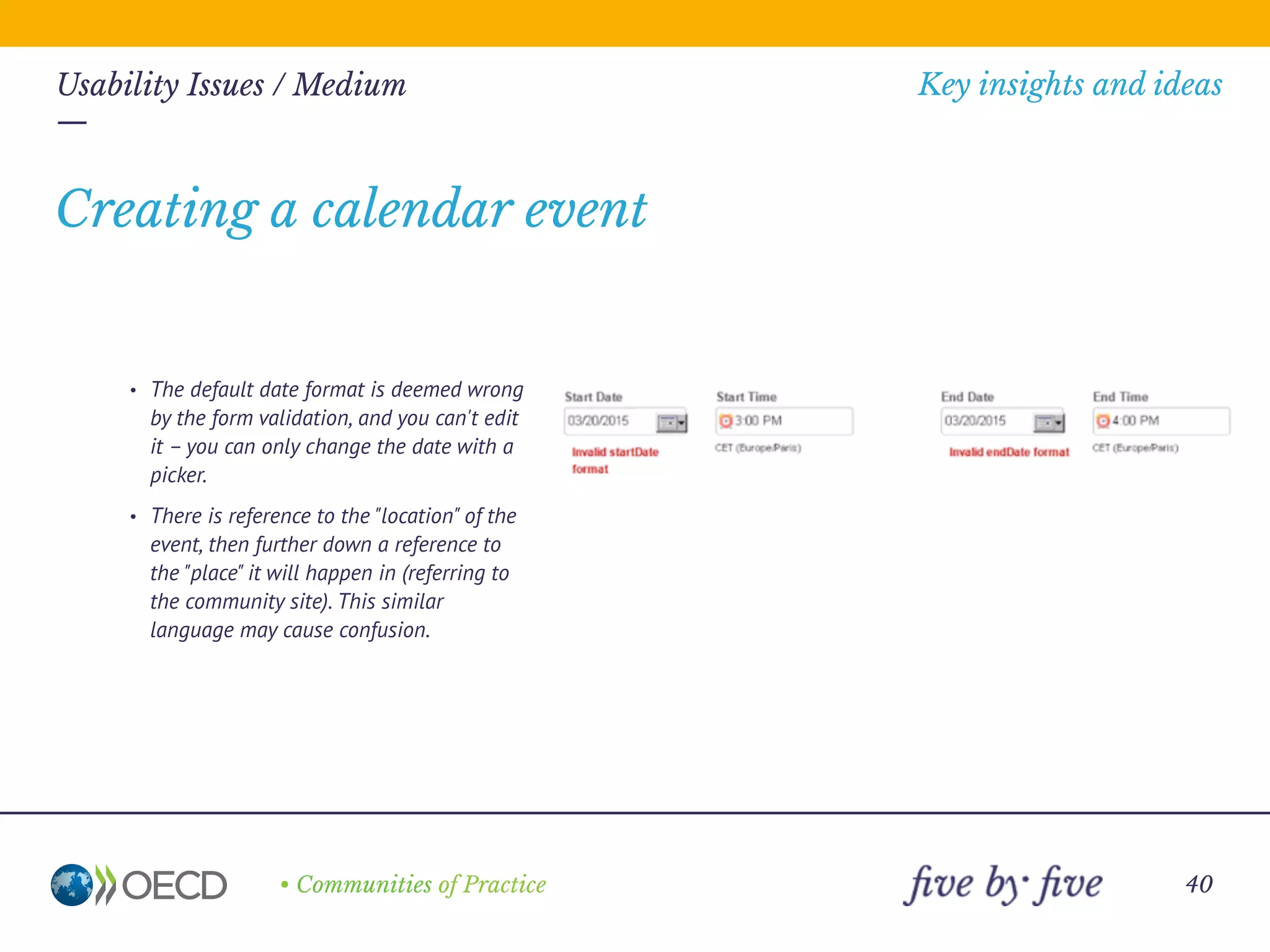
• The default date format is deemed wrong
by the form validation, and you can't edit
it – you can only change the date with a
picker.
• There is reference to the "location" of the
event, then further down a reference to
the "place" it will happen in (referring to
the community site). This similar
language may cause confusion.
Creating a calendar event
—
• Communities of Practice
Key insights and ideas
40
Usability Issues / Medium
—
• There is no mention of which community
the document comes from - just "OECD" in
the header.
• The branding and colours are different to
the main site.
• There is no mention that you can't access
the content, as you're not a member.
• A comment link is offered even though
you can't comment, as you're not a
member.
Email notifications of shared documents
—
• Communities of Practice
Key insights and ideas
41
Usability Issues / Medium
—
People will often forget to select "minor
edit“ when editing a document or changing
the metadata, so site members may receive
notification spam. ‘Minor edit’ should be
checked by default.
Notification and email spam
—
• Communities of Practice
Key insights and ideas
42
Usability Issues / Medium
—
• It seems that you can't change the default
order of the tabs on the content page, to
bring the most relevant tab to the front.
• Eg. This text sets up an expectation of
discussions, but we see documents mixed
in the list.
Content page tabs
—
• Communities of Practice
Key insights and ideas
43
Usability Issues / Medium
—
In the people tab or other lists, the paging
indicator only suggests that there are one or
two pages worth of people. As soon as you
click on the last number in the series, more
page numbers are displayed.
Hidden member lists
—
• Communities of Practice
Key insights and ideas
44
Usability Issues / Medium
—
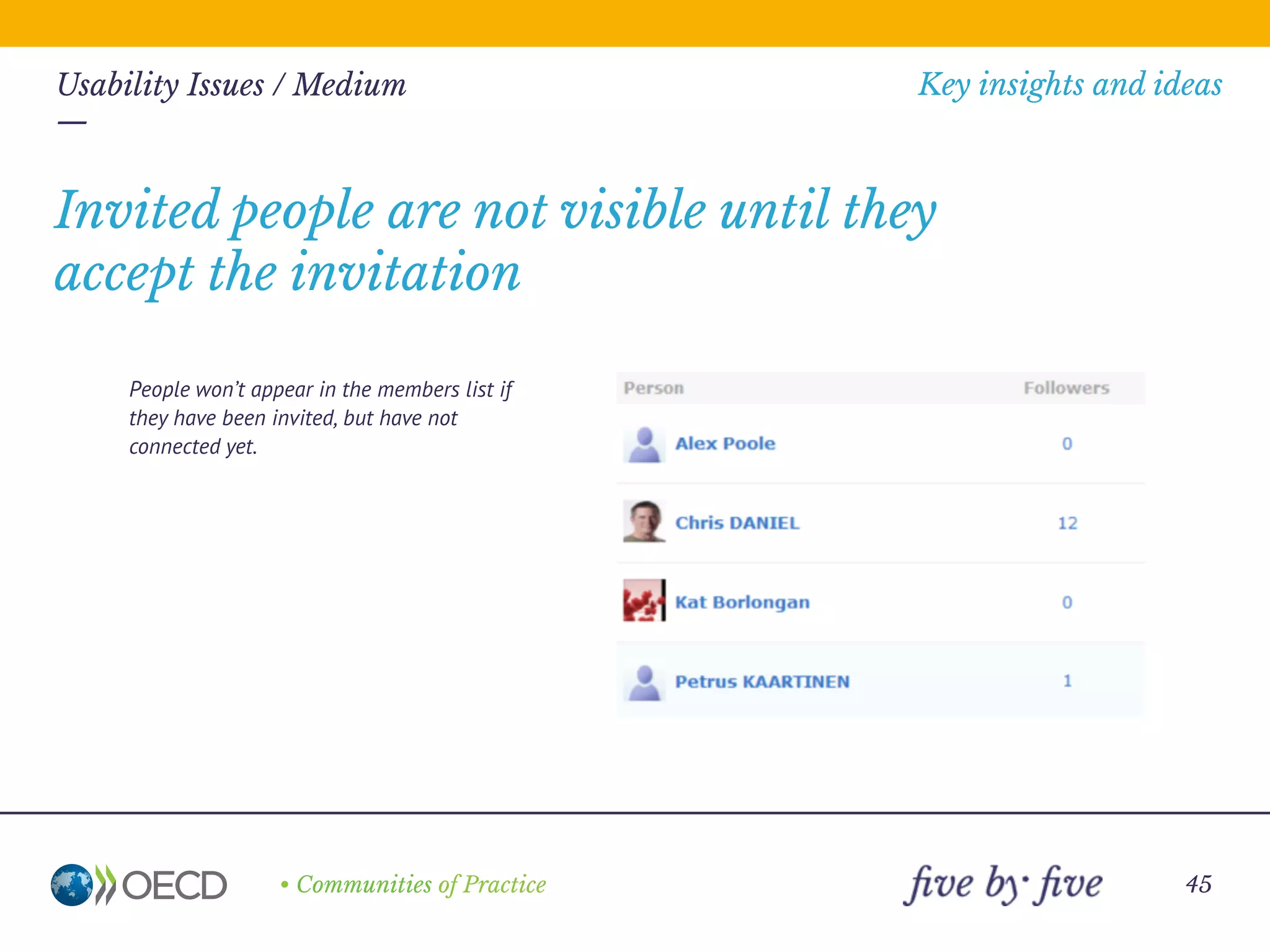
People won’t appear in the members list if
they have been invited, but have not
connected yet.
Invited people are not visible until they
accept the invitation
—
• Communities of Practice
Key insights and ideas
45
Low
Usability issues
—
Non-critical problems or general questions about the product. There are minor
inconsistencies that cause hesitation or small aesthetic issues like labels and
fields that are not aligned properly.
—
• Communities of Practice
Key insights and ideas
46
Usability Issues / Low
—
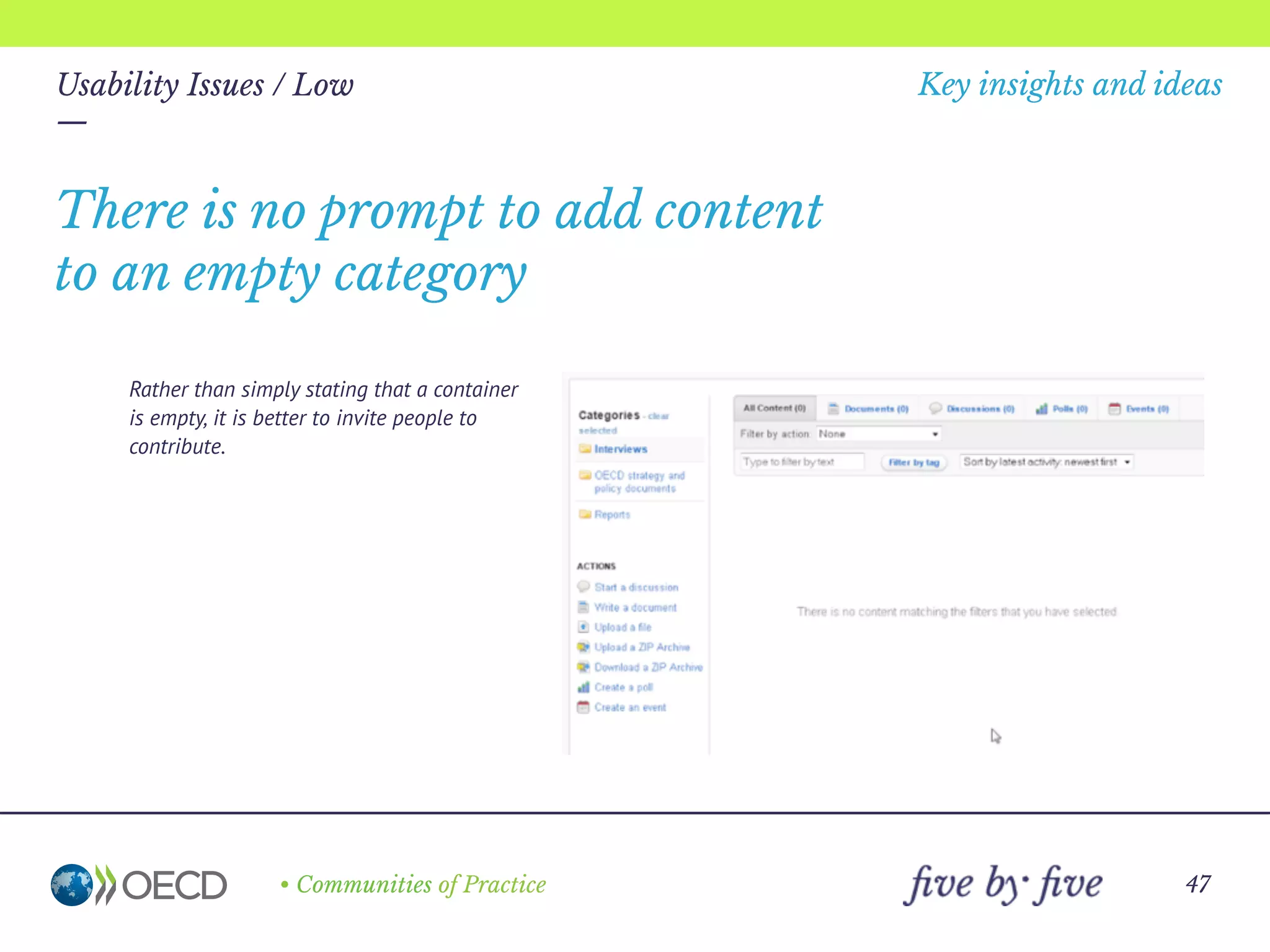
Rather than simply stating that a container
is empty, it is better to invite people to
contribute.
There is no prompt to add content
to an empty category
—
• Communities of Practice
Key insights and ideas
47
Usability Issues / Low
—
You can ‘friend’ yourself, and no error message
is triggered.
You can friend yourself
—
• Communities of Practice
Key insights and ideas
48
Usability Issues / Low
—
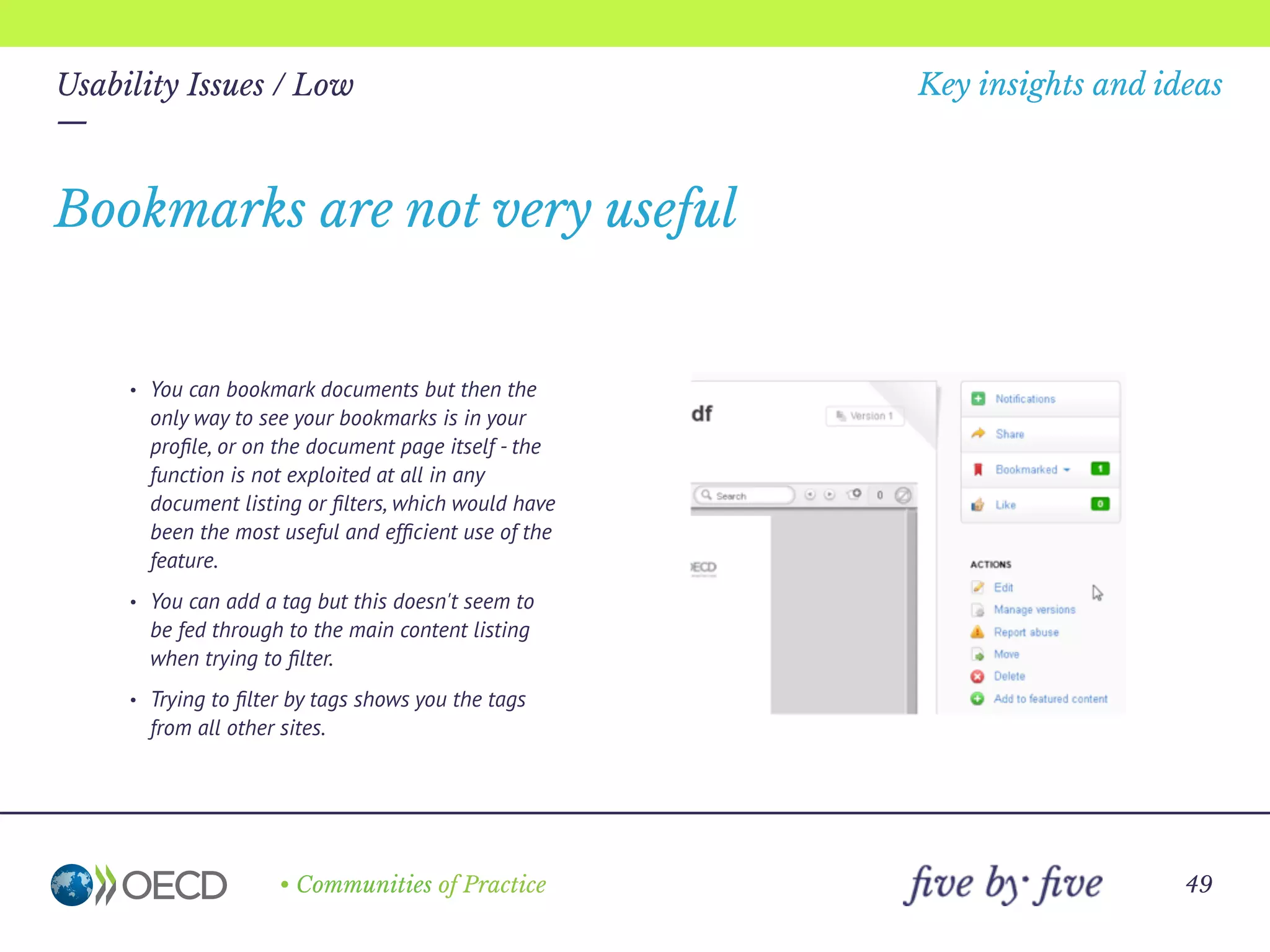
• You can bookmark documents but then the
only way to see your bookmarks is in your
profile, or on the document page itself - the
function is not exploited at all in any
document listing or filters, which would have
been the most useful and efficient use of the
feature.
• You can add a tag but this doesn't seem to
be fed through to the main content listing
when trying to filter.
• Trying to filter by tags shows you the tags
from all other sites.
Bookmarks are not very useful
—
• Communities of Practice
Key insights and ideas
49
Usability Issues / Low
—
You should be able to filter the content based
on the sites that you are ‘consciously’ a member
of, or your ‘favourites’ rather than sites you are
simply a member of by default.
The activity feed has random, non-personalised
content in it by default
—
• Communities of Practice
Key insights and ideas
50
Usability Issues / Low
—
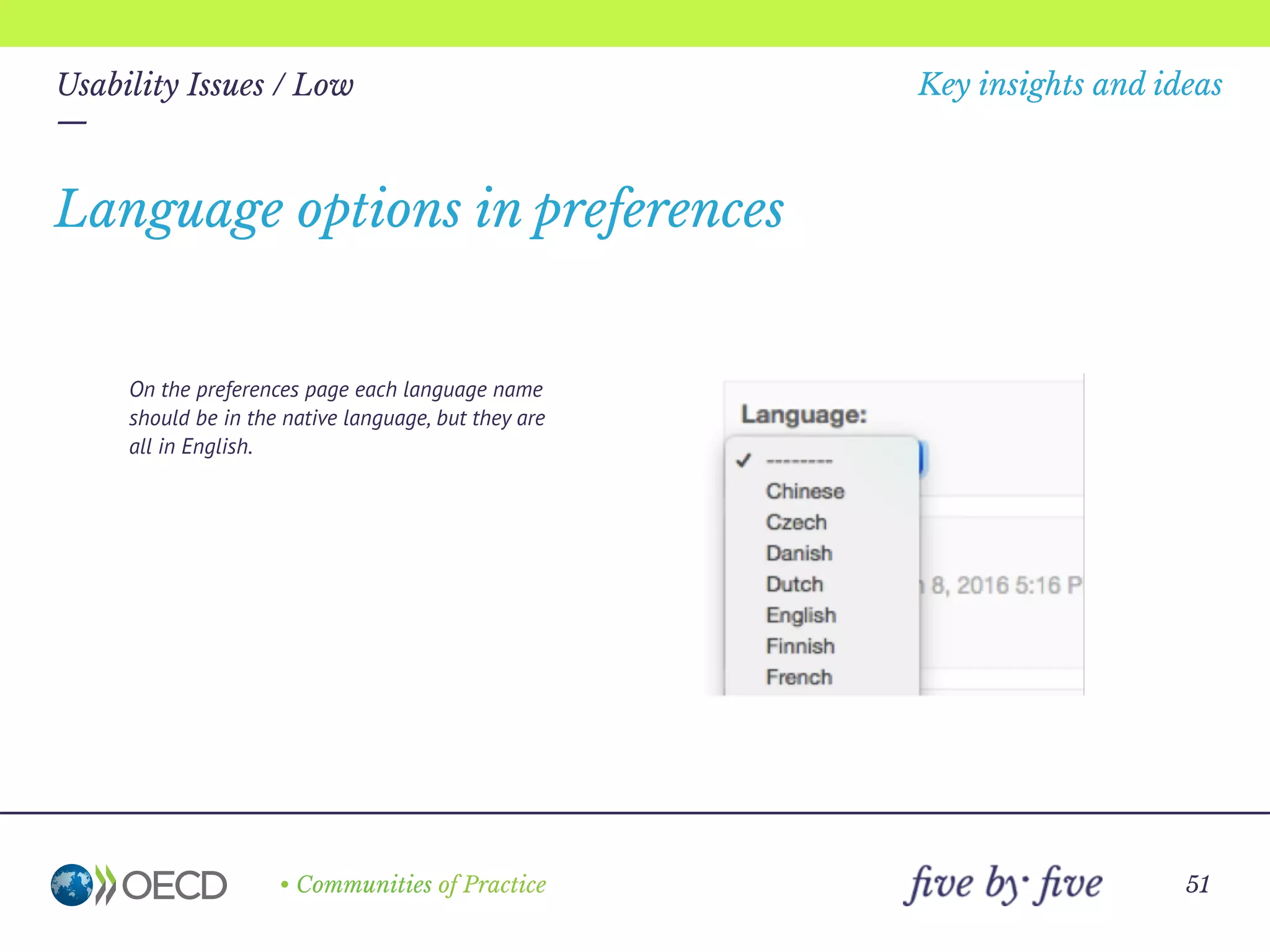
On the preferences page each language name
should be in the native language, but they are
all in English.
Language options in preferences
—
• Communities of Practice
Key insights and ideas
51
Usability Issues / Low
—
Clicking on this number does nothing – there
is no indication of what it is for, with no
obvious way to find out.
The purpose of the number by the avatar
is unknown
—
• Communities of Practice
Key insights and ideas
52
Usability Issues / Low
—
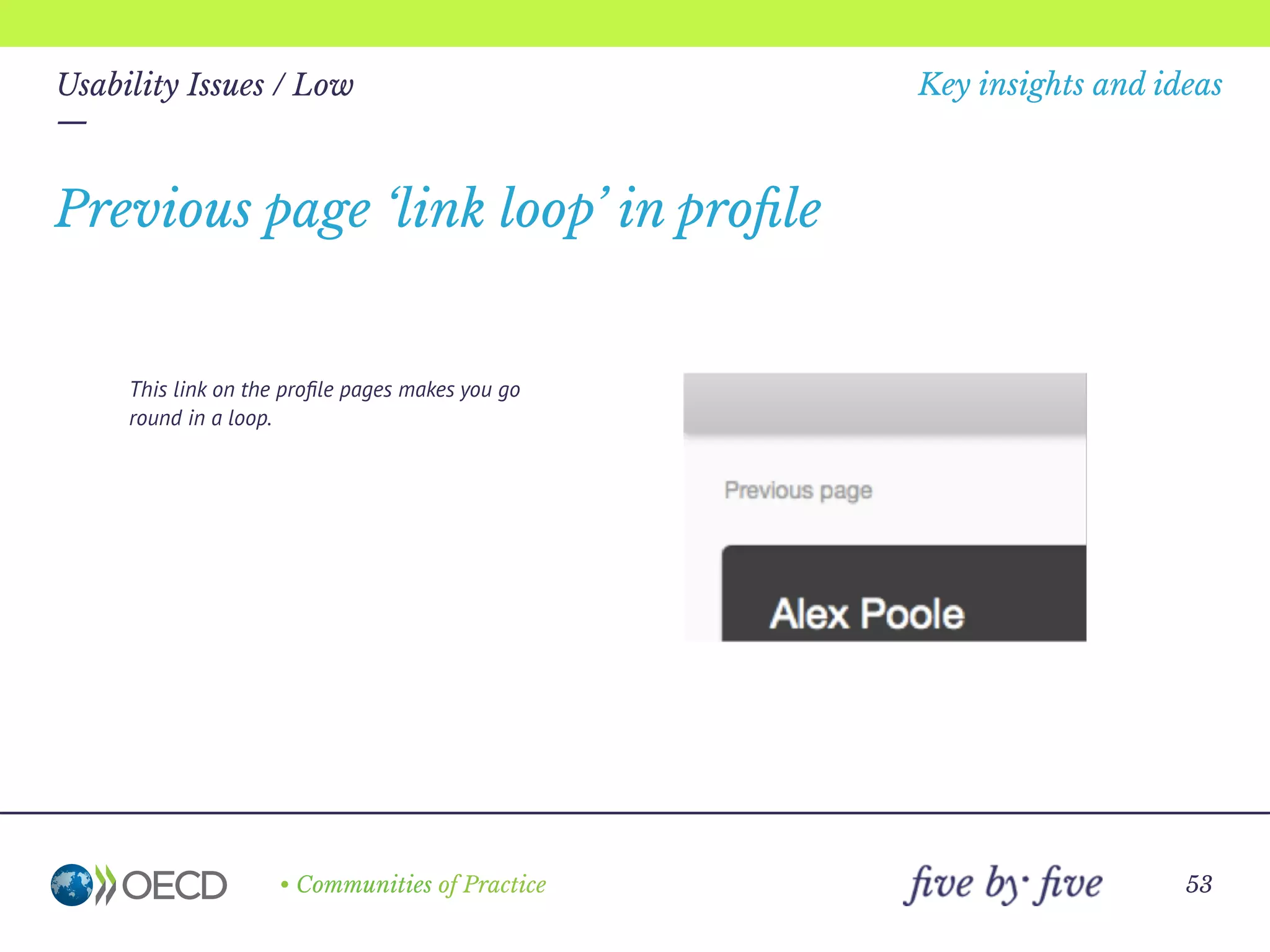
This link on the profile pages makes you go
round in a loop.
Previous page ‘link loop’ in profile
—
• Communities of Practice
Key insights and ideas
53
Usability Issues / Low
—
Depending on your access rights, a large "An
unexpected error has occurred" message is
shown when you try to click on "Content" or
one of the options in "More“ on the public
profile page.
The public profile security handling is
ugly
—
• Communities of Practice
Key insights and ideas
54
Usability Issues / Low
—
Obvious spam messages like the one below are
posted, and sometimes left on display for a
long time.
There doesn’t appear to be a spam filter
active on the site
—
• Communities of Practice
Key insights and ideas
55
Usability Issues / Low
—
For example, if you select preferences while on
the homepage and cancel out, you are sent to
your own profile page.
Cancelling preferences returns you to the
wrong place
• Communities of Practice 56
Merci
Kat Borlongan
kat@fivebyfive.io
06 31 26 60 77

OECD CP

  • 1.
    • Communities ofPractice 1 Key insights, ideas and issues — 22 January 2016
  • 2.
    Key insights and ideas — 22january 2016 Table of contents — 3 … Zoom out: 10 insights and ideas 4 … Decide 8 … Onboard 13 … Grow 23 … Zoom in: 30 usability issues 25 … Critical 27 … High 33 … Medium 46 … Low
  • 3.
    • Communities ofPractice 3 Key insights and ideas — 22 january 2016 10 Insights and ideas ZOOM OUT — This section is divided into the three phases of a community journey: Decide, Onboard and Grow.
  • 4.
    • Communities ofPractice 4 Key insights and ideas — 22 january 2016 Decide Zoom out: 10 insights and ideas —
  • 5.
    • Communities ofPractice Zoom out: 10 insights and ideas — 5 IDEA #1 « OECD Communities is like an iceberg: there’s depth that’s not being utilized at all or exploited. » « It’s just being used in a very basic way - Is it ok to just use it as a document repository? » It should be easy to navigate, easy to understand, and offers your personas information on what they are searching for. In essence, your homepage should answer the question, “Can I help you find what you’re looking for?” right away before Maureen or anyone else on the team has to. Recommendations: A product page containing the key components: 1. Clear value proposition. It should answer two basic questions: What does this do and why does it matter? Examples inspired by other networks include: « Create a home for collaborating seamlessly on projects » or « Harness the knowledge and power of our collective group » 2. Persona-focused copy. Define your personas’ pain points based on previous research and offer solutions. 3. Navigation. Keep things user-friendly for our potential community creator. 4. Call to action. Examples could be « Set up a One-on-one Session » or « Create an OECD Community Site » Set up a product page that answers the most important questions in under a minute.
  • 6.
    • Communities ofPractice Zoom out: 10 insights and ideas — 6 IDEA #2 « It would help to see how others are doing this. » « People were skeptical - we had to conduct a pilot just to prove that people could use it. » Tools are dull and boring if taken on their own - a hammer isn’t as interesting as the treehouse someone built with it. It’s when it’s taken in the context of a project that a tool’s usefulness quickly comes to life. Community Stories are meant to be a kind of show-and-tell of people’s projects and how these came to life with the help of Jive. There is power in recognizing the success of others. By highlighting Jive’s various uses in these stories, site creators can begin to imagine how Jive can be used on their projects, encouraging them to get creative with these available tools. Recommendations: Three community stories based on the real projects of employees, emphasizing different ways that Jive can be used. They would include testimonies, portraits and screen shots (if possible) showcasing their current sites and how they are being used. Special features on communities every 3 months narrated and published on the blog by the Product Manager. This would mean continuing to shout- out and feature users that are leading the way, recognizing good practice and sharing the contacts of champions who could be helpful to other colleagues. Showcase the success of others through community stories.
  • 7.
    • Communities ofPractice Zoom out: 10 insights and ideas — 7 IDEA #3 « Is there a way to see how this might work before committing? » Using an unfamiliar product can be overwhelming, especially when it has many facets and features. Some people at the OECD sometimes associate using aspects of OECD Communities with necessary « skills or expertise » that they do not necessarily believe they have. To avoid driving people away, it’s important to help them find their bearings. This doesn’t necessarily mean holding their hand through the whole process. More than a feature showcase but less extensive than a full tutorial, the Tour Video is exactly what it sounds like: a tour that shows site creators the different directions they can go with Jive’s basic features and that helps them navigate their way confidently through the product all by themselves. Recommendations: A 90 - 120sec video that walks site creators through Jive’s most important basic tools and functions. (See https://slack.com/is for an example). Give new users a quick intro through a short tour-video.
  • 8.
    • Communities ofPractice 8 Key insights and ideas — 22 january 2016 Onboard Zoom out: 10 insights and ideas —
  • 9.
    • Communities ofPractice Zoom out: 10 insights and ideas — 9 IDEA #4 « The site owner can be quite hands-off, and it isn’t part of our job description, so it doesn’t get done. » « We just had someone’s administrative assistant take over and, well, pretty much fend for themselves. » Launching a community site successfullly asks for a committed team of individuals, that represent a cross-section of your organization, to execute tasks effectively and on time. While there are no hard and fast rules for this, as a starting point, it’s helpful to identify: • The three most common community types by use case scenarios: Community of Practice, Formal Work Group and Project Team (description, goals and links to real-world examples). • The diverse roles within a community (ex. community manager, system administrator, content supplier, etc.) and what these roles entail (ex. description of role, desired experience/expertise, responsibilities and estimated time commitment). It’s important to note that these roles may overlap. The specifics of your own community - its size and composition, to start with - determines whether a team member can fulfill multiple roles or if you need several members fulfilling a single role. Recommendations: A section in the « Learning Corner » (see Idea #6) dedicated to the above. Outline community types and recommended roles.
  • 10.
    • Communities ofPractice Zoom out: 10 insights and ideas — 10 IDEA #5 « I didn’t know how to do this. I just looked at what everyone else was doing and copied what I could. » « What’s the point of reinventing the wheel? » « I wish we had something more, well, modern-looking. » « I would love to make it look good, but I just don’t have the time. » Most site creators don’t have the time, skill or budget to customize templates for their communities. Many need their sites to be up-and- running quickly. And, without having to hire a professional, they would like to have a well-designed interface. Currently, site creators informally ask around and look at other community sites to develop an idea of what direction to go with their own site. Unfortunately, even if this speeds up their own design process, the sites they copy don’t necessarily contain the best functionalities, navigation or design for their purposes. Recommendations: To help people get started, we could produce new default templates that come with standard functionalities and navigation frameworks, each based on the three specific community types’ identified needs. A new default theme, with a refreshed color scheme, typography and banner would work hand-in-hand with the templates to improve the user experience and bring it in line with other OECD websites. These templates should have their content and layouts validated through user testing to ensure that each one is well-adapted to type of community it serves straight out of the box. User testing of templates should be done in collaboration with OECD site creators and administrators. Give site creators a head start through customizable themed templates.
  • 11.
    • Communities ofPractice Zoom out: 10 insights and ideas — 11 IDEA #6 « The training showed us the basics of OECD communities but it didn’t cover the things I really wanted to know: how to make the site look good, how to get people to use it. »
 « The training didn’t really apply to people like me. » Because your users have different goals, preferred learning styles as well as levels of understanding, tech-savviness, a cookie-cutter approach is not enough. It would be beneficial to provide personalized support to site creators/administrators. Recommendations: Allow members to schedule One-on-one Workshops that function more like personalized consultancy sessions rather than one-size-fits all training. During the 1-hour sessions, the creator/administrator will be paired with a member of the Ambassadors network, Product Manager or other expert within the OECD Communities Team. Based on a questionnaire, they can advise him/her on several topics including: using specific platform tools, translating their ideas into their community site for the first time, troubleshooting, engagement strategy, etc. Prior to the meeting, the expert could also assess their current environment, and determine any areas that should be changed to ensure a better experience. At the end of the session, will provide you with a checklist and plan to remediate any issues that were surfaced during assessment. Create a well-identified « Learning Corner » to store training resources such as an Onboarding Guide as well tips & tricks identified during this study and/or sourced from the larger community. This space can also be used to introduce product updates, event invitations, success stories and other curated content. … Provide flexible training and support.
  • 12.
    • Communities ofPractice Zoom out: 10 insights and ideas — 12 IDEA #6 …continued … Give community managers access to more specialized training to support those interested in taking a step further: Engaging instead of just administrating. This can be done in the form of a hands-on workshop that: 1. Serves as a crash course on the essentials of Community Management in 2016. 2. Showcases interesting cases and best practices. 3. Goes beyond theory, allowing community managers to learn-by-doing: producing compelling content, conversation-seeding tactics, understanding analytics, etc. Through the champions network, we can encourage Peer Learning (see Idea #7). « It’s so easy—I don’t see why I would need a basic training at all! »
 « We had hoped for active discussions in the forums but it fell flat and we aren’t sure why. Since then we’ve dropped the idea of online collaboration. »
  • 13.
    • Communities ofPractice 13 Key insights and ideas — 22 january 2016 Grow Zoom out: 10 insights and ideas —
  • 14.
    • Communities ofPractice Zoom out: 10 insights and ideas — 14 IDEA #7 « Until people start taking ownership—and stop thinking of the site’s as just ‘the secretary’s space—we’re not going to see any real change. »
 « Seeing leaders use the site is a big deal, especially in some of the more conservative communities. » The most efficient and effective way for people to learn is through the people around them - this is why it’s important to establish a community of champions who are excited about the platform. With their influence, champions help build enthusiasm and competency from within their teams, and promote the adoption of new and improved ways of working. These champions can help lessen the strain on the core project team and drive engagement throughout the community by helping their peers create, manage, and use community sites more effectively. At the same time, internal champions can help identify challenges and potential solutions on the ground, bringing vital feedback to the project team and sponsor. It’s also important to have clear validation from the leadership within OECD. Their influence on company culture puts them in the best position to communicate the value and benefit of the platform across the organization, even if the platform was driven by employee demand to begin with. … Build (and grow) a community of champions.
  • 15.
    • Communities ofPractice Zoom out: 10 insights and ideas — 15 IDEA #7 …continued « I’d like to gain different perspectives from other people’s experiences, and at the same time, promote my own department’s work in the field. » « I found many best practices, but not much discussion about them. Usually on other sites people ask questions or suggest improvements on what the author wrote, but I felt like people were self-censoring on this site. » Recommendations: Design a program that engages and recognizes the efforts of champions. For example, giving them privileged access at relevant events, or highlighting their expertise of the platform by engaging them as speakers in conferences. We could also consider publishing an internal directory showcasing their profiles, which would be particularly useful in the case of Peer Learning (see Idea #6) Maintain a regular rhythm for discussions with the champions on what’s working and what’s not. This could fall under the work of the Head of Community (see Idea #10) who can then push the content back to the communities via blog posts, events or during training. Personally encourage well-established leaders to engage on the platform, in order to pull in others. The goal is to have someone high up on OECD’s command chain to start a relevant and meaningful open dialogue on the Communities platform about a decision that would affect them. This would highlight the platform’s value and usefulness, giving it additional legitimacy and encouraging its adoption. It would also have the added benefit of sending a strong signal about how serious OECD is about employee feedback.
  • 16.
    • Communities ofPractice Zoom out: 10 insights and ideas — 16 IDEA #8 « I think there is a great interest in best practices, but people seem reluctant to have an open discussion about them. » « We’re not sure what’s holding people back in the forum. »
 « The forums have to be organic, people shouldn’t feel like they’re being judged. » Regular events could help build a community, keep them engaged around digital practices around the future of work, create spaces for the informal sharing of best practices both within and beyond the OECD, and of course, give everyone a chance to relax and have a great time. Recommendations: A speaker series or happy hour, tentatively entitled « The Future of Collaboration at Work. » This could be set up in partnership with the Community Champions, who could be engaged as speakers, co-organizers, content curators or ambassadors. Here’s a short blurb to give you an idea of the concept: « Forget about flying cars. Let's start imagining something more relevant about our future: Work. » A lot of different ingredients are being tossed into the pot: improved robotics and the rise of automation, holacracy, the surge of working from home, absolute transparency through information sharing, the growing role of the « Employee Experience Officers »...and these are just a few that are worth mentioning. Get a taste of what's to come, and join us for a happy hour series with a variety of experts, OECD Community members, and friends from other organizations all sharing their take about the future of work. » Engage the community through events.
  • 17.
    • Communities ofPractice Zoom out: 10 insights and ideas — 17 IDEA #9 « Jive's lack of native capabilities to support work that requires process or structure increasingly puts it at a disadvantage. » (Gartner, 2015) « There’s no way to easily share to Twitter or LinkedIn. » Jive is not a one-stop shop—and it doesn’t have to be. The platform makes it possible to extend functionality via software integrations and add-ons. Recommendations: It would be interesting to begin experimenting with integrations around one aspect that community administrators often use: content sharing. Social media. Specifically, Linkedin and Twitter--both of which are already used by communities in the context of their work together. … Explore and curate integrations complimentary to Jive’s core functionalities
  • 18.
    • Communities ofPractice Zoom out: 10 insights and ideas — 18 IDEA #9 …continued « We don’t end up with one long discussion, because some people embed their comments in a document, and attach that to the discussion thread. » « We might need filters in the forum to see comments by country, by theme, and by document. » Recommendations: Google doc. Jive has a connector that enables access to Google Docs. This can help communities create, edit and store documents directly from Jive and save them in Google Drive. Functionalities of particular interest to the communities may include: • Rendering Google Docs within Jive in editing mode, to support full Google Doc capabilities, including concurrent authoring of content. • Get push notifications on new Google Docs and document changes in the connected place activity feed. • Search for Google docs within Jive, utilizing full indexed search of document content. « I signed up to notifications, but it was all or nothing - I couldn’t choose what I was interested in, so I turned them off. »
  • 19.
    • Communities ofPractice Zoom out: 10 insights and ideas — 19 IDEA #9 …continued Recommendations: Box. Integration with Box would enable Jive users to share files of any size with robust security and drag-and-drop simplicity. Some of Box’s user benefits that may tackle current pain points of Project Teams are: • Easy file sharing using shared links with passwords, expiration dates and restricted download access. • The ability to control what content is available to users with scheduled file deletion and link deactivation features (to minimize risks that come with a Project Team’s versioning, such as out-of- date files) • Instant file activity alerts for important edits/comments via email, real-time alerts, or the Box updates tab. • All content and comments are synchronized across Jive and Box, and across all devices.
  • 20.
    • Communities ofPractice Zoom out: 10 insights and ideas — 20 IDEA #10 « I feel like my hands are partially tied here. It will be difficult to manage the community without the tools that I’m used to. » « I don’t think that I’m qualified to build the community online because I’m not good at social media. » With everything in constant motion in a growing community, it’s time to recruit a full-time Product Manager to keep up and stay proactive. It’s important that this role is not structured as that of an “administrator” or “plumbers for community-related issues” but as an almost entrepreneurial role, with someone genuinely passionate about empowering community members. Recommendations: We might write a complete job description and interview process for Phase 2, but for now, here’s an idea of what the Product Manager role would entail: 40% Content production, curation and sharing The Product Manager is a wordsmith, able to craft clear and appealing messages to fit any medium: blog posts, guest articles, emails, proposals, social content, etc. He or she should also have a discerning and organized mind - sifting through the content coming out of communities and determining what to share, how to share, and when to share it. Recruit a full-time Product Manager. « We don’t know if we should dictate how people send comments on drafts - we’re still learning. »
  • 21.
    • Communities ofPractice Zoom out: 10 insights and ideas — 21 IDEA #10 …continued 30% Connecting with, supporting and training community members, Whether in the one-on-one support sessions, through the online platform, organized events or informal cups of coffee throughout the day, the community manager will have to be in many ways one of the faces of the new OECD Communities, and be able to effectively engage with the audience. 15% Researching and analyzing efforts that best drive adoption and engagement and finding creative ways to implement them across the OECD. Like a startup founder, this professional must understand how communities are currently responding to efforts to engage them and determine what’s working and what’s not, incorporating this information effectively into the overall product+community strategy. 15% Project management. There will be launch campaigns, system updates, happy hours, speaker series...the Product Manager needs to keep a birds- eye view of everything happening while making sure each task is completed on-time and with great production value. « Who is monitoring the comments for ideas? How do we reference them when we find good ones? »
  • 22.
    • Communities ofPractice 22 Key insights and ideas — 22 january 2016 30 Usability issues Zoom out — This is not a formal and comprehensive usability review - these are the usability issues noticed during the normal use of the system and brought up by people during the interviews. They are collected here for convenience, and do not include recommendations. They can serve as a basis for future investigation. Some will need to be replicated and confirmed.
  • 23.
    • Communities ofPractice 23 Usability Issues — 30usability issues were noted: 1critical issue 6 high severity issues 12 medium severity issues 11 low severity issues The severity rating method:
  • 24.
    — • Communities ofPractice Key insights and ideas 24 Critical Usability issues — An emergency condition that causes the customer’s system to fail or causes customer data to be lost or destroyed. A showstopper usability bug can also be one that is likely to cause frequent data integrity errors. There is no workaround to these problems. A key feature needed by many customers is not in the system.
  • 25.
    — • Communities ofPractice Key insights and ideas 25 Usability Issues / Critical — Essential functionality missing around category filters • People can’t choose to receive notifications filtered by category, which can defeat the purpose of notifications on some large sites. • Access rights and other permissions can’t be set on specific categories, either for viewing, or for admin functions.
  • 26.
    — • Communities ofPractice Key insights and ideas 26 High Usability issues — A serious condition that impairs the operation, or continued operation, of one or more product functions and cannot be easily circumvented or avoided. The software does not prevent the user from making a serious mistake. The usability problem is frequent, persistent, and affects many users. There is a serious violation of standards.
  • 27.
    — • Communities ofPractice Key insights and ideas 27 Usability Issues / High — • There is no action displayed to assign documents to a category when you make a selection in a content list. • There is no function in the manage categories dialog box itself to assign documents to categories (although upon creating a category it does ask you if you want to "Apply this new category to all content using the suggested tags?“, which seems to conflate the concept of tags and categories). • The help system shows nothing about the topic (with the search term "adding documents to categories”). • It appears that you have to "edit" each individual document in order to assign it to a category. Adding documents to a category
  • 28.
    — • Communities ofPractice Key insights and ideas 28 Usability Issues / High — • Sharing the site to another person who doesn't already have access doesn't appear to work. • The site informs you when you enter a non- member’s email address that they're not a member of the community, but it doesn't explain the consequences of this, or any extra steps you need to take to give them access. • You go through a lengthy registration form over 3 pages, but it looks like you are registering on the main website, not the community portal. • After an apparently successful registration, you confirm your request via email, but you may still not have access. • Login help is not very relevant or helpful. Getting access to a community site
  • 29.
    — • Communities ofPractice Key insights and ideas 29 Usability Issues / High — The primary notification button does not provide a link to view existing global notifications - you can only turn them on here. The notification feed is actually 3 clicks away in the profile. No shortcuts to the notification stream
  • 30.
    — • Communities ofPractice Key insights and ideas 30 Usability Issues / High — The banner space concatenates site names at around 40 chars (4 words), despite there being plenty of room for even the longest titles, meaning that some sites - eg Joint Meeting - have to waste central homepage space for the site name and also don't have the site name prominently displayed on other pages, only in breadcrumbs. The banner title is concatenated
  • 31.
    — • Communities ofPractice Key insights and ideas 31 Usability Issues / High — • The member list or member count on the site doesn’t always tally with EMS, and not many people are aware of the issue. • Many people don’t know how to obtain a member count within their site. Member list inconsistency
  • 32.
    — • Communities ofPractice Key insights and ideas 32 Medium Usability issues — A non-critical, limited problem (no data lost or system failure). It does not hinder operation and can be temporarily circumvented or avoided. The problem causes users moderate confusion or irritation.
  • 33.
    — • Communities ofPractice Key insights and ideas 33 Usability Issues / Medium — • It is not clear what the difference is between categories and tags in terms of their impact on publishing or navigation. • In this dialog box you can add many tags, but if you fail to enter a category, it deletes all your tags after the error message “no categories found”. • Elsewhere, upon creating a category you are asked if you want to "Apply this new category to all content using the suggested tags?“, which seems to conflate the concept of tags and categories. Categories vs. tags
  • 34.
    — • Communities ofPractice Key insights and ideas 34 Usability Issues / Medium — • There is no distinction between editing the document itself, or modifying the meta data in terms of participation or authorship indicators. • Eg. When assigning a document to a category or tag, you are shown as the document author in the main overview and document page (although not in the person profile view, even if "minor edit“ is selected. Authorship vs. participation vs. housekeeping
  • 35.
    — • Communities ofPractice Key insights and ideas 35 Usability Issues / Medium — • Checkboxes to select documents can be very far away from document name. • There is no shift-select function available on the checkboxes to select multiple items. Selecting items
  • 36.
    — • Communities ofPractice Key insights and ideas 36 Usability Issues / Medium — • When filtering content by tag, tags from unrelated sites are displayed. • The filter toggle state is poor (it looks like a link, not a toggle, and you have to guess which state it is in). Filtering content by category
  • 37.
    — • Communities ofPractice Key insights and ideas 37 Usability Issues / Medium — Also the back button on the browser sometimes takes you to the communities listing rather than the home page of your site. There are no back or home links on the profile and settings pages
  • 38.
    — • Communities ofPractice Key insights and ideas 38 Usability Issues / Medium — • There are several different places to customise the site. • The profile, alert, settings and other pages seems to be separate from the main site (although this may be logical if you are a member of more than one site, it could be displayed more clearly). Inconsistent navigation
  • 39.
    — • Communities ofPractice Key insights and ideas 39 Usability Issues / Medium — • The default date format is deemed wrong by the form validation, and you can't edit it – you can only change the date with a picker. • There is reference to the "location" of the event, then further down a reference to the "place" it will happen in (referring to the community site). This similar language may cause confusion. Creating a calendar event
  • 40.
    — • Communities ofPractice Key insights and ideas 40 Usability Issues / Medium — • There is no mention of which community the document comes from - just "OECD" in the header. • The branding and colours are different to the main site. • There is no mention that you can't access the content, as you're not a member. • A comment link is offered even though you can't comment, as you're not a member. Email notifications of shared documents
  • 41.
    — • Communities ofPractice Key insights and ideas 41 Usability Issues / Medium — People will often forget to select "minor edit“ when editing a document or changing the metadata, so site members may receive notification spam. ‘Minor edit’ should be checked by default. Notification and email spam
  • 42.
    — • Communities ofPractice Key insights and ideas 42 Usability Issues / Medium — • It seems that you can't change the default order of the tabs on the content page, to bring the most relevant tab to the front. • Eg. This text sets up an expectation of discussions, but we see documents mixed in the list. Content page tabs
  • 43.
    — • Communities ofPractice Key insights and ideas 43 Usability Issues / Medium — In the people tab or other lists, the paging indicator only suggests that there are one or two pages worth of people. As soon as you click on the last number in the series, more page numbers are displayed. Hidden member lists
  • 44.
    — • Communities ofPractice Key insights and ideas 44 Usability Issues / Medium — People won’t appear in the members list if they have been invited, but have not connected yet. Invited people are not visible until they accept the invitation
  • 45.
    — • Communities ofPractice Key insights and ideas 45 Low Usability issues — Non-critical problems or general questions about the product. There are minor inconsistencies that cause hesitation or small aesthetic issues like labels and fields that are not aligned properly.
  • 46.
    — • Communities ofPractice Key insights and ideas 46 Usability Issues / Low — Rather than simply stating that a container is empty, it is better to invite people to contribute. There is no prompt to add content to an empty category
  • 47.
    — • Communities ofPractice Key insights and ideas 47 Usability Issues / Low — You can ‘friend’ yourself, and no error message is triggered. You can friend yourself
  • 48.
    — • Communities ofPractice Key insights and ideas 48 Usability Issues / Low — • You can bookmark documents but then the only way to see your bookmarks is in your profile, or on the document page itself - the function is not exploited at all in any document listing or filters, which would have been the most useful and efficient use of the feature. • You can add a tag but this doesn't seem to be fed through to the main content listing when trying to filter. • Trying to filter by tags shows you the tags from all other sites. Bookmarks are not very useful
  • 49.
    — • Communities ofPractice Key insights and ideas 49 Usability Issues / Low — You should be able to filter the content based on the sites that you are ‘consciously’ a member of, or your ‘favourites’ rather than sites you are simply a member of by default. The activity feed has random, non-personalised content in it by default
  • 50.
    — • Communities ofPractice Key insights and ideas 50 Usability Issues / Low — On the preferences page each language name should be in the native language, but they are all in English. Language options in preferences
  • 51.
    — • Communities ofPractice Key insights and ideas 51 Usability Issues / Low — Clicking on this number does nothing – there is no indication of what it is for, with no obvious way to find out. The purpose of the number by the avatar is unknown
  • 52.
    — • Communities ofPractice Key insights and ideas 52 Usability Issues / Low — This link on the profile pages makes you go round in a loop. Previous page ‘link loop’ in profile
  • 53.
    — • Communities ofPractice Key insights and ideas 53 Usability Issues / Low — Depending on your access rights, a large "An unexpected error has occurred" message is shown when you try to click on "Content" or one of the options in "More“ on the public profile page. The public profile security handling is ugly
  • 54.
    — • Communities ofPractice Key insights and ideas 54 Usability Issues / Low — Obvious spam messages like the one below are posted, and sometimes left on display for a long time. There doesn’t appear to be a spam filter active on the site
  • 55.
    — • Communities ofPractice Key insights and ideas 55 Usability Issues / Low — For example, if you select preferences while on the homepage and cancel out, you are sent to your own profile page. Cancelling preferences returns you to the wrong place
  • 56.
    • Communities ofPractice 56 Merci Kat Borlongan kat@fivebyfive.io 06 31 26 60 77