1
[Name]
Approaches to Object Detection
Certified Instructor, NVIDIA Deep Learning Institute
NVIDIA Corporation
2
DEEP LEARNING INSTITUTE
DLI Mission
Helping people solve challenging
problems using AI and deep learning.
• Developers, data scientists and
engineers
• Self-driving cars, healthcare and
robotics
• Training, optimizing, and deploying
deep neural networks
33
TOPICS
• Lab Perspective
• Object Detection
• NVIDIA’s DIGITS
• Caffe
• Lab Discussion / Overview
• Lab Review
4
LAB PERSPECTIVE
5
WHAT THIS LAB IS
• Discussion/Demonstration of object detection using Deep Learning
• Hands-on exercises using Caffe and DIGITS
6
WHAT THIS LAB IS NOT
• Intro to machine learning from first principles
• Rigorous mathematical formalism of convolutional neural networks
• Survey of all the features and options of Caffe
7
ASSUMPTIONS
• You are familiar with convolutional neural networks (CNN)
• Helpful to have:
• Object detection experience
• Caffe experience
8
TAKE AWAYS
• You can setup your own object detection workflow in Caffe and
adapt it to your use case
• Know where to go for more info
• Familiarity with Caffe
9
OBJECT DETECTION
10
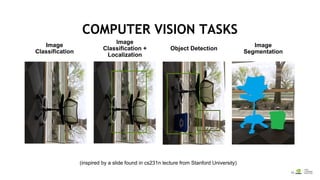
COMPUTER VISION TASKS
Image
Segmentation
Object Detection
Image
Classification +
Localization
Image
Classification
(inspired by a slide found in cs231n lecture from Stanford University)
11
OBJECT DETECTION
• Object detection can identify and classify one or more objects in an
image
• Detection is also about localizing the extent of an object in an
image
• Bounding boxes / heat maps
• Training data must have objects within images labeled
• Can be hard to find / produce training dataset
12
OBJECT DETECTION IN REMOTE SENSING IMAGES
Broad applicability
• Commercial asset tracking
• Humanitarian crisis mapping
• Search and rescue
• Land usage monitoring
• Wildlife tracking
• Human geography
• Geospatial intelligence
production
• Military target recognition
Vermeulen et al, (2013) Unmanned Aerial Survey of Elephants. PLoS ONE 8(2):
e54700
Imagery ©2016 Google, Map data © 2016
Google
13
OBJECT DETECTION
GENERATE CANDIDATE DETECTIONS
EXTRACT
PATCHES
1414
CHALLENGES FOR OBJECT DETECTION
Background clutter Occlusion
Illumination
Object variation
15
ADDITIONAL APPROACHES TO OBJECT
DETECTION ARCHITECTURE
• R-CNN = Region CNN
• Fast R-CNN
• Faster R-CNN Region Proposal Network
• RoI-Pooling = Region of Interest Pooling
16
NVIDIA’S DIGITS
1717
Process Data Configure DNN VisualizationMonitor Progress
Interactive Deep Learning GPU Training System
NVIDIA’S DIGITS
18
CAFFE
19
WHAT IS CAFFE?
• Pure C++/CUDA architecture
• Command line, Python, MATLAB interfaces
• Fast, well-tested code
• Pre-processing and deployment tools, reference models and examples
• Image data management
• Seamless GPU acceleration
• Large community of contributors to the open-source project
An open framework for deep learning developed by the Berkeley
Vision and Learning Center (BVLC)
caffe.berkeleyvision.org
http://github.com/BVLC/caffe
2020
CAFFE FEATURES
Protobuf model format
• Strongly typed format
• Human readable
• Auto-generates and checks Caffe
code
• Developed by Google
• Used to define network
architecture and training
parameters
• No coding required!
name: “conv1”
type: “Convolution”
bottom: “data”
top: “conv1”
convolution_param {
num_output: 20
kernel_size: 5
stride: 1
weight_filler {
type: “xavier”
}
}
Deep Learning model definition
21
LAB DISCUSSION / OVERVIEW
2222
TRAINING APPROACH 1 – SLIDING WINDOW
2323
0
0
0
0
0
0
0
0
1
1
1
0
0
0
0
1
2
2
1
1
1
0
1
2
2
2
1
1
0
1
2
2
2
1
1
0
0
1
1
1
1
1
0
0
0
0
0
0
0
4
0
0
0
0
0
0
0
-4
1
0
-8
Source
Pixel
Convolution
kernel (a.k.a.
filter) New pixel value
(destination
pixel)
Center element of the kernel is
placed over the source pixel.
The source pixel is then
replaced with a weighted sum
of itself and nearby pixels.
CONVOLUTION
24
TRAINING APPROACH 1 – POOLING
• Pooling is a down-sampling technique
• Reduces the spatial size of the representation
• Reduces number of parameters and number of computations (in
upcoming layer)
• Limits overfitting
• No parameters (weights) in the pooling layer
• Typically involves using MAX operation with a 2 X 2 filter with a
stride of 2
25
TRAINING APPROACH 1 - DATASETS
• Two datasets
• First contains the wide area ocean shots containing the whales
• This dataset is located in data_336x224
• Second dataset is ~4500 crops of whale faces and an additional 4500 random
crops from the same images
• We are going to use this second dataset to train our classifier in DIGITS
• These are the “patches”
26
TRAINING APPROACH 1 - TRAINING
• Will train a simple two class CNN classifier on training dataset
• Customize the Image Classification model in DIGITS:
• Choose the Standard Network "AlexNet"
• Set the number of training epochs to 5
27
TRAINING APPROACH 1 – SLIDING WINDOW
• Will execute code shown below
• Example of how you feed new images to a model
• In practice, would write code in C++ and use TensorRT
import numpy as np
import matplotlib.pyplot as plt
import caffe
import time
MODEL_JOB_NUM = '20160920-092148-8c17' ## Remember to set this to be the job number for your model
DATASET_JOB_NUM = '20160920-090913-a43d' ## Remember to set this to be the job number for your dataset
MODEL_FILE = '/home/ubuntu/digits/digits/jobs/' + MODEL_JOB_NUM + '/deploy.prototxt' # Do not change
PRETRAINED = '/home/ubuntu/digits/digits/jobs/' + MODEL_JOB_NUM + '/snapshot_iter_270.caffemodel' # Do not change
MEAN_IMAGE = '/home/ubuntu/digits/digits/jobs/' + DATASET_JOB_NUM + '/mean.jpg' # Do not change
# load the mean image
mean_image = caffe.io.load_image(MEAN_IMAGE)
# Choose a random image to test against
RANDOM_IMAGE = str(np.random.randint(10))
IMAGE_FILE = 'data/samples/w_' + RANDOM_IMAGE + '.jpg'
28
CAPTURING MODEL / DATASET NUMBER
1. Model number
can be found
here
2. Dataset
number will
be different,
but found in
same location
29
TRAINING APPROACH 2
• Candidate generation and classification
• Alternative to classification CNN using sliding window approach
• Discussed in lab instructions, but no lab task associated with this
approach
30
TRAINING APPROACH 3
Fully-Convolutional Network (FCN)
“CONVOLUTIONIZATION
”/
“NET SURGERY”
Conv
Pool
Conv
Pool
Conv
Pool
Fullyconnected
Fullyconnected
CLASS
PREDICTIONS
CAR
TRUCK
DIGGER
BACKGROUND
Conv
Pool
Conv
Pool
Conv
Pool
1x1Conv
1x1Conv
PATCHES
WIDE AREA
IMAGE CLASS PREDICTION
HEATMAP
31
TRAINING APPROACH 3 - EXAMPLE
Alexnet converted to FCN for four class classification
32
TRAINING APPROACH 3 - FALSE ALARM
MINIMIZATION
Imbalanced dataset and
InfogainLoss
Data augmentation
Random scale, crop, flip,
rotate
Transfer learning
ImageNet
data
ImageNet
classes
Kespry
data
Kespry
classes
Extract
pre-trained CNN
weights
Pre-training
Fine-tuning
33
TRAINING APPROACH 3 - INCREASING FCN
PRECISION
Multi-scale and shifted inputs
Slide credit: Fei-Fei Li & Andrej Karpathy, Stanford cs231n
34
TRAINING APPROACH 4 - DETECTNET
• Train a CNN to simultaneously
• Classify the most likely object present at each location within an image
• Predict the corresponding bounding box for that object through regression
• Benefits:
• Simple one-shot detection, classification and bounding box regression
pipeline
• Very low latency
• Very low false alarm rates due to strong, voluminous background training
data
35
TRAINING APPROACH 4 - DETECTNET
Train on wide-area images with bounding box annotations
36
NAVIGATING TO QWIKLABS
1. Navigate to:
https://nvlabs.qwiklab.com
2. Login or create a new
account
37
ACCESSING LAB ENVIRONMENT
1. Select the event
specific
In-Session Class
in the upper left
2. Click the
“Approaches to
Object Detection
Using DIGITS”
Class from the
list
*** Model building may take some time and
may appear to initially not be progressing ***
38
LAB REVIEW
39
TRAINING APPROACHS
• Approach 1:
• Patches to build model
• Sliding window looks for location of whale face
40
TRAINING APPROACHS
• Approach 3:
• Fully-convolut
ion network
(FCN)
41
TRAINING APPROACHS
• Approach 4:
• DetectNet
42
WHAT’S NEXT
• Use / practice what you learned
• Discuss with peers practical applications of DNN
• Reach out to NVIDIA and the Deep Learning Institute
• Attend local meetup groups
• Follow people like Andrej Karpathy and Andrew Ng
4343
WHAT’S NEXT
…for the chance to win an NVIDIA SHIELD
TV.
Check your email for a link.
TAKE SURVEY
Check your email for details to access more
DLI training online.
ACCESS ONLINE LABS
Visit www.nvidia.com/dli for workshops in
your area.
ATTEND WORKSHOP
Visit https://developer.nvidia.com/join for
more.
JOIN DEVELOPER PROGRAM
44
May 8 - 11, 2017 | Silicon Valley | #GTC17
www.gputechconf.com
Don’t miss the world’s most important event for GPU developers
May 8 – 11, 2017 in Silicon Valley
INNOVATE
Hear about disruptive
innovations from startups
DISCOVER
See how GPUs are creating
amazing breakthroughs in
important fields such as
deep learning and AI
CONNECT
Connect with technology
experts from NVIDIA and
other leading organizations
LEARN
Gain insight and valuable
hands-on training through
hundreds of sessions and
research posters
45
www.nvidia.com/dli
Instructor: Charles Killam, LP.D.

NVIDIA 深度學習教育機構 (DLI): Approaches to object detection

  • 1.
    1 [Name] Approaches to ObjectDetection Certified Instructor, NVIDIA Deep Learning Institute NVIDIA Corporation
  • 2.
    2 DEEP LEARNING INSTITUTE DLIMission Helping people solve challenging problems using AI and deep learning. • Developers, data scientists and engineers • Self-driving cars, healthcare and robotics • Training, optimizing, and deploying deep neural networks
  • 3.
    33 TOPICS • Lab Perspective •Object Detection • NVIDIA’s DIGITS • Caffe • Lab Discussion / Overview • Lab Review
  • 4.
  • 5.
    5 WHAT THIS LABIS • Discussion/Demonstration of object detection using Deep Learning • Hands-on exercises using Caffe and DIGITS
  • 6.
    6 WHAT THIS LABIS NOT • Intro to machine learning from first principles • Rigorous mathematical formalism of convolutional neural networks • Survey of all the features and options of Caffe
  • 7.
    7 ASSUMPTIONS • You arefamiliar with convolutional neural networks (CNN) • Helpful to have: • Object detection experience • Caffe experience
  • 8.
    8 TAKE AWAYS • Youcan setup your own object detection workflow in Caffe and adapt it to your use case • Know where to go for more info • Familiarity with Caffe
  • 9.
  • 10.
    10 COMPUTER VISION TASKS Image Segmentation ObjectDetection Image Classification + Localization Image Classification (inspired by a slide found in cs231n lecture from Stanford University)
  • 11.
    11 OBJECT DETECTION • Objectdetection can identify and classify one or more objects in an image • Detection is also about localizing the extent of an object in an image • Bounding boxes / heat maps • Training data must have objects within images labeled • Can be hard to find / produce training dataset
  • 12.
    12 OBJECT DETECTION INREMOTE SENSING IMAGES Broad applicability • Commercial asset tracking • Humanitarian crisis mapping • Search and rescue • Land usage monitoring • Wildlife tracking • Human geography • Geospatial intelligence production • Military target recognition Vermeulen et al, (2013) Unmanned Aerial Survey of Elephants. PLoS ONE 8(2): e54700 Imagery ©2016 Google, Map data © 2016 Google
  • 13.
    13 OBJECT DETECTION GENERATE CANDIDATEDETECTIONS EXTRACT PATCHES
  • 14.
    1414 CHALLENGES FOR OBJECTDETECTION Background clutter Occlusion Illumination Object variation
  • 15.
    15 ADDITIONAL APPROACHES TOOBJECT DETECTION ARCHITECTURE • R-CNN = Region CNN • Fast R-CNN • Faster R-CNN Region Proposal Network • RoI-Pooling = Region of Interest Pooling
  • 16.
  • 17.
    1717 Process Data ConfigureDNN VisualizationMonitor Progress Interactive Deep Learning GPU Training System NVIDIA’S DIGITS
  • 18.
  • 19.
    19 WHAT IS CAFFE? •Pure C++/CUDA architecture • Command line, Python, MATLAB interfaces • Fast, well-tested code • Pre-processing and deployment tools, reference models and examples • Image data management • Seamless GPU acceleration • Large community of contributors to the open-source project An open framework for deep learning developed by the Berkeley Vision and Learning Center (BVLC) caffe.berkeleyvision.org http://github.com/BVLC/caffe
  • 20.
    2020 CAFFE FEATURES Protobuf modelformat • Strongly typed format • Human readable • Auto-generates and checks Caffe code • Developed by Google • Used to define network architecture and training parameters • No coding required! name: “conv1” type: “Convolution” bottom: “data” top: “conv1” convolution_param { num_output: 20 kernel_size: 5 stride: 1 weight_filler { type: “xavier” } } Deep Learning model definition
  • 21.
  • 22.
    2222 TRAINING APPROACH 1– SLIDING WINDOW
  • 23.
    2323 0 0 0 0 0 0 0 0 1 1 1 0 0 0 0 1 2 2 1 1 1 0 1 2 2 2 1 1 0 1 2 2 2 1 1 0 0 1 1 1 1 1 0 0 0 0 0 0 0 4 0 0 0 0 0 0 0 -4 1 0 -8 Source Pixel Convolution kernel (a.k.a. filter) Newpixel value (destination pixel) Center element of the kernel is placed over the source pixel. The source pixel is then replaced with a weighted sum of itself and nearby pixels. CONVOLUTION
  • 24.
    24 TRAINING APPROACH 1– POOLING • Pooling is a down-sampling technique • Reduces the spatial size of the representation • Reduces number of parameters and number of computations (in upcoming layer) • Limits overfitting • No parameters (weights) in the pooling layer • Typically involves using MAX operation with a 2 X 2 filter with a stride of 2
  • 25.
    25 TRAINING APPROACH 1- DATASETS • Two datasets • First contains the wide area ocean shots containing the whales • This dataset is located in data_336x224 • Second dataset is ~4500 crops of whale faces and an additional 4500 random crops from the same images • We are going to use this second dataset to train our classifier in DIGITS • These are the “patches”
  • 26.
    26 TRAINING APPROACH 1- TRAINING • Will train a simple two class CNN classifier on training dataset • Customize the Image Classification model in DIGITS: • Choose the Standard Network "AlexNet" • Set the number of training epochs to 5
  • 27.
    27 TRAINING APPROACH 1– SLIDING WINDOW • Will execute code shown below • Example of how you feed new images to a model • In practice, would write code in C++ and use TensorRT import numpy as np import matplotlib.pyplot as plt import caffe import time MODEL_JOB_NUM = '20160920-092148-8c17' ## Remember to set this to be the job number for your model DATASET_JOB_NUM = '20160920-090913-a43d' ## Remember to set this to be the job number for your dataset MODEL_FILE = '/home/ubuntu/digits/digits/jobs/' + MODEL_JOB_NUM + '/deploy.prototxt' # Do not change PRETRAINED = '/home/ubuntu/digits/digits/jobs/' + MODEL_JOB_NUM + '/snapshot_iter_270.caffemodel' # Do not change MEAN_IMAGE = '/home/ubuntu/digits/digits/jobs/' + DATASET_JOB_NUM + '/mean.jpg' # Do not change # load the mean image mean_image = caffe.io.load_image(MEAN_IMAGE) # Choose a random image to test against RANDOM_IMAGE = str(np.random.randint(10)) IMAGE_FILE = 'data/samples/w_' + RANDOM_IMAGE + '.jpg'
  • 28.
    28 CAPTURING MODEL /DATASET NUMBER 1. Model number can be found here 2. Dataset number will be different, but found in same location
  • 29.
    29 TRAINING APPROACH 2 •Candidate generation and classification • Alternative to classification CNN using sliding window approach • Discussed in lab instructions, but no lab task associated with this approach
  • 30.
    30 TRAINING APPROACH 3 Fully-ConvolutionalNetwork (FCN) “CONVOLUTIONIZATION ”/ “NET SURGERY” Conv Pool Conv Pool Conv Pool Fullyconnected Fullyconnected CLASS PREDICTIONS CAR TRUCK DIGGER BACKGROUND Conv Pool Conv Pool Conv Pool 1x1Conv 1x1Conv PATCHES WIDE AREA IMAGE CLASS PREDICTION HEATMAP
  • 31.
    31 TRAINING APPROACH 3- EXAMPLE Alexnet converted to FCN for four class classification
  • 32.
    32 TRAINING APPROACH 3- FALSE ALARM MINIMIZATION Imbalanced dataset and InfogainLoss Data augmentation Random scale, crop, flip, rotate Transfer learning ImageNet data ImageNet classes Kespry data Kespry classes Extract pre-trained CNN weights Pre-training Fine-tuning
  • 33.
    33 TRAINING APPROACH 3- INCREASING FCN PRECISION Multi-scale and shifted inputs Slide credit: Fei-Fei Li & Andrej Karpathy, Stanford cs231n
  • 34.
    34 TRAINING APPROACH 4- DETECTNET • Train a CNN to simultaneously • Classify the most likely object present at each location within an image • Predict the corresponding bounding box for that object through regression • Benefits: • Simple one-shot detection, classification and bounding box regression pipeline • Very low latency • Very low false alarm rates due to strong, voluminous background training data
  • 35.
    35 TRAINING APPROACH 4- DETECTNET Train on wide-area images with bounding box annotations
  • 36.
    36 NAVIGATING TO QWIKLABS 1.Navigate to: https://nvlabs.qwiklab.com 2. Login or create a new account
  • 37.
    37 ACCESSING LAB ENVIRONMENT 1.Select the event specific In-Session Class in the upper left 2. Click the “Approaches to Object Detection Using DIGITS” Class from the list *** Model building may take some time and may appear to initially not be progressing ***
  • 38.
  • 39.
    39 TRAINING APPROACHS • Approach1: • Patches to build model • Sliding window looks for location of whale face
  • 40.
    40 TRAINING APPROACHS • Approach3: • Fully-convolut ion network (FCN)
  • 41.
  • 42.
    42 WHAT’S NEXT • Use/ practice what you learned • Discuss with peers practical applications of DNN • Reach out to NVIDIA and the Deep Learning Institute • Attend local meetup groups • Follow people like Andrej Karpathy and Andrew Ng
  • 43.
    4343 WHAT’S NEXT …for thechance to win an NVIDIA SHIELD TV. Check your email for a link. TAKE SURVEY Check your email for details to access more DLI training online. ACCESS ONLINE LABS Visit www.nvidia.com/dli for workshops in your area. ATTEND WORKSHOP Visit https://developer.nvidia.com/join for more. JOIN DEVELOPER PROGRAM
  • 44.
    44 May 8 -11, 2017 | Silicon Valley | #GTC17 www.gputechconf.com Don’t miss the world’s most important event for GPU developers May 8 – 11, 2017 in Silicon Valley INNOVATE Hear about disruptive innovations from startups DISCOVER See how GPUs are creating amazing breakthroughs in important fields such as deep learning and AI CONNECT Connect with technology experts from NVIDIA and other leading organizations LEARN Gain insight and valuable hands-on training through hundreds of sessions and research posters
  • 45.