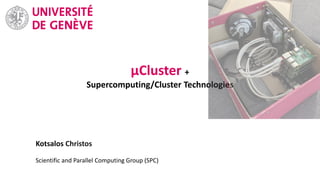
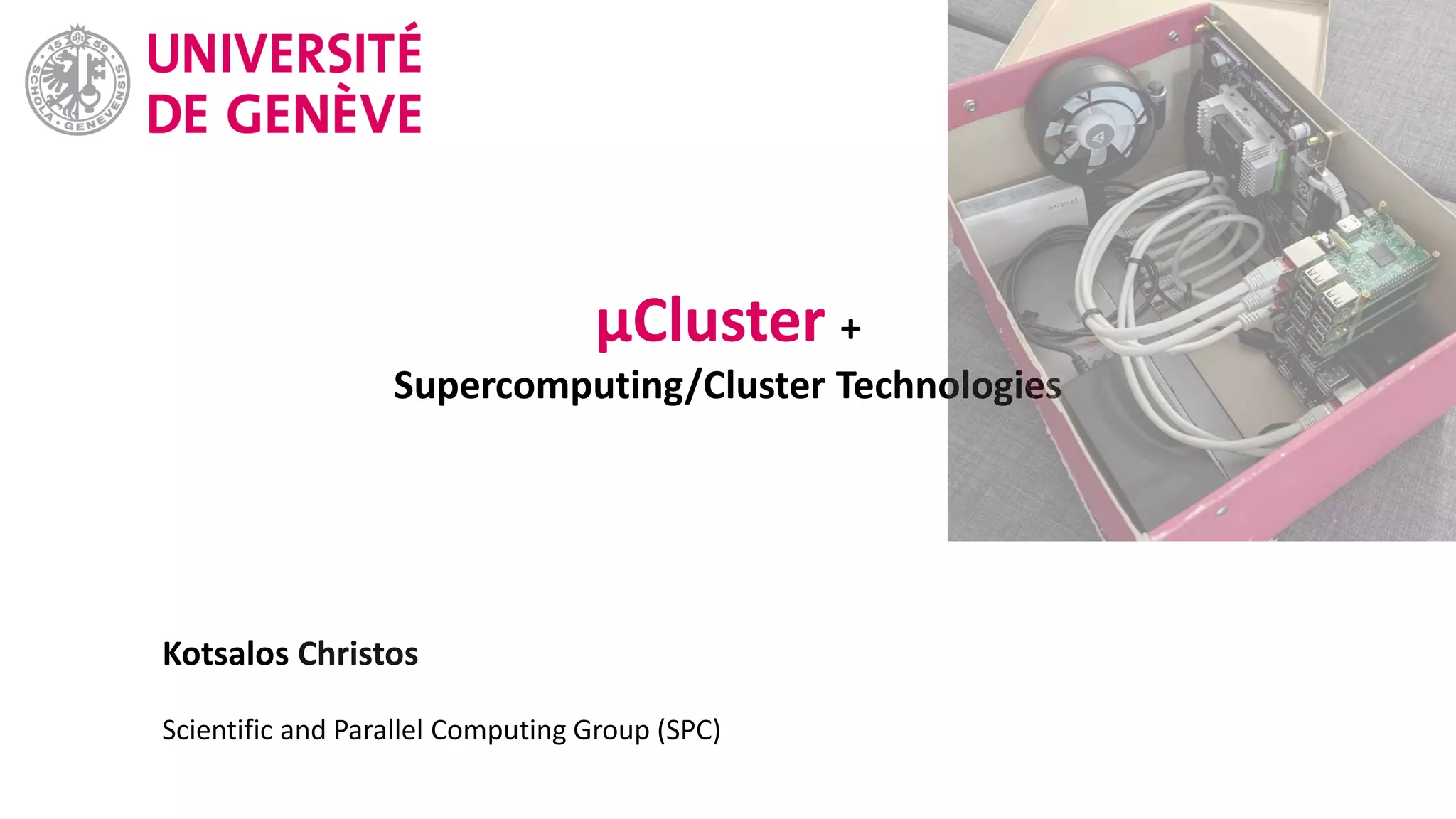
Kotsalos Christos
Scientific and Parallel Computing Group (SPC)
μCluster +
Supercomputing/Cluster Technologies
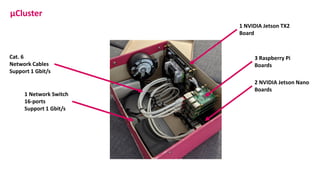
μCluster
2 NVIDIA Jetson Nano
Boards
3 Raspberry Pi
Boards
1 NVIDIA Jetson TX2
Board
1 Network Switch
16-ports
Support 1 Gbit/s
Cat. 6
Network Cables
Support 1 Gbit/s
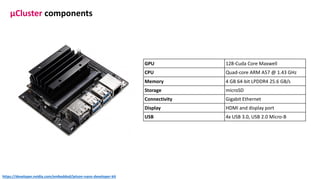
GPU 128-Cuda Core Maxwell
CPU Quad-core ARM A57 @ 1.43 GHz
Memory 4 GB 64-bit LPDDR4 25.6 GB/s
Storage microSD
Connectivity Gigabit Ethernet
Display HDMI and display port
USB 4x USB 3.0, USB 2.0 Micro-B
μCluster components
https://developer.nvidia.com/embedded/jetson-nano-developer-kit
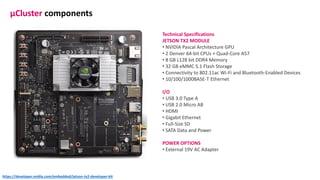
Technical Specifications
JETSON TX2 MODULE
• NVIDIA Pascal Architecture GPU
• 2 Denver 64-bit CPUs + Quad-Core A57
• 8 GB L128 bit DDR4 Memory
• 32 GB eMMC 5.1 Flash Storage
• Connectivity to 802.11ac Wi-Fi and Bluetooth-Enabled Devices
• 10/100/1000BASE-T Ethernet
I/O
• USB 3.0 Type A
• USB 2.0 Micro AB
• HDMI
• Gigabit Ethernet
• Full-Size SD
• SATA Data and Power
POWER OPTIONS
• External 19V AC Adapter
μCluster components
https://developer.nvidia.com/embedded/jetson-tx2-developer-kit
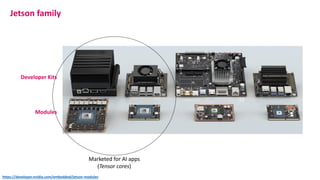
Developer Kits
Modules
Jetson family
Marketed for AI apps
(Tensor cores)
https://developer.nvidia.com/embedded/jetson-modules
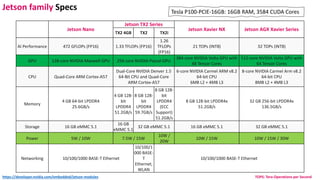
Jetson Nano
Jetson TX2 Series
Jetson Xavier NX Jetson AGX Xavier Series
TX2 4GB TX2 TX2i
AI Performance 472 GFLOPs (FP16) 1.33 TFLOPs (FP16)
1.26
TFLOPs
(FP16)
21 TOPs (INT8) 32 TOPs (INT8)
GPU 128-core NVIDIA Maxwell GPU 256-core NVIDIA Pascal GPU
384-core NVIDIA Volta GPU with
48 Tensor Cores
512-core NVIDIA Volta GPU with
64 Tensor Cores
CPU Quad-Core ARM Cortex-A57
Dual-Core NVIDIA Denver 1.5
64-Bit CPU and Quad-Core
ARM Cortex-A57
6-core NVIDIA Carmel ARM v8.2
64-bit CPU
6MB L2 + 4MB L3
8-core NVIDIA Carmel Arm v8.2
64-bit CPU
8MB L2 + 4MB L3
Memory
4 GB 64-bit LPDDR4
25.6GB/s
4 GB 128-
bit
LPDDR4
51.2GB/s
8 GB 128-
bit
LPDDR4
59.7GB/s
8 GB 128-
bit
LPDDR4
(ECC
Support)
51.2GB/s
8 GB 128-bit LPDDR4x
51.2GB/s
32 GB 256-bit LPDDR4x
136.5GB/s
Storage 16 GB eMMC 5.1
16 GB
eMMC 5.1
32 GB eMMC 5.1 16 GB eMMC 5.1 32 GB eMMC 5.1
Power 5W / 10W 7.5W / 15W
10W /
20W
10W / 15W 10W / 15W / 30W
Networking 10/100/1000 BASE-T Ethernet
10/100/1
000 BASE-
T
Ethernet,
WLAN
10/100/1000 BASE-T Ethernet
Tesla P100-PCIE-16GB: 16GB RAM, 3584 CUDA Cores
Jetson family Specs
https://developer.nvidia.com/embedded/jetson-modules TOPS: Tera-Operations per Second
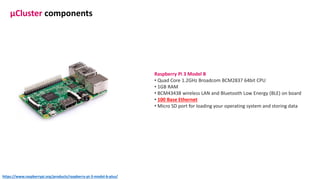
Raspberry Pi 3 Model B
• Quad Core 1.2GHz Broadcom BCM2837 64bit CPU
• 1GB RAM
• BCM43438 wireless LAN and Bluetooth Low Energy (BLE) on board
• 100 Base Ethernet
• Micro SD port for loading your operating system and storing data
μCluster components
https://www.raspberrypi.org/products/raspberry-pi-3-model-b-plus/
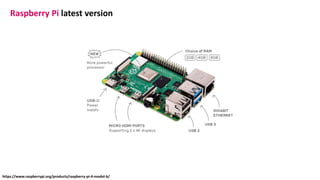
Raspberry Pi latest version
https://www.raspberrypi.org/products/raspberry-pi-4-model-b/
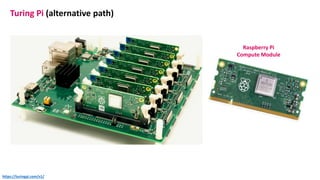
Turing Pi (alternative path)
https://turingpi.com/v1/
Raspberry Pi
Compute Module
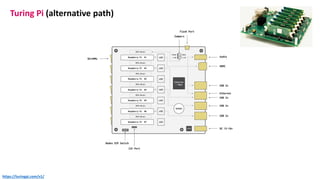
Turing Pi (alternative path)
https://turingpi.com/v1/
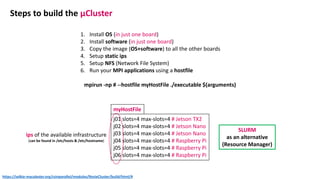
Steps to build the μCluster
1. Install OS (in just one board)
2. Install software (in just one board)
3. Copy the image (OS+software) to all the other boards
4. Setup static ips
5. Setup NFS (Network File System)
6. Run your MPI applications using a hostfile
mpirun -np # --hostfile myHostFile ./executable $(arguments)
j01 slots=4 max-slots=4 # Jetson TX2
j02 slots=4 max-slots=4 # Jetson Nano
j03 slots=4 max-slots=4 # Jetson Nano
j04 slots=4 max-slots=4 # Raspberry Pi
j05 slots=4 max-slots=4 # Raspberry Pi
j06 slots=4 max-slots=4 # Raspberry Pi
myHostFile
ips of the available infrastructure
(can be found in /etc/hosts & /etc/hostname)
https://selkie-macalester.org/csinparallel/modules/RosieCluster/build/html/#
SLURM
as an alternative
(Resource Manager)
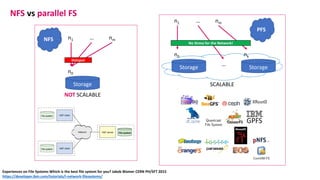
NFS vs parallel FS
Storage
n0
n1 nm…
NOT SCALABLE
NFS
Storage
n0
n1 nm…
Storage
nk
…
SCALABLE
PFS
Experiences on File Systems Which is the best file system for you? Jakob Blomer CERN PH/SFT 2015
https://developer.ibm.com/tutorials/l-network-filesystems/
Hotspot
No Stress for the Network!
parallel FS
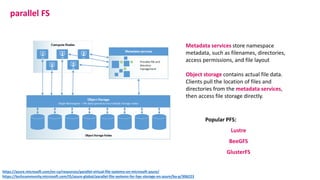
Metadata services store namespace
metadata, such as filenames, directories,
access permissions, and file layout
Object storage contains actual file data.
Clients pull the location of files and
directories from the metadata services,
then access file storage directly.
Popular PFS:
Lustre
BeeGFS
GlusterFS
https://azure.microsoft.com/en-ca/resources/parallel-virtual-file-systems-on-microsoft-azure/
https://techcommunity.microsoft.com/t5/azure-global/parallel-file-systems-for-hpc-storage-on-azure/ba-p/306223
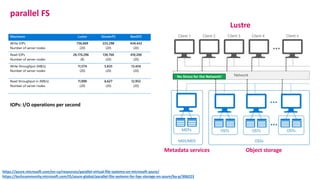
parallel FS
Lustre
Metadata services Object storage
IOPs: I/O operations per second
https://azure.microsoft.com/en-ca/resources/parallel-virtual-file-systems-on-microsoft-azure/
https://techcommunity.microsoft.com/t5/azure-global/parallel-file-systems-for-hpc-storage-on-azure/ba-p/306223
No Stress for the Network!
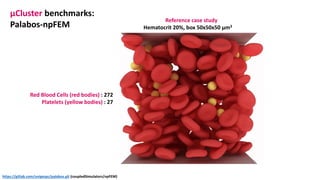
μCluster benchmarks:
Palabos-npFEM
Red Blood Cells (red bodies) : 272
Platelets (yellow bodies) : 27
Reference case study
Hematocrit 20%, box 50x50x50 μm3
https://gitlab.com/unigespc/palabos.git (coupledSimulators/npFEM)
μCluster benchmarks:
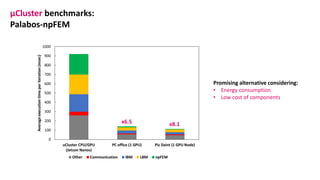
Palabos-npFEM
x6.5 x8.1
Promising alternative considering:
• Energy consumption
• Low cost of components
μCluster benchmarks:
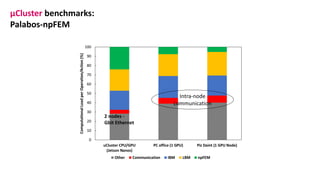
Palabos-npFEM
Intra-node
communication
2 nodes -
Gbit Ethernet
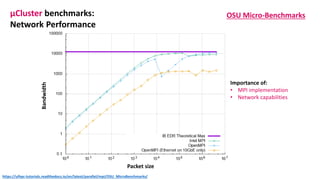
μCluster benchmarks:
Network Performance
OSU Micro-Benchmarks
Testing 2 nodes
osu_get_bw:
Bandwidth Test
MPI_Isend & MPI_Irecv
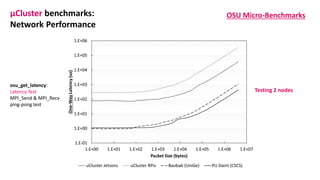
μCluster benchmarks:
Network Performance
OSU Micro-Benchmarks
Testing 2 nodes
osu_get_latency:
Latency Test
MPI_Send & MPI_Recv
ping-pong test
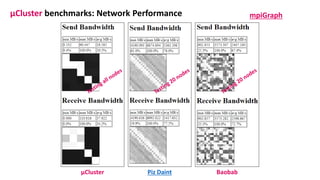
μCluster benchmarks: Network Performance mpiGraph
Piz Daint BaobabμCluster
Bandwidth
Packet size
μCluster benchmarks:
Network Performance
OSU Micro-Benchmarks
https://ulhpc-tutorials.readthedocs.io/en/latest/parallel/mpi/OSU_MicroBenchmarks/
Importance of:
• MPI implementation
• Network capabilities
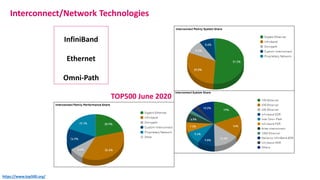
Interconnect/Network Technologies
InfiniBand
Ethernet
Omni-Path
TOP500 June 2020
https://www.top500.org/
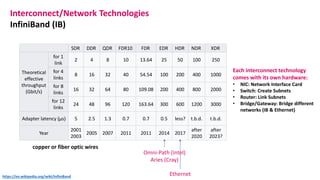
SDR DDR QDR FDR10 FDR EDR HDR NDR XDR
Theoretical
effective
throughput
(Gbit/s)
for 1
link
2 4 8 10 13.64 25 50 100 250
for 4
links
8 16 32 40 54.54 100 200 400 1000
for 8
links
16 32 64 80 109.08 200 400 800 2000
for 12
links
24 48 96 120 163.64 300 600 1200 3000
Adapter latency (µs) 5 2.5 1.3 0.7 0.7 0.5 less? t.b.d. t.b.d.
Year
2001
2003
2005 2007 2011 2011 2014 2017
after
2020
after
2023?
Interconnect/Network Technologies
InfiniBand (IB)
Omni-Path (Intel)
Aries (Cray)
copper or fiber optic wires
Each interconnect technology
comes with its own hardware:
• NIC: Network Interface Card
• Switch: Create Subnets
• Router: Link Subnets
• Bridge/Gateway: Bridge different
networks (IB & Ethernet)
Ethernethttps://en.wikipedia.org/wiki/InfiniBand
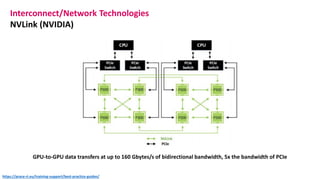
Interconnect/Network Technologies
NVLink (NVIDIA)
GPU-to-GPU data transfers at up to 160 Gbytes/s of bidirectional bandwidth, 5x the bandwidth of PCIe
https://prace-ri.eu/training-support/best-practice-guides/
Interconnect/Network Technologies
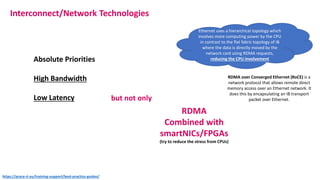
Absolute Priorities
High Bandwidth
Low Latency but not only
RDMA
Combined with
smartNICs/FPGAs
(try to reduce the stress from CPUs)
RDMA over Converged Ethernet (RoCE) is a
network protocol that allows remote direct
memory access over an Ethernet network. It
does this by encapsulating an IB transport
packet over Ethernet.
https://prace-ri.eu/training-support/best-practice-guides/
Ethernet uses a hierarchical topology which
involves more computing power by the CPU
in contrast to the flat fabric topology of IB
where the data is directly moved by the
network card using RDMA requests,
reducing the CPU involvement
Interconnect/Network Technologies
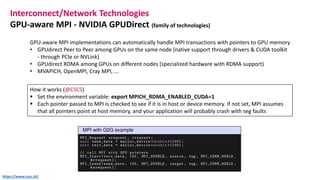
GPU-aware MPI - NVIDIA GPUDirect (family of technologies)
GPU-aware MPI implementations can automatically handle MPI transactions with pointers to GPU memory
• GPUdirect Peer to Peer among GPUs on the same node (native support through drivers & CUDA toolkit
- through PCIe or NVLink)
• GPUdirect RDMA among GPUs on different nodes (specialized hardware with RDMA support)
• MVAPICH, OpenMPI, Cray MPI, ...
How it works (@CSCS)
▪ Set the environment variable: export MPICH_RDMA_ENABLED_CUDA=1
▪ Each pointer passed to MPI is checked to see if it is in host or device memory. If not set, MPI assumes
that all pointers point at host memory, and your application will probably crash with seg faults
https://www.cscs.ch/
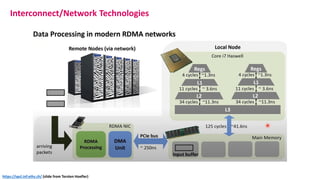
Interconnect/Network Technologies
https://spcl.inf.ethz.ch/ (slide from Torsten Hoefler)
Interconnect/Network Technologies
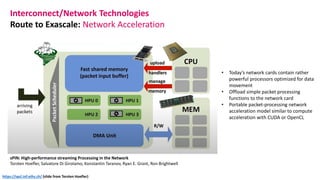
Route to Exascale: Network Acceleration
sPIN: High-performance streaming Processing in the Network
Torsten Hoefler, Salvatore Di Girolamo, Konstantin Taranov, Ryan E. Grant, Ron Brightwell
• Today’s network cards contain rather
powerful processors optimized for data
movement
• Offload simple packet processing
functions to the network card
• Portable packet-processing network
acceleration model similar to compute
acceleration with CUDA or OpenCL
https://spcl.inf.ethz.ch/ (slide from Torsten Hoefler)
Interconnect/Network Technologies
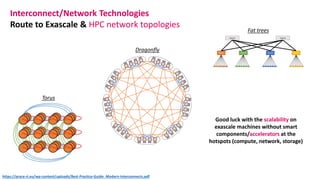
Route to Exascale & HPC network topologies
https://prace-ri.eu/wp-content/uploads/Best-Practice-Guide_Modern-Interconnects.pdf
Fat trees
Torus
Dragonfly
Good luck with the scalability on
exascale machines without smart
components/accelerators at the
hotspots (compute, network, storage)
NVIDIA GPU Micro-architecture
(chronologically)
1. Tesla
2. Fermi
3. Kepler
4. Maxwell
5. Pascal (CSCS)
6. Volta (Summit ORNL)
7. Turing
8. Ampere
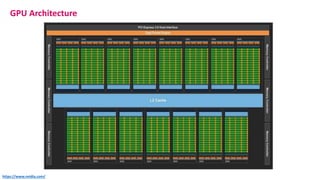
GPU Architecture
GPU Architecture
https://www.nvidia.com/
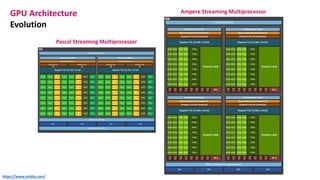
GPU Architecture
Evolution
Pascal Streaming Multiprocessor
Ampere Streaming Multiprocessor
https://www.nvidia.com/
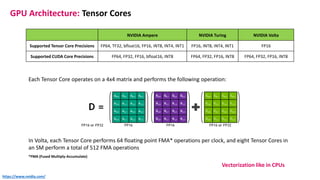
NVIDIA Ampere NVIDIA Turing NVIDIA Volta
Supported Tensor Core Precisions FP64, TF32, bfloat16, FP16, INT8, INT4, INT1 FP16, INT8, INT4, INT1 FP16
Supported CUDA Core Precisions FP64, FP32, FP16, bfloat16, INT8 FP64, FP32, FP16, INT8 FP64, FP32, FP16, INT8
GPU Architecture: Tensor Cores
Each Tensor Core operates on a 4x4 matrix and performs the following operation:
In Volta, each Tensor Core performs 64 floating point FMA* operations per clock, and eight Tensor Cores in
an SM perform a total of 512 FMA operations
*FMA (Fused Multiply-Accumulate)
https://www.nvidia.com/
Vectorization like in CPUs
GPU Architecture: Tensor Cores
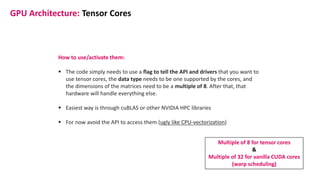
How to use/activate them:
▪ The code simply needs to use a flag to tell the API and drivers that you want to
use tensor cores, the data type needs to be one supported by the cores, and
the dimensions of the matrices need to be a multiple of 8. After that, that
hardware will handle everything else.
▪ Easiest way is through cuBLAS or other NVIDIA HPC libraries
▪ For now avoid the API to access them (ugly like CPU-vectorization)
Multiple of 8 for tensor cores
&
Multiple of 32 for vanilla CUDA cores
(warp scheduling)
// First, create a cuBLAS handle:
cublasStatus_t cublasStat = cublasCreate(&handle);
// Set the math mode to allow cuBLAS to use Tensor Cores:
cublasStat = cublasSetMathMode(handle, CUBLAS_TENSOR_OP_MATH);
// Allocate and initialize your matrices (only the A matrix is shown):
size_t matrixSizeA = (size_t)rowsA * colsA;
T_ELEM_IN **devPtrA = 0;
cudaMalloc((void**)&devPtrA[0], matrixSizeA * sizeof(devPtrA[0][0]));
T_ELEM_IN A = (T_ELEM_IN *)malloc(matrixSizeA * sizeof(A[0]));
memset( A, 0xFF, matrixSizeA* sizeof(A[0]));
status1 = cublasSetMatrix(rowsA, colsA, sizeof(A[0]), A, rowsA, devPtrA[i], rowsA);
// ... allocate and initialize B and C matrices (not shown) ...
// Invoke the GEMM, ensuring k, lda, ldb, and ldc are all multiples of 8,
// and m is a multiple of 4:
cublasStat = cublasGemmEx( handle, transa, transb, m, n, k, alpha,
A, CUDA_R_16F, lda,
B, CUDA_R_16F, ldb,
beta, C, CUDA_R_16F, ldc, CUDA_R_32F, algo);
Few Rules
• The routine must be a GEMM; currently,
only GEMMs support Tensor Core
execution.
• GEMMs that do not satisfy the rules will
fall back to a non-Tensor Core
implementation.
https://www.nvidia.com/
https://developer.nvidia.com/blog/programming-tensor-cores-cuda-9/
GPU Architecture: Tensor Cores (cuBLAS example)
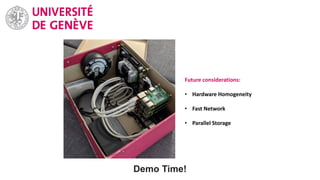
Demo Time!
Future considerations:
• Hardware Homogeneity
• Fast Network
• Parallel Storage

uCluster

  • 1.
    Kotsalos Christos Scientific andParallel Computing Group (SPC) μCluster + Supercomputing/Cluster Technologies
  • 2.
    μCluster 2 NVIDIA JetsonNano Boards 3 Raspberry Pi Boards 1 NVIDIA Jetson TX2 Board 1 Network Switch 16-ports Support 1 Gbit/s Cat. 6 Network Cables Support 1 Gbit/s
  • 3.
    GPU 128-Cuda CoreMaxwell CPU Quad-core ARM A57 @ 1.43 GHz Memory 4 GB 64-bit LPDDR4 25.6 GB/s Storage microSD Connectivity Gigabit Ethernet Display HDMI and display port USB 4x USB 3.0, USB 2.0 Micro-B μCluster components https://developer.nvidia.com/embedded/jetson-nano-developer-kit
  • 4.
    Technical Specifications JETSON TX2MODULE • NVIDIA Pascal Architecture GPU • 2 Denver 64-bit CPUs + Quad-Core A57 • 8 GB L128 bit DDR4 Memory • 32 GB eMMC 5.1 Flash Storage • Connectivity to 802.11ac Wi-Fi and Bluetooth-Enabled Devices • 10/100/1000BASE-T Ethernet I/O • USB 3.0 Type A • USB 2.0 Micro AB • HDMI • Gigabit Ethernet • Full-Size SD • SATA Data and Power POWER OPTIONS • External 19V AC Adapter μCluster components https://developer.nvidia.com/embedded/jetson-tx2-developer-kit
  • 5.
    Developer Kits Modules Jetson family Marketedfor AI apps (Tensor cores) https://developer.nvidia.com/embedded/jetson-modules
  • 6.
    Jetson Nano Jetson TX2Series Jetson Xavier NX Jetson AGX Xavier Series TX2 4GB TX2 TX2i AI Performance 472 GFLOPs (FP16) 1.33 TFLOPs (FP16) 1.26 TFLOPs (FP16) 21 TOPs (INT8) 32 TOPs (INT8) GPU 128-core NVIDIA Maxwell GPU 256-core NVIDIA Pascal GPU 384-core NVIDIA Volta GPU with 48 Tensor Cores 512-core NVIDIA Volta GPU with 64 Tensor Cores CPU Quad-Core ARM Cortex-A57 Dual-Core NVIDIA Denver 1.5 64-Bit CPU and Quad-Core ARM Cortex-A57 6-core NVIDIA Carmel ARM v8.2 64-bit CPU 6MB L2 + 4MB L3 8-core NVIDIA Carmel Arm v8.2 64-bit CPU 8MB L2 + 4MB L3 Memory 4 GB 64-bit LPDDR4 25.6GB/s 4 GB 128- bit LPDDR4 51.2GB/s 8 GB 128- bit LPDDR4 59.7GB/s 8 GB 128- bit LPDDR4 (ECC Support) 51.2GB/s 8 GB 128-bit LPDDR4x 51.2GB/s 32 GB 256-bit LPDDR4x 136.5GB/s Storage 16 GB eMMC 5.1 16 GB eMMC 5.1 32 GB eMMC 5.1 16 GB eMMC 5.1 32 GB eMMC 5.1 Power 5W / 10W 7.5W / 15W 10W / 20W 10W / 15W 10W / 15W / 30W Networking 10/100/1000 BASE-T Ethernet 10/100/1 000 BASE- T Ethernet, WLAN 10/100/1000 BASE-T Ethernet Tesla P100-PCIE-16GB: 16GB RAM, 3584 CUDA Cores Jetson family Specs https://developer.nvidia.com/embedded/jetson-modules TOPS: Tera-Operations per Second
  • 7.
    Raspberry Pi 3Model B • Quad Core 1.2GHz Broadcom BCM2837 64bit CPU • 1GB RAM • BCM43438 wireless LAN and Bluetooth Low Energy (BLE) on board • 100 Base Ethernet • Micro SD port for loading your operating system and storing data μCluster components https://www.raspberrypi.org/products/raspberry-pi-3-model-b-plus/
  • 8.
    Raspberry Pi latestversion https://www.raspberrypi.org/products/raspberry-pi-4-model-b/
  • 9.
    Turing Pi (alternativepath) https://turingpi.com/v1/ Raspberry Pi Compute Module
  • 10.
    Turing Pi (alternativepath) https://turingpi.com/v1/
  • 11.
    Steps to buildthe μCluster 1. Install OS (in just one board) 2. Install software (in just one board) 3. Copy the image (OS+software) to all the other boards 4. Setup static ips 5. Setup NFS (Network File System) 6. Run your MPI applications using a hostfile mpirun -np # --hostfile myHostFile ./executable $(arguments) j01 slots=4 max-slots=4 # Jetson TX2 j02 slots=4 max-slots=4 # Jetson Nano j03 slots=4 max-slots=4 # Jetson Nano j04 slots=4 max-slots=4 # Raspberry Pi j05 slots=4 max-slots=4 # Raspberry Pi j06 slots=4 max-slots=4 # Raspberry Pi myHostFile ips of the available infrastructure (can be found in /etc/hosts & /etc/hostname) https://selkie-macalester.org/csinparallel/modules/RosieCluster/build/html/# SLURM as an alternative (Resource Manager)
  • 12.
    NFS vs parallelFS Storage n0 n1 nm… NOT SCALABLE NFS Storage n0 n1 nm… Storage nk … SCALABLE PFS Experiences on File Systems Which is the best file system for you? Jakob Blomer CERN PH/SFT 2015 https://developer.ibm.com/tutorials/l-network-filesystems/ Hotspot No Stress for the Network!
  • 13.
    parallel FS Metadata servicesstore namespace metadata, such as filenames, directories, access permissions, and file layout Object storage contains actual file data. Clients pull the location of files and directories from the metadata services, then access file storage directly. Popular PFS: Lustre BeeGFS GlusterFS https://azure.microsoft.com/en-ca/resources/parallel-virtual-file-systems-on-microsoft-azure/ https://techcommunity.microsoft.com/t5/azure-global/parallel-file-systems-for-hpc-storage-on-azure/ba-p/306223
  • 14.
    parallel FS Lustre Metadata servicesObject storage IOPs: I/O operations per second https://azure.microsoft.com/en-ca/resources/parallel-virtual-file-systems-on-microsoft-azure/ https://techcommunity.microsoft.com/t5/azure-global/parallel-file-systems-for-hpc-storage-on-azure/ba-p/306223 No Stress for the Network!
  • 15.
    μCluster benchmarks: Palabos-npFEM Red BloodCells (red bodies) : 272 Platelets (yellow bodies) : 27 Reference case study Hematocrit 20%, box 50x50x50 μm3 https://gitlab.com/unigespc/palabos.git (coupledSimulators/npFEM)
  • 16.
    μCluster benchmarks: Palabos-npFEM x6.5 x8.1 Promisingalternative considering: • Energy consumption • Low cost of components
  • 17.
  • 18.
    μCluster benchmarks: Network Performance OSUMicro-Benchmarks Testing 2 nodes osu_get_bw: Bandwidth Test MPI_Isend & MPI_Irecv
  • 19.
    μCluster benchmarks: Network Performance OSUMicro-Benchmarks Testing 2 nodes osu_get_latency: Latency Test MPI_Send & MPI_Recv ping-pong test
  • 20.
    μCluster benchmarks: NetworkPerformance mpiGraph Piz Daint BaobabμCluster
  • 21.
    Bandwidth Packet size μCluster benchmarks: NetworkPerformance OSU Micro-Benchmarks https://ulhpc-tutorials.readthedocs.io/en/latest/parallel/mpi/OSU_MicroBenchmarks/ Importance of: • MPI implementation • Network capabilities
  • 22.
  • 23.
    SDR DDR QDRFDR10 FDR EDR HDR NDR XDR Theoretical effective throughput (Gbit/s) for 1 link 2 4 8 10 13.64 25 50 100 250 for 4 links 8 16 32 40 54.54 100 200 400 1000 for 8 links 16 32 64 80 109.08 200 400 800 2000 for 12 links 24 48 96 120 163.64 300 600 1200 3000 Adapter latency (µs) 5 2.5 1.3 0.7 0.7 0.5 less? t.b.d. t.b.d. Year 2001 2003 2005 2007 2011 2011 2014 2017 after 2020 after 2023? Interconnect/Network Technologies InfiniBand (IB) Omni-Path (Intel) Aries (Cray) copper or fiber optic wires Each interconnect technology comes with its own hardware: • NIC: Network Interface Card • Switch: Create Subnets • Router: Link Subnets • Bridge/Gateway: Bridge different networks (IB & Ethernet) Ethernethttps://en.wikipedia.org/wiki/InfiniBand
  • 24.
    Interconnect/Network Technologies NVLink (NVIDIA) GPU-to-GPUdata transfers at up to 160 Gbytes/s of bidirectional bandwidth, 5x the bandwidth of PCIe https://prace-ri.eu/training-support/best-practice-guides/
  • 25.
    Interconnect/Network Technologies Absolute Priorities HighBandwidth Low Latency but not only RDMA Combined with smartNICs/FPGAs (try to reduce the stress from CPUs) RDMA over Converged Ethernet (RoCE) is a network protocol that allows remote direct memory access over an Ethernet network. It does this by encapsulating an IB transport packet over Ethernet. https://prace-ri.eu/training-support/best-practice-guides/ Ethernet uses a hierarchical topology which involves more computing power by the CPU in contrast to the flat fabric topology of IB where the data is directly moved by the network card using RDMA requests, reducing the CPU involvement
  • 26.
    Interconnect/Network Technologies GPU-aware MPI- NVIDIA GPUDirect (family of technologies) GPU-aware MPI implementations can automatically handle MPI transactions with pointers to GPU memory • GPUdirect Peer to Peer among GPUs on the same node (native support through drivers & CUDA toolkit - through PCIe or NVLink) • GPUdirect RDMA among GPUs on different nodes (specialized hardware with RDMA support) • MVAPICH, OpenMPI, Cray MPI, ... How it works (@CSCS) ▪ Set the environment variable: export MPICH_RDMA_ENABLED_CUDA=1 ▪ Each pointer passed to MPI is checked to see if it is in host or device memory. If not set, MPI assumes that all pointers point at host memory, and your application will probably crash with seg faults https://www.cscs.ch/
  • 27.
  • 28.
    Interconnect/Network Technologies Route toExascale: Network Acceleration sPIN: High-performance streaming Processing in the Network Torsten Hoefler, Salvatore Di Girolamo, Konstantin Taranov, Ryan E. Grant, Ron Brightwell • Today’s network cards contain rather powerful processors optimized for data movement • Offload simple packet processing functions to the network card • Portable packet-processing network acceleration model similar to compute acceleration with CUDA or OpenCL https://spcl.inf.ethz.ch/ (slide from Torsten Hoefler)
  • 29.
    Interconnect/Network Technologies Route toExascale & HPC network topologies https://prace-ri.eu/wp-content/uploads/Best-Practice-Guide_Modern-Interconnects.pdf Fat trees Torus Dragonfly Good luck with the scalability on exascale machines without smart components/accelerators at the hotspots (compute, network, storage)
  • 30.
    NVIDIA GPU Micro-architecture (chronologically) 1.Tesla 2. Fermi 3. Kepler 4. Maxwell 5. Pascal (CSCS) 6. Volta (Summit ORNL) 7. Turing 8. Ampere GPU Architecture
  • 31.
  • 32.
    GPU Architecture Evolution Pascal StreamingMultiprocessor Ampere Streaming Multiprocessor https://www.nvidia.com/
  • 33.
    NVIDIA Ampere NVIDIATuring NVIDIA Volta Supported Tensor Core Precisions FP64, TF32, bfloat16, FP16, INT8, INT4, INT1 FP16, INT8, INT4, INT1 FP16 Supported CUDA Core Precisions FP64, FP32, FP16, bfloat16, INT8 FP64, FP32, FP16, INT8 FP64, FP32, FP16, INT8 GPU Architecture: Tensor Cores Each Tensor Core operates on a 4x4 matrix and performs the following operation: In Volta, each Tensor Core performs 64 floating point FMA* operations per clock, and eight Tensor Cores in an SM perform a total of 512 FMA operations *FMA (Fused Multiply-Accumulate) https://www.nvidia.com/ Vectorization like in CPUs
  • 34.
    GPU Architecture: TensorCores How to use/activate them: ▪ The code simply needs to use a flag to tell the API and drivers that you want to use tensor cores, the data type needs to be one supported by the cores, and the dimensions of the matrices need to be a multiple of 8. After that, that hardware will handle everything else. ▪ Easiest way is through cuBLAS or other NVIDIA HPC libraries ▪ For now avoid the API to access them (ugly like CPU-vectorization) Multiple of 8 for tensor cores & Multiple of 32 for vanilla CUDA cores (warp scheduling)
  • 35.
    // First, createa cuBLAS handle: cublasStatus_t cublasStat = cublasCreate(&handle); // Set the math mode to allow cuBLAS to use Tensor Cores: cublasStat = cublasSetMathMode(handle, CUBLAS_TENSOR_OP_MATH); // Allocate and initialize your matrices (only the A matrix is shown): size_t matrixSizeA = (size_t)rowsA * colsA; T_ELEM_IN **devPtrA = 0; cudaMalloc((void**)&devPtrA[0], matrixSizeA * sizeof(devPtrA[0][0])); T_ELEM_IN A = (T_ELEM_IN *)malloc(matrixSizeA * sizeof(A[0])); memset( A, 0xFF, matrixSizeA* sizeof(A[0])); status1 = cublasSetMatrix(rowsA, colsA, sizeof(A[0]), A, rowsA, devPtrA[i], rowsA); // ... allocate and initialize B and C matrices (not shown) ... // Invoke the GEMM, ensuring k, lda, ldb, and ldc are all multiples of 8, // and m is a multiple of 4: cublasStat = cublasGemmEx( handle, transa, transb, m, n, k, alpha, A, CUDA_R_16F, lda, B, CUDA_R_16F, ldb, beta, C, CUDA_R_16F, ldc, CUDA_R_32F, algo); Few Rules • The routine must be a GEMM; currently, only GEMMs support Tensor Core execution. • GEMMs that do not satisfy the rules will fall back to a non-Tensor Core implementation. https://www.nvidia.com/ https://developer.nvidia.com/blog/programming-tensor-cores-cuda-9/ GPU Architecture: Tensor Cores (cuBLAS example)
  • 36.
    Demo Time! Future considerations: •Hardware Homogeneity • Fast Network • Parallel Storage