Network
Transmission Media
Prof. Henry Martinez
May 2009
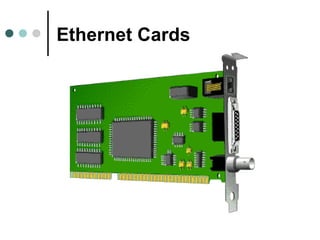
Ethernet Cards
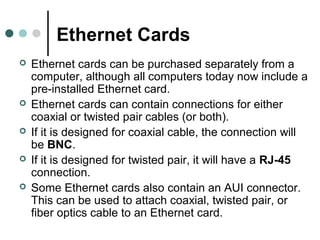
 Ethernet cards can be purchased separately from a
computer, although all computers today now include a
pre-installed Ethernet card.
 Ethernet cards can contain connections for either
coaxial or twisted pair cables (or both).
 If it is designed for coaxial cable, the connection will
be BNC.
 If it is designed for twisted pair, it will have a RJ-45
connection.
 Some Ethernet cards also contain an AUI connector.
This can be used to attach coaxial, twisted pair, or
fiber optics cable to an Ethernet card.
Ethernet Cards
What is Network Cabling?
 Cable is the medium through which
information usually moves from one network
device to another.
 There are several types of cable which are
commonly used with LANs. In some cases, a
network will utilize only one type of cable, other
networks will use a variety of cable types.
 The type of cable chosen for a network is
related to the network's topology, standard,
and size.
Unshielded Twisted Pair
(UTP) Cable
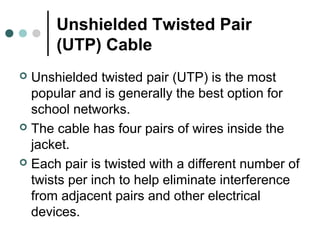
 Unshielded twisted pair (UTP) is the most
popular and is generally the best option for
school networks.
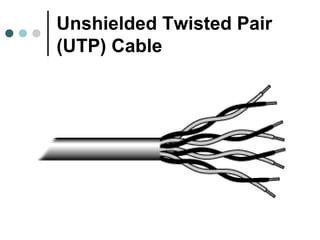
 The cable has four pairs of wires inside the
jacket.
 Each pair is twisted with a different number of
twists per inch to help eliminate interference
from adjacent pairs and other electrical
devices.
Unshielded Twisted Pair
(UTP) Cable
Categories of Unshielded
Twisted Pair
Type Use
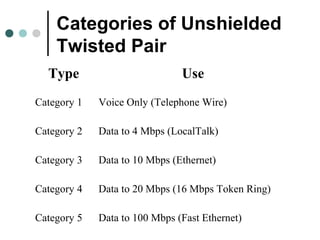
Category 1 Voice Only (Telephone Wire)
Category 2 Data to 4 Mbps (LocalTalk)
Category 3 Data to 10 Mbps (Ethernet)
Category 4 Data to 20 Mbps (16 Mbps Token Ring)
Category 5 Data to 100 Mbps (Fast Ethernet)
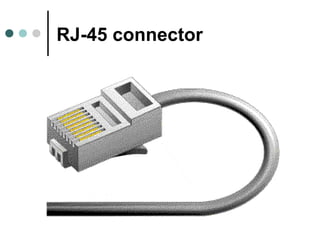
RJ-45 connector
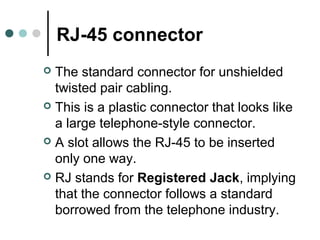
 The standard connector for unshielded
twisted pair cabling.
 This is a plastic connector that looks like
a large telephone-style connector.
 A slot allows the RJ-45 to be inserted
only one way.
 RJ stands for Registered Jack, implying
that the connector follows a standard
borrowed from the telephone industry.
RJ-45 connector
Shielded Twisted Pair
(STP) Cable
 A disadvantage of UTP is that it may be
susceptible to radio and electrical
frequency interference.
 Shielded twisted pair (STP) is suitable for
environments with electrical interference;
however, the extra shielding can make
the cables quite bulky.
 Shielded twisted pair is often used on
networks using Ring topology.
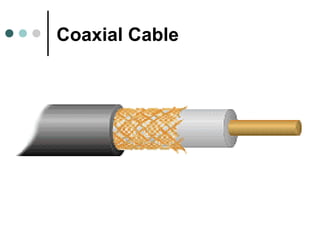
Coaxial Cable
 Coaxial cabling has a single copper
conductor at its center.
 A plastic layer provides insulation
between the center conductor and a
braided metal shield.
 The metal shield helps to block any
outside interference from fluorescent
lights, motors, and other computers.
Coaxial Cable
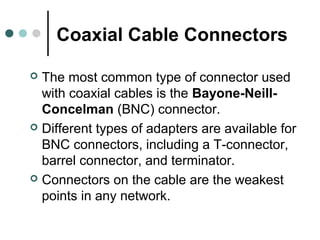
Coaxial Cable Connectors
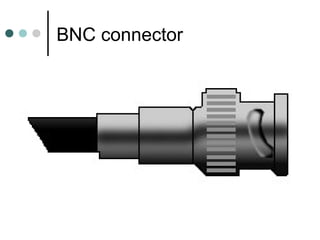
 The most common type of connector used
with coaxial cables is the Bayone-Neill-
Concelman (BNC) connector.
 Different types of adapters are available for
BNC connectors, including a T-connector,
barrel connector, and terminator.
 Connectors on the cable are the weakest
points in any network.
BNC connector
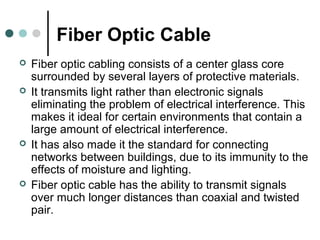
Fiber Optic Cable
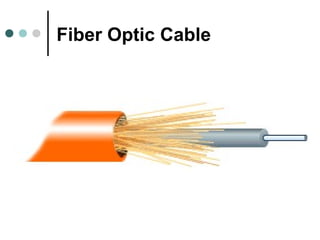
 Fiber optic cabling consists of a center glass core
surrounded by several layers of protective materials.
 It transmits light rather than electronic signals
eliminating the problem of electrical interference. This
makes it ideal for certain environments that contain a
large amount of electrical interference.
 It has also made it the standard for connecting
networks between buildings, due to its immunity to the
effects of moisture and lighting.
 Fiber optic cable has the ability to transmit signals
over much longer distances than coaxial and twisted
pair.
Fiber Optic Cable
Fiber Optic Connector
 The most common connector used with fiber
optic cable is an ST connector.
 It is barrel shaped, similar to a BNC
connector.
 A newer connector, the SC, is becoming more
popular. It has a squared face and is easier to
connect in a confined space.
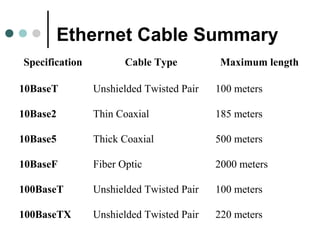
Ethernet Cable Summary
Specification Cable Type Maximum length
10BaseT Unshielded Twisted Pair 100 meters
10Base2 Thin Coaxial 185 meters
10Base5 Thick Coaxial 500 meters
10BaseF Fiber Optic 2000 meters
100BaseT Unshielded Twisted Pair 100 meters
100BaseTX Unshielded Twisted Pair 220 meters
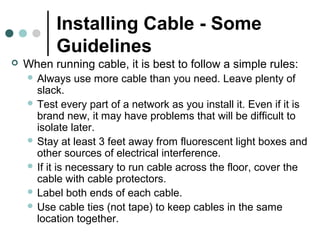
Installing Cable - Some
Guidelines
 When running cable, it is best to follow a simple rules:
 Always use more cable than you need. Leave plenty of
slack.
 Test every part of a network as you install it. Even if it is
brand new, it may have problems that will be difficult to
isolate later.
 Stay at least 3 feet away from fluorescent light boxes and
other sources of electrical interference.
 If it is necessary to run cable across the floor, cover the
cable with cable protectors.
 Label both ends of each cable.
 Use cable ties (not tape) to keep cables in the same
location together.
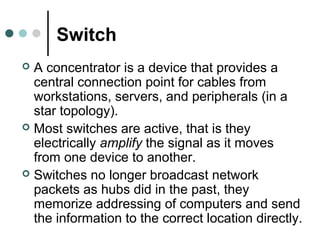
Switch
 A concentrator is a device that provides a
central connection point for cables from
workstations, servers, and peripherals (in a
star topology).
 Most switches are active, that is they
electrically amplify the signal as it moves
from one device to another.
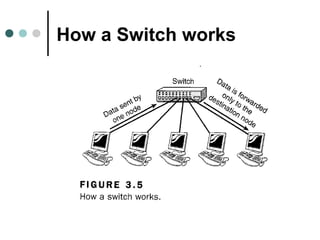
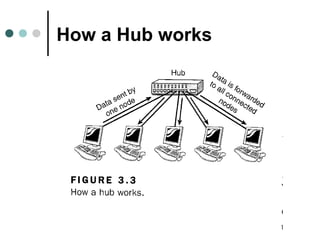
 Switches no longer broadcast network
packets as hubs did in the past, they
memorize addressing of computers and send
the information to the correct location directly.
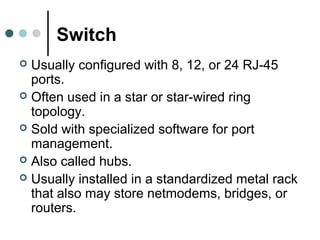
Switch
 Usually configured with 8, 12, or 24 RJ-45
ports.
 Often used in a star or star-wired ring
topology.
 Sold with specialized software for port
management.
 Also called hubs.
 Usually installed in a standardized metal rack
that also may store netmodems, bridges, or
routers.
How a Switch works
How a Hub works
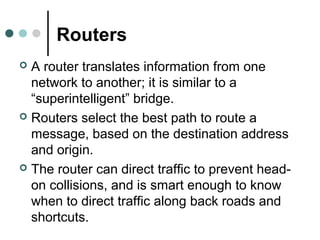
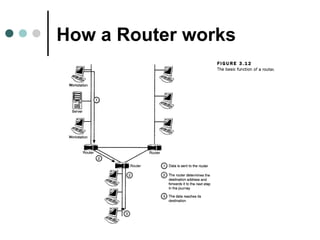
Routers
 A router translates information from one
network to another; it is similar to a
“superintelligent” bridge.
 Routers select the best path to route a
message, based on the destination address
and origin.
 The router can direct traffic to prevent head-
on collisions, and is smart enough to know
when to direct traffic along back roads and
shortcuts.
How a Router works
Repeaters
 Since a signal loses strength as it passes
along a cable, it is often necessary to boost
the signal with a device called a repeater.
 The repeater electrically amplifies the signal
it receives and rebroadcasts it.
 Repeaters can be separate devices or they
can be incorporated into a concentrator.
 They are used when the total length of your
network cable exceeds the standards set for
the type of cable being used.
Bridges
 A bridge is a device that allows you to
segment a large network into two smaller,
more efficient networks.
 If you are adding to an older wiring scheme
and want the new network to be up-to-date, a
bridge can connect the two.
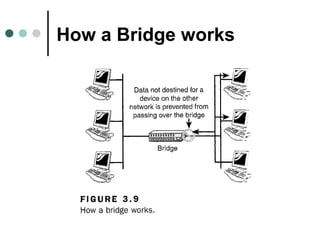
 A bridge monitors the information traffic on
both sides of the network so that it can pass
packets of information to the correct location.
How a Bridge works
Wireless Media
Wireless Routers
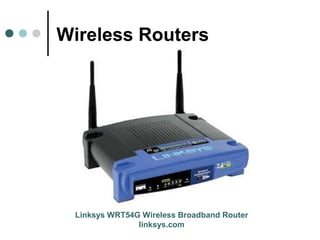
 The centerpiece product of many home/office
computer networks is a wireless router. They
also contain a network switch to allow some
computers to be connected with Ethernet
cables.
 Wireless routers allow cable modem and DSL
Internet connections to be shared.
 Additionally, many wireless router products
include a built-in firewall that protects the
home network from intruders.
Wireless Routers
Linksys WRT54G Wireless Broadband Router
linksys.com
Wireless Access Points
 A wireless access point (sometimes called an
"AP" or "WAP") serves to join or "bridge"
wireless clients to a wired Ethernet network.
 An access point in turn may connect to
another access point, or to a wired Ethernet
router.
 Wireless access points are commonly used in
large office buildings to create one wireless
local area network (WLAN) that spans a large
area. Each access point typically supports up
to 255 client computers.
Wireless Access Points
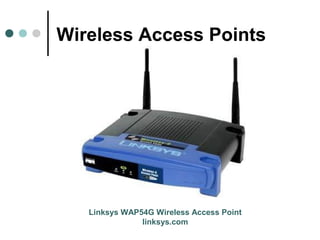
Linksys WAP54G Wireless Access Point
linksys.com
Wireless Network
Adapters
 A wireless network adapter allows a computing device to
join a wireless LAN. Wireless network adapters contain a
built-in radio transmitter and receiver.
 Each adapter supports one or more of the 802.11a,
802.11b, or 802.11g Wi-Fi standards.
 Wireless network adapters also exist in several different
form factors. Traditional PCI wireless adapters are add-in
cards designed for installation inside a desktop computer
having a PCI bus. USB wireless adapters connect to the
external USB port of a computer. Finally, so-called PC
Card or PCMCIA wireless adapters insert into a narrow
open bay on a notebook computer.
Wireless Network
Adapters
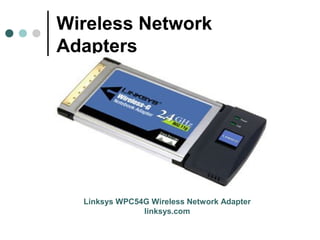
Linksys WPC54G Wireless Network Adapter
linksys.com
Wireless Print Servers
 A wireless print server allows one or two printers to be
conveniently shared across a WiFi network. Wireless print servers
for home networks generally are available in both 802.11b and
802.11g varieties.
 Wireless print servers offer the following advantages:
 Allows printers to be conveniently located anywhere within wireless
network range, not tied to the location of computers.
 Does not require a computer be always turned on in order to print.
 Does not require a computer to manage all print jobs, that can bog
down its performance.
 Allows administrators to change computer names and other settings
without having to re-configure the network printing settings.
 A wireless print server must be connected to printers by a network
cable, normally USB 1.1 or USB 2.0. The print server itself can
connect to a wireless router over WiFi, or it can be joined using an
Ethernet cable.
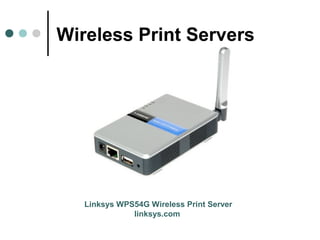
Wireless Print Servers
Linksys WPS54G Wireless Print Server
linksys.com
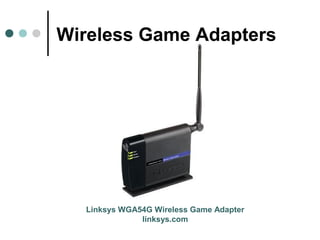
Wireless Game Adapters
 A wireless game adapter connects a video
game console to a Wi-Fi home network to
enable Internet or head-to-head LAN gaming.
Wireless game adapters for home networks
are available in both 802.11b and 802.11g
varieties.
 Wireless game adapters can be connected
either to a wireless router using an Ethernet
cable (for best reliability and performance) or
over Wi-Fi (for greater reach and
convenience).
Wireless Game Adapters
Linksys WGA54G Wireless Game Adapter
linksys.com
Wireless Internet Video
Cameras
 A wireless Internet video camera allows video
(and sometimes audio) data to be captured and
transmitted across a WiFi computer network.
Wireless Internet video cameras are available in
both 802.11b and 802.11g varieties.
 Wireless Internet video cameras work by serving
up data streams to any computer that connects to
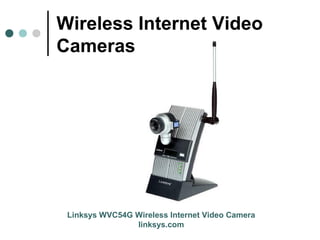
them. Cameras like the one above contain a built
in Web server.
Wireless Internet Video
Cameras
Linksys WVC54G Wireless Internet Video Camera
linksys.com
Wireless Range Extender
 A wireless range extender increases the
distance over which a WLAN signal can spread,
overcoming obstacles and enhancing overall
network signal quality. Several different forms
of wireless range extenders are available.
These products are sometimes called "range
expanders" or "signal boosters."
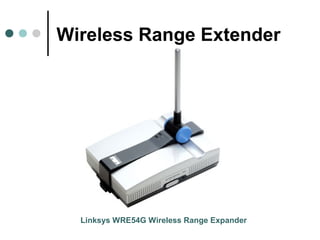
 A wireless range extender works as a relay or
network repeater, picking up and reflecting WiFi
signals from a network's base router or access
point.
Wireless Range Extender
Linksys WRE54G Wireless Range Expander

Nueva presentacion cables y conectores

  • 1.
  • 2.
    Ethernet Cards  Ethernetcards can be purchased separately from a computer, although all computers today now include a pre-installed Ethernet card.  Ethernet cards can contain connections for either coaxial or twisted pair cables (or both).  If it is designed for coaxial cable, the connection will be BNC.  If it is designed for twisted pair, it will have a RJ-45 connection.  Some Ethernet cards also contain an AUI connector. This can be used to attach coaxial, twisted pair, or fiber optics cable to an Ethernet card.
  • 3.
  • 4.
    What is NetworkCabling?  Cable is the medium through which information usually moves from one network device to another.  There are several types of cable which are commonly used with LANs. In some cases, a network will utilize only one type of cable, other networks will use a variety of cable types.  The type of cable chosen for a network is related to the network's topology, standard, and size.
  • 5.
    Unshielded Twisted Pair (UTP)Cable  Unshielded twisted pair (UTP) is the most popular and is generally the best option for school networks.  The cable has four pairs of wires inside the jacket.  Each pair is twisted with a different number of twists per inch to help eliminate interference from adjacent pairs and other electrical devices.
  • 6.
  • 7.
    Categories of Unshielded TwistedPair Type Use Category 1 Voice Only (Telephone Wire) Category 2 Data to 4 Mbps (LocalTalk) Category 3 Data to 10 Mbps (Ethernet) Category 4 Data to 20 Mbps (16 Mbps Token Ring) Category 5 Data to 100 Mbps (Fast Ethernet)
  • 8.
    RJ-45 connector  Thestandard connector for unshielded twisted pair cabling.  This is a plastic connector that looks like a large telephone-style connector.  A slot allows the RJ-45 to be inserted only one way.  RJ stands for Registered Jack, implying that the connector follows a standard borrowed from the telephone industry.
  • 9.
  • 10.
    Shielded Twisted Pair (STP)Cable  A disadvantage of UTP is that it may be susceptible to radio and electrical frequency interference.  Shielded twisted pair (STP) is suitable for environments with electrical interference; however, the extra shielding can make the cables quite bulky.  Shielded twisted pair is often used on networks using Ring topology.
  • 11.
    Coaxial Cable  Coaxialcabling has a single copper conductor at its center.  A plastic layer provides insulation between the center conductor and a braided metal shield.  The metal shield helps to block any outside interference from fluorescent lights, motors, and other computers.
  • 12.
  • 13.
    Coaxial Cable Connectors The most common type of connector used with coaxial cables is the Bayone-Neill- Concelman (BNC) connector.  Different types of adapters are available for BNC connectors, including a T-connector, barrel connector, and terminator.  Connectors on the cable are the weakest points in any network.
  • 14.
  • 15.
    Fiber Optic Cable Fiber optic cabling consists of a center glass core surrounded by several layers of protective materials.  It transmits light rather than electronic signals eliminating the problem of electrical interference. This makes it ideal for certain environments that contain a large amount of electrical interference.  It has also made it the standard for connecting networks between buildings, due to its immunity to the effects of moisture and lighting.  Fiber optic cable has the ability to transmit signals over much longer distances than coaxial and twisted pair.
  • 16.
  • 17.
    Fiber Optic Connector The most common connector used with fiber optic cable is an ST connector.  It is barrel shaped, similar to a BNC connector.  A newer connector, the SC, is becoming more popular. It has a squared face and is easier to connect in a confined space.
  • 18.
    Ethernet Cable Summary SpecificationCable Type Maximum length 10BaseT Unshielded Twisted Pair 100 meters 10Base2 Thin Coaxial 185 meters 10Base5 Thick Coaxial 500 meters 10BaseF Fiber Optic 2000 meters 100BaseT Unshielded Twisted Pair 100 meters 100BaseTX Unshielded Twisted Pair 220 meters
  • 19.
    Installing Cable -Some Guidelines  When running cable, it is best to follow a simple rules:  Always use more cable than you need. Leave plenty of slack.  Test every part of a network as you install it. Even if it is brand new, it may have problems that will be difficult to isolate later.  Stay at least 3 feet away from fluorescent light boxes and other sources of electrical interference.  If it is necessary to run cable across the floor, cover the cable with cable protectors.  Label both ends of each cable.  Use cable ties (not tape) to keep cables in the same location together.
  • 20.
    Switch  A concentratoris a device that provides a central connection point for cables from workstations, servers, and peripherals (in a star topology).  Most switches are active, that is they electrically amplify the signal as it moves from one device to another.  Switches no longer broadcast network packets as hubs did in the past, they memorize addressing of computers and send the information to the correct location directly.
  • 21.
    Switch  Usually configuredwith 8, 12, or 24 RJ-45 ports.  Often used in a star or star-wired ring topology.  Sold with specialized software for port management.  Also called hubs.  Usually installed in a standardized metal rack that also may store netmodems, bridges, or routers.
  • 22.
  • 23.
    How a Hubworks
  • 24.
    Routers  A routertranslates information from one network to another; it is similar to a “superintelligent” bridge.  Routers select the best path to route a message, based on the destination address and origin.  The router can direct traffic to prevent head- on collisions, and is smart enough to know when to direct traffic along back roads and shortcuts.
  • 25.
  • 26.
    Repeaters  Since asignal loses strength as it passes along a cable, it is often necessary to boost the signal with a device called a repeater.  The repeater electrically amplifies the signal it receives and rebroadcasts it.  Repeaters can be separate devices or they can be incorporated into a concentrator.  They are used when the total length of your network cable exceeds the standards set for the type of cable being used.
  • 27.
    Bridges  A bridgeis a device that allows you to segment a large network into two smaller, more efficient networks.  If you are adding to an older wiring scheme and want the new network to be up-to-date, a bridge can connect the two.  A bridge monitors the information traffic on both sides of the network so that it can pass packets of information to the correct location.
  • 28.
  • 29.
  • 30.
    Wireless Routers  Thecenterpiece product of many home/office computer networks is a wireless router. They also contain a network switch to allow some computers to be connected with Ethernet cables.  Wireless routers allow cable modem and DSL Internet connections to be shared.  Additionally, many wireless router products include a built-in firewall that protects the home network from intruders.
  • 31.
    Wireless Routers Linksys WRT54GWireless Broadband Router linksys.com
  • 32.
    Wireless Access Points A wireless access point (sometimes called an "AP" or "WAP") serves to join or "bridge" wireless clients to a wired Ethernet network.  An access point in turn may connect to another access point, or to a wired Ethernet router.  Wireless access points are commonly used in large office buildings to create one wireless local area network (WLAN) that spans a large area. Each access point typically supports up to 255 client computers.
  • 33.
    Wireless Access Points LinksysWAP54G Wireless Access Point linksys.com
  • 34.
    Wireless Network Adapters  Awireless network adapter allows a computing device to join a wireless LAN. Wireless network adapters contain a built-in radio transmitter and receiver.  Each adapter supports one or more of the 802.11a, 802.11b, or 802.11g Wi-Fi standards.  Wireless network adapters also exist in several different form factors. Traditional PCI wireless adapters are add-in cards designed for installation inside a desktop computer having a PCI bus. USB wireless adapters connect to the external USB port of a computer. Finally, so-called PC Card or PCMCIA wireless adapters insert into a narrow open bay on a notebook computer.
  • 35.
    Wireless Network Adapters Linksys WPC54GWireless Network Adapter linksys.com
  • 36.
    Wireless Print Servers A wireless print server allows one or two printers to be conveniently shared across a WiFi network. Wireless print servers for home networks generally are available in both 802.11b and 802.11g varieties.  Wireless print servers offer the following advantages:  Allows printers to be conveniently located anywhere within wireless network range, not tied to the location of computers.  Does not require a computer be always turned on in order to print.  Does not require a computer to manage all print jobs, that can bog down its performance.  Allows administrators to change computer names and other settings without having to re-configure the network printing settings.  A wireless print server must be connected to printers by a network cable, normally USB 1.1 or USB 2.0. The print server itself can connect to a wireless router over WiFi, or it can be joined using an Ethernet cable.
  • 37.
    Wireless Print Servers LinksysWPS54G Wireless Print Server linksys.com
  • 38.
    Wireless Game Adapters A wireless game adapter connects a video game console to a Wi-Fi home network to enable Internet or head-to-head LAN gaming. Wireless game adapters for home networks are available in both 802.11b and 802.11g varieties.  Wireless game adapters can be connected either to a wireless router using an Ethernet cable (for best reliability and performance) or over Wi-Fi (for greater reach and convenience).
  • 39.
    Wireless Game Adapters LinksysWGA54G Wireless Game Adapter linksys.com
  • 40.
    Wireless Internet Video Cameras A wireless Internet video camera allows video (and sometimes audio) data to be captured and transmitted across a WiFi computer network. Wireless Internet video cameras are available in both 802.11b and 802.11g varieties.  Wireless Internet video cameras work by serving up data streams to any computer that connects to them. Cameras like the one above contain a built in Web server.
  • 41.
    Wireless Internet Video Cameras LinksysWVC54G Wireless Internet Video Camera linksys.com
  • 42.
    Wireless Range Extender A wireless range extender increases the distance over which a WLAN signal can spread, overcoming obstacles and enhancing overall network signal quality. Several different forms of wireless range extenders are available. These products are sometimes called "range expanders" or "signal boosters."  A wireless range extender works as a relay or network repeater, picking up and reflecting WiFi signals from a network's base router or access point.
  • 43.
    Wireless Range Extender LinksysWRE54G Wireless Range Expander