Seminar Topic: Recent Trenends in
Networking(NS2)
www.plenzogantechnology.com
Plenzogan Technology
What is Networking
 A network is two or more devices capable of communicating and sharing
resources between them.
 Two types of networks are LAN and WAN:
 LAN (Local Area Network) – A group of devices sharing resources in a
single area such as a room or a building.
 WAN (Wide Area Network) – Two or more LANs communicating,
often across large distances. The most famous WAN is the Internet
 Network - A group of computers connected together in a way that allows
information to be exchanged between the computers.
 Node - Anything that is connected to the network. While a node is typically a
computer, it can also be something like a printer or CD-ROM tower.
 Segment - Any portion of a network that is separated, by a switch, bridge or
router, from other parts of the network.
 Backbone - The main cabling of a network that all of the segments connect to.
Typically, the backbone is capable of carrying more information than the
individual segments. For example, each segment may have a transfer rate of 10
Mbps (megabits per second: 1 million bits a second), while the backbone may
operate at 100 Mbps.
 Topology - The way that each node is physically connected to the network.
History
NS 1
 The first version of ns, known as ns-1, was developed at Lawrence
Berkeley National Laboratory (LBNL) in the 1995-97 timeframe by Steve
McCanne, Sally Floyd, Kevin Fall, and other contributors.
 This was known as the LBNL Network Simulator, and derived from an
earlier simulator known as REAL by S. Keshav.
 The core of the simulator was written in C++, with Tcl-based scripting
of simulation scenarios.Long-running contributions have also come from
Sun Microsystems, the UC Berkeley Daedelus, and Carnegie Mellon
Monarch projects.it used.
NS2
 In 1996-97, ns version 2 (ns-2) was initiated based on a refactoring by Steve
McCanne. Use of Tcl was replaced by MIT's Object Tcl (OTcl), an object-
oriented dialect of Tcl.
 The core of ns-2 is also written in C++, but the C++ simulation objects are
linked to shadow objects in OTcl and variables can be linked between both
language realms. Simulation scripts are written in the OTcl language, an
extension of the Tcl scripting language.
 Presently, ns-2 consists of over 300,000 lines of source code, and there
is probably a comparable amount of contributed code that is not
integrated directly into the main distribution (many forks of ns-2 exist,
both maintained and unmaintained).
 It runs on GNU/Linux, FreeBSD, Solaris, Mac OS X and Windows
versions that support Cygwin. It is licensed for use under version 2 of
the GNU General Public License.
NS2 Design
 ns-3 is built using C++ and Python with scripting capability. The ns-3
library is wrapped to python thanks to the pybindgen library which
delegates the parsing of the ns-3 C++ headers to gccxml and pygccxml
to generate automatically the corresponding C++ binding glue. These
automatically-generated C++ files are finally compiled into the ns-3
python module to allow users to interact with the C++ ns-3 models and
core through python scripts.
 The large majority of its users focuses on wireless simulations which
involve models for Wi-Fi, WiMAX, or LTE for layers 1 and 2 and
routing protocols such as OLSR and AODV.
NS2 Work Flow
 Topology definition: to ease the creation of basic facilities and define
their interrelationships, ns-3 has a system of containers and helpers that
facilitates this process.
 Model development: models are added to simulation (for example,
UDP, IPv4, point-to-point devices and links, applications); most of the
time this is done using helpers.
 Node and link configuration: models set their default values (for
example, the size of packets sent by an application or MTU of a point-
to-point link); most of the time this is done using the attribute system.
 Execution: simulation facilities generate events, data requested by the
user is logged.
 Performance analysis: after the simulation is finished and data is
available as a time-stamped event trace. This data can then be
statistically analysed with tools like R to draw conclusions.
 Graphical Visualization: raw or processed data collected in a
simulation can be graphed using tools like Gnu plot, matplotlib or
XGRAPH.
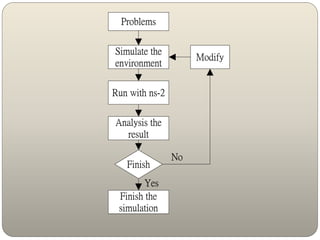
Problems
Simulate the
environment
Run with ns-2
Analysis the
result
Finish
Modify
No
Finish the
simulation
Yes
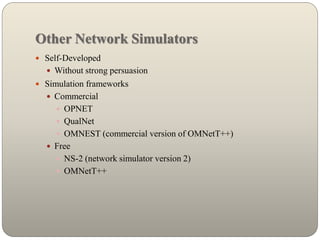
Other Network Simulators
 Self-Developed
 Without strong persuasion
 Simulation frameworks
 Commercial
 OPNET
 QualNet
 OMNEST (commercial version of OMNetT++)
 Free
 NS-2 (network simulator version 2)
 OMNetT++
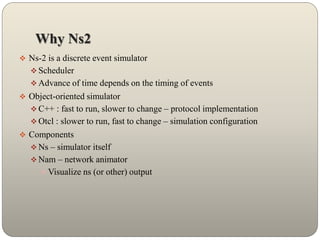
Why Ns2
 Ns-2 is a discrete event simulator
 Scheduler
 Advance of time depends on the timing of events
 Object-oriented simulator
 C++ : fast to run, slower to change – protocol implementation
 Otcl : slower to run, fast to change – simulation configuration
 Components
 Ns – simulator itself
 Nam – network animator
 Visualize ns (or other) output
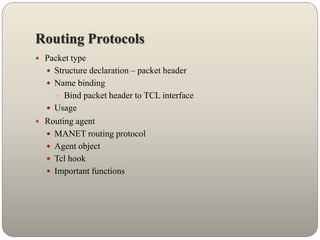
Routing Protocols
 Packet type
 Structure declaration – packet header
 Name binding
 Bind packet header to TCL interface
 Usage
 Routing agent
 MANET routing protocol
 Agent object
 Tcl hook
 Important functions
List of Protocols
1. AODV
2. DSDV
3. DSR
4. OLSR
5. OSPF
6. VoIP
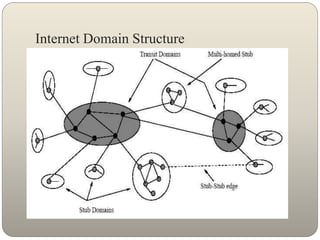
Internet Domain Structure
Software Requirements
 Software:VM ware 7.0
 Supporting Package: Red Hat Linux 2.0
 Language:C,C++,Tcl(tool Command Language)
 Xgraph:Gnuplot
Procedure for wired Network
1. Create a New Simulator
2. Create a Number of Nodes
3. Create a Link(Connections)
4. Create a Agent(Router, Forwarder)
5. Create a Topology
6. Create a Node Position
7. Create a Bandwidth(in Mb Size)
8. Create a Time in Ms
9. Create Nam
10. Start Simulation
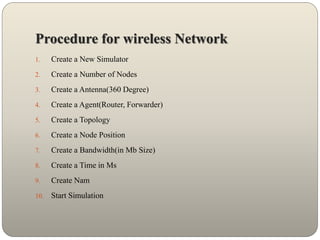
Procedure for wireless Network
1. Create a New Simulator
2. Create a Number of Nodes
3. Create a Antenna(360 Degree)
4. Create a Agent(Router, Forwarder)
5. Create a Topology
6. Create a Node Position
7. Create a Bandwidth(in Mb Size)
8. Create a Time in Ms
9. Create Nam
10. Start Simulation
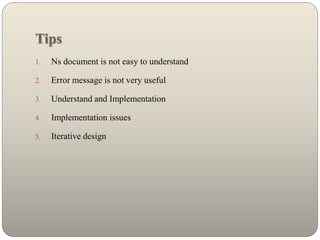
Tips
1. Ns document is not easy to understand
2. Error message is not very useful
3. Understand and Implementation
4. Implementation issues
5. Iterative design
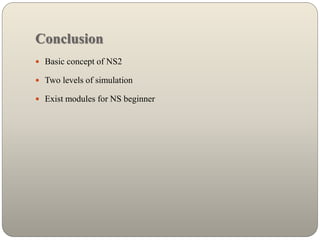
Conclusion
 Basic concept of NS2
 Two levels of simulation
 Exist modules for NS beginner
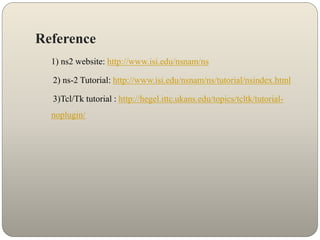
Reference
1) ns2 website: http://www.isi.edu/nsnam/ns
2) ns-2 Tutorial: http://www.isi.edu/nsnam/ns/tutorial/nsindex.html
3)Tcl/Tk tutorial : http://hegel.ittc.ukans.edu/topics/tcltk/tutorial-
noplugin/
Live Demo
Questions ?
Thank You

Plenzogan technology

  • 1.
    Seminar Topic: RecentTrenends in Networking(NS2) www.plenzogantechnology.com Plenzogan Technology
  • 2.
    What is Networking A network is two or more devices capable of communicating and sharing resources between them.  Two types of networks are LAN and WAN:  LAN (Local Area Network) – A group of devices sharing resources in a single area such as a room or a building.  WAN (Wide Area Network) – Two or more LANs communicating, often across large distances. The most famous WAN is the Internet
  • 3.
     Network -A group of computers connected together in a way that allows information to be exchanged between the computers.  Node - Anything that is connected to the network. While a node is typically a computer, it can also be something like a printer or CD-ROM tower.  Segment - Any portion of a network that is separated, by a switch, bridge or router, from other parts of the network.  Backbone - The main cabling of a network that all of the segments connect to. Typically, the backbone is capable of carrying more information than the individual segments. For example, each segment may have a transfer rate of 10 Mbps (megabits per second: 1 million bits a second), while the backbone may operate at 100 Mbps.  Topology - The way that each node is physically connected to the network.
  • 4.
    History NS 1  Thefirst version of ns, known as ns-1, was developed at Lawrence Berkeley National Laboratory (LBNL) in the 1995-97 timeframe by Steve McCanne, Sally Floyd, Kevin Fall, and other contributors.  This was known as the LBNL Network Simulator, and derived from an earlier simulator known as REAL by S. Keshav.  The core of the simulator was written in C++, with Tcl-based scripting of simulation scenarios.Long-running contributions have also come from Sun Microsystems, the UC Berkeley Daedelus, and Carnegie Mellon Monarch projects.it used.
  • 5.
    NS2  In 1996-97,ns version 2 (ns-2) was initiated based on a refactoring by Steve McCanne. Use of Tcl was replaced by MIT's Object Tcl (OTcl), an object- oriented dialect of Tcl.  The core of ns-2 is also written in C++, but the C++ simulation objects are linked to shadow objects in OTcl and variables can be linked between both language realms. Simulation scripts are written in the OTcl language, an extension of the Tcl scripting language.
  • 6.
     Presently, ns-2consists of over 300,000 lines of source code, and there is probably a comparable amount of contributed code that is not integrated directly into the main distribution (many forks of ns-2 exist, both maintained and unmaintained).  It runs on GNU/Linux, FreeBSD, Solaris, Mac OS X and Windows versions that support Cygwin. It is licensed for use under version 2 of the GNU General Public License.
  • 7.
    NS2 Design  ns-3is built using C++ and Python with scripting capability. The ns-3 library is wrapped to python thanks to the pybindgen library which delegates the parsing of the ns-3 C++ headers to gccxml and pygccxml to generate automatically the corresponding C++ binding glue. These automatically-generated C++ files are finally compiled into the ns-3 python module to allow users to interact with the C++ ns-3 models and core through python scripts.  The large majority of its users focuses on wireless simulations which involve models for Wi-Fi, WiMAX, or LTE for layers 1 and 2 and routing protocols such as OLSR and AODV.
  • 8.
    NS2 Work Flow Topology definition: to ease the creation of basic facilities and define their interrelationships, ns-3 has a system of containers and helpers that facilitates this process.  Model development: models are added to simulation (for example, UDP, IPv4, point-to-point devices and links, applications); most of the time this is done using helpers.  Node and link configuration: models set their default values (for example, the size of packets sent by an application or MTU of a point- to-point link); most of the time this is done using the attribute system.
  • 9.
     Execution: simulationfacilities generate events, data requested by the user is logged.  Performance analysis: after the simulation is finished and data is available as a time-stamped event trace. This data can then be statistically analysed with tools like R to draw conclusions.  Graphical Visualization: raw or processed data collected in a simulation can be graphed using tools like Gnu plot, matplotlib or XGRAPH.
  • 10.
    Problems Simulate the environment Run withns-2 Analysis the result Finish Modify No Finish the simulation Yes
  • 11.
    Other Network Simulators Self-Developed  Without strong persuasion  Simulation frameworks  Commercial  OPNET  QualNet  OMNEST (commercial version of OMNetT++)  Free  NS-2 (network simulator version 2)  OMNetT++
  • 12.
    Why Ns2  Ns-2is a discrete event simulator  Scheduler  Advance of time depends on the timing of events  Object-oriented simulator  C++ : fast to run, slower to change – protocol implementation  Otcl : slower to run, fast to change – simulation configuration  Components  Ns – simulator itself  Nam – network animator  Visualize ns (or other) output
  • 13.
    Routing Protocols  Packettype  Structure declaration – packet header  Name binding  Bind packet header to TCL interface  Usage  Routing agent  MANET routing protocol  Agent object  Tcl hook  Important functions
  • 14.
    List of Protocols 1.AODV 2. DSDV 3. DSR 4. OLSR 5. OSPF 6. VoIP
  • 15.
  • 16.
    Software Requirements  Software:VMware 7.0  Supporting Package: Red Hat Linux 2.0  Language:C,C++,Tcl(tool Command Language)  Xgraph:Gnuplot
  • 17.
    Procedure for wiredNetwork 1. Create a New Simulator 2. Create a Number of Nodes 3. Create a Link(Connections) 4. Create a Agent(Router, Forwarder) 5. Create a Topology 6. Create a Node Position 7. Create a Bandwidth(in Mb Size) 8. Create a Time in Ms 9. Create Nam 10. Start Simulation
  • 18.
    Procedure for wirelessNetwork 1. Create a New Simulator 2. Create a Number of Nodes 3. Create a Antenna(360 Degree) 4. Create a Agent(Router, Forwarder) 5. Create a Topology 6. Create a Node Position 7. Create a Bandwidth(in Mb Size) 8. Create a Time in Ms 9. Create Nam 10. Start Simulation
  • 19.
    Tips 1. Ns documentis not easy to understand 2. Error message is not very useful 3. Understand and Implementation 4. Implementation issues 5. Iterative design
  • 20.
    Conclusion  Basic conceptof NS2  Two levels of simulation  Exist modules for NS beginner
  • 21.
    Reference 1) ns2 website:http://www.isi.edu/nsnam/ns 2) ns-2 Tutorial: http://www.isi.edu/nsnam/ns/tutorial/nsindex.html 3)Tcl/Tk tutorial : http://hegel.ittc.ukans.edu/topics/tcltk/tutorial- noplugin/
  • 22.
  • 23.
  • 24.