Giles Phillips - @gilesphillips
Notes on mobile UX
Web pages are clickable newspapers
The concepts map,
but the design isn’t
optimized
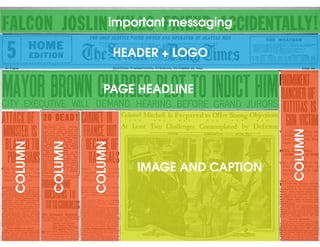
Newspapers have
pretty large viewports
You can fit lots of content
HEADER
HEADER + LOGO
PAGE HEADLINE
IMAGE AND CAPTION
COLUMN
COLUMN
COLUMN
COLUMN
important messaging
HEADER + LOGO + GLOBAL NAV
PAGE HEADLINE
IMAGE AND CAPTION
SECONDARYNAV
COLUMN
COLUMN
SIDEBARNAV
important annoying message
HEADER + GLOBAL NAV
PAGE HEADLINE
SECONDARYNAV
SIDEBARNAV
annoying message!!
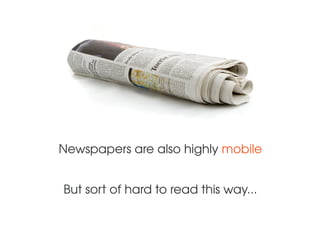
Newspapers are also highly mobile
But sort of hard to read this way...
Too bad this doesn’t fold up
mobile devices have created a
revolutionary new medium
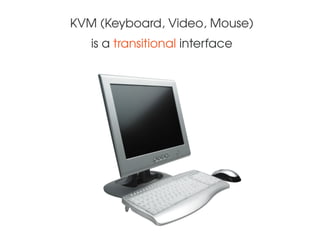
KVM (Keyboard, Video, Mouse)
is a transitional interface
Somewhere between dials and knobs...
...and
natural
human
interaction
Mobile is more natural: touch & voice inputs
Carried on the body, mobile extends us
We’ve become Cyborgs
mobile is disrupting the user experience:
design paradigms,
constraints,
metaphors
Design is creation for use
Design has intent
Expressing intent as simply as possible
is good design
OPTIMIZE
OPTIMIZING MOBILE UX - FORM FACTOR
• Small viewport = limited screen real estate
- Old nav paradigms not efficient, use new lighter models
- Shorten content for affordances and headings
• Make your affordances big (40x40px +10 px)
• Hovers = fail
• Popups stink
• Reference the platform interface guidelines
OPTIMIZING MOBILE UX - PERFORMANCE
• Load times are just as important as ever
• Minimize payload - including using the UX to
break up requests
• Perceived performance as an element
of your user experience
OPTIMIZING MOBILE UX - CONTEXT OF USE
• Map your user scenario & touchpoint
• Design for a 1-minute timebox
• Divided attention, not sustained attention
• Mobile usage is not about engagement
- Usage tends to be destination-driven
- The completion of a specific task
- Responding to an alert or checking update
OPTIMIZING MOBILE UX - CONTENT
• Different labels work better on mobile
• Always be succinct
• Map or storyboard your content along a linear
sequence

Notes on Mobile UX

  • 1.
    Giles Phillips -@gilesphillips Notes on mobile UX
  • 2.
    Web pages areclickable newspapers
  • 3.
    The concepts map, butthe design isn’t optimized
  • 4.
    Newspapers have pretty largeviewports You can fit lots of content
  • 5.
  • 6.
    HEADER + LOGO PAGEHEADLINE IMAGE AND CAPTION COLUMN COLUMN COLUMN COLUMN important messaging
  • 7.
    HEADER + LOGO+ GLOBAL NAV PAGE HEADLINE IMAGE AND CAPTION SECONDARYNAV COLUMN COLUMN SIDEBARNAV important annoying message
  • 8.
    HEADER + GLOBALNAV PAGE HEADLINE SECONDARYNAV SIDEBARNAV annoying message!!
  • 10.
    Newspapers are alsohighly mobile But sort of hard to read this way...
  • 11.
    Too bad thisdoesn’t fold up
  • 12.
    mobile devices havecreated a revolutionary new medium
  • 13.
    KVM (Keyboard, Video,Mouse) is a transitional interface
  • 14.
  • 15.
  • 16.
    Mobile is morenatural: touch & voice inputs Carried on the body, mobile extends us We’ve become Cyborgs
  • 17.
    mobile is disruptingthe user experience: design paradigms, constraints, metaphors
  • 18.
    Design is creationfor use Design has intent Expressing intent as simply as possible is good design OPTIMIZE
  • 19.
    OPTIMIZING MOBILE UX- FORM FACTOR • Small viewport = limited screen real estate - Old nav paradigms not efficient, use new lighter models - Shorten content for affordances and headings • Make your affordances big (40x40px +10 px) • Hovers = fail • Popups stink • Reference the platform interface guidelines
  • 20.
    OPTIMIZING MOBILE UX- PERFORMANCE • Load times are just as important as ever • Minimize payload - including using the UX to break up requests • Perceived performance as an element of your user experience
  • 21.
    OPTIMIZING MOBILE UX- CONTEXT OF USE • Map your user scenario & touchpoint • Design for a 1-minute timebox • Divided attention, not sustained attention • Mobile usage is not about engagement - Usage tends to be destination-driven - The completion of a specific task - Responding to an alert or checking update
  • 22.
    OPTIMIZING MOBILE UX- CONTENT • Different labels work better on mobile • Always be succinct • Map or storyboard your content along a linear sequence