


SQL Server 2017
on Linux
Maxi Accotto (MVP Data Platform)
www.triggerdb.com
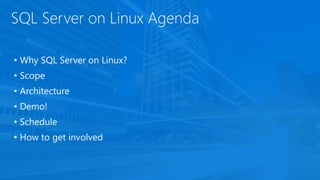
SQL Server on Linux Agenda
• Why SQL Server on Linux?
• Scope
• Architecture
• Demo!
• Schedule
• How to get involved
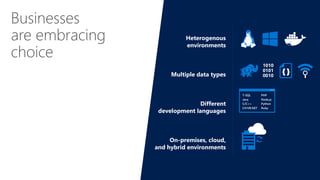
Businesses
are embracing
choice
1010
0101
0010
{ }
T-SQL
Java
C/C++
C#/VB.NET
PHP
Node.js
Python
Ruby
Heterogenous
environments
Multiple data types
Different
development languages
On-premises, cloud,
and hybrid environments
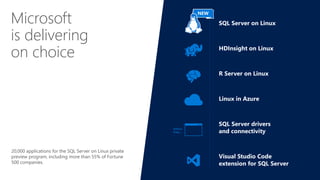
Microsoft
is delivering
on choice
SQL Server on Linux
HDInsight on Linux
R Server on Linux
Linux in Azure
SQL Server drivers
and connectivity
Visual Studio Code
extension for SQL Server
Python,
Ruby, …
20,000 applications for the SQL Server on Linux private
preview program, including more than 55% of Fortune
500 companies.
NEW
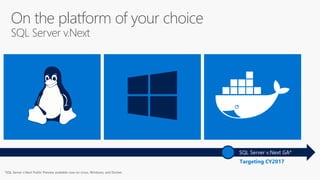
On the platform of your choice
SQL Server v.Next
Targeting CY2017
SQL Server v.Next GA*
SQL Server v.Next Public Preview available now on Linux, Windows, and Docker.
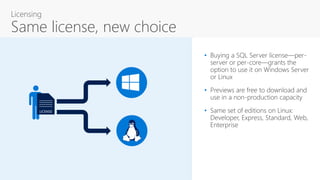
• Buying a SQL Server license—per-
server or per-core—grants the
option to use it on Windows Server
or Linux
• Previews are free to download and
use in a non-production capacity
• Same set of editions on Linux:
Developer, Express, Standard, Web,
Enterprise
LICENSE
Licensing
Same license, new choice
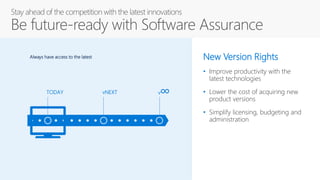
Stay ahead of the competition with the latest innovations
Be future-ready with Software Assurance
TODAY vNEXT v∞
Always have access to the latest New Version Rights
• Improve productivity with the
latest technologies
• Lower the cost of acquiring new
product versions
• Simplify licensing, budgeting and
administration
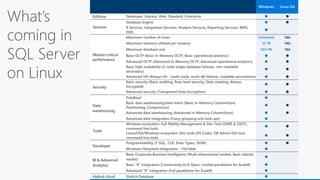
Scope
Windows Linux GA
Developer, Express, Web, Standard, Enterprise  
Database Engine  
R Services, Integration Services, Analysis Services, Reporting Services, MDS,
DQS

Maximum number of cores Unlimited TBD
Maximum memory utilized per instance 12 TB TBD
Maximum database size 524 PB TBD
Basic OLTP (Basic In-Memory OLTP, Basic operational analytics)  
Advanced OLTP (Advanced In-Memory OLTP, Advanced operational analytics)  
Basic high availability (2-node single database failover, non-readable
secondary)
 
Advanced HA (Always On - multi-node, multi-db failover, readable secondaries)  
Security
Basic security (Basic auditing, Row-level security, Data masking, Always
Encrypted)
 
Advanced security (Transparent Data Encryption)  
Data
warehousing
PolyBase2 
Basic data warehousing/data marts (Basic In-Memory ColumnStore,
Partitioning, Compression)
 
Advanced data warehousing (Advanced In-Memory ColumnStore)  
Advanced data integration (Fuzzy grouping and look ups) 
Tools
Windows ecosystem: Full-fidelity Management & Dev Tool (SSMS & SSDT),
command line tools
 
Linux/OSX/Windows ecosystem: Dev tools (VS Code), DB Admin GUI tool,
command line tools
 
Developer
Programmability (T-SQL, CLR, Data Types, JSON)  
Windows Filesystem Integration - FileTable 
BI & Advanced
Analytics
Basic Corporate Business Intelligence (Multi-dimensional models, Basic tabular
model)

Basic “R” integration (Connectivity to R Open, Limited parallelism for ScaleR) 
Advanced “R” integration (Full parallelism for ScaleR) 
Hybrid cloud Stretch Database 
What’s
coming in
SQL Server
on Linux
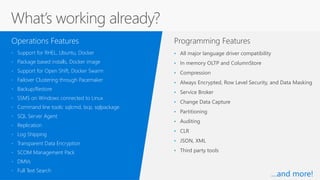
Programming Features
• Support for RHEL, Ubuntu, Docker
• Package based installs, Docker image
• Support for Open Shift, Docker Swarm
• Failover Clustering through Pacemaker
• Backup/Restore
• SSMS on Windows connected to Linux
• Command line tools: sqlcmd, bcp, sqlpackage
• SQL Server Agent
• Replication
• Log Shipping
• Transparent Data Encryption
• SCOM Management Pack
• DMVs
• Full Text Search
Operations Features
• All major language driver compatibility
• In memory OLTP and ColumnStore
• Compression
• Always Encrypted, Row Level Security, and Data Masking
• Service Broker
• Change Data Capture
• Partitioning
• Auditing
• CLR
• JSON, XML
• Third party tools
What’s working already?
…and more!
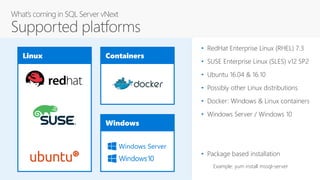
Linux Containers
Windows
Windows Server
• RedHat Enterprise Linux (RHEL) 7.3
• SUSE Enterprise Linux (SLES) v12 SP2
• Ubuntu 16.04 & 16.10
• Possibly other Linux distributions
• Docker: Windows & Linux containers
• Windows Server / Windows 10
• Package based installation
Example: yum install mssql-server
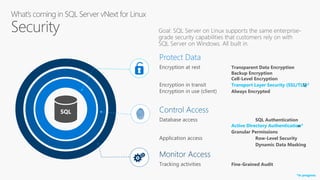
SQL Control Access
Database access SQL Authentication
Active Directory Authentication
Granular Permissions
Application access Row-Level Security
Dynamic Data Masking
Monitor Access
Tracking activities Fine-Grained Audit
Protect Data
Encryption at rest Transparent Data Encryption
Backup Encryption
Cell-Level Encryption
Encryption in transit Transport Layer Security (SSL/TLS)
Encryption in use (client) Always Encrypted
Protect Data
Encryption at rest Transparent Data Encryption
Backup Encryption
Cell-Level Encryption
Encryption in transit Transport Layer Security (SSL/TLS)*
Encryption in use (client) Always Encrypted
Control Access
Database access SQL Authentication
Active Directory Authentication*
Granular Permissions
Application access Row-Level Security
Dynamic Data Masking
*In progress
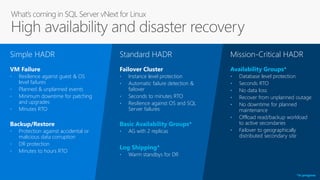
• Resilience against guest & OS
level failures
• Planned & unplanned events
• Minimum downtime for patching
and upgrades
• Minutes RTO
Simple HADR
VM Failure
• Protection against accidental or
malicious data corruption
• DR protection
• Minutes to hours RTO
Backup/Restore
• Instance level protection
• Automatic failure detection &
failover
• Seconds to minutes RTO
• Resilience against OS and SQL
Server failures
Standard HADR
Failover Cluster
• AG with 2 replicas
Basic Availability Groups*
• Warm standbys for DR
Log Shipping*
• Database level protection
• Seconds RTO
• No data loss
• Recover from unplanned outage
• No downtime for planned
maintenance
• Offload read/backup workload
to active secondaries
• Failover to geographically
distributed secondary site
Availability Groups*
Mission-Critical HADR
*In progress
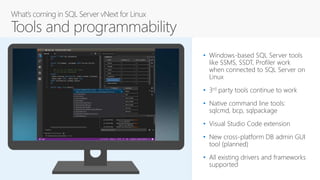
• Windows-based SQL Server tools
like SSMS, SSDT, Profiler work
when connected to SQL Server on
Linux
• 3rd party tools continue to work
• Native command line tools:
sqlcmd, bcp, sqlpackage
• Visual Studio Code extension
• New cross-platform DB admin GUI
tool (planned)
• All existing drivers and frameworks
supported
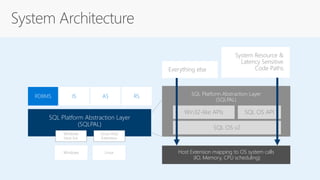
Architecture
SQL Platform Abstraction Layer
(SQLPAL)
RDBMS IS AS RS
Windows Linux
Windows
Host Ext.
Linux Host
Extension
SQL Platform Abstraction Layer
(SQLPAL)
Win32-like APIs
Host Extension mapping to OS system calls
(IO, Memory, CPU scheduling)
SQL OS API
SQL OS v2
Everything else
System Resource &
Latency Sensitive
Code Paths
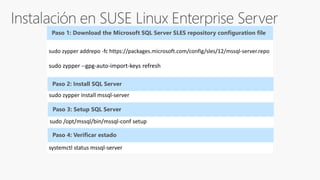
sudo zypper addrepo -fc https://packages.microsoft.com/config/sles/12/mssql-server.repo
sudo zypper --gpg-auto-import-keys refresh
Paso 1: Download the Microsoft SQL Server SLES repository configuration file
Paso 2: Install SQL Server
sudo zypper install mssql-server
Paso 3: Setup SQL Server
sudo /opt/mssql/bin/mssql-conf setup
Paso 4: Verificar estado
systemctl status mssql-server
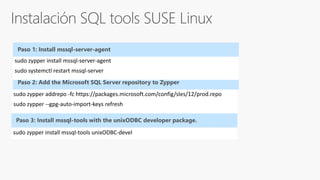
sudo zypper addrepo -fc https://packages.microsoft.com/config/sles/12/prod.repo
sudo zypper --gpg-auto-import-keys refresh
Paso 2: Add the Microsoft SQL Server repository to Zypper
Paso 3: Install mssql-tools with the unixODBC developer package.
sudo zypper install mssql-tools unixODBC-devel
sudo zypper install mssql-server-agent
sudo systemctl restart mssql-server
Paso 1: Install mssql-server-agent
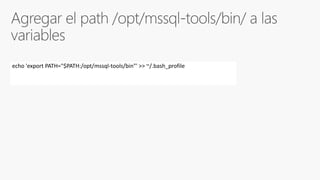
echo 'export PATH="$PATH:/opt/mssql-tools/bin"' >> ~/.bash_profile
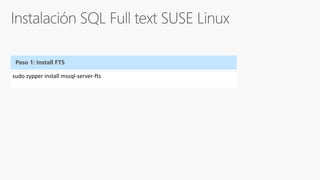
sudo zypper install mssql-server-fts
Paso 1: Install FTS
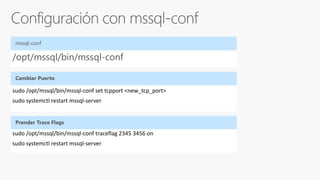
/opt/mssql/bin/mssql-conf
mssql-conf
sudo /opt/mssql/bin/mssql-conf set tcpport <new_tcp_port>
sudo systemctl restart mssql-server
sudo /opt/mssql/bin/mssql-conf traceflag 2345 3456 on
sudo systemctl restart mssql-server
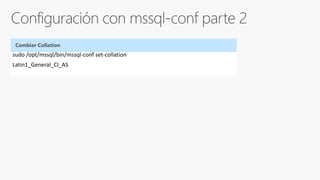
sudo /opt/mssql/bin/mssql-conf set-collation
Latin1_General_CI_AS
Q&A

Bootcamp 2017 - SQL Server on Linux

  • 1.
    SQL Server 2017 onLinux Maxi Accotto (MVP Data Platform) www.triggerdb.com
  • 2.
    SQL Server onLinux Agenda • Why SQL Server on Linux? • Scope • Architecture • Demo! • Schedule • How to get involved
  • 3.
  • 4.
    Microsoft is delivering on choice SQLServer on Linux HDInsight on Linux R Server on Linux Linux in Azure SQL Server drivers and connectivity Visual Studio Code extension for SQL Server Python, Ruby, … 20,000 applications for the SQL Server on Linux private preview program, including more than 55% of Fortune 500 companies. NEW
  • 5.
    On the platformof your choice SQL Server v.Next Targeting CY2017 SQL Server v.Next GA* SQL Server v.Next Public Preview available now on Linux, Windows, and Docker.
  • 6.
    • Buying aSQL Server license—per- server or per-core—grants the option to use it on Windows Server or Linux • Previews are free to download and use in a non-production capacity • Same set of editions on Linux: Developer, Express, Standard, Web, Enterprise LICENSE Licensing Same license, new choice
  • 7.
    Stay ahead ofthe competition with the latest innovations Be future-ready with Software Assurance TODAY vNEXT v∞ Always have access to the latest New Version Rights • Improve productivity with the latest technologies • Lower the cost of acquiring new product versions • Simplify licensing, budgeting and administration
  • 8.
  • 9.
    Windows Linux GA Developer,Express, Web, Standard, Enterprise   Database Engine   R Services, Integration Services, Analysis Services, Reporting Services, MDS, DQS  Maximum number of cores Unlimited TBD Maximum memory utilized per instance 12 TB TBD Maximum database size 524 PB TBD Basic OLTP (Basic In-Memory OLTP, Basic operational analytics)   Advanced OLTP (Advanced In-Memory OLTP, Advanced operational analytics)   Basic high availability (2-node single database failover, non-readable secondary)   Advanced HA (Always On - multi-node, multi-db failover, readable secondaries)   Security Basic security (Basic auditing, Row-level security, Data masking, Always Encrypted)   Advanced security (Transparent Data Encryption)   Data warehousing PolyBase2  Basic data warehousing/data marts (Basic In-Memory ColumnStore, Partitioning, Compression)   Advanced data warehousing (Advanced In-Memory ColumnStore)   Advanced data integration (Fuzzy grouping and look ups)  Tools Windows ecosystem: Full-fidelity Management & Dev Tool (SSMS & SSDT), command line tools   Linux/OSX/Windows ecosystem: Dev tools (VS Code), DB Admin GUI tool, command line tools   Developer Programmability (T-SQL, CLR, Data Types, JSON)   Windows Filesystem Integration - FileTable  BI & Advanced Analytics Basic Corporate Business Intelligence (Multi-dimensional models, Basic tabular model)  Basic “R” integration (Connectivity to R Open, Limited parallelism for ScaleR)  Advanced “R” integration (Full parallelism for ScaleR)  Hybrid cloud Stretch Database  What’s coming in SQL Server on Linux
  • 10.
    Programming Features • Supportfor RHEL, Ubuntu, Docker • Package based installs, Docker image • Support for Open Shift, Docker Swarm • Failover Clustering through Pacemaker • Backup/Restore • SSMS on Windows connected to Linux • Command line tools: sqlcmd, bcp, sqlpackage • SQL Server Agent • Replication • Log Shipping • Transparent Data Encryption • SCOM Management Pack • DMVs • Full Text Search Operations Features • All major language driver compatibility • In memory OLTP and ColumnStore • Compression • Always Encrypted, Row Level Security, and Data Masking • Service Broker • Change Data Capture • Partitioning • Auditing • CLR • JSON, XML • Third party tools What’s working already? …and more!
  • 11.
    Linux Containers Windows Windows Server •RedHat Enterprise Linux (RHEL) 7.3 • SUSE Enterprise Linux (SLES) v12 SP2 • Ubuntu 16.04 & 16.10 • Possibly other Linux distributions • Docker: Windows & Linux containers • Windows Server / Windows 10 • Package based installation Example: yum install mssql-server
  • 12.
    SQL Control Access Databaseaccess SQL Authentication Active Directory Authentication Granular Permissions Application access Row-Level Security Dynamic Data Masking Monitor Access Tracking activities Fine-Grained Audit Protect Data Encryption at rest Transparent Data Encryption Backup Encryption Cell-Level Encryption Encryption in transit Transport Layer Security (SSL/TLS) Encryption in use (client) Always Encrypted Protect Data Encryption at rest Transparent Data Encryption Backup Encryption Cell-Level Encryption Encryption in transit Transport Layer Security (SSL/TLS)* Encryption in use (client) Always Encrypted Control Access Database access SQL Authentication Active Directory Authentication* Granular Permissions Application access Row-Level Security Dynamic Data Masking *In progress
  • 13.
    • Resilience againstguest & OS level failures • Planned & unplanned events • Minimum downtime for patching and upgrades • Minutes RTO Simple HADR VM Failure • Protection against accidental or malicious data corruption • DR protection • Minutes to hours RTO Backup/Restore • Instance level protection • Automatic failure detection & failover • Seconds to minutes RTO • Resilience against OS and SQL Server failures Standard HADR Failover Cluster • AG with 2 replicas Basic Availability Groups* • Warm standbys for DR Log Shipping* • Database level protection • Seconds RTO • No data loss • Recover from unplanned outage • No downtime for planned maintenance • Offload read/backup workload to active secondaries • Failover to geographically distributed secondary site Availability Groups* Mission-Critical HADR *In progress
  • 14.
    • Windows-based SQLServer tools like SSMS, SSDT, Profiler work when connected to SQL Server on Linux • 3rd party tools continue to work • Native command line tools: sqlcmd, bcp, sqlpackage • Visual Studio Code extension • New cross-platform DB admin GUI tool (planned) • All existing drivers and frameworks supported
  • 15.
  • 16.
    SQL Platform AbstractionLayer (SQLPAL) RDBMS IS AS RS Windows Linux Windows Host Ext. Linux Host Extension SQL Platform Abstraction Layer (SQLPAL) Win32-like APIs Host Extension mapping to OS system calls (IO, Memory, CPU scheduling) SQL OS API SQL OS v2 Everything else System Resource & Latency Sensitive Code Paths
  • 17.
    sudo zypper addrepo-fc https://packages.microsoft.com/config/sles/12/mssql-server.repo sudo zypper --gpg-auto-import-keys refresh Paso 1: Download the Microsoft SQL Server SLES repository configuration file Paso 2: Install SQL Server sudo zypper install mssql-server Paso 3: Setup SQL Server sudo /opt/mssql/bin/mssql-conf setup Paso 4: Verificar estado systemctl status mssql-server
  • 18.
    sudo zypper addrepo-fc https://packages.microsoft.com/config/sles/12/prod.repo sudo zypper --gpg-auto-import-keys refresh Paso 2: Add the Microsoft SQL Server repository to Zypper Paso 3: Install mssql-tools with the unixODBC developer package. sudo zypper install mssql-tools unixODBC-devel sudo zypper install mssql-server-agent sudo systemctl restart mssql-server Paso 1: Install mssql-server-agent
  • 19.
  • 20.
    sudo zypper installmssql-server-fts Paso 1: Install FTS
  • 21.
    /opt/mssql/bin/mssql-conf mssql-conf sudo /opt/mssql/bin/mssql-conf settcpport <new_tcp_port> sudo systemctl restart mssql-server sudo /opt/mssql/bin/mssql-conf traceflag 2345 3456 on sudo systemctl restart mssql-server
  • 22.
  • 23.

Editor's Notes

  • #2 Lets talk about SQL Server v.Next, the next major release of SQL Server, currently in public preview, which brings the power and innovation of SQL Server, for any application, to the platform of your choice.
  • #4 The business landscape is becoming increasingly diverse Development and deployment environments include Windows, Linux, macOS, and Docker Data is no longer relational, with companies accessing diverse data, including video, streaming, documents, relational, both external data and data internal to their org Languages and frameworks are also expanding with the poularity of Node.js, Python, Ruby and others Companies deploy on-premises, in the cloud, or both, with a hybrid solution
  • #5 Microsoft has delivered a number of products enabling choice for customers, including: HD Insight on Linux - a managed Apache Hadoop, Spark, R, HBase, and Storm cloud service made easy R Server on Linux - Use R—the powerful, statistical programming language—in an enterprise-class, big data analytics platform. Microsoft R Server is your flexible choice for analyzing data at scale, building intelligent apps, and discovering valuable insights across your business (https://www.microsoft.com/en-us/cloud-platform/r-server) Linux in Azure – run Linux-based virtual machines in Microsoft Azure (IaaS) Customers can take advantage of Microsoft–created database connectivity drivers and open-source drivers that enable developers to build any application using the platforms and tools of their choice, including Python, Ruby, and Node.js
  • #6 With SQL Server v.Next, now in public preview, and generally available to purchase targeting mid-calendar year 2017, the power of SQL Server is available on the platform of your choice.
  • #10 Collapse BI and AA into one single row AA: “single R integration BI: Corporate business intelligence and mobile BI
  • #13 So that’s High Availability and Disaster Recovery for SQL Server on Linux. Let’s look at another aspect of SQL Server that is also critically important for enterprises – security. Our goal is for SQL Server on Linux to support the same enterprise-grade security capabilities that customers rely on with SQL Server on Windows today. [click] We think about security for SQL Server in terms of layers. At the center, you have your data and how you protect the data itself, typically using encryption. SQL Server supports a variety of encryption features to help protect your data against different types of threats. Transparent Data Encryption (TDE) encrypts your whole database at rest, without requiring any application changes. Backup Encryption encrypts your backup files, and Cell-Level Encryption gives you granular control over the encryption of individual cells of data. To encrypt data in transit to and from the database, SQL Server supports the industry-standard TLS 1.2 protocol. And finally, Always Encrypted enables you to encrypt sensitive data client-side, so that even privileged SQL Server administrators are unable to see it in plaintext. [click] The next layer is about controlling access to the data. SQL Authentication allows users to authenticate via a username and password, while Active Directory Authentication allows users to authenticate using single sign-on through Active Directory and Kerberos. Granular permissions enable you to control access to individual tables or even columns of data. Row-Level Security allows you to control read- and write-access to individual rows of data based on a customizable policy, and Dynamic Data Masking allows you to easily mask fields (such as account numbers) so that only part of the data can be seen. [click] The last layer is about monitoring who accesses the data. SQL Server’s Fine-Grained Audit feature allows you to enforce a data audit policy and track which users are doing which actions. [click] So that’s where we’re going with security for SQL Server on Linux. Almost all of these features are already available for you to try in the CTP1 preview release, please try them out and share your feedback with us. Support for TLS is in progress and will become available in an upcoming build. Similarly, Active Directory Authentication is one of our most requested features and will become available in an upcoming build.
  • #14 Add diagram from Travis
  • #19 Se ha rediseñado la forma en que SQL realiza la transferencia de los cambios en el transaction log para poder utilizar major la red y que los cambios se aplique mas rapido en los secondaries Antes se podia direccionar el trafico read-only solo al primer secondary, ahora se puede armar un grupo de secondaries para hacer load-balancing de todo el trafico read-only High Availavility basico en SQL Standard Edition. Es el reemplazo de database mirroring. 2 replicas – 1 primary 1 secondary y 1 base por grupo. No read-only access en el secondary . Async o Sync
  • #20 Se ha rediseñado la forma en que SQL realiza la transferencia de los cambios en el transaction log para poder utilizar major la red y que los cambios se aplique mas rapido en los secondaries Antes se podia direccionar el trafico read-only solo al primer secondary, ahora se puede armar un grupo de secondaries para hacer load-balancing de todo el trafico read-only High Availavility basico en SQL Standard Edition. Es el reemplazo de database mirroring. 2 replicas – 1 primary 1 secondary y 1 base por grupo. No read-only access en el secondary . Async o Sync
  • #21 Se ha rediseñado la forma en que SQL realiza la transferencia de los cambios en el transaction log para poder utilizar major la red y que los cambios se aplique mas rapido en los secondaries Antes se podia direccionar el trafico read-only solo al primer secondary, ahora se puede armar un grupo de secondaries para hacer load-balancing de todo el trafico read-only High Availavility basico en SQL Standard Edition. Es el reemplazo de database mirroring. 2 replicas – 1 primary 1 secondary y 1 base por grupo. No read-only access en el secondary . Async o Sync
  • #22 Se ha rediseñado la forma en que SQL realiza la transferencia de los cambios en el transaction log para poder utilizar major la red y que los cambios se aplique mas rapido en los secondaries Antes se podia direccionar el trafico read-only solo al primer secondary, ahora se puede armar un grupo de secondaries para hacer load-balancing de todo el trafico read-only High Availavility basico en SQL Standard Edition. Es el reemplazo de database mirroring. 2 replicas – 1 primary 1 secondary y 1 base por grupo. No read-only access en el secondary . Async o Sync
  • #23 Se ha rediseñado la forma en que SQL realiza la transferencia de los cambios en el transaction log para poder utilizar major la red y que los cambios se aplique mas rapido en los secondaries Antes se podia direccionar el trafico read-only solo al primer secondary, ahora se puede armar un grupo de secondaries para hacer load-balancing de todo el trafico read-only High Availavility basico en SQL Standard Edition. Es el reemplazo de database mirroring. 2 replicas – 1 primary 1 secondary y 1 base por grupo. No read-only access en el secondary . Async o Sync
  • #24 5 Minutes