Building Web Apps 
using Node.js 
@DaveChubbuck 
https://github.com/davidchubbs
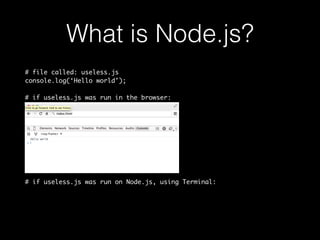
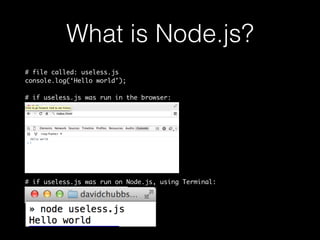
What is Node.js? 
# file called: useless.js 
console.log(‘Hello world’); 
# if useless.js was run in the browser: 
# if useless.js was run on Node.js, using Terminal:
What is Node.js? 
# file called: useless.js 
console.log(‘Hello world’); 
# if useless.js was run in the browser: 
# if useless.js was run on Node.js, using Terminal:
What is Node.js? 
# file called: useless.js 
console.log(‘Hello world’); 
# if useless.js was run in the browser: 
# if useless.js was run on Node.js, using Terminal:
Node.js executes 
Javascript files.
Node.js is a Platform 
(not a framework)
Node.js is a Platform 
(not a framework) 
• Node.js includes some utilities to make it consistent with the 
browser, like: 
• Timer API: setTimeout 
• Console API: console.log
Node.js is a Platform 
• Node.js also includes utilities for various types of network and 
file I/O. These include (among others): 
• http, https 
• Datagram (UDP) 
• NET (TCP) 
• fs (File System) 
(not a framework)
Frameworks are interested in organizing your code 
and/or providing sugar for faster development.
Frameworks are interested in organizing your code 
and/or providing sugar for faster development. 
Node.js provides minimal, low-level APIs necessary 
to do things like build a web-server, command line 
tool, etc. Consequentially, we consider it to be a 
platform, not a framework, though there are 
frameworks built on top of Node.js 
Complete API: http://nodejs.org/api/
Node.js Modules
Scope, Exporting, & 
Importing 
Including logic from another file does not affect the global 
scope. Each file has its own scope, keeping everything in the 
file private unless it is exported.
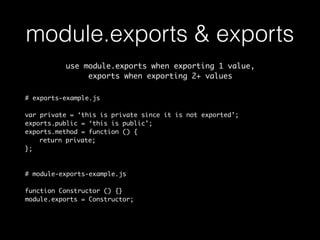
module.exports & exports 
use module.exports when exporting 1 value, 
exports when exporting 2+ values 
# exports-example.js 
var private = ‘this is private since it is not exported’; 
exports.public = ‘this is public’; 
exports.method = function () { 
return private; 
}; 
# module-exports-example.js 
function Constructor () {} 
module.exports = Constructor;
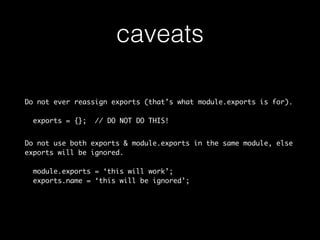
caveats 
Do not ever reassign exports (that’s what module.exports is for). 
exports = {}; // DO NOT DO THIS! 
Do not use both exports & module.exports in the same module, else 
exports will be ignored. 
module.exports = ‘this will work’; 
exports.name = ‘this will be ignored’;
require 
To import/include a module, we use require()
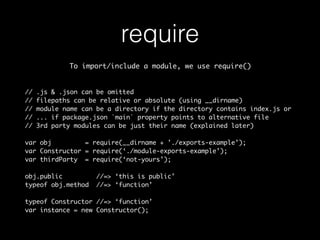
require 
To import/include a module, we use require() 
// .js & .json can be omitted 
// filepaths can be relative or absolute (using __dirname) 
// module name can be a directory if the directory contains index.js or 
// ... if package.json `main` property points to alternative file 
// 3rd party modules can be just their name (explained later) 
var obj = require(__dirname + ’./exports-example’); 
var Constructor = require(‘./module-exports-example’); 
var thirdParty = require(‘not-yours’); 
obj.public //=> ‘this is public’ 
typeof obj.method //=> ‘function’ 
typeof Constructor //=> ‘function’ 
var instance = new Constructor();
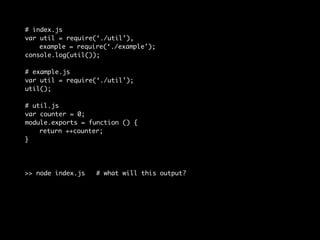
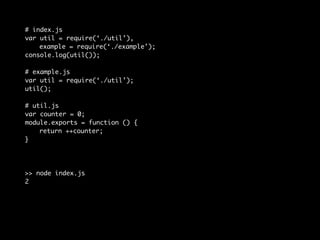
Module Caching
# index.js 
var util = require(‘./util’), 
example = require(‘./example’); 
console.log(util()); 
# example.js 
var util = require(‘./util’); 
util(); 
# util.js 
var counter = 0; 
module.exports = function () { 
return ++counter; 
} 
>> node index.js # what will this output?
# index.js 
var util = require(‘./util’), 
example = require(‘./example’); 
console.log(util()); 
# example.js 
var util = require(‘./util’); 
util(); 
# util.js 
var counter = 0; 
module.exports = function () { 
return ++counter; 
} 
>> node index.js 
2
Modules is one of the best things about Node.js 
Node’s implementation of modules is done so well 
that Node.js projects tend to be super modular, 
promoting low coupling & high cohesion 
(it also influenced Browserify, which lets us write front-end 
JS files using this same modular pattern)
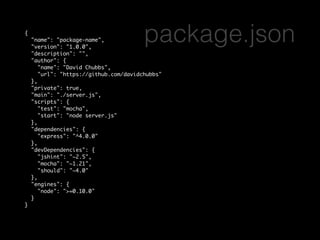
{ 
"name": "package-name", 
"version": "1.0.0", 
"description": "", 
"author": { 
package.json 
"name": "David Chubbs", 
"url": "https://github.com/davidchubbs" 
}, 
"private": true, 
"main": "./server.js", 
"scripts": { 
"test": "mocha", 
"start": "node server.js" 
}, 
"dependencies": { 
"express": "^4.0.0" 
}, 
"devDependencies": { 
"jshint": "~2.5", 
"mocha": "~1.21", 
"should": "~4.0" 
}, 
"engines": { 
"node": ">=0.10.0" 
} 
}
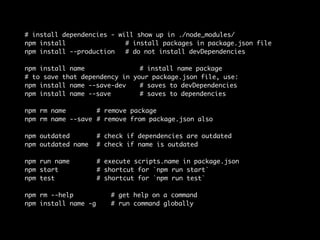
# install dependencies - will show up in ./node_modules/ 
npm install # install packages in package.json file 
npm install --production # do not install devDependencies 
npm install name # install name package 
# to save that dependency in your package.json file, use: 
npm install name --save-dev # saves to devDependencies 
npm install name --save # saves to dependencies 
npm rm name # remove package 
npm rm name --save # remove from package.json also 
npm outdated # check if dependencies are outdated 
npm outdated name # check if name is outdated 
npm run name # execute scripts.name in package.json 
npm start # shortcut for `npm run start` 
npm test # shortcut for `npm run test` 
npm rm --help # get help on a command 
npm install name -g # run command globally
express
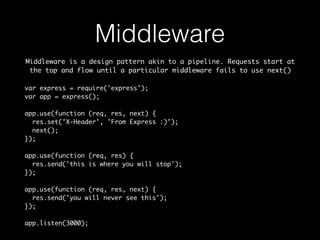
Middleware 
Middleware is a design pattern akin to a pipeline. Requests start at 
the top and flow until a particular middleware fails to use next() 
var express = require('express'); 
var app = express(); 
app.use(function (req, res, next) { 
res.set('X-Header', 'From Express :)'); 
next(); 
}); 
app.use(function (req, res) { 
res.send('this is where you will stop'); 
}); 
app.use(function (req, res, next) { 
res.send('you will never see this'); 
}); 
app.listen(3000);
Middleware 
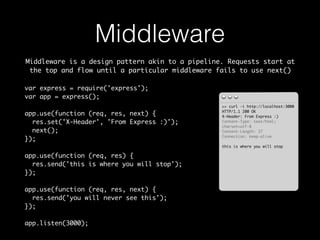
Middleware is a design pattern akin to a pipeline. Requests start at 
the top and flow until a particular middleware fails to use next() 
>> curl -i http://localhost:3000 
HTTP/1.1 200 OK 
X-Header: From Express :) 
Content-Type: text/html; 
charset=utf-8 
Content-Length: 27 
Connection: keep-alive 
this is where you will stop 
var express = require('express'); 
var app = express(); 
app.use(function (req, res, next) { 
res.set('X-Header', 'From Express :)'); 
next(); 
}); 
app.use(function (req, res) { 
res.send('this is where you will stop'); 
}); 
app.use(function (req, res, next) { 
res.send('you will never see this'); 
}); 
app.listen(3000);
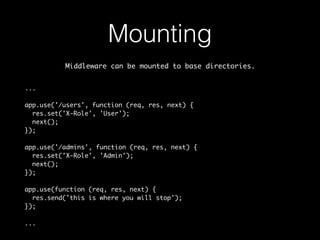
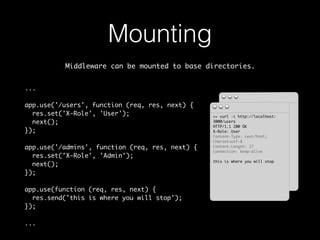
Mounting 
Middleware can be mounted to base directories. 
... 
app.use('/users', function (req, res, next) { 
res.set('X-Role', 'User'); 
next(); 
}); 
app.use('/admins', function (req, res, next) { 
res.set('X-Role', 'Admin'); 
next(); 
}); 
app.use(function (req, res, next) { 
res.send('this is where you will stop'); 
}); 
...
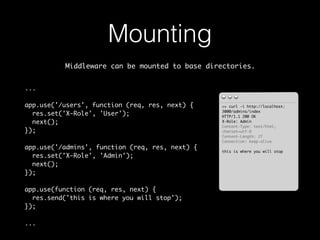
Mounting 
Middleware can be mounted to base directories. 
... 
app.use('/users', function (req, res, next) { 
res.set('X-Role', 'User'); 
next(); 
}); 
app.use('/admins', function (req, res, next) { 
res.set('X-Role', 'Admin'); 
next(); 
}); 
app.use(function (req, res, next) { 
res.send('this is where you will stop'); 
}); 
... 
>> curl -i http://localhost: 
3000/admins/index 
HTTP/1.1 200 OK 
X-Role: Admin 
Content-Type: text/html; 
charset=utf-8 
Content-Length: 27 
Connection: keep-alive 
this is where you will stop
Mounting 
Middleware can be mounted to base directories. 
... 
app.use('/users', function (req, res, next) { 
res.set('X-Role', 'User'); 
next(); 
}); 
app.use('/admins', function (req, res, next) { 
res.set('X-Role', 'Admin'); 
next(); 
}); 
app.use(function (req, res, next) { 
res.send('this is where you will stop'); 
}); 
... 
>> curl -i http://localhost: 
3000/admins/index 
HTTP/1.1 200 OK 
X-Role: Admin 
Content-Type: text/html; 
charset=utf-8 
Content-Length: 27 
Connection: keep-alive 
this is where you will stop 
>> curl -i http://localhost: 
3000/users 
HTTP/1.1 200 OK 
X-Role: User 
Content-Type: text/html; 
charset=utf-8 
Content-Length: 27 
Connection: keep-alive 
this is where you will stop
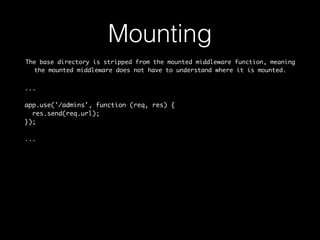
Mounting 
The base directory is stripped from the mounted middleware function, meaning 
the mounted middleware does not have to understand where it is mounted. 
... 
app.use('/admins', function (req, res) { 
res.send(req.url); 
}); 
...
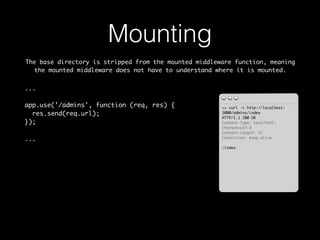
Mounting 
The base directory is stripped from the mounted middleware function, meaning 
the mounted middleware does not have to understand where it is mounted. 
... 
app.use('/admins', function (req, res) { 
res.send(req.url); 
}); 
... 
>> curl -i http://localhost: 
3000/admins/index 
HTTP/1.1 200 OK 
Content-Type: text/html; 
charset=utf-8 
Content-Length: 27 
Connection: keep-alive 
/index
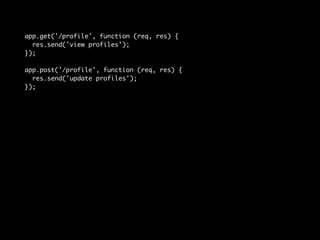
Routing
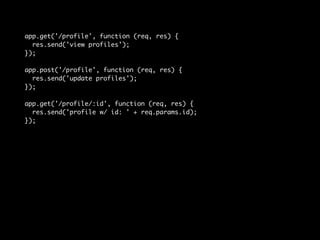
app.get('/profile', function (req, res) { 
res.send('view profiles'); 
}); 
app.post('/profile', function (req, res) { 
res.send('update profiles'); 
});
app.get('/profile', function (req, res) { 
res.send('view profiles'); 
}); 
app.post('/profile', function (req, res) { 
res.send('update profiles'); 
}); 
app.get('/profile/:id', function (req, res) { 
res.send('profile w/ id: ' + req.params.id); 
});
app.get('/profile', function (req, res) { 
res.send('view profiles'); 
}); 
app.post('/profile', function (req, res) { 
res.send('update profiles'); 
}); 
app.get('/profile/:id', function (req, res) { 
res.send('profile w/ id: ' + req.params.id); 
}); 
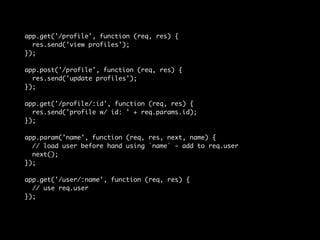
app.param('name', function (req, res, next, name) { 
// load user before hand using `name` - add to req.user 
next(); 
}); 
app.get('/user/:name', function (req, res) { 
// use req.user 
});
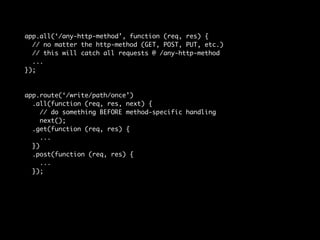
app.all(‘/any-http-method’, function (req, res) { 
// no matter the http-method (GET, POST, PUT, etc.) 
// this will catch all requests @ /any-http-method 
... 
}); 
app.route(‘/write/path/once’) 
.all(function (req, res, next) { 
// do something BEFORE method-specific handling 
next(); 
.get(function (req, res) { 
... 
}) 
.post(function (req, res) { 
... 
});
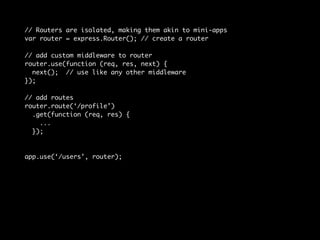
// Routers are isolated, making them akin to mini-apps 
var router = express.Router(); // create a router 
// add custom middleware to router 
router.use(function (req, res, next) { 
next(); // use like any other middleware 
}); 
// add routes 
router.route(‘/profile’) 
.get(function (req, res) { 
... 
}); 
app.use(‘/users’, router);
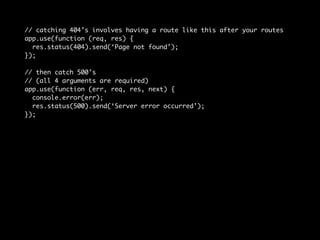
// catching 404’s involves having a route like this after your routes 
app.use(function (req, res) { 
res.status(404).send(‘Page not found’); 
}); 
// then catch 500’s 
// (all 4 arguments are required) 
app.use(function (err, req, res, next) { 
console.error(err); 
res.status(500).send(‘Server error occurred’); 
});
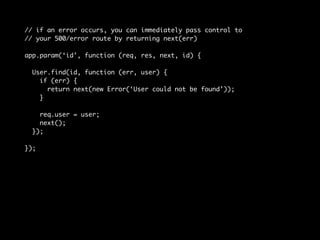
// if an error occurs, you can immediately pass control to 
// your 500/error route by returning next(err) 
app.param(‘id’, function (req, res, next, id) { 
User.find(id, function (err, user) { 
if (err) { 
return next(new Error(‘User could not be found’)); 
} 
req.user = user; 
next(); 
}); 
});
Popular Middleware 
& Configuration
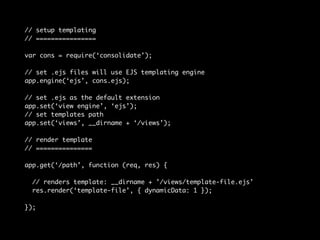
// setup templating 
// ================ 
var cons = require(‘consolidate’); 
// set .ejs files will use EJS templating engine 
app.engine(‘ejs’, cons.ejs); 
// set .ejs as the default extension 
app.set(‘view engine’, ‘ejs’); 
// set templates path 
app.set(‘views’, __dirname + ‘/views’); 
// render template 
// =============== 
app.get(‘/path’, function (req, res) { 
// renders template: __dirname + ’/views/template-file.ejs’ 
res.render(‘template-file’, { dynamicData: 1 }); 
});
var compress = require('compression'); 
var bodyParser = require('body-parser'); 
var logger = require('morgan'); 
app.use(compress()); 
app.use(bodyParser()); 
app.use(express.static(__dirname + '/public')); 
app.use(logger('dev')); 
// or write custom syntax - :method :url :status :res[content-length]
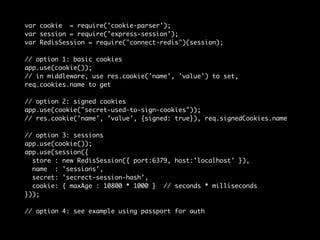
var cookie = require('cookie-parser'); 
var session = require('express-session'); 
var RedisSession = require("connect-redis")(session); 
// option 1: basic cookies 
app.use(cookie()); 
// in middleware, use res.cookie('name', 'value') to set, 
req.cookies.name to get 
// option 2: signed cookies 
app.use(cookie("secret-used-to-sign-cookies")); 
// res.cookie('name', 'value', {signed: true}), req.signedCookies.name 
// option 3: sessions 
app.use(cookie()); 
app.use(session({ 
store : new RedisSession({ port:6379, host:'localhost' }), 
name : 'sessions', 
secret: 'secrect-session-hash', 
cookie: { maxAge : 10800 * 1000 } // seconds * milliseconds 
})); 
// option 4: see example using passport for auth
req & res
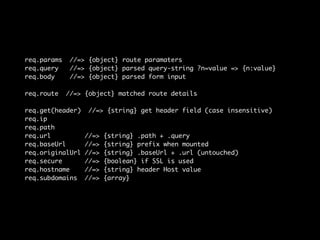
req.params //=> {object} route paramaters 
req.query //=> {object} parsed query-string ?n=value => {n:value} 
req.body //=> {object} parsed form input 
req.route //=> {object} matched route details 
req.get(header) //=> {string} get header field (case insensitive) 
req.ip 
req.path 
req.url //=> {string} .path + .query 
req.baseUrl //=> {string} prefix when mounted 
req.originalUrl //=> {string} .baseUrl + .url (untouched) 
req.secure //=> {boolean} if SSL is used 
req.hostname //=> {string} header Host value 
req.subdomains //=> {array}
res.set(headerName, value) 
res.status(404) // set status code of response 
res.cookie(name, value, [options]) 
res.clearCookie(name, [options]) 
// generating a response packet 
// ============================ 
res.send(data) 
res.render(template, [data, callback]) 
res.json(data) 
res.redirect([status=302], url) 
// url can be host relative (‘/path’) or path relative (‘add-to-path’)
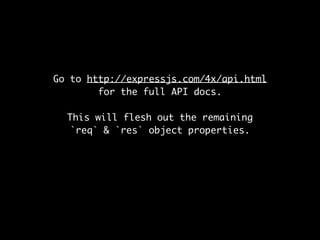
Go to http://expressjs.com/4x/api.html 
for the full API docs. 
This will flesh out the remaining 
`req` & `res` object properties.

Build Web Apps using Node.js

  • 1.
    Building Web Apps using Node.js @DaveChubbuck https://github.com/davidchubbs
  • 2.
    What is Node.js? # file called: useless.js console.log(‘Hello world’); # if useless.js was run in the browser: # if useless.js was run on Node.js, using Terminal:
  • 3.
    What is Node.js? # file called: useless.js console.log(‘Hello world’); # if useless.js was run in the browser: # if useless.js was run on Node.js, using Terminal:
  • 4.
    What is Node.js? # file called: useless.js console.log(‘Hello world’); # if useless.js was run in the browser: # if useless.js was run on Node.js, using Terminal:
  • 5.
  • 6.
    Node.js is aPlatform (not a framework)
  • 7.
    Node.js is aPlatform (not a framework) • Node.js includes some utilities to make it consistent with the browser, like: • Timer API: setTimeout • Console API: console.log
  • 8.
    Node.js is aPlatform • Node.js also includes utilities for various types of network and file I/O. These include (among others): • http, https • Datagram (UDP) • NET (TCP) • fs (File System) (not a framework)
  • 9.
    Frameworks are interestedin organizing your code and/or providing sugar for faster development.
  • 10.
    Frameworks are interestedin organizing your code and/or providing sugar for faster development. Node.js provides minimal, low-level APIs necessary to do things like build a web-server, command line tool, etc. Consequentially, we consider it to be a platform, not a framework, though there are frameworks built on top of Node.js Complete API: http://nodejs.org/api/
  • 11.
  • 12.
    Scope, Exporting, & Importing Including logic from another file does not affect the global scope. Each file has its own scope, keeping everything in the file private unless it is exported.
  • 13.
    module.exports & exports use module.exports when exporting 1 value, exports when exporting 2+ values # exports-example.js var private = ‘this is private since it is not exported’; exports.public = ‘this is public’; exports.method = function () { return private; }; # module-exports-example.js function Constructor () {} module.exports = Constructor;
  • 14.
    caveats Do notever reassign exports (that’s what module.exports is for). exports = {}; // DO NOT DO THIS! Do not use both exports & module.exports in the same module, else exports will be ignored. module.exports = ‘this will work’; exports.name = ‘this will be ignored’;
  • 15.
    require To import/includea module, we use require()
  • 16.
    require To import/includea module, we use require() // .js & .json can be omitted // filepaths can be relative or absolute (using __dirname) // module name can be a directory if the directory contains index.js or // ... if package.json `main` property points to alternative file // 3rd party modules can be just their name (explained later) var obj = require(__dirname + ’./exports-example’); var Constructor = require(‘./module-exports-example’); var thirdParty = require(‘not-yours’); obj.public //=> ‘this is public’ typeof obj.method //=> ‘function’ typeof Constructor //=> ‘function’ var instance = new Constructor();
  • 17.
  • 18.
    # index.js varutil = require(‘./util’), example = require(‘./example’); console.log(util()); # example.js var util = require(‘./util’); util(); # util.js var counter = 0; module.exports = function () { return ++counter; } >> node index.js # what will this output?
  • 19.
    # index.js varutil = require(‘./util’), example = require(‘./example’); console.log(util()); # example.js var util = require(‘./util’); util(); # util.js var counter = 0; module.exports = function () { return ++counter; } >> node index.js 2
  • 20.
    Modules is oneof the best things about Node.js Node’s implementation of modules is done so well that Node.js projects tend to be super modular, promoting low coupling & high cohesion (it also influenced Browserify, which lets us write front-end JS files using this same modular pattern)
  • 22.
    { "name": "package-name", "version": "1.0.0", "description": "", "author": { package.json "name": "David Chubbs", "url": "https://github.com/davidchubbs" }, "private": true, "main": "./server.js", "scripts": { "test": "mocha", "start": "node server.js" }, "dependencies": { "express": "^4.0.0" }, "devDependencies": { "jshint": "~2.5", "mocha": "~1.21", "should": "~4.0" }, "engines": { "node": ">=0.10.0" } }
  • 23.
    # install dependencies- will show up in ./node_modules/ npm install # install packages in package.json file npm install --production # do not install devDependencies npm install name # install name package # to save that dependency in your package.json file, use: npm install name --save-dev # saves to devDependencies npm install name --save # saves to dependencies npm rm name # remove package npm rm name --save # remove from package.json also npm outdated # check if dependencies are outdated npm outdated name # check if name is outdated npm run name # execute scripts.name in package.json npm start # shortcut for `npm run start` npm test # shortcut for `npm run test` npm rm --help # get help on a command npm install name -g # run command globally
  • 24.
  • 25.
    Middleware Middleware isa design pattern akin to a pipeline. Requests start at the top and flow until a particular middleware fails to use next() var express = require('express'); var app = express(); app.use(function (req, res, next) { res.set('X-Header', 'From Express :)'); next(); }); app.use(function (req, res) { res.send('this is where you will stop'); }); app.use(function (req, res, next) { res.send('you will never see this'); }); app.listen(3000);
  • 26.
    Middleware Middleware isa design pattern akin to a pipeline. Requests start at the top and flow until a particular middleware fails to use next() >> curl -i http://localhost:3000 HTTP/1.1 200 OK X-Header: From Express :) Content-Type: text/html; charset=utf-8 Content-Length: 27 Connection: keep-alive this is where you will stop var express = require('express'); var app = express(); app.use(function (req, res, next) { res.set('X-Header', 'From Express :)'); next(); }); app.use(function (req, res) { res.send('this is where you will stop'); }); app.use(function (req, res, next) { res.send('you will never see this'); }); app.listen(3000);
  • 27.
    Mounting Middleware canbe mounted to base directories. ... app.use('/users', function (req, res, next) { res.set('X-Role', 'User'); next(); }); app.use('/admins', function (req, res, next) { res.set('X-Role', 'Admin'); next(); }); app.use(function (req, res, next) { res.send('this is where you will stop'); }); ...
  • 28.
    Mounting Middleware canbe mounted to base directories. ... app.use('/users', function (req, res, next) { res.set('X-Role', 'User'); next(); }); app.use('/admins', function (req, res, next) { res.set('X-Role', 'Admin'); next(); }); app.use(function (req, res, next) { res.send('this is where you will stop'); }); ... >> curl -i http://localhost: 3000/admins/index HTTP/1.1 200 OK X-Role: Admin Content-Type: text/html; charset=utf-8 Content-Length: 27 Connection: keep-alive this is where you will stop
  • 29.
    Mounting Middleware canbe mounted to base directories. ... app.use('/users', function (req, res, next) { res.set('X-Role', 'User'); next(); }); app.use('/admins', function (req, res, next) { res.set('X-Role', 'Admin'); next(); }); app.use(function (req, res, next) { res.send('this is where you will stop'); }); ... >> curl -i http://localhost: 3000/admins/index HTTP/1.1 200 OK X-Role: Admin Content-Type: text/html; charset=utf-8 Content-Length: 27 Connection: keep-alive this is where you will stop >> curl -i http://localhost: 3000/users HTTP/1.1 200 OK X-Role: User Content-Type: text/html; charset=utf-8 Content-Length: 27 Connection: keep-alive this is where you will stop
  • 30.
    Mounting The basedirectory is stripped from the mounted middleware function, meaning the mounted middleware does not have to understand where it is mounted. ... app.use('/admins', function (req, res) { res.send(req.url); }); ...
  • 31.
    Mounting The basedirectory is stripped from the mounted middleware function, meaning the mounted middleware does not have to understand where it is mounted. ... app.use('/admins', function (req, res) { res.send(req.url); }); ... >> curl -i http://localhost: 3000/admins/index HTTP/1.1 200 OK Content-Type: text/html; charset=utf-8 Content-Length: 27 Connection: keep-alive /index
  • 32.
  • 33.
    app.get('/profile', function (req,res) { res.send('view profiles'); }); app.post('/profile', function (req, res) { res.send('update profiles'); });
  • 34.
    app.get('/profile', function (req,res) { res.send('view profiles'); }); app.post('/profile', function (req, res) { res.send('update profiles'); }); app.get('/profile/:id', function (req, res) { res.send('profile w/ id: ' + req.params.id); });
  • 35.
    app.get('/profile', function (req,res) { res.send('view profiles'); }); app.post('/profile', function (req, res) { res.send('update profiles'); }); app.get('/profile/:id', function (req, res) { res.send('profile w/ id: ' + req.params.id); }); app.param('name', function (req, res, next, name) { // load user before hand using `name` - add to req.user next(); }); app.get('/user/:name', function (req, res) { // use req.user });
  • 36.
    app.all(‘/any-http-method’, function (req,res) { // no matter the http-method (GET, POST, PUT, etc.) // this will catch all requests @ /any-http-method ... }); app.route(‘/write/path/once’) .all(function (req, res, next) { // do something BEFORE method-specific handling next(); .get(function (req, res) { ... }) .post(function (req, res) { ... });
  • 37.
    // Routers areisolated, making them akin to mini-apps var router = express.Router(); // create a router // add custom middleware to router router.use(function (req, res, next) { next(); // use like any other middleware }); // add routes router.route(‘/profile’) .get(function (req, res) { ... }); app.use(‘/users’, router);
  • 38.
    // catching 404’sinvolves having a route like this after your routes app.use(function (req, res) { res.status(404).send(‘Page not found’); }); // then catch 500’s // (all 4 arguments are required) app.use(function (err, req, res, next) { console.error(err); res.status(500).send(‘Server error occurred’); });
  • 39.
    // if anerror occurs, you can immediately pass control to // your 500/error route by returning next(err) app.param(‘id’, function (req, res, next, id) { User.find(id, function (err, user) { if (err) { return next(new Error(‘User could not be found’)); } req.user = user; next(); }); });
  • 40.
    Popular Middleware &Configuration
  • 41.
    // setup templating // ================ var cons = require(‘consolidate’); // set .ejs files will use EJS templating engine app.engine(‘ejs’, cons.ejs); // set .ejs as the default extension app.set(‘view engine’, ‘ejs’); // set templates path app.set(‘views’, __dirname + ‘/views’); // render template // =============== app.get(‘/path’, function (req, res) { // renders template: __dirname + ’/views/template-file.ejs’ res.render(‘template-file’, { dynamicData: 1 }); });
  • 42.
    var compress =require('compression'); var bodyParser = require('body-parser'); var logger = require('morgan'); app.use(compress()); app.use(bodyParser()); app.use(express.static(__dirname + '/public')); app.use(logger('dev')); // or write custom syntax - :method :url :status :res[content-length]
  • 43.
    var cookie =require('cookie-parser'); var session = require('express-session'); var RedisSession = require("connect-redis")(session); // option 1: basic cookies app.use(cookie()); // in middleware, use res.cookie('name', 'value') to set, req.cookies.name to get // option 2: signed cookies app.use(cookie("secret-used-to-sign-cookies")); // res.cookie('name', 'value', {signed: true}), req.signedCookies.name // option 3: sessions app.use(cookie()); app.use(session({ store : new RedisSession({ port:6379, host:'localhost' }), name : 'sessions', secret: 'secrect-session-hash', cookie: { maxAge : 10800 * 1000 } // seconds * milliseconds })); // option 4: see example using passport for auth
  • 44.
  • 45.
    req.params //=> {object}route paramaters req.query //=> {object} parsed query-string ?n=value => {n:value} req.body //=> {object} parsed form input req.route //=> {object} matched route details req.get(header) //=> {string} get header field (case insensitive) req.ip req.path req.url //=> {string} .path + .query req.baseUrl //=> {string} prefix when mounted req.originalUrl //=> {string} .baseUrl + .url (untouched) req.secure //=> {boolean} if SSL is used req.hostname //=> {string} header Host value req.subdomains //=> {array}
  • 46.
    res.set(headerName, value) res.status(404)// set status code of response res.cookie(name, value, [options]) res.clearCookie(name, [options]) // generating a response packet // ============================ res.send(data) res.render(template, [data, callback]) res.json(data) res.redirect([status=302], url) // url can be host relative (‘/path’) or path relative (‘add-to-path’)
  • 47.
    Go to http://expressjs.com/4x/api.html for the full API docs. This will flesh out the remaining `req` & `res` object properties.