WebView 뛰어 넘기
부제: 고성능 WebView 만들기

박창현
About Us

http://www.skplanet.com
http://readme.skplanet.com
About Me
•
•
•
•
•

단말 플랫폼 개발 Specialist
웹 플랫폼 개발 Specialist
Android 보안 시스템 개발 Specialist
Android/HTML5/Hybrid App Framework/...
현) SK planet / Mobile SW 개발 1팀 / 팀장
Contents
• Why High-performance WebView?
• Basic Tech. Idea for High-performance
WebView
• Demo
• Lessons Learned
Why High-performance WebView?
Hybrid Apps. Become More Popular
What is Hybrid Application?

Native

Web

WebView
• A Part of Android

Fr
ag
m
en

Framework
• Different from Web
Browser (Chrome)
• Less Powerful Than Web
Browser (Chrome...)
• Web Standard
Compatibility
- Depend On Android OS
Version

ta
tio
n

WebView Is ...

• A Part of iOS
• Different from Web

Browser (Safari)
• Less Powerful Than Web
Browser (Safari)
• Web Standard
Compatibility
- Depend On iOS Version
Web Standard Compatibility for
WebView
Web
Audio/Vi
Web
Canvas
Worker
deo
Sockets
s

Web
Audio

Web
Notificat WebGL
ion

GB

O

△

X

X

X

X

X

ICS

O

△

X

X

X

X

X

JB

O

△

△

X

X

X

X
Web Standard Compatibility for
WebView
Web
Audio/Vi
Web
Canvas
Worker
deo
Sockets
s

Web
Audio

Web
Notificat WebGL
ion

5.0

O

△

O

△

X

X

X

6.0

O

△

O

O

O

X

X

7.0

O

△

O

O

O

X

X
Hybrid App’s Problems Are ...
“We have to make several versions of in-app
web contents for each android/iOS version.”

Fragmentation

“We need Web Worker feature for our
Performance can support
contents. But because only iOS
Web Worker spec at this time, we can’s
support android devices.”
We Need To Have Special
WebView
Provide The Same Web Standards
Independent of OS version and Manufacturers

Should Be Faster Than Native
Basic Technical Ingredient
We Need To Know ...
• How To Call JavaScript Function
From Native

• How To Call Native Function From
JavaScript
Android
• onPageFinished + bookmarklet
webview.setWebViewClient(new WebViewClient() {
@Override
public void onPageFinished(WebView view, String url) {
// evaluate your javascript code here!
view.loadUrl(“javascript:.... “);
}
});
Android
• addJavascriptInterface
//Define Bridge Class
class MyBridgeClass {
public void foo(final String args) {
// do something
}
}
webview.addJavascriptInterface(new MyBridgeClass(), “MyBridge”);

// In javascript code
window.MyBride.foo(“hello world”);
iOS
• webViewDidFinishLoad +

stringByEvaluatingJavaScriptFromString

//Insert my own javascript codes like this:
- (void)webViewDidFinishLoad:(UIWebView *)webView
{
outputString = [webView
stringByEvaluatingJavaScriptFromString:@"whatever js code I want
to evaluate"];
}
iOS
• shouldStartLoadWithRequest
//Insert my own javascript codes like this:
- (BOOL)webView:(UIWebView *)theWebView
shouldStartLoadWithRequest:(NSURLRequest *)request
navigationType: UIWebViewNavigationType)navigationType {
if ([[[request URL] absoluteString] hasPrefix:@"skp:"]) {
// do my job
return NO;
}
return YES;
}
//Javascript code
var iframe = document.createElement("IFRAME");
iframe.setAttribute("src", "skp:myBridgeFunction";
document.documentElement.appendChild(iframe);
iframe.parentNode.removeChild(iframe);
iframe = null;
Add & Replace
Web Sockets and Canvas 2D
• Web Sockets

- Android WebView Does Not Support
- Add Web Sockets Features Into WebView

• Canvas 2D

- Android WebView’s Canvas 2D Is Extremely Slow
- Replace Canvas 2D Features With My Own
Implementation (with SurfaceView)
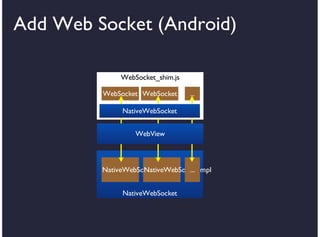
Add Web Socket (Android)
WebSocket_shim.js
WebSocket WebSocket

...

NativeWebSocket
WebView

NativeWebSocketImpl
NativeWebSocketImpl
...
NativeWebSocket
Add Web Socket (Android)
• Define Web Socket (JavaScript)
// websocket_shim.js
(function() {
var store = {};
// Websocket constructor
var WebSocket = window.WebSocket = function(url) {
// Initialize web socket
this.socketId = nativewebsocket.getInstance(url);
WebSocket.store[this.socketId] = this;
}
// declare prototype method
WebSocket.prototype.send = function(data) {
// bind to native
nativewebsocket.send(data, this.socketId);
}
...
// event dispatcher
WebSocket.onopen = function(evt) {
// dispatch event to proper instance
WebSocket.store[evt.id].onopen(evt);
}
...
})();
Add Web Socket (Android)
• Define Web Socket / Register /
Callback(Java)

// Define Bridge Interface
class NativeWebSocket {
class NativeWebSocketImpl {
public String id;
public void send(String data) { }
public void onOpen(...) {
webview.post(new Runnable() {
@override
public void run() {
webview.loadUrl(“javascript:WebSocket.onopen({targetId:“ + id + “,
data:” + “data + “});”);
}
});
}
};
...
public void send(String data, String id) { }
public String getInstance(String url) { hash.put(getId(), new
NativeWebSocketImpl(url, id)); }
}
...
// Register NativeWebSocket
webview.addJavascriptInterface(new NativeWebSocket(), “nativewebsocket”);
Add Web Socket (Android)
• Install WebSocket_shim.js!
webview.setWebViewClient(new WebViewClient() {
@Override
public void onPageFinished(WebView view, String url) {
// evaluate your javascript code here!
view.loadUrl(“javascript:“ + <WebSocket_shim.js 파일 내용>);
}
});
Replace Canvas 2D (Android)
Original Canvas
(JavaScript)
Image

Image

canvas_shim.js
(JavaScript)
...

CanvasRenderingContext2D
...
Canvas

Canvas

...

Image

Image

...

CanvasRenderingContext2D
...
Canvas

Canvas

...

NativeCanvas2DContext
WebView

WebView
Bitmap

Bitmap

...

SurfaceView

SurfaceView

...

NativeCanvas2DContext
WebKit

WebKit
Replace Canvas 2D (Android)
HTML
Canvas

WebView
SurfaceView
Replace Canvas 2D (Android)
• Override Canvas.getContext(“2d”)
// canvas2d_shim.js
// Replace built-in function prototype with your own
HTMLCanvasElement.prototype.getContext = function(getCtxOld) {
return function (val) {
var ctx;
ctx = getCtxOld.apply(this, arguments);
if (val == ‘2d’) {
// make Native Canvas
NativeCanvas2DContext.createNativeCanvas(...);
// Object Instance Mixin
}
return ctx;
};
}(HTMLCanvasElement.prototype.getContext);
Replace Canvas 2D (Android)
• Override CanvasRendering2DContext
// Replace built-in CanvasRenderingContext2D prototype with your
own
CanvasRenderingContext2D.prototype.fillText = function(..) {
NativeCanvas2DContext.fillText(...);
};
CanvasRenderingContext2D.prototype.drawImage = function(..) {
if (arguments.length == 9) {
NativeCanvas2DContext.drawImage(...);
} else if (arguments.length == 3) {
...
} else {
}
};
Replace Canvas 2D (Android)
• Override Image

// Replace built-in constructor of Image object with my own
Image = function() {
var image = {};
var imageId = NativeCanvas2DContext.getImageId();
image.__defineSetter__("src", function(val) {
NativeCanvas2DContext.setImageSrc(imageId, val);
this._src = val;
});
image.__defineGetter__("width", function() {
return NativeCanvas2DContext.getImageWidth(imageId);
});
image.__defineGetter__("height", function() {
return NativeCanvas2DContext.getImageHeight(imageId);
});
...
return image;
};
Replace Canvas 2D (Android)
• Define Native Canvas / Register
// Define Bridge Interface
class NativeCanvas2DContext {
public SurfaceView nativeView;
public Bitmap image;
public void createCanvas(int width, int height) { ... }
public void fillText(..) { ... }
public void drawImage(..) { ... }
public void drawArc(..) { ...}
...
public String getImageId() { ... }
public void setImageSrc(..) { ... }
...
}
...
// Register NativeCanvas2DContext
webview.addJavascriptInterface(new NativeCanvas2DContext(),
“NativeCanvas2DContext”);
Replace Canvas 2D (Android)
• Install canvas2d_shim.js!
webview.setWebViewClient(new WebViewClient() {
@Override
public void onPageFinished(WebView view, String url) {
// evaluate your javascript code here!
view.loadUrl(“javascript:“ + <canvas2d_shim.js 파일 내용>);
}
});
Demo
Lessons Learned
General Lessons
• Do as many implementations as possible in
javascript world
• Minimize Javascript ⬌ Native
communications
• Watch out threads (PostMessage)
Android Specific Lessons
• We Can’t Override Native Properties In
WebView

- Object.defineProperty Doesn’t Work for Native
Properties

• Object Instance Mixin

- Add Getter/Setter into CanvasRendering2DContext’s
Instance

• Object.defineProperty bugs

- Use __defineGetter__, __defineSetter__ instead
Q&A

125 고성능 web view-deview 2013 발표 자료_공유용

  • 1.
    WebView 뛰어 넘기 부제:고성능 WebView 만들기 박창현
  • 2.
  • 3.
    About Me • • • • • 단말 플랫폼개발 Specialist 웹 플랫폼 개발 Specialist Android 보안 시스템 개발 Specialist Android/HTML5/Hybrid App Framework/... 현) SK planet / Mobile SW 개발 1팀 / 팀장
  • 4.
    Contents • Why High-performanceWebView? • Basic Tech. Idea for High-performance WebView • Demo • Lessons Learned
  • 5.
  • 6.
    Hybrid Apps. BecomeMore Popular
  • 7.
    What is HybridApplication? Native Web WebView
  • 8.
    • A Partof Android Fr ag m en Framework • Different from Web Browser (Chrome) • Less Powerful Than Web Browser (Chrome...) • Web Standard Compatibility - Depend On Android OS Version ta tio n WebView Is ... • A Part of iOS • Different from Web Browser (Safari) • Less Powerful Than Web Browser (Safari) • Web Standard Compatibility - Depend On iOS Version
  • 9.
    Web Standard Compatibilityfor WebView Web Audio/Vi Web Canvas Worker deo Sockets s Web Audio Web Notificat WebGL ion GB O △ X X X X X ICS O △ X X X X X JB O △ △ X X X X
  • 10.
    Web Standard Compatibilityfor WebView Web Audio/Vi Web Canvas Worker deo Sockets s Web Audio Web Notificat WebGL ion 5.0 O △ O △ X X X 6.0 O △ O O O X X 7.0 O △ O O O X X
  • 11.
    Hybrid App’s ProblemsAre ... “We have to make several versions of in-app web contents for each android/iOS version.” Fragmentation “We need Web Worker feature for our Performance can support contents. But because only iOS Web Worker spec at this time, we can’s support android devices.”
  • 12.
    We Need ToHave Special WebView Provide The Same Web Standards Independent of OS version and Manufacturers Should Be Faster Than Native
  • 13.
  • 14.
    We Need ToKnow ... • How To Call JavaScript Function From Native • How To Call Native Function From JavaScript
  • 15.
    Android • onPageFinished +bookmarklet webview.setWebViewClient(new WebViewClient() { @Override public void onPageFinished(WebView view, String url) { // evaluate your javascript code here! view.loadUrl(“javascript:.... “); } });
  • 16.
    Android • addJavascriptInterface //Define BridgeClass class MyBridgeClass { public void foo(final String args) { // do something } } webview.addJavascriptInterface(new MyBridgeClass(), “MyBridge”); // In javascript code window.MyBride.foo(“hello world”);
  • 17.
    iOS • webViewDidFinishLoad + stringByEvaluatingJavaScriptFromString //Insertmy own javascript codes like this: - (void)webViewDidFinishLoad:(UIWebView *)webView { outputString = [webView stringByEvaluatingJavaScriptFromString:@"whatever js code I want to evaluate"]; }
  • 18.
    iOS • shouldStartLoadWithRequest //Insert myown javascript codes like this: - (BOOL)webView:(UIWebView *)theWebView shouldStartLoadWithRequest:(NSURLRequest *)request navigationType: UIWebViewNavigationType)navigationType { if ([[[request URL] absoluteString] hasPrefix:@"skp:"]) { // do my job return NO; } return YES; } //Javascript code var iframe = document.createElement("IFRAME"); iframe.setAttribute("src", "skp:myBridgeFunction"; document.documentElement.appendChild(iframe); iframe.parentNode.removeChild(iframe); iframe = null;
  • 19.
  • 20.
    Web Sockets andCanvas 2D • Web Sockets - Android WebView Does Not Support - Add Web Sockets Features Into WebView • Canvas 2D - Android WebView’s Canvas 2D Is Extremely Slow - Replace Canvas 2D Features With My Own Implementation (with SurfaceView)
  • 21.
    Add Web Socket(Android) WebSocket_shim.js WebSocket WebSocket ... NativeWebSocket WebView NativeWebSocketImpl NativeWebSocketImpl ... NativeWebSocket
  • 22.
    Add Web Socket(Android) • Define Web Socket (JavaScript) // websocket_shim.js (function() { var store = {}; // Websocket constructor var WebSocket = window.WebSocket = function(url) { // Initialize web socket this.socketId = nativewebsocket.getInstance(url); WebSocket.store[this.socketId] = this; } // declare prototype method WebSocket.prototype.send = function(data) { // bind to native nativewebsocket.send(data, this.socketId); } ... // event dispatcher WebSocket.onopen = function(evt) { // dispatch event to proper instance WebSocket.store[evt.id].onopen(evt); } ... })();
  • 23.
    Add Web Socket(Android) • Define Web Socket / Register / Callback(Java) // Define Bridge Interface class NativeWebSocket { class NativeWebSocketImpl { public String id; public void send(String data) { } public void onOpen(...) { webview.post(new Runnable() { @override public void run() { webview.loadUrl(“javascript:WebSocket.onopen({targetId:“ + id + “, data:” + “data + “});”); } }); } }; ... public void send(String data, String id) { } public String getInstance(String url) { hash.put(getId(), new NativeWebSocketImpl(url, id)); } } ... // Register NativeWebSocket webview.addJavascriptInterface(new NativeWebSocket(), “nativewebsocket”);
  • 24.
    Add Web Socket(Android) • Install WebSocket_shim.js! webview.setWebViewClient(new WebViewClient() { @Override public void onPageFinished(WebView view, String url) { // evaluate your javascript code here! view.loadUrl(“javascript:“ + <WebSocket_shim.js 파일 내용>); } });
  • 25.
    Replace Canvas 2D(Android) Original Canvas (JavaScript) Image Image canvas_shim.js (JavaScript) ... CanvasRenderingContext2D CanvasRenderingContext2D ... Canvas Canvas ... Image Image ... CanvasRenderingContext2D CanvasRenderingContext2D ... Canvas Canvas ... NativeCanvas2DContext WebView WebView Bitmap Bitmap ... SurfaceView SurfaceView ... NativeCanvas2DContext WebKit WebKit
  • 26.
    Replace Canvas 2D(Android) HTML Canvas WebView SurfaceView
  • 27.
    Replace Canvas 2D(Android) • Override Canvas.getContext(“2d”) // canvas2d_shim.js // Replace built-in function prototype with your own HTMLCanvasElement.prototype.getContext = function(getCtxOld) { return function (val) { var ctx; ctx = getCtxOld.apply(this, arguments); if (val == ‘2d’) { // make Native Canvas NativeCanvas2DContext.createNativeCanvas(...); // Object Instance Mixin } return ctx; }; }(HTMLCanvasElement.prototype.getContext);
  • 28.
    Replace Canvas 2D(Android) • Override CanvasRendering2DContext // Replace built-in CanvasRenderingContext2D prototype with your own CanvasRenderingContext2D.prototype.fillText = function(..) { NativeCanvas2DContext.fillText(...); }; CanvasRenderingContext2D.prototype.drawImage = function(..) { if (arguments.length == 9) { NativeCanvas2DContext.drawImage(...); } else if (arguments.length == 3) { ... } else { } };
  • 29.
    Replace Canvas 2D(Android) • Override Image // Replace built-in constructor of Image object with my own Image = function() { var image = {}; var imageId = NativeCanvas2DContext.getImageId(); image.__defineSetter__("src", function(val) { NativeCanvas2DContext.setImageSrc(imageId, val); this._src = val; }); image.__defineGetter__("width", function() { return NativeCanvas2DContext.getImageWidth(imageId); }); image.__defineGetter__("height", function() { return NativeCanvas2DContext.getImageHeight(imageId); }); ... return image; };
  • 30.
    Replace Canvas 2D(Android) • Define Native Canvas / Register // Define Bridge Interface class NativeCanvas2DContext { public SurfaceView nativeView; public Bitmap image; public void createCanvas(int width, int height) { ... } public void fillText(..) { ... } public void drawImage(..) { ... } public void drawArc(..) { ...} ... public String getImageId() { ... } public void setImageSrc(..) { ... } ... } ... // Register NativeCanvas2DContext webview.addJavascriptInterface(new NativeCanvas2DContext(), “NativeCanvas2DContext”);
  • 31.
    Replace Canvas 2D(Android) • Install canvas2d_shim.js! webview.setWebViewClient(new WebViewClient() { @Override public void onPageFinished(WebView view, String url) { // evaluate your javascript code here! view.loadUrl(“javascript:“ + <canvas2d_shim.js 파일 내용>); } });
  • 32.
  • 34.
  • 35.
    General Lessons • Doas many implementations as possible in javascript world • Minimize Javascript ⬌ Native communications • Watch out threads (PostMessage)
  • 36.
    Android Specific Lessons •We Can’t Override Native Properties In WebView - Object.defineProperty Doesn’t Work for Native Properties • Object Instance Mixin - Add Getter/Setter into CanvasRendering2DContext’s Instance • Object.defineProperty bugs - Use __defineGetter__, __defineSetter__ instead
  • 37.