

Node.js
Express Yourself: Building Web
Applications with Node.js and Express
Yaniv Rodenski - @YRodenski
About me:
• Senior Architect @ Sela
• Windows Azure MVP
• Co-manager of the Windows Azure
Community
• Co-author of Developing Windows Azure and
Web Services (MOC 20487)
• Developing software professionally since 1997
About 1997:
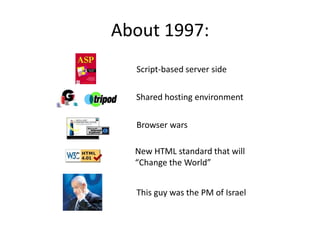
About 1997:
Script-based server side
Shared hosting environment
Browser wars
New HTML standard that will
“Change the World”
This guy was the PM of Israel
Agenda
• What is Node.js
• The Importance of Being Asynchronous
• NPM
• Connect Middleware
• Express
What is Node.js
• A JavaScript runtime that is designed for
asynchronous IO operations
• Very lightweight and fast
• In use by a growing number of companies:
The Node.js Ecosystem
• Node.js has a rapidly growing ecosystem:
– Web frameworks:
• Express.js
• Socket.io
– Database support:
• MongoDB
• SQL Server
– Hosting and Cloud environments:
• IIS, Azure
• Forever.js
• Joyent, Heroku
Demo
Hello Node.js
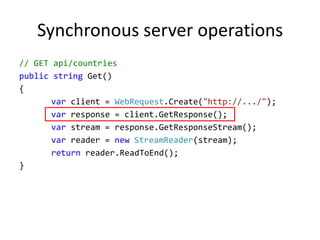
Synchronous server operations
// GET api/countries
public string Get()
{
var client = WebRequest.Create("http://.../");
var response = client.GetResponse();
var stream = response.GetResponseStream();
var reader = new StreamReader(stream);
return reader.ReadToEnd();
}
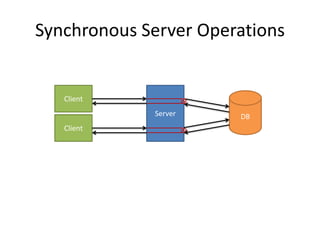
Synchronous Server Operations
Client
DBServer
Client
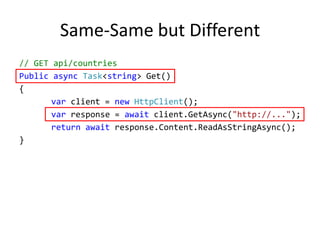
Same-Same but Different
// GET api/countries
Public async Task<string> Get()
{
var client = new HttpClient();
var response = await client.GetAsync("http://...");
return await response.Content.ReadAsStringAsync();
}
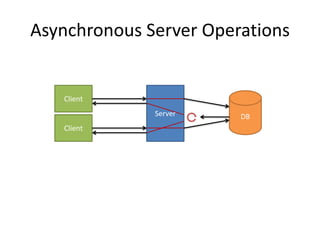
Asynchronous Server Operations
Client
DBServer
Client
Demo
Async server in Node.js
Async JavaScript with Node.js
• Node.js is asynchronous by design
• Most IO operations have no synchronous API
• This is crucial since Node.js (or rather V8) has
a single thread
Node Package Manager (NPM)
• The Node Package Manager (NPM) provides a
management mechanism for modules
• Download and install
• Version management
• Deployment
Demo
Getting Express.js
Connect Middleware
• Node.js http module provides bare-bones HTTP server
functionality
• Connect middleware (by Sencha Labs) provides an expandable
pipeline on top of Node.js's httpServer
• You can add any functionality to the pipeline by calling the use
method, and passing a method:
server.use(function(req, res, next){
// some code
next();
})
Demo
Simple HTTP server using connect
Out-of-the-Box Middleware
Components
• Logging
• Body parser (JSON/forms)
• Cookies
• Error handling
• Session management
• Basic authentication
Demo
Using Cookies and Sessions
ExpressJS
• ExpressJS is a web application framework
inspired by Ruby’s Sinatra
• Provides a model-view-route architecture
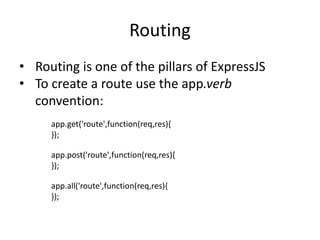
Routing
• Routing is one of the pillars of ExpressJS
• To create a route use the app.verb
convention:
app.get('route',function(req,res){
});
app.post('route',function(req,res){
});
app.all('route',function(req,res){
});
Demo
Simple routing
Routing and Parameters
• Express supports parameters as part of the URI
• Declare a parameter in the URI using a
placeholder
• Access query-string parameters using req.query
• Use regular expression
Demo
Passing Parameters to Routes
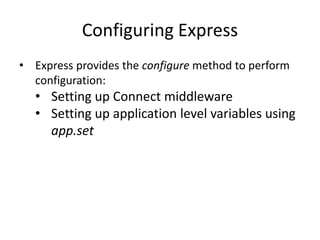
Configuring Express
• Express provides the configure method to perform
configuration:
• Setting up Connect middleware
• Setting up application level variables using
app.set
Views
• Views are a template-based UI mechanism
• Express supports many view-engines
including:
• Jade
• JSHtml
• EJS
Jade
• Jade is Express’s default view engine
• It is based on Haml in order to provide a clean
syntax for generating HTML
• Tab based
• Full support for HTML
Demo
Basic Jade Template
Mixing Up JavaScript & Jade
• Jade fully supports JavaScript using the script
element:
• Linking to external JS files
• Embedding in-line JavaScript
Demo
Jade and bootstrap
Blocks
• In most applications, a number of UI
components are used throughout the
application
• Blocks provide a way to declare a common
layout that is shared among views
Demo
Using Blocks
ModelModel
• Express provides a mechanism to insert data-
models into views
• The rendering of the complete artifact is up to
the view engine
Demo
Rendering Data with Jade
Summary
• Node.js allows JavaScript
to run outside of browsers
and perform IO
• Asynchronous by nature
• Lightweight, fast and
extremely cool
• Rich ecosystem for
building JavaScript-based
servers
What’s next
• ExpressJS can be used to
use the MVR/MVC
patterns in web
applications
• Currently there are
1688 projects in NPM
which use Express: Sails,
Express.io, etc.
• All you need is a text
editor and a command line

Express yourself

  • 1.
    Node.js Express Yourself: BuildingWeb Applications with Node.js and Express Yaniv Rodenski - @YRodenski
  • 2.
    About me: • SeniorArchitect @ Sela • Windows Azure MVP • Co-manager of the Windows Azure Community • Co-author of Developing Windows Azure and Web Services (MOC 20487) • Developing software professionally since 1997
  • 3.
  • 4.
    About 1997: Script-based serverside Shared hosting environment Browser wars New HTML standard that will “Change the World” This guy was the PM of Israel
  • 5.
    Agenda • What isNode.js • The Importance of Being Asynchronous • NPM • Connect Middleware • Express
  • 6.
    What is Node.js •A JavaScript runtime that is designed for asynchronous IO operations • Very lightweight and fast • In use by a growing number of companies:
  • 7.
    The Node.js Ecosystem •Node.js has a rapidly growing ecosystem: – Web frameworks: • Express.js • Socket.io – Database support: • MongoDB • SQL Server – Hosting and Cloud environments: • IIS, Azure • Forever.js • Joyent, Heroku
  • 8.
  • 9.
    Synchronous server operations //GET api/countries public string Get() { var client = WebRequest.Create("http://.../"); var response = client.GetResponse(); var stream = response.GetResponseStream(); var reader = new StreamReader(stream); return reader.ReadToEnd(); }
  • 10.
  • 11.
    Same-Same but Different //GET api/countries Public async Task<string> Get() { var client = new HttpClient(); var response = await client.GetAsync("http://..."); return await response.Content.ReadAsStringAsync(); }
  • 12.
  • 13.
  • 14.
    Async JavaScript withNode.js • Node.js is asynchronous by design • Most IO operations have no synchronous API • This is crucial since Node.js (or rather V8) has a single thread
  • 15.
    Node Package Manager(NPM) • The Node Package Manager (NPM) provides a management mechanism for modules • Download and install • Version management • Deployment
  • 16.
  • 17.
    Connect Middleware • Node.jshttp module provides bare-bones HTTP server functionality • Connect middleware (by Sencha Labs) provides an expandable pipeline on top of Node.js's httpServer • You can add any functionality to the pipeline by calling the use method, and passing a method: server.use(function(req, res, next){ // some code next(); })
  • 18.
  • 19.
    Out-of-the-Box Middleware Components • Logging •Body parser (JSON/forms) • Cookies • Error handling • Session management • Basic authentication
  • 20.
  • 21.
    ExpressJS • ExpressJS isa web application framework inspired by Ruby’s Sinatra • Provides a model-view-route architecture
  • 22.
    Routing • Routing isone of the pillars of ExpressJS • To create a route use the app.verb convention: app.get('route',function(req,res){ }); app.post('route',function(req,res){ }); app.all('route',function(req,res){ });
  • 23.
  • 24.
    Routing and Parameters •Express supports parameters as part of the URI • Declare a parameter in the URI using a placeholder • Access query-string parameters using req.query • Use regular expression
  • 25.
  • 26.
    Configuring Express • Expressprovides the configure method to perform configuration: • Setting up Connect middleware • Setting up application level variables using app.set
  • 27.
    Views • Views area template-based UI mechanism • Express supports many view-engines including: • Jade • JSHtml • EJS
  • 28.
    Jade • Jade isExpress’s default view engine • It is based on Haml in order to provide a clean syntax for generating HTML • Tab based • Full support for HTML
  • 29.
  • 30.
    Mixing Up JavaScript& Jade • Jade fully supports JavaScript using the script element: • Linking to external JS files • Embedding in-line JavaScript
  • 31.
  • 32.
    Blocks • In mostapplications, a number of UI components are used throughout the application • Blocks provide a way to declare a common layout that is shared among views
  • 33.
  • 34.
    ModelModel • Express providesa mechanism to insert data- models into views • The rendering of the complete artifact is up to the view engine
  • 35.
  • 36.
    Summary • Node.js allowsJavaScript to run outside of browsers and perform IO • Asynchronous by nature • Lightweight, fast and extremely cool • Rich ecosystem for building JavaScript-based servers
  • 37.
    What’s next • ExpressJScan be used to use the MVR/MVC patterns in web applications • Currently there are 1688 projects in NPM which use Express: Sails, Express.io, etc. • All you need is a text editor and a command line

Editor's Notes

  • #9 Explain the basic node concepts:Modules and how we import them using requireThe use of callbacks
  • #14 Explain the basic node concepts:Modules and how we import them using requireThe use of callbacks