Meetup #10
Intro to Node.js
AWS Chatbot Follow-up
Overview
We'll begin this meetup with an introduction to NodeJS, covering the following topics:
The history of Node.js
How to install and get up and running
Practical solutions using NodeJS
Resources for learning
Open discussion
Then we'll follow up with the progress for the AWS Chatbot Challenge solution and
discuss next steps for the ongoing project.
Node.js - What is it?
In a nutshell, Node.js is a JavaScript-based server-side
platform.
From the product website https://nodejs.org:
Node.js® is a JavaScript runtime built on Chrome's V8
JavaScript engine. Node.js uses an event-driven, non-
blocking I/O model that makes it lightweight and efficient.
Node.js' package ecosystem, npm, is the largest ecosystem
of open source libraries in the world.
NPM - Node Package Manager
NPM provides the mechanism to easily import packages and
effectively manage the dependencies between packages.
It is the primary way of importing functionality into Node.js
applications.
From the Package Manager website https://www.npmjs.com:
“npm is the package manager for JavaScript and the world’s
largest software registry”
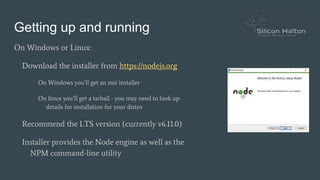
Getting up and running
On Windows or Linux:
Download the installer from https://nodejs.org
On Windows you’ll get an msi installer
On linux you’ll get a tarball - you may need to look up
details for installation for your distro
Recommend the LTS version (currently v6.11.0)
Installer provides the Node engine as well as the
NPM command-line utility
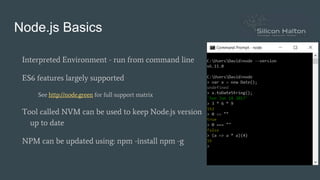
Node.js Basics
Interpreted Environment - run from command line
ES6 features largely supported
See http://node.green for full support matrix
Tool called NVM can be used to keep Node.js version
up to date
NPM can be updated using: npm -install npm -g
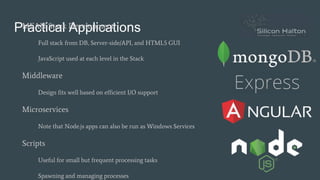
Practical ApplicationsMEAN Stack Development
Full stack from DB, Server-side/API, and HTML5 GUI
JavaScript used at each level in the Stack
Middleware
Design fits well based on efficient I/O support
Microservices
Note that Node.js apps can also be run as Windows Services
Scripts
Useful for small but frequent processing tasks
Spawning and managing processes
ResourcesCore resources:
Node.js: http://nodejs.org
NPM (package repository): http://npmjs.com
Node.green (EcmaScript support matrix): http://node.green
Tutorials:
Node School: http://nodeschool.io - Excellent self-guided tutorials for learning Node.js
Node School Toronto: https://nodeschool.io/toronto - Monthly gathering to do nodeschool.io
workshops with others
Libraries and Tools:
Express (web server application framework): https://expressjs.com
Node.js Discussion
Open Floor For Discussion!
Questions?
Comments?
Potential Follow-up Topics?
AWS Chatbot Challenge
Quick catch-up on progress
New Slack group created:
haltonsoftware.slack.com
Project channel on Slack for Chatbot
Challenge
Meetup Wrap-up
Takeaways from today’s session?
Open Floor
Next Meetup - Ideas?
More on JavaScript? ES6, TypeScript, etc.
Another software technology, framework, language?

Halton Software Peer 2 Peer Meetup #10

  • 1.
    Meetup #10 Intro toNode.js AWS Chatbot Follow-up
  • 2.
    Overview We'll begin thismeetup with an introduction to NodeJS, covering the following topics: The history of Node.js How to install and get up and running Practical solutions using NodeJS Resources for learning Open discussion Then we'll follow up with the progress for the AWS Chatbot Challenge solution and discuss next steps for the ongoing project.
  • 3.
    Node.js - Whatis it? In a nutshell, Node.js is a JavaScript-based server-side platform. From the product website https://nodejs.org: Node.js® is a JavaScript runtime built on Chrome's V8 JavaScript engine. Node.js uses an event-driven, non- blocking I/O model that makes it lightweight and efficient. Node.js' package ecosystem, npm, is the largest ecosystem of open source libraries in the world.
  • 4.
    NPM - NodePackage Manager NPM provides the mechanism to easily import packages and effectively manage the dependencies between packages. It is the primary way of importing functionality into Node.js applications. From the Package Manager website https://www.npmjs.com: “npm is the package manager for JavaScript and the world’s largest software registry”
  • 5.
    Getting up andrunning On Windows or Linux: Download the installer from https://nodejs.org On Windows you’ll get an msi installer On linux you’ll get a tarball - you may need to look up details for installation for your distro Recommend the LTS version (currently v6.11.0) Installer provides the Node engine as well as the NPM command-line utility
  • 6.
    Node.js Basics Interpreted Environment- run from command line ES6 features largely supported See http://node.green for full support matrix Tool called NVM can be used to keep Node.js version up to date NPM can be updated using: npm -install npm -g
  • 7.
    Practical ApplicationsMEAN StackDevelopment Full stack from DB, Server-side/API, and HTML5 GUI JavaScript used at each level in the Stack Middleware Design fits well based on efficient I/O support Microservices Note that Node.js apps can also be run as Windows Services Scripts Useful for small but frequent processing tasks Spawning and managing processes
  • 8.
    ResourcesCore resources: Node.js: http://nodejs.org NPM(package repository): http://npmjs.com Node.green (EcmaScript support matrix): http://node.green Tutorials: Node School: http://nodeschool.io - Excellent self-guided tutorials for learning Node.js Node School Toronto: https://nodeschool.io/toronto - Monthly gathering to do nodeschool.io workshops with others Libraries and Tools: Express (web server application framework): https://expressjs.com
  • 9.
    Node.js Discussion Open FloorFor Discussion! Questions? Comments? Potential Follow-up Topics?
  • 10.
    AWS Chatbot Challenge Quickcatch-up on progress New Slack group created: haltonsoftware.slack.com Project channel on Slack for Chatbot Challenge
  • 11.
    Meetup Wrap-up Takeaways fromtoday’s session? Open Floor Next Meetup - Ideas? More on JavaScript? ES6, TypeScript, etc. Another software technology, framework, language?