Create ReactJS component &
publish as npm package
#LiveCoding #CaseStudy
#HowTo
Facebook: Andrii Lundiak
Twitter: @landike
GitHub: @alundiak
Agenda
● How to prepare your (provider) ReactJS component and let your friends (consumer) to use it.
● What issues you may face with Babel, Webpack, Eslint, Node, npm.
● When to use “npm link” approach and “npm publish” approach.
● What else to read and to try.
● Coding demo.
Problem?
No problems :) but…
● What if you want to import JSX original file from component?
● Component built for CommonJS and u need Browser version?
● Component built with LESS/CSS and you need to override?
● Component published with distributed and source code, but package.json wrong?
● What if your provider components is minified, and you want to improve debugging? (displayName)
● What if you need to use component you implement locally, in another component? (npm link)
#howto Babel v6 + Webpack v3 examples
● https://medium.com/@BrodaNoel/how-to-create-a-react-component-and-publish-it-in-npm-668ad7d363ce
● https://medium.com/quick-code/publish-your-own-react-component-as-npm-package-under-5-minutes-8a47f0cb92
b9
● https://codeburst.io/extracting-a-react-js-component-and-publishing-it-on-npm-2a49096757f5
● https://codeburst.io/deploy-react-component-as-an-npm-library-d396efc25122 (with Rollup)
● http://jasonwatmore.com/post/2018/04/14/react-npm-how-to-publish-a-react-component-to-npm (webpack 4)
● https://hackernoon.com/creating-a-library-of-react-components-using-create-react-app-without-ejecting-d182df690
c6b - with create-react-app and create-react-lib
● https://itnext.io/how-to-package-your-react-component-for-distribution-via-npm-d32d4bf71b4f
First 2 examples using “npm link”. More about my experience after Demo.
Provider & Consumer ReactJS Components
Provider component:
1. Create
2. Verify
3. Publish to npm-registry
Consumer code:
1. npm install
2. Import provider component
3. Use/render.
Example (demo base)
Provider component(s):
● React Sum ( 50+ commits, Babel v7, Webpack v.4, React v16.8.6) by @alundiak,
● React Math (2 commits, Webpack v1, React 0.12)
● React Color Square (4 commits, Babel v6, Webpack v3, React v16.4.0),
● React Color (632 commits, Babel v6, Webpack v1, React v15).
Consumer code example:
● React Experiments by @alundiak.
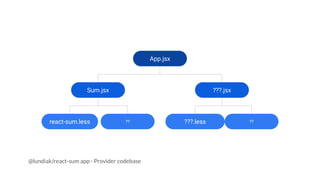
App.jsx
???.jsxSum.jsx
react-sum.less ?? ???.less ??
@lundiak/react-sum app - Provider codebase
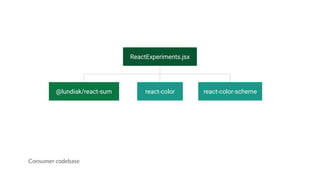
ReactExperiments.jsx
@lundiak/react-sum react-color-scheme
Consumer codebase
react-color
Issues: Webpack & JS/JSX #1
● “npm link” + eslint-loader issue. More later.
● “Module parse failed: Unexpected token. You may need an appropriate loader to handle this file type.”
○ “exclude: /node_modules/,” (babel-loader. But ….)
● How to separate index.jsx (with main.less) and App.jsx (with built in import app.less) as main
package file.
○ Single entry point vs. Multiple entry points. + MiniCssExtractPlugin issue.
● “Cannot use [chunkhash] or [contenthash] for chunk in '[name].[contenthash].js' (use [hash] instead)”
● How to properly build “library” (commonjs2 vs. umd). GitHub md file.
○ root["ReactApp"]["Sum"] = factory(); + many other issues.
Issues: Webpack & JS/JSX #2
● Old Webpack approach with “vendors” and new Webpack 4 approach with optimization and
SplitChunksPlugin.
● Using “externals” seems easy, but it seems not working properly with React and ReactDOM.
○ GitHub md file for externals, where good examples of compiled UMD code.
○ Still TODO for me.
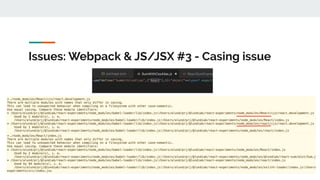
● Casing issue - depends how externals written (“React” vs. “react”) for “amd” in provider
component, it will affect codebase of consumer component.
Issues: Webpack & JS/JSX #3 - Casing issue
Issues: Webpack & CSS/LESS
● Duplicated CSS code from less-loader (in fact from mini-css-extract-plugin)
○ https://webpack.js.org/loaders/less-loader/
○ https://github.com/webpack-contrib/mini-css-extract-plugin
● “Multiple chunks emit assets to the same filename css/main.css (chunks app and index)”
○ MiniCssExtractPlugin issue. + Single/Multiple entries issue.
● If relative/aliased PATH, then friends code have to implement alias (requires webpack restart).
● If ur component imports less file using absolute PATH, webpack in ur friends codebase will extract
it into his codebase app.css
○ If App.jsx exports Sum.jsx and Count.jsx with their less files, then even “import { Sum } from App.jsx will
import all CSS code from all less files. Solution - need to import directly.
Issues: Babel
● .babelrc (v6.x) vs. babel.config.js (v7.x)
○ ModuleBuildError in Module build failed (from ./node_modules/babel-loader/lib/index.js): SyntaxError:
….: Support for the experimental syntax 'classProperties' isn't currently enabled
● to use import(), you’ll need Babel’s dynamic-import plugin
Issues: Node/npm
● How to implement npm scripts to build dev and prod version of code.
○ “npm run devBuild” + “npm run prodBuild” + push dist fodler
● “Module not found: Error: Can't resolve '@lundiak/react-sum'”
○ Read Webpack targets + resolve.mainFields.
○ If target === “webworker”, “web” or not specified !!!
■ 1) “browser” is default. Works for
■ 2) “module” - If you implement React Component and want to provide direct JSX file (ES6+).
■ 3) “main” - If you implement React Component and want to provide built code in ES5 format
○ Sequence matters. Custom array may be OK, depends on package.json fields values.
■ If file not available at all, it skipped, and next is taken.
● “ReferenceError: require is not defined” - when target = “node”.
Issues: in Browser
● Include React, ReactDOM, Babel from CDN
○ And using webpack-dev-server template options, conditionally decide when to include.
● Use type=”text/babel”
○ + Include babel-standalone.
○ Create/Use JSX code inside of <script>
other Issues
● When Hot Module Replacement enabled and entry point is single, part of HMR code injected in
bundle.js. Which is redundancy code for production.
○ http://gaearon.github.io/react-hot-loader/
● Serving images. For JS/JSX, for HTML code and for CSS code.
○ Webpack file-loader and url-loader.
○ https://stackoverflow.com/questions/51013035/how-to-serve-images-using-webpack
○ https://stackoverflow.com/questions/37671342/how-to-load-image-files-with-webpack-file-loader
● Webpack Dev Server serves files from memory, but it doesn’t work always.
○ So need to “rm -rf dist && npm run build” to clean it up. TODO.
Demo Time
to Read
● [Feb-2019] How to set up & deploy your React app from scratch using Webpack and Babel (+ Netlify)
● [Feb-2018] How to package your React Component for distribution via NPM (very detailed)
● [APr-2018] React + npm - How to Publish a React Component to npm
● [Sep-2018] The 100% correct way to split your chunks with Webpack
● [Aug-2017] How to write your first React.js component
● [Jul-2018] Common code mistakes in React that you (maybe) made
● [Jul-2018] Transforming Elements In React
● UMD (Universal Module Definition)
● GitHub Webpack Examples - md files with good explantions.
to Try
● Npm package “create-reactjs-component” (uses SCSS).
● Webpack plugin optimize-css-assets-webpack-plugin.
● Webpack plugin Bundle Analyzer Plugin
○ to read #8 Step By Step: Bundle Analyzer Plugin
● JSS and React-JSS.
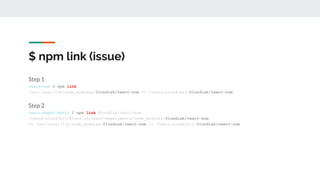
Step 1
react-sum $ npm link
/usr/local/lib/node_modules/@lundiak/react-sum -> /Users/alund/prj/@lundiak/react-sum
Step 2
react-experiments $ npm link @lundiak/react-sum
/Users/alund/prj/@lundiak/react-experiments/node_modules/@lundiak/react-sum
-> /usr/local/lib/node_modules/@lundiak/react-sum -> /Users/alund/prj/@lundiak/react-sum
$ npm link (issue)
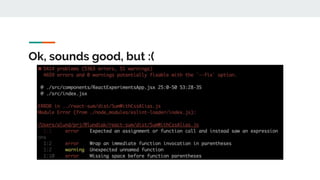
Ok, sounds good, but :(
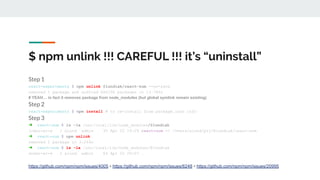
$ npm unlink !!! CAREFUL !!! it’s “uninstall”
Step 1
react-experiments $ npm unlink @lundiak/react-sum --no-save
removed 1 package and audited 866196 packages in 13.785s
# YEAH… in fact it removes package from node_modules (but global symlink remain existing)
Step 2
react-experiments $ npm install # to re-install from package.json info
Step 3
➜ react-sum $ ls -la /usr/local/lib/node_modules/@lundiak
lrwxr-xr-x 1 alund admin 35 Apr 22 19:29 react-sum -> /Users/alund/prj/@lundiak/react-sum
➜ react-sum $ npm unlink
removed 1 package in 3.264s
➜ react-sum $ ls -la /usr/local/lib/node_modules/@lundiak
drwxr-xr-x 2 alund admin 64 Apr 22 20:07 .
https://github.com/npm/npm/issues/4005 + https://github.com/npm/npm/issues/6248 + https://github.com/npm/npm/issues/20995
$ npm link Workaround
eslint-loader:
When used npm link, in fact folder node_modules/@lundiak/react-sum is NOT in real node_modules.
So need to add RegExp (or string) value to exclude that “symlinked” folder.
exclude: [
/node_modules/,
/@lundiak/react-sum/dist/
]
to Read (npm-link related)
● https://docs.npmjs.com/cli/link.html
● [Oct-2018] Understanding npm-link
● [Apr-2017] The magic behind npm link
● [2018] My dev.js slides about "npm #HowTo"
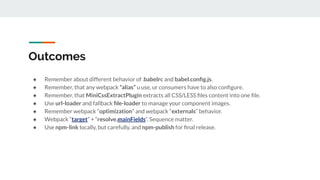
Outcomes
● Remember about different behavior of .babelrc and babel.config.js.
● Remember, that any webpack “alias” u use, ur consumers have to also configure.
● Remember, that MiniCssExtractPlugin extracts all CSS/LESS files content into one file.
● Use url-loader and fallback file-loader to manage your component images.
● Remember webpack “optimization” and webpack “externals” behavior.
● Webpack “target” + “resolve.mainFields”. Sequence matter.
● Use npm-link locally, but carefully, and npm-publish for final release.
Q&A
Facebook: Andrii Lundiak
Twitter: @landike
GitHub: @alundiak

Create ReactJS Component & publish as npm package

  • 1.
    Create ReactJS component& publish as npm package #LiveCoding #CaseStudy #HowTo Facebook: Andrii Lundiak Twitter: @landike GitHub: @alundiak
  • 2.
    Agenda ● How toprepare your (provider) ReactJS component and let your friends (consumer) to use it. ● What issues you may face with Babel, Webpack, Eslint, Node, npm. ● When to use “npm link” approach and “npm publish” approach. ● What else to read and to try. ● Coding demo.
  • 3.
    Problem? No problems :)but… ● What if you want to import JSX original file from component? ● Component built for CommonJS and u need Browser version? ● Component built with LESS/CSS and you need to override? ● Component published with distributed and source code, but package.json wrong? ● What if your provider components is minified, and you want to improve debugging? (displayName) ● What if you need to use component you implement locally, in another component? (npm link)
  • 4.
    #howto Babel v6+ Webpack v3 examples ● https://medium.com/@BrodaNoel/how-to-create-a-react-component-and-publish-it-in-npm-668ad7d363ce ● https://medium.com/quick-code/publish-your-own-react-component-as-npm-package-under-5-minutes-8a47f0cb92 b9 ● https://codeburst.io/extracting-a-react-js-component-and-publishing-it-on-npm-2a49096757f5 ● https://codeburst.io/deploy-react-component-as-an-npm-library-d396efc25122 (with Rollup) ● http://jasonwatmore.com/post/2018/04/14/react-npm-how-to-publish-a-react-component-to-npm (webpack 4) ● https://hackernoon.com/creating-a-library-of-react-components-using-create-react-app-without-ejecting-d182df690 c6b - with create-react-app and create-react-lib ● https://itnext.io/how-to-package-your-react-component-for-distribution-via-npm-d32d4bf71b4f First 2 examples using “npm link”. More about my experience after Demo.
  • 5.
    Provider & ConsumerReactJS Components Provider component: 1. Create 2. Verify 3. Publish to npm-registry Consumer code: 1. npm install 2. Import provider component 3. Use/render.
  • 6.
    Example (demo base) Providercomponent(s): ● React Sum ( 50+ commits, Babel v7, Webpack v.4, React v16.8.6) by @alundiak, ● React Math (2 commits, Webpack v1, React 0.12) ● React Color Square (4 commits, Babel v6, Webpack v3, React v16.4.0), ● React Color (632 commits, Babel v6, Webpack v1, React v15). Consumer code example: ● React Experiments by @alundiak.
  • 7.
    App.jsx ???.jsxSum.jsx react-sum.less ?? ???.less?? @lundiak/react-sum app - Provider codebase
  • 8.
  • 9.
    Issues: Webpack &JS/JSX #1 ● “npm link” + eslint-loader issue. More later. ● “Module parse failed: Unexpected token. You may need an appropriate loader to handle this file type.” ○ “exclude: /node_modules/,” (babel-loader. But ….) ● How to separate index.jsx (with main.less) and App.jsx (with built in import app.less) as main package file. ○ Single entry point vs. Multiple entry points. + MiniCssExtractPlugin issue. ● “Cannot use [chunkhash] or [contenthash] for chunk in '[name].[contenthash].js' (use [hash] instead)” ● How to properly build “library” (commonjs2 vs. umd). GitHub md file. ○ root["ReactApp"]["Sum"] = factory(); + many other issues.
  • 10.
    Issues: Webpack &JS/JSX #2 ● Old Webpack approach with “vendors” and new Webpack 4 approach with optimization and SplitChunksPlugin. ● Using “externals” seems easy, but it seems not working properly with React and ReactDOM. ○ GitHub md file for externals, where good examples of compiled UMD code. ○ Still TODO for me. ● Casing issue - depends how externals written (“React” vs. “react”) for “amd” in provider component, it will affect codebase of consumer component.
  • 11.
    Issues: Webpack &JS/JSX #3 - Casing issue
  • 12.
    Issues: Webpack &CSS/LESS ● Duplicated CSS code from less-loader (in fact from mini-css-extract-plugin) ○ https://webpack.js.org/loaders/less-loader/ ○ https://github.com/webpack-contrib/mini-css-extract-plugin ● “Multiple chunks emit assets to the same filename css/main.css (chunks app and index)” ○ MiniCssExtractPlugin issue. + Single/Multiple entries issue. ● If relative/aliased PATH, then friends code have to implement alias (requires webpack restart). ● If ur component imports less file using absolute PATH, webpack in ur friends codebase will extract it into his codebase app.css ○ If App.jsx exports Sum.jsx and Count.jsx with their less files, then even “import { Sum } from App.jsx will import all CSS code from all less files. Solution - need to import directly.
  • 13.
    Issues: Babel ● .babelrc(v6.x) vs. babel.config.js (v7.x) ○ ModuleBuildError in Module build failed (from ./node_modules/babel-loader/lib/index.js): SyntaxError: ….: Support for the experimental syntax 'classProperties' isn't currently enabled ● to use import(), you’ll need Babel’s dynamic-import plugin
  • 14.
    Issues: Node/npm ● Howto implement npm scripts to build dev and prod version of code. ○ “npm run devBuild” + “npm run prodBuild” + push dist fodler ● “Module not found: Error: Can't resolve '@lundiak/react-sum'” ○ Read Webpack targets + resolve.mainFields. ○ If target === “webworker”, “web” or not specified !!! ■ 1) “browser” is default. Works for ■ 2) “module” - If you implement React Component and want to provide direct JSX file (ES6+). ■ 3) “main” - If you implement React Component and want to provide built code in ES5 format ○ Sequence matters. Custom array may be OK, depends on package.json fields values. ■ If file not available at all, it skipped, and next is taken. ● “ReferenceError: require is not defined” - when target = “node”.
  • 15.
    Issues: in Browser ●Include React, ReactDOM, Babel from CDN ○ And using webpack-dev-server template options, conditionally decide when to include. ● Use type=”text/babel” ○ + Include babel-standalone. ○ Create/Use JSX code inside of <script>
  • 16.
    other Issues ● WhenHot Module Replacement enabled and entry point is single, part of HMR code injected in bundle.js. Which is redundancy code for production. ○ http://gaearon.github.io/react-hot-loader/ ● Serving images. For JS/JSX, for HTML code and for CSS code. ○ Webpack file-loader and url-loader. ○ https://stackoverflow.com/questions/51013035/how-to-serve-images-using-webpack ○ https://stackoverflow.com/questions/37671342/how-to-load-image-files-with-webpack-file-loader ● Webpack Dev Server serves files from memory, but it doesn’t work always. ○ So need to “rm -rf dist && npm run build” to clean it up. TODO.
  • 17.
  • 18.
    to Read ● [Feb-2019]How to set up & deploy your React app from scratch using Webpack and Babel (+ Netlify) ● [Feb-2018] How to package your React Component for distribution via NPM (very detailed) ● [APr-2018] React + npm - How to Publish a React Component to npm ● [Sep-2018] The 100% correct way to split your chunks with Webpack ● [Aug-2017] How to write your first React.js component ● [Jul-2018] Common code mistakes in React that you (maybe) made ● [Jul-2018] Transforming Elements In React ● UMD (Universal Module Definition) ● GitHub Webpack Examples - md files with good explantions.
  • 19.
    to Try ● Npmpackage “create-reactjs-component” (uses SCSS). ● Webpack plugin optimize-css-assets-webpack-plugin. ● Webpack plugin Bundle Analyzer Plugin ○ to read #8 Step By Step: Bundle Analyzer Plugin ● JSS and React-JSS.
  • 20.
    Step 1 react-sum $npm link /usr/local/lib/node_modules/@lundiak/react-sum -> /Users/alund/prj/@lundiak/react-sum Step 2 react-experiments $ npm link @lundiak/react-sum /Users/alund/prj/@lundiak/react-experiments/node_modules/@lundiak/react-sum -> /usr/local/lib/node_modules/@lundiak/react-sum -> /Users/alund/prj/@lundiak/react-sum $ npm link (issue)
  • 21.
  • 22.
    $ npm unlink!!! CAREFUL !!! it’s “uninstall” Step 1 react-experiments $ npm unlink @lundiak/react-sum --no-save removed 1 package and audited 866196 packages in 13.785s # YEAH… in fact it removes package from node_modules (but global symlink remain existing) Step 2 react-experiments $ npm install # to re-install from package.json info Step 3 ➜ react-sum $ ls -la /usr/local/lib/node_modules/@lundiak lrwxr-xr-x 1 alund admin 35 Apr 22 19:29 react-sum -> /Users/alund/prj/@lundiak/react-sum ➜ react-sum $ npm unlink removed 1 package in 3.264s ➜ react-sum $ ls -la /usr/local/lib/node_modules/@lundiak drwxr-xr-x 2 alund admin 64 Apr 22 20:07 . https://github.com/npm/npm/issues/4005 + https://github.com/npm/npm/issues/6248 + https://github.com/npm/npm/issues/20995
  • 23.
    $ npm linkWorkaround eslint-loader: When used npm link, in fact folder node_modules/@lundiak/react-sum is NOT in real node_modules. So need to add RegExp (or string) value to exclude that “symlinked” folder. exclude: [ /node_modules/, /@lundiak/react-sum/dist/ ]
  • 24.
    to Read (npm-linkrelated) ● https://docs.npmjs.com/cli/link.html ● [Oct-2018] Understanding npm-link ● [Apr-2017] The magic behind npm link ● [2018] My dev.js slides about "npm #HowTo"
  • 25.
    Outcomes ● Remember aboutdifferent behavior of .babelrc and babel.config.js. ● Remember, that any webpack “alias” u use, ur consumers have to also configure. ● Remember, that MiniCssExtractPlugin extracts all CSS/LESS files content into one file. ● Use url-loader and fallback file-loader to manage your component images. ● Remember webpack “optimization” and webpack “externals” behavior. ● Webpack “target” + “resolve.mainFields”. Sequence matter. ● Use npm-link locally, but carefully, and npm-publish for final release.
  • 26.
    Q&A Facebook: Andrii Lundiak Twitter:@landike GitHub: @alundiak