Getting Down to the Nitty Gritty of How to Find Your Next Job Day 2
Agenda Using LinkedIn Networking, A Life Skill Email, Blogs and Newsletter Preparing for an Interview Wrap-up
How to create your electronic resume using LinkedIn By  David Strom [email_address]
Presentations available http://slideshare.net/bouncebackstl
Who is David Strom?
Agenda Ways to beef up your profile Do’s and don’ts List all of your positions Make sure people can contact you How to grow your network Ask for recommendations Privacy and visibility issues
Why bother The new “Parachute” Typical business uses What happens if you don’t join It isn’t just for job seekers Start small and develop experience and learn by using more of its features
Too many choices!
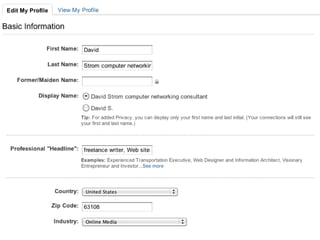
Your profile What is in a name -- header, email identity, and photo Status updates
What to include in your “headline” Photo Email address A concise way to describe yourself as part of your name (“computer networking consultant”)
Sample header files
Here is one that I like!
My header
Ways to show your name Nancy Shoup, MBA Nancy Shoup, ace project manager Nancy Shoup, project manager maven Nancy Shoup, project manager professional
Do’s Make sure they are people you can visualize in your mind or have some memory Do check LinkedIn daily Make sure you have your settings the way you intended Constantly cultivate and feed your network
Don’ts Don’t send out mass invites to more than 30 people at once Don’t put non-professional items in your status updates Don’t obsess about the number of connections and build slowly over time Don’t just get started on the site two weeks before you are changing jobs Don’t worry too much about using InMail
List ALL of your positions Both paid and volunteer, part-time and full-time! And get recommendations from as many as possible
 
Make sure people can contact you Under “edit contact settings”
How to grow your network Sending out invites Accepting requests
Criteria for adding people
Now let’s add them!
Export from email  address book
Be choosey!
Forwarding requests
Recommendations But I don’t know anyone! Part time jobs Family friends, neighbors, other adults who know you well can be a good substitute
Recommendations
Claim a Public Profile URL
My business card
Privacy and visibility
Facebook “marriage”
Do you want your connections visible? Visit this setting first!
What is the difference?
Different types of contacts
Making your contact info visible In Profile/edit contacts:
Profile updates announced
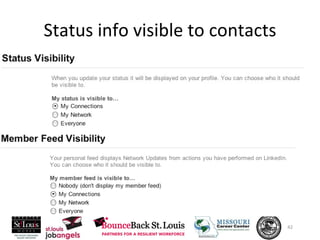
Status info visible to contacts


Should you pay for it?
Finally: make it a daily habit For new job postings on your groups For new connections with your network To tweak your profile and update your job history To update your status with noteworthy activities, meetings, or plans
Good luck with your networking! David Strom (310) 857-6867 [email_address] http://strominator.com http://webinformant.tv Slides available: http://slideshare.net/davidstrom
15 MINUTE BREAK INTRODUCE YOURSELF TO ONE PERSON WHO YOU DO NOT KNOW. FIND SOMETHING OUT ABOUT THAT PERSON THAT WOULD HELP YOU REFER AN OPPORTUNITY TO THEM
Networking, A Life Skill Tap the Hidden Job Market Property of Frank Danzo
Agenda How are jobs found? Elements of a Successful Job Search Personal Marketing Story Target companies and people Networking Tools Networking Guidelines Networking Process
How are Jobs Found?
Successful Job Search
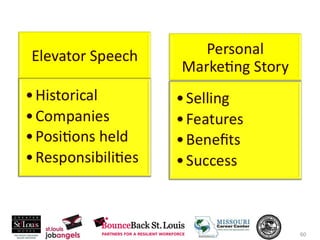
Personal Marketing Story
LinkedIn Property of Frank Danzo
The biggest mistake that job seekers make when networking?
Business Cards Jerry Chapman Sales Professional 314-594-0923 [email_address] 34 West Ridge St. Louis, MO 63087 Jerry Chapman 314-594-0923 [email_address] 34 West Ridge St. Louis, MO 63087
Brent Koffman   555-999-8888 [email_address]  
Networking Process
Friends Family Church Kids Sports Vendors Consultants Accountants Bankers Attorneys Past jobs Professional Org. Insurance Agents Alumni Org. Neighbors
Networking Guidelines
Networking Touch Points
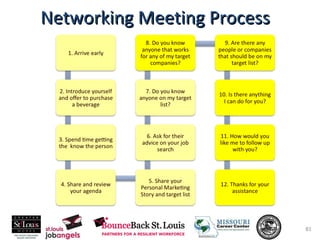
Networking Meeting Process
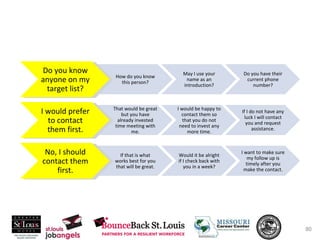
Do you know anyone on my target list? How do you know this person? May I use your name as an introduction? Do you have their current phone number? I would prefer to contact them first. That would be great but you have already invested time meeting with me. I would be happy to contact them so that you do not need to invest any more time. If I do not have any luck I will contact you and request assistance. No, I should contact them first. If that is what works best for you that will be great. Would it be alright if I check back with you in a week? I want to make sure my follow up is timely after you make the contact.
Networking Meeting Process
Networking Process
Invest in Your Network! Strengthen Your Network! Expand Your Network!
15 MINUTE BREAK INTRODUCE YOURSELF TO ONE PERSON WHO YOU DO NOT KNOW. FIND SOMETHING OUT ABOUT THAT PERSON THAT WOULD HELP YOU REFER AN OPPORTUNITY TO THEM
How to create your blog, newsletter and personal Web site By  David Strom [email_address]
Agenda The web site becomes your resume What about blogs What about Twitter Good and bad email choices How to communicate with prospects Why an email newsletter is important
Become master of your domain No, not that kind of domain!
The Internet domain! You need your own dot com! Remember my business card?
Why a domain? It is all about branding!
Hosting your Web site You need a Web server  A hosting provider (different from domain provider), also called a registrar Web browser to control and configure And content!
Cheap hosting providers
Why blogs are a better Web site No programming required Easy to make frequent updates  Easy to quickly change the appearance of your pages Automatic posting of your content to Google’s search index
The blog IS your Web site Make it your first and in some cases your only Web presence It is very simple to setup!
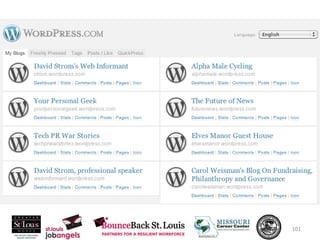
Use blog hosting providers Wordpress.com
Google juice!
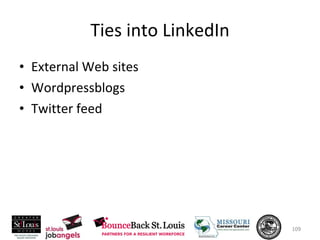
Ties into LinkedIn External Web sites Wordpressblogs Twitter feed
List your Web sites Use the “other” choice  Also can put a 4th in “Interests” This is what it will look like on screen:
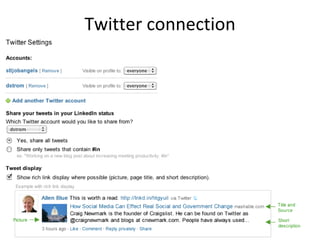
Twitter connection
Bad email IDs [email_address] Something involving your favorite fruit names Anything @ juno.com
Good email choices Use your own domain that you mastered Work proactively with your contacts to keep in touch Start your own email newsletter
Google Apps Standard:  free and 7 GB mailbox for up to 50 email accounts Premier:  $50/user/year and 25 GB mailbox and unlimited accounts Non profits can get Premier for free!
Set up your email software with your domain http://www.google.com/a/cpanel/domain/new
Why is a mailing list important?
Email choices Free: Yahoo Groups  Cheap: Mailman on EMWD.com ($4/mo) Expensive: ConstantContact.com ($30/mo and up)
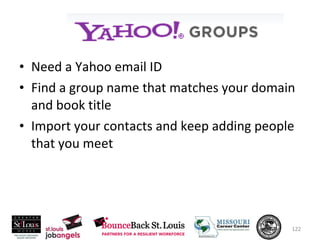
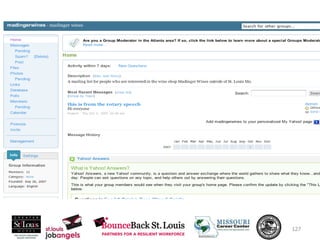
Need a Yahoo email ID Find a group name that matches your domain and book title Import your contacts and keep adding people that you meet
Yahoo
Constant Contact
Typical pricing
Good luck with your job search! David Strom (310) 857-6867 [email_address] http://strominator.com http://webinformant.tv Slides available: http://slideshare.net/davidstrom
Preparing For An Interview Build Confidence and WOW employers Property of Frank Danzo
Agenda Why interviews fail? Interviewers goals? Getting Mentally Prepared Preparation Tools Interview Tools Follow Up
Why Interviews Fail? Poor personal appearance Poor grammar Poor eye-contact Arriving late No enthusiasm Derogatory remarks about past employers Not doing your homework Being too humble Talking too much or too little No follow up after the interview
What Interviewers are trying to conclude? Can you effectively perform the role Focus on achievements Highlight skills Share experiences Demonstrate ability to communicate Flexibility
Are you professionally and personally motivated to succeed? Past accomplishments Why do you want the job? Career ambitions What Interviewers are trying to conclude?
Will you fit it in the organization? Likeability Teamwork Interpersonal What Interviewers are trying to conclude?
Make Sure You Are Mentally Prepared
DO Did vs
Stop talking about what you “ DID” for your last employer. Start talking about what you will “ DO” for your future employer.
Interview Preparation Prior to your interview Write answers to toughest interview questions Write answers to toughest behavioral questions Write out ACCOMPLISHMENT STORIES
When Answering Questions Name Number Title Give the conclusion you want Happy ending
Accomplishment Stories When you answer questions tell stories. Keeps the listeners attention Easier for others to remember Connects you closer to the question Property of Frank Danzo
Accomplishment Stories When you answer questions tell stories in the STAR format. ST – Situation – 2 – 3 sentences A – Action  – 4 – 6 sentences R – Results  – 1 – 2 sentences Let’s review an example
Accomplishment Stories
Interview Preparation Exercise Write answers to toughest interview questions What is your biggest weakness?
Interview Preparation When you get asked to interview REQUIREMENTS vs  QUALIFICATIONS CHEAT SHEET Property of Frank Danzo
Interview Preparation REQUIREMENTS vs  QUALIFICATIONS Let’s review an example Property of Frank Danzo
Requirements vs Qualifications
Property of Frank Danzo Requirements vs Qualifications
Interview Preparation CHEAT SHEET Let’s review an example Property of Frank Danzo
Cheat Sheet
Property of Frank Danzo Cheat Sheet
Send hand written thank you notes to everyone you interview with or assists with the process Email a summary of why you are the best candidate before the decision date reminding them of your key selling points and your interest in the position Follow any other agreed upon follow up from the interview Follow up
Interview Preparation Job offers are not always given to the best candidate but the best…. Prepared Performance Follow through Let this be you!!!! Property of Frank Danzo
Wrap-Up Creating Your Personal Marketing Plan Transferrable Skills – Your Value! Career Options – Your Function! Target Companies – Your Focus! Learning the Culture – Will you fit? Creating an Electronic Presence – Being found! Networking – Meeting the right people! Preparing for an Interview – Standing out!

Nitty Gritty Day2 workshop March 2011

  • 1.
    Getting Down tothe Nitty Gritty of How to Find Your Next Job Day 2
  • 2.
    Agenda Using LinkedInNetworking, A Life Skill Email, Blogs and Newsletter Preparing for an Interview Wrap-up
  • 3.
    How to createyour electronic resume using LinkedIn By David Strom [email_address]
  • 5.
  • 6.
  • 7.
    Agenda Ways tobeef up your profile Do’s and don’ts List all of your positions Make sure people can contact you How to grow your network Ask for recommendations Privacy and visibility issues
  • 8.
    Why bother Thenew “Parachute” Typical business uses What happens if you don’t join It isn’t just for job seekers Start small and develop experience and learn by using more of its features
  • 9.
  • 10.
    Your profile Whatis in a name -- header, email identity, and photo Status updates
  • 11.
    What to includein your “headline” Photo Email address A concise way to describe yourself as part of your name (“computer networking consultant”)
  • 12.
  • 13.
    Here is onethat I like!
  • 14.
  • 15.
    Ways to showyour name Nancy Shoup, MBA Nancy Shoup, ace project manager Nancy Shoup, project manager maven Nancy Shoup, project manager professional
  • 16.
    Do’s Make surethey are people you can visualize in your mind or have some memory Do check LinkedIn daily Make sure you have your settings the way you intended Constantly cultivate and feed your network
  • 17.
    Don’ts Don’t sendout mass invites to more than 30 people at once Don’t put non-professional items in your status updates Don’t obsess about the number of connections and build slowly over time Don’t just get started on the site two weeks before you are changing jobs Don’t worry too much about using InMail
  • 19.
    List ALL ofyour positions Both paid and volunteer, part-time and full-time! And get recommendations from as many as possible
  • 21.
  • 22.
    Make sure peoplecan contact you Under “edit contact settings”
  • 24.
    How to growyour network Sending out invites Accepting requests
  • 25.
  • 26.
  • 27.
    Export from email address book
  • 28.
  • 29.
  • 30.
    Recommendations But Idon’t know anyone! Part time jobs Family friends, neighbors, other adults who know you well can be a good substitute
  • 31.
  • 33.
    Claim a PublicProfile URL
  • 34.
  • 35.
  • 36.
  • 37.
    Do you wantyour connections visible? Visit this setting first!
  • 38.
    What is thedifference?
  • 39.
  • 40.
    Making your contactinfo visible In Profile/edit contacts:
  • 41.
  • 42.
  • 45.
  • 46.
  • 47.
  • 48.
  • 49.
  • 50.
  • 51.
  • 52.
    Finally: make ita daily habit For new job postings on your groups For new connections with your network To tweak your profile and update your job history To update your status with noteworthy activities, meetings, or plans
  • 53.
    Good luck withyour networking! David Strom (310) 857-6867 [email_address] http://strominator.com http://webinformant.tv Slides available: http://slideshare.net/davidstrom
  • 54.
    15 MINUTE BREAKINTRODUCE YOURSELF TO ONE PERSON WHO YOU DO NOT KNOW. FIND SOMETHING OUT ABOUT THAT PERSON THAT WOULD HELP YOU REFER AN OPPORTUNITY TO THEM
  • 55.
    Networking, A LifeSkill Tap the Hidden Job Market Property of Frank Danzo
  • 56.
    Agenda How arejobs found? Elements of a Successful Job Search Personal Marketing Story Target companies and people Networking Tools Networking Guidelines Networking Process
  • 57.
  • 58.
  • 59.
  • 64.
  • 65.
    The biggest mistakethat job seekers make when networking?
  • 68.
    Business Cards JerryChapman Sales Professional 314-594-0923 [email_address] 34 West Ridge St. Louis, MO 63087 Jerry Chapman 314-594-0923 [email_address] 34 West Ridge St. Louis, MO 63087
  • 69.
    Brent Koffman  555-999-8888 [email_address]  
  • 71.
  • 72.
    Friends Family ChurchKids Sports Vendors Consultants Accountants Bankers Attorneys Past jobs Professional Org. Insurance Agents Alumni Org. Neighbors
  • 74.
  • 75.
  • 76.
  • 77.
  • 78.
  • 79.
  • 80.
    Do you knowanyone on my target list? How do you know this person? May I use your name as an introduction? Do you have their current phone number? I would prefer to contact them first. That would be great but you have already invested time meeting with me. I would be happy to contact them so that you do not need to invest any more time. If I do not have any luck I will contact you and request assistance. No, I should contact them first. If that is what works best for you that will be great. Would it be alright if I check back with you in a week? I want to make sure my follow up is timely after you make the contact.
  • 81.
  • 82.
  • 83.
    Invest in YourNetwork! Strengthen Your Network! Expand Your Network!
  • 84.
    15 MINUTE BREAKINTRODUCE YOURSELF TO ONE PERSON WHO YOU DO NOT KNOW. FIND SOMETHING OUT ABOUT THAT PERSON THAT WOULD HELP YOU REFER AN OPPORTUNITY TO THEM
  • 85.
    How to createyour blog, newsletter and personal Web site By David Strom [email_address]
  • 87.
    Agenda The website becomes your resume What about blogs What about Twitter Good and bad email choices How to communicate with prospects Why an email newsletter is important
  • 89.
    Become master ofyour domain No, not that kind of domain!
  • 90.
    The Internet domain!You need your own dot com! Remember my business card?
  • 91.
    Why a domain?It is all about branding!
  • 92.
    Hosting your Website You need a Web server A hosting provider (different from domain provider), also called a registrar Web browser to control and configure And content!
  • 94.
  • 98.
    Why blogs area better Web site No programming required Easy to make frequent updates Easy to quickly change the appearance of your pages Automatic posting of your content to Google’s search index
  • 99.
    The blog ISyour Web site Make it your first and in some cases your only Web presence It is very simple to setup!
  • 100.
    Use blog hostingproviders Wordpress.com
  • 107.
  • 109.
    Ties into LinkedInExternal Web sites Wordpressblogs Twitter feed
  • 110.
    List your Websites Use the “other” choice Also can put a 4th in “Interests” This is what it will look like on screen:
  • 113.
  • 116.
    Bad email IDs[email_address] Something involving your favorite fruit names Anything @ juno.com
  • 117.
    Good email choicesUse your own domain that you mastered Work proactively with your contacts to keep in touch Start your own email newsletter
  • 118.
    Google Apps Standard: free and 7 GB mailbox for up to 50 email accounts Premier: $50/user/year and 25 GB mailbox and unlimited accounts Non profits can get Premier for free!
  • 119.
    Set up youremail software with your domain http://www.google.com/a/cpanel/domain/new
  • 120.
    Why is amailing list important?
  • 121.
    Email choices Free:Yahoo Groups Cheap: Mailman on EMWD.com ($4/mo) Expensive: ConstantContact.com ($30/mo and up)
  • 122.
    Need a Yahooemail ID Find a group name that matches your domain and book title Import your contacts and keep adding people that you meet
  • 123.
  • 128.
  • 130.
  • 131.
    Good luck withyour job search! David Strom (310) 857-6867 [email_address] http://strominator.com http://webinformant.tv Slides available: http://slideshare.net/davidstrom
  • 132.
    Preparing For AnInterview Build Confidence and WOW employers Property of Frank Danzo
  • 133.
    Agenda Why interviewsfail? Interviewers goals? Getting Mentally Prepared Preparation Tools Interview Tools Follow Up
  • 134.
    Why Interviews Fail?Poor personal appearance Poor grammar Poor eye-contact Arriving late No enthusiasm Derogatory remarks about past employers Not doing your homework Being too humble Talking too much or too little No follow up after the interview
  • 135.
    What Interviewers aretrying to conclude? Can you effectively perform the role Focus on achievements Highlight skills Share experiences Demonstrate ability to communicate Flexibility
  • 136.
    Are you professionallyand personally motivated to succeed? Past accomplishments Why do you want the job? Career ambitions What Interviewers are trying to conclude?
  • 137.
    Will you fitit in the organization? Likeability Teamwork Interpersonal What Interviewers are trying to conclude?
  • 138.
    Make Sure YouAre Mentally Prepared
  • 139.
  • 140.
    Stop talking aboutwhat you “ DID” for your last employer. Start talking about what you will “ DO” for your future employer.
  • 141.
    Interview Preparation Priorto your interview Write answers to toughest interview questions Write answers to toughest behavioral questions Write out ACCOMPLISHMENT STORIES
  • 142.
    When Answering QuestionsName Number Title Give the conclusion you want Happy ending
  • 143.
    Accomplishment Stories Whenyou answer questions tell stories. Keeps the listeners attention Easier for others to remember Connects you closer to the question Property of Frank Danzo
  • 144.
    Accomplishment Stories Whenyou answer questions tell stories in the STAR format. ST – Situation – 2 – 3 sentences A – Action – 4 – 6 sentences R – Results – 1 – 2 sentences Let’s review an example
  • 145.
  • 146.
    Interview Preparation ExerciseWrite answers to toughest interview questions What is your biggest weakness?
  • 147.
    Interview Preparation Whenyou get asked to interview REQUIREMENTS vs QUALIFICATIONS CHEAT SHEET Property of Frank Danzo
  • 148.
    Interview Preparation REQUIREMENTSvs QUALIFICATIONS Let’s review an example Property of Frank Danzo
  • 149.
  • 150.
    Property of FrankDanzo Requirements vs Qualifications
  • 151.
    Interview Preparation CHEATSHEET Let’s review an example Property of Frank Danzo
  • 152.
  • 153.
    Property of FrankDanzo Cheat Sheet
  • 154.
    Send hand writtenthank you notes to everyone you interview with or assists with the process Email a summary of why you are the best candidate before the decision date reminding them of your key selling points and your interest in the position Follow any other agreed upon follow up from the interview Follow up
  • 155.
    Interview Preparation Joboffers are not always given to the best candidate but the best…. Prepared Performance Follow through Let this be you!!!! Property of Frank Danzo
  • 156.
    Wrap-Up Creating YourPersonal Marketing Plan Transferrable Skills – Your Value! Career Options – Your Function! Target Companies – Your Focus! Learning the Culture – Will you fit? Creating an Electronic Presence – Being found! Networking – Meeting the right people! Preparing for an Interview – Standing out!

Editor's Notes

  • #4 V2
  • #10 “ Reserve” your name for LinkedIn, Facebook, Twitter, email lists, and other places around the Internet
  • #13 What is missing here? No email No picture Old update more than 3 weeks ago
  • #15 This is because LinkedIn doesn’t display emails, so if you want to be found, put it in
  • #26 Have you met this person ever? Do you remember what they look like? Have you corresponded with them via email or called lately?
  • #28 You’ll need to create a CSV or vCard file from your contact manager and upload it to LinkedIn -- you really just need their first and last name and email fields
  • #29 Customize the message and be choosey!
  • #32 Make and ask for them from your past clients
  • #34 Put this on your business card
  • #44 There are other tools from HubSpot at grader.com to evaluate your web site and Facebook efforts too.
  • #45 Can be used for a variety of things, including this presentation! And also a copy of your paper resume
  • #55 10:45 a.m.
  • #85 10:45 a.m.
  • #89 “ Reserve” your name for LinkedIn, Facebook, Twitter, email lists, and other places around the Internet
  • #92 Preserve your brand Easy to remember and to say Makes your more professional Doesn’t cost much Isn’t hard to setup
  • #95 Microsoft charges $15/year but you need IE and Windows to post Weebly charges $50/year and integrates into Google’s Gmail GoDaddy charges $60/yr for the basic accounts
  • #98 GoDaddy control panel for hosting server
  • #104 Setup
  • #105 Change look and feel of site
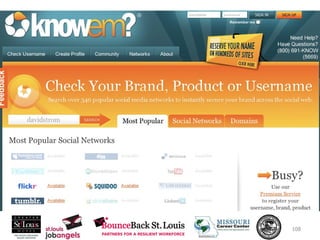
  • #109 Use this site to check to see if your domain name, facebook user ID and other identities are already taken at more than 300 different services
  • #114 Tweets ===> update your LinkedIn status Can limit the updates if you include a special hashtag
  • #115 Twitter > LinkedIn status, only can use one Twitter account per Lin account
  • #121 Send out regular information to your prospects Remind people you are looking for a job Get you in the habit of regularly writing stuff Give you an activity to organize your week Sending out emails from your desktop is cumbersome Avoids the “reply all” mistake Makes managing bounces easier Looks more professional Another way to brand yourself