




Wissahickon School District New teacher Induction 2011Technology Overview
Today’s AgendaMeet Your MacBookWSD Technology ToolsInstructional & Technical SupportAcceptable Use & CopyrightTechnology Integration
Meet your MacBook
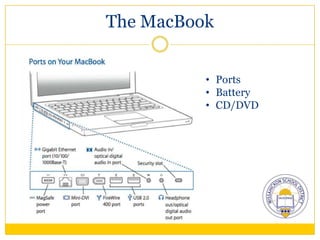
The MacBook Ports
Battery
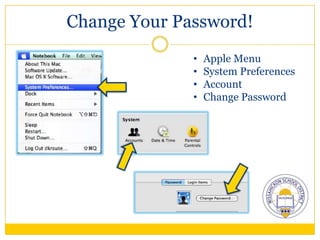
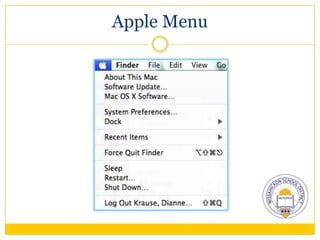
CD/DVDChange Your Password!Apple Menu
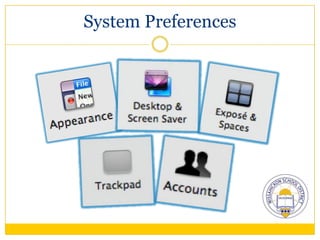
System Preferences
Account
Change PasswordApple Menu
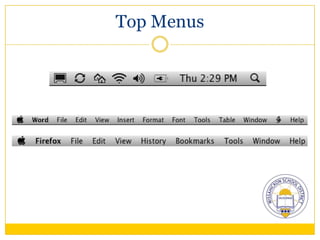
Top Menus
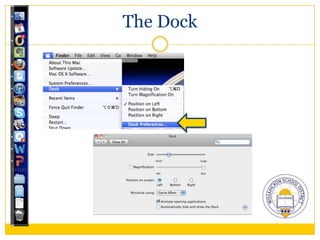
The Dock
System Preferences
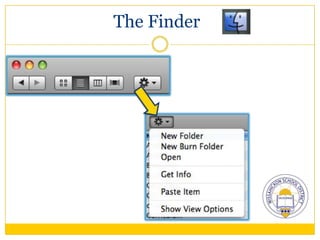
The Finder
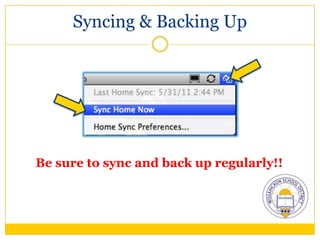
Syncing & Backing UpBe sure to sync and back up regularly!!
Keyboard Shortcuts
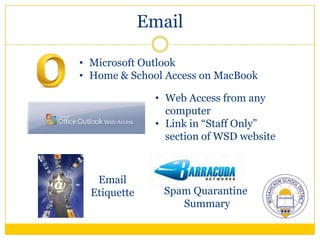
EmailMicrosoft Outlook
Home & School Access on MacBook
Web Access from any computer
Link in “Staff Only” section of WSD websiteEmail EtiquetteSpam Quarantine Summary
More Info AvailableMeet Your Mac Page on the eToolBoxhttp://etoolbox.wikispaces.com
WSD Technology Tools
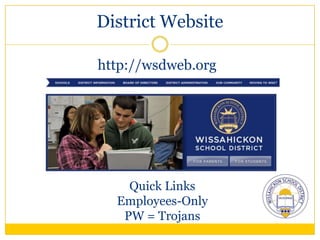
District Websitehttp://wsdweb.orghttp://etoolbox.wikispaces.comQuick LinksEmployees-OnlyPW = Trojans
Sapphire Suitehttp://sapphire.k12system.com
Grade Book & Attendance
Login:  dkrause   PW:  dkrause
Contact your mentor for helpPerformance Plushttps://wissahickon-pa.perfplusk12.com
Performance Data:  PSSA, district assessments
Login:  dkrause   PW:  dkrause
Contact your mentor for helpMy Learning Planhttp://www.mylearningplan.com
Record professional development activities and Act 48 hours
District activities are automatically entered
Login:  email address     PW:  changemeThe Ninghttp://wissahickon.ning.com
Professional network for sharing, collaboration, communication and learningMoodlehttp://wsdmoodle.mciu.org
Classroom management system
Option for a teacher website to place class materials, assignments, etc.Technical & InstructionalSupport
Technology Help DeskTechnology support requests for hardware, software, and technology problems
Technology support solutions
Help Desk – 215-619-HELP
Building Technology AssistantseToolBoxhttp://etoolbox.wikispaces.com
Technology tools and how to use them
“One Stop Shop” for technology integrationInstructional CoachesDianne Krause – K-12 Technology CoachMarie Walsh – K-12 Literacy CoachTara Strouse – K-2 Instructional CoachSusan Dziedzic – 3-5 Instructional CoachAnne McDonough – 6-12 Instructional CoachOur Blog:  http://wsdpd.wordpress.com
Acceptable Use & Copyright
Acceptable Use of District Information and Telecommunication Resources Policy (Employees – #356, #453, #546 / Students #256)This policy and these guidelines shall apply to all users who obtain access privileges to or otherwise access networks and/or telecommunications systems, which are entered via equipment and access lines housed, operated or maintained by or for the District.The use of any and all information and telecommunications resources accessed through the Wissahickon Network Services (“WNS”) will be in accordance with the law, in adherence with standards of the District and the community, and primarily for educational purposes consistent with the curricular goals of the District.Incidental personal use of network resources is permitted for employees so long as such use does not violate other applicable provisions of this policy and does not interfere with the employee's job duties and performance, nor with systems operations or with other systems users, education, employment or WNS usage.Use of WNS for personal solicitation or profit is prohibited, unless prior written approval is given by the Superintendent or his/her designee.
Acceptable Use of District Information and Telecommunication Resources Policy (Employees – #356, #453, #546 / Students #256)Electronic mail (E-mail) accounts and other forms of electronic communication provided by or through WNS are not private. The Superintendent or his/her designee and the Director of Technology may access e-mail and other forms of communication at any time, and E-mail software may be utilized to misdirect messages if so designated. Users should be aware of these limitations when communicating with others.The District does not warrant, either express or implied, that the functions or the services provided by or through the WNS are error-free or without defect. The District will not be responsible for any damage users may suffer, including but not limited to, loss of data, interruptions of service and/or the inability to access WNS.The District will fully cooperate with local, state, and federal officials in any investigation concerning or relating to any alleged illegal activities conducted through the District system. The District reserves the right to provide appropriate access to outside consultants who are retained to address a WNS issue.Users will not use the District system to access material that is profane, obscene, pornographic, that advocates illegal acts, or that advocates violence or discrimination towards other people (“hate literature”).Users will not use the District system for commercial purposes. Commercial purposes are defined as offering or providing, soliciting or requesting goods or services for personal use. District acquisition policies will apply to the District purchase of goods or services through the system.
Acceptable Use of District Information and Telecommunication Resources Policy (Employees – #356, #453, #546 / Students #256)This policy and these guidelines shall apply to all users who obtain access privileges to or otherwise access networks and/or telecommunications systems, which are entered via equipment and access lines housed, operated or maintained by or for the District.The use of any and all information and telecommunications resources accessed through the Wissahickon Network Services (“WNS”) will be in accordance with the law, in adherence with standards of the District and the community, and primarily for educational purposes consistent with the curricular goals of the District.Incidental personal use of network resources is permitted for employees so long as such use does not violate other applicable provisions of this policy and does not interfere with the employee's job duties and performance, nor with systems operations or with other systems users, education, employment or WNS usage.Use of WNS for personal solicitation or profit is prohibited, unless prior written approval is given by the Superintendent or his/her designee.
Acceptable Use of District Information and Telecommunication Resources Policy (Employees – #356, #453, #546 / Students #256)Electronic mail (E-mail) accounts and other forms of electronic communication provided by or through WNS are not private. The Superintendent or his/her designee and the Director of Technology may access e-mail and other forms of communication at any time, and E-mail software may be utilized to misdirect messages if so designated. Users should be aware of these limitations when communicating with others.The District does not warrant, either express or implied, that the functions or the services provided by or through the WNS are error-free or without defect. The District will not be responsible for any damage users may suffer, including but not limited to, loss of data, interruptions of service and/or the inability to access WNS.The District will fully cooperate with local, state, and federal officials in any investigation concerning or relating to any alleged illegal activities conducted through the District system. The District reserves the right to provide appropriate access to outside consultants who are retained to address a WNS issue.Users will not use the District system to access material that is profane, obscene, pornographic, that advocates illegal acts, or that advocates violence or discrimination towards other people (“hate literature”).Users will not use the District system for commercial purposes. Commercial purposes are defined as offering or providing, soliciting or requesting goods or services for personal use. District acquisition policies will apply to the District purchase of goods or services through the system.
Acceptable Use of District Information and Telecommunication Resources Policy (Employees – #356, #453, #546 / Students #256)This policy and these guidelines shall apply to all users who obtain access privileges to or otherwise access networks and/or telecommunications systems, which are entered via equipment and access lines housed, operated or maintained by or for the District.The use of any and all information and telecommunications resources accessed through the Wissahickon Network Services (“WNS”) will be in accordance with the law, in adherence with standards of the District and the community, and primarily for educational purposes consistent with the curricular goals of the District.Incidental personal use of network resources is permitted for employees so long as such use does not violate other applicable provisions of this policy and does not interfere with the employee's job duties and performance, nor with systems operations or with other systems users, education, employment or WNS usage.Use of WNS for personal solicitation or profit is prohibited, unless prior written approval is given by the Superintendent or his/her designee.
Copyright Policy #814The Board emphasizes that the United States Code makes it illegal for anyone to duplicate copyrighted materials without permission, except as otherwise permitted by law. The Board attests that severe penalties are provided for unauthorized copying of audio, visual, software or printed materials unless otherwise permissible. The Board acknowledges the copyright owner’s exclusive rights to reproduce, prepare (alter), distribute, perform and display his/her work.Areas for potential copyright infringement are defined through administrative guidelines. (i.e. copy machines, broadcast programs, distance learning, software, web publishing)
Copyright Policy #814The complexities of the law and the impracticality of supervising all District duplicating equipment require that each district employee becomes familiar with the copyright requirements and assume responsibility for adherence to this Board policy and the accompanying guidelines. Staff may make copies of copyrighted materials that fall within stated guidelines. Staff members who fail to follow this policy may be held personally liable for copyright infringement.The guidelines for applying fair use of copyrighted material are provided.
Copyright Policy #814Employees should review the full policy on the web as it provides guidelines for Fair Use and a Frequently Asked Questions section.Additional copyright resources are available on the WSD eToolbox.
Software Installations Policy #814.1In order to be compliant with copyright laws, all software-licensing agreements must be honored by District employees and students. This policy is to protect the District and its employees, administrators, and students from violating copyright laws.The term “Software” includes any computer programs that physically reside on a computer or network.The District’s Director of Technology shall maintain an updated license database to assure compliance with copyrights laws.The District’s technology staff shall perform all software installations.No student, employee or administrator shall install software on his/her own or District computers using the Wissahickon Network Services (WNS).Employees, administrators and students are liable for the consequences of any illegal software installed on their assigned computers.Unawareness of the content of a software agreement is not an excuse from prosecution or disciplinary action.
Next StepsPolicies are available on the district web page www.wsdweb.org under About WSD  School Board  Board PoliciesEmployees should review the policies appropriate to their employee classification as the information provided in this presentation were the key points of each policy. More details are included in the full policies.All employees should sign the BLUE AUP cards and the Software Licensing Acknowledgement Form which will be kept on file in the Personnel Department.
Procedures for StudentsA copy of the AUP with the student form attached should be distributed to students in homerooms the first week of school. Homeroom teachers should review and discuss the key points with their students.Homeroom teachers should sign off on the cards that the discussion was held.The policy and form should be sent home for parents and the student to sign.Signed and completed forms should be kept on file in the school’s main office.Cards that are not signed by parents and the student, or have not been returned to school, will result in the student’s network account being deactivated and will not have access to the computers and other technology. Parents that request no Internet be available to their child can be accommodated and the technology department will only turn off access to the Internet. Other appropriate access to the network will still be available.Future forms should be distributed when student enter Grades 3, 6, and 9.

New teacher Technology Overview 2011

  • 1.
    Wissahickon School DistrictNew teacher Induction 2011Technology Overview
  • 2.
    Today’s AgendaMeet YourMacBookWSD Technology ToolsInstructional & Technical SupportAcceptable Use & CopyrightTechnology Integration
  • 3.
  • 4.
  • 5.
  • 6.
  • 7.
  • 8.
  • 9.
  • 10.
  • 11.
  • 12.
  • 13.
  • 14.
    Syncing & BackingUpBe sure to sync and back up regularly!!
  • 15.
  • 16.
  • 17.
    Home & SchoolAccess on MacBook
  • 18.
    Web Access fromany computer
  • 19.
    Link in “StaffOnly” section of WSD websiteEmail EtiquetteSpam Quarantine Summary
  • 20.
    More Info AvailableMeetYour Mac Page on the eToolBoxhttp://etoolbox.wikispaces.com
  • 21.
  • 22.
  • 23.
  • 24.
    Grade Book &Attendance
  • 25.
    Login: dkrause PW: dkrause
  • 26.
    Contact your mentorfor helpPerformance Plushttps://wissahickon-pa.perfplusk12.com
  • 27.
    Performance Data: PSSA, district assessments
  • 28.
    Login: dkrause PW: dkrause
  • 29.
    Contact your mentorfor helpMy Learning Planhttp://www.mylearningplan.com
  • 30.
    Record professional developmentactivities and Act 48 hours
  • 31.
    District activities areautomatically entered
  • 32.
    Login: emailaddress PW: changemeThe Ninghttp://wissahickon.ning.com
  • 33.
    Professional network forsharing, collaboration, communication and learningMoodlehttp://wsdmoodle.mciu.org
  • 34.
  • 35.
    Option for ateacher website to place class materials, assignments, etc.Technical & InstructionalSupport
  • 36.
    Technology Help DeskTechnologysupport requests for hardware, software, and technology problems
  • 37.
  • 38.
    Help Desk –215-619-HELP
  • 39.
  • 40.
    Technology tools andhow to use them
  • 41.
    “One Stop Shop”for technology integrationInstructional CoachesDianne Krause – K-12 Technology CoachMarie Walsh – K-12 Literacy CoachTara Strouse – K-2 Instructional CoachSusan Dziedzic – 3-5 Instructional CoachAnne McDonough – 6-12 Instructional CoachOur Blog: http://wsdpd.wordpress.com
  • 42.
  • 43.
    Acceptable Use ofDistrict Information and Telecommunication Resources Policy (Employees – #356, #453, #546 / Students #256)This policy and these guidelines shall apply to all users who obtain access privileges to or otherwise access networks and/or telecommunications systems, which are entered via equipment and access lines housed, operated or maintained by or for the District.The use of any and all information and telecommunications resources accessed through the Wissahickon Network Services (“WNS”) will be in accordance with the law, in adherence with standards of the District and the community, and primarily for educational purposes consistent with the curricular goals of the District.Incidental personal use of network resources is permitted for employees so long as such use does not violate other applicable provisions of this policy and does not interfere with the employee's job duties and performance, nor with systems operations or with other systems users, education, employment or WNS usage.Use of WNS for personal solicitation or profit is prohibited, unless prior written approval is given by the Superintendent or his/her designee.
  • 44.
    Acceptable Use ofDistrict Information and Telecommunication Resources Policy (Employees – #356, #453, #546 / Students #256)Electronic mail (E-mail) accounts and other forms of electronic communication provided by or through WNS are not private. The Superintendent or his/her designee and the Director of Technology may access e-mail and other forms of communication at any time, and E-mail software may be utilized to misdirect messages if so designated. Users should be aware of these limitations when communicating with others.The District does not warrant, either express or implied, that the functions or the services provided by or through the WNS are error-free or without defect. The District will not be responsible for any damage users may suffer, including but not limited to, loss of data, interruptions of service and/or the inability to access WNS.The District will fully cooperate with local, state, and federal officials in any investigation concerning or relating to any alleged illegal activities conducted through the District system. The District reserves the right to provide appropriate access to outside consultants who are retained to address a WNS issue.Users will not use the District system to access material that is profane, obscene, pornographic, that advocates illegal acts, or that advocates violence or discrimination towards other people (“hate literature”).Users will not use the District system for commercial purposes. Commercial purposes are defined as offering or providing, soliciting or requesting goods or services for personal use. District acquisition policies will apply to the District purchase of goods or services through the system.
  • 45.
    Acceptable Use ofDistrict Information and Telecommunication Resources Policy (Employees – #356, #453, #546 / Students #256)This policy and these guidelines shall apply to all users who obtain access privileges to or otherwise access networks and/or telecommunications systems, which are entered via equipment and access lines housed, operated or maintained by or for the District.The use of any and all information and telecommunications resources accessed through the Wissahickon Network Services (“WNS”) will be in accordance with the law, in adherence with standards of the District and the community, and primarily for educational purposes consistent with the curricular goals of the District.Incidental personal use of network resources is permitted for employees so long as such use does not violate other applicable provisions of this policy and does not interfere with the employee's job duties and performance, nor with systems operations or with other systems users, education, employment or WNS usage.Use of WNS for personal solicitation or profit is prohibited, unless prior written approval is given by the Superintendent or his/her designee.
  • 46.
    Acceptable Use ofDistrict Information and Telecommunication Resources Policy (Employees – #356, #453, #546 / Students #256)Electronic mail (E-mail) accounts and other forms of electronic communication provided by or through WNS are not private. The Superintendent or his/her designee and the Director of Technology may access e-mail and other forms of communication at any time, and E-mail software may be utilized to misdirect messages if so designated. Users should be aware of these limitations when communicating with others.The District does not warrant, either express or implied, that the functions or the services provided by or through the WNS are error-free or without defect. The District will not be responsible for any damage users may suffer, including but not limited to, loss of data, interruptions of service and/or the inability to access WNS.The District will fully cooperate with local, state, and federal officials in any investigation concerning or relating to any alleged illegal activities conducted through the District system. The District reserves the right to provide appropriate access to outside consultants who are retained to address a WNS issue.Users will not use the District system to access material that is profane, obscene, pornographic, that advocates illegal acts, or that advocates violence or discrimination towards other people (“hate literature”).Users will not use the District system for commercial purposes. Commercial purposes are defined as offering or providing, soliciting or requesting goods or services for personal use. District acquisition policies will apply to the District purchase of goods or services through the system.
  • 47.
    Acceptable Use ofDistrict Information and Telecommunication Resources Policy (Employees – #356, #453, #546 / Students #256)This policy and these guidelines shall apply to all users who obtain access privileges to or otherwise access networks and/or telecommunications systems, which are entered via equipment and access lines housed, operated or maintained by or for the District.The use of any and all information and telecommunications resources accessed through the Wissahickon Network Services (“WNS”) will be in accordance with the law, in adherence with standards of the District and the community, and primarily for educational purposes consistent with the curricular goals of the District.Incidental personal use of network resources is permitted for employees so long as such use does not violate other applicable provisions of this policy and does not interfere with the employee's job duties and performance, nor with systems operations or with other systems users, education, employment or WNS usage.Use of WNS for personal solicitation or profit is prohibited, unless prior written approval is given by the Superintendent or his/her designee.
  • 48.
    Copyright Policy #814TheBoard emphasizes that the United States Code makes it illegal for anyone to duplicate copyrighted materials without permission, except as otherwise permitted by law. The Board attests that severe penalties are provided for unauthorized copying of audio, visual, software or printed materials unless otherwise permissible. The Board acknowledges the copyright owner’s exclusive rights to reproduce, prepare (alter), distribute, perform and display his/her work.Areas for potential copyright infringement are defined through administrative guidelines. (i.e. copy machines, broadcast programs, distance learning, software, web publishing)
  • 49.
    Copyright Policy #814Thecomplexities of the law and the impracticality of supervising all District duplicating equipment require that each district employee becomes familiar with the copyright requirements and assume responsibility for adherence to this Board policy and the accompanying guidelines. Staff may make copies of copyrighted materials that fall within stated guidelines. Staff members who fail to follow this policy may be held personally liable for copyright infringement.The guidelines for applying fair use of copyrighted material are provided.
  • 50.
    Copyright Policy #814Employeesshould review the full policy on the web as it provides guidelines for Fair Use and a Frequently Asked Questions section.Additional copyright resources are available on the WSD eToolbox.
  • 51.
    Software Installations Policy#814.1In order to be compliant with copyright laws, all software-licensing agreements must be honored by District employees and students. This policy is to protect the District and its employees, administrators, and students from violating copyright laws.The term “Software” includes any computer programs that physically reside on a computer or network.The District’s Director of Technology shall maintain an updated license database to assure compliance with copyrights laws.The District’s technology staff shall perform all software installations.No student, employee or administrator shall install software on his/her own or District computers using the Wissahickon Network Services (WNS).Employees, administrators and students are liable for the consequences of any illegal software installed on their assigned computers.Unawareness of the content of a software agreement is not an excuse from prosecution or disciplinary action.
  • 52.
    Next StepsPolicies areavailable on the district web page www.wsdweb.org under About WSD  School Board  Board PoliciesEmployees should review the policies appropriate to their employee classification as the information provided in this presentation were the key points of each policy. More details are included in the full policies.All employees should sign the BLUE AUP cards and the Software Licensing Acknowledgement Form which will be kept on file in the Personnel Department.
  • 53.
    Procedures for StudentsAcopy of the AUP with the student form attached should be distributed to students in homerooms the first week of school. Homeroom teachers should review and discuss the key points with their students.Homeroom teachers should sign off on the cards that the discussion was held.The policy and form should be sent home for parents and the student to sign.Signed and completed forms should be kept on file in the school’s main office.Cards that are not signed by parents and the student, or have not been returned to school, will result in the student’s network account being deactivated and will not have access to the computers and other technology. Parents that request no Internet be available to their child can be accommodated and the technology department will only turn off access to the Internet. Other appropriate access to the network will still be available.Future forms should be distributed when student enter Grades 3, 6, and 9.

Editor's Notes

  • #28 Ongoing research.
  • #30 Ongoing research.
  • #32 Ongoing research.
  • #47 The user must apply the fair use check.