How to Configure Product Variant
Price in Odo V12
OPEN HRMS
What’s New in Open HRMS HR Software
www.openhrms.com
First of all, we would like to thank all of you who contribute your efforts to building up an open suite for
a complete HR solution. We are getting 100s of emails daily including an appreciation for making this
HRMS completely open to all. As we are a community, it’s not only us but each and every one of you
who give their hands to place a brick on the OpenHRMS building. We are always open to hearing from
you. You can mail your suggestions, bugs and additional features that you would like to have in the suit
as on info@openhrms.com.
Now let's look into the new features in the latest update of OpenHRMS modules.
Before starting with each module we would like to say that now all the modules of OpenHRMS will
support the Arabic Language. I hope the Middle East people will enjoy this.
Now let's start with OpenHRMS Core.
INTRODUCTION
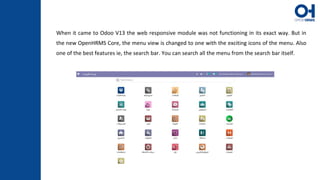
When it came to Odoo V13 the web responsive module was not functioning in its exact way. But in
the new OpenHRMS Core, the menu view is changed to one with the exciting icons of the menu. Also
one of the best features ie, the search bar. You can search all the menu from the search bar itself.
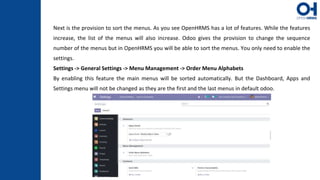
Next is the provision to sort the menus. As you see OpenHRMS has a lot of features. While the features
increase, the list of the menus will also increase. Odoo gives the provision to change the sequence
number of the menus but in OpenHRMS you will be able to sort the menus. You only need to enable the
settings.
Settings -> General Settings -> Menu Management -> Order Menu Alphabets
By enabling this feature the main menus will be sorted automatically. But the Dashboard, Apps and
Settings menu will not be changed as they are the first and the last menus in default odoo.
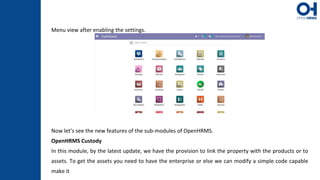
Menu view after enabling the settings.
Now let’s see the new features of the sub-modules of OpenHRMS.
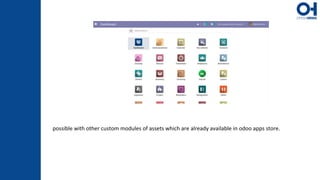
OpenHRMS Custody
In this module, by the latest update, we have the provision to link the property with the products or to
assets. To get the assets you need to have the enterprise or else we can modify a simple code capable
make it
possible with other custom modules of assets which are already available in odoo apps store.
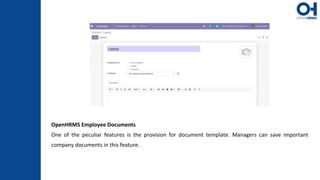
OpenHRMS Employee Documents
One of the peculiar features is the provision for document template. Managers can save important
company documents in this feature.
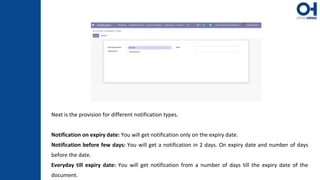
Next is the provision for different notification types.
Notification on expiry date: You will get notification only on the expiry date.
Notification before few days: You will get a notification in 2 days. On expiry date and number of days
before the date.
Everyday till expiry date: You will get notification from a number of days till the expiry date of the
document.
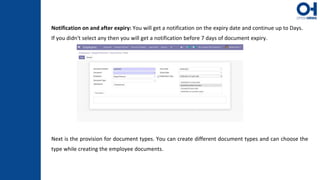
Notification on and after expiry: You will get a notification on the expiry date and continue up to Days.
If you didn't select any then you will get a notification before 7 days of document expiry.
Next is the provision for document types. You can create different document types and can choose the
type while creating the employee documents.
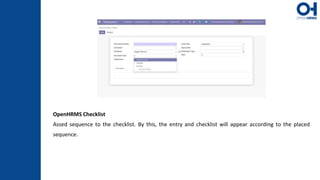
OpenHRMS Checklist
Assed sequence to the checklist. By this, the entry and checklist will appear according to the placed
sequence.
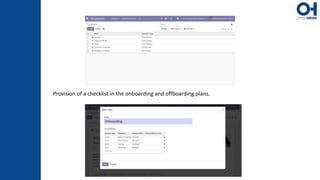
Provision of a checklist in the onboarding and offboarding plans.
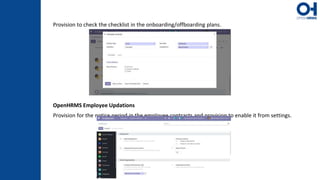
Provision to check the checklist in the onboarding/offboarding plans.
OpenHRMS Employee Updations
Provision for the notice period in the employee contracts and provision to enable it from settings.
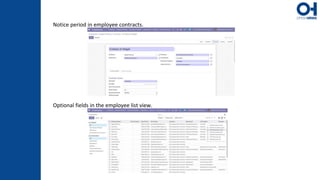
Notice period in employee contracts.
Optional fields in the employee list view.
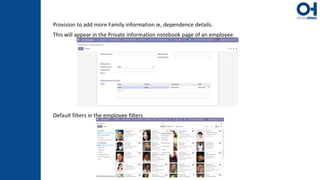
Provision to add more Family information ie, dependence details.
This will appear in the Private information notebook page of an employee.
Default filters in the employee filters
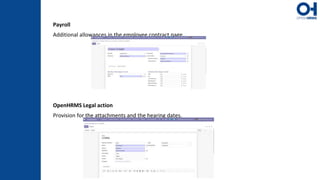
Payroll
Additional allowances in the employee contract page.
OpenHRMS Legal action
Provision for the attachments and the hearing dates.
For More Information, Check Out the Blog: What’s New in Open HRMS HR
Software
Cybrosys Ltd
Cybrosys Limited
Alpha House, 100 Borough High
Street, London, Greater London,
SE1 1LB, United Kingdom
Cybrosys Technologies Pvt. Ltd.
Neospace, Kinfra Techno Park,
Kakkanchery,
Calicut University P.O.
Calicut Kerala, India - 673635.
Thank You !
Cybrosys Technologies Pvt. Ltd.
1st Floor, Thapasya Building,
Infopark, Kakkanad, Kochi,
India - 682030.

New Open HRMS HR Software Features

  • 1.
    How to ConfigureProduct Variant Price in Odo V12 OPEN HRMS What’s New in Open HRMS HR Software www.openhrms.com
  • 2.
    First of all,we would like to thank all of you who contribute your efforts to building up an open suite for a complete HR solution. We are getting 100s of emails daily including an appreciation for making this HRMS completely open to all. As we are a community, it’s not only us but each and every one of you who give their hands to place a brick on the OpenHRMS building. We are always open to hearing from you. You can mail your suggestions, bugs and additional features that you would like to have in the suit as on info@openhrms.com. Now let's look into the new features in the latest update of OpenHRMS modules. Before starting with each module we would like to say that now all the modules of OpenHRMS will support the Arabic Language. I hope the Middle East people will enjoy this. Now let's start with OpenHRMS Core. INTRODUCTION
  • 3.
    When it cameto Odoo V13 the web responsive module was not functioning in its exact way. But in the new OpenHRMS Core, the menu view is changed to one with the exciting icons of the menu. Also one of the best features ie, the search bar. You can search all the menu from the search bar itself.
  • 4.
    Next is theprovision to sort the menus. As you see OpenHRMS has a lot of features. While the features increase, the list of the menus will also increase. Odoo gives the provision to change the sequence number of the menus but in OpenHRMS you will be able to sort the menus. You only need to enable the settings. Settings -> General Settings -> Menu Management -> Order Menu Alphabets By enabling this feature the main menus will be sorted automatically. But the Dashboard, Apps and Settings menu will not be changed as they are the first and the last menus in default odoo.
  • 5.
    Menu view afterenabling the settings. Now let’s see the new features of the sub-modules of OpenHRMS. OpenHRMS Custody In this module, by the latest update, we have the provision to link the property with the products or to assets. To get the assets you need to have the enterprise or else we can modify a simple code capable make it
  • 6.
    possible with othercustom modules of assets which are already available in odoo apps store.
  • 7.
    OpenHRMS Employee Documents Oneof the peculiar features is the provision for document template. Managers can save important company documents in this feature.
  • 8.
    Next is theprovision for different notification types. Notification on expiry date: You will get notification only on the expiry date. Notification before few days: You will get a notification in 2 days. On expiry date and number of days before the date. Everyday till expiry date: You will get notification from a number of days till the expiry date of the document.
  • 9.
    Notification on andafter expiry: You will get a notification on the expiry date and continue up to Days. If you didn't select any then you will get a notification before 7 days of document expiry. Next is the provision for document types. You can create different document types and can choose the type while creating the employee documents.
  • 10.
    OpenHRMS Checklist Assed sequenceto the checklist. By this, the entry and checklist will appear according to the placed sequence.
  • 11.
    Provision of achecklist in the onboarding and offboarding plans.
  • 12.
    Provision to checkthe checklist in the onboarding/offboarding plans. OpenHRMS Employee Updations Provision for the notice period in the employee contracts and provision to enable it from settings.
  • 13.
    Notice period inemployee contracts. Optional fields in the employee list view.
  • 14.
    Provision to addmore Family information ie, dependence details. This will appear in the Private information notebook page of an employee. Default filters in the employee filters
  • 15.
    Payroll Additional allowances inthe employee contract page. OpenHRMS Legal action Provision for the attachments and the hearing dates.
  • 16.
    For More Information,Check Out the Blog: What’s New in Open HRMS HR Software
  • 17.
    Cybrosys Ltd Cybrosys Limited AlphaHouse, 100 Borough High Street, London, Greater London, SE1 1LB, United Kingdom Cybrosys Technologies Pvt. Ltd. Neospace, Kinfra Techno Park, Kakkanchery, Calicut University P.O. Calicut Kerala, India - 673635. Thank You ! Cybrosys Technologies Pvt. Ltd. 1st Floor, Thapasya Building, Infopark, Kakkanad, Kochi, India - 682030.