1
NETWORK SOFTWARE
Sayma Sultana
Id : 1834902550
Department : CSE Department
Batch : 49th
University : City University
Submitted To
Pranab Bandhu Nath
Lecturer of CSE Department
City University
2
NETWORK SOFTWARE
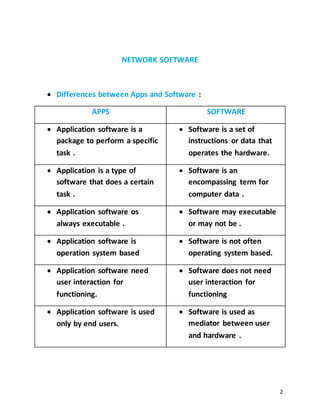
 Differences between Apps and Software :
APPS SOFTWARE
 Application software is a
package to perform a specific
task .
 Software is a set of
instructions or data that
operates the hardware.
 Application is a type of
software that does a certain
task .
 Software is an
encompassing term for
computer data .
 Application software os
always executable .
 Software may executable
or may not be .
 Application software is
operation system based
 Software is not often
operating system based.
 Application software need
user interaction for
functioning.
 Software does not need
user interaction for
functioning
 Application software is used
only by end users.
 Software is used as
mediator between user
and hardware .
3
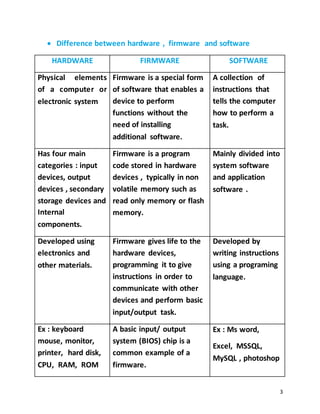
 Difference between hardware , firmware and software
HARDWARE FIRMWARE SOFTWARE
Physical elements
of a computer or
electronic system
Firmware is a special form
of software that enables a
device to perform
functions without the
need of installing
additional software.
A collection of
instructions that
tells the computer
how to perform a
task.
Has four main
categories : input
devices, output
devices , secondary
storage devices and
Internal
components.
Firmware is a program
code stored in hardware
devices , typically in non
volatile memory such as
read only memory or flash
memory.
Mainly divided into
system software
and application
software .
Developed using
electronics and
other materials.
Firmware gives life to the
hardware devices,
programming it to give
instructions in order to
communicate with other
devices and perform basic
input/output task.
Developed by
writing instructions
using a programing
language.
Ex : keyboard
mouse, monitor,
printer, hard disk,
CPU, RAM, ROM
A basic input/ output
system (BIOS) chip is a
common example of a
firmware.
Ex : Ms word,
Excel, MSSQL,
MySQL , photoshop
4
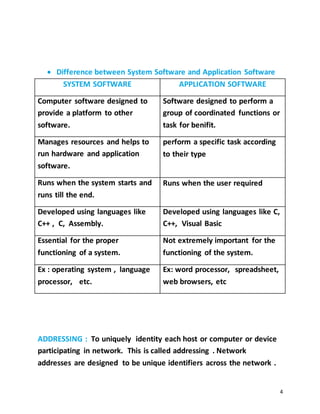
 Difference between System Software and Application Software
SYSTEM SOFTWARE APPLICATION SOFTWARE
Computer software designed to
provide a platform to other
software.
Software designed to perform a
group of coordinated functions or
task for benifit.
Manages resources and helps to
run hardware and application
software.
perform a specific task according
to their type
Runs when the system starts and
runs till the end.
Runs when the user required
Developed using languages like
C++ , C, Assembly.
Developed using languages like C,
C++, Visual Basic
Essential for the proper
functioning of a system.
Not extremely important for the
functioning of the system.
Ex : operating system , language
processor, etc.
Ex: word processor, spreadsheet,
web browsers, etc
ADDRESSING : To uniquely identity each host or computer or device
participating in network. This is called addressing . Network
addresses are designed to be unique identifiers across the network .
5
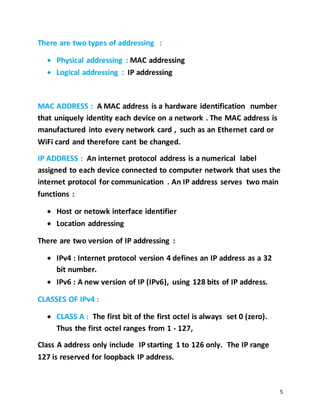
There are two types of addressing :
 Physical addressing : MAC addressing
 Logical addressing : IP addressing
MAC ADDRESS : A MAC address is a hardware identification number
that uniquely identity each device on a network . The MAC address is
manufactured into every network card , such as an Ethernet card or
WiFi card and therefore cant be changed.
IP ADDRESS : An internet protocol address is a numerical label
assigned to each device connected to computer network that uses the
internet protocol for communication . An IP address serves two main
functions :
 Host or netowk interface identifier
 Location addressing
There are two version of IP addressing :
 IPv4 : Internet protocol version 4 defines an IP address as a 32
bit number.
 IPv6 : A new version of IP (IPv6), using 128 bits of IP address.
CLASSES OF IPv4 :
 CLASS A : The first bit of the first octel is always set 0 (zero).
Thus the first octel ranges from 1 - 127,
Class A address only include IP starting 1 to 126 only. The IP range
127 is reserved for loopback IP address.
6
Class A IP address format is thus : N HHH
 Loopback IP address : An address that sends outgoing signals
back to the same computer for testing. The loopback address
allows a network administrator to treat the local machine as if it
were a remote machine.
 CLASS B : An IP address which belongs to class B has the first
two bits in the first octel set to 10 ,
Class B IP Address range from 128 to 191.
Class B address format is : NN HH
 CLASS C : The first octel class C IP address has its first 3 bits to
110.
Class C IP address range is from 192 to 223.
Class C IP address format is : NNN H
 CLASS D : Very first four bits of the first octel in Class D IP
address are set to 1110,
Class D IP address range from 224 to 239. Class D is reserved for
multicasting. In multicasting data is not destined for particular host.
 CLASS E : This IP address is reserved for experimental purpose
only for R&D or study. IP addresses in this class range from 240
to 255.
7
PRIVATE IP ADDRESS : Private IP address is used with a local network.
For class A the range of private IP address is 10. For class B the range
of private IP address is 172. For class C the range of private IP address
is 192.
PUBLIC IP ADDRESS : Public IP address is used to identity a machine
on the internet . Public IP address is used to communicate outside
the network.
HOST : A host is a computer or other device that communicates with
other hosts on a network . Host on a network include clients and
servers - that send or receive data , services or applications. Hosts
typically do not include intermediary network devices like switches
and routers , which are instead often categorized as nodes.

Network software

  • 1.
    1 NETWORK SOFTWARE Sayma Sultana Id: 1834902550 Department : CSE Department Batch : 49th University : City University Submitted To Pranab Bandhu Nath Lecturer of CSE Department City University
  • 2.
    2 NETWORK SOFTWARE  Differencesbetween Apps and Software : APPS SOFTWARE  Application software is a package to perform a specific task .  Software is a set of instructions or data that operates the hardware.  Application is a type of software that does a certain task .  Software is an encompassing term for computer data .  Application software os always executable .  Software may executable or may not be .  Application software is operation system based  Software is not often operating system based.  Application software need user interaction for functioning.  Software does not need user interaction for functioning  Application software is used only by end users.  Software is used as mediator between user and hardware .
  • 3.
    3  Difference betweenhardware , firmware and software HARDWARE FIRMWARE SOFTWARE Physical elements of a computer or electronic system Firmware is a special form of software that enables a device to perform functions without the need of installing additional software. A collection of instructions that tells the computer how to perform a task. Has four main categories : input devices, output devices , secondary storage devices and Internal components. Firmware is a program code stored in hardware devices , typically in non volatile memory such as read only memory or flash memory. Mainly divided into system software and application software . Developed using electronics and other materials. Firmware gives life to the hardware devices, programming it to give instructions in order to communicate with other devices and perform basic input/output task. Developed by writing instructions using a programing language. Ex : keyboard mouse, monitor, printer, hard disk, CPU, RAM, ROM A basic input/ output system (BIOS) chip is a common example of a firmware. Ex : Ms word, Excel, MSSQL, MySQL , photoshop
  • 4.
    4  Difference betweenSystem Software and Application Software SYSTEM SOFTWARE APPLICATION SOFTWARE Computer software designed to provide a platform to other software. Software designed to perform a group of coordinated functions or task for benifit. Manages resources and helps to run hardware and application software. perform a specific task according to their type Runs when the system starts and runs till the end. Runs when the user required Developed using languages like C++ , C, Assembly. Developed using languages like C, C++, Visual Basic Essential for the proper functioning of a system. Not extremely important for the functioning of the system. Ex : operating system , language processor, etc. Ex: word processor, spreadsheet, web browsers, etc ADDRESSING : To uniquely identity each host or computer or device participating in network. This is called addressing . Network addresses are designed to be unique identifiers across the network .
  • 5.
    5 There are twotypes of addressing :  Physical addressing : MAC addressing  Logical addressing : IP addressing MAC ADDRESS : A MAC address is a hardware identification number that uniquely identity each device on a network . The MAC address is manufactured into every network card , such as an Ethernet card or WiFi card and therefore cant be changed. IP ADDRESS : An internet protocol address is a numerical label assigned to each device connected to computer network that uses the internet protocol for communication . An IP address serves two main functions :  Host or netowk interface identifier  Location addressing There are two version of IP addressing :  IPv4 : Internet protocol version 4 defines an IP address as a 32 bit number.  IPv6 : A new version of IP (IPv6), using 128 bits of IP address. CLASSES OF IPv4 :  CLASS A : The first bit of the first octel is always set 0 (zero). Thus the first octel ranges from 1 - 127, Class A address only include IP starting 1 to 126 only. The IP range 127 is reserved for loopback IP address.
  • 6.
    6 Class A IPaddress format is thus : N HHH  Loopback IP address : An address that sends outgoing signals back to the same computer for testing. The loopback address allows a network administrator to treat the local machine as if it were a remote machine.  CLASS B : An IP address which belongs to class B has the first two bits in the first octel set to 10 , Class B IP Address range from 128 to 191. Class B address format is : NN HH  CLASS C : The first octel class C IP address has its first 3 bits to 110. Class C IP address range is from 192 to 223. Class C IP address format is : NNN H  CLASS D : Very first four bits of the first octel in Class D IP address are set to 1110, Class D IP address range from 224 to 239. Class D is reserved for multicasting. In multicasting data is not destined for particular host.  CLASS E : This IP address is reserved for experimental purpose only for R&D or study. IP addresses in this class range from 240 to 255.
  • 7.
    7 PRIVATE IP ADDRESS: Private IP address is used with a local network. For class A the range of private IP address is 10. For class B the range of private IP address is 172. For class C the range of private IP address is 192. PUBLIC IP ADDRESS : Public IP address is used to identity a machine on the internet . Public IP address is used to communicate outside the network. HOST : A host is a computer or other device that communicates with other hosts on a network . Host on a network include clients and servers - that send or receive data , services or applications. Hosts typically do not include intermediary network devices like switches and routers , which are instead often categorized as nodes.