City University
Course Title: Computer Networks
Course Code: CSE317
Topic Name: Network Software, System Software,
Hardware, Software, Firmware, App, IP Address
Submitted By
Nishat Tasnim Ali
ID:1834902591
Batch: 49th
Submitted To
Pranab Bandhu Nath
Senior Lecturer
Department of CSE
City University
Network Software
Network software is a set of tools that helps computers to share
information with others or allow to share computer programs. Example:
Client-Server program.
Function of Network Software
1. Enables network virtualizations.
2. Allow administrations to add or remove users.
3. It helps to set up and install computer networks.
4. Allow users to access data and network resources.
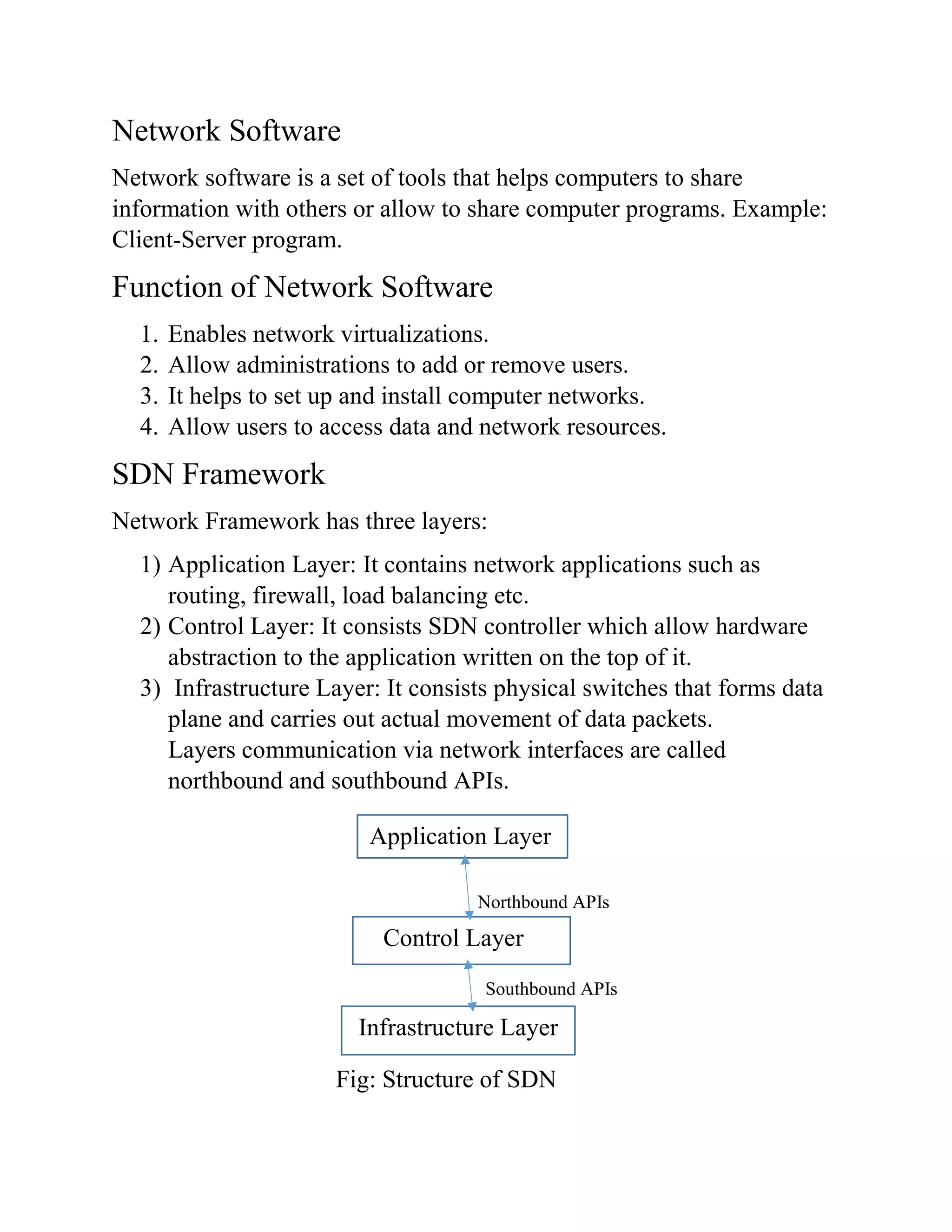
SDN Framework
Network Framework has three layers:
1) Application Layer: It contains network applications such as
routing, firewall, load balancing etc.
2) Control Layer: It consists SDN controller which allow hardware
abstraction to the application written on the top of it.
3) Infrastructure Layer: It consists physical switches that forms data
plane and carries out actual movement of data packets.
Layers communication via network interfaces are called
northbound and southbound APIs.
Northbound APIs
Southbound APIs
Fig: Structure of SDN
Application Layer
Control Layer
Infrastructure Layer
System Software
System software includes the programs that are dedicated to managing
the computer itself such as operating system, file management utilities
and also controls monitors, printers and storage devices.
Application Software
A software that helps the user to perform specific tasks is called
application software. Example: Firefox, Excel, Word, PowerPoint,
Skype etc.
Software
It is the program and routine for a computer or an electronic device
which make it run. Example: Excel, Windows etc.
Hardware
It is the physical elements of a computer or a system. Example:
Keyboard, Mouse, Monitor and CPU.
Firmware
It is a semi-permanent software program or set of instructions
programmed on a hardware. Example: Embedded Systems.
App
App is a software that used on smart phones or mobile devices or
computers or other electronic devices that perform a specific function
directly for the user or other application program. Example: Microsoft
Word.
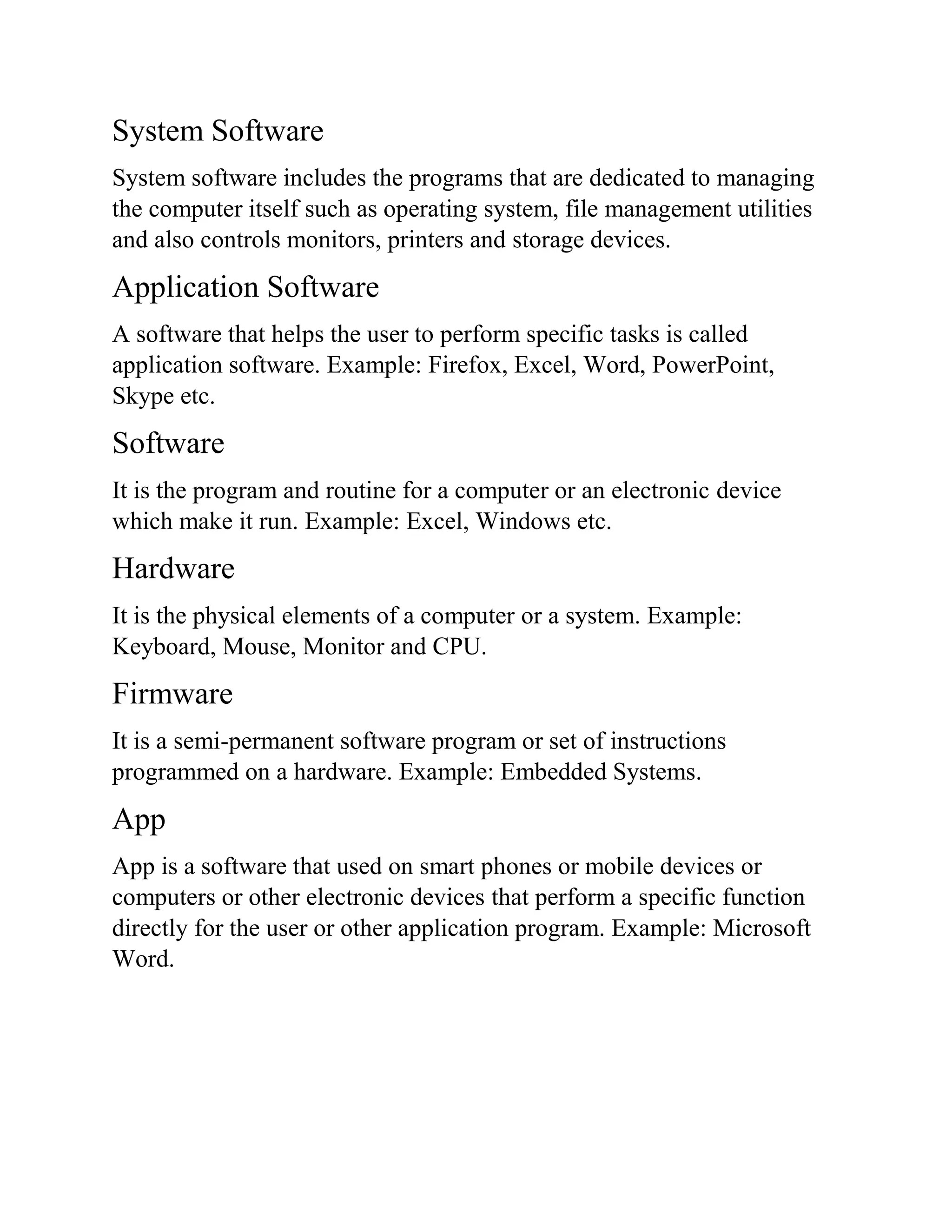
Difference between Application software & System
Software
Application Software System Software
1. It runs on the platform which is
provided by system software as
per user request.
1. It is the interface between
application software and system.
2. It is used by users to perform
specific tasks.
2. It is used for operating
computer hardware.
3. It can’t run independently
without the presence of system
software.
3. It can run independently.
4. They are developed in high
level language as for some
specific purpose software.
4. They are developed in low level
language.
5. It runs as per the user’s request 5. It runs when system is turned
on and stop when system is turned
off.
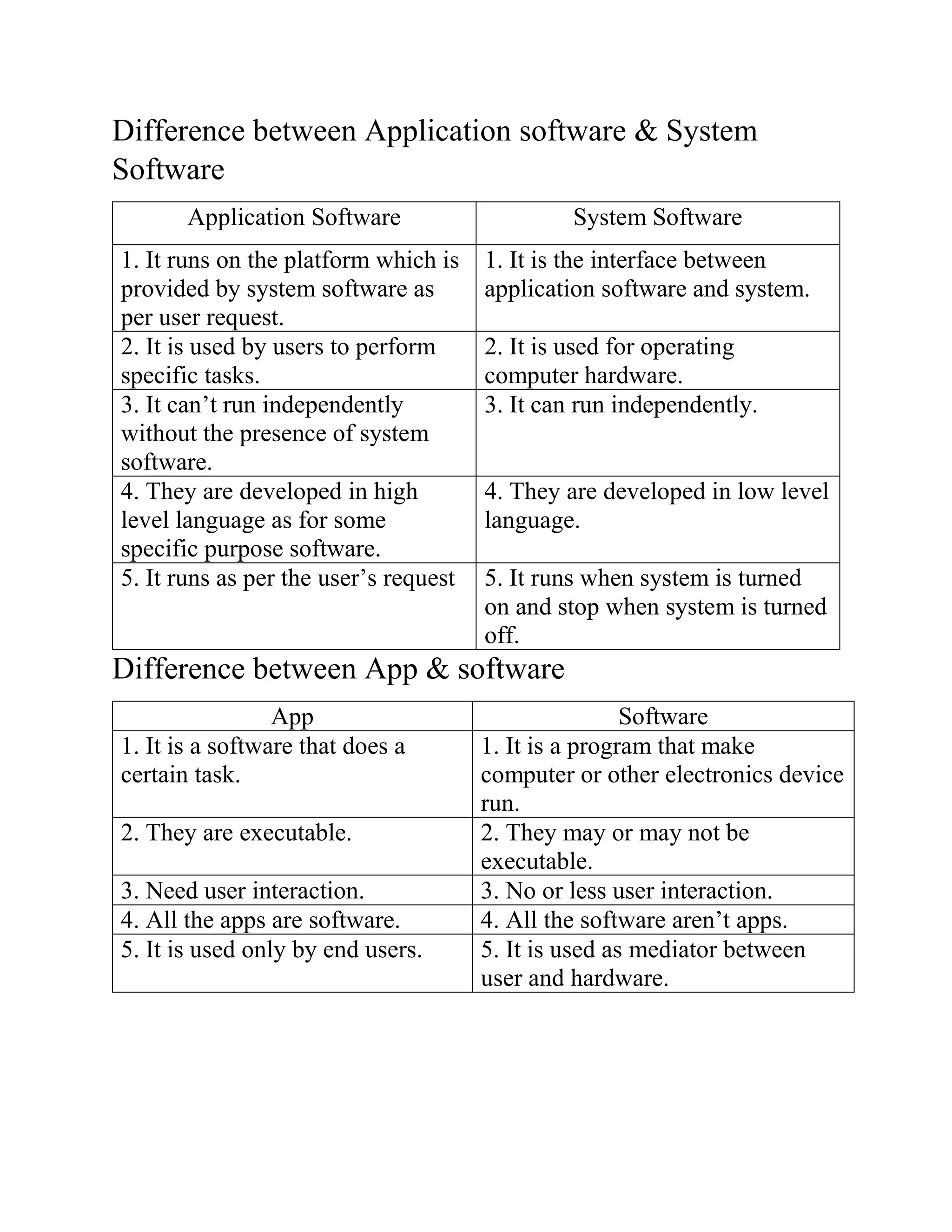
Difference between App & software
App Software
1. It is a software that does a
certain task.
1. It is a program that make
computer or other electronics device
run.
2. They are executable. 2. They may or may not be
executable.
3. Need user interaction. 3. No or less user interaction.
4. All the apps are software. 4. All the software aren’t apps.
5. It is used only by end users. 5. It is used as mediator between
user and hardware.
6. Example: Microsoft Word,
Adobe Photoshop, Duo lingo etc.
6.Example: Google Chrome, Opera,
Firefox etc.
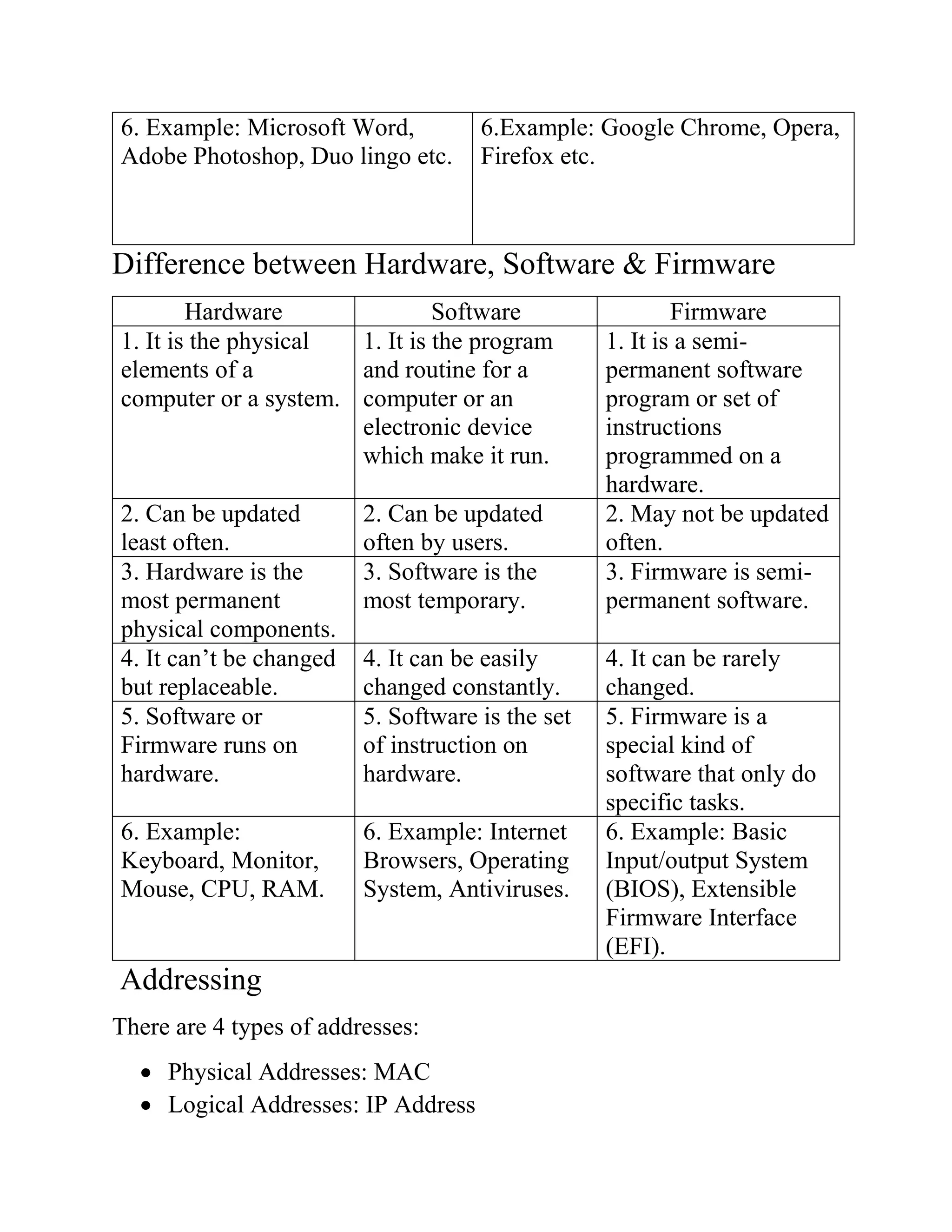
Difference between Hardware, Software & Firmware
Hardware Software Firmware
1. It is the physical
elements of a
computer or a system.
1. It is the program
and routine for a
computer or an
electronic device
which make it run.
1. It is a semi-
permanent software
program or set of
instructions
programmed on a
hardware.
2. Can be updated
least often.
2. Can be updated
often by users.
2. May not be updated
often.
3. Hardware is the
most permanent
physical components.
3. Software is the
most temporary.
3. Firmware is semi-
permanent software.
4. It can’t be changed
but replaceable.
4. It can be easily
changed constantly.
4. It can be rarely
changed.
5. Software or
Firmware runs on
hardware.
5. Software is the set
of instruction on
hardware.
5. Firmware is a
special kind of
software that only do
specific tasks.
6. Example:
Keyboard, Monitor,
Mouse, CPU, RAM.
6. Example: Internet
Browsers, Operating
System, Antiviruses.
6. Example: Basic
Input/output System
(BIOS), Extensible
Firmware Interface
(EFI).
Addressing
There are 4 types of addresses:
 Physical Addresses: MAC
 Logical Addresses: IP Address
 Port Addresses: TCP/IP protocol suite.
 Application Special Addresses: URL
IP Address
An Internet Protocol (IP) address is a numerical label assigned to device
that connected to the computer network that uses the IP for
communication.
Every IP address divided into two parts:
 Network ID: It is the number of networks.
 Host ID: It is the number of hosts.
Types of IP Address
 Public: IP address that provided by ISP to routers.
 Private: Bluetooth devices, printers etc.
 Static: Static IP addresses are consistent, which is assigned once,
that stays the same over the years.
 Dynamic: Dynamic IPs can trace their origin to a collection of IP
addresses that are shared across many computers.
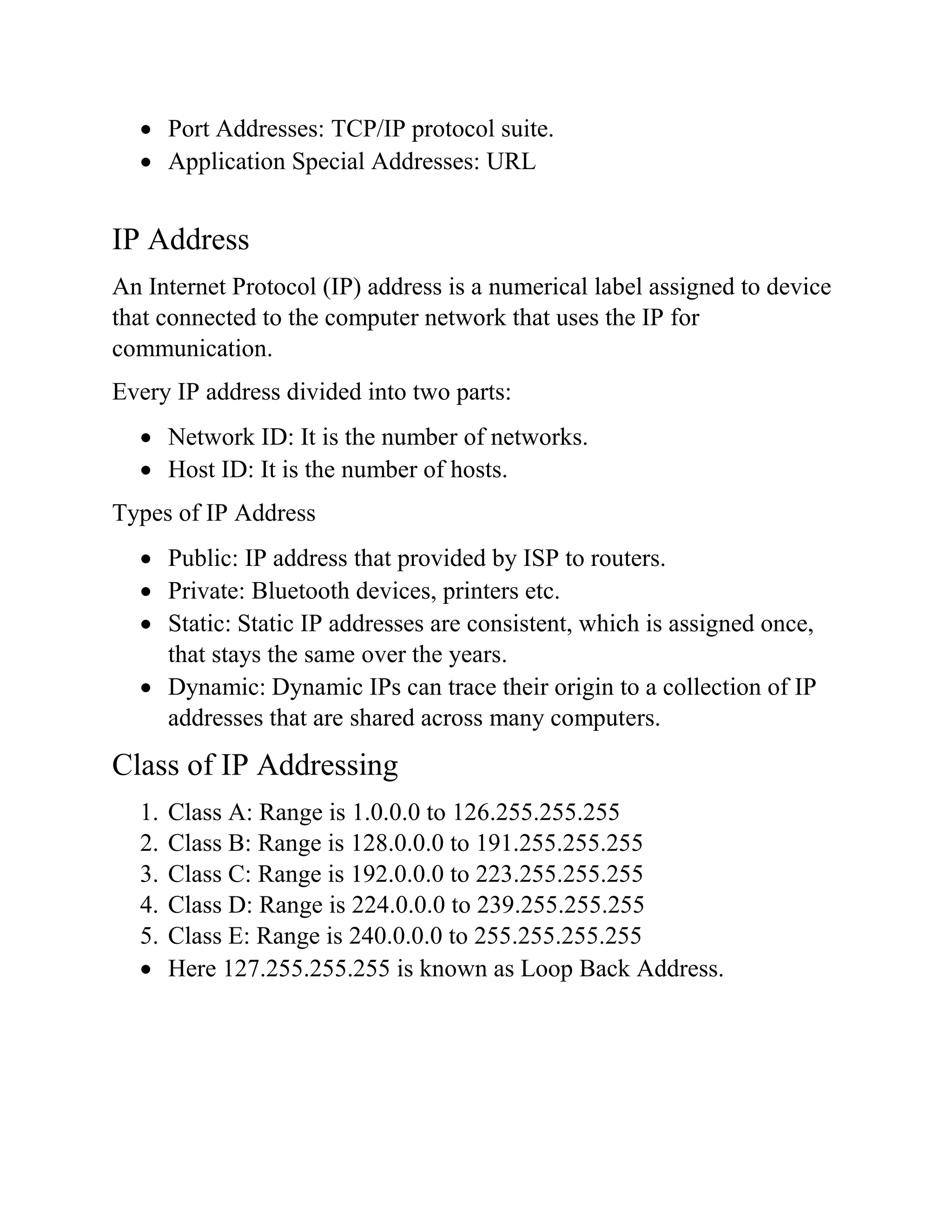
Class of IP Addressing
1. Class A: Range is 1.0.0.0 to 126.255.255.255
2. Class B: Range is 128.0.0.0 to 191.255.255.255
3. Class C: Range is 192.0.0.0 to 223.255.255.255
4. Class D: Range is 224.0.0.0 to 239.255.255.255
5. Class E: Range is 240.0.0.0 to 255.255.255.255
 Here 127.255.255.255 is known as Loop Back Address.

Computer Network Theory Part 3

  • 1.
    City University Course Title:Computer Networks Course Code: CSE317 Topic Name: Network Software, System Software, Hardware, Software, Firmware, App, IP Address Submitted By Nishat Tasnim Ali ID:1834902591 Batch: 49th Submitted To Pranab Bandhu Nath Senior Lecturer Department of CSE City University
  • 2.
    Network Software Network softwareis a set of tools that helps computers to share information with others or allow to share computer programs. Example: Client-Server program. Function of Network Software 1. Enables network virtualizations. 2. Allow administrations to add or remove users. 3. It helps to set up and install computer networks. 4. Allow users to access data and network resources. SDN Framework Network Framework has three layers: 1) Application Layer: It contains network applications such as routing, firewall, load balancing etc. 2) Control Layer: It consists SDN controller which allow hardware abstraction to the application written on the top of it. 3) Infrastructure Layer: It consists physical switches that forms data plane and carries out actual movement of data packets. Layers communication via network interfaces are called northbound and southbound APIs. Northbound APIs Southbound APIs Fig: Structure of SDN Application Layer Control Layer Infrastructure Layer
  • 3.
    System Software System softwareincludes the programs that are dedicated to managing the computer itself such as operating system, file management utilities and also controls monitors, printers and storage devices. Application Software A software that helps the user to perform specific tasks is called application software. Example: Firefox, Excel, Word, PowerPoint, Skype etc. Software It is the program and routine for a computer or an electronic device which make it run. Example: Excel, Windows etc. Hardware It is the physical elements of a computer or a system. Example: Keyboard, Mouse, Monitor and CPU. Firmware It is a semi-permanent software program or set of instructions programmed on a hardware. Example: Embedded Systems. App App is a software that used on smart phones or mobile devices or computers or other electronic devices that perform a specific function directly for the user or other application program. Example: Microsoft Word.
  • 4.
    Difference between Applicationsoftware & System Software Application Software System Software 1. It runs on the platform which is provided by system software as per user request. 1. It is the interface between application software and system. 2. It is used by users to perform specific tasks. 2. It is used for operating computer hardware. 3. It can’t run independently without the presence of system software. 3. It can run independently. 4. They are developed in high level language as for some specific purpose software. 4. They are developed in low level language. 5. It runs as per the user’s request 5. It runs when system is turned on and stop when system is turned off. Difference between App & software App Software 1. It is a software that does a certain task. 1. It is a program that make computer or other electronics device run. 2. They are executable. 2. They may or may not be executable. 3. Need user interaction. 3. No or less user interaction. 4. All the apps are software. 4. All the software aren’t apps. 5. It is used only by end users. 5. It is used as mediator between user and hardware.
  • 5.
    6. Example: MicrosoftWord, Adobe Photoshop, Duo lingo etc. 6.Example: Google Chrome, Opera, Firefox etc. Difference between Hardware, Software & Firmware Hardware Software Firmware 1. It is the physical elements of a computer or a system. 1. It is the program and routine for a computer or an electronic device which make it run. 1. It is a semi- permanent software program or set of instructions programmed on a hardware. 2. Can be updated least often. 2. Can be updated often by users. 2. May not be updated often. 3. Hardware is the most permanent physical components. 3. Software is the most temporary. 3. Firmware is semi- permanent software. 4. It can’t be changed but replaceable. 4. It can be easily changed constantly. 4. It can be rarely changed. 5. Software or Firmware runs on hardware. 5. Software is the set of instruction on hardware. 5. Firmware is a special kind of software that only do specific tasks. 6. Example: Keyboard, Monitor, Mouse, CPU, RAM. 6. Example: Internet Browsers, Operating System, Antiviruses. 6. Example: Basic Input/output System (BIOS), Extensible Firmware Interface (EFI). Addressing There are 4 types of addresses:  Physical Addresses: MAC  Logical Addresses: IP Address
  • 6.
     Port Addresses:TCP/IP protocol suite.  Application Special Addresses: URL IP Address An Internet Protocol (IP) address is a numerical label assigned to device that connected to the computer network that uses the IP for communication. Every IP address divided into two parts:  Network ID: It is the number of networks.  Host ID: It is the number of hosts. Types of IP Address  Public: IP address that provided by ISP to routers.  Private: Bluetooth devices, printers etc.  Static: Static IP addresses are consistent, which is assigned once, that stays the same over the years.  Dynamic: Dynamic IPs can trace their origin to a collection of IP addresses that are shared across many computers. Class of IP Addressing 1. Class A: Range is 1.0.0.0 to 126.255.255.255 2. Class B: Range is 128.0.0.0 to 191.255.255.255 3. Class C: Range is 192.0.0.0 to 223.255.255.255 4. Class D: Range is 224.0.0.0 to 239.255.255.255 5. Class E: Range is 240.0.0.0 to 255.255.255.255  Here 127.255.255.255 is known as Loop Back Address.