System Software 121
BUDGET FOR NETWORK
        SETUP

Part time group
Names:
Kannigan Padayachee    1965 08 98
Amina Badat            1945 19 07
Clerista Govindsamy    2121 35 58
Fadiel Ahmed           2120 82 54
Silindile F Khanyile   1644 12 67
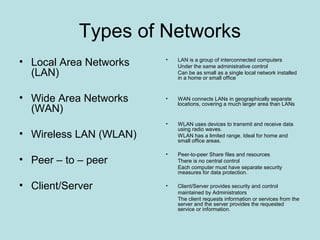
Types of Networks
• Local Area Networks   •   LAN is a group of interconnected computers
                            Under the same administrative control
  (LAN)                     Can be as small as a single local network installed
                            in a home or small office


• Wide Area Networks    •   WAN connects LANs in geographically separate
                            locations, covering a much larger area than LANs
  (WAN)
                        •   WLAN uses devices to transmit and receive data
                            using radio waves.
• Wireless LAN (WLAN)       WLAN has a limited range. Ideal for home and
                            small office areas.

                        •   Peer-to-peer Share files and resources
• Peer – to – peer          There is no central control
                            Each computer must have separate security
                            measures for data protection.

• Client/Server         •   Client/Server provides security and control
                            maintained by Administrators
                            The client requests information or services from the
                            server and the server provides the requested
                            service or information.
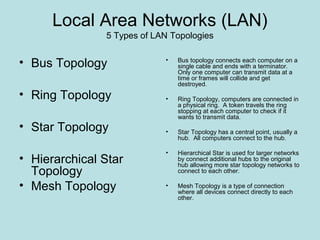
Local Area Networks (LAN)
               5 Types of LAN Topologies


• Bus Topology              •   Bus topology connects each computer on a
                                single cable and ends with a terminator.
                                Only one computer can transmit data at a
                                time or frames will collide and get
                                destroyed.
• Ring Topology             •   Ring Topology, computers are connected in
                                a physical ring. A token travels the ring
                                stopping at each computer to check if it
                                wants to transmit data.
• Star Topology             •   Star Topology has a central point, usually a
                                hub. All computers connect to the hub.

                            •   Hierarchical Star is used for larger networks
• Hierarchical Star             by connect additional hubs to the original
                                hub allowing more star topology networks to
  Topology                      connect to each other.

• Mesh Topology             •   Mesh Topology is a type of connection
                                where all devices connect directly to each
                                other.
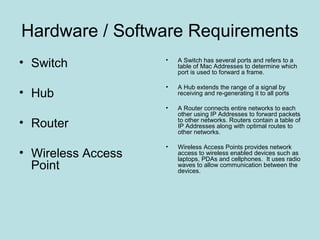
Hardware / Software Requirements
• Switch            •   A Switch has several ports and refers to a
                        table of Mac Addresses to determine which
                        port is used to forward a frame.

                    •   A Hub extends the range of a signal by
• Hub                   receiving and re-generating it to all ports

                    •   A Router connects entire networks to each
                        other using IP Addresses to forward packets
• Router                to other networks. Routers contain a table of
                        IP Addresses along with optimal routes to
                        other networks.

                    •   Wireless Access Points provides network
• Wireless Access       access to wireless enabled devices such as
                        laptops, PDAs and cellphones. It uses radio
  Point                 waves to allow communication between the
                        devices.
Hardware / Software Requirements
• Multi-Purpose Device   •   Multi-purpose Device performs more than one
                             function. It combines a router, switch and wireless
                             access point into one device.


• Twisted pair cabling   •   Twisted Pair Cabling is a pair of wires that form a
                             circuit to allow data transmission. The twists in the
                             cable provide protection against crosstalk.

                             Unshielded Twisted Pair has four pairs of wires and
                             relies on cancellation effect for reduction of
                             interference caused by EMI and RFI. Range of 100
                             metres.

                             Shielded Twisted Pair has each pair of wires
                             covered in foil for better shielding and all 4 pairs are
                             wrapped in foil or a metallic braid.

• Co-Axial cables        •   Co-Axial Cable has a copper core wire surrounded
                             by heavy shielding.


• Fibre-Optic            •   Fibre-Optic is a glass strand enclosed in a sheath.
                             It uses light to transmit information over long
                             distances.
Comparison of Service Providers
Service Provider   ADSL 384 - 1024   ADSL 384 – 1024 incl. Line Rental


Afrihost           R 197.00          R 297.00
Axxess             R 169.00          R 318.00
Cybersmart         R 139.00          R 199.00
ImagineIT          R 149.00          R 289.00
MWEB               R 199.00          R 339.00
openWeb            R 149.00          R 301.00
Telkom             R 219.00          R 349.00
Web Africa         R 179.00          R 329.00
Budget
• Multi-Function Device    •   Mecer 802.11b/g/n wireless ADSL2 + 2TRDR
                               Router with 4 port switching hub. Up to
                               300Mbps Connection Speed
                                                                    R 364.80

• PCI internal Wireless    •   Mecer 802.11b/g/n wireless pci internal card.
                               Used for each desktop computer. Up to
  card                         300Mbps Connection Speed
                                                                R 171.00 each

                           •   Mecer 802.11b/g/n USB External Wireless
• USB External Wireless        Adaptor. Used to connect Laptops that don’t
                               have built-in wireless cards. Up to 300Mbps
  adaptor                      Connection Speed
                                                                R 119.70 each


• MWEB ADSL                •   Uncapped, unthrottled ADSL. Includes 1 year
                               free unlimited WEB hosting, 2GB mailbox with 5
  Subscription including       email addresses, 5GB Store-IT cloud storage
                               account, 5 hours free wi-fi per month at any of
  Line Rental                  750 hotspots
                                                         R339.00 per month
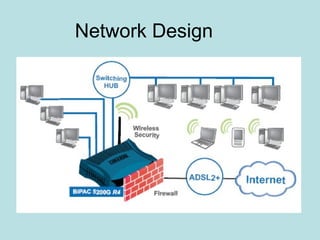
Network Design

Network setup

  • 1.
    System Software 121 BUDGETFOR NETWORK SETUP Part time group Names: Kannigan Padayachee 1965 08 98 Amina Badat 1945 19 07 Clerista Govindsamy 2121 35 58 Fadiel Ahmed 2120 82 54 Silindile F Khanyile 1644 12 67
  • 2.
    Types of Networks •Local Area Networks • LAN is a group of interconnected computers Under the same administrative control (LAN) Can be as small as a single local network installed in a home or small office • Wide Area Networks • WAN connects LANs in geographically separate locations, covering a much larger area than LANs (WAN) • WLAN uses devices to transmit and receive data using radio waves. • Wireless LAN (WLAN) WLAN has a limited range. Ideal for home and small office areas. • Peer-to-peer Share files and resources • Peer – to – peer There is no central control Each computer must have separate security measures for data protection. • Client/Server • Client/Server provides security and control maintained by Administrators The client requests information or services from the server and the server provides the requested service or information.
  • 3.
    Local Area Networks(LAN) 5 Types of LAN Topologies • Bus Topology • Bus topology connects each computer on a single cable and ends with a terminator. Only one computer can transmit data at a time or frames will collide and get destroyed. • Ring Topology • Ring Topology, computers are connected in a physical ring. A token travels the ring stopping at each computer to check if it wants to transmit data. • Star Topology • Star Topology has a central point, usually a hub. All computers connect to the hub. • Hierarchical Star is used for larger networks • Hierarchical Star by connect additional hubs to the original hub allowing more star topology networks to Topology connect to each other. • Mesh Topology • Mesh Topology is a type of connection where all devices connect directly to each other.
  • 4.
    Hardware / SoftwareRequirements • Switch • A Switch has several ports and refers to a table of Mac Addresses to determine which port is used to forward a frame. • A Hub extends the range of a signal by • Hub receiving and re-generating it to all ports • A Router connects entire networks to each other using IP Addresses to forward packets • Router to other networks. Routers contain a table of IP Addresses along with optimal routes to other networks. • Wireless Access Points provides network • Wireless Access access to wireless enabled devices such as laptops, PDAs and cellphones. It uses radio Point waves to allow communication between the devices.
  • 5.
    Hardware / SoftwareRequirements • Multi-Purpose Device • Multi-purpose Device performs more than one function. It combines a router, switch and wireless access point into one device. • Twisted pair cabling • Twisted Pair Cabling is a pair of wires that form a circuit to allow data transmission. The twists in the cable provide protection against crosstalk. Unshielded Twisted Pair has four pairs of wires and relies on cancellation effect for reduction of interference caused by EMI and RFI. Range of 100 metres. Shielded Twisted Pair has each pair of wires covered in foil for better shielding and all 4 pairs are wrapped in foil or a metallic braid. • Co-Axial cables • Co-Axial Cable has a copper core wire surrounded by heavy shielding. • Fibre-Optic • Fibre-Optic is a glass strand enclosed in a sheath. It uses light to transmit information over long distances.
  • 6.
    Comparison of ServiceProviders Service Provider ADSL 384 - 1024 ADSL 384 – 1024 incl. Line Rental Afrihost R 197.00 R 297.00 Axxess R 169.00 R 318.00 Cybersmart R 139.00 R 199.00 ImagineIT R 149.00 R 289.00 MWEB R 199.00 R 339.00 openWeb R 149.00 R 301.00 Telkom R 219.00 R 349.00 Web Africa R 179.00 R 329.00
  • 7.
    Budget • Multi-Function Device • Mecer 802.11b/g/n wireless ADSL2 + 2TRDR Router with 4 port switching hub. Up to 300Mbps Connection Speed R 364.80 • PCI internal Wireless • Mecer 802.11b/g/n wireless pci internal card. Used for each desktop computer. Up to card 300Mbps Connection Speed R 171.00 each • Mecer 802.11b/g/n USB External Wireless • USB External Wireless Adaptor. Used to connect Laptops that don’t have built-in wireless cards. Up to 300Mbps adaptor Connection Speed R 119.70 each • MWEB ADSL • Uncapped, unthrottled ADSL. Includes 1 year free unlimited WEB hosting, 2GB mailbox with 5 Subscription including email addresses, 5GB Store-IT cloud storage account, 5 hours free wi-fi per month at any of Line Rental 750 hotspots R339.00 per month
  • 8.