Network Security
Lab Manual
Department of Computer Science and
Engineering
The NorthCap University, Gurugram
Network Security Lab Manual (CSL383)
2020-21
ii
Network Security
Lab Manual
CSL383
Dr. Shilpa Mahajan
Department of Computer Science and Engineering
NorthCap University, Gurugram- 122001, India
Session 2020-21
Published by:
School of Engineering and Technology
Department of Computer Science & Engineering
The NorthCap University Gurugram
• Laboratory Manual is for Internal Circulation only
© Copyright Reserved
No part of this Practical Record Book may be
Network Security Lab Manual (CSL383)
2020-21
iii
reproduced, used, stored without prior permission of The NorthCap University
Copying or facilitating copying of lab work comes under cheating and is considered as use of
unfair means. Students indulging in copying or facilitating copying shall be awarded zero
marks for that particular experiment. Frequent cases of copying may lead to disciplinary
action. Attendance in lab classes is mandatory.
PREFACE
Network Security Lab Manual is designed to meet the course and program requirements of
NCU curriculum for B.Tech 3rd year students of CSE branch. The concept of the lab work is
to give brief practical experience for basic lab skills to students. It provides the space and
scope for self-study so that students can come up with new and creative ideas.
The Lab manual is written on the basis of “teach yourself pattern” and expected that students
who come with proper preparation should be able to perform the experiments without any
difficulty. Brief introduction to each experiment with information about self-study material
is provided. The laboratory exercises will held to develop strong network and security
concept.Students are expected to come thoroughly prepared for the lab. General disciplines,
safety guidelines and report writing are also discussed.
The lab manual is a part of curriculum for the TheNorthCap University, Gurugram. Teacher’s
copy of the experimental results and answer for the questions are available as sample
guidelines.
We hope that lab manual would be useful to students of CSE branches and author requests
the readers to kindly forward their suggestions / constructive criticism for further
improvement of the workbook.
Author expresses deep gratitude to Members, Governing Body-NCU for encouragement and
motivation.
Authors
The NorthCap University
Gurugram, India
Network Security Lab Manual (CSL383)
2020-21
iv
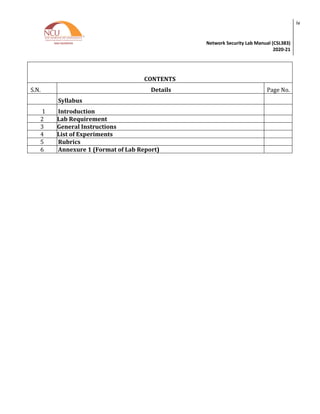
CONTENTS
S.N. Details Page No.
Syllabus
1 Introduction
2 Lab Requirement
3 General Instructions
4 List of Experiments
5 Rubrics
6 Annexure 1 (Format of Lab Report)
Network Security Lab Manual (CSL383)
2020-21
v
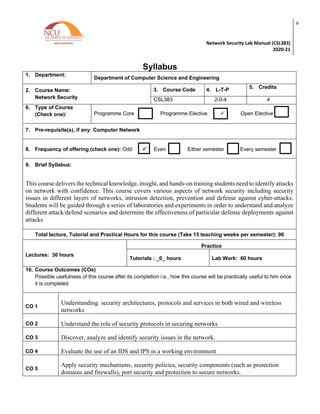
Syllabus
1. Department:
Department of Computer Science and Engineering
2. Course Name:
Network Security
3. Course Code 4. L-T-P 5. Credits
CSL383 2-0-4 4
6. Type of Course
(Check one): Programme Core Programme Elective ü Open Elective
7. Pre-requisite(s), if any: Computer Network
8. Frequency of offering (check one): Odd ü Even Either semester Every semester
9. Brief Syllabus:
This course delivers the technical knowledge, insight, and hands-on training students need to identify attacks
on network with confidence. This course covers various aspects of network security including security
issues in different layers of networks, intrusion detection, prevention and defense against cyber-attacks.
Students will be guided through a series of laboratories and experiments in order to understand and analyze
different attack/defend scenarios and determine the effectiveness of particular defense deployments against
attacks
Total lecture, Tutorial and Practical Hours for this course (Take 15 teaching weeks per semester): 90
Lectures: 30 hours
Practice
Tutorials : _0_ hours Lab Work: 60 hours
10. Course Outcomes (COs)
Possible usefulness of this course after its completion i.e., how this course will be practically useful to him once
it is completed
CO 1
Understanding security architectures, protocols and services in both wired and wireless
networks
CO 2 Understand the role of security protocols in securing networks
CO 3 Discover, analyze and identify security issues in the network.
CO 4 Evaluate the use of an IDS and IPS in a working environment
CO 5
Apply security mechanisms, security policies, security components (such as protection
domains and firewalls), port security and protection to secure networks.
ü
Network Security Lab Manual (CSL383)
2020-21
vi
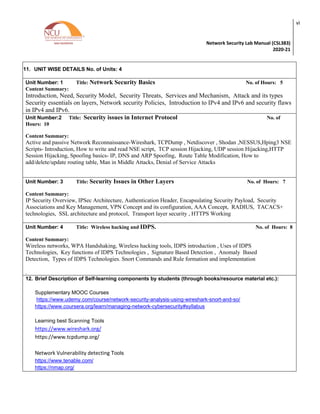
11. UNIT WISE DETAILS No. of Units: 4
Unit Number: 1 Title: Network Security Basics No. of Hours: 5
Content Summary:
Introduction, Need, Security Model, Security Threats, Services and Mechanism, Attack and its types
Security essentials on layers, Network security Policies, Introduction to IPv4 and IPv6 and security flaws
in IPv4 and IPv6.
Unit Number:2 Title: Security issues in Internet Protocol No. of
Hours: 10
Content Summary:
Active and passive Network Reconnaissance-Wireshark, TCPDump , Netdiscover , Shodan ,NESSUS,Hping3 NSE
Scripts- Introduction, How to write and read NSE script, TCP session Hijacking, UDP session Hijacking,HTTP
Session Hijacking, Spoofing basics- IP, DNS and ARP Spoofing, Route Table Modification, How to
add/delete/update routing table, Man in Middle Attacks, Denial of Service Attacks
Unit Number: 3 Title: Security Issues in Other Layers No. of Hours: 7
Content Summary:
IP Security Overview, IPSec Architecture, Authentication Header, Encapsulating Security Payload, Security
Associations and Key Management, VPN Concept and its configuration, AAA Concept, RADIUS, TACACS+
technologies, SSL architecture and protocol, Transport layer security , HTTPS Working
Unit Number: 4 Title: Wireless hacking and IDPS. No. of Hours: 8
Content Summary:
Wireless networks, WPA Handshaking, Wireless hacking tools, IDPS introduction , Uses of IDPS
Technologies, Key functions of IDPS Technologies , Signature Based Detection , Anomaly Based
Detection, Types of IDPS Technologies. Snort Commands and Rule formation and implementation
.
12. Brief Description of Self-learning components by students (through books/resource material etc.):
Supplementary MOOC Courses
https://www.udemy.com/course/network-security-analysis-using-wireshark-snort-and-so/
https://www.coursera.org/learn/managing-network-cybersecurity#syllabus
Learning best Scanning Tools
https://www.wireshark.org/
https://www.tcpdump.org/
Network Vulnerability detecting Tools
https://www.tenable.com/
https://nmap.org/
Network Security Lab Manual (CSL383)
2020-21
vii
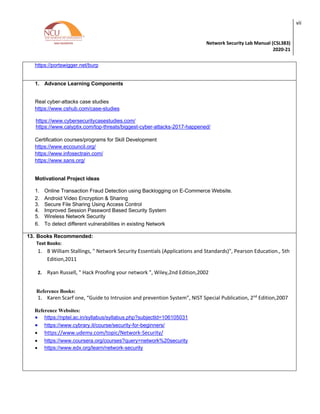
https://portswigger.net/burp
1. Advance Learning Components
Real cyber-attacks case studies
https://www.cshub.com/case-studies
https://www.cybersecuritycasestudies.com/
https://www.calyptix.com/top-threats/biggest-cyber-attacks-2017-happened/
Certification courses/programs for Skill Development
https://www.eccouncil.org/
https://www.infosectrain.com/
https://www.sans.org/
Motivational Project ideas
1. Online Transaction Fraud Detection using Backlogging on E-Commerce Website.
2. Android Video Encryption & Sharing
3. Secure File Sharing Using Access Control
4. Improved Session Password Based Security System
5. Wireless Network Security
6. To detect different vulnerabilities in existing Network
13. Books Recommended:
Text Books:
1. B William Stallings, " Network Security Essentials (Applications and Standards)", Pearson Education., 5th
Edition,2011
2. Ryan Russell, " Hack Proofing your network ", Wiley,2nd Edition,2002
Reference Books:
1. Karen Scarf one, “Guide to Intrusion and prevention System”, NIST Special Publication, 2nd
Edition,2007
Reference Websites:
• https://nptel.ac.in/syllabus/syllabus.php?subjectId=106105031
• https://www.cybrary.it/course/security-for-beginners/
• https://www.udemy.com/topic/Network-Security/
• https://www.coursera.org/courses?query=network%20security
• https://www.edx.org/learn/network-security
Network Security Lab Manual (CSL383)
2020-21
viii
eBooks:
• https://www.pdfdrive.com/network-security-books.html
• https://www.pdfdrive.com/hacking-exposed-7-network-security-secrets-solutions-seventh-edition-
e37530888.html
• https://www.engineeringbookspdf.com/network-security-tutorial/
Interview/Placement related Commonly asked Questions:
• https://www.wisdomjobs.com/e-university/network-security-interview-questions.html
• https://www.glassdoor.com.hk/Interview/Deloitte-Graduate-Cyber-Security-Interview-Questions-
EI_IE2763.0,8_KO9,32.htm
• https://danielmiessler.com/study/infosec_interview_questions/
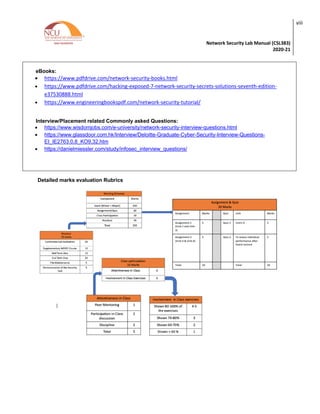
Detailed marks evaluation Rubrics
Network Security Lab Manual (CSL383)
2020-21
ix
1. INTRODUCTION
That ‘learning is a continuous process’ cannot be over emphasized. The theoretical
knowledge gained during lecture sessions need to be strengthened through practical
experimentation. Thus practical makes an integral part of a learning process.
The purpose of conducting these experiments can be stated as follows;
1. To familiarize the students with the concepts, of securing the network and give practical
oriented assignments for better understanding.
2. The lab sessions will be based on exploring the concepts discussed in class.
3. Observing flaws in a network.
4. Reporting and analysing the network related threats using tools.
Network Security Lab Manual (CSL383)
2020-21
x
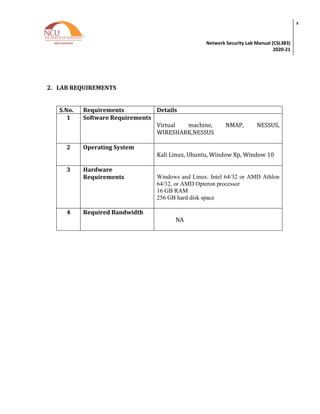
2. LAB REQUIREMENTS
S.No. Requirements Details
1 Software Requirements
Virtual machine, NMAP, NESSUS,
WIRESHARK,NESSUS
2 Operating System
Kali Linux, Ubuntu, Window Xp, Window 10
3 Hardware
Requirements Windows and Linux: Intel 64/32 or AMD Athlon
64/32, or AMD Opteron processor
16 GB RAM
256 GB hard disk space
4 Required Bandwidth
NA
Network Security Lab Manual (CSL383)
2020-21
xi
3. GENERAL INSTRUCTIONS
a. General discipline in the lab
• Students must turn up in time and contact concerned faculty for the experiment
they are supposed to perform.
• Students will not be allowed to enter late in the lab.
• Students will not leave the class till the period is over.
• Students should come prepared for their experiment.
• Experimental results should be entered in the lab report format and
certified/signed by concerned faculty/ lab Instructor.
• Students must get the connection of the hardware setup verified before switching
on the power supply.
• Students should maintain silence while performing the experiments. If any
necessity arises for discussion amongst them, they should discuss with a very low
pitch without disturbing the adjacent groups.
• Violating the above code of conduct may attract disciplinary action.
• Damaging lab equipment or removing any component from the lab may invite
penalties and strict disciplinary action.
b. Attendance
• Attendance in the lab class is compulsory.
• Students should not attend a different lab group/section other than the one
assigned at the beginning of the session.
• On account of illness or some family problems, if a student misses his/her lab
classes, he/she may be assigned a different group to make up the losses in
consultation with the concerned faculty / lab instructor. Or he/she may work in
the lab during spare/extra hours to complete the experiment. No attendance
will be granted for such case.
c. Preparation and Performance
• Students should come to the lab thoroughly prepared on the experiments they
are assigned to perform on that day. Brief introduction to each experiment with
information about self study reference is provided on LMS.
• Students must bring the lab report during each practical class with written
records of the last experiments performed complete in all respect.
Network Security Lab Manual (CSL383)
2020-21
xii
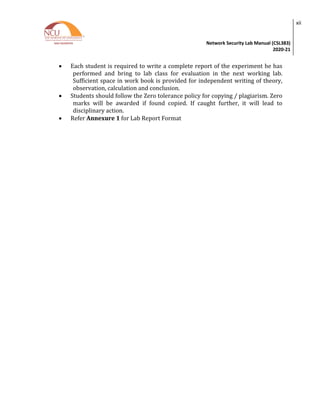
• Each student is required to write a complete report of the experiment he has
performed and bring to lab class for evaluation in the next working lab.
Sufficient space in work book is provided for independent writing of theory,
observation, calculation and conclusion.
• Students should follow the Zero tolerance policy for copying / plagiarism. Zero
marks will be awarded if found copied. If caught further, it will lead to
disciplinary action.
• Refer Annexure 1 for Lab Report Format
Network Security Lab Manual (CSL383)
2020-21
xiii
4. LIST OF EXPERIMENTS
Practical Content
Sr. No. Title of the Experiment Software/Hard
ware based
Unit
covered
Time
Required
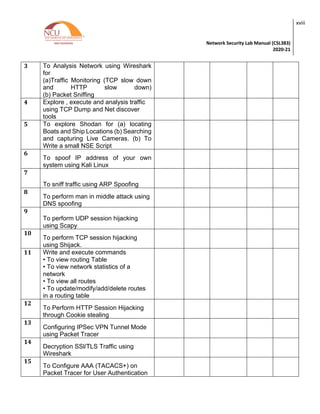
1. Make a Detailed Report on Network Security
Threats covering Structured, Unstructured, Internal
and External Threats
Software
Based 1
3 Hours
2. Perform the following Scan using Wireshark and
analyze your results
(a)Analyze TCP session
(b) Perform and analyze these scans
(i) Start a Wireshark capture. Open a Windows->
command window and perform a Host Scan (using
ICMP packets) on a neighbours machine using
nmap –sP [neighbors ip address]. Stop the capture
and filter the traffic for ARP and ICMP packets.
(ii)Start a new Wireshark capture, and then
perform a host scan (ICMP scan) on a system out
with the subnet, such as nmap –sP
scanme.nmap.org.(Stop the capture and filter the
traffic for ARP and ICMP packets and Compare
with previous results.
(iii) Start a new Wireshark capture, and then
perform a complete Port Scan (in this case a TCP
SYN scan) and an Operating System Fingerprint
on a neighbours machine using nmap –O
[neighbours ip address] . The –O option should
provide the OS running on the scanned machine.
Stop the capture and filter for source address ==
your machines address if necessary.
Software
Based
2 3 Hours
3. To Analysis Network using Wireshark for
(a)Traffic Monitoring (TCP slow down and HTTP
slow down)
(b) Packet Sniffing
Software
Based
2 3 Hours
4. Explore , execute and analysis traffic using TCP
Dump and Net discover tools
Software
Based
2 3 Hours
Network Security Lab Manual (CSL383)
2020-21
xiv
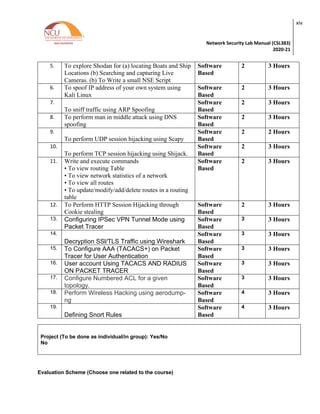
5. To explore Shodan for (a) locating Boats and Ship
Locations (b) Searching and capturing Live
Cameras. (b) To Write a small NSE Script
Software
Based
2 3 Hours
6. To spoof IP address of your own system using
Kali Linux
Software
Based
2 3 Hours
7.
To sniff traffic using ARP Spoofing
Software
Based
2 3 Hours
8. To perform man in middle attack using DNS
spoofing
Software
Based
2 3 Hours
9.
To perform UDP session hijacking using Scapy
Software
Based
2 2 Hours
10.
To perform TCP session hijacking using Shijack.
Software
Based
2 3 Hours
11. Write and execute commands
• To view routing Table
• To view network statistics of a network
• To view all routes
• To update/modify/add/delete routes in a routing
table
Software
Based
2 3 Hours
12. To Perform HTTP Session Hijacking through
Cookie stealing
Software
Based
2 3 Hours
13. Configuring IPSec VPN Tunnel Mode using
Packet Tracer
Software
Based
3 3 Hours
14.
Decryption SSl/TLS Traffic using Wireshark
Software
Based
3 3 Hours
15. To Configure AAA (TACACS+) on Packet
Tracer for User Authentication
Software
Based
3 3 Hours
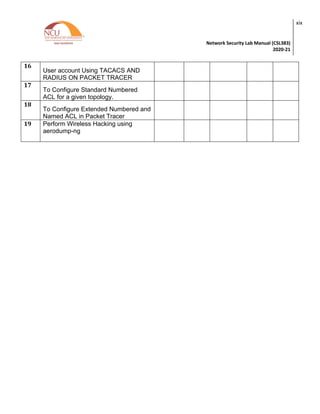
16. User account Using TACACS AND RADIUS
ON PACKET TRACER
Software
Based
3 3 Hours
17. Configure Numbered ACL for a given
topology.
Software
Based
3 3 Hours
18. Perform Wireless Hacking using aerodump-
ng
Software
Based
4 3 Hours
19.
Defining Snort Rules
Software
Based
4 3 Hours
Project (To be done as individual/in group): Yes/No
No
Evaluation Scheme (Choose one related to the course)
Network Security Lab Manual (CSL383)
2020-21
xv
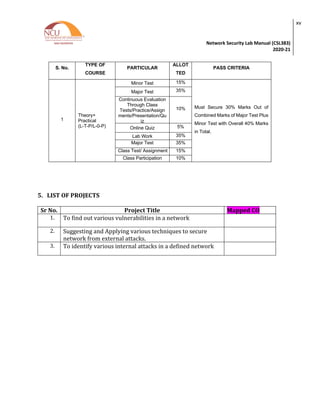
S. No.
TYPE OF
COURSE
PARTICULAR
ALLOT
TED
RANG
E OF
MARK
S
PASS CRITERIA
1
Theory+
Practical
(L-T-P/L-0-P)
Minor Test 15%
Must Secure 30% Marks Out of
Combined Marks of Major Test Plus
Minor Test with Overall 40% Marks
in Total.
Major Test 35%
Continuous Evaluation
Through Class
Tests/Practice/Assign
ments/Presentation/Qu
iz
10%
Online Quiz 5%
Lab Work 35%
Major Test 35%
Class Test/ Assignment 15%
Class Participation
Evaluation Through
Class
Tests/Practice/Assign
ments/Presentation/Qu
iz
10%
5. LIST OF PROJECTS
Sr No. Project Title Mapped CO
1. To find out various vulnerabilities in a network
2. Suggesting and Applying various techniques to secure
network from external attacks.
3. To identify various internal attacks in a defined network
Network Security Lab Manual (CSL383)
2020-21
xvi
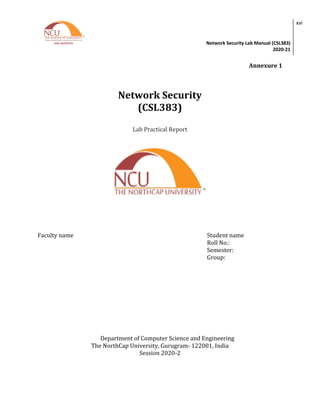
Annexure 1
Network Security
(CSL383)
Lab Practical Report
Faculty name Student name
Roll No.:
Semester:
Group:
Department of Computer Science and Engineering
The NorthCap University, Gurugram- 122001, India
Session 2020-2
Network Security Lab Manual (CSL383)
2020-21
xvii
INDEX
S.No Experiment Page
No.
Date of
Experi
ment
Date of
Submissio
n
Marks Signat
ure
1
Make a Detailed Report on Network
Security Threats covering Structured,
Unstructured, Internal and External
Threats
2 Perform the following Scan using
Wireshark and analyze your results
(a)Analyze TCP session
(b) Perform and analyze these scans
(i) Start a Wireshark capture. Open a
Windows-> command window and
perform a Host Scan (using ICMP
packets) on a neighbours machine
using nmap –sP [neighbors ip address].
Stop the capture and filter the traffic for
ARP and ICMP packets.
(ii)Start a new Wireshark capture, and
then perform a host scan (ICMP scan)
on a system out with the subnet, such
as nmap –sP scanme.nmap.org.(Stop
the capture and filter the traffic for ARP
and ICMP packets and Compare with
previous results.
(iii) Start a new Wireshark capture, and
then perform a complete Port Scan (in
this case a TCP SYN scan) and an
Operating System Fingerprint on a
neighbours machine using nmap –O
[neighbours ip address] . The –O option
should provide the OS running on the
scanned machine. Stop the capture
and filter for source address == your
machines address if necessary.
Network Security Lab Manual (CSL383)
2020-21
xviii
3 To Analysis Network using Wireshark
for
(a)Traffic Monitoring (TCP slow down
and HTTP slow down)
(b) Packet Sniffing
4 Explore , execute and analysis traffic
using TCP Dump and Net discover
tools
5 To explore Shodan for (a) locating
Boats and Ship Locations (b) Searching
and capturing Live Cameras. (b) To
Write a small NSE Script
6
To spoof IP address of your own
system using Kali Linux
7
To sniff traffic using ARP Spoofing
8
To perform man in middle attack using
DNS spoofing
9
To perform UDP session hijacking
using Scapy
10
To perform TCP session hijacking
using Shijack.
11 Write and execute commands
• To view routing Table
• To view network statistics of a
network
• To view all routes
• To update/modify/add/delete routes
in a routing table
12
To Perform HTTP Session Hijacking
through Cookie stealing
13
Configuring IPSec VPN Tunnel Mode
using Packet Tracer
14
Decryption SSl/TLS Traffic using
Wireshark
15
To Configure AAA (TACACS+) on
Packet Tracer for User Authentication
Network Security Lab Manual (CSL383)
2020-21
xix
16
User account Using TACACS AND
RADIUS ON PACKET TRACER
17
To Configure Standard Numbered
ACL for a given topology.
18
To Configure Extended Numbered and
Named ACL in Packet Tracer
19 Perform Wireless Hacking using
aerodump-ng
Network Security Lab Manual (CSL383)
2020-21
xx
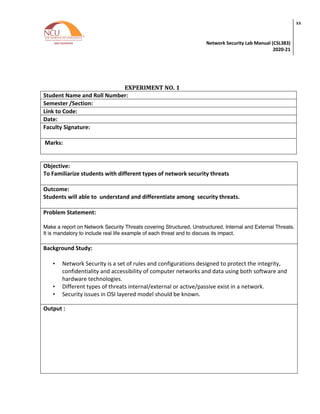
EXPERIMENT NO. 1
Student Name and Roll Number:
Semester /Section:
Link to Code:
Date:
Faculty Signature:
Marks:
Objective:
To Familiarize students with different types of network security threats
Outcome:
Students will able to understand and differentiate among security threats.
Problem Statement:
Make a report on Network Security Threats covering Structured, Unstructured, Internal and External Threats.
It is mandatory to include real life example of each threat and to discuss its impact.
Background Study:
• Network Security is a set of rules and configurations designed to protect the integrity,
confidentiality and accessibility of computer networks and data using both software and
hardware technologies.
• Different types of threats internal/external or active/passive exist in a network.
• Security issues in OSI layered model should be known.
Output :
Network Security Lab Manual (CSL383)
2020-21
xxi
Question Bank
Q1. Name to active Threats.
Q2. Name to Passive Threats.
Q3. Name 7 layers of OCI Model
Q4. Quote one recent real life threat.
Network Security Lab Manual (CSL383)
2020-21
xxii
EXPERIMENT NO. 2
Student Name and Roll Number:
Semester /Section:
Link to Code:
Date:
Faculty Signature:
Marks:
Objective:
To familiarize students with the working of Wireshark and how to analyse traffic moving in
and out of the network.
Outcome:
Students will able to analyse TCP sessions and various scans using NMAP and Wireshark.
Students will able to understand the working of NMAP.
Problem Statement:
Perform the following Scan using Wireshark and analyze your results
(a)Analyze TCP session
(b)Perform and analyze these scans
(i) Start a Wireshark capture. Open a Windows-> command window and perform a Host Scan
(using ICMP packets) on a neighbours machine using nmap –sP [neighbors ip address]. Stop the
capture and filter the traffic for ARP and ICMP packets.
(ii)Start a new Wireshark capture, and then perform a host scan (ICMP scan) on a system out with
the subnet, such as nmap –sP scanme.nmap.org.(Stop the capture and filter the traffic for ARP and
ICMP packets and Compare with previous results.
iii) Start a new Wireshark capture, and then perform a complete Port Scan (in this case a TCP SYN
scan) and an Operating System Fingerprint on a neighbours machine using nmap –O [neighbours ip
address] . The –O option should provide the OS running on the scanned machine. Stop the capture
and filter for source address == your machines address if necessary.
Network Security Lab Manual (CSL383)
2020-21
xxiii
Background Study:
• Wireshark is a passive reconnaissance tool
• World’s foremost and widely used network protocol analyser.
• Tells what’s happening on your network at a microscopic level
• Standard across many commercial and non-profit enterprises, government agencies, and
educational institutions.
Output (Screenshots)
Network Security Lab Manual (CSL383)
2020-21
xxiv
Network Security Lab Manual (CSL383)
2020-21
xxv
Question Bank
Q1. Define TCP Syn.
Q2. In which layer ARP and RARP protocol falls?
Q3. How to write a Nmap script to scan a target for service detection?
Q4. Why is NMAP Dangerous ?
Q5. What is a UDP Scan ?
Network Security Lab Manual (CSL383)
2020-21
xxvi
EXPERIMENT NO. 3
Student Name and Roll Number:
Semester /Section:
Link to Code:
Date:
Faculty Signature:
Marks:
Objective:
To familiarize students with the working of Wireshark and how to monitor and analyse network
slowdown in an network.
Outcome:
Students will able to analyse TCP and HTTP slowdown in a network. Also, How password sniffing
can be performed using Wireshark on an un secured websites.
Problem Statement:
To Analysis Network using Wireshark for
(a)Traffic Monitoring (TCP slow down and HTTP slow down)
(b) Packet Sniffing
Background Study:
To monitor the data transmitted over a network
• used for diagnostic or troubleshooting purposes
• To steal data transmitted over the network.
• Applicable to both wired and wireless networks
• Can be passive or active
Output (Screenshots)
Network Security Lab Manual (CSL383)
2020-21
xxvii
Network Security Lab Manual (CSL383)
2020-21
xxviii
Question Bank
Q1. Difference between HTTP 1.0. and HTTP 1.1
Q2. What is the significance of tcp.sync.flag==0 ?
Q3 Difference between TCP and UDP ?
Q4. Difference between GET and POST method ?
Q5. You are required to monitor and display all incoming packets to a particular system from the
IP address 192.169.3.29. What filter would you use ?
Q6. Which filter would you use to display destination broadcast frames ?
Network Security Lab Manual (CSL383)
2020-21
xxix
EXPERIMENT NO. 4
Student Name and Roll Number:
Semester /Section:
Link to Code:
Date:
Faculty Signature:
Marks:
Objective:
To familiarize students with TCPDump and NetDiscover commands and their options
Outcome:
Students will able to scan and analyse network dump in a network. They will also learn to find
active machines and trace their mac address in a network.
Problem Statement:
Explore , execute and analysis traffic using TCP Dump and Net discover tools
Background Study:
To monitor the network
• Using command line interface
• Should able to differentiate between GUI and CLI.
• ARP concept of retrieving Mac Addresses.
• Knowledge of IPv4 and IPV6 headers
Output (Screenshots)
Network Security Lab Manual (CSL383)
2020-21
xxx
Network Security Lab Manual (CSL383)
2020-21
xxxi
Question
Q1. Which port uses dns port 53 to generate udp Traffic ?
Q2. Which command to view Hex Dump format of packet in TCP DUMP ?
Q3. What is the purpose of -s option in NetDiscover?
Q4. Which tool is better TCPDUMP or WIRESHARK ? Explain
Q5. What is the purpose of – P option in NetDiscover?
Network Security Lab Manual (CSL383)
2020-21
xxxii
EXPERIMENT NO. 5
Student Name and Roll Number:
Semester /Section:
Link to Code:
Date:
Faculty Signature:
Marks:
Objective:
Student should able to detect vulnerabilities in SHODAN .
To make students capable of writing and executing a small NSE script.
Outcome:
Students will able explore SHODAN for detecting Vulnerabilities . Students will able to
understand , read and write NSE scripts.
Problem Statement:
1. To Explore Shodan for-
a. Locating Boats and Ship Locations
b. Searching and Capturing Live Camera
2. To Write small NSE Script
Background Study:
• Shodan: It is a search engine that lets the user find specific types of computers (webcams,
routers, servers, etc.) connected to the internet using a variety of filters.
• Filters should be known
• NSE: The Nmap Scripting Engine (NSE) is one of Nmap's most powerful and flexible features.
It allows users to write (and share) simple scripts to automate a wide variety of networking
tasks
• The Knowledge of NMAP is required.
Network Security Lab Manual (CSL383)
2020-21
xxxiii
Output (Screenshots)
Network Security Lab Manual (CSL383)
2020-21
xxxiv
Questions
Q1. How Shodan different from General Search Engine?
Q2. What additional information can be used tracked using Shodan?
Q3. Define general body to write NSE Script.
Network Security Lab Manual (CSL383)
2020-21
xxxv
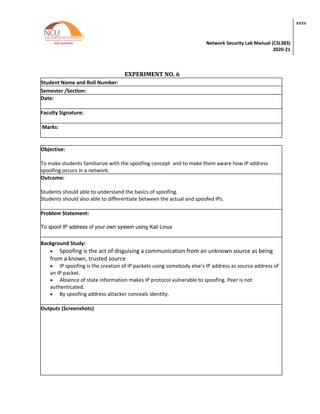
EXPERIMENT NO. 6
Student Name and Roll Number:
Semester /Section:
Date:
Faculty Signature:
Marks:
Objective:
To make students familiarize with the spoofing concept and to make them aware how IP address
spoofing occurs in a network.
Outcome:
Students should able to understand the basics of spoofing.
Students should also able to differentiate between the actual and spoofed IPs.
Problem Statement:
To spoof IP address of your own system using Kali Linux
Background Study:
• Spoofing is the act of disguising a communication from an unknown source as being
from a known, trusted source
• IP spoofing is the creation of IP packets using somebody else’s IP address as source address of
an IP packet.
• Absence of state information makes IP protocol vulnerable to spoofing. Peer is not
authenticated.
• By spoofing address attacker conceals identity.
Outputs (Screenshots)
Network Security Lab Manual (CSL383)
2020-21
xxxvi
Network Security Lab Manual (CSL383)
2020-21
xxxvii
Question Bank
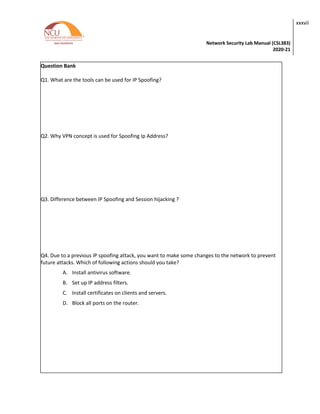
Q1. What are the tools can be used for IP Spoofing?
Q2. Why VPN concept is used for Spoofing Ip Address?
Q3. Difference between IP Spoofing and Session hijacking ?
Q4. Due to a previous IP spoofing attack, you want to make some changes to the network to prevent
future attacks. Which of following actions should you take?
A. Install antivirus software.
B. Set up IP address filters.
C. Install certificates on clients and servers.
D. Block all ports on the router.
Network Security Lab Manual (CSL383)
2020-21
xxxviii
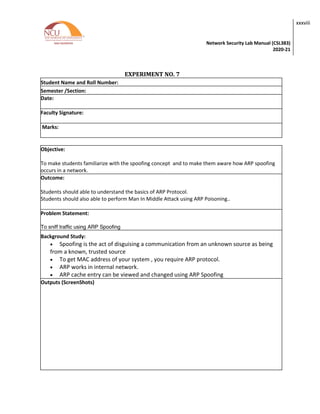
EXPERIMENT NO. 7
Student Name and Roll Number:
Semester /Section:
Date:
Faculty Signature:
Marks:
Objective:
To make students familiarize with the spoofing concept and to make them aware how ARP spoofing
occurs in a network.
Outcome:
Students should able to understand the basics of ARP Protocol.
Students should also able to perform Man In Middle Attack using ARP Poisoning..
Problem Statement:
To sniff traffic using ARP Spoofing
Background Study:
• Spoofing is the act of disguising a communication from an unknown source as being
from a known, trusted source
• To get MAC address of your system , you require ARP protocol.
• ARP works in internal network.
• ARP cache entry can be viewed and changed using ARP Spoofing
Outputs (ScreenShots)
Network Security Lab Manual (CSL383)
2020-21
xxxix
Question Bank
Network Security Lab Manual (CSL383)
2020-21
xl
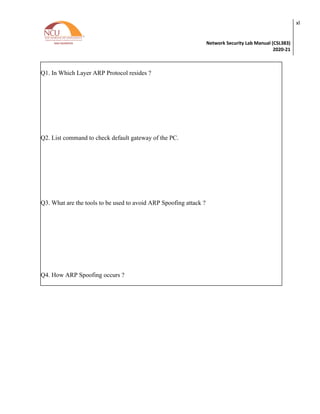
Q1. In Which Layer ARP Protocol resides ?
Q2. List command to check default gateway of the PC.
Q3. What are the tools to be used to avoid ARP Spoofing attack ?
Q4. How ARP Spoofing occurs ?
Network Security Lab Manual (CSL383)
2020-21
xli
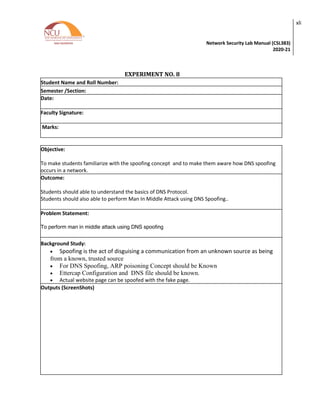
EXPERIMENT NO. 8
Student Name and Roll Number:
Semester /Section:
Date:
Faculty Signature:
Marks:
Objective:
To make students familiarize with the spoofing concept and to make them aware how DNS spoofing
occurs in a network.
Outcome:
Students should able to understand the basics of DNS Protocol.
Students should also able to perform Man In Middle Attack using DNS Spoofing..
Problem Statement:
To perform man in middle attack using DNS spoofing
Background Study:
• Spoofing is the act of disguising a communication from an unknown source as being
from a known, trusted source
• For DNS Spoofing, ARP poisoning Concept should be Known
• Ettercap Configuration and DNS file should be known.
• Actual website page can be spoofed with the fake page.
Outputs (ScreenShots)
Network Security Lab Manual (CSL383)
2020-21
xlii
Question Bank:
Network Security Lab Manual (CSL383)
2020-21
xliii
Q1. What is the need of DNS in networking?
Q2. What is the purpose of changing UID value to 0 ?
Q3. How this Attack can be avoided.
Q4 What other tools can be used for DNS Spoofing ?
Network Security Lab Manual (CSL383)
2020-21
xliv
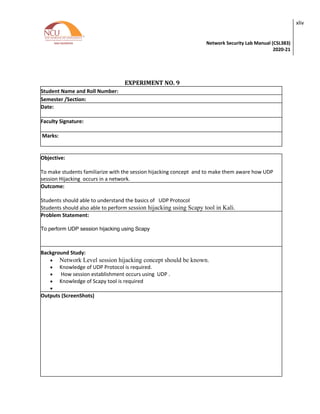
EXPERIMENT NO. 9
Student Name and Roll Number:
Semester /Section:
Date:
Faculty Signature:
Marks:
Objective:
To make students familiarize with the session hijacking concept and to make them aware how UDP
session Hijacking occurs in a network.
Outcome:
Students should able to understand the basics of UDP Protocol
Students should also able to perform session hijacking using Scapy tool in Kali.
Problem Statement:
To perform UDP session hijacking using Scapy
Background Study:
• Network Level session hijacking concept should be known.
• Knowledge of UDP Protocol is required.
• How session establishment occurs using UDP .
• Knowledge of Scapy tool is required
•
Outputs (ScreenShots)
Network Security Lab Manual (CSL383)
2020-21
xlv
Question Bank:
Network Security Lab Manual (CSL383)
2020-21
xlvi
Q1. Why UDP is used for Video Streaming of data ?
Q2. Why UDP is an Unreliable protocol. ?
Q3. List other Tools for doing UDP Session Hijacking
Network Security Lab Manual (CSL383)
2020-21
xlvii
EXPERIMENT NO. 10
Student Name and Roll Number:
Semester /Section:
Date:
Faculty Signature:
Marks:
Objective:
To make students familiarize with the session hijacking concept and to make them aware how TCP
Session Hijacking occurs in a network.
Outcome:
Students should able to understand the basics of TCP Protocol.
TCP Handshaking concept will be cleared.
Students should also able to perform session hijacking using Shijack tool in Kali.
Problem Statement:
To perform TCP session hijacking using Shijack.
Background Study:
• Network Level session hijacking concept should be known.
• Knowledge of TCP Protocol and TCP Header is required.
• How three way handshake occurs using TCP .
• Knowledge of Shijack tool is required
•
Outputs (ScreenShots)
Network Security Lab Manual (CSL383)
2020-21
xlviii
Network Security Lab Manual (CSL383)
2020-21
xlix
Question Bank:
Q1. Why TCP is called a reliable Protocol ?
Q2. Explain 3 way handshaking in TCP
Q3. What is the role of shjack in TCP session Hijacking
Q4. What measures can be adopted for avoiding this attack ?
Network Security Lab Manual (CSL383)
2020-21
l
EXPERIMENT NO. 11
Student Name and Roll Number:
Semester /Section:
Date:
Faculty Signature:
Marks:
Objective:
To make students familiarize with the Routing Table concept and how to modify Routing table
Outcome:
Students should able to understand Routing Table
Different fields in the Routing Table.
Students should also able to View and Modify routes in the routing table.
Problem Statement:
Write and execute commands
• To view routing Table
• To view network statistics of a network
• To view all routes
• To update/modify/add/delete routes in a routing table
Background Study:
• Routing table is constructed inside routers.
• Routers used it to find best path for packet forwarding in the network.
• It is a layer three concept.
• Knowledge of gateways, Addresses are required.
Outputs (ScreenShots)
Network Security Lab Manual (CSL383)
2020-21
li
Network Security Lab Manual (CSL383)
2020-21
lii
Question
Q1. What do you mean by Route Filtering ?
Q2. How to delete a route in a routing Table?
Q3. Write command to view routing table ?
Q4. Discuss field that are visible in a routing table?
Network Security Lab Manual (CSL383)
2020-21
liii
EXPERIMENT NO. 12
Student Name and Roll Number:
Semester /Section:
Date:
Faculty Signature:
Marks:
Objective:
To make students familiarize with the Session Hijacking concept and how HTTP session hijacking can
be achieved using Cookies.
Outcome:
Students should able to understand the concept of Cookies and its related concepts
Student should get to know how session created on opening a webpage
Students should also able to learn tools used for Cookie stealing.
Problem Statement:
To Perform HTTP Session Hijacking through Cookie Stealing
Background Study:
• Understanding of HTTP language is required.
• Unique session IDs are created between user and web server on opening any web page
• Wireshark analysis is required to read dump files.
• Concept of session Hijacking should be known
Outputs (Screen Shots)
Network Security Lab Manual (CSL383)
2020-21
liv
Network Security Lab Manual (CSL383)
2020-21
lv
Question Bank:
Q1. How does session hijacking work?
2. Mention what flaw arises from session tokens having poor randomness across a range of values?
3. How cookies differ from session?
4. What happens if you visit an unsecure website during a man in the middle attack?
5. What is the role of session ID in session hijack
Network Security Lab Manual (CSL383)
2020-21
lvi
EXPERIMENT NO. 13
Student Name and Roll Number:
Semester /Section:
Date:
Faculty Signature:
Marks:
Objective:
To make students familiarize with the Virtual private Network (VPN) concept and how IPsec protocol is
used to configure VPN in Tunnel Mode
Outcome:
Students should able to understand the concept of VPN
Student should get to know how IPsec Tunnel mode works
Students should also able to learn to configure VPN using Packet Tracer.
Problem Statement:
Configuring IPSec VPN Tunnel Mode using Packet Tracer
Background Study:
• Understanding of IPsec protocol is required.
• How negotiation occurs between machines using IPsec
• How to configure topology in a Packet Tracer.
• Working of VPN and its related concepts
Outputs (Screen Shots)
Network Security Lab Manual (CSL383)
2020-21
lvii
Network Security Lab Manual (CSL383)
2020-21
lviii
Question Bank:
Q1. What IPSec Mode Is Most Commonly Used To Create Site-To-Site VPNs Between
Locations?
Q2.Which two tools should you use to create, manage, and deploy IPSec policies?
Q3. How IPsec works step by step?
Q4.How VPN manage Privacy of data ?
Network Security Lab Manual (CSL383)
2020-21
lix
EXPERIMENT NO. 14
Student Name and Roll Number:
Semester /Section:
Date:
Faculty Signature:
Marks:
Objective:
To make students familiarize with the SSL/TLS concept and how TLS protocol is used to configure
Client side traffic
Outcome:
Students should able to understand the concept of SSL
Student should get to know how SSL/TLS Handshaking occurs
Students should also able to learn to configure SSL/TLS Client Side traffic.
Problem Statement:
Decrypting SSL/TLS Client Traffic using Wireshark
Background Study:
• Understanding of SSL/TLS protocol is required.
• How Handshaking occurs between machines using SSL
• Usage of Wireshark is required
Outputs (Screen Shots)
Network Security Lab Manual (CSL383)
2020-21
lx
Network Security Lab Manual (CSL383)
2020-21
lxi
Question Bank:
1. How SSL uses both asymmetric and symmetric encryption?
2. Why is TLS more secure than SSL?
3. What encryption does SSL use?
4. How HTTP differs from HTTPS ?
Network Security Lab Manual (CSL383)
2020-21
lxii
EXPERIMENT NO. 15
Student Name and Roll Number:
Semester /Section:
Date:
Faculty Signature:
Marks:
Objective:
To make students familiarize with the AAA concept and how RADIUS and TACAS+ protocol is used to
authentic Client
Outcome:
Students should able to understand the concept of AAA
Student should get to know how RADIUS and TACACS+ works
Students should also able to learn to configure AAA concept using Packet Tracer
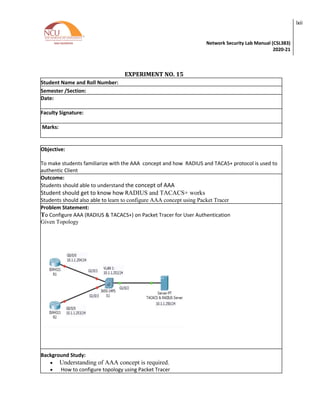
Problem Statement:
To Configure AAA (RADIUS & TACACS+) on Packet Tracer for User Authentication
Given Topology
Background Study:
• Understanding of AAA concept is required.
• How to configure topology using Packet Tracer
Network Security Lab Manual (CSL383)
2020-21
lxiii
• Knowledge of RADIUS and TACACS+ Protocol is required
Outputs (Screen Shots)
Network Security Lab Manual (CSL383)
2020-21
lxiv
Network Security Lab Manual (CSL383)
2020-21
lxv
Question Bank:
1. Why is the AAA protocol important in network security?
2. Ann has taken over as the new head of the IT department. One of her first assignments was
to implement AAA in preparation for the company’s new telecommuting policy. When she
takes inventory of the organizations existing network infrastructure, she makes note that it is a
mix of several different vendors. Ann knows she needs a method of secure centralized access to
the company’s network resources. Which of the following is the BEST service for Ann to
implement?
3. Why is authentication with AAA preferred over a local database method?
Network Security Lab Manual (CSL383)
2020-21
lxvi
EXPERIMENT NO. 17
Student Name and Roll Number:
Semester /Section:
Date:
Faculty Signature:
Marks:
Objective:
To make students familiarize with the ACL concept and how Standard named and
numbered ACL concept can be used to define various security policies
Outcome:
Students should able to understand the concept of ACL
Student should get to know difference between Named and Numbered Standard ACL.
Students should also able to learn to configure Standard ACL using Packet Tracer
Problem Statement:
To Configure Standard ACL on Packet Tracer for User Authentication
• Policies to be defined.
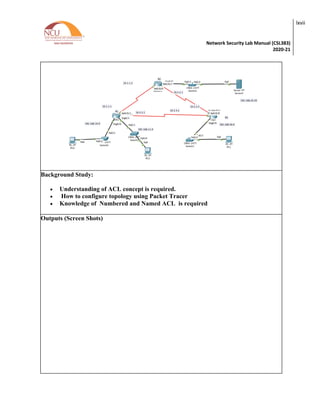
• ON R2
• 192.168.11.0/24 network is not allowed access to the Web Server on the
192.168.20.0 network
• All Other Access is permitted
On R3 implement Policies
192.168.10.0/24 network is not allowed to communicate with 192.168.30.0/24
network
All other Access is permitted.
Network Security Lab Manual (CSL383)
2020-21
lxvii
Background Study:
• Understanding of ACL concept is required.
• How to configure topology using Packet Tracer
• Knowledge of Numbered and Named ACL is required
Outputs (Screen Shots)
Network Security Lab Manual (CSL383)
2020-21
lxviii
Network Security Lab Manual (CSL383)
2020-21
lxix
Question Bank:
1. Which type of ACL should be placed closest to the source of traffic?
2. Which type of ACL should be placed closest to the destination of traffic?
3. Difference between Standard and Extended ACL?
4. What is the usage of wildcard mask in a network?
Network Security Lab Manual (CSL383)
2020-21
lxx
EXPERIMENT NO. 18
Student Name and Roll Number:
Semester /Section:
Date:
Faculty Signature:
Marks:
Objective:
To make students familiarize with the ACL concept and how Extended named and
numbered ACL concept can be used to define various security policies
Outcome:
Students should able to understand the concept of ACL
Student should get to know difference between Named and Numbered Standard ACL.
Students should also able to learn to configure Extended ACL using Packet Tracer
Problem Statement:
To Configure Extended ACL on Packet Tracer for User Authentication
• Policies to be defined.
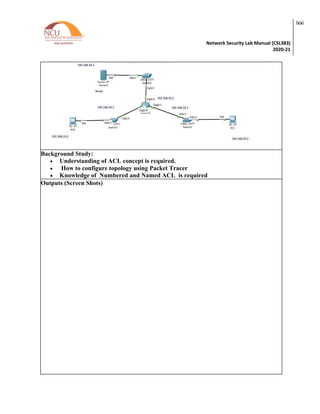
• Two employees need services provided by the Company. PC0 need FTP access while
PC1 need web server access.
• Both PCs should ping to server but not each other.
Network Security Lab Manual (CSL383)
2020-21
lxxi
Background Study:
• Understanding of ACL concept is required.
• How to configure topology using Packet Tracer
• Knowledge of Numbered and Named ACL is required
Outputs (Screen Shots)
Network Security Lab Manual (CSL383)
2020-21
lxxii
Network Security Lab Manual (CSL383)
2020-21
lxxiii
Question Bank:
1. How Extended ACL differs from standard ACL ?
2. Which command can you enter to block HTTPS traffic from the whole class A private
network range to a host?
3. While troubleshooting a connection problem on a computer, you determined that the
computer can ping a specific web server but it cannot connect to TCP port 80 on that
server. Which reason for the problem is most likely true?
Network Security Lab Manual (CSL383)
2020-21
lxxiv
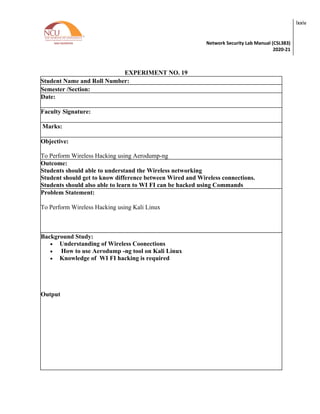
EXPERIMENT NO. 19
Student Name and Roll Number:
Semester /Section:
Date:
Faculty Signature:
Marks:
Objective:
To Perform Wireless Hacking using Aerodump-ng
Outcome:
Students should able to understand the Wireless networking
Student should get to know difference between Wired and Wireless connections.
Students should also able to learn to WI FI can be hacked using Commands
Problem Statement:
To Perform Wireless Hacking using Kali Linux
Background Study:
• Understanding of Wireless Coonections
• How to use Aerodump -ng tool on Kali Linux
• Knowledge of WI FI hacking is required
Output
Network Security Lab Manual (CSL383)
2020-21
lxxv
Network Security Lab Manual (CSL383)
2020-21
lxxvi
Question Bank:
1. Is WPA3 better than WPA2?
2. What is the weakest wireless encryption standard?
3. Does WIFI security affect speed
Network Security Lab Manual (CSL383)
2020-21
lxxvii

Network Security LabNetwork Security Lab

  • 1.
    Network Security Lab Manual Departmentof Computer Science and Engineering The NorthCap University, Gurugram
  • 2.
    Network Security LabManual (CSL383) 2020-21 ii Network Security Lab Manual CSL383 Dr. Shilpa Mahajan Department of Computer Science and Engineering NorthCap University, Gurugram- 122001, India Session 2020-21 Published by: School of Engineering and Technology Department of Computer Science & Engineering The NorthCap University Gurugram • Laboratory Manual is for Internal Circulation only © Copyright Reserved No part of this Practical Record Book may be
  • 3.
    Network Security LabManual (CSL383) 2020-21 iii reproduced, used, stored without prior permission of The NorthCap University Copying or facilitating copying of lab work comes under cheating and is considered as use of unfair means. Students indulging in copying or facilitating copying shall be awarded zero marks for that particular experiment. Frequent cases of copying may lead to disciplinary action. Attendance in lab classes is mandatory. PREFACE Network Security Lab Manual is designed to meet the course and program requirements of NCU curriculum for B.Tech 3rd year students of CSE branch. The concept of the lab work is to give brief practical experience for basic lab skills to students. It provides the space and scope for self-study so that students can come up with new and creative ideas. The Lab manual is written on the basis of “teach yourself pattern” and expected that students who come with proper preparation should be able to perform the experiments without any difficulty. Brief introduction to each experiment with information about self-study material is provided. The laboratory exercises will held to develop strong network and security concept.Students are expected to come thoroughly prepared for the lab. General disciplines, safety guidelines and report writing are also discussed. The lab manual is a part of curriculum for the TheNorthCap University, Gurugram. Teacher’s copy of the experimental results and answer for the questions are available as sample guidelines. We hope that lab manual would be useful to students of CSE branches and author requests the readers to kindly forward their suggestions / constructive criticism for further improvement of the workbook. Author expresses deep gratitude to Members, Governing Body-NCU for encouragement and motivation. Authors The NorthCap University Gurugram, India
  • 4.
    Network Security LabManual (CSL383) 2020-21 iv CONTENTS S.N. Details Page No. Syllabus 1 Introduction 2 Lab Requirement 3 General Instructions 4 List of Experiments 5 Rubrics 6 Annexure 1 (Format of Lab Report)
  • 5.
    Network Security LabManual (CSL383) 2020-21 v Syllabus 1. Department: Department of Computer Science and Engineering 2. Course Name: Network Security 3. Course Code 4. L-T-P 5. Credits CSL383 2-0-4 4 6. Type of Course (Check one): Programme Core Programme Elective ü Open Elective 7. Pre-requisite(s), if any: Computer Network 8. Frequency of offering (check one): Odd ü Even Either semester Every semester 9. Brief Syllabus: This course delivers the technical knowledge, insight, and hands-on training students need to identify attacks on network with confidence. This course covers various aspects of network security including security issues in different layers of networks, intrusion detection, prevention and defense against cyber-attacks. Students will be guided through a series of laboratories and experiments in order to understand and analyze different attack/defend scenarios and determine the effectiveness of particular defense deployments against attacks Total lecture, Tutorial and Practical Hours for this course (Take 15 teaching weeks per semester): 90 Lectures: 30 hours Practice Tutorials : _0_ hours Lab Work: 60 hours 10. Course Outcomes (COs) Possible usefulness of this course after its completion i.e., how this course will be practically useful to him once it is completed CO 1 Understanding security architectures, protocols and services in both wired and wireless networks CO 2 Understand the role of security protocols in securing networks CO 3 Discover, analyze and identify security issues in the network. CO 4 Evaluate the use of an IDS and IPS in a working environment CO 5 Apply security mechanisms, security policies, security components (such as protection domains and firewalls), port security and protection to secure networks. ü
  • 6.
    Network Security LabManual (CSL383) 2020-21 vi 11. UNIT WISE DETAILS No. of Units: 4 Unit Number: 1 Title: Network Security Basics No. of Hours: 5 Content Summary: Introduction, Need, Security Model, Security Threats, Services and Mechanism, Attack and its types Security essentials on layers, Network security Policies, Introduction to IPv4 and IPv6 and security flaws in IPv4 and IPv6. Unit Number:2 Title: Security issues in Internet Protocol No. of Hours: 10 Content Summary: Active and passive Network Reconnaissance-Wireshark, TCPDump , Netdiscover , Shodan ,NESSUS,Hping3 NSE Scripts- Introduction, How to write and read NSE script, TCP session Hijacking, UDP session Hijacking,HTTP Session Hijacking, Spoofing basics- IP, DNS and ARP Spoofing, Route Table Modification, How to add/delete/update routing table, Man in Middle Attacks, Denial of Service Attacks Unit Number: 3 Title: Security Issues in Other Layers No. of Hours: 7 Content Summary: IP Security Overview, IPSec Architecture, Authentication Header, Encapsulating Security Payload, Security Associations and Key Management, VPN Concept and its configuration, AAA Concept, RADIUS, TACACS+ technologies, SSL architecture and protocol, Transport layer security , HTTPS Working Unit Number: 4 Title: Wireless hacking and IDPS. No. of Hours: 8 Content Summary: Wireless networks, WPA Handshaking, Wireless hacking tools, IDPS introduction , Uses of IDPS Technologies, Key functions of IDPS Technologies , Signature Based Detection , Anomaly Based Detection, Types of IDPS Technologies. Snort Commands and Rule formation and implementation . 12. Brief Description of Self-learning components by students (through books/resource material etc.): Supplementary MOOC Courses https://www.udemy.com/course/network-security-analysis-using-wireshark-snort-and-so/ https://www.coursera.org/learn/managing-network-cybersecurity#syllabus Learning best Scanning Tools https://www.wireshark.org/ https://www.tcpdump.org/ Network Vulnerability detecting Tools https://www.tenable.com/ https://nmap.org/
  • 7.
    Network Security LabManual (CSL383) 2020-21 vii https://portswigger.net/burp 1. Advance Learning Components Real cyber-attacks case studies https://www.cshub.com/case-studies https://www.cybersecuritycasestudies.com/ https://www.calyptix.com/top-threats/biggest-cyber-attacks-2017-happened/ Certification courses/programs for Skill Development https://www.eccouncil.org/ https://www.infosectrain.com/ https://www.sans.org/ Motivational Project ideas 1. Online Transaction Fraud Detection using Backlogging on E-Commerce Website. 2. Android Video Encryption & Sharing 3. Secure File Sharing Using Access Control 4. Improved Session Password Based Security System 5. Wireless Network Security 6. To detect different vulnerabilities in existing Network 13. Books Recommended: Text Books: 1. B William Stallings, " Network Security Essentials (Applications and Standards)", Pearson Education., 5th Edition,2011 2. Ryan Russell, " Hack Proofing your network ", Wiley,2nd Edition,2002 Reference Books: 1. Karen Scarf one, “Guide to Intrusion and prevention System”, NIST Special Publication, 2nd Edition,2007 Reference Websites: • https://nptel.ac.in/syllabus/syllabus.php?subjectId=106105031 • https://www.cybrary.it/course/security-for-beginners/ • https://www.udemy.com/topic/Network-Security/ • https://www.coursera.org/courses?query=network%20security • https://www.edx.org/learn/network-security
  • 8.
    Network Security LabManual (CSL383) 2020-21 viii eBooks: • https://www.pdfdrive.com/network-security-books.html • https://www.pdfdrive.com/hacking-exposed-7-network-security-secrets-solutions-seventh-edition- e37530888.html • https://www.engineeringbookspdf.com/network-security-tutorial/ Interview/Placement related Commonly asked Questions: • https://www.wisdomjobs.com/e-university/network-security-interview-questions.html • https://www.glassdoor.com.hk/Interview/Deloitte-Graduate-Cyber-Security-Interview-Questions- EI_IE2763.0,8_KO9,32.htm • https://danielmiessler.com/study/infosec_interview_questions/ Detailed marks evaluation Rubrics
  • 9.
    Network Security LabManual (CSL383) 2020-21 ix 1. INTRODUCTION That ‘learning is a continuous process’ cannot be over emphasized. The theoretical knowledge gained during lecture sessions need to be strengthened through practical experimentation. Thus practical makes an integral part of a learning process. The purpose of conducting these experiments can be stated as follows; 1. To familiarize the students with the concepts, of securing the network and give practical oriented assignments for better understanding. 2. The lab sessions will be based on exploring the concepts discussed in class. 3. Observing flaws in a network. 4. Reporting and analysing the network related threats using tools.
  • 10.
    Network Security LabManual (CSL383) 2020-21 x 2. LAB REQUIREMENTS S.No. Requirements Details 1 Software Requirements Virtual machine, NMAP, NESSUS, WIRESHARK,NESSUS 2 Operating System Kali Linux, Ubuntu, Window Xp, Window 10 3 Hardware Requirements Windows and Linux: Intel 64/32 or AMD Athlon 64/32, or AMD Opteron processor 16 GB RAM 256 GB hard disk space 4 Required Bandwidth NA
  • 11.
    Network Security LabManual (CSL383) 2020-21 xi 3. GENERAL INSTRUCTIONS a. General discipline in the lab • Students must turn up in time and contact concerned faculty for the experiment they are supposed to perform. • Students will not be allowed to enter late in the lab. • Students will not leave the class till the period is over. • Students should come prepared for their experiment. • Experimental results should be entered in the lab report format and certified/signed by concerned faculty/ lab Instructor. • Students must get the connection of the hardware setup verified before switching on the power supply. • Students should maintain silence while performing the experiments. If any necessity arises for discussion amongst them, they should discuss with a very low pitch without disturbing the adjacent groups. • Violating the above code of conduct may attract disciplinary action. • Damaging lab equipment or removing any component from the lab may invite penalties and strict disciplinary action. b. Attendance • Attendance in the lab class is compulsory. • Students should not attend a different lab group/section other than the one assigned at the beginning of the session. • On account of illness or some family problems, if a student misses his/her lab classes, he/she may be assigned a different group to make up the losses in consultation with the concerned faculty / lab instructor. Or he/she may work in the lab during spare/extra hours to complete the experiment. No attendance will be granted for such case. c. Preparation and Performance • Students should come to the lab thoroughly prepared on the experiments they are assigned to perform on that day. Brief introduction to each experiment with information about self study reference is provided on LMS. • Students must bring the lab report during each practical class with written records of the last experiments performed complete in all respect.
  • 12.
    Network Security LabManual (CSL383) 2020-21 xii • Each student is required to write a complete report of the experiment he has performed and bring to lab class for evaluation in the next working lab. Sufficient space in work book is provided for independent writing of theory, observation, calculation and conclusion. • Students should follow the Zero tolerance policy for copying / plagiarism. Zero marks will be awarded if found copied. If caught further, it will lead to disciplinary action. • Refer Annexure 1 for Lab Report Format
  • 13.
    Network Security LabManual (CSL383) 2020-21 xiii 4. LIST OF EXPERIMENTS Practical Content Sr. No. Title of the Experiment Software/Hard ware based Unit covered Time Required 1. Make a Detailed Report on Network Security Threats covering Structured, Unstructured, Internal and External Threats Software Based 1 3 Hours 2. Perform the following Scan using Wireshark and analyze your results (a)Analyze TCP session (b) Perform and analyze these scans (i) Start a Wireshark capture. Open a Windows-> command window and perform a Host Scan (using ICMP packets) on a neighbours machine using nmap –sP [neighbors ip address]. Stop the capture and filter the traffic for ARP and ICMP packets. (ii)Start a new Wireshark capture, and then perform a host scan (ICMP scan) on a system out with the subnet, such as nmap –sP scanme.nmap.org.(Stop the capture and filter the traffic for ARP and ICMP packets and Compare with previous results. (iii) Start a new Wireshark capture, and then perform a complete Port Scan (in this case a TCP SYN scan) and an Operating System Fingerprint on a neighbours machine using nmap –O [neighbours ip address] . The –O option should provide the OS running on the scanned machine. Stop the capture and filter for source address == your machines address if necessary. Software Based 2 3 Hours 3. To Analysis Network using Wireshark for (a)Traffic Monitoring (TCP slow down and HTTP slow down) (b) Packet Sniffing Software Based 2 3 Hours 4. Explore , execute and analysis traffic using TCP Dump and Net discover tools Software Based 2 3 Hours
  • 14.
    Network Security LabManual (CSL383) 2020-21 xiv 5. To explore Shodan for (a) locating Boats and Ship Locations (b) Searching and capturing Live Cameras. (b) To Write a small NSE Script Software Based 2 3 Hours 6. To spoof IP address of your own system using Kali Linux Software Based 2 3 Hours 7. To sniff traffic using ARP Spoofing Software Based 2 3 Hours 8. To perform man in middle attack using DNS spoofing Software Based 2 3 Hours 9. To perform UDP session hijacking using Scapy Software Based 2 2 Hours 10. To perform TCP session hijacking using Shijack. Software Based 2 3 Hours 11. Write and execute commands • To view routing Table • To view network statistics of a network • To view all routes • To update/modify/add/delete routes in a routing table Software Based 2 3 Hours 12. To Perform HTTP Session Hijacking through Cookie stealing Software Based 2 3 Hours 13. Configuring IPSec VPN Tunnel Mode using Packet Tracer Software Based 3 3 Hours 14. Decryption SSl/TLS Traffic using Wireshark Software Based 3 3 Hours 15. To Configure AAA (TACACS+) on Packet Tracer for User Authentication Software Based 3 3 Hours 16. User account Using TACACS AND RADIUS ON PACKET TRACER Software Based 3 3 Hours 17. Configure Numbered ACL for a given topology. Software Based 3 3 Hours 18. Perform Wireless Hacking using aerodump- ng Software Based 4 3 Hours 19. Defining Snort Rules Software Based 4 3 Hours Project (To be done as individual/in group): Yes/No No Evaluation Scheme (Choose one related to the course)
  • 15.
    Network Security LabManual (CSL383) 2020-21 xv S. No. TYPE OF COURSE PARTICULAR ALLOT TED RANG E OF MARK S PASS CRITERIA 1 Theory+ Practical (L-T-P/L-0-P) Minor Test 15% Must Secure 30% Marks Out of Combined Marks of Major Test Plus Minor Test with Overall 40% Marks in Total. Major Test 35% Continuous Evaluation Through Class Tests/Practice/Assign ments/Presentation/Qu iz 10% Online Quiz 5% Lab Work 35% Major Test 35% Class Test/ Assignment 15% Class Participation Evaluation Through Class Tests/Practice/Assign ments/Presentation/Qu iz 10% 5. LIST OF PROJECTS Sr No. Project Title Mapped CO 1. To find out various vulnerabilities in a network 2. Suggesting and Applying various techniques to secure network from external attacks. 3. To identify various internal attacks in a defined network
  • 16.
    Network Security LabManual (CSL383) 2020-21 xvi Annexure 1 Network Security (CSL383) Lab Practical Report Faculty name Student name Roll No.: Semester: Group: Department of Computer Science and Engineering The NorthCap University, Gurugram- 122001, India Session 2020-2
  • 17.
    Network Security LabManual (CSL383) 2020-21 xvii INDEX S.No Experiment Page No. Date of Experi ment Date of Submissio n Marks Signat ure 1 Make a Detailed Report on Network Security Threats covering Structured, Unstructured, Internal and External Threats 2 Perform the following Scan using Wireshark and analyze your results (a)Analyze TCP session (b) Perform and analyze these scans (i) Start a Wireshark capture. Open a Windows-> command window and perform a Host Scan (using ICMP packets) on a neighbours machine using nmap –sP [neighbors ip address]. Stop the capture and filter the traffic for ARP and ICMP packets. (ii)Start a new Wireshark capture, and then perform a host scan (ICMP scan) on a system out with the subnet, such as nmap –sP scanme.nmap.org.(Stop the capture and filter the traffic for ARP and ICMP packets and Compare with previous results. (iii) Start a new Wireshark capture, and then perform a complete Port Scan (in this case a TCP SYN scan) and an Operating System Fingerprint on a neighbours machine using nmap –O [neighbours ip address] . The –O option should provide the OS running on the scanned machine. Stop the capture and filter for source address == your machines address if necessary.
  • 18.
    Network Security LabManual (CSL383) 2020-21 xviii 3 To Analysis Network using Wireshark for (a)Traffic Monitoring (TCP slow down and HTTP slow down) (b) Packet Sniffing 4 Explore , execute and analysis traffic using TCP Dump and Net discover tools 5 To explore Shodan for (a) locating Boats and Ship Locations (b) Searching and capturing Live Cameras. (b) To Write a small NSE Script 6 To spoof IP address of your own system using Kali Linux 7 To sniff traffic using ARP Spoofing 8 To perform man in middle attack using DNS spoofing 9 To perform UDP session hijacking using Scapy 10 To perform TCP session hijacking using Shijack. 11 Write and execute commands • To view routing Table • To view network statistics of a network • To view all routes • To update/modify/add/delete routes in a routing table 12 To Perform HTTP Session Hijacking through Cookie stealing 13 Configuring IPSec VPN Tunnel Mode using Packet Tracer 14 Decryption SSl/TLS Traffic using Wireshark 15 To Configure AAA (TACACS+) on Packet Tracer for User Authentication
  • 19.
    Network Security LabManual (CSL383) 2020-21 xix 16 User account Using TACACS AND RADIUS ON PACKET TRACER 17 To Configure Standard Numbered ACL for a given topology. 18 To Configure Extended Numbered and Named ACL in Packet Tracer 19 Perform Wireless Hacking using aerodump-ng
  • 20.
    Network Security LabManual (CSL383) 2020-21 xx EXPERIMENT NO. 1 Student Name and Roll Number: Semester /Section: Link to Code: Date: Faculty Signature: Marks: Objective: To Familiarize students with different types of network security threats Outcome: Students will able to understand and differentiate among security threats. Problem Statement: Make a report on Network Security Threats covering Structured, Unstructured, Internal and External Threats. It is mandatory to include real life example of each threat and to discuss its impact. Background Study: • Network Security is a set of rules and configurations designed to protect the integrity, confidentiality and accessibility of computer networks and data using both software and hardware technologies. • Different types of threats internal/external or active/passive exist in a network. • Security issues in OSI layered model should be known. Output :
  • 21.
    Network Security LabManual (CSL383) 2020-21 xxi Question Bank Q1. Name to active Threats. Q2. Name to Passive Threats. Q3. Name 7 layers of OCI Model Q4. Quote one recent real life threat.
  • 22.
    Network Security LabManual (CSL383) 2020-21 xxii EXPERIMENT NO. 2 Student Name and Roll Number: Semester /Section: Link to Code: Date: Faculty Signature: Marks: Objective: To familiarize students with the working of Wireshark and how to analyse traffic moving in and out of the network. Outcome: Students will able to analyse TCP sessions and various scans using NMAP and Wireshark. Students will able to understand the working of NMAP. Problem Statement: Perform the following Scan using Wireshark and analyze your results (a)Analyze TCP session (b)Perform and analyze these scans (i) Start a Wireshark capture. Open a Windows-> command window and perform a Host Scan (using ICMP packets) on a neighbours machine using nmap –sP [neighbors ip address]. Stop the capture and filter the traffic for ARP and ICMP packets. (ii)Start a new Wireshark capture, and then perform a host scan (ICMP scan) on a system out with the subnet, such as nmap –sP scanme.nmap.org.(Stop the capture and filter the traffic for ARP and ICMP packets and Compare with previous results. iii) Start a new Wireshark capture, and then perform a complete Port Scan (in this case a TCP SYN scan) and an Operating System Fingerprint on a neighbours machine using nmap –O [neighbours ip address] . The –O option should provide the OS running on the scanned machine. Stop the capture and filter for source address == your machines address if necessary.
  • 23.
    Network Security LabManual (CSL383) 2020-21 xxiii Background Study: • Wireshark is a passive reconnaissance tool • World’s foremost and widely used network protocol analyser. • Tells what’s happening on your network at a microscopic level • Standard across many commercial and non-profit enterprises, government agencies, and educational institutions. Output (Screenshots)
  • 24.
    Network Security LabManual (CSL383) 2020-21 xxiv
  • 25.
    Network Security LabManual (CSL383) 2020-21 xxv Question Bank Q1. Define TCP Syn. Q2. In which layer ARP and RARP protocol falls? Q3. How to write a Nmap script to scan a target for service detection? Q4. Why is NMAP Dangerous ? Q5. What is a UDP Scan ?
  • 26.
    Network Security LabManual (CSL383) 2020-21 xxvi EXPERIMENT NO. 3 Student Name and Roll Number: Semester /Section: Link to Code: Date: Faculty Signature: Marks: Objective: To familiarize students with the working of Wireshark and how to monitor and analyse network slowdown in an network. Outcome: Students will able to analyse TCP and HTTP slowdown in a network. Also, How password sniffing can be performed using Wireshark on an un secured websites. Problem Statement: To Analysis Network using Wireshark for (a)Traffic Monitoring (TCP slow down and HTTP slow down) (b) Packet Sniffing Background Study: To monitor the data transmitted over a network • used for diagnostic or troubleshooting purposes • To steal data transmitted over the network. • Applicable to both wired and wireless networks • Can be passive or active Output (Screenshots)
  • 27.
    Network Security LabManual (CSL383) 2020-21 xxvii
  • 28.
    Network Security LabManual (CSL383) 2020-21 xxviii Question Bank Q1. Difference between HTTP 1.0. and HTTP 1.1 Q2. What is the significance of tcp.sync.flag==0 ? Q3 Difference between TCP and UDP ? Q4. Difference between GET and POST method ? Q5. You are required to monitor and display all incoming packets to a particular system from the IP address 192.169.3.29. What filter would you use ? Q6. Which filter would you use to display destination broadcast frames ?
  • 29.
    Network Security LabManual (CSL383) 2020-21 xxix EXPERIMENT NO. 4 Student Name and Roll Number: Semester /Section: Link to Code: Date: Faculty Signature: Marks: Objective: To familiarize students with TCPDump and NetDiscover commands and their options Outcome: Students will able to scan and analyse network dump in a network. They will also learn to find active machines and trace their mac address in a network. Problem Statement: Explore , execute and analysis traffic using TCP Dump and Net discover tools Background Study: To monitor the network • Using command line interface • Should able to differentiate between GUI and CLI. • ARP concept of retrieving Mac Addresses. • Knowledge of IPv4 and IPV6 headers Output (Screenshots)
  • 30.
    Network Security LabManual (CSL383) 2020-21 xxx
  • 31.
    Network Security LabManual (CSL383) 2020-21 xxxi Question Q1. Which port uses dns port 53 to generate udp Traffic ? Q2. Which command to view Hex Dump format of packet in TCP DUMP ? Q3. What is the purpose of -s option in NetDiscover? Q4. Which tool is better TCPDUMP or WIRESHARK ? Explain Q5. What is the purpose of – P option in NetDiscover?
  • 32.
    Network Security LabManual (CSL383) 2020-21 xxxii EXPERIMENT NO. 5 Student Name and Roll Number: Semester /Section: Link to Code: Date: Faculty Signature: Marks: Objective: Student should able to detect vulnerabilities in SHODAN . To make students capable of writing and executing a small NSE script. Outcome: Students will able explore SHODAN for detecting Vulnerabilities . Students will able to understand , read and write NSE scripts. Problem Statement: 1. To Explore Shodan for- a. Locating Boats and Ship Locations b. Searching and Capturing Live Camera 2. To Write small NSE Script Background Study: • Shodan: It is a search engine that lets the user find specific types of computers (webcams, routers, servers, etc.) connected to the internet using a variety of filters. • Filters should be known • NSE: The Nmap Scripting Engine (NSE) is one of Nmap's most powerful and flexible features. It allows users to write (and share) simple scripts to automate a wide variety of networking tasks • The Knowledge of NMAP is required.
  • 33.
    Network Security LabManual (CSL383) 2020-21 xxxiii Output (Screenshots)
  • 34.
    Network Security LabManual (CSL383) 2020-21 xxxiv Questions Q1. How Shodan different from General Search Engine? Q2. What additional information can be used tracked using Shodan? Q3. Define general body to write NSE Script.
  • 35.
    Network Security LabManual (CSL383) 2020-21 xxxv EXPERIMENT NO. 6 Student Name and Roll Number: Semester /Section: Date: Faculty Signature: Marks: Objective: To make students familiarize with the spoofing concept and to make them aware how IP address spoofing occurs in a network. Outcome: Students should able to understand the basics of spoofing. Students should also able to differentiate between the actual and spoofed IPs. Problem Statement: To spoof IP address of your own system using Kali Linux Background Study: • Spoofing is the act of disguising a communication from an unknown source as being from a known, trusted source • IP spoofing is the creation of IP packets using somebody else’s IP address as source address of an IP packet. • Absence of state information makes IP protocol vulnerable to spoofing. Peer is not authenticated. • By spoofing address attacker conceals identity. Outputs (Screenshots)
  • 36.
    Network Security LabManual (CSL383) 2020-21 xxxvi
  • 37.
    Network Security LabManual (CSL383) 2020-21 xxxvii Question Bank Q1. What are the tools can be used for IP Spoofing? Q2. Why VPN concept is used for Spoofing Ip Address? Q3. Difference between IP Spoofing and Session hijacking ? Q4. Due to a previous IP spoofing attack, you want to make some changes to the network to prevent future attacks. Which of following actions should you take? A. Install antivirus software. B. Set up IP address filters. C. Install certificates on clients and servers. D. Block all ports on the router.
  • 38.
    Network Security LabManual (CSL383) 2020-21 xxxviii EXPERIMENT NO. 7 Student Name and Roll Number: Semester /Section: Date: Faculty Signature: Marks: Objective: To make students familiarize with the spoofing concept and to make them aware how ARP spoofing occurs in a network. Outcome: Students should able to understand the basics of ARP Protocol. Students should also able to perform Man In Middle Attack using ARP Poisoning.. Problem Statement: To sniff traffic using ARP Spoofing Background Study: • Spoofing is the act of disguising a communication from an unknown source as being from a known, trusted source • To get MAC address of your system , you require ARP protocol. • ARP works in internal network. • ARP cache entry can be viewed and changed using ARP Spoofing Outputs (ScreenShots)
  • 39.
    Network Security LabManual (CSL383) 2020-21 xxxix Question Bank
  • 40.
    Network Security LabManual (CSL383) 2020-21 xl Q1. In Which Layer ARP Protocol resides ? Q2. List command to check default gateway of the PC. Q3. What are the tools to be used to avoid ARP Spoofing attack ? Q4. How ARP Spoofing occurs ?
  • 41.
    Network Security LabManual (CSL383) 2020-21 xli EXPERIMENT NO. 8 Student Name and Roll Number: Semester /Section: Date: Faculty Signature: Marks: Objective: To make students familiarize with the spoofing concept and to make them aware how DNS spoofing occurs in a network. Outcome: Students should able to understand the basics of DNS Protocol. Students should also able to perform Man In Middle Attack using DNS Spoofing.. Problem Statement: To perform man in middle attack using DNS spoofing Background Study: • Spoofing is the act of disguising a communication from an unknown source as being from a known, trusted source • For DNS Spoofing, ARP poisoning Concept should be Known • Ettercap Configuration and DNS file should be known. • Actual website page can be spoofed with the fake page. Outputs (ScreenShots)
  • 42.
    Network Security LabManual (CSL383) 2020-21 xlii Question Bank:
  • 43.
    Network Security LabManual (CSL383) 2020-21 xliii Q1. What is the need of DNS in networking? Q2. What is the purpose of changing UID value to 0 ? Q3. How this Attack can be avoided. Q4 What other tools can be used for DNS Spoofing ?
  • 44.
    Network Security LabManual (CSL383) 2020-21 xliv EXPERIMENT NO. 9 Student Name and Roll Number: Semester /Section: Date: Faculty Signature: Marks: Objective: To make students familiarize with the session hijacking concept and to make them aware how UDP session Hijacking occurs in a network. Outcome: Students should able to understand the basics of UDP Protocol Students should also able to perform session hijacking using Scapy tool in Kali. Problem Statement: To perform UDP session hijacking using Scapy Background Study: • Network Level session hijacking concept should be known. • Knowledge of UDP Protocol is required. • How session establishment occurs using UDP . • Knowledge of Scapy tool is required • Outputs (ScreenShots)
  • 45.
    Network Security LabManual (CSL383) 2020-21 xlv Question Bank:
  • 46.
    Network Security LabManual (CSL383) 2020-21 xlvi Q1. Why UDP is used for Video Streaming of data ? Q2. Why UDP is an Unreliable protocol. ? Q3. List other Tools for doing UDP Session Hijacking
  • 47.
    Network Security LabManual (CSL383) 2020-21 xlvii EXPERIMENT NO. 10 Student Name and Roll Number: Semester /Section: Date: Faculty Signature: Marks: Objective: To make students familiarize with the session hijacking concept and to make them aware how TCP Session Hijacking occurs in a network. Outcome: Students should able to understand the basics of TCP Protocol. TCP Handshaking concept will be cleared. Students should also able to perform session hijacking using Shijack tool in Kali. Problem Statement: To perform TCP session hijacking using Shijack. Background Study: • Network Level session hijacking concept should be known. • Knowledge of TCP Protocol and TCP Header is required. • How three way handshake occurs using TCP . • Knowledge of Shijack tool is required • Outputs (ScreenShots)
  • 48.
    Network Security LabManual (CSL383) 2020-21 xlviii
  • 49.
    Network Security LabManual (CSL383) 2020-21 xlix Question Bank: Q1. Why TCP is called a reliable Protocol ? Q2. Explain 3 way handshaking in TCP Q3. What is the role of shjack in TCP session Hijacking Q4. What measures can be adopted for avoiding this attack ?
  • 50.
    Network Security LabManual (CSL383) 2020-21 l EXPERIMENT NO. 11 Student Name and Roll Number: Semester /Section: Date: Faculty Signature: Marks: Objective: To make students familiarize with the Routing Table concept and how to modify Routing table Outcome: Students should able to understand Routing Table Different fields in the Routing Table. Students should also able to View and Modify routes in the routing table. Problem Statement: Write and execute commands • To view routing Table • To view network statistics of a network • To view all routes • To update/modify/add/delete routes in a routing table Background Study: • Routing table is constructed inside routers. • Routers used it to find best path for packet forwarding in the network. • It is a layer three concept. • Knowledge of gateways, Addresses are required. Outputs (ScreenShots)
  • 51.
    Network Security LabManual (CSL383) 2020-21 li
  • 52.
    Network Security LabManual (CSL383) 2020-21 lii Question Q1. What do you mean by Route Filtering ? Q2. How to delete a route in a routing Table? Q3. Write command to view routing table ? Q4. Discuss field that are visible in a routing table?
  • 53.
    Network Security LabManual (CSL383) 2020-21 liii EXPERIMENT NO. 12 Student Name and Roll Number: Semester /Section: Date: Faculty Signature: Marks: Objective: To make students familiarize with the Session Hijacking concept and how HTTP session hijacking can be achieved using Cookies. Outcome: Students should able to understand the concept of Cookies and its related concepts Student should get to know how session created on opening a webpage Students should also able to learn tools used for Cookie stealing. Problem Statement: To Perform HTTP Session Hijacking through Cookie Stealing Background Study: • Understanding of HTTP language is required. • Unique session IDs are created between user and web server on opening any web page • Wireshark analysis is required to read dump files. • Concept of session Hijacking should be known Outputs (Screen Shots)
  • 54.
    Network Security LabManual (CSL383) 2020-21 liv
  • 55.
    Network Security LabManual (CSL383) 2020-21 lv Question Bank: Q1. How does session hijacking work? 2. Mention what flaw arises from session tokens having poor randomness across a range of values? 3. How cookies differ from session? 4. What happens if you visit an unsecure website during a man in the middle attack? 5. What is the role of session ID in session hijack
  • 56.
    Network Security LabManual (CSL383) 2020-21 lvi EXPERIMENT NO. 13 Student Name and Roll Number: Semester /Section: Date: Faculty Signature: Marks: Objective: To make students familiarize with the Virtual private Network (VPN) concept and how IPsec protocol is used to configure VPN in Tunnel Mode Outcome: Students should able to understand the concept of VPN Student should get to know how IPsec Tunnel mode works Students should also able to learn to configure VPN using Packet Tracer. Problem Statement: Configuring IPSec VPN Tunnel Mode using Packet Tracer Background Study: • Understanding of IPsec protocol is required. • How negotiation occurs between machines using IPsec • How to configure topology in a Packet Tracer. • Working of VPN and its related concepts Outputs (Screen Shots)
  • 57.
    Network Security LabManual (CSL383) 2020-21 lvii
  • 58.
    Network Security LabManual (CSL383) 2020-21 lviii Question Bank: Q1. What IPSec Mode Is Most Commonly Used To Create Site-To-Site VPNs Between Locations? Q2.Which two tools should you use to create, manage, and deploy IPSec policies? Q3. How IPsec works step by step? Q4.How VPN manage Privacy of data ?
  • 59.
    Network Security LabManual (CSL383) 2020-21 lix EXPERIMENT NO. 14 Student Name and Roll Number: Semester /Section: Date: Faculty Signature: Marks: Objective: To make students familiarize with the SSL/TLS concept and how TLS protocol is used to configure Client side traffic Outcome: Students should able to understand the concept of SSL Student should get to know how SSL/TLS Handshaking occurs Students should also able to learn to configure SSL/TLS Client Side traffic. Problem Statement: Decrypting SSL/TLS Client Traffic using Wireshark Background Study: • Understanding of SSL/TLS protocol is required. • How Handshaking occurs between machines using SSL • Usage of Wireshark is required Outputs (Screen Shots)
  • 60.
    Network Security LabManual (CSL383) 2020-21 lx
  • 61.
    Network Security LabManual (CSL383) 2020-21 lxi Question Bank: 1. How SSL uses both asymmetric and symmetric encryption? 2. Why is TLS more secure than SSL? 3. What encryption does SSL use? 4. How HTTP differs from HTTPS ?
  • 62.
    Network Security LabManual (CSL383) 2020-21 lxii EXPERIMENT NO. 15 Student Name and Roll Number: Semester /Section: Date: Faculty Signature: Marks: Objective: To make students familiarize with the AAA concept and how RADIUS and TACAS+ protocol is used to authentic Client Outcome: Students should able to understand the concept of AAA Student should get to know how RADIUS and TACACS+ works Students should also able to learn to configure AAA concept using Packet Tracer Problem Statement: To Configure AAA (RADIUS & TACACS+) on Packet Tracer for User Authentication Given Topology Background Study: • Understanding of AAA concept is required. • How to configure topology using Packet Tracer
  • 63.
    Network Security LabManual (CSL383) 2020-21 lxiii • Knowledge of RADIUS and TACACS+ Protocol is required Outputs (Screen Shots)
  • 64.
    Network Security LabManual (CSL383) 2020-21 lxiv
  • 65.
    Network Security LabManual (CSL383) 2020-21 lxv Question Bank: 1. Why is the AAA protocol important in network security? 2. Ann has taken over as the new head of the IT department. One of her first assignments was to implement AAA in preparation for the company’s new telecommuting policy. When she takes inventory of the organizations existing network infrastructure, she makes note that it is a mix of several different vendors. Ann knows she needs a method of secure centralized access to the company’s network resources. Which of the following is the BEST service for Ann to implement? 3. Why is authentication with AAA preferred over a local database method?
  • 66.
    Network Security LabManual (CSL383) 2020-21 lxvi EXPERIMENT NO. 17 Student Name and Roll Number: Semester /Section: Date: Faculty Signature: Marks: Objective: To make students familiarize with the ACL concept and how Standard named and numbered ACL concept can be used to define various security policies Outcome: Students should able to understand the concept of ACL Student should get to know difference between Named and Numbered Standard ACL. Students should also able to learn to configure Standard ACL using Packet Tracer Problem Statement: To Configure Standard ACL on Packet Tracer for User Authentication • Policies to be defined. • ON R2 • 192.168.11.0/24 network is not allowed access to the Web Server on the 192.168.20.0 network • All Other Access is permitted On R3 implement Policies 192.168.10.0/24 network is not allowed to communicate with 192.168.30.0/24 network All other Access is permitted.
  • 67.
    Network Security LabManual (CSL383) 2020-21 lxvii Background Study: • Understanding of ACL concept is required. • How to configure topology using Packet Tracer • Knowledge of Numbered and Named ACL is required Outputs (Screen Shots)
  • 68.
    Network Security LabManual (CSL383) 2020-21 lxviii
  • 69.
    Network Security LabManual (CSL383) 2020-21 lxix Question Bank: 1. Which type of ACL should be placed closest to the source of traffic? 2. Which type of ACL should be placed closest to the destination of traffic? 3. Difference between Standard and Extended ACL? 4. What is the usage of wildcard mask in a network?
  • 70.
    Network Security LabManual (CSL383) 2020-21 lxx EXPERIMENT NO. 18 Student Name and Roll Number: Semester /Section: Date: Faculty Signature: Marks: Objective: To make students familiarize with the ACL concept and how Extended named and numbered ACL concept can be used to define various security policies Outcome: Students should able to understand the concept of ACL Student should get to know difference between Named and Numbered Standard ACL. Students should also able to learn to configure Extended ACL using Packet Tracer Problem Statement: To Configure Extended ACL on Packet Tracer for User Authentication • Policies to be defined. • Two employees need services provided by the Company. PC0 need FTP access while PC1 need web server access. • Both PCs should ping to server but not each other.
  • 71.
    Network Security LabManual (CSL383) 2020-21 lxxi Background Study: • Understanding of ACL concept is required. • How to configure topology using Packet Tracer • Knowledge of Numbered and Named ACL is required Outputs (Screen Shots)
  • 72.
    Network Security LabManual (CSL383) 2020-21 lxxii
  • 73.
    Network Security LabManual (CSL383) 2020-21 lxxiii Question Bank: 1. How Extended ACL differs from standard ACL ? 2. Which command can you enter to block HTTPS traffic from the whole class A private network range to a host? 3. While troubleshooting a connection problem on a computer, you determined that the computer can ping a specific web server but it cannot connect to TCP port 80 on that server. Which reason for the problem is most likely true?
  • 74.
    Network Security LabManual (CSL383) 2020-21 lxxiv EXPERIMENT NO. 19 Student Name and Roll Number: Semester /Section: Date: Faculty Signature: Marks: Objective: To Perform Wireless Hacking using Aerodump-ng Outcome: Students should able to understand the Wireless networking Student should get to know difference between Wired and Wireless connections. Students should also able to learn to WI FI can be hacked using Commands Problem Statement: To Perform Wireless Hacking using Kali Linux Background Study: • Understanding of Wireless Coonections • How to use Aerodump -ng tool on Kali Linux • Knowledge of WI FI hacking is required Output
  • 75.
    Network Security LabManual (CSL383) 2020-21 lxxv
  • 76.
    Network Security LabManual (CSL383) 2020-21 lxxvi Question Bank: 1. Is WPA3 better than WPA2? 2. What is the weakest wireless encryption standard? 3. Does WIFI security affect speed
  • 77.
    Network Security LabManual (CSL383) 2020-21 lxxvii