1
Chapter 13
Network Security
2
Introduction
While computer systems today have some of the best security
systems ever, they are more vulnerable than ever before.
This vulnerability stems from the world-wide access to computer
systems via the Internet.
Computer and network security comes in many forms, including
encryption algorithms, access to facilities, digital signatures, and
using fingerprints and face scans as passwords.
-Chapter T hirteen N etw ork S ecurity
3
Viruses and Worms
A computer virus is a small program that alters the way a
computer operates and often does various types of damage by
deleting and corrupting data and program files, or by altering
operating system components, so that computer operation is
impaired or even halted.
Many different types of viruses, such as parasitic, boot sector,
stealth, polymorphic, and macro.
-Chapter T hirteen N etw ork S ecurity
4
Viruses and Worms
A computer worm is a program that copies itself from one system
to another over a network, without the assistance of a human
being.
Worms usually propagate themselves by transferring from
computer to computer via e-mail.
Typically, a virus or a worm is transported as a Trojan horse—in
other words, hiding inside a harmless-looking piece of code such
as an e-mail or an application macro.
-Chapter T hirteen N etw ork S ecurity
5
Standard System Attacks
Two leading forms of attacks the last few years:
1. Exploiting known operating system vulnerabilities
2. Exploiting known vulnerabilities in application software
For both of these, software company issues a patch.
Patch may fix it, or introduce even more holes.
Either way, bad guys find new holes and exploit.
-Chapter T hirteen N etw ork S ecurity
6
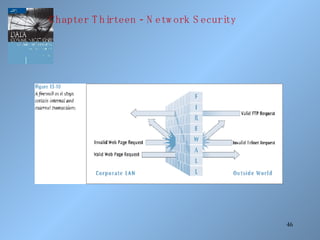
Standard System Attacks
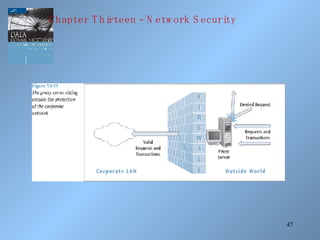
A very common way to attack vulnerability is via an e-mail
attachment. You open the attachment and you launch the virus.
Second common way to attack is to simply scan your computer
ports while you are connected to the Internet (either dial-up or
non-dial-up). If you have an open port, hacker will download
malicious software to your machine.
-Chapter T hirteen N etw ork S ecurity
7
Other Standard System Attacks
Denial of service attacks, or distributed denial of service attacks,
bombard a computer site with so many messages that the site is
incapable of answering valid request.
In e-mail bombing, a user sends an excessive amount of
unwanted e-mail to someone.
Smurfing is a nasty technique in which a program attacks a
network by exploiting IP broadcast addressing operations.
Ping storm is a condition in which the Internet Ping program is
used to send a flood of packets to a server.
-Chapter T hirteen N etw ork S ecurity
8
-Chapter T hirteen N etw ork S ecurity
9
Other Standard System Attacks
Spoofing is when a user creates a packet that appears to be
something else or from someone else.
Trojan Horse is a malicious piece of code hidden inside a
seemingly harmless piece of code.
Stealing, guessing, and intercepting passwords is also a tried and
true form of attack.
-Chapter T hirteen N etw ork S ecurity
10
Physical Protection
Protection from environmental damage such as floods,
earthquakes, and heat.
Physical security such as locking rooms, locking down
computers, keyboards, and other devices.
Electrical protection from power surges.
Noise protection from placing computers away from devices that
generate electromagnetic interference.
-Chapter T hirteen N etw ork S ecurity
11
Physical Protection - Surveillance
Proper placement of security cameras can deter theft and
vandalism.
Cameras can also provide a record of activities.
Intrusion detection is a field of study in which specialists try to
prevent intrusion and try to determine if a computer system has
been violated.
A honeypot is an indirect form of surveillance. Network
personnel create a trap, watching for unscrupulous activity
-Chapter T hirteen N etw ork S ecurity
12
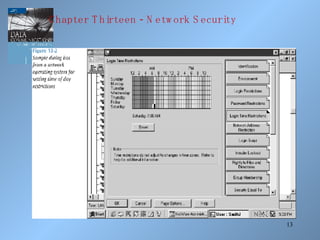
Controlling Access
Deciding who has access to what.
Limiting time of day access.
Limiting day of week access.
Limiting access from a location, such as not allowing a user to
use a remote login during certain periods or any time.
-Chapter T hirteen N etw ork S ecurity
13
-Chapter T hirteen N etw ork S ecurity
14
Passwords and ID Systems
Passwords are the most common form of security and the most
abused.
Simple rules help support safe passwords, including:
• Change your password often.
• Pick a good, random password (minimum 8 characters, mixed
symbols).
• Don’t share passwords or write them down.
• Don’t select names and familiar objects as passwords.
-Chapter T hirteen N etw ork S ecurity
15
-Chapter T hirteen N etw ork S ecurity
16
Passwords and ID Systems
Many new forms of “passwords” are emerging (biometrics):
• Fingerprints
• Face prints
• Retina scans and iris scans
• Voice prints
• Ear prints
-Chapter T hirteen N etw ork S ecurity
17
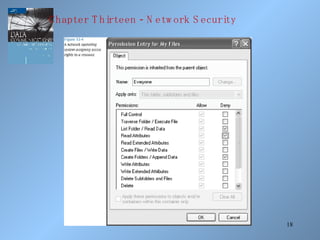
Access Rights
Two basic questions to access right: who and how?
Who do you give access right to? No one, group of users, entire
set of users?
How does a user or group of users have access? Read, write,
delete, print, copy, execute?
Most network operating systems have a powerful system for
assigning access rights.
-Chapter T hirteen N etw ork S ecurity
18
-Chapter T hirteen N etw ork S ecurity
19
Auditing
Creating a computer or paper audit can help detect wrongdoing.
Auditing can also be used as a deterrent.
Many network operating systems allow the administrator to audit
most types of transactions.
Many types of criminals have been caught because of computer-
based audits.
-Chapter T hirteen N etw ork S ecurity
20
-Chapter T hirteen N etw ork S ecurity
21
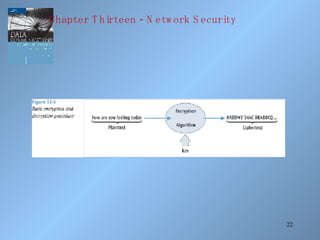
Basic Encryption and Decryption
Cryptography is the study of creating and using encryption and
decryption techniques.
Plaintext is the the data that before any encryption has been
performed.
Ciphertext is the data after encryption has been performed.
The key is the unique piece of information that is used to create
ciphertext and decrypt the ciphertext back into plaintext.
-Chapter T hirteen N etw ork S ecurity
22
-Chapter T hirteen N etw ork S ecurity
23
Monoalphabetic Substitution-based
Ciphers
Monoalphabetic substitution-based ciphers replace a character or
characters with a different character or characters, based upon
some key.
Replacing: abcdefghijklmnopqrstuvwxyz
With: POIUYTREWQLKJHGFDSAMNBVCXZ
The message: how about lunch at noon
encodes into EGVPO GNMKN HIEPM HGGH
-Chapter T hirteen N etw ork S ecurity
24
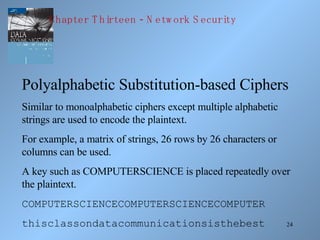
Polyalphabetic Substitution-based Ciphers
Similar to monoalphabetic ciphers except multiple alphabetic
strings are used to encode the plaintext.
For example, a matrix of strings, 26 rows by 26 characters or
columns can be used.
A key such as COMPUTERSCIENCE is placed repeatedly over
the plaintext.
COMPUTERSCIENCECOMPUTERSCIENCECOMPUTER
thisclassondatacommunicationsisthebest
-Chapter T hirteen N etw ork S ecurity
25
Polyalphabetic Substitution-based Ciphers
To encode the message, take the first letter of the plaintext, t, and
the corresponding key character immediately above it, C. Go to
row C column t in the 26x26 matrix and retrieve the ciphertext
character V.
Continue with the other characters in the plaintext.
-Chapter T hirteen N etw ork S ecurity
26
Transposition-based Ciphers
In a transposition-based cipher, the order the plaintext is not
preserved.
As a simple example, select a key such as COMPUTER.
Number the letters of the word COMPUTER in the order they
appear in the alphabet.
1 4 3 5 8 7 2 6
C O M P U T E R
-Chapter T hirteen N etw ork S ecurity
27
Transposition-based Ciphers
Now take the plaintext message and write it under the key.
1 4 3 5 8 7 2 6
C O M P U T E R
t h i s i s t h
e b e s t c l a
s s i h a v e e
v e r t a k e n
-Chapter T hirteen N etw ork S ecurity
28
Transposition-based Ciphers
Then read the ciphertext down the columns, starting with the
column numbered 1, followed by column number 2.
TESVTLEEIEIRHBSESSHTHAENSCVKITAA
-Chapter T hirteen N etw ork S ecurity
29
Public Key Cryptography
Very powerful encryption technique in which two keys are used:
the first key (the public key) encrypts the message while the
second key (the private key) decrypts the message.
Not possible to deduce one key from the other.
Not possible to break the code given the public key.
If you want someone to send you secure data, give them your
public key, you keep the private key.
Secure sockets layer on the Internet is a common example of
public key cryptography.
-Chapter T hirteen N etw ork S ecurity
30
Data Encryption Standard
Created in 1977 and in operation into the 1990s, the data
encryption standard took a 64-bit block of data and subjected it
to 16 levels of encryption.
The choice of encryption performed at each of the 16 levels
depends on the 56-bit key applied.
Even though 56 bits provides over 72 quadrillion combinations, a
system using this standard has been cracked (in 1998 by
Electronic Frontier Foundation in 3 days).
-Chapter T hirteen N etw ork S ecurity
31
-Chapter T hirteen N etw ork S ecurity
32
Triple-DES
A more powerful data encryption standard.
Data is encrypted using DES three times: the first time by the
first key, the second time by a second key, and the third time by
the first key again. (Can also have 3 unique keys.)
While virtually unbreakable, triple-DES is CPU intensive.
With more smart cards, cell phones, and PDAs, a faster (and
smaller) piece of code is highly desirable.
-Chapter T hirteen N etw ork S ecurity
33
Advanced Encryption Standard (AES)
Selected by the U.S. government to replace DES.
National Institute of Standards and Technology selected the
algorithm Rijndael (pronounced rain-doll) in October 2000 as the
basis for AES.
AES has more elegant mathematical formulas, requires only one
pass, and was designed to be fast, unbreakable, and able to
support even the smallest computing device.
-Chapter T hirteen N etw ork S ecurity
34
Advanced Encryption Standard (AES)
Key size of AES: 128, 192, or 256 bits
Estimated time to crack (assuming a machine could crack a DES
key in 1 second) : 149 trillion years
Very fast execution with very good use of resources
AES should be widely implemented by 2004
-Chapter T hirteen N etw ork S ecurity
35
Digital Signatures
Document to be signed is sent through a complex mathematical
computation that generates a hash.
Hash is encoded with the owner’s private key then stored.
To prove future ownership, stored hash is decoded using the
owner’s public key and that hash is compared with a current hash
of the document.
If the two hashes agree, the document belongs to the owner.
The U.S. has just approved legislation to accept digitally signed
documents as legal proof.
-Chapter T hirteen N etw ork S ecurity
36
Public Key Infrastructure
The combination of encryption techniques, software, and
services that involves all the necessary pieces to support digital
certificates, certificate authorities, and public key generation,
storage, and management.
A certificate, or digital certificate, is an electronic document,
similar to a passport, that establishes your credentials when you
are performing transactions.
-Chapter T hirteen N etw ork S ecurity
37
Public Key Infrastructure
A digital certificate contains your name, serial number,
expiration dates, copy of your public key, and digital signature of
certificate-issuing authority.
Certificates are usually kept in a registry so other users may
check them for authenticity.
-Chapter T hirteen N etw ork S ecurity
38
Public Key Infrastructure
Certificates are issued by a certificate authority (CA). A CA is
either specialized software on a company network or a trusted
third party.
Let’s say you want to order something over the Internet. The
web site wants to make sure you are legit, so the web server
requests your browser to sign the order with your private key
(obtained from your certificate).
-Chapter T hirteen N etw ork S ecurity
39
Public Key Infrastructure
The web server then requests your certificate from the third party
CA, validates that certificate by verifying third party’s signature,
then uses that certificate to validate the signature on your order.
The user can do the same procedure to make sure the web server
is not a bogus operation.
A certificate revocation list is used to “deactivate” a user’s
certificate.
-Chapter T hirteen N etw ork S ecurity
40
Public Key Infrastructure
Applications that could benefit from PKI:
• World Wide Web transactions
• Virtual private networks
• Electronic mail
• Client-server applications
• Banking transactions
-Chapter T hirteen N etw ork S ecurity
41
Steganography
The art and science of hiding information inside other, seemingly
ordinary messages or documents.
Unlike sending an encrypted message, you do not know when
steganography is hiding a secret message within a document.
Examples include creating a watermark over an image or taking
“random” pixels from an image and replacing them with the
hidden data.
-Chapter T hirteen N etw ork S ecurity
42
Securing Communications
So far we have examined standard system attacks, physical
protection, controlling access, and securing data. Now let’s
examine securing communications.
One way to secure the transfer of data is to scramble the signal as
it is being transmitted. This is called spread spectrum
technology.
-Chapter T hirteen N etw ork S ecurity
43
Guarding Against Viruses
Signature-based scanners look for particular virus patterns or
signatures and alert the user.
Terminate-and-stay-resident programs run in the background
constantly watching for viruses and their actions.
Multi-level generic scanning is a combination of antivirus
techniques including intelligent checksum analysis and expert
system analysis.
-Chapter T hirteen N etw ork S ecurity
44
Firewalls
A system or combination of systems that supports an access
control policy between two networks.
A firewall can limit the types of transactions that enter a system,
as well as the types of transactions that leave a system.
Firewalls can be programmed to stop certain types or ranges of
IP addresses, as well as certain types of TCP port numbers
(applications).
-Chapter T hirteen N etw ork S ecurity
45
Firewalls
A packet filter firewall is essentially a router that has been
programmed to filter out or allow to pass certain IP addresses or
TCP port numbers.
A proxy server is a more advanced firewall that acts as a
doorman into a corporate network. Any external transaction that
request something from the corporate network must enter
through the proxy server.
Proxy servers are more advanced but make external accesses
slower.
-Chapter T hirteen N etw ork S ecurity
46
-Chapter T hirteen N etw ork S ecurity
47
-Chapter T hirteen N etw ork S ecurity
48
Wireless Security
How do you make a wireless LAN secure?
WEP (Wired Equivalency Protocol) was the first security
protocol used with wireless LANs. It had weak 40-bit static keys
and was too easy to break.
WPA (Wi-Fi Protected Access) replaced WEP. Major
improvement including dynamic key encryption and mutual
authentication for wireless clients.
-Chapter T hirteen N etw ork S ecurity
49
Wireless Security
Both of these should eventually give way to a new protocol
created by the IEEE - IEEE 802.11i.
802.11i allows the keys, the encryption algorithms, and
negotiation to be dynamically assigned.
Also, AES encryption based on the Rijndael algorithm with 128-,
192-, or 256-bit keys is incorporated.
-Chapter T hirteen N etw ork S ecurity
50
Security Policy Design Issues
What is the company’s desired level of security?
How much money is the company willing to invest in security?
If the company is serious about restricting access through an
Internet link, what about restricting access through all other entry
ways?
The company must have a well-designed security policy.
-Chapter T hirteen N etw ork S ecurity
51
Network Security In Action: Making
Wireless LANs Secure
Recall Hannah the network administrator from Chapters Seven,
Eight, and Nine? Now her company wants to add a wireless
LAN to their system and make it secure.
She needs to protect herself from war drivers.
Should she use WEP?
What about Cisco’s LEAP (Lightweight Extensible
Authentication Protocol)?
-Chapter T hirteen N etw ork S ecurity
52
Network Security In Action: Making
Wireless LANs Secure
What about WPA? It is relatively new. Is the software and
hardware all compatible with WPA?
If she decides to use WPA, where does she have to install the
WPA software? In the user’s laptop? At the wireless access
point? At the network server? All the above?
-Chapter T hirteen N etw ork S ecurity

Network security

  • 1.
  • 2.
    2 Introduction While computer systemstoday have some of the best security systems ever, they are more vulnerable than ever before. This vulnerability stems from the world-wide access to computer systems via the Internet. Computer and network security comes in many forms, including encryption algorithms, access to facilities, digital signatures, and using fingerprints and face scans as passwords. -Chapter T hirteen N etw ork S ecurity
  • 3.
    3 Viruses and Worms Acomputer virus is a small program that alters the way a computer operates and often does various types of damage by deleting and corrupting data and program files, or by altering operating system components, so that computer operation is impaired or even halted. Many different types of viruses, such as parasitic, boot sector, stealth, polymorphic, and macro. -Chapter T hirteen N etw ork S ecurity
  • 4.
    4 Viruses and Worms Acomputer worm is a program that copies itself from one system to another over a network, without the assistance of a human being. Worms usually propagate themselves by transferring from computer to computer via e-mail. Typically, a virus or a worm is transported as a Trojan horse—in other words, hiding inside a harmless-looking piece of code such as an e-mail or an application macro. -Chapter T hirteen N etw ork S ecurity
  • 5.
    5 Standard System Attacks Twoleading forms of attacks the last few years: 1. Exploiting known operating system vulnerabilities 2. Exploiting known vulnerabilities in application software For both of these, software company issues a patch. Patch may fix it, or introduce even more holes. Either way, bad guys find new holes and exploit. -Chapter T hirteen N etw ork S ecurity
  • 6.
    6 Standard System Attacks Avery common way to attack vulnerability is via an e-mail attachment. You open the attachment and you launch the virus. Second common way to attack is to simply scan your computer ports while you are connected to the Internet (either dial-up or non-dial-up). If you have an open port, hacker will download malicious software to your machine. -Chapter T hirteen N etw ork S ecurity
  • 7.
    7 Other Standard SystemAttacks Denial of service attacks, or distributed denial of service attacks, bombard a computer site with so many messages that the site is incapable of answering valid request. In e-mail bombing, a user sends an excessive amount of unwanted e-mail to someone. Smurfing is a nasty technique in which a program attacks a network by exploiting IP broadcast addressing operations. Ping storm is a condition in which the Internet Ping program is used to send a flood of packets to a server. -Chapter T hirteen N etw ork S ecurity
  • 8.
    8 -Chapter T hirteenN etw ork S ecurity
  • 9.
    9 Other Standard SystemAttacks Spoofing is when a user creates a packet that appears to be something else or from someone else. Trojan Horse is a malicious piece of code hidden inside a seemingly harmless piece of code. Stealing, guessing, and intercepting passwords is also a tried and true form of attack. -Chapter T hirteen N etw ork S ecurity
  • 10.
    10 Physical Protection Protection fromenvironmental damage such as floods, earthquakes, and heat. Physical security such as locking rooms, locking down computers, keyboards, and other devices. Electrical protection from power surges. Noise protection from placing computers away from devices that generate electromagnetic interference. -Chapter T hirteen N etw ork S ecurity
  • 11.
    11 Physical Protection -Surveillance Proper placement of security cameras can deter theft and vandalism. Cameras can also provide a record of activities. Intrusion detection is a field of study in which specialists try to prevent intrusion and try to determine if a computer system has been violated. A honeypot is an indirect form of surveillance. Network personnel create a trap, watching for unscrupulous activity -Chapter T hirteen N etw ork S ecurity
  • 12.
    12 Controlling Access Deciding whohas access to what. Limiting time of day access. Limiting day of week access. Limiting access from a location, such as not allowing a user to use a remote login during certain periods or any time. -Chapter T hirteen N etw ork S ecurity
  • 13.
    13 -Chapter T hirteenN etw ork S ecurity
  • 14.
    14 Passwords and IDSystems Passwords are the most common form of security and the most abused. Simple rules help support safe passwords, including: • Change your password often. • Pick a good, random password (minimum 8 characters, mixed symbols). • Don’t share passwords or write them down. • Don’t select names and familiar objects as passwords. -Chapter T hirteen N etw ork S ecurity
  • 15.
    15 -Chapter T hirteenN etw ork S ecurity
  • 16.
    16 Passwords and IDSystems Many new forms of “passwords” are emerging (biometrics): • Fingerprints • Face prints • Retina scans and iris scans • Voice prints • Ear prints -Chapter T hirteen N etw ork S ecurity
  • 17.
    17 Access Rights Two basicquestions to access right: who and how? Who do you give access right to? No one, group of users, entire set of users? How does a user or group of users have access? Read, write, delete, print, copy, execute? Most network operating systems have a powerful system for assigning access rights. -Chapter T hirteen N etw ork S ecurity
  • 18.
    18 -Chapter T hirteenN etw ork S ecurity
  • 19.
    19 Auditing Creating a computeror paper audit can help detect wrongdoing. Auditing can also be used as a deterrent. Many network operating systems allow the administrator to audit most types of transactions. Many types of criminals have been caught because of computer- based audits. -Chapter T hirteen N etw ork S ecurity
  • 20.
    20 -Chapter T hirteenN etw ork S ecurity
  • 21.
    21 Basic Encryption andDecryption Cryptography is the study of creating and using encryption and decryption techniques. Plaintext is the the data that before any encryption has been performed. Ciphertext is the data after encryption has been performed. The key is the unique piece of information that is used to create ciphertext and decrypt the ciphertext back into plaintext. -Chapter T hirteen N etw ork S ecurity
  • 22.
    22 -Chapter T hirteenN etw ork S ecurity
  • 23.
    23 Monoalphabetic Substitution-based Ciphers Monoalphabetic substitution-basedciphers replace a character or characters with a different character or characters, based upon some key. Replacing: abcdefghijklmnopqrstuvwxyz With: POIUYTREWQLKJHGFDSAMNBVCXZ The message: how about lunch at noon encodes into EGVPO GNMKN HIEPM HGGH -Chapter T hirteen N etw ork S ecurity
  • 24.
    24 Polyalphabetic Substitution-based Ciphers Similarto monoalphabetic ciphers except multiple alphabetic strings are used to encode the plaintext. For example, a matrix of strings, 26 rows by 26 characters or columns can be used. A key such as COMPUTERSCIENCE is placed repeatedly over the plaintext. COMPUTERSCIENCECOMPUTERSCIENCECOMPUTER thisclassondatacommunicationsisthebest -Chapter T hirteen N etw ork S ecurity
  • 25.
    25 Polyalphabetic Substitution-based Ciphers Toencode the message, take the first letter of the plaintext, t, and the corresponding key character immediately above it, C. Go to row C column t in the 26x26 matrix and retrieve the ciphertext character V. Continue with the other characters in the plaintext. -Chapter T hirteen N etw ork S ecurity
  • 26.
    26 Transposition-based Ciphers In atransposition-based cipher, the order the plaintext is not preserved. As a simple example, select a key such as COMPUTER. Number the letters of the word COMPUTER in the order they appear in the alphabet. 1 4 3 5 8 7 2 6 C O M P U T E R -Chapter T hirteen N etw ork S ecurity
  • 27.
    27 Transposition-based Ciphers Now takethe plaintext message and write it under the key. 1 4 3 5 8 7 2 6 C O M P U T E R t h i s i s t h e b e s t c l a s s i h a v e e v e r t a k e n -Chapter T hirteen N etw ork S ecurity
  • 28.
    28 Transposition-based Ciphers Then readthe ciphertext down the columns, starting with the column numbered 1, followed by column number 2. TESVTLEEIEIRHBSESSHTHAENSCVKITAA -Chapter T hirteen N etw ork S ecurity
  • 29.
    29 Public Key Cryptography Verypowerful encryption technique in which two keys are used: the first key (the public key) encrypts the message while the second key (the private key) decrypts the message. Not possible to deduce one key from the other. Not possible to break the code given the public key. If you want someone to send you secure data, give them your public key, you keep the private key. Secure sockets layer on the Internet is a common example of public key cryptography. -Chapter T hirteen N etw ork S ecurity
  • 30.
    30 Data Encryption Standard Createdin 1977 and in operation into the 1990s, the data encryption standard took a 64-bit block of data and subjected it to 16 levels of encryption. The choice of encryption performed at each of the 16 levels depends on the 56-bit key applied. Even though 56 bits provides over 72 quadrillion combinations, a system using this standard has been cracked (in 1998 by Electronic Frontier Foundation in 3 days). -Chapter T hirteen N etw ork S ecurity
  • 31.
    31 -Chapter T hirteenN etw ork S ecurity
  • 32.
    32 Triple-DES A more powerfuldata encryption standard. Data is encrypted using DES three times: the first time by the first key, the second time by a second key, and the third time by the first key again. (Can also have 3 unique keys.) While virtually unbreakable, triple-DES is CPU intensive. With more smart cards, cell phones, and PDAs, a faster (and smaller) piece of code is highly desirable. -Chapter T hirteen N etw ork S ecurity
  • 33.
    33 Advanced Encryption Standard(AES) Selected by the U.S. government to replace DES. National Institute of Standards and Technology selected the algorithm Rijndael (pronounced rain-doll) in October 2000 as the basis for AES. AES has more elegant mathematical formulas, requires only one pass, and was designed to be fast, unbreakable, and able to support even the smallest computing device. -Chapter T hirteen N etw ork S ecurity
  • 34.
    34 Advanced Encryption Standard(AES) Key size of AES: 128, 192, or 256 bits Estimated time to crack (assuming a machine could crack a DES key in 1 second) : 149 trillion years Very fast execution with very good use of resources AES should be widely implemented by 2004 -Chapter T hirteen N etw ork S ecurity
  • 35.
    35 Digital Signatures Document tobe signed is sent through a complex mathematical computation that generates a hash. Hash is encoded with the owner’s private key then stored. To prove future ownership, stored hash is decoded using the owner’s public key and that hash is compared with a current hash of the document. If the two hashes agree, the document belongs to the owner. The U.S. has just approved legislation to accept digitally signed documents as legal proof. -Chapter T hirteen N etw ork S ecurity
  • 36.
    36 Public Key Infrastructure Thecombination of encryption techniques, software, and services that involves all the necessary pieces to support digital certificates, certificate authorities, and public key generation, storage, and management. A certificate, or digital certificate, is an electronic document, similar to a passport, that establishes your credentials when you are performing transactions. -Chapter T hirteen N etw ork S ecurity
  • 37.
    37 Public Key Infrastructure Adigital certificate contains your name, serial number, expiration dates, copy of your public key, and digital signature of certificate-issuing authority. Certificates are usually kept in a registry so other users may check them for authenticity. -Chapter T hirteen N etw ork S ecurity
  • 38.
    38 Public Key Infrastructure Certificatesare issued by a certificate authority (CA). A CA is either specialized software on a company network or a trusted third party. Let’s say you want to order something over the Internet. The web site wants to make sure you are legit, so the web server requests your browser to sign the order with your private key (obtained from your certificate). -Chapter T hirteen N etw ork S ecurity
  • 39.
    39 Public Key Infrastructure Theweb server then requests your certificate from the third party CA, validates that certificate by verifying third party’s signature, then uses that certificate to validate the signature on your order. The user can do the same procedure to make sure the web server is not a bogus operation. A certificate revocation list is used to “deactivate” a user’s certificate. -Chapter T hirteen N etw ork S ecurity
  • 40.
    40 Public Key Infrastructure Applicationsthat could benefit from PKI: • World Wide Web transactions • Virtual private networks • Electronic mail • Client-server applications • Banking transactions -Chapter T hirteen N etw ork S ecurity
  • 41.
    41 Steganography The art andscience of hiding information inside other, seemingly ordinary messages or documents. Unlike sending an encrypted message, you do not know when steganography is hiding a secret message within a document. Examples include creating a watermark over an image or taking “random” pixels from an image and replacing them with the hidden data. -Chapter T hirteen N etw ork S ecurity
  • 42.
    42 Securing Communications So farwe have examined standard system attacks, physical protection, controlling access, and securing data. Now let’s examine securing communications. One way to secure the transfer of data is to scramble the signal as it is being transmitted. This is called spread spectrum technology. -Chapter T hirteen N etw ork S ecurity
  • 43.
    43 Guarding Against Viruses Signature-basedscanners look for particular virus patterns or signatures and alert the user. Terminate-and-stay-resident programs run in the background constantly watching for viruses and their actions. Multi-level generic scanning is a combination of antivirus techniques including intelligent checksum analysis and expert system analysis. -Chapter T hirteen N etw ork S ecurity
  • 44.
    44 Firewalls A system orcombination of systems that supports an access control policy between two networks. A firewall can limit the types of transactions that enter a system, as well as the types of transactions that leave a system. Firewalls can be programmed to stop certain types or ranges of IP addresses, as well as certain types of TCP port numbers (applications). -Chapter T hirteen N etw ork S ecurity
  • 45.
    45 Firewalls A packet filterfirewall is essentially a router that has been programmed to filter out or allow to pass certain IP addresses or TCP port numbers. A proxy server is a more advanced firewall that acts as a doorman into a corporate network. Any external transaction that request something from the corporate network must enter through the proxy server. Proxy servers are more advanced but make external accesses slower. -Chapter T hirteen N etw ork S ecurity
  • 46.
    46 -Chapter T hirteenN etw ork S ecurity
  • 47.
    47 -Chapter T hirteenN etw ork S ecurity
  • 48.
    48 Wireless Security How doyou make a wireless LAN secure? WEP (Wired Equivalency Protocol) was the first security protocol used with wireless LANs. It had weak 40-bit static keys and was too easy to break. WPA (Wi-Fi Protected Access) replaced WEP. Major improvement including dynamic key encryption and mutual authentication for wireless clients. -Chapter T hirteen N etw ork S ecurity
  • 49.
    49 Wireless Security Both ofthese should eventually give way to a new protocol created by the IEEE - IEEE 802.11i. 802.11i allows the keys, the encryption algorithms, and negotiation to be dynamically assigned. Also, AES encryption based on the Rijndael algorithm with 128-, 192-, or 256-bit keys is incorporated. -Chapter T hirteen N etw ork S ecurity
  • 50.
    50 Security Policy DesignIssues What is the company’s desired level of security? How much money is the company willing to invest in security? If the company is serious about restricting access through an Internet link, what about restricting access through all other entry ways? The company must have a well-designed security policy. -Chapter T hirteen N etw ork S ecurity
  • 51.
    51 Network Security InAction: Making Wireless LANs Secure Recall Hannah the network administrator from Chapters Seven, Eight, and Nine? Now her company wants to add a wireless LAN to their system and make it secure. She needs to protect herself from war drivers. Should she use WEP? What about Cisco’s LEAP (Lightweight Extensible Authentication Protocol)? -Chapter T hirteen N etw ork S ecurity
  • 52.
    52 Network Security InAction: Making Wireless LANs Secure What about WPA? It is relatively new. Is the software and hardware all compatible with WPA? If she decides to use WPA, where does she have to install the WPA software? In the user’s laptop? At the wireless access point? At the network server? All the above? -Chapter T hirteen N etw ork S ecurity