Chapter Seven
Computer Network Security Basics
Data Communication and Computer
Networks
(TIT 1101)
What is network security?
2
 While computer systems today have some of the best
security systems ever, they are more vulnerable than ever
before.
 This vulnerability stems from the world-wide access to
computer systems via the Internet.
 Network security is preventing attackers from achieving
objectives through unauthorized access or unauthorized
use of computers and networks.
Basic Security Measures
 The basic security measures for computer systems fall into the
following categories:
1. External security
2. Operational security
3. Surveillance
4. Passwords/authentication
5. Auditing
6. Access rights
7. Standard System attacks
8. Viruses/worms and antivirus
tools
9. Firewalls
10. Encryption and Decryption
Techniques
11. Digital Signature
12. Security Policy
3
External Security
 Protection from environmental damage such as floods,
earthquakes, and heat.
 Physical security such as locking rooms, locking down
computers, keyboards, and other devices.
 Electrical protection from power surges.
 Noise protection from placing computers away from devices
that generate electromagnetic interference.
4
Operational Security
1. Deciding who has access to what.
2. Limiting time of day access.
3. Limiting day of week access.
4. Limiting access from a location, such as not allowing a
user to use a remote login during certain periods or any
time.
5
Surveillance
 Proper placement of security cameras can deter theft and
vandalism.
 Cameras can also provide a record of activities.
 Intrusion detection is a field of study in which specialists try
to prevent intrusion and try to determine if a computer
system has been violated.
6
Passwords and ID Systems
 Passwords are the most common form of security and the most
abused.
 Simple rules help support safe passwords, including:
1. Change your password often.
2. Pick a good, random password (minimum 8
characters, mixed symbols).
3. Don’t share passwords or write them down.
4. Don’t select names and familiar objects as passwords.
7
Authentication
8
 Authentication is the process of reliably verifying the identity
of someone (or something) by means of:
 A secret (password [one-time], ...)
 An object (smart card, ...)
 Physical characteristics (fingerprint, retina, ...)
 Trust
Passwords and ID Systems - Authentication?
Many new forms of “passwords” are emerging:
 Fingerprints
 Face prints
 Retina scans and iris scans
 Voice prints
 Ear prints
 Nose recognition
9
Auditing
 Creating a computer or paper audit can help detect wrongdoing.
 Auditing can also be used as a deterrent.
 Many network operating systems allow the administrator to audit
most types of transactions.
 Many types of criminals have been caught because of computer-
based audits.
10
Access Rights
 Two basic questions to access right: who and how?
 Who do you give access right to? No one, group of users,
entire set of users?
 How does a user or group of users have access? Read, write,
delete, print, copy, execute?
 Most network operating systems have a powerful system for
assigning access rights.
11
Computer virus and a computer worm?
12
 Viruses are computer programs that are designed to spread themselves
from one file to another on a single computer. A virus might rapidly
infect every application file on an individual computer, or slowly infect
the documents on that computer, but it does not intentionally try to
spread itself from that computer to other computers.
 We send e-mail document attachments, trade programs on diskettes, or
copy files to file servers. When the next unsuspecting user receives the
infected file or disk, they spread the virus to their computer, and so on.
 The computer worm is a program that is designed to copy itself from
one computer to another over a network (e.g. by using e-mail). The
worm spreads itself to many computers over a network, and doesn't
wait for a human being to help. This means that computer worms
spread much more rapidly than computer viruses.
Standard System Attacks
1. Denial of service attacks, or distributed denial of service attacks, bombard
a computer site with so many messages that the site is incapable of
answering valid request.
2. e-mail bombing, a user sends an excessive amount of unwanted e-mail to
someone.
3. Smurfing is a nasty technique in which a program attacks a network by
exploiting IP broadcast addressing operations.
4. Ping storm is a condition in which the Internet Ping program is used to
send a flood of packets to a server.
5. Spoofing is when a user creates a packet making them appear as though
they came from a trusted user within the network
6. Trojan Horse is a malicious piece of code hidden inside a seemingly
harmless piece of code.
7. Stealing, guessing, and intercepting passwords is also a tried and true
form of attack
13
Cryptography
14
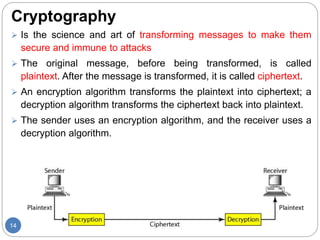
 Is the science and art of transforming messages to make them
secure and immune to attacks
 The original message, before being transformed, is called
plaintext. After the message is transformed, it is called ciphertext.
 An encryption algorithm transforms the plaintext into ciphertext; a
decryption algorithm transforms the ciphertext back into plaintext.
 The sender uses an encryption algorithm, and the receiver uses a
decryption algorithm.
15
 A key is a number (or a set of numbers) that the cipher, as
an algorithm, operates on.
 To encrypt a message, we need an encryption algorithm,
an encryption key, and the plaintext. These create the
ciphertext.
 To decrypt a message, we need a decryption algorithm, a
decryption key, and the ciphertext. These reveal the
original plaintext.
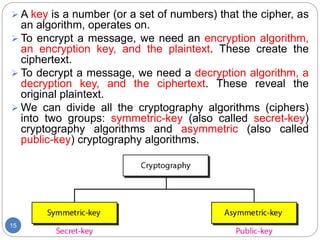
 We can divide all the cryptography algorithms (ciphers)
into two groups: symmetric-key (also called secret-key)
cryptography algorithms and asymmetric (also called
public-key) cryptography algorithms.
Symmetric-Key Cryptography
16
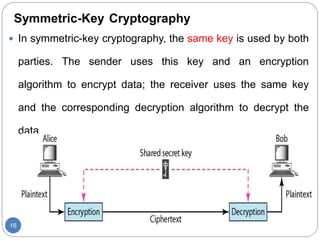
 In symmetric-key cryptography, the same key is used by both
parties. The sender uses this key and an encryption
algorithm to encrypt data; the receiver uses the same key
and the corresponding decryption algorithm to decrypt the
data
Asymmetric-Key Cryptography
17
 In asymmetric or public-key cryptography, there are two keys: a
private key and a public key. The private key is kept by the
receiver. The public key is announced to the public.
 In public-key encryption/decryption, the public key that is used
for encryption is different from the private key that is used for
decryption. The public key is available to the public; the private
key is available only to an individual.
Keys used in cryptography
18
SYMMETRIC-KEY CRYPTOGRAPHY
19
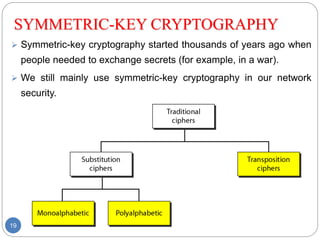
 Symmetric-key cryptography started thousands of years ago when
people needed to exchange secrets (for example, in a war).
 We still mainly use symmetric-key cryptography in our network
security.
20
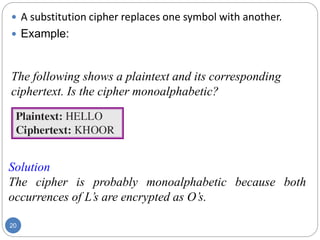
 A substitution cipher replaces one symbol with another.
 Example:
The following shows a plaintext and its corresponding
ciphertext. Is the cipher monoalphabetic?
Solution
The cipher is probably monoalphabetic because both
occurrences of L’s are encrypted as O’s.
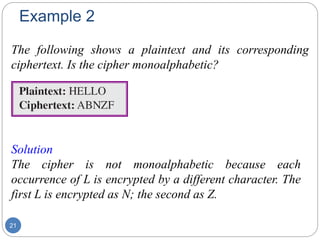
Example 2
21
The following shows a plaintext and its corresponding
ciphertext. Is the cipher monoalphabetic?
Solution
The cipher is not monoalphabetic because each
occurrence of L is encrypted by a different character. The
first L is encrypted as N; the second as Z.
22
 The shift cipher is sometimes referred to as the Caesar
cipher. In this cipher, the encryption algorithm is "shift
key characters down," with key equal to some number.
The decryption algorithm is "shift key characters up.“
 Example:
Use the shift cipher with key = 15 to encrypt the message
“HELLO.”
Solution
We encrypt one character at a time. Each character is shifted 15
characters down. Letter H is encrypted to W. Letter E is encrypted to
T. The first L is encrypted to A. The second L is also encrypted to A.
And O is encrypted to D. The cipher text is WTAAD.
Example 2
23
Use the shift cipher with key = 15 to decrypt the message
“WTAAD.”
Solution
We decrypt one character at a time. Each character is
shifted 15 characters up. Letter W is decrypted to H. Letter
T is decrypted to E. The first A is decrypted to L. The
second A is decrypted to L. And, finally, D is decrypted to
O. The plaintext is HELLO.
24
 A transposition cipher reorders (permutes) symbols in
a block of symbols.
Example
25
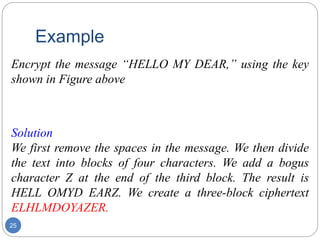
Encrypt the message “HELLO MY DEAR,” using the key
shown in Figure above
Solution
We first remove the spaces in the message. We then divide
the text into blocks of four characters. We add a bogus
character Z at the end of the third block. The result is
HELL OMYD EARZ. We create a three-block ciphertext
ELHLMDOYAZER.
Data Encryption Standard (DES)
26
 One example of a complex block cipher is the Data Encryption
Standard (DES). DES was designed by IBM and adopted by the
U.S. government as the standard encryption method for nonmilitary
and nonclassified use.
 The algorithm encrypts a 64-bit plaintext block using a 64-bit key
ASYMMETRIC-KEY CRYPTOGRAPHY
27
 An asymmetric-key (or public-key) cipher uses two keys: one
private and one public.
 Example: RSA (Rivest, Shamir, and Adleman )
Selecting Keys
28
 Bob use the following steps to select the private and public keys:
1. Bob chooses two very large prime numbers p and q. Remember
that a prime number is one that can be divided evenly only by 1
and itself.
2. Bob multiplies the above two primes to find n, the modulus for
encryption and decryption. In other words, n=p X q.
3. Bob calculates another number F =(p-1) X (q-1).
4. Bob chooses a random integer e. He then calculates d so that d x
e=1 mod F.=>dxe-1 evenly divide F
5. Bob announces e and n to the public; he keeps F and d secret
In RSA, e and n are announced to the public; d and F are kept
secret.
Example
29
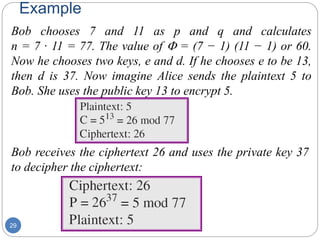
Bob chooses 7 and 11 as p and q and calculates
n = 7 · 11 = 77. The value of F = (7 − 1) (11 − 1) or 60.
Now he chooses two keys, e and d. If he chooses e to be 13,
then d is 37. Now imagine Alice sends the plaintext 5 to
Bob. She uses the public key 13 to encrypt 5.
Bob receives the ciphertext 26 and uses the private key 37
to decipher the ciphertext:
Digital Signatures
30
 A digital signature is much like a hand signature in that it provides
proof that you are the originator of the message (Authentication);
assigns a code to a document.
 Used to bound the message originator with the exact contents of the
message through the use of key pairs. This allows for the feature of
non-repudiation (non-rejection) to be achieved - this is crucial for
electronic commerce.
 Non-repudiation is a property achieved through cryptographic
methods which prevents an individual or entity from denying having
performed a particular action related to data.
 The private key of the sender is used to compute a message digest.
Class Activity: How is conventional signature send? How
is it verified by the receiver?
Firewalls
31
 Used to control the flow of traffic (both inflows and outflows,
but primarily inflows) between networks
 The connected networks can be internal or a combination of
internal and external networks
 A system or combination of systems that supports an access
control policy between two networks.
 A firewall can limit the types of transactions that enter a
system, as well as the types of transactions that leave a
system.
 Firewalls can be programmed to stop certain types or ranges
of IP addresses, as well as certain types of TCP port numbers
Characteristics of Good Firewalls
32
 All traffic from inside the corporate network to outside the
network, and vice-versa, must pass through it;
 Only authorized traffic, as defined by the security policy,
is allowed to pass through it; and the system itself is
immune to penetration.
A firewall as it stops certain internet and external transactions
33
Types of Firewall
 A packet filter firewall is essentially a router that has been
programmed to filter out or allow to pass certain IP addresses or
TCP port numbers.
 A proxy server is a more advanced firewall that acts as a doorman
into a corporate network.
 Any external transaction that request something from the
corporate network must enter through the proxy server, this server
replaces the IP addresses of the packets going out by its own
address.
 Proxy servers are more advanced but make external accesses
slower.
34
Firewall Functions
35
1. Protect the system from the hackers from logging into
machines on network.
2. Provide a single access point from where security and
audit can be imposed.
3. Act as an effective tracing tool.
4. Provide an important logging and auditing function
5. Provide information about the nature of traffic and the
number of attempts made to break into it.
Security Policy Design Issues
 What is the company’s desired level of security?
 How much money is the company willing to invest in security?
 If the company is serious about restricting access through an
Internet link, what about restricting access through all other entry
ways?
 The company must have a well-designed security policy.
36
10 Tips for Computer Network Security
1. Use a good anti-virus program.
2. Make sure your virus definitions are up-to-date.
3. Run regular virus scans.
4. Update your operating system regularly.
5. Configure and use a firewall.
6. Use your Web browser’s security features.
7. Enable your router’s security features.
8. Install an anti-spyware program.
9. Use strong, varied passwords.
10. Consider a computer network security suite and policy. .
37

chapter 7.pptx

  • 1.
    Chapter Seven Computer NetworkSecurity Basics Data Communication and Computer Networks (TIT 1101)
  • 2.
    What is networksecurity? 2  While computer systems today have some of the best security systems ever, they are more vulnerable than ever before.  This vulnerability stems from the world-wide access to computer systems via the Internet.  Network security is preventing attackers from achieving objectives through unauthorized access or unauthorized use of computers and networks.
  • 3.
    Basic Security Measures The basic security measures for computer systems fall into the following categories: 1. External security 2. Operational security 3. Surveillance 4. Passwords/authentication 5. Auditing 6. Access rights 7. Standard System attacks 8. Viruses/worms and antivirus tools 9. Firewalls 10. Encryption and Decryption Techniques 11. Digital Signature 12. Security Policy 3
  • 4.
    External Security  Protectionfrom environmental damage such as floods, earthquakes, and heat.  Physical security such as locking rooms, locking down computers, keyboards, and other devices.  Electrical protection from power surges.  Noise protection from placing computers away from devices that generate electromagnetic interference. 4
  • 5.
    Operational Security 1. Decidingwho has access to what. 2. Limiting time of day access. 3. Limiting day of week access. 4. Limiting access from a location, such as not allowing a user to use a remote login during certain periods or any time. 5
  • 6.
    Surveillance  Proper placementof security cameras can deter theft and vandalism.  Cameras can also provide a record of activities.  Intrusion detection is a field of study in which specialists try to prevent intrusion and try to determine if a computer system has been violated. 6
  • 7.
    Passwords and IDSystems  Passwords are the most common form of security and the most abused.  Simple rules help support safe passwords, including: 1. Change your password often. 2. Pick a good, random password (minimum 8 characters, mixed symbols). 3. Don’t share passwords or write them down. 4. Don’t select names and familiar objects as passwords. 7
  • 8.
    Authentication 8  Authentication isthe process of reliably verifying the identity of someone (or something) by means of:  A secret (password [one-time], ...)  An object (smart card, ...)  Physical characteristics (fingerprint, retina, ...)  Trust
  • 9.
    Passwords and IDSystems - Authentication? Many new forms of “passwords” are emerging:  Fingerprints  Face prints  Retina scans and iris scans  Voice prints  Ear prints  Nose recognition 9
  • 10.
    Auditing  Creating acomputer or paper audit can help detect wrongdoing.  Auditing can also be used as a deterrent.  Many network operating systems allow the administrator to audit most types of transactions.  Many types of criminals have been caught because of computer- based audits. 10
  • 11.
    Access Rights  Twobasic questions to access right: who and how?  Who do you give access right to? No one, group of users, entire set of users?  How does a user or group of users have access? Read, write, delete, print, copy, execute?  Most network operating systems have a powerful system for assigning access rights. 11
  • 12.
    Computer virus anda computer worm? 12  Viruses are computer programs that are designed to spread themselves from one file to another on a single computer. A virus might rapidly infect every application file on an individual computer, or slowly infect the documents on that computer, but it does not intentionally try to spread itself from that computer to other computers.  We send e-mail document attachments, trade programs on diskettes, or copy files to file servers. When the next unsuspecting user receives the infected file or disk, they spread the virus to their computer, and so on.  The computer worm is a program that is designed to copy itself from one computer to another over a network (e.g. by using e-mail). The worm spreads itself to many computers over a network, and doesn't wait for a human being to help. This means that computer worms spread much more rapidly than computer viruses.
  • 13.
    Standard System Attacks 1.Denial of service attacks, or distributed denial of service attacks, bombard a computer site with so many messages that the site is incapable of answering valid request. 2. e-mail bombing, a user sends an excessive amount of unwanted e-mail to someone. 3. Smurfing is a nasty technique in which a program attacks a network by exploiting IP broadcast addressing operations. 4. Ping storm is a condition in which the Internet Ping program is used to send a flood of packets to a server. 5. Spoofing is when a user creates a packet making them appear as though they came from a trusted user within the network 6. Trojan Horse is a malicious piece of code hidden inside a seemingly harmless piece of code. 7. Stealing, guessing, and intercepting passwords is also a tried and true form of attack 13
  • 14.
    Cryptography 14  Is thescience and art of transforming messages to make them secure and immune to attacks  The original message, before being transformed, is called plaintext. After the message is transformed, it is called ciphertext.  An encryption algorithm transforms the plaintext into ciphertext; a decryption algorithm transforms the ciphertext back into plaintext.  The sender uses an encryption algorithm, and the receiver uses a decryption algorithm.
  • 15.
    15  A keyis a number (or a set of numbers) that the cipher, as an algorithm, operates on.  To encrypt a message, we need an encryption algorithm, an encryption key, and the plaintext. These create the ciphertext.  To decrypt a message, we need a decryption algorithm, a decryption key, and the ciphertext. These reveal the original plaintext.  We can divide all the cryptography algorithms (ciphers) into two groups: symmetric-key (also called secret-key) cryptography algorithms and asymmetric (also called public-key) cryptography algorithms.
  • 16.
    Symmetric-Key Cryptography 16  Insymmetric-key cryptography, the same key is used by both parties. The sender uses this key and an encryption algorithm to encrypt data; the receiver uses the same key and the corresponding decryption algorithm to decrypt the data
  • 17.
    Asymmetric-Key Cryptography 17  Inasymmetric or public-key cryptography, there are two keys: a private key and a public key. The private key is kept by the receiver. The public key is announced to the public.  In public-key encryption/decryption, the public key that is used for encryption is different from the private key that is used for decryption. The public key is available to the public; the private key is available only to an individual.
  • 18.
    Keys used incryptography 18
  • 19.
    SYMMETRIC-KEY CRYPTOGRAPHY 19  Symmetric-keycryptography started thousands of years ago when people needed to exchange secrets (for example, in a war).  We still mainly use symmetric-key cryptography in our network security.
  • 20.
    20  A substitutioncipher replaces one symbol with another.  Example: The following shows a plaintext and its corresponding ciphertext. Is the cipher monoalphabetic? Solution The cipher is probably monoalphabetic because both occurrences of L’s are encrypted as O’s.
  • 21.
    Example 2 21 The followingshows a plaintext and its corresponding ciphertext. Is the cipher monoalphabetic? Solution The cipher is not monoalphabetic because each occurrence of L is encrypted by a different character. The first L is encrypted as N; the second as Z.
  • 22.
    22  The shiftcipher is sometimes referred to as the Caesar cipher. In this cipher, the encryption algorithm is "shift key characters down," with key equal to some number. The decryption algorithm is "shift key characters up.“  Example: Use the shift cipher with key = 15 to encrypt the message “HELLO.” Solution We encrypt one character at a time. Each character is shifted 15 characters down. Letter H is encrypted to W. Letter E is encrypted to T. The first L is encrypted to A. The second L is also encrypted to A. And O is encrypted to D. The cipher text is WTAAD.
  • 23.
    Example 2 23 Use theshift cipher with key = 15 to decrypt the message “WTAAD.” Solution We decrypt one character at a time. Each character is shifted 15 characters up. Letter W is decrypted to H. Letter T is decrypted to E. The first A is decrypted to L. The second A is decrypted to L. And, finally, D is decrypted to O. The plaintext is HELLO.
  • 24.
    24  A transpositioncipher reorders (permutes) symbols in a block of symbols.
  • 25.
    Example 25 Encrypt the message“HELLO MY DEAR,” using the key shown in Figure above Solution We first remove the spaces in the message. We then divide the text into blocks of four characters. We add a bogus character Z at the end of the third block. The result is HELL OMYD EARZ. We create a three-block ciphertext ELHLMDOYAZER.
  • 26.
    Data Encryption Standard(DES) 26  One example of a complex block cipher is the Data Encryption Standard (DES). DES was designed by IBM and adopted by the U.S. government as the standard encryption method for nonmilitary and nonclassified use.  The algorithm encrypts a 64-bit plaintext block using a 64-bit key
  • 27.
    ASYMMETRIC-KEY CRYPTOGRAPHY 27  Anasymmetric-key (or public-key) cipher uses two keys: one private and one public.  Example: RSA (Rivest, Shamir, and Adleman )
  • 28.
    Selecting Keys 28  Bobuse the following steps to select the private and public keys: 1. Bob chooses two very large prime numbers p and q. Remember that a prime number is one that can be divided evenly only by 1 and itself. 2. Bob multiplies the above two primes to find n, the modulus for encryption and decryption. In other words, n=p X q. 3. Bob calculates another number F =(p-1) X (q-1). 4. Bob chooses a random integer e. He then calculates d so that d x e=1 mod F.=>dxe-1 evenly divide F 5. Bob announces e and n to the public; he keeps F and d secret In RSA, e and n are announced to the public; d and F are kept secret.
  • 29.
    Example 29 Bob chooses 7and 11 as p and q and calculates n = 7 · 11 = 77. The value of F = (7 − 1) (11 − 1) or 60. Now he chooses two keys, e and d. If he chooses e to be 13, then d is 37. Now imagine Alice sends the plaintext 5 to Bob. She uses the public key 13 to encrypt 5. Bob receives the ciphertext 26 and uses the private key 37 to decipher the ciphertext:
  • 30.
    Digital Signatures 30  Adigital signature is much like a hand signature in that it provides proof that you are the originator of the message (Authentication); assigns a code to a document.  Used to bound the message originator with the exact contents of the message through the use of key pairs. This allows for the feature of non-repudiation (non-rejection) to be achieved - this is crucial for electronic commerce.  Non-repudiation is a property achieved through cryptographic methods which prevents an individual or entity from denying having performed a particular action related to data.  The private key of the sender is used to compute a message digest. Class Activity: How is conventional signature send? How is it verified by the receiver?
  • 31.
    Firewalls 31  Used tocontrol the flow of traffic (both inflows and outflows, but primarily inflows) between networks  The connected networks can be internal or a combination of internal and external networks  A system or combination of systems that supports an access control policy between two networks.  A firewall can limit the types of transactions that enter a system, as well as the types of transactions that leave a system.  Firewalls can be programmed to stop certain types or ranges of IP addresses, as well as certain types of TCP port numbers
  • 32.
    Characteristics of GoodFirewalls 32  All traffic from inside the corporate network to outside the network, and vice-versa, must pass through it;  Only authorized traffic, as defined by the security policy, is allowed to pass through it; and the system itself is immune to penetration.
  • 33.
    A firewall asit stops certain internet and external transactions 33
  • 34.
    Types of Firewall A packet filter firewall is essentially a router that has been programmed to filter out or allow to pass certain IP addresses or TCP port numbers.  A proxy server is a more advanced firewall that acts as a doorman into a corporate network.  Any external transaction that request something from the corporate network must enter through the proxy server, this server replaces the IP addresses of the packets going out by its own address.  Proxy servers are more advanced but make external accesses slower. 34
  • 35.
    Firewall Functions 35 1. Protectthe system from the hackers from logging into machines on network. 2. Provide a single access point from where security and audit can be imposed. 3. Act as an effective tracing tool. 4. Provide an important logging and auditing function 5. Provide information about the nature of traffic and the number of attempts made to break into it.
  • 36.
    Security Policy DesignIssues  What is the company’s desired level of security?  How much money is the company willing to invest in security?  If the company is serious about restricting access through an Internet link, what about restricting access through all other entry ways?  The company must have a well-designed security policy. 36
  • 37.
    10 Tips forComputer Network Security 1. Use a good anti-virus program. 2. Make sure your virus definitions are up-to-date. 3. Run regular virus scans. 4. Update your operating system regularly. 5. Configure and use a firewall. 6. Use your Web browser’s security features. 7. Enable your router’s security features. 8. Install an anti-spyware program. 9. Use strong, varied passwords. 10. Consider a computer network security suite and policy. . 37