- Pankaj
Ix c
G.L.T Saraswati Bal Mandir
Nehru Nagar
Networking
Networking
 Computer network A collection of computing devices that are connected in
various ways in order to communicate and share resources
 Usually, the connections between computers in a network are made using
physical wires or cables
 However, some connections are wireless, using radio waves or infrared signals
 The generic term node or host refers to any device on a network
 Data transfer rate The speed with which data is moved from one place on a
network to another
 Data transfer rate is a key issue in computer networks
 Computer networks have opened up an entire frontier in the world of
computing called the client/server model
 File server A computer that stores and manages files for multiple users on a
network
 Web server A computer dedicated to responding to requests (from the browser
client) for web pages
Types of Networks
 Local-area network (LAN) A network that connects a relatively small number
of machines in a relatively close geographical area
 Various configurations, called topologies, have been used to administer LANs
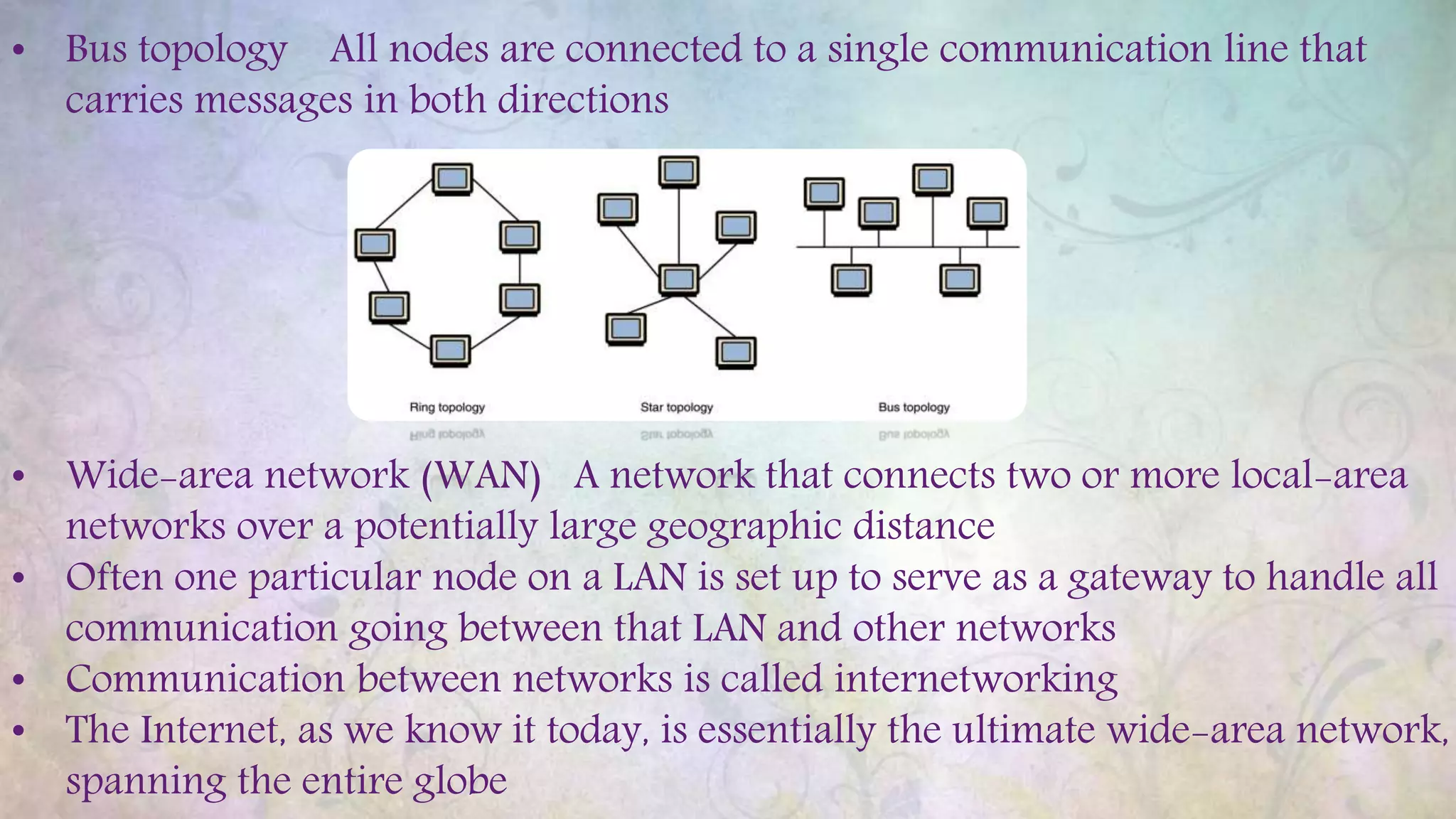
• Ring topology A configuration that connects all nodes in a
closed loop on which messages travel in one direction
• Star topology A configuration that centers around one node to which all
others are connected and through which all messages are sent
• Bus topology All nodes are connected to a single communication line that
carries messages in both directions
• Bus topology All nodes are connected to a single communication line that
carries messages in both directions
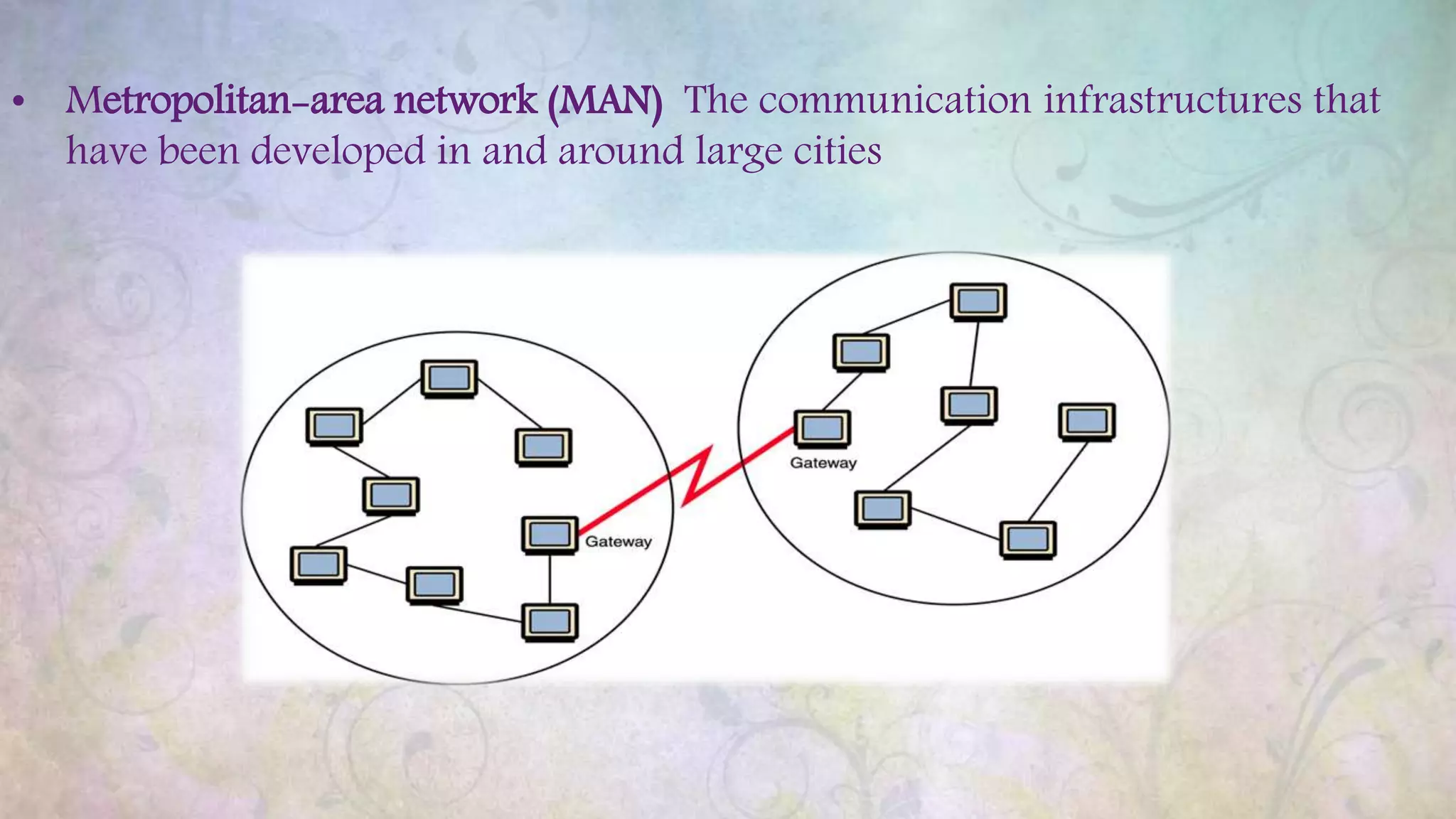
• Wide-area network (WAN) A network that connects two or more local-area
networks over a potentially large geographic distance
• Often one particular node on a LAN is set up to serve as a gateway to handle all
communication going between that LAN and other networks
• Communication between networks is called internetworking
• The Internet, as we know it today, is essentially the ultimate wide-area network,
spanning the entire globe
• Metropolitan-area network (MAN) The communication infrastructures that
have been developed in and around large cities
So, who owns the Internet?
Well, nobody does. No single person or company owns
the Internet or even controls it entirely. As a wide-
area network, it is made up of many smaller networks.
These smaller networks are often owned and managed
by a person or organization. The Internet, then, is
really defined by how connections can be made
between these networks.
Internet Connections
Internet backbone A set of high-speed networks that carry Internet traffic
These networks are provided by companies such as AT&T, GTE, and IBM
 Internet service provider (ISP) A company that provides other companies or
individuals with access to the Internet
 There are various technologies available that you can use to connect a home
computer to the Internet
• A phone modem converts computer data into an analog audio signal for
transfer over a telephone line, and then a modem at the destination
converts it back again into data
• A digital subscriber line (DSL) uses regular copper phone lines to transfer
digital data to and from the phone company’s central office
 Broadband A connection in which transfer speeds are faster than 128 bits per
second
• DSL connections and cable modems are broadband connections
• The speed for downloads (getting data from the Internet to your home
computer) may not be the same as uploads (sending data from your home
computer to the Internet)
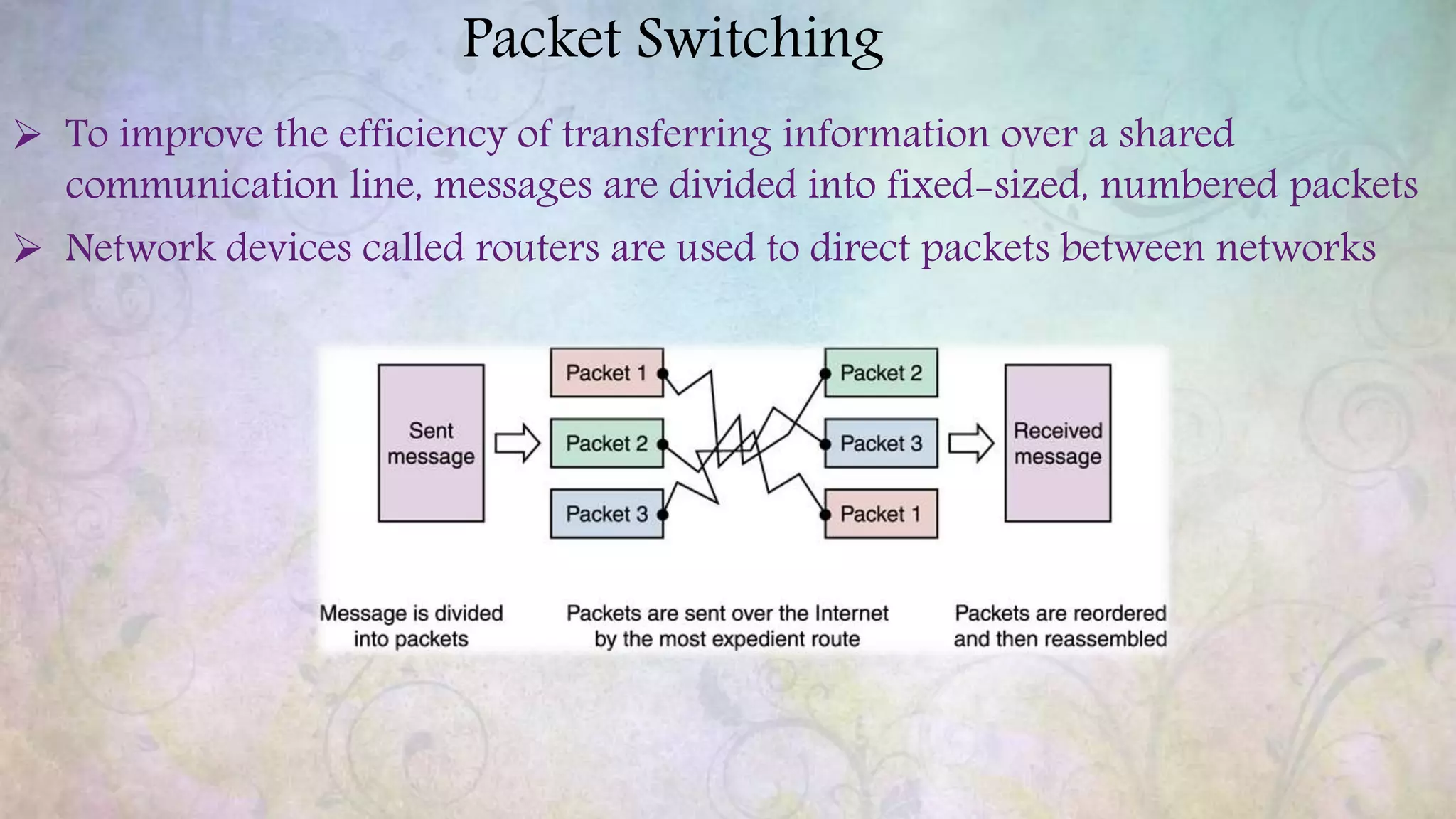
Packet Switching
 To improve the efficiency of transferring information over a shared
communication line, messages are divided into fixed-sized, numbered packets
 Network devices called routers are used to direct packets between networks
Open Systems
 Proprietary system A system that uses technologies kept private by a particular
commercial vendor
• One system couldn’t communicate with another, leading to the need for
 Interoperability The ability of software and hardware on multiple machines
and from multiple commercial vendors to communicate
 Open systems Systems based on a common model of network architecture and
a suite of protocols used in its implementation
 The International Organization for Standardization (ISO) established the Open
Systems Interconnection (OSI) Reference Model
 Each layer deals with a particular aspect of network communication
15-12
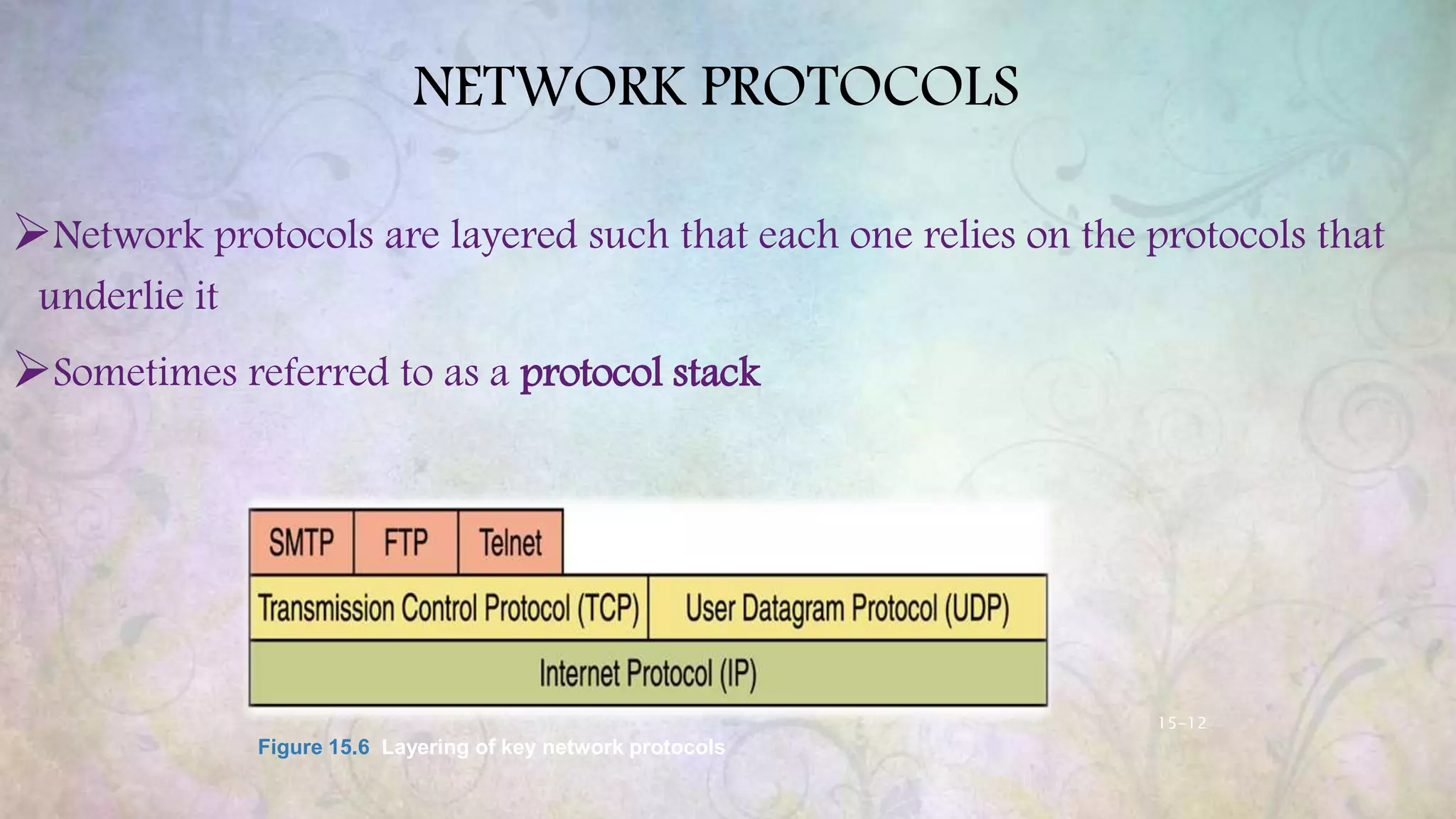
NETWORK PROTOCOLS
Network protocols are layered such that each one relies on the protocols that
underlie it
Sometimes referred to as a protocol stack
Figure 15.6 Layering of key network protocols
15-13
TCP/IP
 TCP stands for Transmission Control Protocol
 TCP software breaks messages into packets, hands them off to the IP
software for delivery, and then orders and reassembles the packets at their
destination
 IP stands for Internet Protocol
 IP software deals with the routing of packets through the maze of
interconnected networks to their final destination
High-Level Protocols
 Other protocols build on the foundation established by the TCP/IP protocol
suite
• Simple Mail Transfer Protocol (SMTP)
• File Transfer Protocol (FTP)
• Telnet
• Hyper Text Transfer Protocol (http)
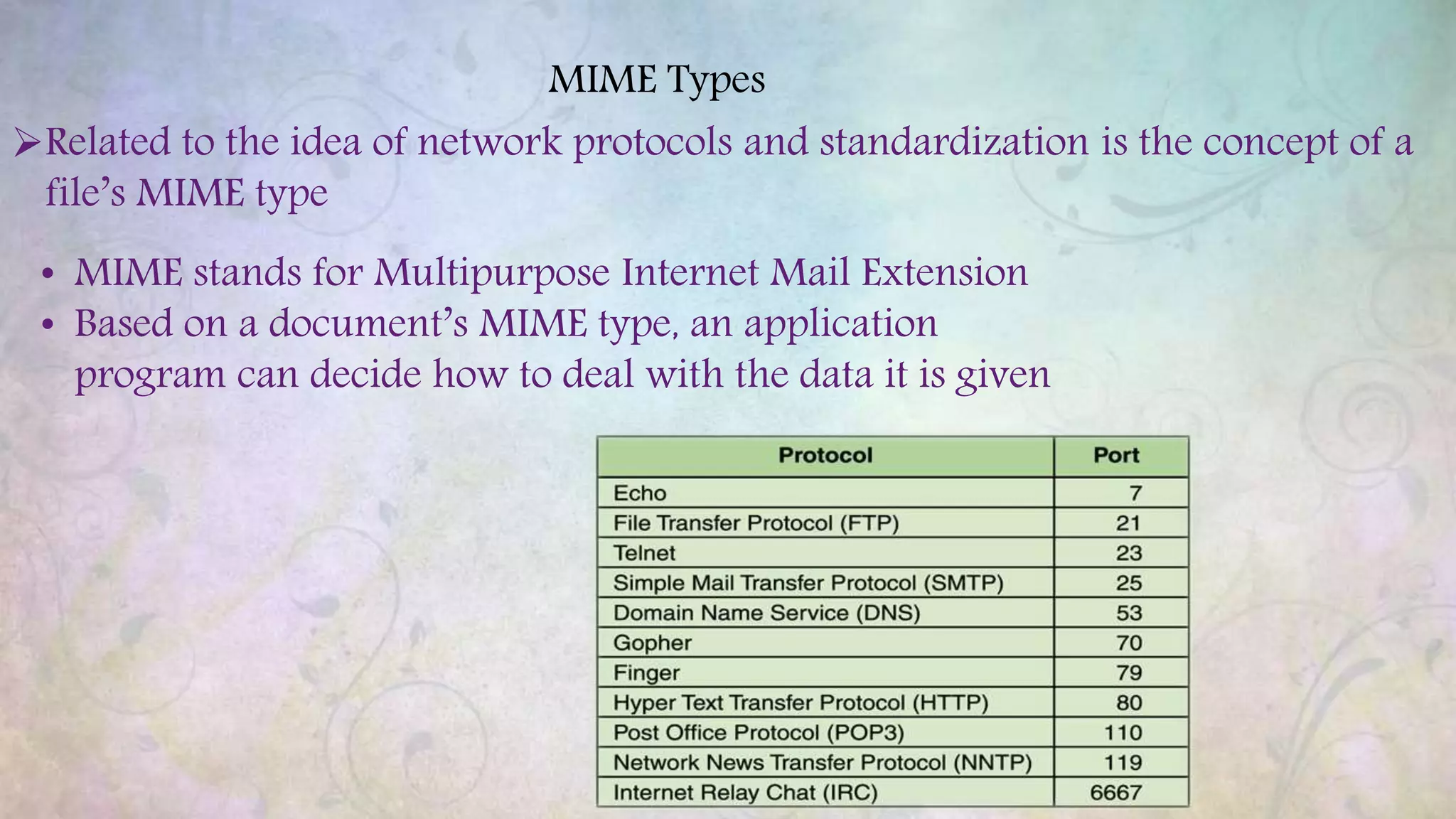
MIME Types
Related to the idea of network protocols and standardization is the concept of a
file’s MIME type
• MIME stands for Multipurpose Internet Mail Extension
• Based on a document’s MIME type, an application
program can decide how to deal with the data it is given
Firewalls
 Firewall A machine and its software that serve as a special gateway to a
network, protecting it from inappropriate access
• Filters the network traffic that comes in, checking the validity of the
messages as much as possible and perhaps denying some messages
altogether
• Enforces an organization’s access control policy
Network Addresses
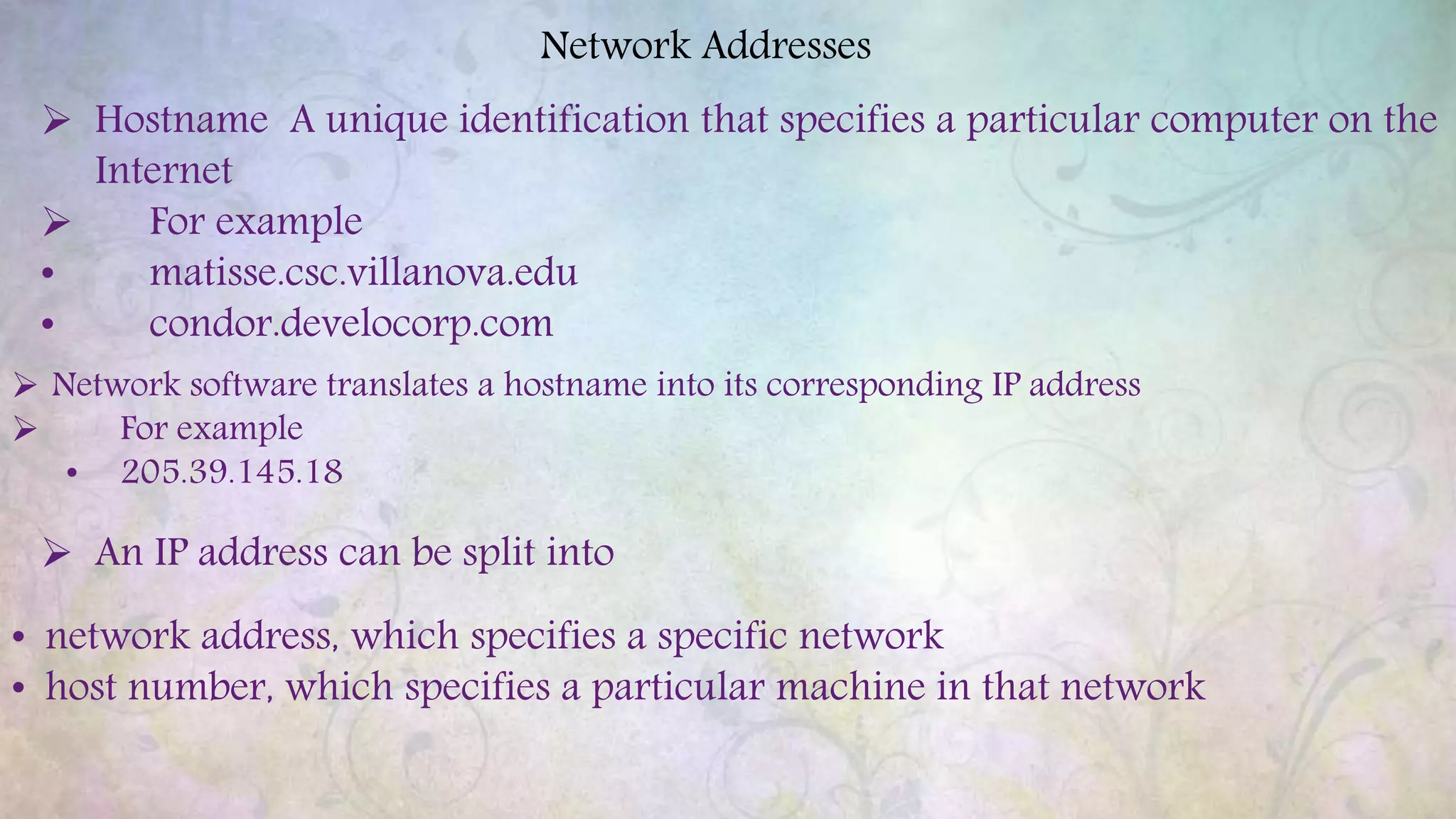
 Hostname A unique identification that specifies a particular computer on the
Internet
 For example
• matisse.csc.villanova.edu
• condor.develocorp.com
 Network software translates a hostname into its corresponding IP address
 For example
• 205.39.145.18
 An IP address can be split into
• network address, which specifies a specific network
• host number, which specifies a particular machine in that network
Domain Name System
 A hostname consists of the computer name followed by the domain name
csc.villanova.edu is the domain name
• A domain name is separated into two or more sections that specify the
organization, and possibly a subset of an organization, of which the
computer is a part
• Two organizations can have a computer named the same thing because the
domain name makes it clear which one is being referred to
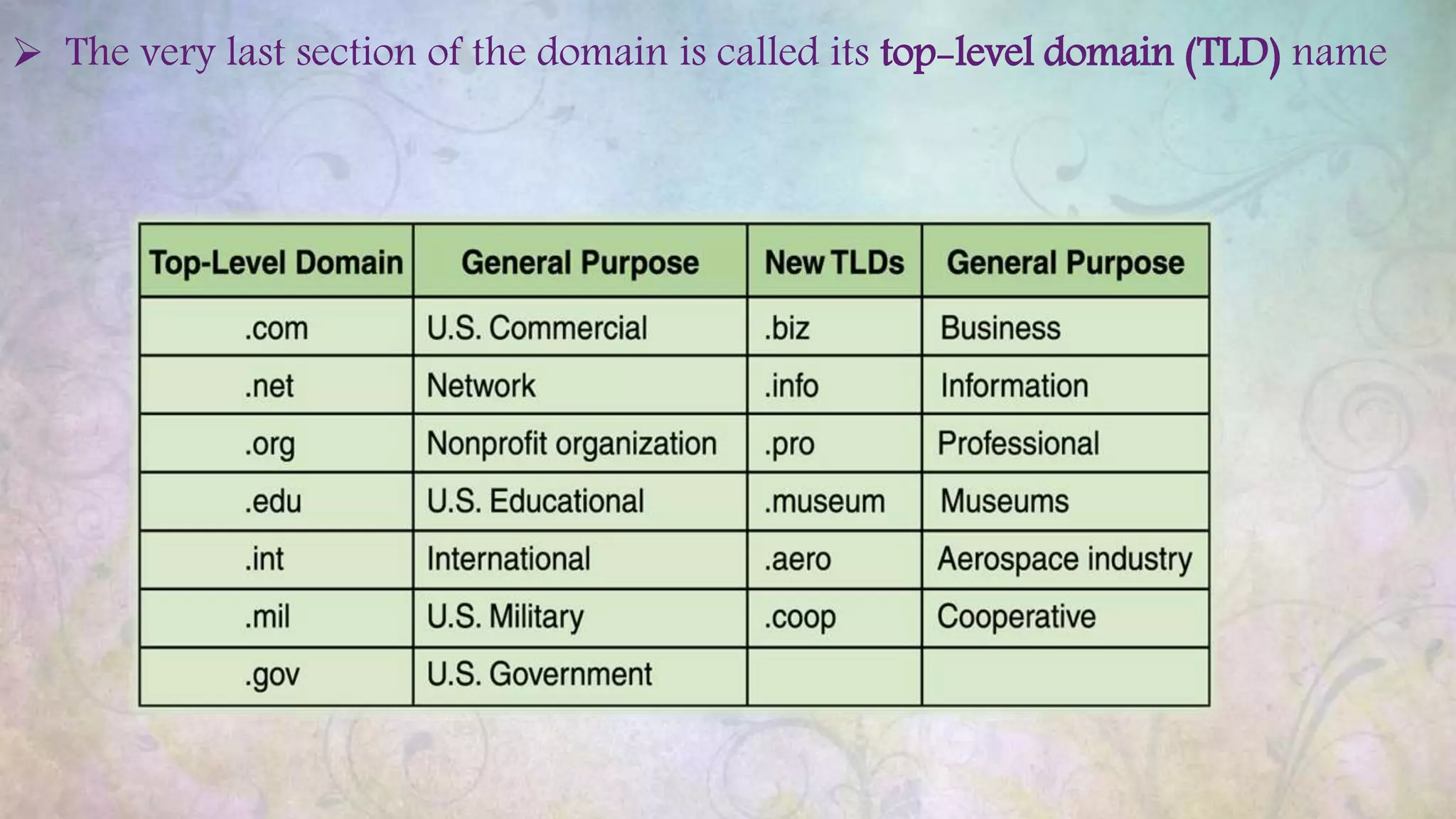
 The very last section of the domain is called its top-level domain (TLD) name
Organizations based in countries other than the United States use a top-level
domain that corresponds to their two-letter country codes
The domain name system (DNS) is chiefly used to translate hostnames into
numeric IP addresses
• DNS is an example of a distributed database
• If that server can resolve the hostname, it does so
• If not, that server asks another domain name server

Networking

  • 1.
    - Pankaj Ix c G.L.TSaraswati Bal Mandir Nehru Nagar Networking
  • 2.
    Networking  Computer networkA collection of computing devices that are connected in various ways in order to communicate and share resources  Usually, the connections between computers in a network are made using physical wires or cables  However, some connections are wireless, using radio waves or infrared signals  The generic term node or host refers to any device on a network  Data transfer rate The speed with which data is moved from one place on a network to another  Data transfer rate is a key issue in computer networks
  • 3.
     Computer networkshave opened up an entire frontier in the world of computing called the client/server model  File server A computer that stores and manages files for multiple users on a network  Web server A computer dedicated to responding to requests (from the browser client) for web pages
  • 4.
    Types of Networks Local-area network (LAN) A network that connects a relatively small number of machines in a relatively close geographical area  Various configurations, called topologies, have been used to administer LANs • Ring topology A configuration that connects all nodes in a closed loop on which messages travel in one direction • Star topology A configuration that centers around one node to which all others are connected and through which all messages are sent • Bus topology All nodes are connected to a single communication line that carries messages in both directions
  • 5.
    • Bus topologyAll nodes are connected to a single communication line that carries messages in both directions • Wide-area network (WAN) A network that connects two or more local-area networks over a potentially large geographic distance • Often one particular node on a LAN is set up to serve as a gateway to handle all communication going between that LAN and other networks • Communication between networks is called internetworking • The Internet, as we know it today, is essentially the ultimate wide-area network, spanning the entire globe
  • 6.
    • Metropolitan-area network(MAN) The communication infrastructures that have been developed in and around large cities
  • 7.
    So, who ownsthe Internet? Well, nobody does. No single person or company owns the Internet or even controls it entirely. As a wide- area network, it is made up of many smaller networks. These smaller networks are often owned and managed by a person or organization. The Internet, then, is really defined by how connections can be made between these networks.
  • 8.
    Internet Connections Internet backboneA set of high-speed networks that carry Internet traffic These networks are provided by companies such as AT&T, GTE, and IBM  Internet service provider (ISP) A company that provides other companies or individuals with access to the Internet  There are various technologies available that you can use to connect a home computer to the Internet • A phone modem converts computer data into an analog audio signal for transfer over a telephone line, and then a modem at the destination converts it back again into data • A digital subscriber line (DSL) uses regular copper phone lines to transfer digital data to and from the phone company’s central office
  • 9.
     Broadband Aconnection in which transfer speeds are faster than 128 bits per second • DSL connections and cable modems are broadband connections • The speed for downloads (getting data from the Internet to your home computer) may not be the same as uploads (sending data from your home computer to the Internet)
  • 10.
    Packet Switching  Toimprove the efficiency of transferring information over a shared communication line, messages are divided into fixed-sized, numbered packets  Network devices called routers are used to direct packets between networks
  • 11.
    Open Systems  Proprietarysystem A system that uses technologies kept private by a particular commercial vendor • One system couldn’t communicate with another, leading to the need for  Interoperability The ability of software and hardware on multiple machines and from multiple commercial vendors to communicate  Open systems Systems based on a common model of network architecture and a suite of protocols used in its implementation  The International Organization for Standardization (ISO) established the Open Systems Interconnection (OSI) Reference Model  Each layer deals with a particular aspect of network communication
  • 12.
    15-12 NETWORK PROTOCOLS Network protocolsare layered such that each one relies on the protocols that underlie it Sometimes referred to as a protocol stack Figure 15.6 Layering of key network protocols
  • 13.
    15-13 TCP/IP  TCP standsfor Transmission Control Protocol  TCP software breaks messages into packets, hands them off to the IP software for delivery, and then orders and reassembles the packets at their destination  IP stands for Internet Protocol  IP software deals with the routing of packets through the maze of interconnected networks to their final destination
  • 14.
    High-Level Protocols  Otherprotocols build on the foundation established by the TCP/IP protocol suite • Simple Mail Transfer Protocol (SMTP) • File Transfer Protocol (FTP) • Telnet • Hyper Text Transfer Protocol (http)
  • 15.
    MIME Types Related tothe idea of network protocols and standardization is the concept of a file’s MIME type • MIME stands for Multipurpose Internet Mail Extension • Based on a document’s MIME type, an application program can decide how to deal with the data it is given
  • 16.
    Firewalls  Firewall Amachine and its software that serve as a special gateway to a network, protecting it from inappropriate access • Filters the network traffic that comes in, checking the validity of the messages as much as possible and perhaps denying some messages altogether • Enforces an organization’s access control policy
  • 17.
    Network Addresses  HostnameA unique identification that specifies a particular computer on the Internet  For example • matisse.csc.villanova.edu • condor.develocorp.com  Network software translates a hostname into its corresponding IP address  For example • 205.39.145.18  An IP address can be split into • network address, which specifies a specific network • host number, which specifies a particular machine in that network
  • 18.
    Domain Name System A hostname consists of the computer name followed by the domain name csc.villanova.edu is the domain name • A domain name is separated into two or more sections that specify the organization, and possibly a subset of an organization, of which the computer is a part • Two organizations can have a computer named the same thing because the domain name makes it clear which one is being referred to
  • 19.
     The verylast section of the domain is called its top-level domain (TLD) name
  • 20.
    Organizations based incountries other than the United States use a top-level domain that corresponds to their two-letter country codes
  • 21.
    The domain namesystem (DNS) is chiefly used to translate hostnames into numeric IP addresses • DNS is an example of a distributed database • If that server can resolve the hostname, it does so • If not, that server asks another domain name server