Network Cables
Network cables
• Network cables are physical media used to connect computers,
servers, switches, and other network devices to transfer data
between them. They are a fundamental component of wired
network infrastructures. There are several types of network
cables, each designed for specific purposes and use case.
Following are the most common types of Network Cables:
• Twisted Pair Cables
• Coaxial Cables
• Fiber Optic Cables
2
Twisted Pair Cables
• A twisted pair cable is a type of wiring where two conductors are
twisted together to cancel out electromagnetic interference (EMI)
from external sources, such as electromagnetic radiation from
other cables and noise from other electronic devices.
• Twisting the wires reduces interference and crosstalk, improving
the quality and speed of data transmission over longer distances.
• Twisted pair cables are commonly used in telecommunication and
networking to transmit data.
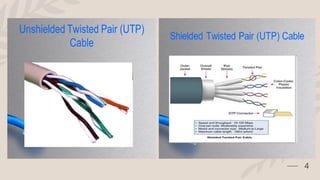
• There are two main types:
• Unshielded Twisted Pair (UTP): The most common form, used in
Ethernet cables (like Cat5e, Cat6), telephone lines, and other data
transmission applications.
• Shielded Twisted Pair (STP): Includes additional shielding to protect
against EMI, offering better performance in environments with high
interference.
3
4
5
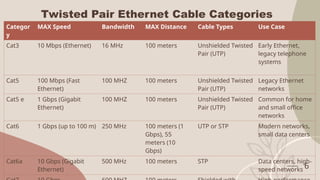
Twisted Pair Ethernet Cable Categories
Categor
y
MAX Speed Bandwidth MAX Distance Cable Types Use Case
Cat3 10 Mbps (Ethernet) 16 MHz 100 meters Unshielded Twisted
Pair (UTP)
Early Ethernet,
legacy telephone
systems
Cat5 100 Mbps (Fast
Ethernet)
100 MHZ 100 meters Unshielded Twisted
Pair (UTP)
Legacy Ethernet
networks
Cat5 e 1 Gbps (Gigabit
Ethernet)
100 MHZ 100 meters Unshielded Twisted
Pair (UTP)
Common for home
and small office
networks
Cat6 1 Gbps (up to 100 m) 250 MHz 100 meters (1
Gbps), 55
meters (10
Gbps)
UTP or STP Modern networks,
small data centers
Cat6a 10 Gbps (Gigabit
Ethernet)
500 MHz 100 meters STP Data centers, high-
speed networks 6
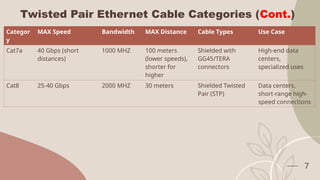
Twisted Pair Ethernet Cable Categories (Cont.)
Categor
y
MAX Speed Bandwidth MAX Distance Cable Types Use Case
Cat7a 40 Gbps (short
distances)
1000 MHZ 100 meters
(lower speeds),
shorter for
higher
Shielded with
GG45/TERA
connectors
High-end data
centers,
specialized uses
Cat8 25-40 Gbps 2000 MHZ 30 meters Shielded Twisted
Pair (STP)
Data centers,
short-range high-
speed connections
7
T568A & T568B Standard
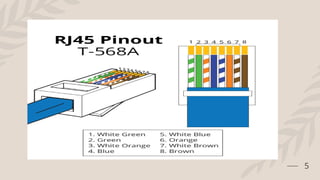
• T568A and T568B are two standards for wiring Ethernet cables
(specifically, twisted-pair copper cables like Cat5e, Cat6, etc.) and
define the pinout (wire arrangement) for connecting to RJ45
connectors. These standards are defined by the TIA/EIA
(Telecommunications Industry Association/Electronic Industries
Alliance) under the TIA/EIA-568 standard. The main difference
between them lies in the order of wire pairs in the connector, even
though both achieve the same performance for Ethernet.
8
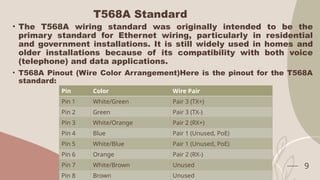
T568A Standard
• The T568A wiring standard was originally intended to be the
primary standard for Ethernet wiring, particularly in residential
and government installations. It is still widely used in homes and
older installations because of its compatibility with both voice
(telephone) and data applications.
• T568A Pinout (Wire Color Arrangement)Here is the pinout for the T568A
standard:
9
Pin Color Wire Pair
Pin 1 White/Green Pair 3 (TX+)
Pin 2 Green Pair 3 (TX-)
Pin 3 White/Orange Pair 2 (RX+)
Pin 4 Blue Pair 1 (Unused, PoE)
Pin 5 White/Blue Pair 1 (Unused, PoE)
Pin 6 Orange Pair 2 (RX-)
Pin 7 White/Brown Unused
Pin 8 Brown Unused
T568B Standard
• The T568B standard is more widely used in commercial and
modern Ethernet installations due to its historical adoption in
business and IT infrastructure. While it offers the same
performance as T568A, many businesses prefer it due to
familiarity and widespread usage.
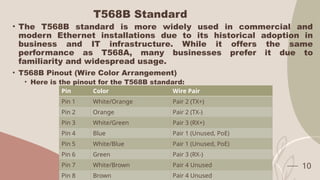
• T568B Pinout (Wire Color Arrangement)
• Here is the pinout for the T568B standard:
10
Pin Color Wire Pair
Pin 1 White/Orange Pair 2 (TX+)
Pin 2 Orange Pair 2 (TX-)
Pin 3 White/Green Pair 3 (RX+)
Pin 4 Blue Pair 1 (Unused, PoE)
Pin 5 White/Blue Pair 1 (Unused, PoE)
Pin 6 Green Pair 3 (RX-)
Pin 7 White/Brown Pair 4 Unused
Pin 8 Brown Pair 4 Unused
Straight-Through Cable
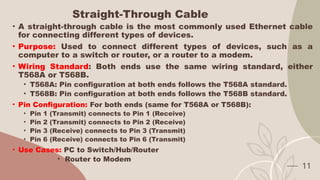
• A straight-through cable is the most commonly used Ethernet cable
for connecting different types of devices.
• Purpose: Used to connect different types of devices, such as a
computer to a switch or router, or a router to a modem.
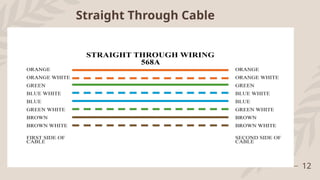
• Wiring Standard: Both ends use the same wiring standard, either
T568A or T568B.
• T568A: Pin configuration at both ends follows the T568A standard.
• T568B: Pin configuration at both ends follows the T568B standard.
• Pin Configuration: For both ends (same for T568A or T568B):
• Pin 1 (Transmit) connects to Pin 1 (Receive)
• Pin 2 (Transmit) connects to Pin 2 (Receive)
• Pin 3 (Receive) connects to Pin 3 (Transmit)
• Pin 6 (Receive) connects to Pin 6 (Transmit)
• Use Cases: PC to Switch/Hub/Router
• Router to Modem
11
12
Straight Through Cable
Crossover Cable
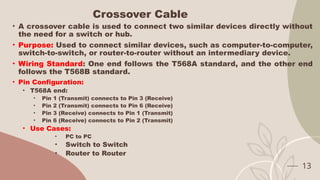
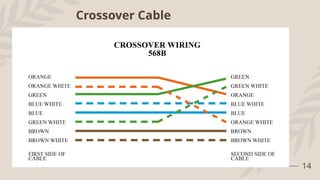
• A crossover cable is used to connect two similar devices directly without
the need for a switch or hub.
• Purpose: Used to connect similar devices, such as computer-to-computer,
switch-to-switch, or router-to-router without an intermediary device.
• Wiring Standard: One end follows the T568A standard, and the other end
follows the T568B standard.
• Pin Configuration:
• T568A end:
• Pin 1 (Transmit) connects to Pin 3 (Receive)
• Pin 2 (Transmit) connects to Pin 6 (Receive)
• Pin 3 (Receive) connects to Pin 1 (Transmit)
• Pin 6 (Receive) connects to Pin 2 (Transmit)
• Use Cases:
• PC to PC
• Switch to Switch
• Router to Router
13
14
Crossover Cable
Rollover Cable (Console cable)
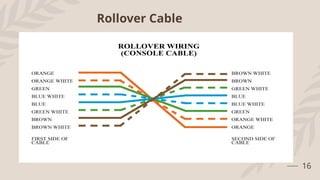
• A rollover cable is used to connect a computer to a router or switch's
console port, typically for administrative purposes.
• Purpose: Used for connecting a computer to the console port of networking
devices, such as Cisco routers or switches for configuration purposes.
• Wiring Standard: The pins on one end are completely reversed from the
other end.
• Pin Configuration:
• T568A end:
• Pin 1 connects to Pin 8
• Pin 2 connects to Pin 7
• Pin 3 connects to Pin 6
• Pin 4 connects to Pin 5
• Pin 5 connects to Pin 4
• Pin 6 connects to Pin 3
• Pin 7 connects to Pin 2
• Pin 8 connects to Pin 1
• Use Cases:
• Computer to Router/Switch Console Port 15
16
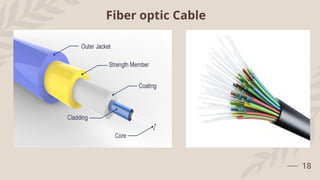
Rollover Cable
Fiber Optic Cable
• Fiber optic cables use light to transmit data and offer higher
speeds and longer distances compared to copper cables.
• Single-mode Fiber (SMF): Description: Single-mode fiber has a
smaller core (about 9 microns in diameter) and is used for long-
distance transmission, such as in WANs (Wide Area Networks) or
undersea cables. It typically supports distances up to 40
kilometers or more.
• Use Cases: Long-distance communication, telecommunications,
and backbone networks.
• Multi-mode Fiber (MMF)Description: Multi-mode fiber has a larger core
(50–62.5 microns) and is used for shorter distances, typically up to 500
meters. It is more affordable than single-mode fiber and is commonly
used in LANs and data centers.
• Use Cases: Short-distance communication, high-speed data transmission
in LAN environments.
17
18
Fiber optic Cable
Coaxial Cables
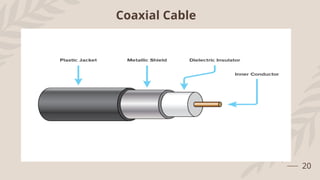
• Description: Coax, short for coaxial, is a type of cable used to
transmit data, the internet, video and voice communications. A
coax cable is made up of an aluminum and copper shield with an
outer plastic jacket (see below) with the dielectric insulator
helping to minimize signal loss.
• Coaxial cables have a central conductor made of copper,
surrounded by an insulating layer, a metallic shield, and an outer
insulating layer. These cables are used for high-frequency signal
transmission.
• Use Cases: Cable TV, internet connections (e.g., DOCSIS
standards), and older networking protocols (e.g., Ethernet over
coax).
• Types:RG-6: Common for cable TV and internet connections.RG-59:
Used in older analog video and CCTV systems.
19
20
Coaxial Cable
Ethernet Standards
• Description: Fast Ethernet and Gigabit Ethernet are two different
Ethernet standards that define the speed of data transmission in a
network. Each standard has its own specifications for speed,
cabling, and use cases.
• Fast Ethernet
• Fast Ethernet is an Ethernet standard that supports data transfer
rates of up to 100 Mbps. It is a step up from the original Ethernet
standard, which supported only 10 Mbps.
• Key Features of Fast Ethernet:
• Speed: Up to 100 Mbps.
• IEEE Standard: Defined under IEEE 802.3u.
• Cable Types: Typically uses Cat5 or Cat5e twisted-pair Ethernet cables
with RJ45 connectors, but can also work over fiber optic cables.
• Duplex Modes: Supports both half-duplex (shared bandwidth) and full-
duplex (dedicated bandwidth) modes.
21
Gigabit Ethernet Standards
• Description: Gigabit Ethernet is a faster Ethernet standard that
supports data transfer rates of 1 Gbps (1000 Mbps), which is 10
times faster than Fast Ethernet. It is now the most widely used
standard for home networks, business LANs, and data centers..
• Key Features of Fast Ethernet:
• Speed: Up to 1 Gbps (1000 Mbps).
• IEEE Standard: Defined under IEEE 802.3ab (for copper) and IEEE 802.3z
(for fiber).
• Cable Types:
• For copper wiring, typically uses Cat5e, Cat6, or higher cables.
• For fiber optic wiring, it uses 1000BASE-LX (single-mode fiber) or 1000BASE-
SX (multi-mode fiber)..
• Duplex Modes: Operates in full-duplex mode, meaning it can send and
receive data simultaneously, effectively achieving 2 Gbps throughput (1
Gbps in each direction).
22

Network Cables in computer networks for AI

  • 1.
  • 2.
    Network cables • Networkcables are physical media used to connect computers, servers, switches, and other network devices to transfer data between them. They are a fundamental component of wired network infrastructures. There are several types of network cables, each designed for specific purposes and use case. Following are the most common types of Network Cables: • Twisted Pair Cables • Coaxial Cables • Fiber Optic Cables 2
  • 3.
    Twisted Pair Cables •A twisted pair cable is a type of wiring where two conductors are twisted together to cancel out electromagnetic interference (EMI) from external sources, such as electromagnetic radiation from other cables and noise from other electronic devices. • Twisting the wires reduces interference and crosstalk, improving the quality and speed of data transmission over longer distances. • Twisted pair cables are commonly used in telecommunication and networking to transmit data. • There are two main types: • Unshielded Twisted Pair (UTP): The most common form, used in Ethernet cables (like Cat5e, Cat6), telephone lines, and other data transmission applications. • Shielded Twisted Pair (STP): Includes additional shielding to protect against EMI, offering better performance in environments with high interference. 3
  • 4.
  • 5.
  • 6.
    Twisted Pair EthernetCable Categories Categor y MAX Speed Bandwidth MAX Distance Cable Types Use Case Cat3 10 Mbps (Ethernet) 16 MHz 100 meters Unshielded Twisted Pair (UTP) Early Ethernet, legacy telephone systems Cat5 100 Mbps (Fast Ethernet) 100 MHZ 100 meters Unshielded Twisted Pair (UTP) Legacy Ethernet networks Cat5 e 1 Gbps (Gigabit Ethernet) 100 MHZ 100 meters Unshielded Twisted Pair (UTP) Common for home and small office networks Cat6 1 Gbps (up to 100 m) 250 MHz 100 meters (1 Gbps), 55 meters (10 Gbps) UTP or STP Modern networks, small data centers Cat6a 10 Gbps (Gigabit Ethernet) 500 MHz 100 meters STP Data centers, high- speed networks 6
  • 7.
    Twisted Pair EthernetCable Categories (Cont.) Categor y MAX Speed Bandwidth MAX Distance Cable Types Use Case Cat7a 40 Gbps (short distances) 1000 MHZ 100 meters (lower speeds), shorter for higher Shielded with GG45/TERA connectors High-end data centers, specialized uses Cat8 25-40 Gbps 2000 MHZ 30 meters Shielded Twisted Pair (STP) Data centers, short-range high- speed connections 7
  • 8.
    T568A & T568BStandard • T568A and T568B are two standards for wiring Ethernet cables (specifically, twisted-pair copper cables like Cat5e, Cat6, etc.) and define the pinout (wire arrangement) for connecting to RJ45 connectors. These standards are defined by the TIA/EIA (Telecommunications Industry Association/Electronic Industries Alliance) under the TIA/EIA-568 standard. The main difference between them lies in the order of wire pairs in the connector, even though both achieve the same performance for Ethernet. 8
  • 9.
    T568A Standard • TheT568A wiring standard was originally intended to be the primary standard for Ethernet wiring, particularly in residential and government installations. It is still widely used in homes and older installations because of its compatibility with both voice (telephone) and data applications. • T568A Pinout (Wire Color Arrangement)Here is the pinout for the T568A standard: 9 Pin Color Wire Pair Pin 1 White/Green Pair 3 (TX+) Pin 2 Green Pair 3 (TX-) Pin 3 White/Orange Pair 2 (RX+) Pin 4 Blue Pair 1 (Unused, PoE) Pin 5 White/Blue Pair 1 (Unused, PoE) Pin 6 Orange Pair 2 (RX-) Pin 7 White/Brown Unused Pin 8 Brown Unused
  • 10.
    T568B Standard • TheT568B standard is more widely used in commercial and modern Ethernet installations due to its historical adoption in business and IT infrastructure. While it offers the same performance as T568A, many businesses prefer it due to familiarity and widespread usage. • T568B Pinout (Wire Color Arrangement) • Here is the pinout for the T568B standard: 10 Pin Color Wire Pair Pin 1 White/Orange Pair 2 (TX+) Pin 2 Orange Pair 2 (TX-) Pin 3 White/Green Pair 3 (RX+) Pin 4 Blue Pair 1 (Unused, PoE) Pin 5 White/Blue Pair 1 (Unused, PoE) Pin 6 Green Pair 3 (RX-) Pin 7 White/Brown Pair 4 Unused Pin 8 Brown Pair 4 Unused
  • 11.
    Straight-Through Cable • Astraight-through cable is the most commonly used Ethernet cable for connecting different types of devices. • Purpose: Used to connect different types of devices, such as a computer to a switch or router, or a router to a modem. • Wiring Standard: Both ends use the same wiring standard, either T568A or T568B. • T568A: Pin configuration at both ends follows the T568A standard. • T568B: Pin configuration at both ends follows the T568B standard. • Pin Configuration: For both ends (same for T568A or T568B): • Pin 1 (Transmit) connects to Pin 1 (Receive) • Pin 2 (Transmit) connects to Pin 2 (Receive) • Pin 3 (Receive) connects to Pin 3 (Transmit) • Pin 6 (Receive) connects to Pin 6 (Transmit) • Use Cases: PC to Switch/Hub/Router • Router to Modem 11
  • 12.
  • 13.
    Crossover Cable • Acrossover cable is used to connect two similar devices directly without the need for a switch or hub. • Purpose: Used to connect similar devices, such as computer-to-computer, switch-to-switch, or router-to-router without an intermediary device. • Wiring Standard: One end follows the T568A standard, and the other end follows the T568B standard. • Pin Configuration: • T568A end: • Pin 1 (Transmit) connects to Pin 3 (Receive) • Pin 2 (Transmit) connects to Pin 6 (Receive) • Pin 3 (Receive) connects to Pin 1 (Transmit) • Pin 6 (Receive) connects to Pin 2 (Transmit) • Use Cases: • PC to PC • Switch to Switch • Router to Router 13
  • 14.
  • 15.
    Rollover Cable (Consolecable) • A rollover cable is used to connect a computer to a router or switch's console port, typically for administrative purposes. • Purpose: Used for connecting a computer to the console port of networking devices, such as Cisco routers or switches for configuration purposes. • Wiring Standard: The pins on one end are completely reversed from the other end. • Pin Configuration: • T568A end: • Pin 1 connects to Pin 8 • Pin 2 connects to Pin 7 • Pin 3 connects to Pin 6 • Pin 4 connects to Pin 5 • Pin 5 connects to Pin 4 • Pin 6 connects to Pin 3 • Pin 7 connects to Pin 2 • Pin 8 connects to Pin 1 • Use Cases: • Computer to Router/Switch Console Port 15
  • 16.
  • 17.
    Fiber Optic Cable •Fiber optic cables use light to transmit data and offer higher speeds and longer distances compared to copper cables. • Single-mode Fiber (SMF): Description: Single-mode fiber has a smaller core (about 9 microns in diameter) and is used for long- distance transmission, such as in WANs (Wide Area Networks) or undersea cables. It typically supports distances up to 40 kilometers or more. • Use Cases: Long-distance communication, telecommunications, and backbone networks. • Multi-mode Fiber (MMF)Description: Multi-mode fiber has a larger core (50–62.5 microns) and is used for shorter distances, typically up to 500 meters. It is more affordable than single-mode fiber and is commonly used in LANs and data centers. • Use Cases: Short-distance communication, high-speed data transmission in LAN environments. 17
  • 18.
  • 19.
    Coaxial Cables • Description:Coax, short for coaxial, is a type of cable used to transmit data, the internet, video and voice communications. A coax cable is made up of an aluminum and copper shield with an outer plastic jacket (see below) with the dielectric insulator helping to minimize signal loss. • Coaxial cables have a central conductor made of copper, surrounded by an insulating layer, a metallic shield, and an outer insulating layer. These cables are used for high-frequency signal transmission. • Use Cases: Cable TV, internet connections (e.g., DOCSIS standards), and older networking protocols (e.g., Ethernet over coax). • Types:RG-6: Common for cable TV and internet connections.RG-59: Used in older analog video and CCTV systems. 19
  • 20.
  • 21.
    Ethernet Standards • Description:Fast Ethernet and Gigabit Ethernet are two different Ethernet standards that define the speed of data transmission in a network. Each standard has its own specifications for speed, cabling, and use cases. • Fast Ethernet • Fast Ethernet is an Ethernet standard that supports data transfer rates of up to 100 Mbps. It is a step up from the original Ethernet standard, which supported only 10 Mbps. • Key Features of Fast Ethernet: • Speed: Up to 100 Mbps. • IEEE Standard: Defined under IEEE 802.3u. • Cable Types: Typically uses Cat5 or Cat5e twisted-pair Ethernet cables with RJ45 connectors, but can also work over fiber optic cables. • Duplex Modes: Supports both half-duplex (shared bandwidth) and full- duplex (dedicated bandwidth) modes. 21
  • 22.
    Gigabit Ethernet Standards •Description: Gigabit Ethernet is a faster Ethernet standard that supports data transfer rates of 1 Gbps (1000 Mbps), which is 10 times faster than Fast Ethernet. It is now the most widely used standard for home networks, business LANs, and data centers.. • Key Features of Fast Ethernet: • Speed: Up to 1 Gbps (1000 Mbps). • IEEE Standard: Defined under IEEE 802.3ab (for copper) and IEEE 802.3z (for fiber). • Cable Types: • For copper wiring, typically uses Cat5e, Cat6, or higher cables. • For fiber optic wiring, it uses 1000BASE-LX (single-mode fiber) or 1000BASE- SX (multi-mode fiber).. • Duplex Modes: Operates in full-duplex mode, meaning it can send and receive data simultaneously, effectively achieving 2 Gbps throughput (1 Gbps in each direction). 22