


Network automation with
Ansible and Python
Oliver Elliott, network architect, University of Bristol
What’s this all about?
Managing Campus and Data Centre networks
Why Automate?
3
Do more things Do things faster Create things
consistently
Check and
validate the
network
Improve
troubleshooting
Which Tools?
4
• Python
• Defacto standard programming
language
• Ansible
• Easy to learn
• Compatibility with most network OS’
Why not Vendor tools?
5
• Take advantage of vast experience of
open source community
• Flexibility for multi-vendor environments
Example
6
New DC network using Dell & Cumulus Linux
Spine01
S5232F
Leaf01
S5248F
Leaf02
S5248F
Spine02
S5232F
Leaf03
S5248F
Leaf04
S5248F
Leaf05
S5248F
Leaf06
S5248F
exit01
S5248F
exit02
S5248F
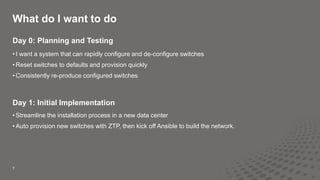
What do I want to do
7
Day 0: Planning and Testing
• I want a system that can rapidly configure and de-configure switches
• Reset switches to defaults and provision quickly
• Consistently re-produce configured switches
Day 1: Initial Implementation
• Streamline the installation process in a new data center
• Auto provision new switches with ZTP, then kick off Ansible to build the network.
8
Day 2: Running it as “business as usual”
• Make it easy
• Easy changes
• Easy Validation
• Make changes consistent – Ease the change control process
• Idempotence
• Crucial!
• Challenges:
• Now you have to run automation AND switches.
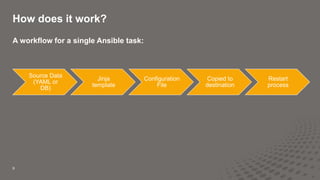
How does it work?
9
A workflow for a single Ansible task:
Source Data
(YAML or
DB)
Jinja
template
Configuration
File
Copied to
destination
Restart
process
10
---
- name: Configure Cumulus Linux Switches
hosts: all
become: yes
gather_facts: False
pre_tasks:
- name: Create ports.conf list for 100G switch
set_fact: ports_list_qsfp="{{ ports_40g | ports_list_100G }}"
when: ports_40g is defined
- name: Create ports.conf list for 25G switch
set_fact: ports_list_sfp="{{ ports_10g | ports_list_25G }}"
when: ports_10g is defined
- name: Create vlan_range used in jinja2 later
set_fact:
vlan_range: "{{ vlans | json_query('[*].number') | list_to_range }}"
when: vlans is defined
roles:
# Only required on first installation
# - base_config
# Normal roles
- ports_configuration
- interface_configuration
- routing_configuration
Run on all hosts
“sudo”
Run these
things first
Variable with a filter
Inherit other tasks
and variables
Example Playbook:
Configures a Cumulus
Leaf & Spine Network
11
filter_plugins/custom_filters.py:
#!/usr/bin/env python
# [1, 3, 4, 7, 8, 9] becomes "1 3-4 7-9"
def list_to_range(numlist):
newlist = sorted(set(numlist))
output = ''
i = 0
while i < len(newlist):
nextval = ''
if i + 1 < len(newlist) and newlist[i + 1] == newlist[i] + 1:
nextval += (str(newlist[i]) + '-')
while(i + 1 < len(newlist) and newlist[i + 1] == newlist[i] + 1):
i += 1
nextval += (str(newlist[i]) + ' ')
i += 1
output += nextval
return(output[:-1])
class FilterModule(object):
def filters(self):
return {
'list_to_range': list_to_range
}
Python in Ansible
“filter_plugin”
12
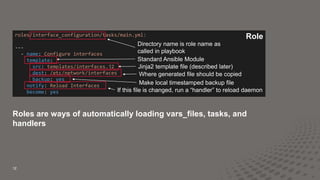
roles/interface_configuration/tasks/main.yml:
---
- name: Configure interfaces
template:
src: templates/interfaces.j2
dest: /etc/network/interfaces
backup: yes
notify: Reload Interfaces
become: yes
Role
Directory name is role name as
called in playbook
Standard Ansible Module
Jinja2 template file (described later)
Where generated file should be copied
Make local timestamped backup file
If this file is changed, run a “handler” to reload daemon
Roles are ways of automatically loading vars_files, tasks, and
handlers
13
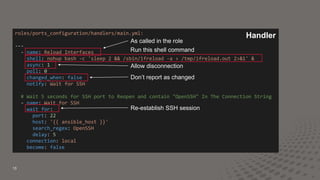
roles/ports_configuration/handlers/main.yml:
---
- name: Reload Interfaces
shell: nohup bash -c 'sleep 2 && /sbin/ifreload -a > /tmp/ifreload.out 2>&1' &
async: 1
poll: 0
changed_when: false
notify: Wait for SSH
# Wait 5 seconds for SSH port to Reopen and contain "OpenSSH" In The Connection String
- name: Wait for SSH
wait_for:
port: 22
host: '{{ ansible_host }}'
search_regex: OpenSSH
delay: 5
connection: local
become: false
Handler
As called in the role
Run this shell command
Allow disconnection
Don’t report as changed
Re-establish SSH session
14
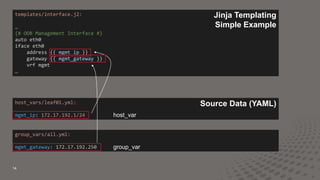
templates/interface.j2:
…
{# OOB Management Interface #}
auto eth0
iface eth0
address {{ mgmt_ip }}
gateway {{ mgmt_gateway }}
vrf mgmt
…
host_vars/leaf01.yml:
mgmt_ip: 172.17.192.1/24
group_vars/all.yml:
mgmt_gateway: 172.17.192.250
Source Data (YAML)
Jinja Templating
Simple Example
host_var
group_var
15
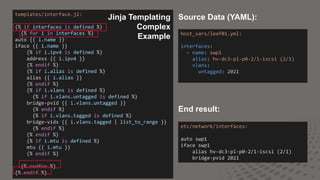
templates/interface.j2:
{% if interfaces is defined %}
{% for i in interfaces %}
auto {{ i.name }}
iface {{ i.name }}
{% if i.ipv4 is defined %}
address {{ i.ipv4 }}
{% endif %}
{% if i.alias is defined %}
alias {{ i.alias }}
{% endif %}
{% if i.vlans is defined %}
{% if i.vlans.untagged is defined %}
bridge-pvid {{ i.vlans.untagged }}
{% endif %}
{% if i.vlans.tagged is defined %}
bridge-vids {{ i.vlans.tagged | list_to_range }}
{% endif %}
{% endif %}
{% if i.mtu is defined %}
mtu {{ i.mtu }}
{% endif %}
{% endfor %}
{% endif %}
host_vars/leaf01.yml:
interfaces:
- name: swp1
alias: hv-dc3-pl-p0-2/1-iscsi (2/1)
vlans:
untagged: 2021
etc/network/interfaces:
auto swp1
iface swp1
alias hv-dc3-pl-p0-2/1-iscsi (2/1)
bridge-pvid 2021
Source Data (YAML):
End result:
Jinja Templating
Complex
Example
16
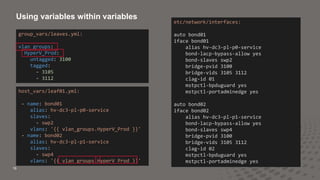
group_vars/leaves.yml:
vlan_groups:
HyperV_Prod:
untagged: 3100
tagged:
- 3105
- 3112
etc/network/interfaces:
auto bond01
iface bond01
alias hv-dc3-pl-p0-service
bond-lacp-bypass-allow yes
bond-slaves swp2
bridge-pvid 3100
bridge-vids 3105 3112
clag-id 01
mstpctl-bpduguard yes
mstpctl-portadminedge yes
auto bond02
iface bond02
alias hv-dc3-pl-p1-service
bond-lacp-bypass-allow yes
bond-slaves swp4
bridge-pvid 3100
bridge-vids 3105 3112
clag-id 02
mstpctl-bpduguard yes
mstpctl-portadminedge yes
host_vars/leaf01.yml:
- name: bond01
alias: hv-dc3-pl-p0-service
slaves:
- swp2
vlans: '{{ vlan_groups.HyperV_Prod }}'
- name: bond02
alias: hv-dc3-pl-p1-service
slaves:
- swp4
vlans: '{{ vlan_groups.HyperV_Prod }}'
Using variables within variables
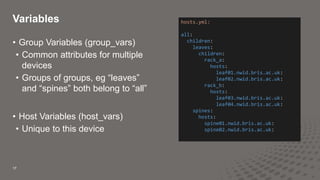
• Group Variables (group_vars)
• Common attributes for multiple
devices
• Groups of groups, eg “leaves”
and “spines” both belong to “all”
• Host Variables (host_vars)
• Unique to this device
Variables
17
hosts.yml:
all:
children:
leaves:
children:
rack_a:
hosts:
leaf01.nwid.bris.ac.uk:
leaf02.nwid.bris.ac.uk:
rack_b:
hosts:
leaf03.nwid.bris.ac.uk:
leaf04.nwid.bris.ac.uk:
spines:
hosts:
spine01.nwid.bris.ac.uk:
spine02.nwid.bris.ac.uk:
Live Demo!
18
Improvements
19
• ZTP
• Get the switches to a point where Ansible can configure them
• CI/CD Pipeline in Gitlab to automate tests
• Linting of YAML – catch typos
• Apply config to virtual test system
•Test for application errors
•Catch Ansible errors
•End to end testing with VMs representing services
• Source data in a database, eg Netbox
• AWX
• GUI
• Scheduling
• Eventual self-service for Server Systems teams

Network automation with Ansible and Python

  • 1.
    Network automation with Ansibleand Python Oliver Elliott, network architect, University of Bristol
  • 2.
    What’s this allabout? Managing Campus and Data Centre networks
  • 3.
    Why Automate? 3 Do morethings Do things faster Create things consistently Check and validate the network Improve troubleshooting
  • 4.
    Which Tools? 4 • Python •Defacto standard programming language • Ansible • Easy to learn • Compatibility with most network OS’
  • 5.
    Why not Vendortools? 5 • Take advantage of vast experience of open source community • Flexibility for multi-vendor environments
  • 6.
    Example 6 New DC networkusing Dell & Cumulus Linux Spine01 S5232F Leaf01 S5248F Leaf02 S5248F Spine02 S5232F Leaf03 S5248F Leaf04 S5248F Leaf05 S5248F Leaf06 S5248F exit01 S5248F exit02 S5248F
  • 7.
    What do Iwant to do 7 Day 0: Planning and Testing • I want a system that can rapidly configure and de-configure switches • Reset switches to defaults and provision quickly • Consistently re-produce configured switches Day 1: Initial Implementation • Streamline the installation process in a new data center • Auto provision new switches with ZTP, then kick off Ansible to build the network.
  • 8.
    8 Day 2: Runningit as “business as usual” • Make it easy • Easy changes • Easy Validation • Make changes consistent – Ease the change control process • Idempotence • Crucial! • Challenges: • Now you have to run automation AND switches.
  • 9.
    How does itwork? 9 A workflow for a single Ansible task: Source Data (YAML or DB) Jinja template Configuration File Copied to destination Restart process
  • 10.
    10 --- - name: ConfigureCumulus Linux Switches hosts: all become: yes gather_facts: False pre_tasks: - name: Create ports.conf list for 100G switch set_fact: ports_list_qsfp="{{ ports_40g | ports_list_100G }}" when: ports_40g is defined - name: Create ports.conf list for 25G switch set_fact: ports_list_sfp="{{ ports_10g | ports_list_25G }}" when: ports_10g is defined - name: Create vlan_range used in jinja2 later set_fact: vlan_range: "{{ vlans | json_query('[*].number') | list_to_range }}" when: vlans is defined roles: # Only required on first installation # - base_config # Normal roles - ports_configuration - interface_configuration - routing_configuration Run on all hosts “sudo” Run these things first Variable with a filter Inherit other tasks and variables Example Playbook: Configures a Cumulus Leaf & Spine Network
  • 11.
    11 filter_plugins/custom_filters.py: #!/usr/bin/env python # [1,3, 4, 7, 8, 9] becomes "1 3-4 7-9" def list_to_range(numlist): newlist = sorted(set(numlist)) output = '' i = 0 while i < len(newlist): nextval = '' if i + 1 < len(newlist) and newlist[i + 1] == newlist[i] + 1: nextval += (str(newlist[i]) + '-') while(i + 1 < len(newlist) and newlist[i + 1] == newlist[i] + 1): i += 1 nextval += (str(newlist[i]) + ' ') i += 1 output += nextval return(output[:-1]) class FilterModule(object): def filters(self): return { 'list_to_range': list_to_range } Python in Ansible “filter_plugin”
  • 12.
    12 roles/interface_configuration/tasks/main.yml: --- - name: Configureinterfaces template: src: templates/interfaces.j2 dest: /etc/network/interfaces backup: yes notify: Reload Interfaces become: yes Role Directory name is role name as called in playbook Standard Ansible Module Jinja2 template file (described later) Where generated file should be copied Make local timestamped backup file If this file is changed, run a “handler” to reload daemon Roles are ways of automatically loading vars_files, tasks, and handlers
  • 13.
    13 roles/ports_configuration/handlers/main.yml: --- - name: ReloadInterfaces shell: nohup bash -c 'sleep 2 && /sbin/ifreload -a > /tmp/ifreload.out 2>&1' & async: 1 poll: 0 changed_when: false notify: Wait for SSH # Wait 5 seconds for SSH port to Reopen and contain "OpenSSH" In The Connection String - name: Wait for SSH wait_for: port: 22 host: '{{ ansible_host }}' search_regex: OpenSSH delay: 5 connection: local become: false Handler As called in the role Run this shell command Allow disconnection Don’t report as changed Re-establish SSH session
  • 14.
    14 templates/interface.j2: … {# OOB ManagementInterface #} auto eth0 iface eth0 address {{ mgmt_ip }} gateway {{ mgmt_gateway }} vrf mgmt … host_vars/leaf01.yml: mgmt_ip: 172.17.192.1/24 group_vars/all.yml: mgmt_gateway: 172.17.192.250 Source Data (YAML) Jinja Templating Simple Example host_var group_var
  • 15.
    15 templates/interface.j2: {% if interfacesis defined %} {% for i in interfaces %} auto {{ i.name }} iface {{ i.name }} {% if i.ipv4 is defined %} address {{ i.ipv4 }} {% endif %} {% if i.alias is defined %} alias {{ i.alias }} {% endif %} {% if i.vlans is defined %} {% if i.vlans.untagged is defined %} bridge-pvid {{ i.vlans.untagged }} {% endif %} {% if i.vlans.tagged is defined %} bridge-vids {{ i.vlans.tagged | list_to_range }} {% endif %} {% endif %} {% if i.mtu is defined %} mtu {{ i.mtu }} {% endif %} {% endfor %} {% endif %} host_vars/leaf01.yml: interfaces: - name: swp1 alias: hv-dc3-pl-p0-2/1-iscsi (2/1) vlans: untagged: 2021 etc/network/interfaces: auto swp1 iface swp1 alias hv-dc3-pl-p0-2/1-iscsi (2/1) bridge-pvid 2021 Source Data (YAML): End result: Jinja Templating Complex Example
  • 16.
    16 group_vars/leaves.yml: vlan_groups: HyperV_Prod: untagged: 3100 tagged: - 3105 -3112 etc/network/interfaces: auto bond01 iface bond01 alias hv-dc3-pl-p0-service bond-lacp-bypass-allow yes bond-slaves swp2 bridge-pvid 3100 bridge-vids 3105 3112 clag-id 01 mstpctl-bpduguard yes mstpctl-portadminedge yes auto bond02 iface bond02 alias hv-dc3-pl-p1-service bond-lacp-bypass-allow yes bond-slaves swp4 bridge-pvid 3100 bridge-vids 3105 3112 clag-id 02 mstpctl-bpduguard yes mstpctl-portadminedge yes host_vars/leaf01.yml: - name: bond01 alias: hv-dc3-pl-p0-service slaves: - swp2 vlans: '{{ vlan_groups.HyperV_Prod }}' - name: bond02 alias: hv-dc3-pl-p1-service slaves: - swp4 vlans: '{{ vlan_groups.HyperV_Prod }}' Using variables within variables
  • 17.
    • Group Variables(group_vars) • Common attributes for multiple devices • Groups of groups, eg “leaves” and “spines” both belong to “all” • Host Variables (host_vars) • Unique to this device Variables 17 hosts.yml: all: children: leaves: children: rack_a: hosts: leaf01.nwid.bris.ac.uk: leaf02.nwid.bris.ac.uk: rack_b: hosts: leaf03.nwid.bris.ac.uk: leaf04.nwid.bris.ac.uk: spines: hosts: spine01.nwid.bris.ac.uk: spine02.nwid.bris.ac.uk:
  • 18.
  • 19.
    Improvements 19 • ZTP • Getthe switches to a point where Ansible can configure them • CI/CD Pipeline in Gitlab to automate tests • Linting of YAML – catch typos • Apply config to virtual test system •Test for application errors •Catch Ansible errors •End to end testing with VMs representing services • Source data in a database, eg Netbox • AWX • GUI • Scheduling • Eventual self-service for Server Systems teams

Editor's Notes

  • #3 I will talk about: How we approach automating the network at UoB Started by adding configuration snippets to cisco Complete templated config for Juniper QFX5110 and EX3400 F5 LTM and GTM Finally greenfield deployment of Dell & Cumulus
  • #5 Bishop says… You can trust Bishop.
  • #6 Ash might think they are good… Don’t trust Ash.
  • #7 Intended from the outset to be completely automated. Rare greenfield deployment so a chance to get it right!
  • #8 Day 0: I will be destroying/re-creating a lot, so make that process easy Never did get around to ZTP! Day1: Spend as little time in Leeds as possible, maybe zero time?
  • #9 I don’t want to be the only one running this system
  • #10 Very high level overview
  • #11 Things to explain: hosts: all don’t filter hosts in the playbook, do it with using limit if required. become: yes sudo commands gather facts: False Speed up the playbook by not gathering facts as is default. These might be useful for other tasks pre_tasks: These use Python to create some data we use later. “set_fact” puts it into a variable to use in Jinja in later tasks. when: Only run this task when we need to roles: Abstract the sections of playbook into “roles”. This allows modularity.
  • #12 Use the power of python to do things that would be unwieldy in Ansible I want to be able to source the list of vlans in a standard way, ultimately from the source of truth, eg Netbox via API.
  • #13 Things to explain: Directory name: This is how it was called from the main playbook Structure of files and directories as per Ansible standards template: Standard Ansible module src: jinja2 template file I will explain later dest: Where the ultimate file should live on the switch backup: Create a local backup on the switch with a time stamp in the filename notify: If this task results in a change, call a “handler” to reload the config become: sudo this command
  • #14 What is a handler? How does it work? name: As called from the role shell: Just run this on the command line aync: allow us to become disconnected (if changing the mgmt. port) changed_when: Don’t report as changed (default is yes) wait_for: re-establish connection over SSH
  • #15 Basic jinja example Uses 1 host variable and 1 group variable
  • #16 More complicated example with “if” statements Hmm, output is the same size as the input so it didn’t really save much!
  • #17 Ensuring consistency Lots of options on the output that must be correct, easy to make a mistake.
  • #18 DRY Don’t Repeat Yourself
  • #20 AKA Things I haven’t had time to implement yet