Travel with your 
mock server 
Jorge D. Ortiz-Fuentes 
@jdortiz
A POWWAU 
production
Agenda 
★ “Problem” 
★ A realistic solution 
★ Automation insights 
★More automation 
★Useful 
★Q&A
First world 
problems
My first 
Raspberry 
Pi 
A DIY Story
No Power Warning 
Raspberry Pi ADSL 
UPS 
Internet 
⌁ X 
Notification 
Ruby 
mailer 
Email
The “problem” 
★ I bought another Raspberry Pi 
★ Possible uses: 
• Learning computer 
• Git server 
• File downloader 
• File server (even ownCloud) 
• Rails test environment 
• Domotics server 
Want them all!
A realistic 
solution
Have them all separately 
★Use different SDs 
★ Each for its own purpose 
★But…
But… 
★ Isn’t it to burdensome/expensive to create 
and maintain all those “disks”? 
★Will they be updated when I need them?
Automation
Automate my 
wishes
Automation requirements 
★ No dependencies (or few): root and ssh. The image can 
be used as is 
★ No central server 
★ No constant updating 
★Reusable solution with my cloud servers 
★Configuration in VCS 
★My own recipes, but lots available 
★Better if language is known
CM Tools
Alternatives 
★Docker:Go; container portability, Linux x86 
★ PalletOps:Clojure/JVM; targets cloud servers 
★ cfengine: C; steep learning curve, agent 
★ Puppet: Ruby; agent based, pull, declarative 
★Chef: Ruby; agent based, more imperative 
★ Ansible: Python; just ssh access, modules for * 
★ Fabric: Python; like scripting SSH, deploy apps 
★Capistrano: Ruby; like fabric
Ansible 
★ Python based (but modules in other langs) 
★ Agent-less (SSH with public key auth) 
★Declarative 
★ Idempotent 
★ Playbooks are equal for my cloud server and my 
raspberry pi (Ubuntu & Raspbian) and even VM. 
★ Talks to other devices (like my Mikrotik)
Some Ansible 
hints
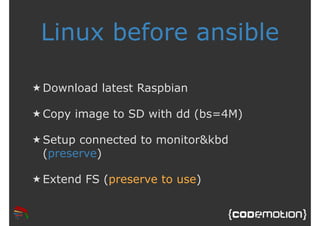
Linux before ansible 
★Download latest Raspbian 
★Copy image to SD with dd (bs=4M) 
★ Setup connected to monitor&kbd 
(preserve) 
★ Extend FS (preserve to use)
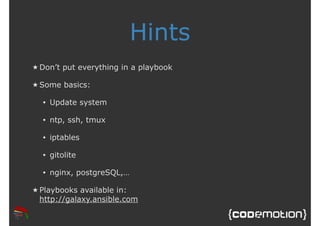
Hints 
★Don’t put everything in a playbook 
★ Some basics: 
• Update system 
• ntp, ssh, tmux 
• iptables 
• gitolite 
• nginx, postgreSQL,… 
★ Playbooks available in: 
http://galaxy.ansible.com
Configure iptables (1) 
roles: 
- role: iptables 
vars: 
incomming_rules: [ { proto: tcp, 
dport: http }, 
{ proto: udp, 
sport: ntp } ] 
outgoing_rules: [ { proto: udp, dport: 
bootps } ]
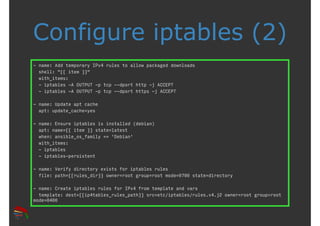
Configure iptables (2) 
- name: Add temporary IPv4 rules to allow packaged downloads 
shell: "{{ item }}" 
with_items: 
- iptables -A OUTPUT -p tcp --dport http -j ACCEPT 
- iptables -A OUTPUT -p tcp --dport https -j ACCEPT 
- name: Update apt cache 
apt: update_cache=yes 
- name: Ensure iptables is installed (debian) 
apt: name={{ item }} state=latest 
when: ansible_os_family == 'Debian' 
with_items: 
- iptables 
- iptables-persistent 
- name: Verify directory exists for iptables rules 
file: path={{rules_dir}} owner=root group=root mode=0700 state=directory 
- name: Create iptables rules for IPv4 from template and vars 
template: dest={{ip4tables_rules_path}} src=etc/iptables/rules.v4.j2 owner=root group=root 
mode=0400
Can’t automate 
anymore, my a**
Deploy (rails) 
apps
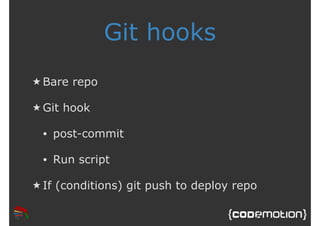
Git hooks 
★Bare repo 
★Git hook 
• post-commit 
• Run script 
★ If (conditions) git push to deploy repo
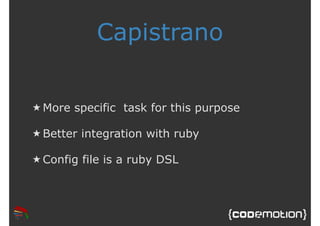
Capistrano 
★More specific task for this purpose 
★Better integration with ruby 
★Config file is a ruby DSL
Talkin’ to me?
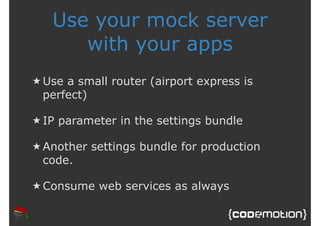
Use your mock server 
with your apps 
★Use a small router (airport express is 
perfect) 
★ IP parameter in the settings bundle 
★ Another settings bundle for production 
code. 
★Consume web services as always
Thank 
you! Images courtesy of Shutterstock

Travel with your mock server

  • 1.
    Travel with your mock server Jorge D. Ortiz-Fuentes @jdortiz
  • 2.
  • 3.
    Agenda ★ “Problem” ★ A realistic solution ★ Automation insights ★More automation ★Useful ★Q&A
  • 4.
  • 5.
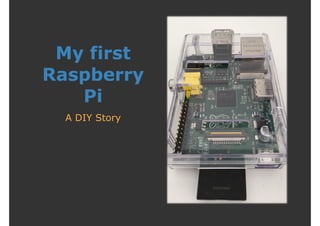
    My first Raspberry Pi A DIY Story
  • 6.
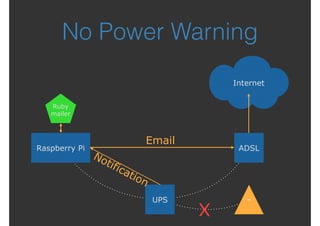
    No Power Warning Raspberry Pi ADSL UPS Internet ⌁ X Notification Ruby mailer Email
  • 7.
    The “problem” ★I bought another Raspberry Pi ★ Possible uses: • Learning computer • Git server • File downloader • File server (even ownCloud) • Rails test environment • Domotics server Want them all!
  • 8.
  • 9.
    Have them allseparately ★Use different SDs ★ Each for its own purpose ★But…
  • 10.
    But… ★ Isn’tit to burdensome/expensive to create and maintain all those “disks”? ★Will they be updated when I need them?
  • 11.
  • 12.
  • 13.
    Automation requirements ★No dependencies (or few): root and ssh. The image can be used as is ★ No central server ★ No constant updating ★Reusable solution with my cloud servers ★Configuration in VCS ★My own recipes, but lots available ★Better if language is known
  • 14.
  • 15.
    Alternatives ★Docker:Go; containerportability, Linux x86 ★ PalletOps:Clojure/JVM; targets cloud servers ★ cfengine: C; steep learning curve, agent ★ Puppet: Ruby; agent based, pull, declarative ★Chef: Ruby; agent based, more imperative ★ Ansible: Python; just ssh access, modules for * ★ Fabric: Python; like scripting SSH, deploy apps ★Capistrano: Ruby; like fabric
  • 16.
    Ansible ★ Pythonbased (but modules in other langs) ★ Agent-less (SSH with public key auth) ★Declarative ★ Idempotent ★ Playbooks are equal for my cloud server and my raspberry pi (Ubuntu & Raspbian) and even VM. ★ Talks to other devices (like my Mikrotik)
  • 17.
  • 18.
    Linux before ansible ★Download latest Raspbian ★Copy image to SD with dd (bs=4M) ★ Setup connected to monitor&kbd (preserve) ★ Extend FS (preserve to use)
  • 19.
    Hints ★Don’t puteverything in a playbook ★ Some basics: • Update system • ntp, ssh, tmux • iptables • gitolite • nginx, postgreSQL,… ★ Playbooks available in: http://galaxy.ansible.com
  • 20.
    Configure iptables (1) roles: - role: iptables vars: incomming_rules: [ { proto: tcp, dport: http }, { proto: udp, sport: ntp } ] outgoing_rules: [ { proto: udp, dport: bootps } ]
  • 21.
    Configure iptables (2) - name: Add temporary IPv4 rules to allow packaged downloads shell: "{{ item }}" with_items: - iptables -A OUTPUT -p tcp --dport http -j ACCEPT - iptables -A OUTPUT -p tcp --dport https -j ACCEPT - name: Update apt cache apt: update_cache=yes - name: Ensure iptables is installed (debian) apt: name={{ item }} state=latest when: ansible_os_family == 'Debian' with_items: - iptables - iptables-persistent - name: Verify directory exists for iptables rules file: path={{rules_dir}} owner=root group=root mode=0700 state=directory - name: Create iptables rules for IPv4 from template and vars template: dest={{ip4tables_rules_path}} src=etc/iptables/rules.v4.j2 owner=root group=root mode=0400
  • 22.
  • 23.
  • 24.
    Git hooks ★Barerepo ★Git hook • post-commit • Run script ★ If (conditions) git push to deploy repo
  • 25.
    Capistrano ★More specifictask for this purpose ★Better integration with ruby ★Config file is a ruby DSL
  • 26.
  • 27.
    Use your mockserver with your apps ★Use a small router (airport express is perfect) ★ IP parameter in the settings bundle ★ Another settings bundle for production code. ★Consume web services as always
  • 28.
    Thank you! Imagescourtesy of Shutterstock