.NET Database Toolkit
Dapper, Spritely.Cqrs, AutoMapper, FluentMigrator
What is Dapper?
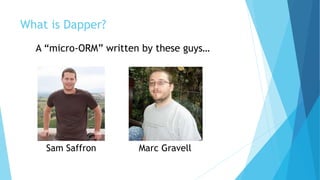
A “micro-ORM” written by these guys…
Sam Saffron Marc Gravell
What is an ORM?
 From Wikipedia: Object-relational mapping (ORM, O/RM, and O/R mapping) in
computer science is a programming technique for converting data between
incompatible type systems in object-oriented programming languages.
 Challenges
 There are a variety of difficulties that arise when considering how to match an object
system to a relational database.
 An alternative to implementing ORM is use of the native procedural languages provided
with every major database on the market. The Data Access Object (DAO) design pattern
is used to abstract these statements and offer a lightweight object-oriented interface to
the rest of the application
 Examples
 Entity Framework
 NHibernate
What is CQ[R]S?
 From Wikipedia: Command–query separation (CQS) is a principle
of imperative computer programming. It was devised by Bertrand Meyer as part of
his pioneering work on the Eiffel programming language.
 It states that every method should either be a command that performs an action,
or a query that returns data to the caller, but not both. In other words, Asking a
question should not change the answer. More formally, methods should return a
value only if they are referentially transparent and hence possess no side effects.
 Offers:
 Easier scaling (easy to manage read replicas).
 Easier testing (easy to mock out each call explicitly).
 I’m using interfaces from NuGet package: Spritely.Cqrs.
 The “query” or “command” class is the parameter object (can have zero
properties).
 The handler class has the behavior and is what gets mocked during testing.
// arrange
var expectedThing = new ThingDataAccessObject() { Id = 0, Values = "Monkey" };
var thingMap = new Dictionary<int, ThingDataAccessObject> {
{ expectedThing.Id, expectedThing } };
var mockGetThingByIdQueryHandler = new
Mock<IQueryHandler<GetThingByIdQuery, ThingDataAccessObject>>();
mockGetThingByIdQueryHandler
.Setup(_ => _.Handle(It.IsAny<GetThingByIdQuery>()))
.Returns<GetThingByIdQuery>(query => thingMap[query.ThingId]);
var service = new ThingWcfService(mockGetThingByIdQueryHandler.Object);
// act
var actualThing = service.GetThing(expectedThing.Id);
// assert
Assert.Equal(expectedThing.ToThingWcfObject().Id, actualThing.Id);
Assert.Equal(expectedThing.ToThingWcfObject().Values, actualThing.Values);
// - make sure we're testing all of the properties
Assert.Equal(2, typeof(ThingWcfObject).GetProperties().Count());
Testing with CQRS
Ok, what is Dapper?
 From Wikipedia: Dapper was started by Sam Saffron and Marc
Gravell because of the N+1 and other performance issues with Entity
framework. Dapper was written for and is used by Stack Overflow.
 Dapper's primary feature is mapping from .NET classes to database tables
(and from CLR data types to SQL data types). Dapper also provides data query
and retrieval facilities.
 Dapper is a micro-ORM: it does not offer the full range of features of a full
ORM such as nHibernate or Entity Framework. This is by design. Dapper does
not generate the SQL queries, but only maps the result to Plain Old CLR
Objects (POCOs).
 The single class ORM is also available on NuGet.
What about performance?
ADO.Net vs. Dapper – First the CQRS Part
public class GetThingByIdQuery : IQuery<ThingDataAccessObject>
{
public int ThingId { get; set; }
}
public class GetThingByIdQueryHandler :
IQueryHandler<GetThingByIdQuery, ThingDataAccessObject>
{
private readonly string connectionString;
public GetThingByIdQueryHandler(string connectionstring)
{
this.connectionString = connectionstring;
}
public ThingDataAccessObject Handle(GetThingByIdQuery query)
{
Basic CQRS…
• Class for params (the ‘Query’)
• Class for behavior (the
‘QueryHandler’)
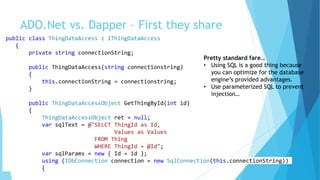
ADO.Net vs. Dapper – What they share
Pretty standard fare…
• Using SQL is a good thing because
you can optimize for the database
engine’s provided advantages.
• Use parameterized SQL to prevent
injection…
ThingDataAccessObject ret = null;
var sqlText = @"SELECT ThingId as [Id],
[Values] as [Values]
FROM Thing
WHERE ThingId = @ThingId";
using (IDbConnection connection = new SqlConnection(this.connectionString))
{
connection.Open();
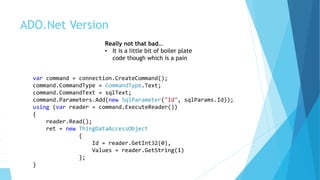
ADO.Net Version
Really not that bad…
• It is a little bit of boiler plate
code though which is a pain
var command = connection.CreateCommand();
command.CommandType = CommandType.Text;
command.CommandText = sqlText;
command.Parameters.Add(new SqlParameter("ThingId", query.ThingId));
using (var reader = command.ExecuteReader())
{
reader.Read();
ret = new ThingDataAccessObject
{
Id = reader.GetInt32(0),
Values = reader.GetString(1)
};
}
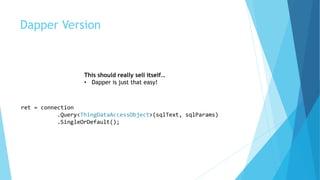
Dapper Version
This should really sell itself…
• Dapper is just that easy!
ret = connection
.Query<ThingDataAccessObject>(sqlText, query)
.SingleOrDefault();
What is AutoMapper?
 AutoMapper is a package on Nuget (Id=AutoMapper)
 A convention-based object-object mapper.
 Uses a fluent configuration API to define an object-object mapping strategy
and uses a convention-based matching algorithm to match up source to
destination values.
 Geared towards model projection scenarios to flatten complex object models
to DTOs and other simple objects, whose design is better suited for
serialization, communication, messaging, or simply an anti-corruption layer
between the domain and application layer.
So you have this in your world…
• This is normal!
• Don’t ever just use only the
EntityFramework class in all
layers no matter what anyone
tells you!
• These objects are contracts in
their own systems.
public class ThingDatabaseObject
{
public int Id { get; set; }
public string Values { get; set; }
}
public class ThingDataAccessObject
{
public int Id { get; set; }
public string Values { get; set; }
}
public class ThingWcfObject
{
public int Id { get; set; }
public string Values { get; set; }
}
public class ThingRestObject
{
public int Id { get; set; }
public string Values { get; set; }
}
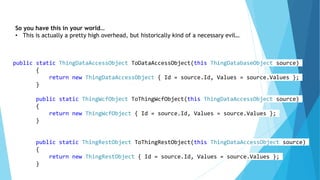
So you have this in your world…
• This is actually a pretty high overhead, but historically kind of a necessary evil…
public static ThingDataAccessObject ToDataAccessObject(this ThingDatabaseObject source)
{
return new ThingDataAccessObject { Id = source.Id, Values = source.Values };
}
public static ThingWcfObject ToThingWcfObject(this ThingDataAccessObject source)
{
return new ThingWcfObject { Id = source.Id, Values = source.Values };
}
public static ThingRestObject ToThingRestObject(this ThingDataAccessObject source)
{
return new ThingRestObject { Id = source.Id, Values = source.Values };
}
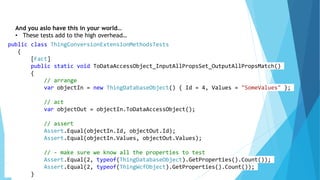
And you aslo have this in your world…
• These tests add to the high overhead…
public class ThingConversionExtensionMethodsTests
{
[Fact]
public static void ToDataAccessObject_InputAllPropsSet_OutputAllPropsMatch()
{
// arrange
var objectIn = new ThingDatabaseObject() { Id = 4, Values = "SomeValues" };
// act
var objectOut = objectIn.ToDataAccessObject();
// assert
Assert.Equal(objectIn.Id, objectOut.Id);
Assert.Equal(objectIn.Values, objectOut.Values);
// - make sure we know all the properties to test
Assert.Equal(2, typeof(ThingDatabaseObject).GetProperties().Count());
Assert.Equal(2, typeof(ThingWcfObject).GetProperties().Count());
}
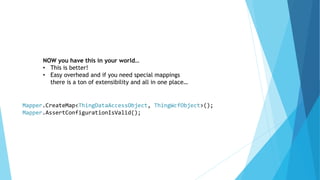
Mapper.CreateMap<ThingDataAccessObject, ThingWcfObject>();
Mapper.AssertConfigurationIsValid();
NOW you have this in your world…
• This is better!
• Easy overhead and if you need special mappings
there is a ton of extensibility and all in one place…
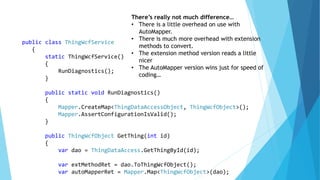
There’s really not much difference…
• There is a little overhead on use with
AutoMapper.
• There is much more overhead with extension
methods to convert.
• The extension method version reads a little
nicer
• The AutoMapper version wins just for speed of
coding…
public class ThingWcfService
{
static ThingWcfService()
{
RunDiagnostics();
}
public static void RunDiagnostics()
{
Mapper.CreateMap<ThingDataAccessObject, ThingWcfObject>();
Mapper.AssertConfigurationIsValid();
}
public ThingWcfObject GetThing(int id)
{
var dao = ThingDataAccess.GetThingById(id);
var extMethodRet = dao.ToThingWcfObject();
var autoMapperRet = Mapper.Map<ThingWcfObject>(dao);
What is Fluent Migrator?
 A NuGet package that allows you manage your database migrations in .NET
source control with supported tooling.
 Modeled after the Ruby style of database migrations.
 You need this because otherwise you’re probably in one of these camps:
 We just re-script from production because we have no DB source we trust.
 We suffer EntityFramework because then we always have DB source checked in.
 We have some custom complicated process of keeping alter scripts in a structure.
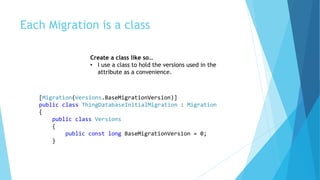
Each Migration is a class
[Migration(Versions.BaseMigrationVersion)]
public class ThingDatabaseInitialMigration : Migration
{
public class Versions
{
public const long BaseMigrationVersion = 0;
}
Create a class like so…
• I use a class to hold the versions used in the
attribute as a convenience.
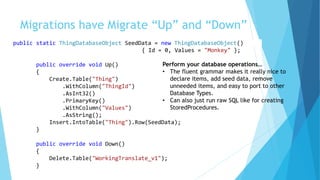
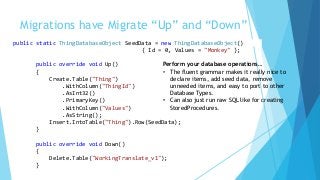
Migrations have Migrate “Up” and “Down”
Perform your database operations…
• The fluent grammar makes it really nice to
declare items, add seed data, remove
unneeded items, and easy to port to other
Database Types.
• Can also just run raw SQL like for creating
StoredProcedures.
public static ThingDatabaseObject SeedData = new ThingDatabaseObject()
{ Id = 0, Values = "Monkey" };
public override void Up()
{
Create.Table("Thing")
.WithColumn("ThingId")
.AsInt32()
.PrimaryKey()
.WithColumn("Values")
.AsString();
Insert.IntoTable("Thing").Row(SeedData);
}
public override void Down()
{
Delete.Table("WorkingTranslate_v1");
}
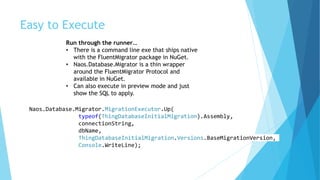
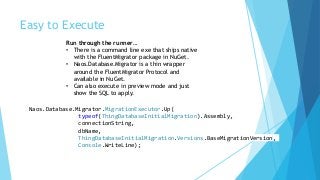
Easy to Execute
Naos.Database.Migrator.MigrationExecutor.Up(
typeof(ThingDatabaseInitialMigration).Assembly,
connectionString,
dbName,
ThingDatabaseInitialMigration.Versions.BaseMigrationVersion,
Console.WriteLine);
Run through the runner…
• There is a command line exe that ships native
with the FluentMigrator package in NuGet.
• Naos.Database.Migrator is a thin wrapper
around the FluentMigrator Protocol and
available in NuGet.
• Can also execute in preview mode and just
show the SQL to apply.
Links
 Author: Lawson Caudill – http://www.getthinktank.com
 Code in deck is available at – https://github.com/wlscaudill/Presentation---
.NET-Database-Toolkit
 https://github.com/StackExchange/dapper-dot-net
 http://samsaffron.com
 http://marcgravell.blogspot.com/
 http://en.wikipedia.org/wiki/Object-relational_mapping
 https://www.nuget.org/packages/Spritely.Cqrs/
 https://www.nuget.org/packages/AutoMapper/
 https://github.com/schambers/fluentmigrator
 https://www.cuttingedge.it/blogs/steven/pivot/entry.php?id=92

.NET Database Toolkit

  • 1.
    .NET Database Toolkit Dapper,Spritely.Cqrs, AutoMapper, FluentMigrator
  • 2.
    What is Dapper? A“micro-ORM” written by these guys… Sam Saffron Marc Gravell
  • 3.
    What is anORM?  From Wikipedia: Object-relational mapping (ORM, O/RM, and O/R mapping) in computer science is a programming technique for converting data between incompatible type systems in object-oriented programming languages.  Challenges  There are a variety of difficulties that arise when considering how to match an object system to a relational database.  An alternative to implementing ORM is use of the native procedural languages provided with every major database on the market. The Data Access Object (DAO) design pattern is used to abstract these statements and offer a lightweight object-oriented interface to the rest of the application  Examples  Entity Framework  NHibernate
  • 4.
    What is CQ[R]S? From Wikipedia: Command–query separation (CQS) is a principle of imperative computer programming. It was devised by Bertrand Meyer as part of his pioneering work on the Eiffel programming language.  It states that every method should either be a command that performs an action, or a query that returns data to the caller, but not both. In other words, Asking a question should not change the answer. More formally, methods should return a value only if they are referentially transparent and hence possess no side effects.  Offers:  Easier scaling (easy to manage read replicas).  Easier testing (easy to mock out each call explicitly).  I’m using interfaces from NuGet package: Spritely.Cqrs.  The “query” or “command” class is the parameter object (can have zero properties).  The handler class has the behavior and is what gets mocked during testing.
  • 5.
    // arrange var expectedThing= new ThingDataAccessObject() { Id = 0, Values = "Monkey" }; var thingMap = new Dictionary<int, ThingDataAccessObject> { { expectedThing.Id, expectedThing } }; var mockGetThingByIdQueryHandler = new Mock<IQueryHandler<GetThingByIdQuery, ThingDataAccessObject>>(); mockGetThingByIdQueryHandler .Setup(_ => _.Handle(It.IsAny<GetThingByIdQuery>())) .Returns<GetThingByIdQuery>(query => thingMap[query.ThingId]); var service = new ThingWcfService(mockGetThingByIdQueryHandler.Object); // act var actualThing = service.GetThing(expectedThing.Id); // assert Assert.Equal(expectedThing.ToThingWcfObject().Id, actualThing.Id); Assert.Equal(expectedThing.ToThingWcfObject().Values, actualThing.Values); // - make sure we're testing all of the properties Assert.Equal(2, typeof(ThingWcfObject).GetProperties().Count()); Testing with CQRS
  • 6.
    Ok, what isDapper?  From Wikipedia: Dapper was started by Sam Saffron and Marc Gravell because of the N+1 and other performance issues with Entity framework. Dapper was written for and is used by Stack Overflow.  Dapper's primary feature is mapping from .NET classes to database tables (and from CLR data types to SQL data types). Dapper also provides data query and retrieval facilities.  Dapper is a micro-ORM: it does not offer the full range of features of a full ORM such as nHibernate or Entity Framework. This is by design. Dapper does not generate the SQL queries, but only maps the result to Plain Old CLR Objects (POCOs).  The single class ORM is also available on NuGet.
  • 7.
  • 8.
    ADO.Net vs. Dapper– First the CQRS Part public class GetThingByIdQuery : IQuery<ThingDataAccessObject> { public int ThingId { get; set; } } public class GetThingByIdQueryHandler : IQueryHandler<GetThingByIdQuery, ThingDataAccessObject> { private readonly string connectionString; public GetThingByIdQueryHandler(string connectionstring) { this.connectionString = connectionstring; } public ThingDataAccessObject Handle(GetThingByIdQuery query) { Basic CQRS… • Class for params (the ‘Query’) • Class for behavior (the ‘QueryHandler’)
  • 9.
    ADO.Net vs. Dapper– What they share Pretty standard fare… • Using SQL is a good thing because you can optimize for the database engine’s provided advantages. • Use parameterized SQL to prevent injection… ThingDataAccessObject ret = null; var sqlText = @"SELECT ThingId as [Id], [Values] as [Values] FROM Thing WHERE ThingId = @ThingId"; using (IDbConnection connection = new SqlConnection(this.connectionString)) { connection.Open();
  • 10.
    ADO.Net Version Really notthat bad… • It is a little bit of boiler plate code though which is a pain var command = connection.CreateCommand(); command.CommandType = CommandType.Text; command.CommandText = sqlText; command.Parameters.Add(new SqlParameter("ThingId", query.ThingId)); using (var reader = command.ExecuteReader()) { reader.Read(); ret = new ThingDataAccessObject { Id = reader.GetInt32(0), Values = reader.GetString(1) }; }
  • 11.
    Dapper Version This shouldreally sell itself… • Dapper is just that easy! ret = connection .Query<ThingDataAccessObject>(sqlText, query) .SingleOrDefault();
  • 12.
    What is AutoMapper? AutoMapper is a package on Nuget (Id=AutoMapper)  A convention-based object-object mapper.  Uses a fluent configuration API to define an object-object mapping strategy and uses a convention-based matching algorithm to match up source to destination values.  Geared towards model projection scenarios to flatten complex object models to DTOs and other simple objects, whose design is better suited for serialization, communication, messaging, or simply an anti-corruption layer between the domain and application layer.
  • 13.
    So you havethis in your world… • This is normal! • Don’t ever just use only the EntityFramework class in all layers no matter what anyone tells you! • These objects are contracts in their own systems. public class ThingDatabaseObject { public int Id { get; set; } public string Values { get; set; } } public class ThingDataAccessObject { public int Id { get; set; } public string Values { get; set; } } public class ThingWcfObject { public int Id { get; set; } public string Values { get; set; } } public class ThingRestObject { public int Id { get; set; } public string Values { get; set; } }
  • 14.
    So you havethis in your world… • This is actually a pretty high overhead, but historically kind of a necessary evil… public static ThingDataAccessObject ToDataAccessObject(this ThingDatabaseObject source) { return new ThingDataAccessObject { Id = source.Id, Values = source.Values }; } public static ThingWcfObject ToThingWcfObject(this ThingDataAccessObject source) { return new ThingWcfObject { Id = source.Id, Values = source.Values }; } public static ThingRestObject ToThingRestObject(this ThingDataAccessObject source) { return new ThingRestObject { Id = source.Id, Values = source.Values }; }
  • 15.
    And you aslohave this in your world… • These tests add to the high overhead… public class ThingConversionExtensionMethodsTests { [Fact] public static void ToDataAccessObject_InputAllPropsSet_OutputAllPropsMatch() { // arrange var objectIn = new ThingDatabaseObject() { Id = 4, Values = "SomeValues" }; // act var objectOut = objectIn.ToDataAccessObject(); // assert Assert.Equal(objectIn.Id, objectOut.Id); Assert.Equal(objectIn.Values, objectOut.Values); // - make sure we know all the properties to test Assert.Equal(2, typeof(ThingDatabaseObject).GetProperties().Count()); Assert.Equal(2, typeof(ThingWcfObject).GetProperties().Count()); }
  • 16.
    Mapper.CreateMap<ThingDataAccessObject, ThingWcfObject>(); Mapper.AssertConfigurationIsValid(); NOW youhave this in your world… • This is better! • Easy overhead and if you need special mappings there is a ton of extensibility and all in one place…
  • 17.
    There’s really notmuch difference… • There is a little overhead on use with AutoMapper. • There is much more overhead with extension methods to convert. • The extension method version reads a little nicer • The AutoMapper version wins just for speed of coding… public class ThingWcfService { static ThingWcfService() { RunDiagnostics(); } public static void RunDiagnostics() { Mapper.CreateMap<ThingDataAccessObject, ThingWcfObject>(); Mapper.AssertConfigurationIsValid(); } public ThingWcfObject GetThing(int id) { var dao = ThingDataAccess.GetThingById(id); var extMethodRet = dao.ToThingWcfObject(); var autoMapperRet = Mapper.Map<ThingWcfObject>(dao);
  • 18.
    What is FluentMigrator?  A NuGet package that allows you manage your database migrations in .NET source control with supported tooling.  Modeled after the Ruby style of database migrations.  You need this because otherwise you’re probably in one of these camps:  We just re-script from production because we have no DB source we trust.  We suffer EntityFramework because then we always have DB source checked in.  We have some custom complicated process of keeping alter scripts in a structure.
  • 19.
    Each Migration isa class [Migration(Versions.BaseMigrationVersion)] public class ThingDatabaseInitialMigration : Migration { public class Versions { public const long BaseMigrationVersion = 0; } Create a class like so… • I use a class to hold the versions used in the attribute as a convenience.
  • 20.
    Migrations have Migrate“Up” and “Down” Perform your database operations… • The fluent grammar makes it really nice to declare items, add seed data, remove unneeded items, and easy to port to other Database Types. • Can also just run raw SQL like for creating StoredProcedures. public static ThingDatabaseObject SeedData = new ThingDatabaseObject() { Id = 0, Values = "Monkey" }; public override void Up() { Create.Table("Thing") .WithColumn("ThingId") .AsInt32() .PrimaryKey() .WithColumn("Values") .AsString(); Insert.IntoTable("Thing").Row(SeedData); } public override void Down() { Delete.Table("WorkingTranslate_v1"); }
  • 21.
    Easy to Execute Naos.Database.Migrator.MigrationExecutor.Up( typeof(ThingDatabaseInitialMigration).Assembly, connectionString, dbName, ThingDatabaseInitialMigration.Versions.BaseMigrationVersion, Console.WriteLine); Runthrough the runner… • There is a command line exe that ships native with the FluentMigrator package in NuGet. • Naos.Database.Migrator is a thin wrapper around the FluentMigrator Protocol and available in NuGet. • Can also execute in preview mode and just show the SQL to apply.
  • 22.
    Links  Author: LawsonCaudill – http://www.getthinktank.com  Code in deck is available at – https://github.com/wlscaudill/Presentation--- .NET-Database-Toolkit  https://github.com/StackExchange/dapper-dot-net  http://samsaffron.com  http://marcgravell.blogspot.com/  http://en.wikipedia.org/wiki/Object-relational_mapping  https://www.nuget.org/packages/Spritely.Cqrs/  https://www.nuget.org/packages/AutoMapper/  https://github.com/schambers/fluentmigrator  https://www.cuttingedge.it/blogs/steven/pivot/entry.php?id=92