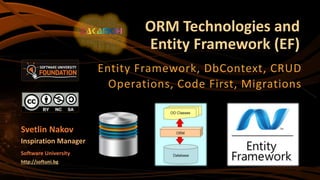
ORM Technologies and
Entity Framework (EF)
Entity Framework, DbContext, CRUD
Operations, Code First, Migrations
Svetlin Nakov
Inspiration Manager
Software University
http://softuni.bg
Table of Contents
1. ORM Technologies – Basic Concepts
2. Entity Framework – Overview
3. Database First with EF
4. Reading Data and CRUD operations with EF
5. Code First with EF
 Domain Classes and DbContext
6. Migrations in EF
2
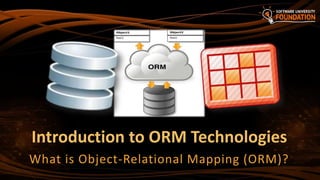
Introduction to ORM Technologies
What is Object-Relational Mapping (ORM)?
4
 Object-Relational Mapping (ORM) is a programming technique
for automatic mapping data and database schema
 Map relational DB tables to classes and objects
 ORM creates a "virtual object database"
 Used from the programming language (C#, Java, PHP, …)
 ORM frameworks automate the ORM process
 A.k.a. Object-Relational Persistence Frameworks
ORM Technologies
5
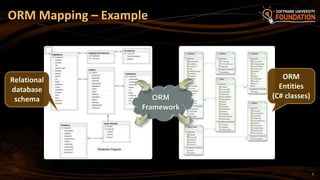
ORM Mapping – Example
ORM
Framework
Relational
database
schema
ORM
Entities
(C# classes)
Entity Framework (EF)
The ORM Framework for .NET
7
 Entity Framework (EF) is the standard ORM framework for .NET
 Maps relational database to C# object model
 Powerful data manipulation API over the mapped schema
 CRUD operations and complex querying with LINQ
 Database first approach: from database to C# classes
 Code first approach: from classes to DB schema
 Visual Studio generates EF data models
 Data mappings consist of C# classes, attributes and XML
Overview of EF
8
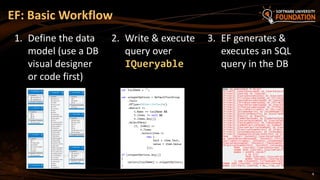
EF: Basic Workflow
2. Write & execute
query over
IQueryable
3. EF generates &
executes an SQL
query in the DB
1. Define the data
model (use a DB
visual designer
or code first)
9
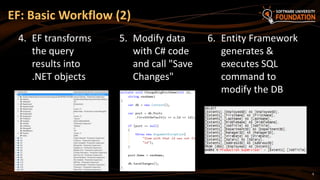
EF: Basic Workflow (2)
5. Modify data
with C# code
and call "Save
Changes"
6. Entity Framework
generates &
executes SQL
command to
modify the DB
4. EF transforms
the query
results into
.NET objects
10
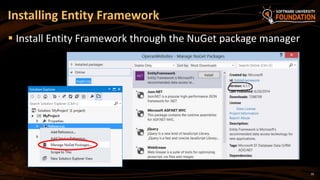
 Install Entity Framework through the NuGet package manager
Installing Entity Framework
Database First with Entity
Framework and Visual Studio
Live Demo
Entity Framework – Components
 The DbContext class
 DbContext holds the DB connection
 Holds and DbSet<T> for the entity classes
 Provides LINQ-based data access ( through IQueryable)
 Provides API for CRUD operations
 Entity classes
 Hold entities (objects with their attributes and relations)
 Each database table is typically mapped to a single C# entity class
12
13
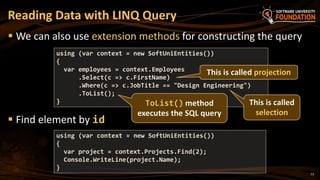
 We can also use extension methods for constructing the query
 Find element by id
Reading Data with LINQ Query
using (var context = new SoftUniEntities())
{
var project = context.Projects.Find(2);
Console.WriteLine(project.Name);
}
using (var context = new SoftUniEntities())
{
var employees = context.Employees
.Select(c => c.FirstName)
.Where(c => c.JobTitle == "Design Engineering")
.ToList();
}
This is called projection
ToList() method
executes the SQL query
This is called
selection
14
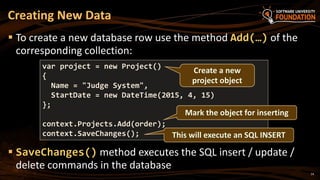
 To create a new database row use the method Add(…) of the
corresponding collection:
 SaveChanges() method executes the SQL insert / update /
delete commands in the database
Creating New Data
var project = new Project()
{
Name = "Judge System",
StartDate = new DateTime(2015, 4, 15)
};
context.Projects.Add(order);
context.SaveChanges(); This will execute an SQL INSERT
Create a new
project object
Mark the object for inserting
15
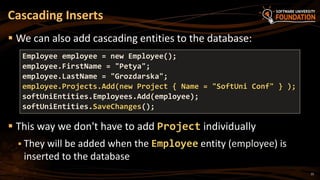
 We can also add cascading entities to the database:
 This way we don't have to add Project individually
 They will be added when the Employee entity (employee) is
inserted to the database
Cascading Inserts
Employee employee = new Employee();
employee.FirstName = "Petya";
employee.LastName = "Grozdarska";
employee.Projects.Add(new Project { Name = "SoftUni Conf" } );
softUniEntities.Employees.Add(employee);
softUniEntities.SaveChanges();
16
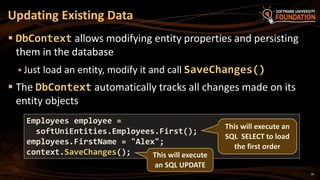
 DbContext allows modifying entity properties and persisting
them in the database
 Just load an entity, modify it and call SaveChanges()
 The DbContext automatically tracks all changes made on its
entity objects
Updating Existing Data
Employees employee =
softUniEntities.Employees.First();
employees.FirstName = "Alex";
context.SaveChanges(); This will execute
an SQL UPDATE
This will execute an
SQL SELECT to load
the first order
17
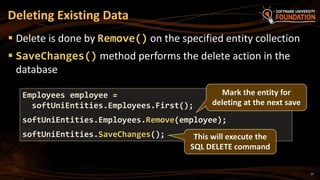
 Delete is done by Remove() on the specified entity collection
 SaveChanges() method performs the delete action in the
database
Deleting Existing Data
Employees employee =
softUniEntities.Employees.First();
softUniEntities.Employees.Remove(employee);
softUniEntities.SaveChanges();
Mark the entity for
deleting at the next save
This will execute the
SQL DELETE command
18
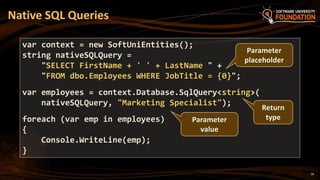
Native SQL Queries
var context = new SoftUniEntities();
string nativeSQLQuery =
"SELECT FirstName + ' ' + LastName " +
"FROM dbo.Employees WHERE JobTitle = {0}";
var employees = context.Database.SqlQuery<string>(
nativeSQLQuery, "Marketing Specialist");
foreach (var emp in employees)
{
Console.WriteLine(emp);
}
Parameter
placeholder
Parameter
value
Return
type
CRUD Operations with EF
Live Demo
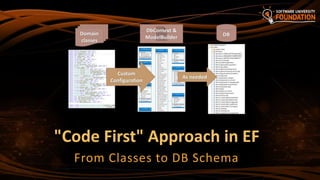
"Code First" Approach in EF
From Classes to DB Schema
21
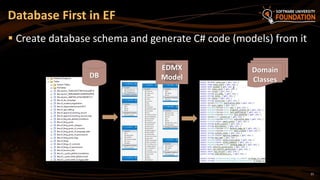
 Create database schema and generate C# code (models) from it
Database First in EF
DB
EDMX
Model
Domain
Classes
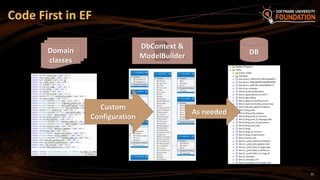
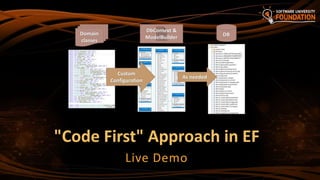
Code First in EF
Custom
Configuration
DbContext &
ModelBuilder
Domain
classes
As needed
DB
22
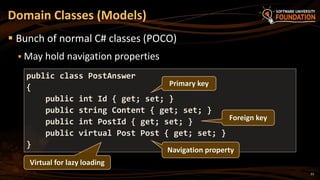
Domain Classes (Models)
 Bunch of normal C# classes (POCO)
 May hold navigation properties
public class PostAnswer
{
public int Id { get; set; }
public string Content { get; set; }
public int PostId { get; set; }
public virtual Post Post { get; set; }
}
Primary key
Foreign key
Navigation property
Virtual for lazy loading
23
24
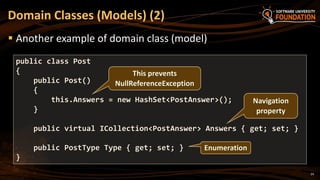
 Another example of domain class (model)
Domain Classes (Models) (2)
public class Post
{
public Post()
{
this.Answers = new HashSet<PostAnswer>();
}
public virtual ICollection<PostAnswer> Answers { get; set; }
public PostType Type { get; set; }
}
This prevents
NullReferenceException
Navigation
property
Enumeration
25
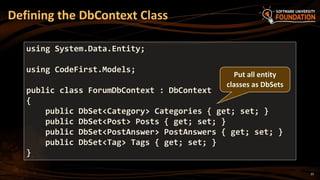
Defining the DbContext Class
using System.Data.Entity;
using CodeFirst.Models;
public class ForumDbContext : DbContext
{
public DbSet<Category> Categories { get; set; }
public DbSet<Post> Posts { get; set; }
public DbSet<PostAnswer> PostAnswers { get; set; }
public DbSet<Tag> Tags { get; set; }
}
Put all entity
classes as DbSets
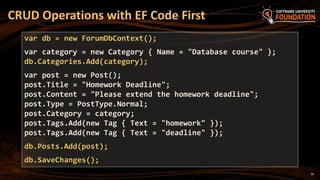
CRUD Operations with EF Code First
var db = new ForumDbContext();
var category = new Category { Name = "Database course" };
db.Categories.Add(category);
var post = new Post();
post.Title = "Homework Deadline";
post.Content = "Please extend the homework deadline";
post.Type = PostType.Normal;
post.Category = category;
post.Tags.Add(new Tag { Text = "homework" });
post.Tags.Add(new Tag { Text = "deadline" });
db.Posts.Add(post);
db.SaveChanges();
26
"Code First" Approach in EF
Live Demo
Using Code First Migrations in EF
29
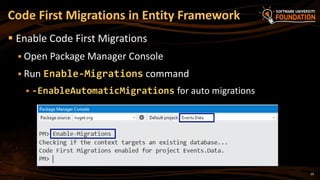
 Enable Code First Migrations
 Open Package Manager Console
 Run Enable-Migrations command
 -EnableAutomaticMigrations for auto migrations
Code First Migrations in Entity Framework
30
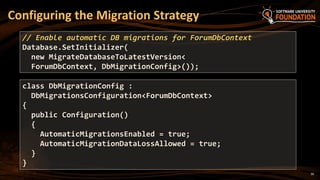
Configuring the Migration Strategy
// Enable automatic DB migrations for ForumDbContext
Database.SetInitializer(
new MigrateDatabaseToLatestVersion<
ForumDbContext, DbMigrationConfig>());
class DbMigrationConfig :
DbMigrationsConfiguration<ForumDbContext>
{
public Configuration()
{
AutomaticMigrationsEnabled = true;
AutomaticMigrationDataLossAllowed = true;
}
}
Using Code First Migrations in EF
Live Demo
?
https://softuni.bg
ORM Technologies and Entity Framework (EF)
Free Trainings @ Software University
 Software University Foundation – softuni.org
 Software University – High-Quality Education,
Profession and Job for Software Developers
 softuni.bg
 Software University @ Facebook
 facebook.com/SoftwareUniversity
 Software University @ YouTube
 youtube.com/SoftwareUniversity
 Software University Forums – forum.softuni.bg

Entity Framework: Nakov @ BFU Hackhaton 2015

  • 1.
    ORM Technologies and EntityFramework (EF) Entity Framework, DbContext, CRUD Operations, Code First, Migrations Svetlin Nakov Inspiration Manager Software University http://softuni.bg
  • 2.
    Table of Contents 1.ORM Technologies – Basic Concepts 2. Entity Framework – Overview 3. Database First with EF 4. Reading Data and CRUD operations with EF 5. Code First with EF  Domain Classes and DbContext 6. Migrations in EF 2
  • 3.
    Introduction to ORMTechnologies What is Object-Relational Mapping (ORM)?
  • 4.
    4  Object-Relational Mapping(ORM) is a programming technique for automatic mapping data and database schema  Map relational DB tables to classes and objects  ORM creates a "virtual object database"  Used from the programming language (C#, Java, PHP, …)  ORM frameworks automate the ORM process  A.k.a. Object-Relational Persistence Frameworks ORM Technologies
  • 5.
    5 ORM Mapping –Example ORM Framework Relational database schema ORM Entities (C# classes)
  • 6.
    Entity Framework (EF) TheORM Framework for .NET
  • 7.
    7  Entity Framework(EF) is the standard ORM framework for .NET  Maps relational database to C# object model  Powerful data manipulation API over the mapped schema  CRUD operations and complex querying with LINQ  Database first approach: from database to C# classes  Code first approach: from classes to DB schema  Visual Studio generates EF data models  Data mappings consist of C# classes, attributes and XML Overview of EF
  • 8.
    8 EF: Basic Workflow 2.Write & execute query over IQueryable 3. EF generates & executes an SQL query in the DB 1. Define the data model (use a DB visual designer or code first)
  • 9.
    9 EF: Basic Workflow(2) 5. Modify data with C# code and call "Save Changes" 6. Entity Framework generates & executes SQL command to modify the DB 4. EF transforms the query results into .NET objects
  • 10.
    10  Install EntityFramework through the NuGet package manager Installing Entity Framework
  • 11.
    Database First withEntity Framework and Visual Studio Live Demo
  • 12.
    Entity Framework –Components  The DbContext class  DbContext holds the DB connection  Holds and DbSet<T> for the entity classes  Provides LINQ-based data access ( through IQueryable)  Provides API for CRUD operations  Entity classes  Hold entities (objects with their attributes and relations)  Each database table is typically mapped to a single C# entity class 12
  • 13.
    13  We canalso use extension methods for constructing the query  Find element by id Reading Data with LINQ Query using (var context = new SoftUniEntities()) { var project = context.Projects.Find(2); Console.WriteLine(project.Name); } using (var context = new SoftUniEntities()) { var employees = context.Employees .Select(c => c.FirstName) .Where(c => c.JobTitle == "Design Engineering") .ToList(); } This is called projection ToList() method executes the SQL query This is called selection
  • 14.
    14  To createa new database row use the method Add(…) of the corresponding collection:  SaveChanges() method executes the SQL insert / update / delete commands in the database Creating New Data var project = new Project() { Name = "Judge System", StartDate = new DateTime(2015, 4, 15) }; context.Projects.Add(order); context.SaveChanges(); This will execute an SQL INSERT Create a new project object Mark the object for inserting
  • 15.
    15  We canalso add cascading entities to the database:  This way we don't have to add Project individually  They will be added when the Employee entity (employee) is inserted to the database Cascading Inserts Employee employee = new Employee(); employee.FirstName = "Petya"; employee.LastName = "Grozdarska"; employee.Projects.Add(new Project { Name = "SoftUni Conf" } ); softUniEntities.Employees.Add(employee); softUniEntities.SaveChanges();
  • 16.
    16  DbContext allowsmodifying entity properties and persisting them in the database  Just load an entity, modify it and call SaveChanges()  The DbContext automatically tracks all changes made on its entity objects Updating Existing Data Employees employee = softUniEntities.Employees.First(); employees.FirstName = "Alex"; context.SaveChanges(); This will execute an SQL UPDATE This will execute an SQL SELECT to load the first order
  • 17.
    17  Delete isdone by Remove() on the specified entity collection  SaveChanges() method performs the delete action in the database Deleting Existing Data Employees employee = softUniEntities.Employees.First(); softUniEntities.Employees.Remove(employee); softUniEntities.SaveChanges(); Mark the entity for deleting at the next save This will execute the SQL DELETE command
  • 18.
    18 Native SQL Queries varcontext = new SoftUniEntities(); string nativeSQLQuery = "SELECT FirstName + ' ' + LastName " + "FROM dbo.Employees WHERE JobTitle = {0}"; var employees = context.Database.SqlQuery<string>( nativeSQLQuery, "Marketing Specialist"); foreach (var emp in employees) { Console.WriteLine(emp); } Parameter placeholder Parameter value Return type
  • 19.
  • 20.
    "Code First" Approachin EF From Classes to DB Schema
  • 21.
    21  Create databaseschema and generate C# code (models) from it Database First in EF DB EDMX Model Domain Classes
  • 22.
    Code First inEF Custom Configuration DbContext & ModelBuilder Domain classes As needed DB 22
  • 23.
    Domain Classes (Models) Bunch of normal C# classes (POCO)  May hold navigation properties public class PostAnswer { public int Id { get; set; } public string Content { get; set; } public int PostId { get; set; } public virtual Post Post { get; set; } } Primary key Foreign key Navigation property Virtual for lazy loading 23
  • 24.
    24  Another exampleof domain class (model) Domain Classes (Models) (2) public class Post { public Post() { this.Answers = new HashSet<PostAnswer>(); } public virtual ICollection<PostAnswer> Answers { get; set; } public PostType Type { get; set; } } This prevents NullReferenceException Navigation property Enumeration
  • 25.
    25 Defining the DbContextClass using System.Data.Entity; using CodeFirst.Models; public class ForumDbContext : DbContext { public DbSet<Category> Categories { get; set; } public DbSet<Post> Posts { get; set; } public DbSet<PostAnswer> PostAnswers { get; set; } public DbSet<Tag> Tags { get; set; } } Put all entity classes as DbSets
  • 26.
    CRUD Operations withEF Code First var db = new ForumDbContext(); var category = new Category { Name = "Database course" }; db.Categories.Add(category); var post = new Post(); post.Title = "Homework Deadline"; post.Content = "Please extend the homework deadline"; post.Type = PostType.Normal; post.Category = category; post.Tags.Add(new Tag { Text = "homework" }); post.Tags.Add(new Tag { Text = "deadline" }); db.Posts.Add(post); db.SaveChanges(); 26
  • 27.
    "Code First" Approachin EF Live Demo
  • 28.
    Using Code FirstMigrations in EF
  • 29.
    29  Enable CodeFirst Migrations  Open Package Manager Console  Run Enable-Migrations command  -EnableAutomaticMigrations for auto migrations Code First Migrations in Entity Framework
  • 30.
    30 Configuring the MigrationStrategy // Enable automatic DB migrations for ForumDbContext Database.SetInitializer( new MigrateDatabaseToLatestVersion< ForumDbContext, DbMigrationConfig>()); class DbMigrationConfig : DbMigrationsConfiguration<ForumDbContext> { public Configuration() { AutomaticMigrationsEnabled = true; AutomaticMigrationDataLossAllowed = true; } }
  • 31.
    Using Code FirstMigrations in EF Live Demo
  • 32.
  • 33.
    Free Trainings @Software University  Software University Foundation – softuni.org  Software University – High-Quality Education, Profession and Job for Software Developers  softuni.bg  Software University @ Facebook  facebook.com/SoftwareUniversity  Software University @ YouTube  youtube.com/SoftwareUniversity  Software University Forums – forum.softuni.bg