by Vitaly Kamluk, Kaspersky Lab & Nicolas Collery, DBS Bank
Needle In An Encrypted Haystack:
Forensics in a hardened environment
(with Full Disk Encryption)
“Bionic”
HTCIA SINGAPORE CHAPTER 2ND ANNUAL CONFERENCE
29 NOVEMBER 2018
+Who are we?
Vitaly Kamluk
Kaspersky Lab
Nicolas Collery
DBS Bank
We both presented at HITB Commsec in 2017 and 2018 about a similar topic and now we are extending.
2017 - COMMSEC D2 - Nicolas Collery –
It's Friday Evening Professor Moriarty
2017 - COMMSEC D2 - Vitaly Kamluk and Wayne Lee –
Searching for a Needle in a Remote Haystack
Materials found at: https://gsec.hitb.org/materials/sg2017/ and https://gsec.hitb.org/materials/sg2018/
Security engineer at DBS Bank, now
leading the Offensive Team, I still am a
forensic SME for the CERT and passionate
about it.
Our heavily hardened environment,
makes attacks difficult but investigations
potentially too. Staying ahead is key.
Principal Security Researcher
 13 years at Kaspersky Lab
 2 years with INTERPOL
Author of Bitscout project
Reverse engineer, digital forensic
analyst, security researcher.
2018 - COMMSEC: Brain Surgery: Breaking Full Disk Encryption (Vitaly Kamluk and Nicolas Collery)
+Context & Bitscout Introduction
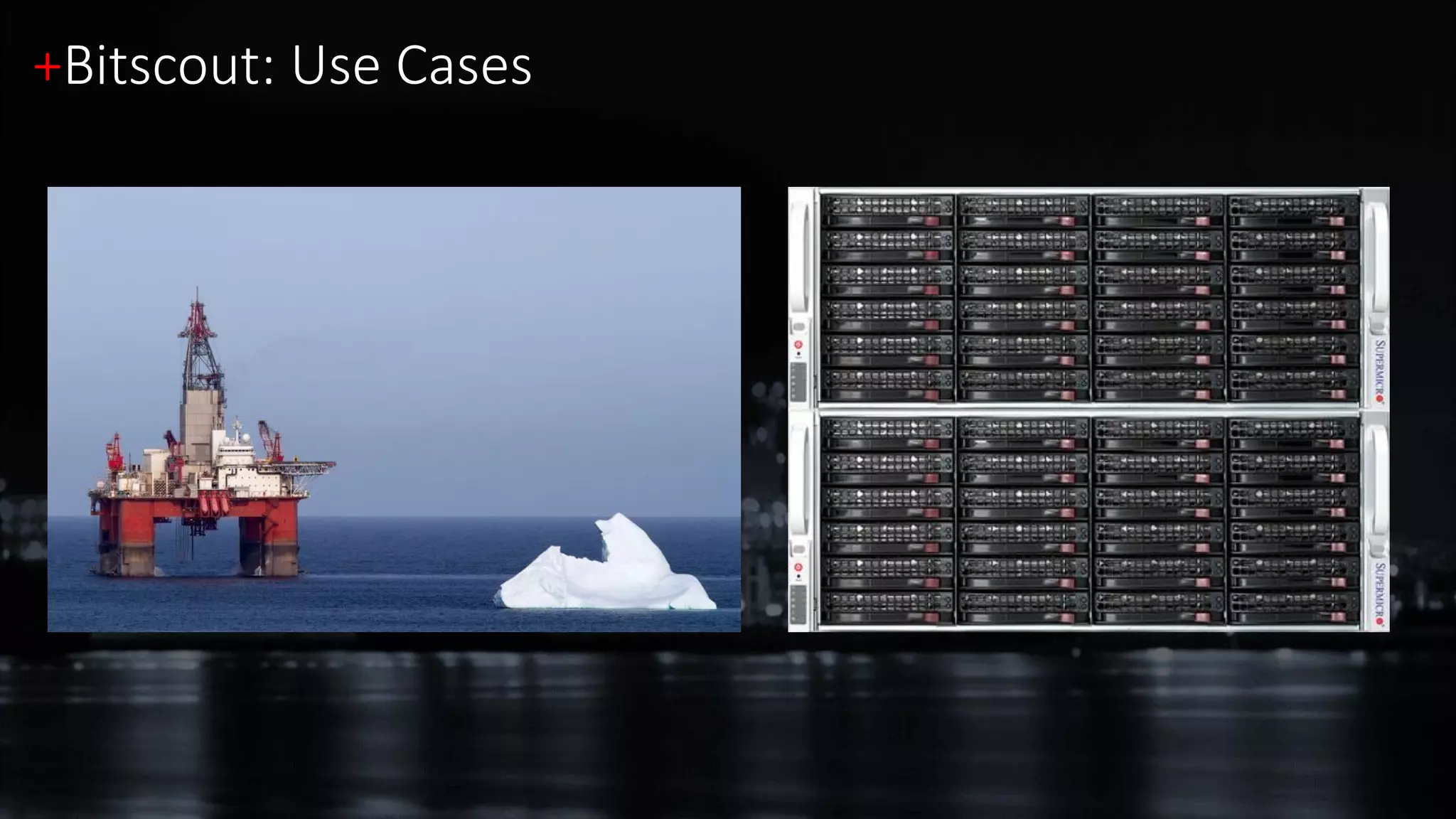
+Bitscout: Use Cases
https://github.com/vitaly-kamluk/bitscout
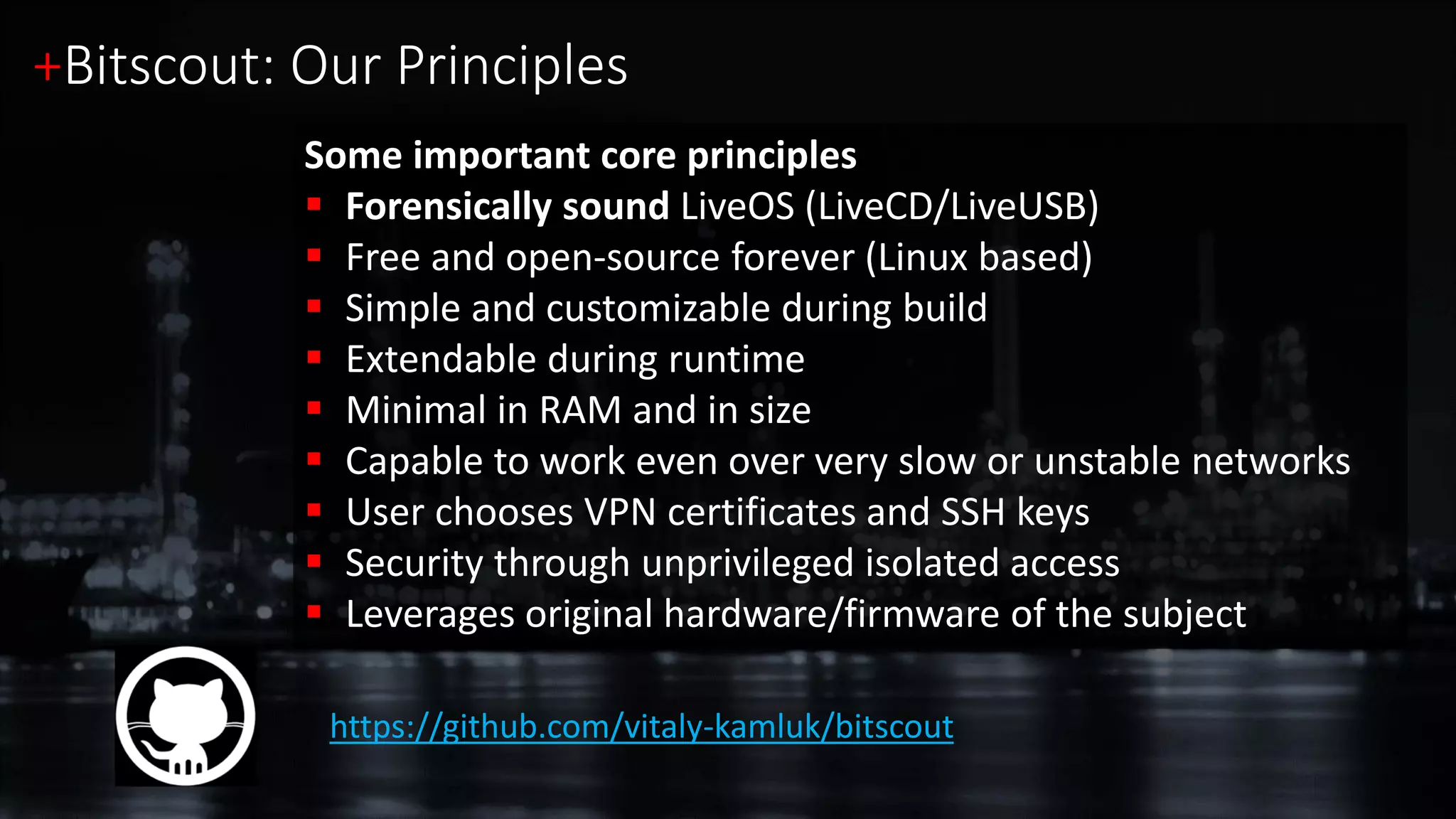
Some important core principles
 Forensically sound LiveOS (LiveCD/LiveUSB)
 Free and open-source forever (Linux based)
 Simple and customizable during build
 Extendable during runtime
 Minimal in RAM and in size
 Capable to work even over very slow or unstable networks
 User chooses VPN certificates and SSH keys
 Security through unprivileged isolated access
 Leverages original hardware/firmware of the subject
+Bitscout: Our Principles
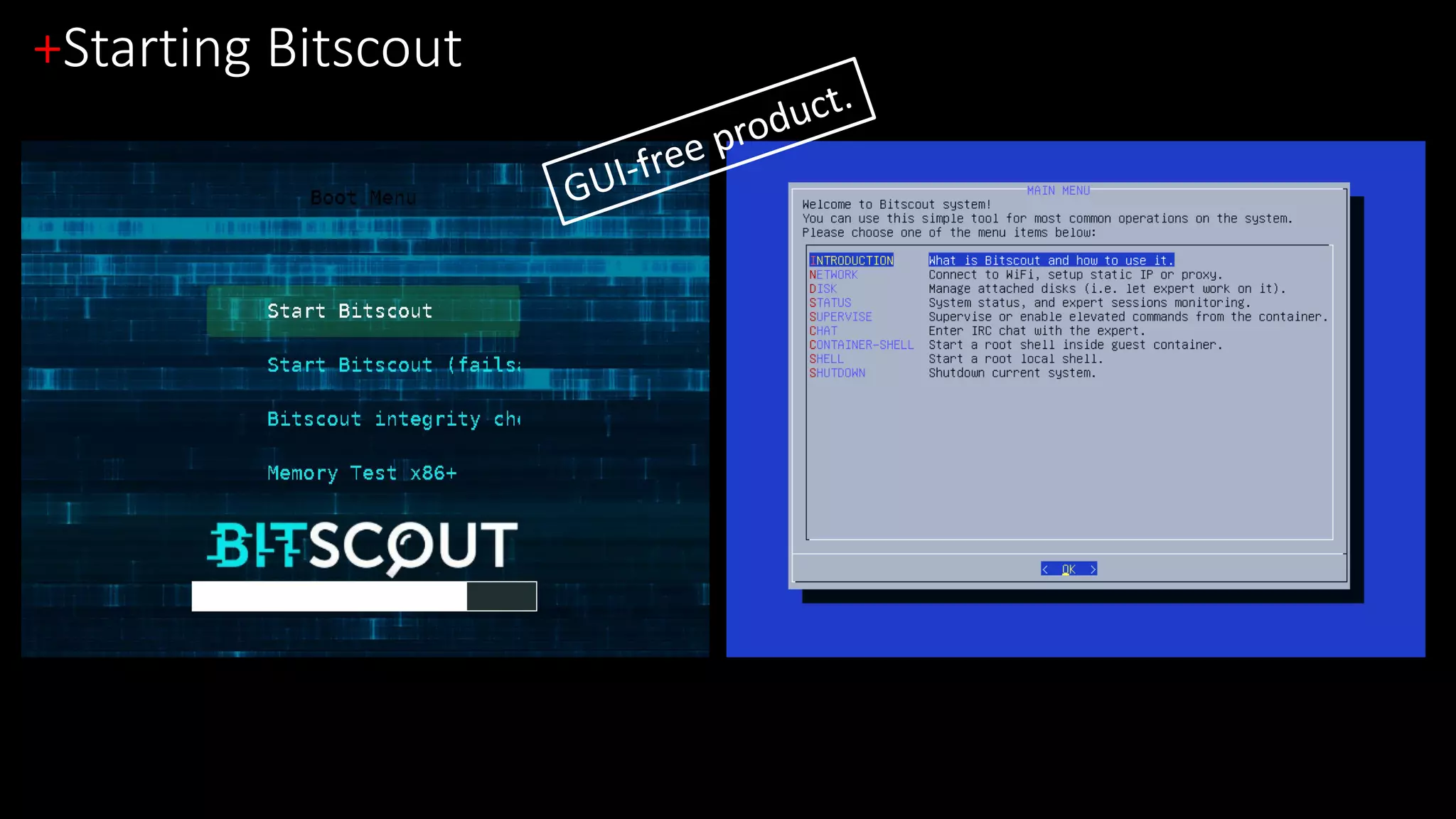
+Starting Bitscout
+Disk Setup
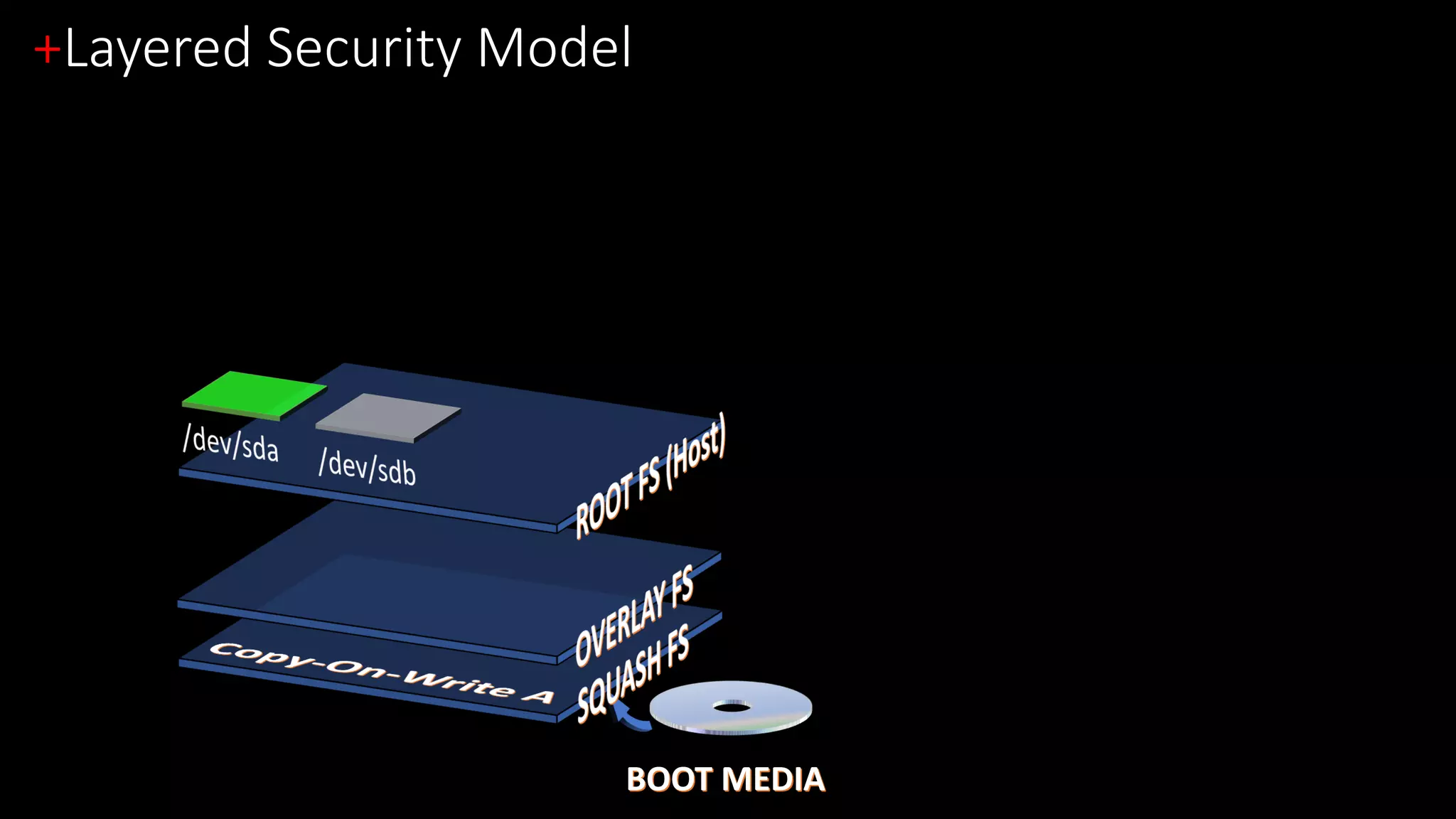
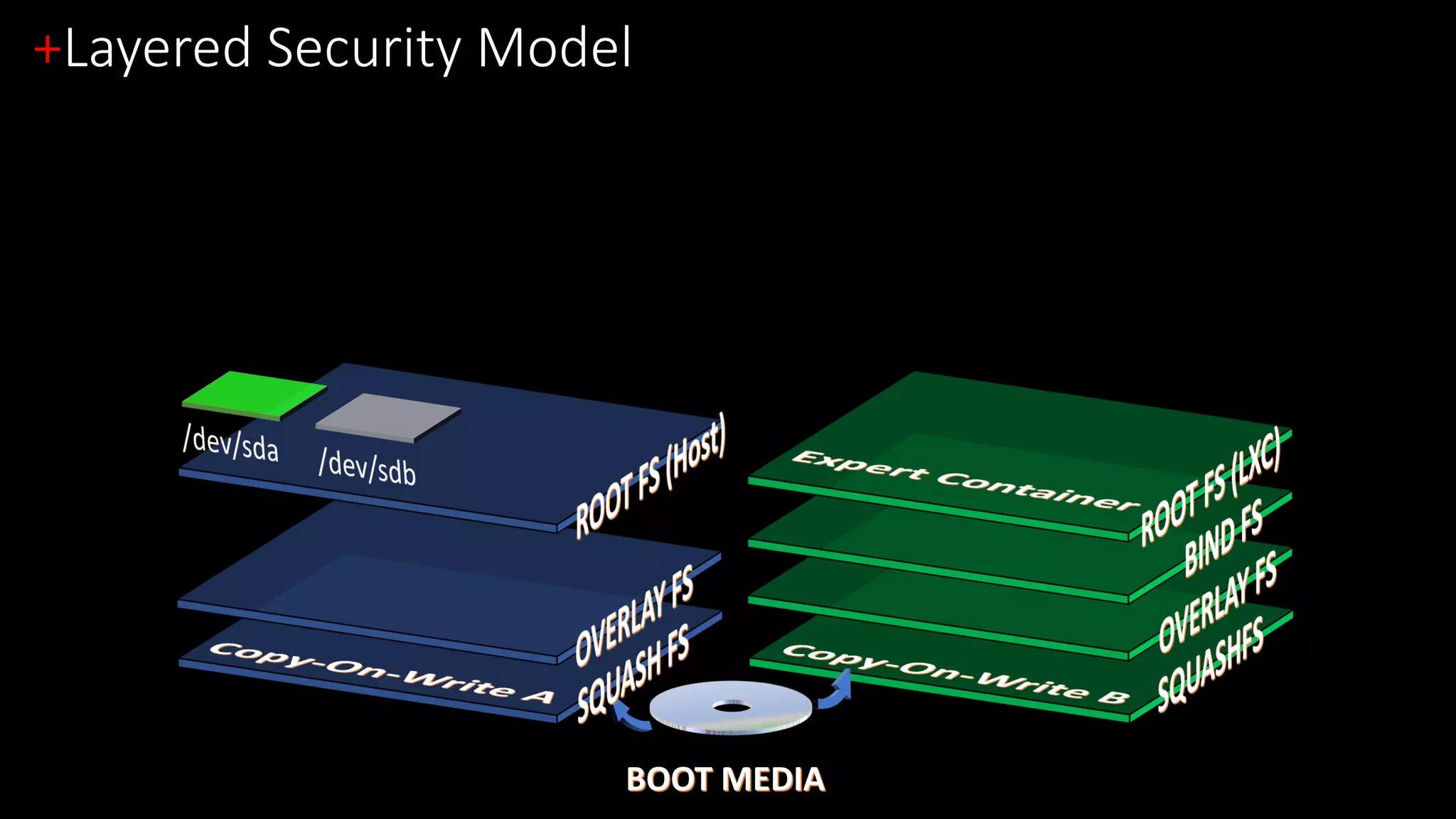
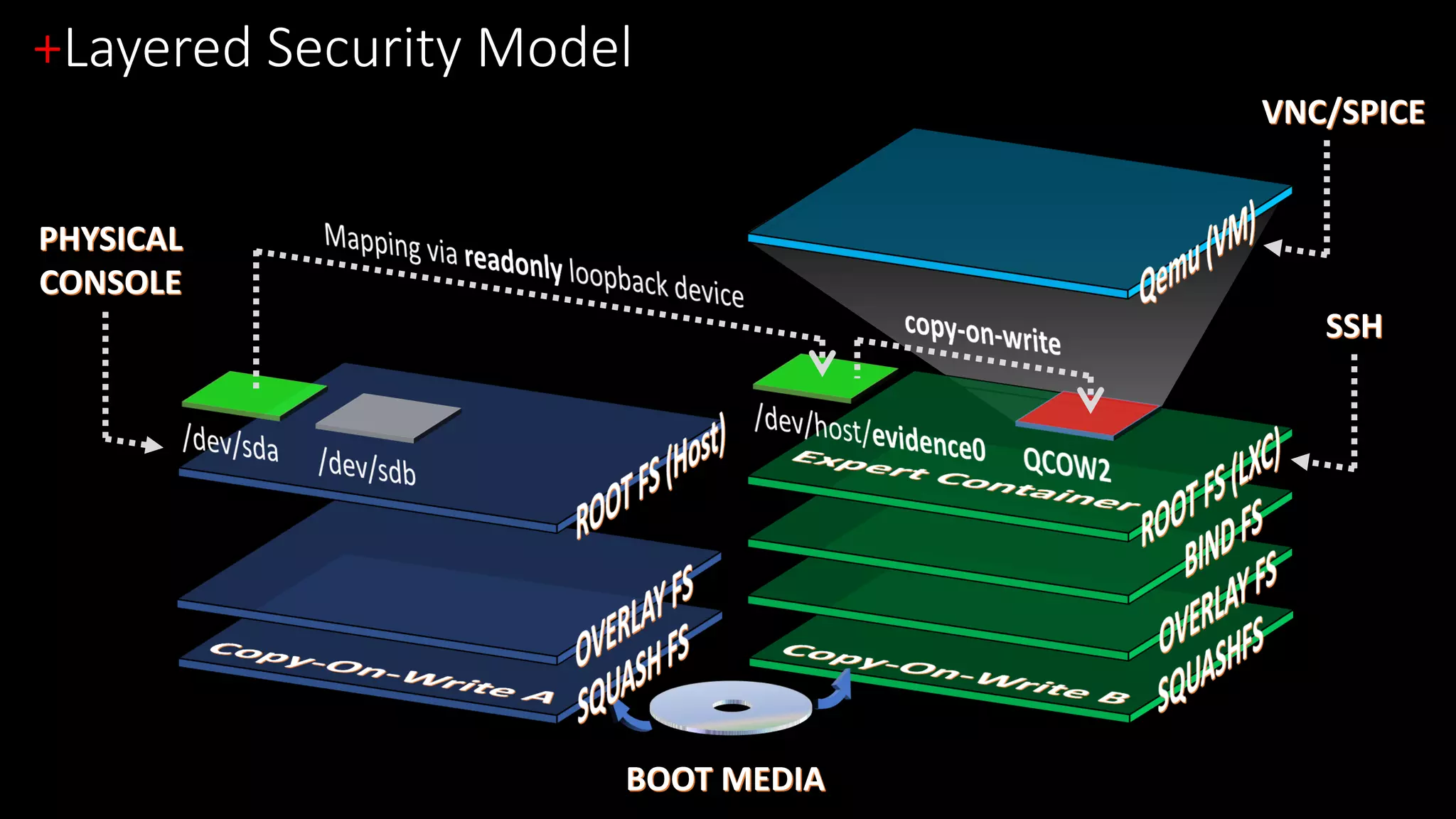
+Layered Security Model
BOOT MEDIA
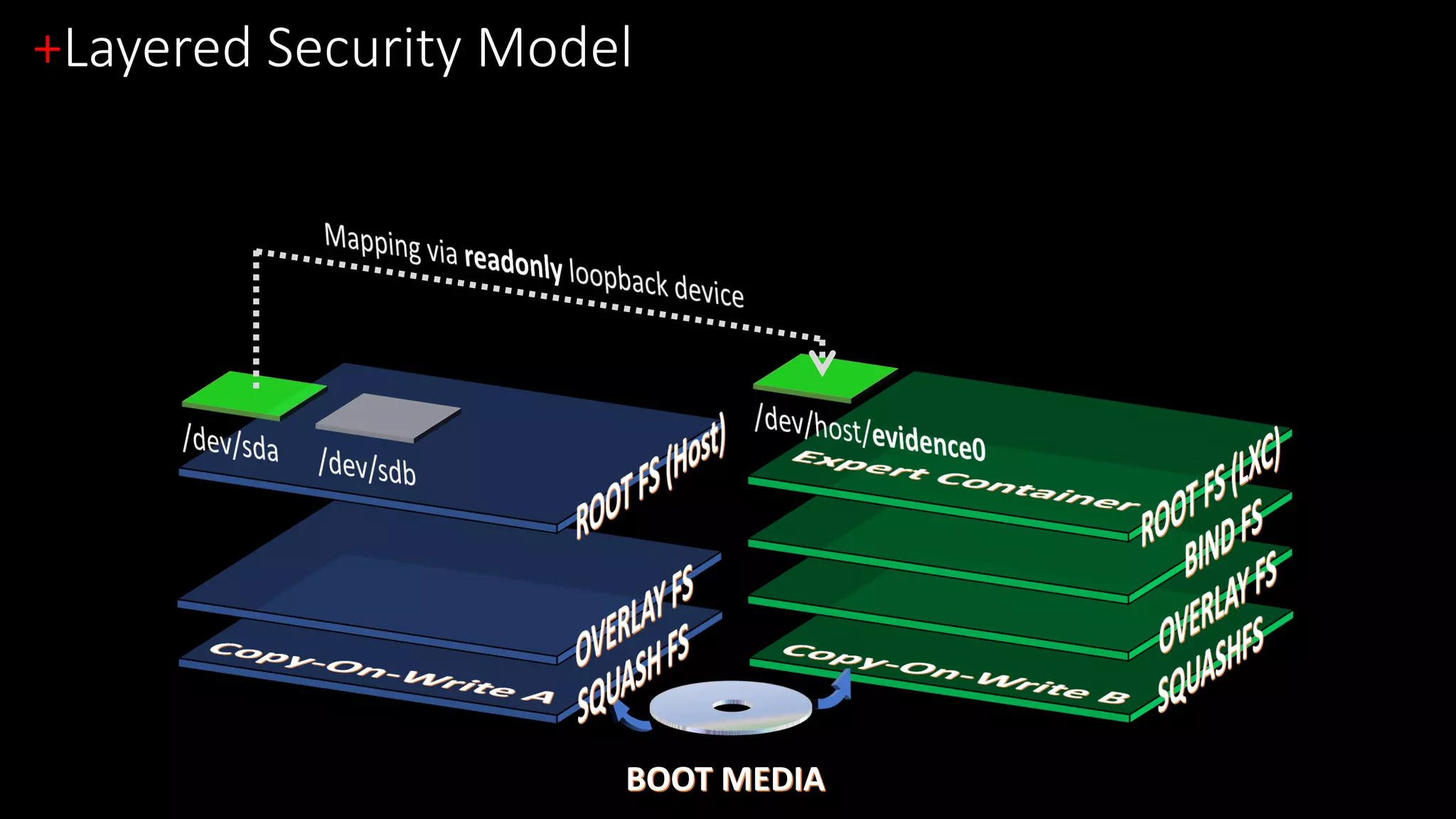
+Layered Security Model
BOOT MEDIA
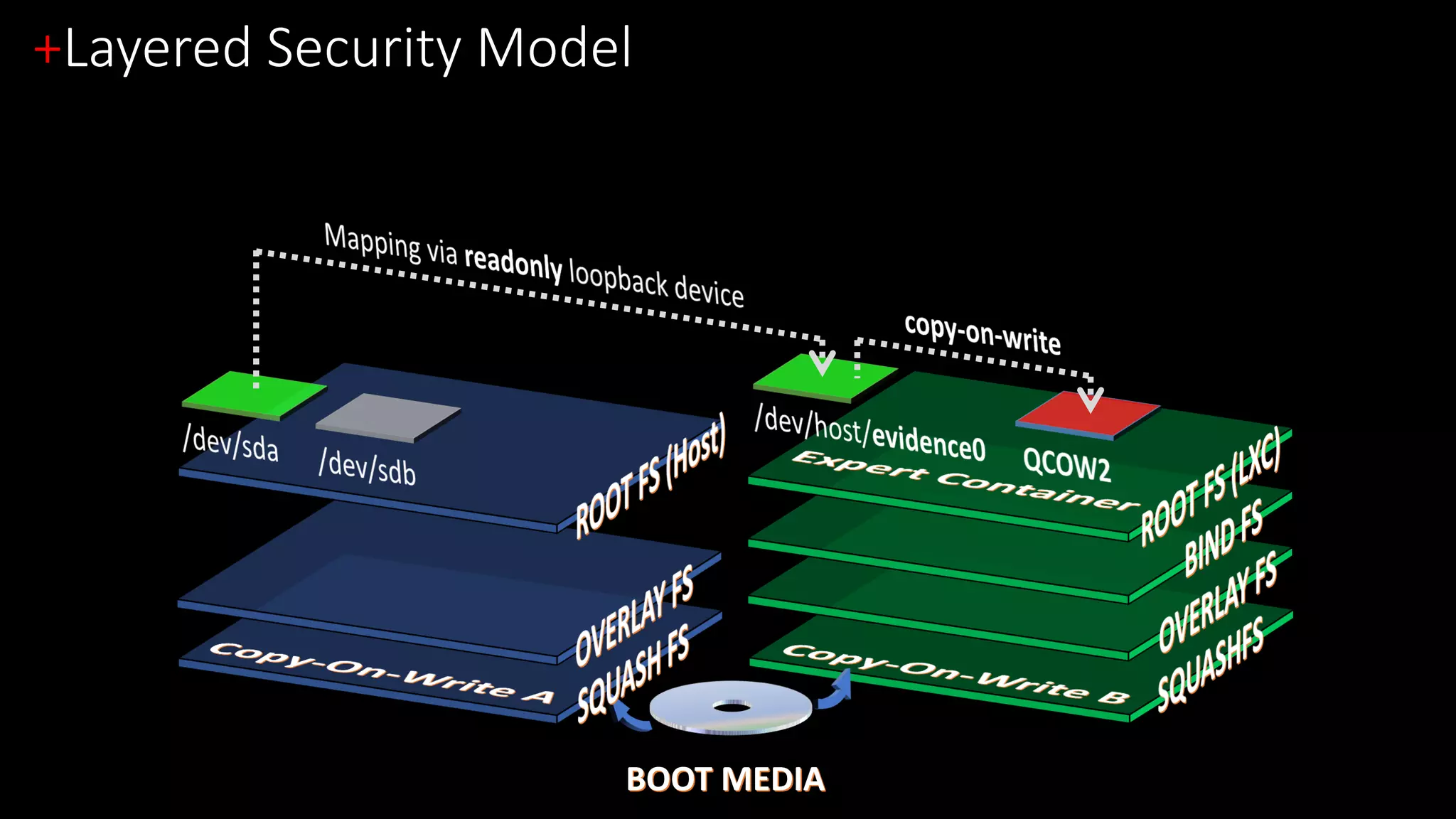
+Layered Security Model
BOOT MEDIA
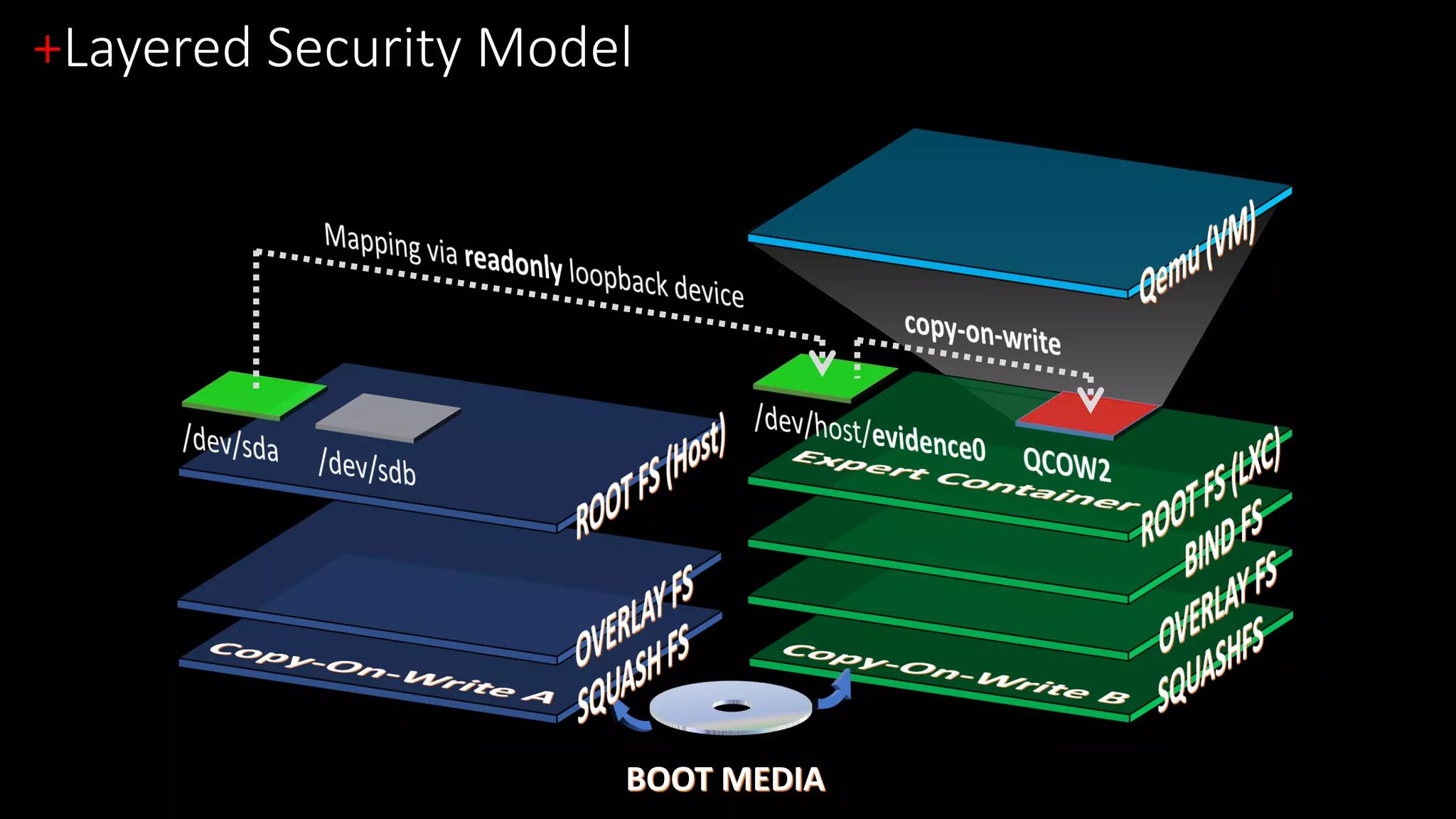
+Layered Security Model
BOOT MEDIA
+Layered Security Model
BOOT MEDIA
+Layered Security Model
BOOT MEDIA
PHYSICAL
CONSOLE
VNC/SPICE
SSH
+Opening the gates for the expert
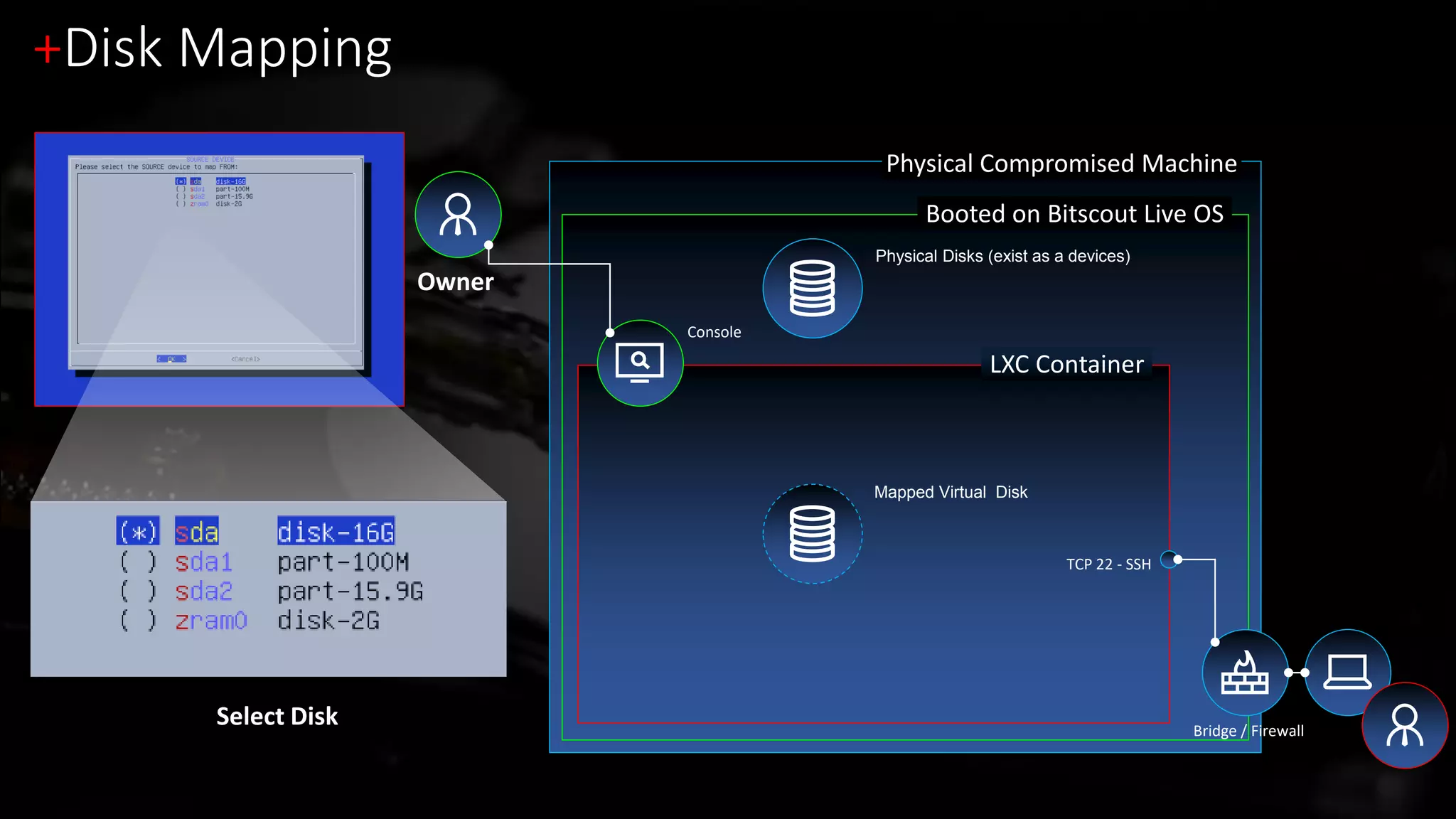
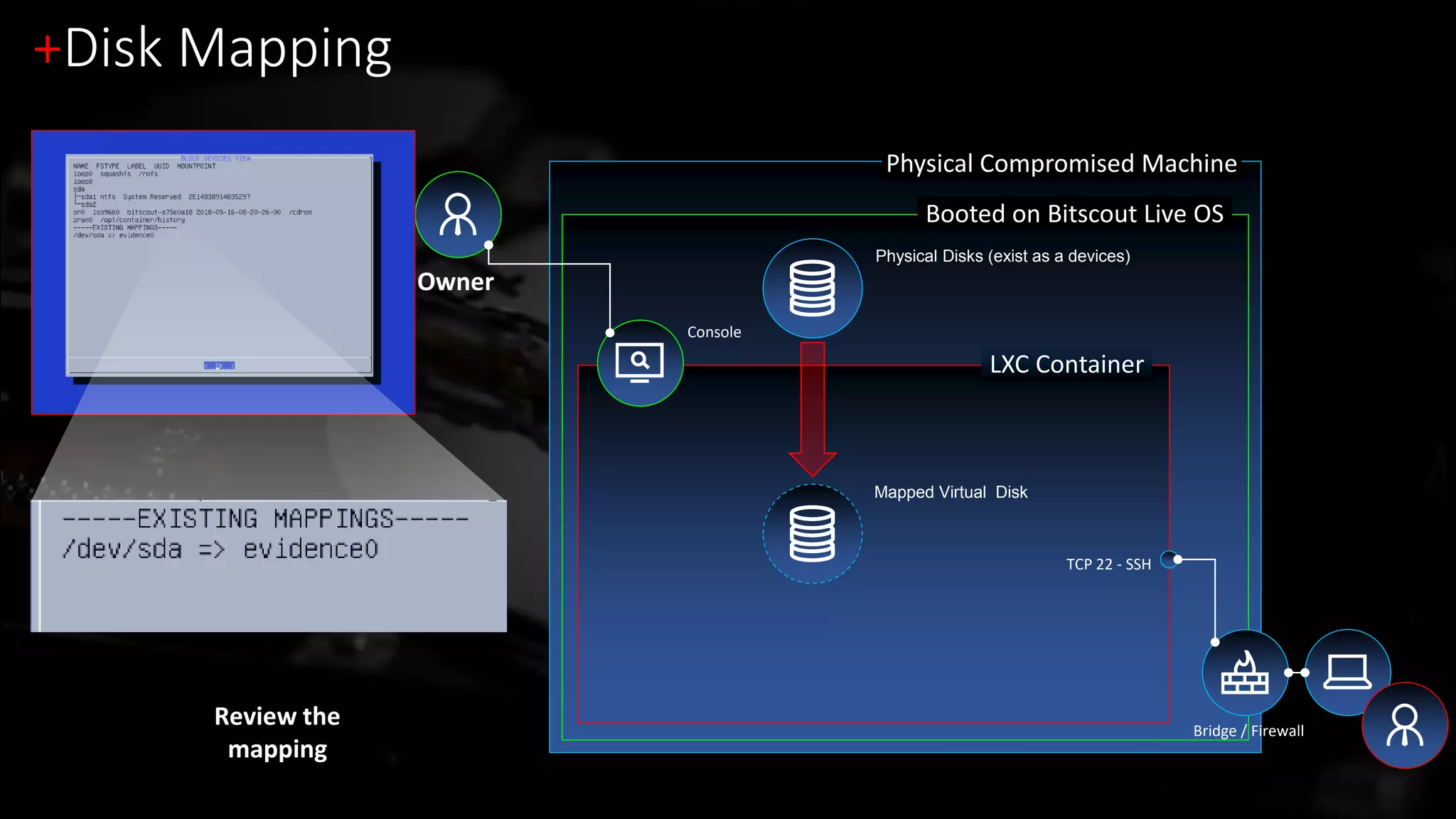
Physical Compromised Machine
Booted on Bitscout Live OS
LXC Container
Console
+Disk Mapping
Owner
Bridge / Firewall
TCP 22 - SSH
Select Disk
Physical Disks (exist as a devices)
Mapped Virtual Disk
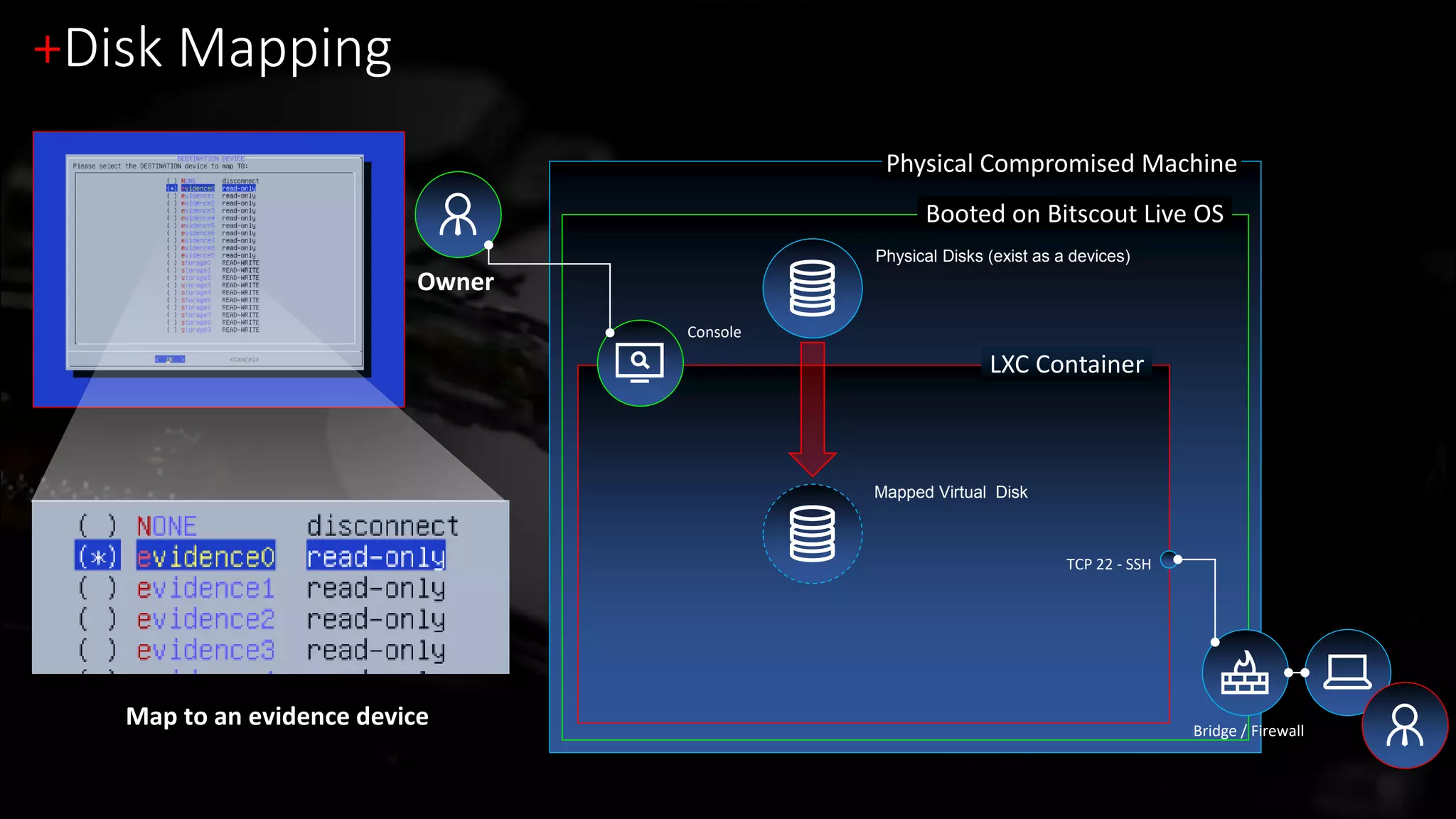
Physical Compromised Machine
Booted on Bitscout Live OS
LXC Container
Console
+Disk Mapping
Owner
Bridge / Firewall
TCP 22 - SSH
Map to an evidence device
Physical Disks (exist as a devices)
Mapped Virtual Disk
Physical Compromised Machine
Booted on Bitscout Live OS
LXC Container
Console
+Disk Mapping
Owner
Bridge / Firewall
TCP 22 - SSH
Review the
mapping
Physical Disks (exist as a devices)
Mapped Virtual Disk
+Network Setup
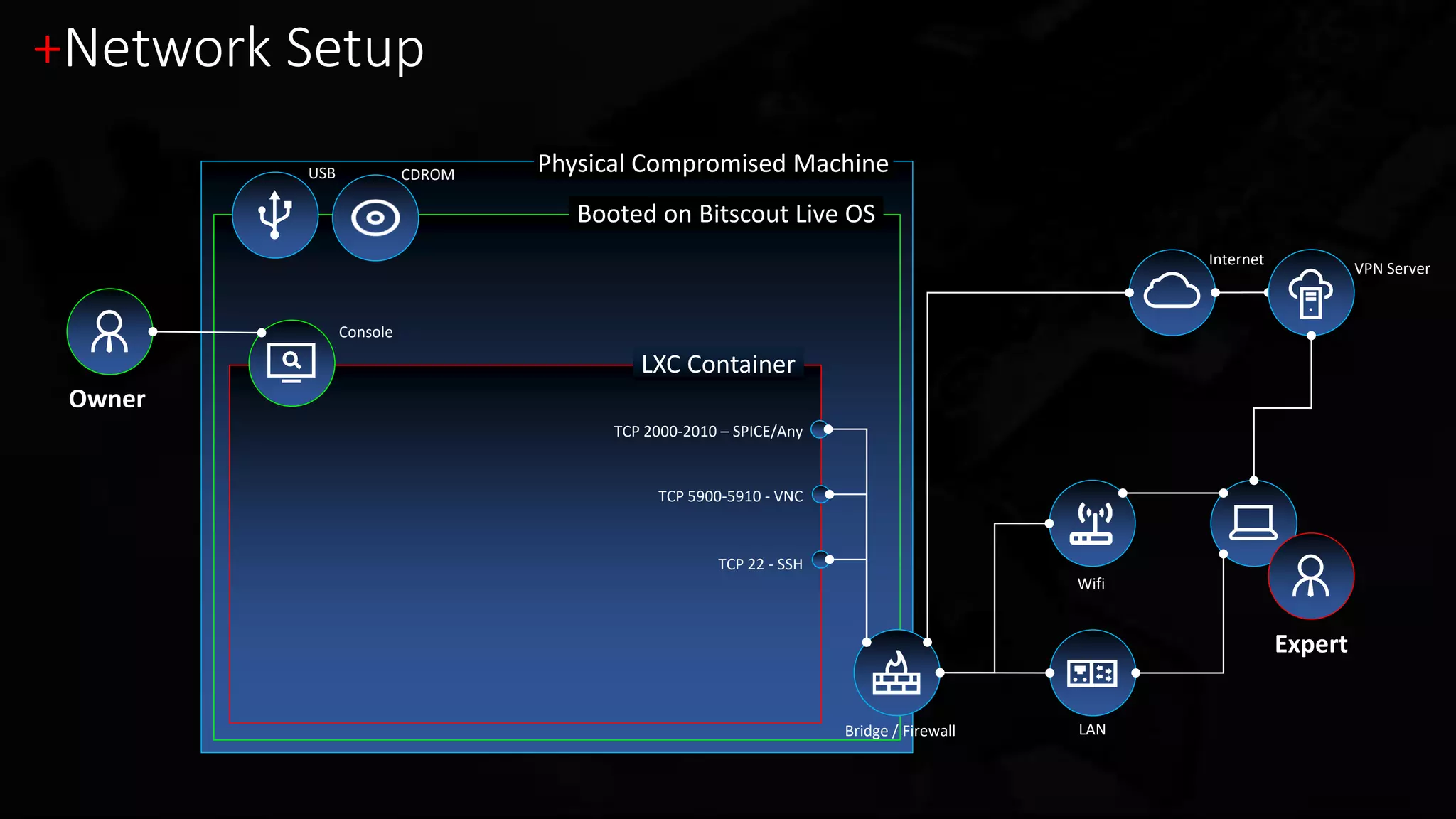
USB CDROM Physical Compromised Machine
Booted on Bitscout Live OS
LXC Container
Console
+Network Setup
Internet
LAN
Owner
Wifi
Bridge / Firewall
TCP 22 - SSH
TCP 2000-2010 – SPICE/Any
TCP 5900-5910 - VNC
VPN Server
Expert
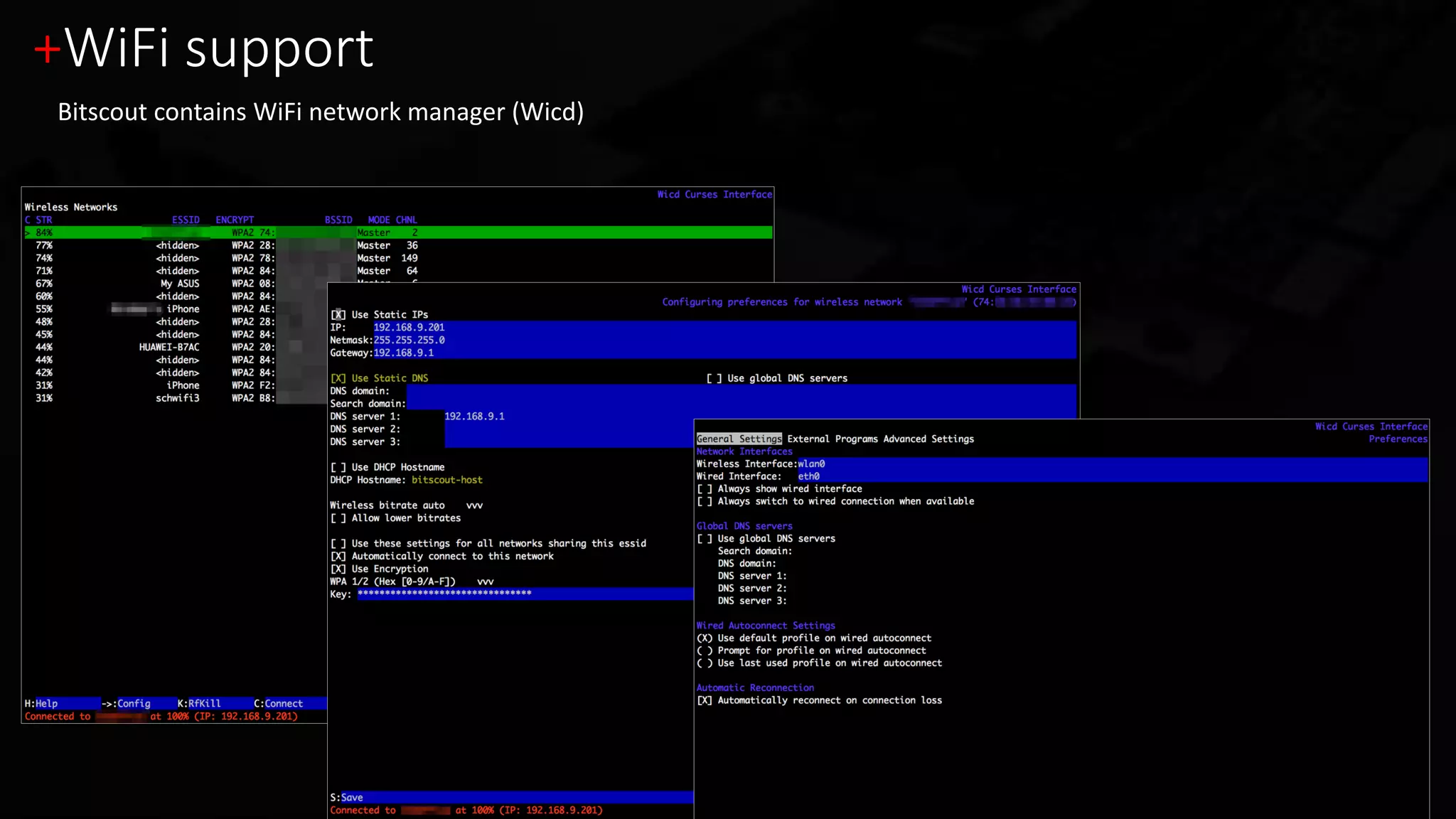
+WiFi support
Bitscout contains WiFi network manager (Wicd)
+Network Setup
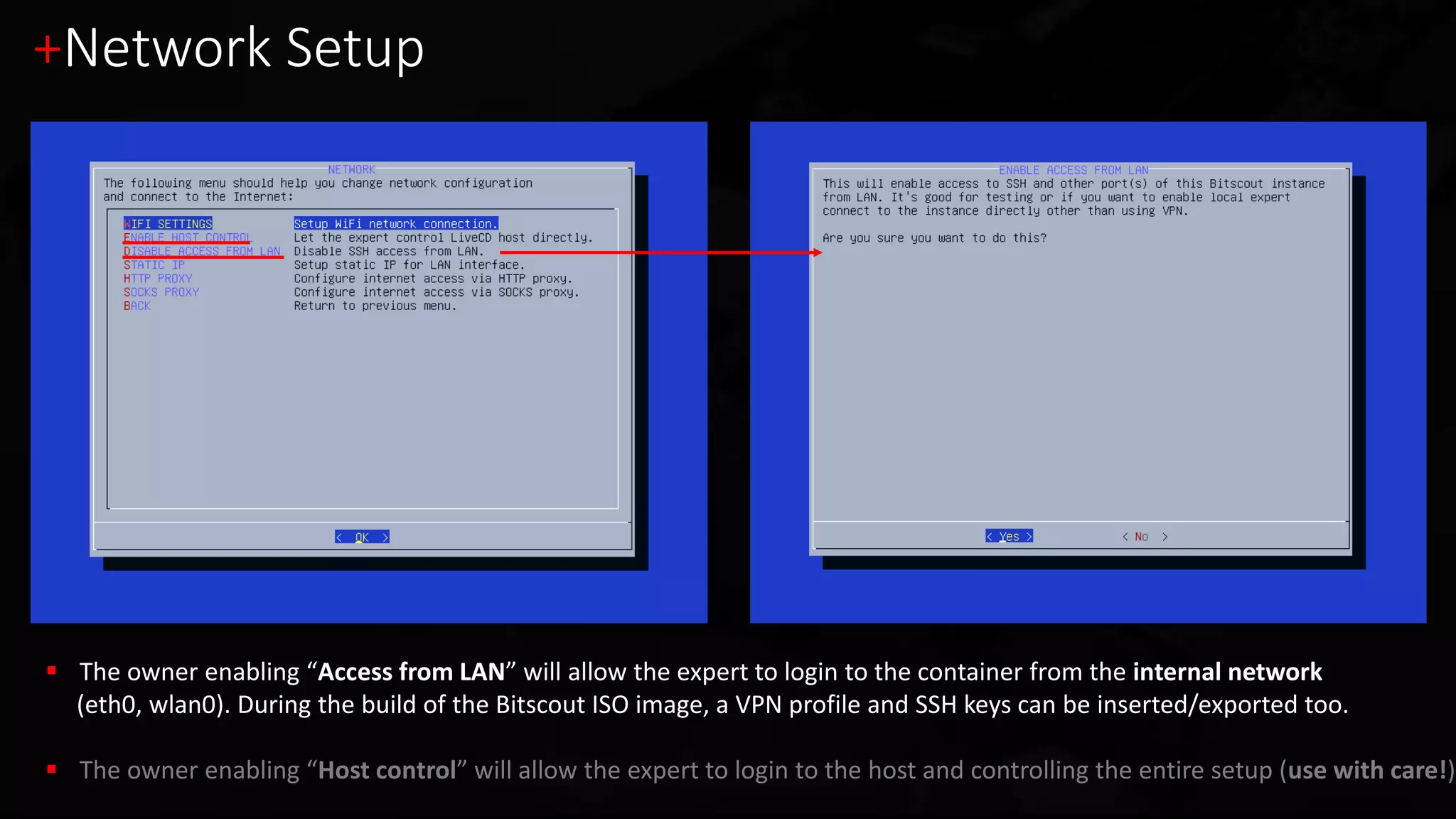
 The owner enabling “Access from LAN” will allow the expert to login to the container from the internal network
(eth0, wlan0). During the build of the Bitscout ISO image, a VPN profile and SSH keys can be inserted/exported too.
 The owner enabling “Host control” will allow the expert to login to the host and controlling the entire setup (use with care!)
+Today’s demo menu – Full Disk Encryption
Windows 10 x64 with Proprietary Full Disk Encryption (FDE)
1. [Demo 1] Interactive analysis of locked live Windows (zero-footprint live forensics)
2. [Demo 2] Legacy MBR-based FDE and pre-boot disk access
3. [Demo 3] UEFI-based FDE and pre-boot disk access
Disclaimer: This presentation is not about breaking cryptographic algorithms!
Let’s see some Bitscout-fu!
+ Demo 1
Windows 10 – Full Disk Encryption
Interactive analysis (zero-footprint live forensics)
+The disk is encrypted with an unknown solution
$ parted /dev/host/evidence0 print
Disk /dev/host/evidence0: 12.9GB
Number Start End Size Type File System Flags
1 1049kB 525MB 524MB primary ntfs boot
2 525MB 12.9GB 12.4GB primary
Partition start: 2048 (0x800)
00000000: eb52 904e 5446 5320 2020 2000 0208 0000 .R.NTFS .....
00000010: 0000 0000 00f8 0000 3f00 ff00 0008 0000 ........?.......
00000020: 0000 0000 8000 8000 ff9f 0f00 0000 0000 ................
00000030: aaa6 0000 0000 0000 0200 0000 0000 0000 ................
00000040: f600 0000 0100 0000 f214 6ada 3b6a da18 ..........j.;j..
Partition start: 1026048 (0xfa800)
00000000: 8ba3 53ca 36b1 0d1c f349 3809 5517 cb6b ..S.6....I8.U..k
00000010: 6be2 2a9e b713 8e61 66f0 e8e6 e085 0efc k.*....af.......
00000020: 7a64 8877 ab8a 87d3 2b1e 94c3 6b4e 08ca zd.w....+...kN..
00000030: c4b1 f16c 485d 4278 682d 78c1 c407 ea57 ...lH]Bxh-x....W
00000040: bd22 0780 f121 8dcc 61ac 035d d6b6 c7dc ."...!..a..]....
Windows boot partition
is not encrypted.
System disk however
is apparently
encrypted, tools like
fls won’t work
Physical Compromised Machine
Booted on Bitscout Live OS
LXC Container
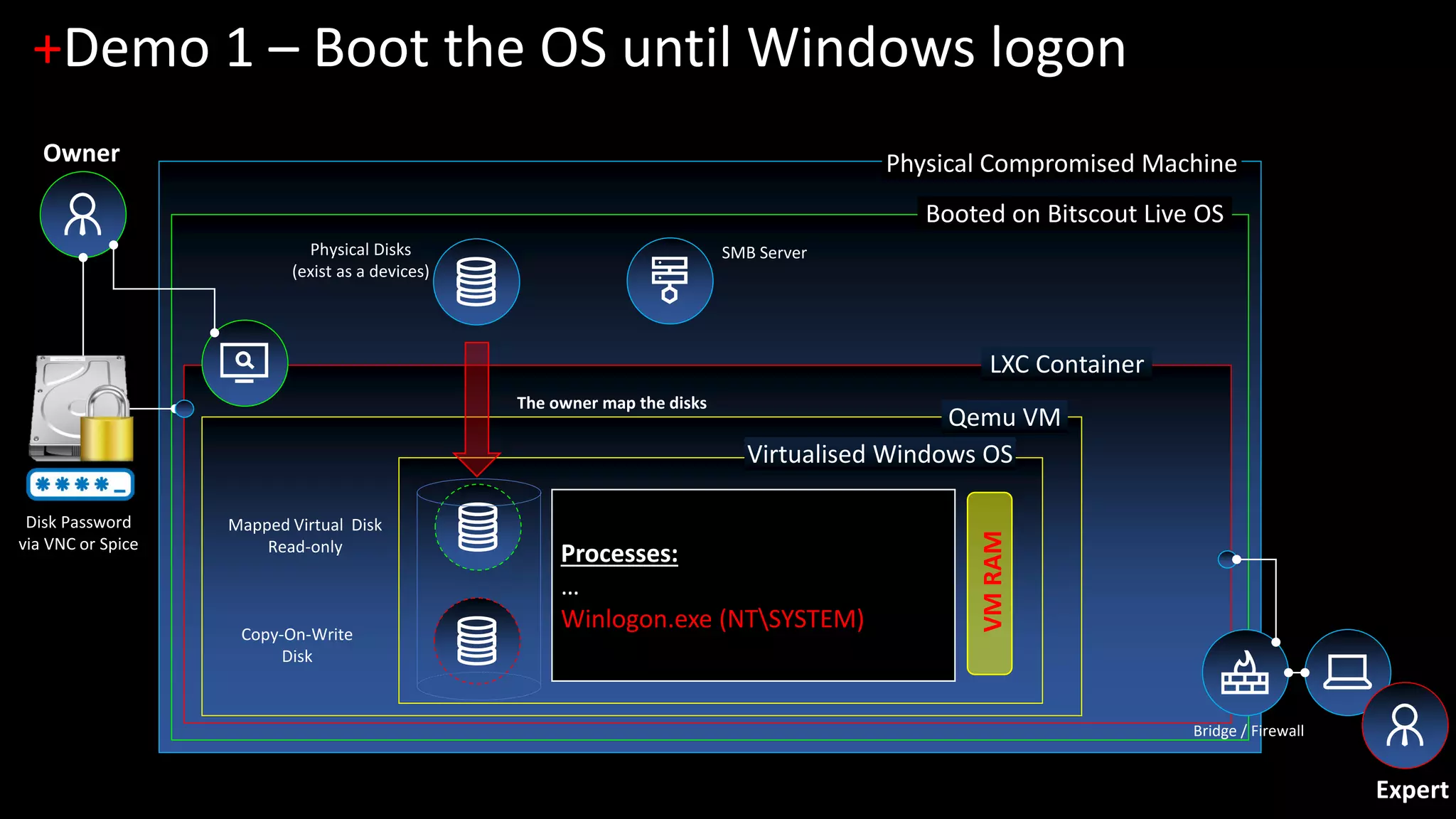
+Demo 1 – Boot the OS until Windows logon
Owner
Physical Disks
(exist as a devices)
Bridge / Firewall
Qemu VM
Virtualised Windows OS
SMB Server
Processes:
…
Winlogon.exe (NTSYSTEM)
VMRAM
Expert
The owner map the disks
Disk Password
via VNC or Spice
Copy-On-Write
Disk
Mapped Virtual Disk
Read-only
Physical Compromised Machine
Booted on Bitscout Live OS
LXC Container
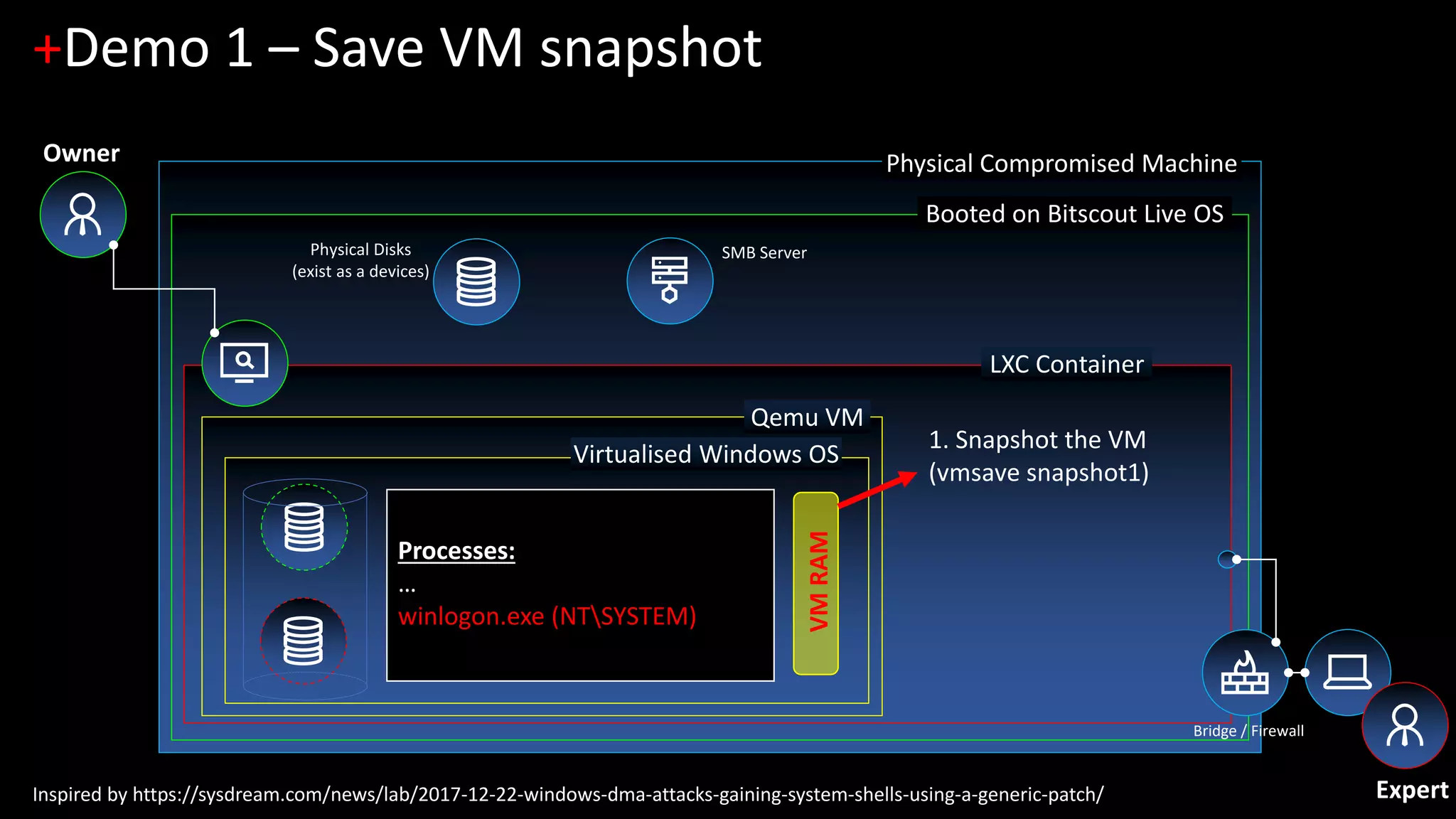
+Demo 1 – Save VM snapshot
Physical Disks
(exist as a devices)
Bridge / Firewall
Qemu VM
Virtualised Windows OS
SMB Server
Processes:
…
winlogon.exe (NTSYSTEM)
VMRAM
1. Snapshot the VM
(vmsave snapshot1)
Expert
Owner
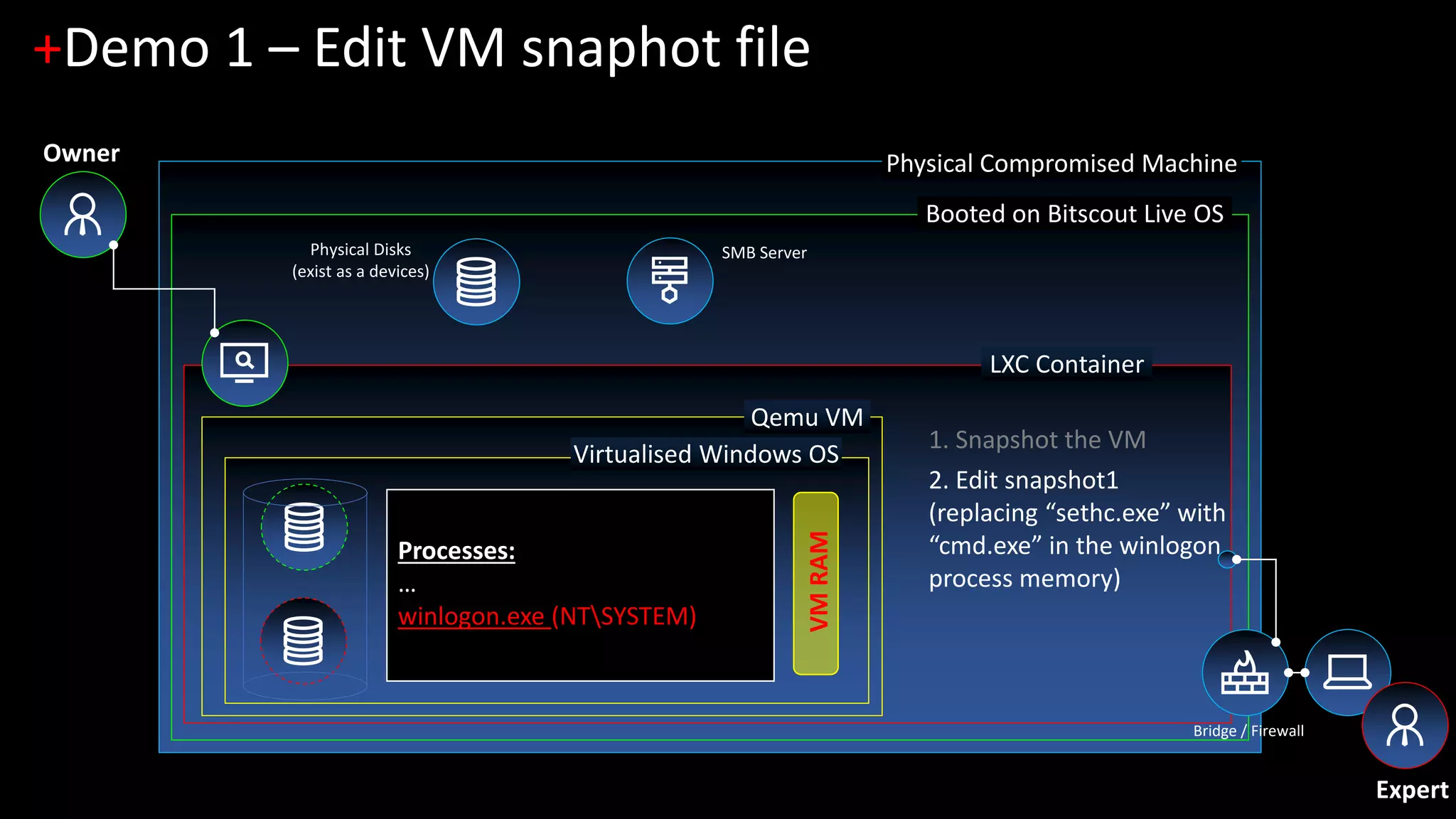
Inspired by https://sysdream.com/news/lab/2017-12-22-windows-dma-attacks-gaining-system-shells-using-a-generic-patch/
Physical Compromised Machine
Booted on Bitscout Live OS
LXC Container
+Demo 1 – Edit VM snaphot file
Physical Disks
(exist as a devices)
Bridge / Firewall
Qemu VM
Virtualised Windows OS
SMB Server
VMRAM
2. Edit snapshot1
(replacing “sethc.exe” with
“cmd.exe” in the winlogon
process memory)
1. Snapshot the VM
Expert
Owner
Processes:
…
winlogon.exe (NTSYSTEM)
Physical Compromised Machine
Booted on Bitscout Live OS
LXC Container
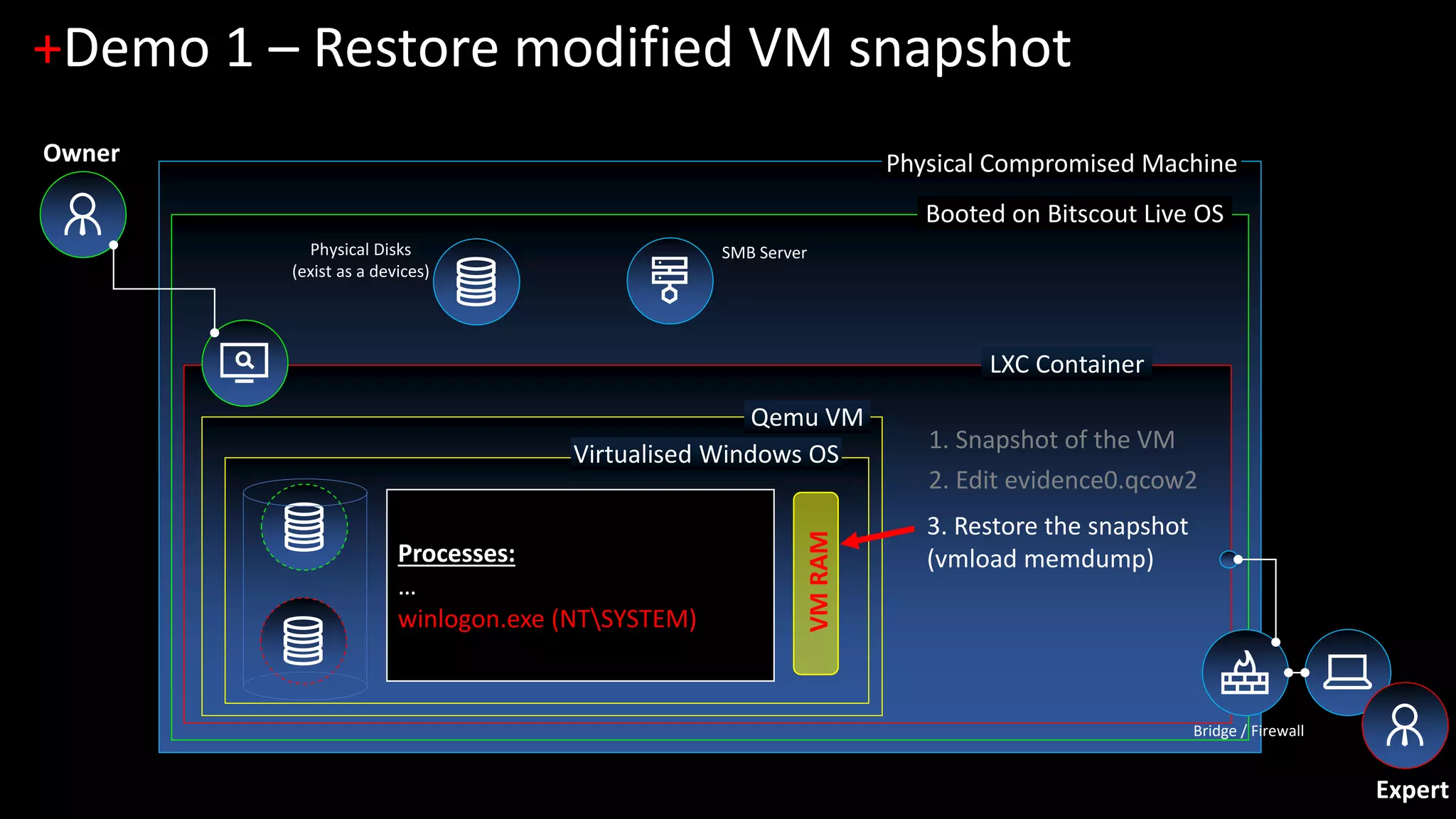
+Demo 1 – Restore modified VM snapshot
Physical Disks
(exist as a devices)
Bridge / Firewall
Qemu VM
Virtualised Windows OS
SMB Server
Processes:
…
winlogon.exe (NTSYSTEM)
VMRAM
3. Restore the snapshot
(vmload memdump)
Expert
Owner
1. Snapshot of the VM
2. Edit evidence0.qcow2
Physical Compromised Machine
Booted on Bitscout Live OS
LXC Container
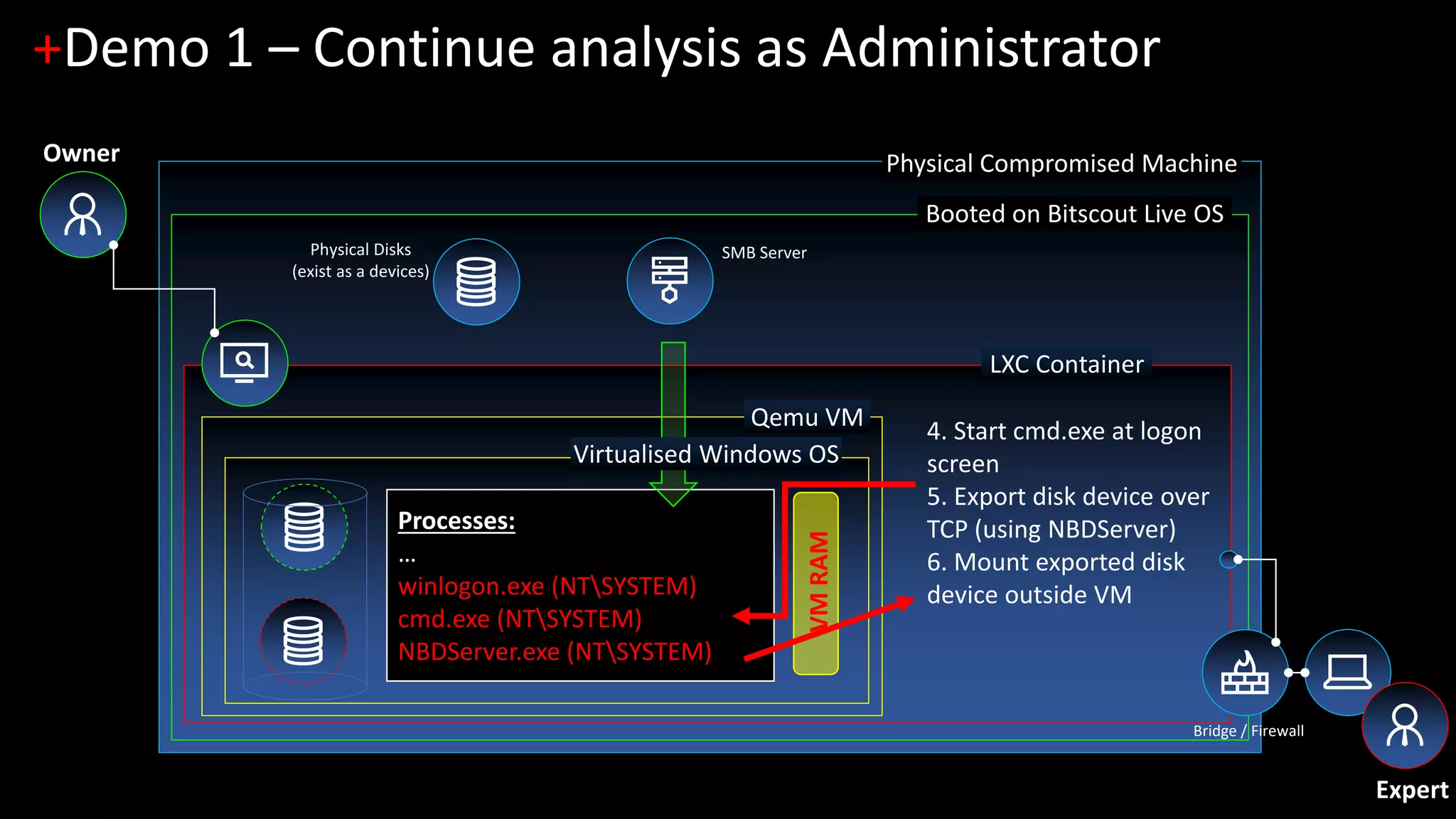
+Demo 1 – Continue analysis as Administrator
Physical Disks
(exist as a devices)
Bridge / Firewall
Qemu VM
SMB Server
Processes:
…
winlogon.exe (NTSYSTEM)
cmd.exe (NTSYSTEM)
NBDServer.exe (NTSYSTEM)
VMRAM
4. Start cmd.exe at logon
screen
5. Export disk device over
TCP (using NBDServer)
6. Mount exported disk
device outside VM
Virtualised Windows OS
Expert
Owner
+ Demo 2
Windows 10 – Full Disk Encryption
Legacy MBR-based FDE and pre-boot disk access
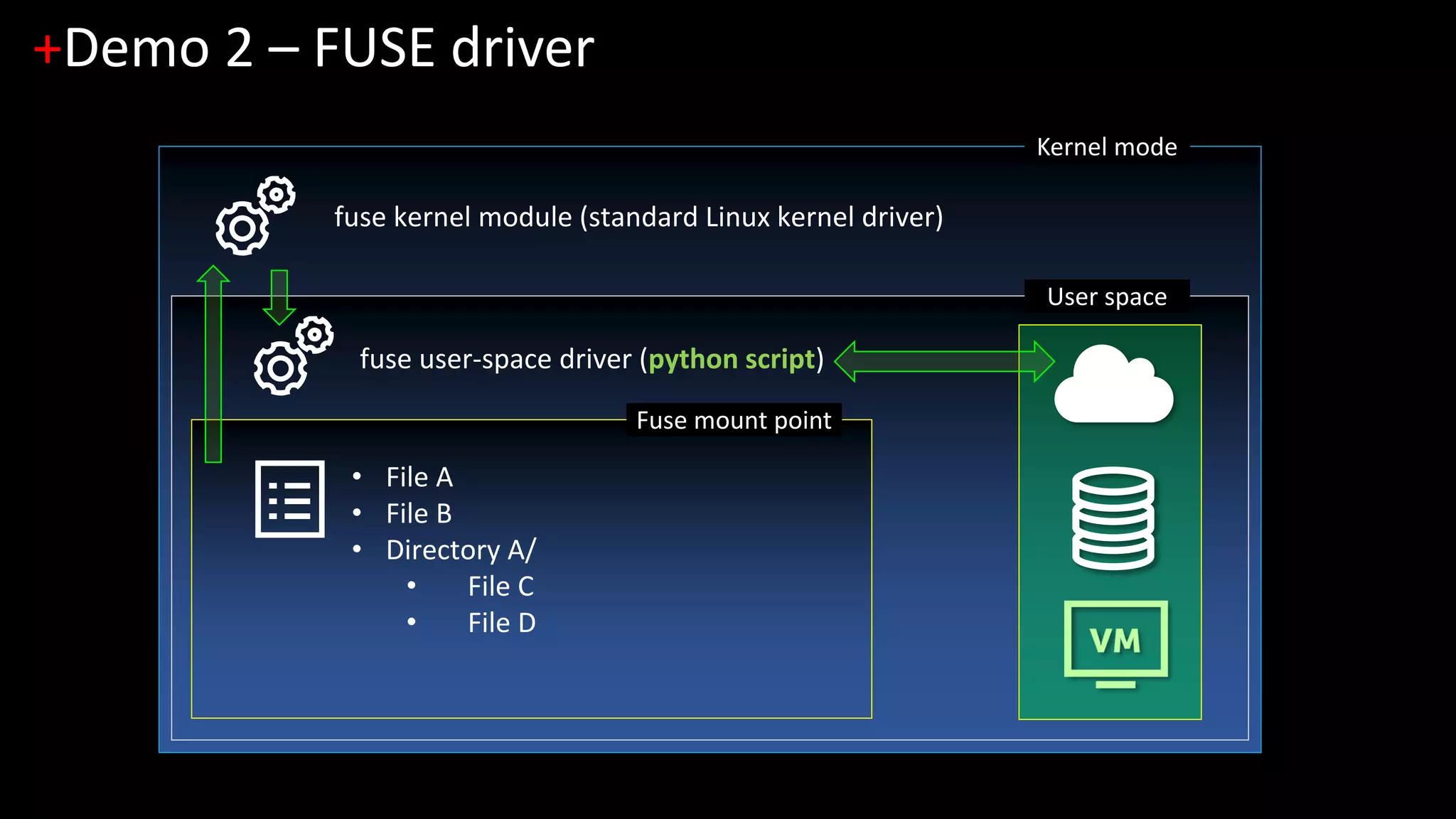
Kernel mode
+Demo 2 – FUSE driver
User space
fuse kernel module (standard Linux kernel driver)
Fuse mount point
fuse user-space driver (python script)
• File A
• File B
• Directory A/
• File C
• File D
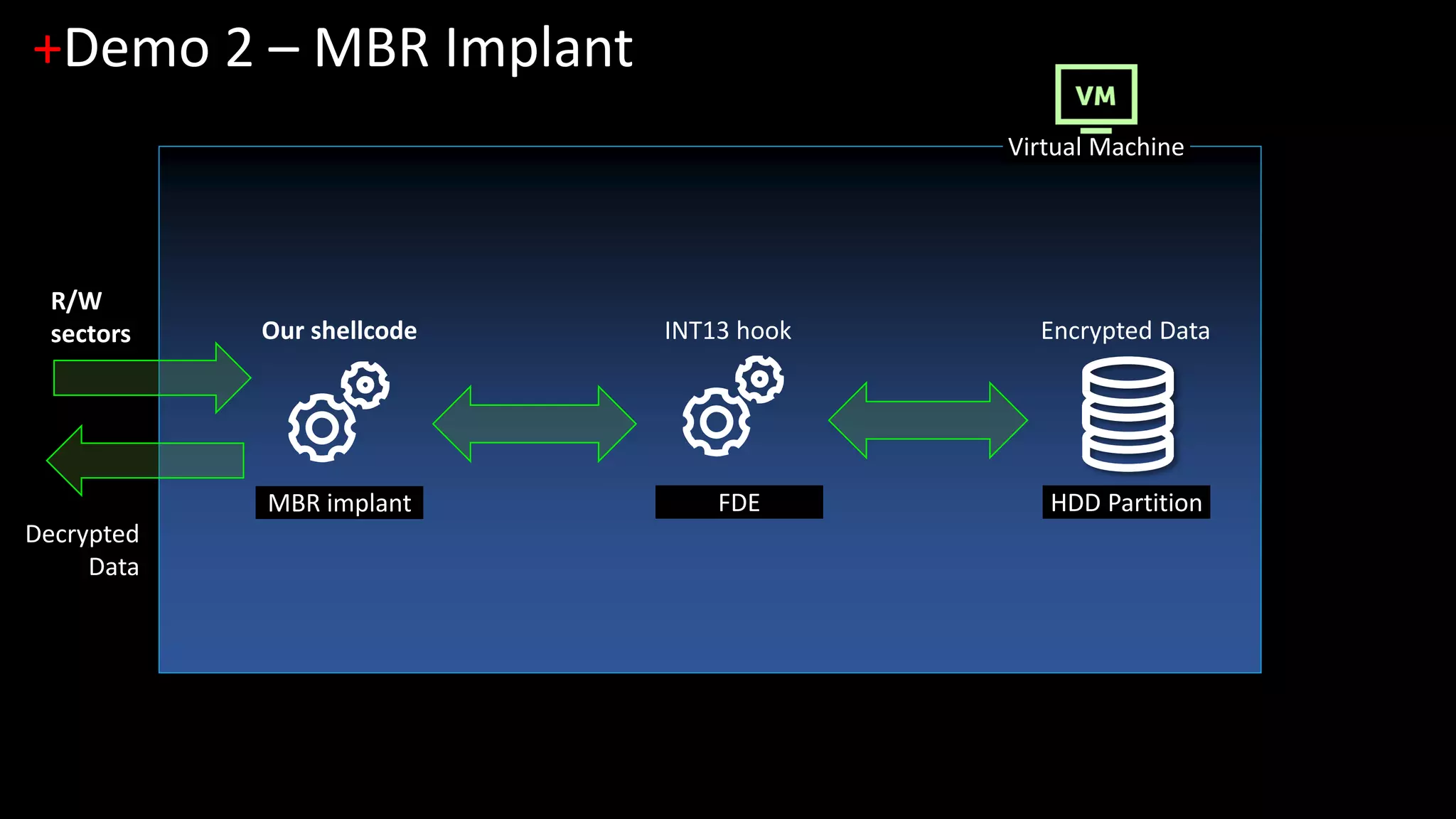
Virtual Machine
+Demo 2 – MBR Implant
MBR implant FDE
Encrypted DataINT13 hookOur shellcode
HDD Partition
R/W
sectors
Decrypted
Data
+ Demo 3
Windows 10 – Full Disk Encryption
UEFI-based FDE and pre-boot disk access
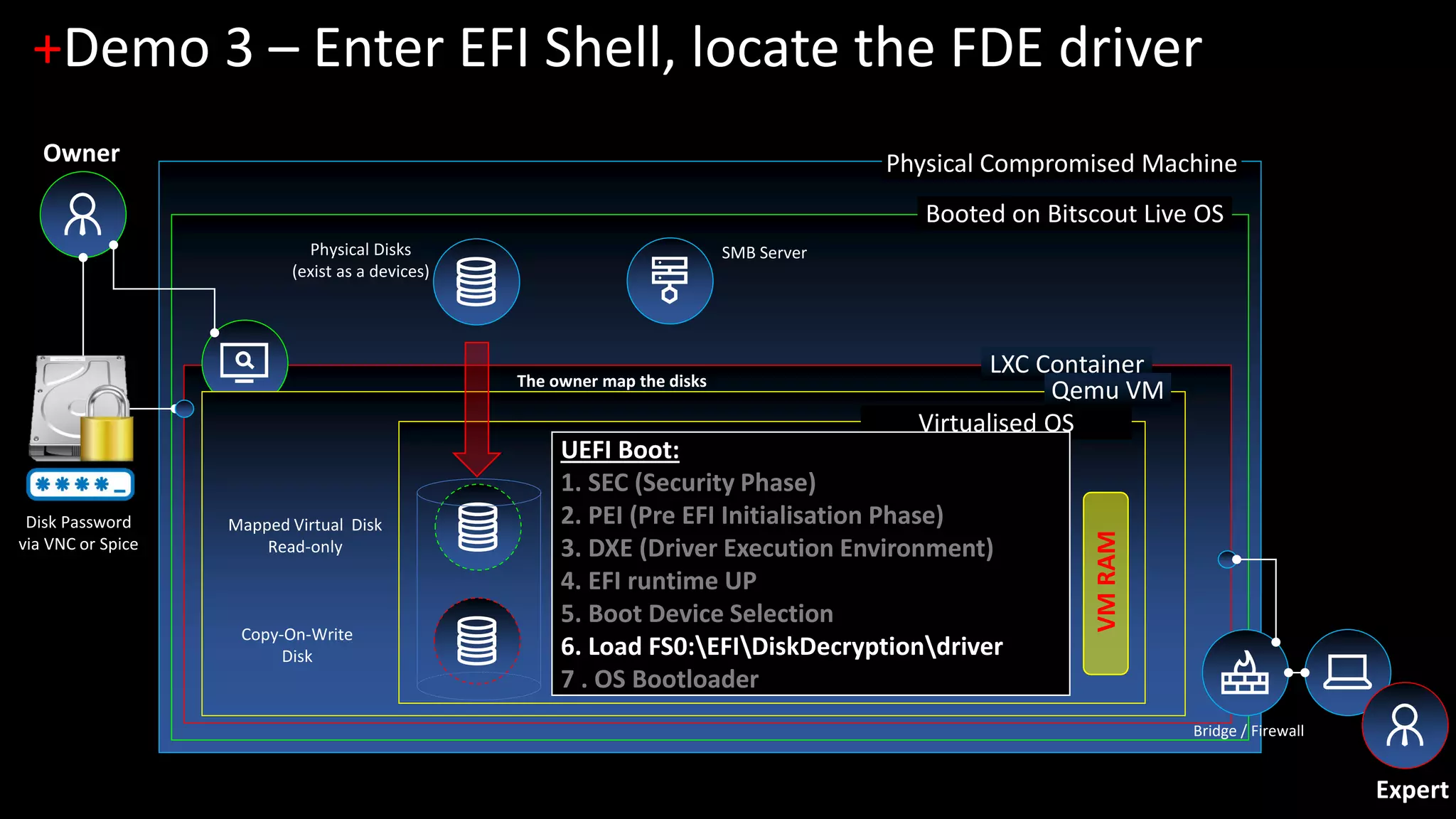
Physical Compromised Machine
Booted on Bitscout Live OS
LXC Container
+Demo 3 – Enter EFI Shell, locate the FDE driver
Owner
Physical Disks
(exist as a devices)
Bridge / Firewall
Qemu VM
Virtualised OS
SMB Server
UEFI Boot:
1. SEC (Security Phase)
2. PEI (Pre EFI Initialisation Phase)
3. DXE (Driver Execution Environment)
4. EFI runtime UP
5. Boot Device Selection
6. Load FS0:EFIDiskDecryptiondriver
7 . OS Bootloader
VMRAM
Expert
The owner map the disks
Disk Password
via VNC or Spice
Copy-On-Write
Disk
Mapped Virtual Disk
Read-only
Physical Compromised Machine
Booted on Bitscout Live OS
LXC Container
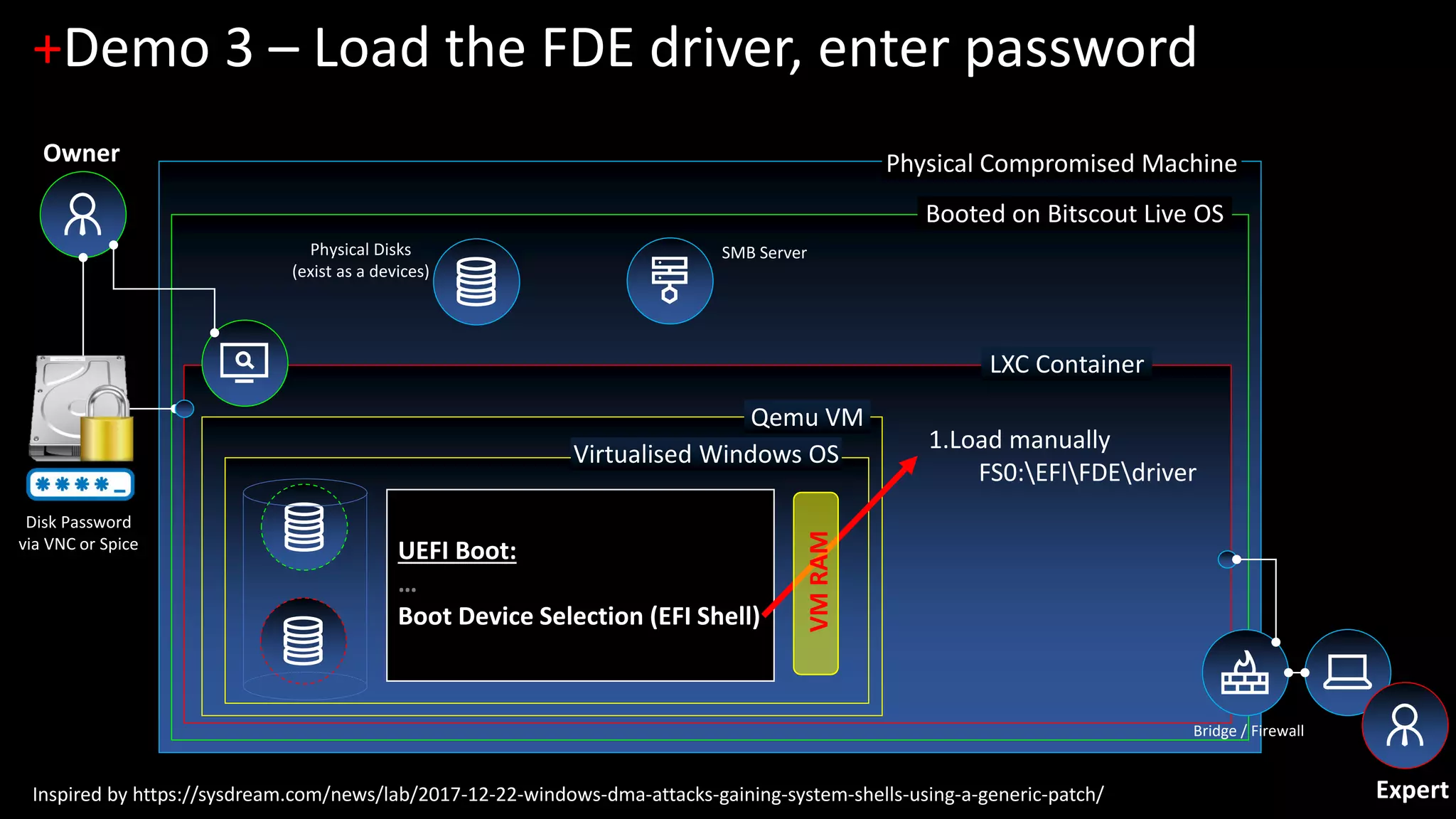
+Demo 3 – Load the FDE driver, enter password
Physical Disks
(exist as a devices)
Bridge / Firewall
Qemu VM
Virtualised Windows OS
SMB Server
UEFI Boot:
…
Boot Device Selection (EFI Shell)
1.Load manually
FS0:EFIFDEdriver
Expert
Owner
Inspired by https://sysdream.com/news/lab/2017-12-22-windows-dma-attacks-gaining-system-shells-using-a-generic-patch/
Disk Password
via VNC or Spice
VMRAM
Physical Compromised Machine
Booted on Bitscout Live OS
LXC Container
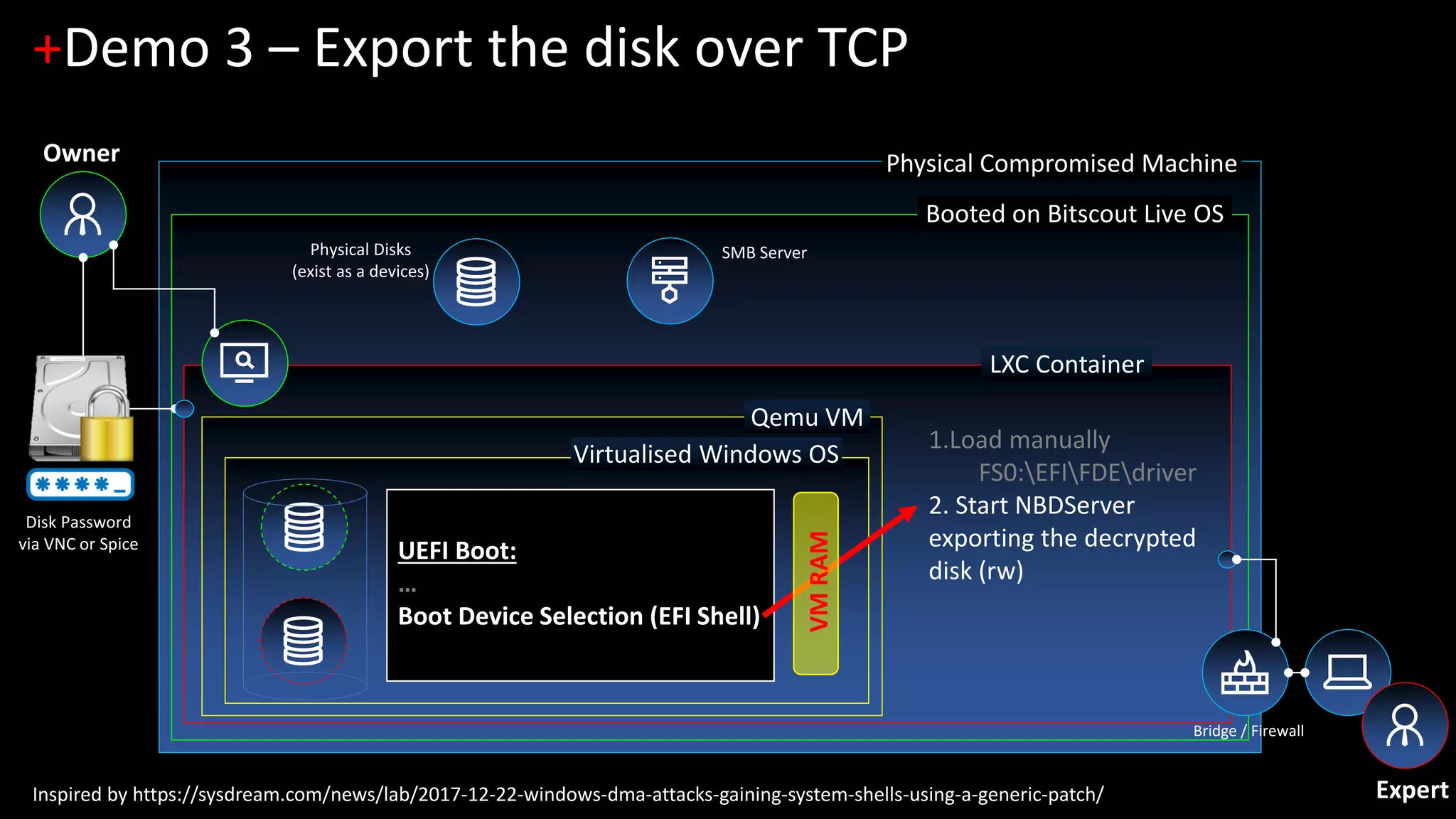
+Demo 3 – Export the disk over TCP
Physical Disks
(exist as a devices)
Bridge / Firewall
Qemu VM
Virtualised Windows OS
SMB Server
UEFI Boot:
…
Boot Device Selection (EFI Shell)
1.Load manually
FS0:EFIFDEdriver
2. Start NBDServer
exporting the decrypted
disk (rw)
Expert
Owner
Inspired by https://sysdream.com/news/lab/2017-12-22-windows-dma-attacks-gaining-system-shells-using-a-generic-patch/
Disk Password
via VNC or Spice
VMRAM
Physical Compromised Machine
Booted on Bitscout Live OS
LXC Container
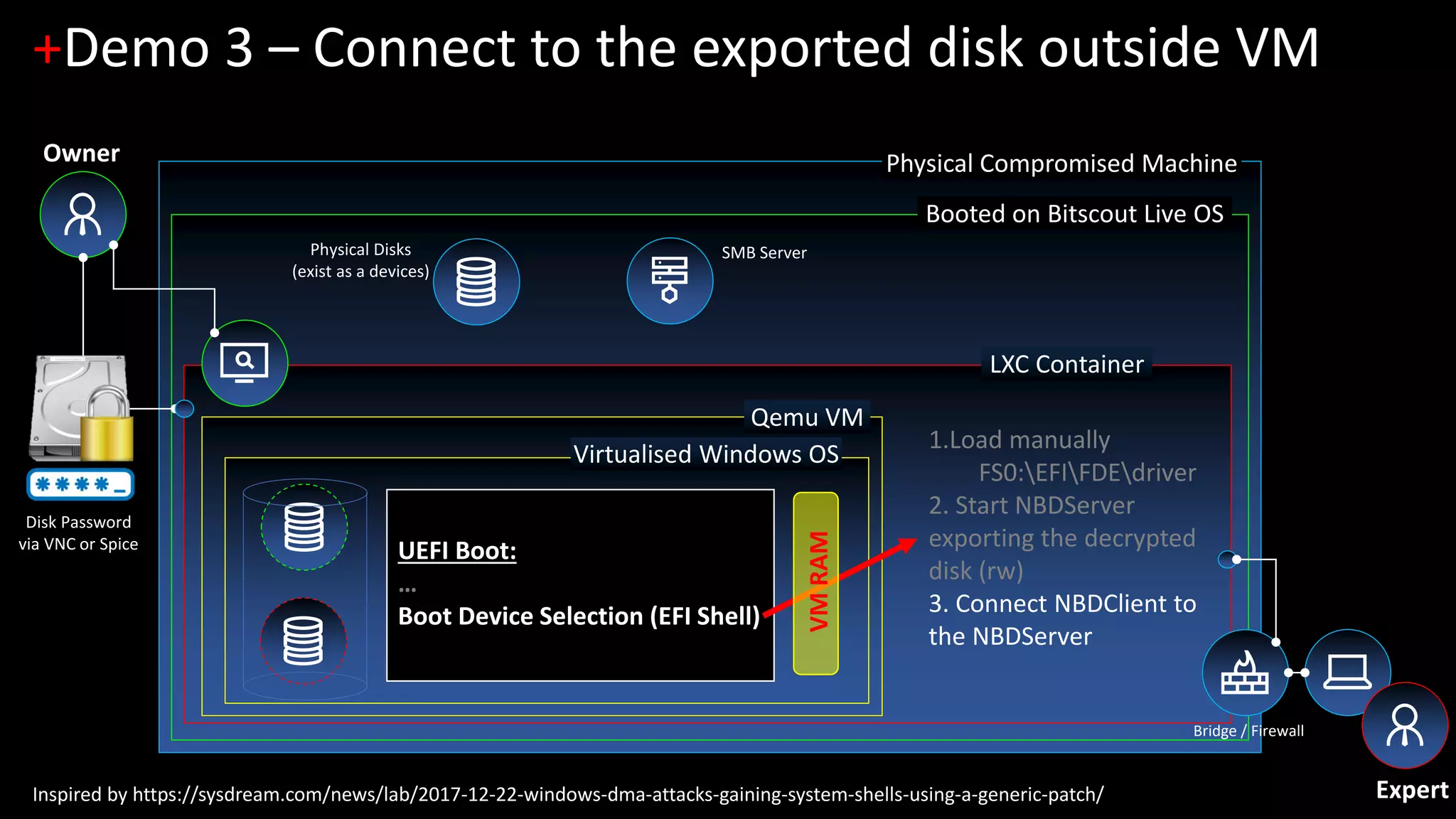
+Demo 3 – Connect to the exported disk outside VM
Physical Disks
(exist as a devices)
Bridge / Firewall
Qemu VM
Virtualised Windows OS
SMB Server
UEFI Boot:
…
Boot Device Selection (EFI Shell)
1.Load manually
FS0:EFIFDEdriver
2. Start NBDServer
exporting the decrypted
disk (rw)
3. Connect NBDClient to
the NBDServer
Expert
Owner
Inspired by https://sysdream.com/news/lab/2017-12-22-windows-dma-attacks-gaining-system-shells-using-a-generic-patch/
Disk Password
via VNC or Spice
VMRAM
Physical Compromised Machine
Booted on Bitscout Live OS
LXC Container
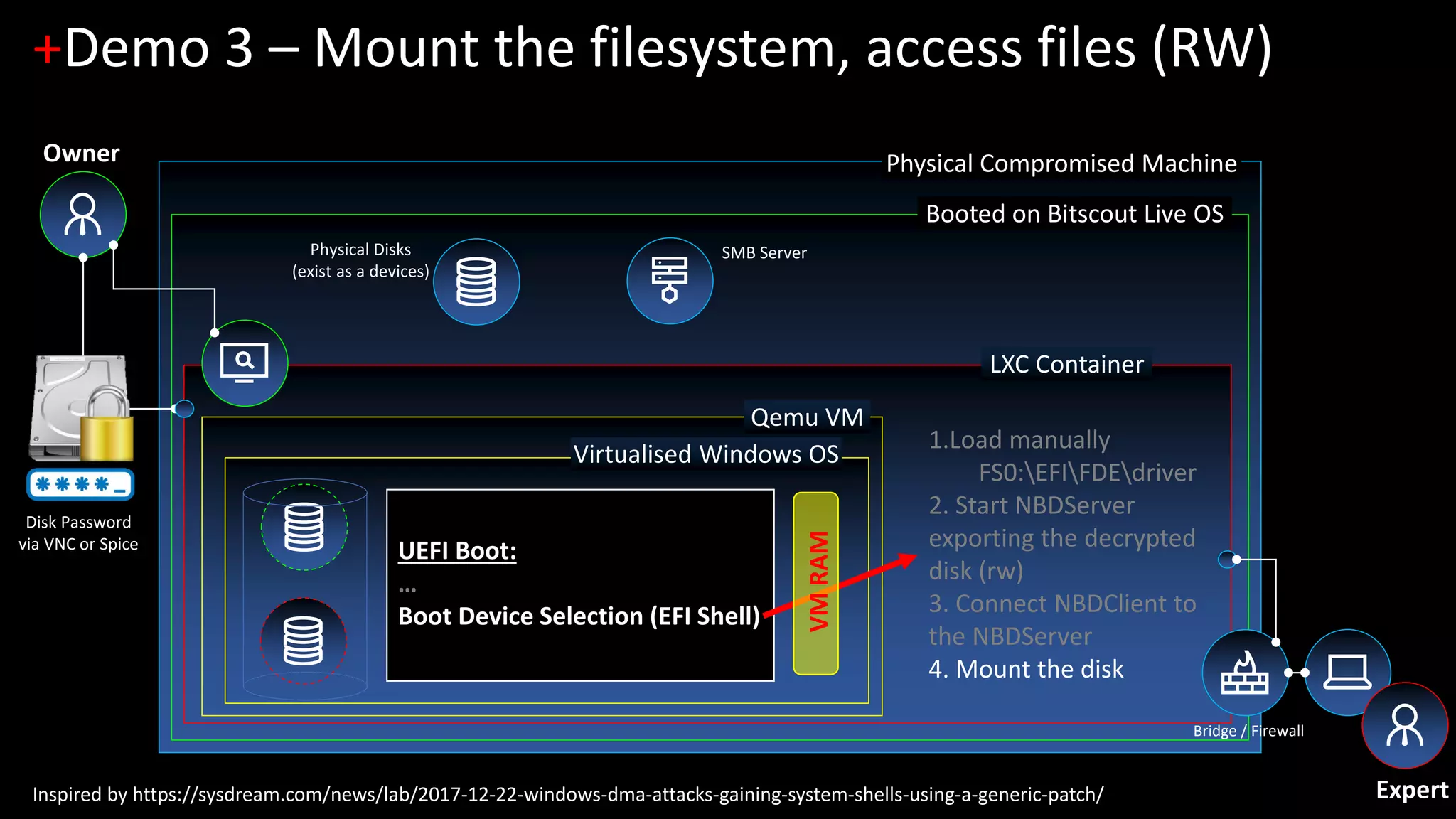
+Demo 3 – Mount the filesystem, access files (RW)
Physical Disks
(exist as a devices)
Bridge / Firewall
Qemu VM
Virtualised Windows OS
SMB Server
UEFI Boot:
…
Boot Device Selection (EFI Shell)
1.Load manually
FS0:EFIFDEdriver
2. Start NBDServer
exporting the decrypted
disk (rw)
3. Connect NBDClient to
the NBDServer
4. Mount the disk
Expert
Owner
Inspired by https://sysdream.com/news/lab/2017-12-22-windows-dma-attacks-gaining-system-shells-using-a-generic-patch/
Disk Password
via VNC or Spice
VMRAM
+Conclusions
Questions? Remarks?
+Thank you!
https://github.com/vitaly-kamluk/bitscout
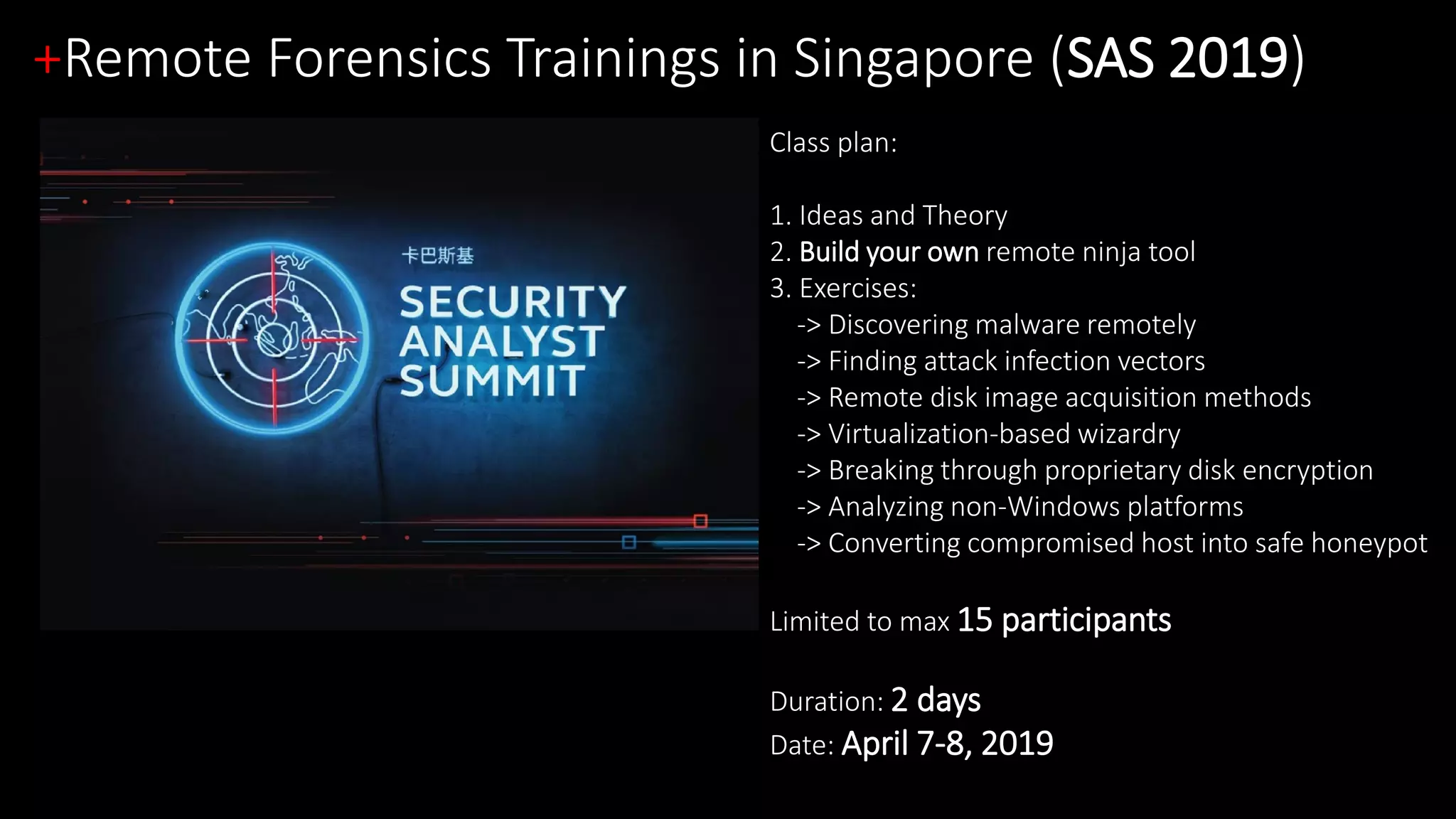
+Remote Forensics Trainings in Singapore (SAS 2019)
Class plan:
1. Ideas and Theory
2. Build your own remote ninja tool
3. Exercises:
-> Discovering malware remotely
-> Finding attack infection vectors
-> Remote disk image acquisition methods
-> Virtualization-based wizardry
-> Breaking through proprietary disk encryption
-> Analyzing non-Windows platforms
-> Converting compromised host into safe honeypot
Limited to max 15 participants
Duration: 2 days
Date: April 7-8, 2019

Needle In An Encrypted Haystack: Forensics in a hardened environment (with Full Disk Encryption)

  • 1.
    by Vitaly Kamluk,Kaspersky Lab & Nicolas Collery, DBS Bank Needle In An Encrypted Haystack: Forensics in a hardened environment (with Full Disk Encryption) “Bionic” HTCIA SINGAPORE CHAPTER 2ND ANNUAL CONFERENCE 29 NOVEMBER 2018
  • 2.
    +Who are we? VitalyKamluk Kaspersky Lab Nicolas Collery DBS Bank We both presented at HITB Commsec in 2017 and 2018 about a similar topic and now we are extending. 2017 - COMMSEC D2 - Nicolas Collery – It's Friday Evening Professor Moriarty 2017 - COMMSEC D2 - Vitaly Kamluk and Wayne Lee – Searching for a Needle in a Remote Haystack Materials found at: https://gsec.hitb.org/materials/sg2017/ and https://gsec.hitb.org/materials/sg2018/ Security engineer at DBS Bank, now leading the Offensive Team, I still am a forensic SME for the CERT and passionate about it. Our heavily hardened environment, makes attacks difficult but investigations potentially too. Staying ahead is key. Principal Security Researcher  13 years at Kaspersky Lab  2 years with INTERPOL Author of Bitscout project Reverse engineer, digital forensic analyst, security researcher. 2018 - COMMSEC: Brain Surgery: Breaking Full Disk Encryption (Vitaly Kamluk and Nicolas Collery)
  • 3.
    +Context & BitscoutIntroduction
  • 4.
  • 5.
    https://github.com/vitaly-kamluk/bitscout Some important coreprinciples  Forensically sound LiveOS (LiveCD/LiveUSB)  Free and open-source forever (Linux based)  Simple and customizable during build  Extendable during runtime  Minimal in RAM and in size  Capable to work even over very slow or unstable networks  User chooses VPN certificates and SSH keys  Security through unprivileged isolated access  Leverages original hardware/firmware of the subject +Bitscout: Our Principles
  • 6.
  • 7.
  • 8.
  • 9.
  • 10.
  • 11.
  • 12.
  • 13.
    +Layered Security Model BOOTMEDIA PHYSICAL CONSOLE VNC/SPICE SSH
  • 14.
    +Opening the gatesfor the expert
  • 15.
    Physical Compromised Machine Bootedon Bitscout Live OS LXC Container Console +Disk Mapping Owner Bridge / Firewall TCP 22 - SSH Select Disk Physical Disks (exist as a devices) Mapped Virtual Disk
  • 16.
    Physical Compromised Machine Bootedon Bitscout Live OS LXC Container Console +Disk Mapping Owner Bridge / Firewall TCP 22 - SSH Map to an evidence device Physical Disks (exist as a devices) Mapped Virtual Disk
  • 17.
    Physical Compromised Machine Bootedon Bitscout Live OS LXC Container Console +Disk Mapping Owner Bridge / Firewall TCP 22 - SSH Review the mapping Physical Disks (exist as a devices) Mapped Virtual Disk
  • 18.
  • 19.
    USB CDROM PhysicalCompromised Machine Booted on Bitscout Live OS LXC Container Console +Network Setup Internet LAN Owner Wifi Bridge / Firewall TCP 22 - SSH TCP 2000-2010 – SPICE/Any TCP 5900-5910 - VNC VPN Server Expert
  • 20.
    +WiFi support Bitscout containsWiFi network manager (Wicd)
  • 21.
    +Network Setup  Theowner enabling “Access from LAN” will allow the expert to login to the container from the internal network (eth0, wlan0). During the build of the Bitscout ISO image, a VPN profile and SSH keys can be inserted/exported too.  The owner enabling “Host control” will allow the expert to login to the host and controlling the entire setup (use with care!)
  • 22.
    +Today’s demo menu– Full Disk Encryption Windows 10 x64 with Proprietary Full Disk Encryption (FDE) 1. [Demo 1] Interactive analysis of locked live Windows (zero-footprint live forensics) 2. [Demo 2] Legacy MBR-based FDE and pre-boot disk access 3. [Demo 3] UEFI-based FDE and pre-boot disk access Disclaimer: This presentation is not about breaking cryptographic algorithms! Let’s see some Bitscout-fu!
  • 23.
    + Demo 1 Windows10 – Full Disk Encryption Interactive analysis (zero-footprint live forensics)
  • 24.
    +The disk isencrypted with an unknown solution $ parted /dev/host/evidence0 print Disk /dev/host/evidence0: 12.9GB Number Start End Size Type File System Flags 1 1049kB 525MB 524MB primary ntfs boot 2 525MB 12.9GB 12.4GB primary Partition start: 2048 (0x800) 00000000: eb52 904e 5446 5320 2020 2000 0208 0000 .R.NTFS ..... 00000010: 0000 0000 00f8 0000 3f00 ff00 0008 0000 ........?....... 00000020: 0000 0000 8000 8000 ff9f 0f00 0000 0000 ................ 00000030: aaa6 0000 0000 0000 0200 0000 0000 0000 ................ 00000040: f600 0000 0100 0000 f214 6ada 3b6a da18 ..........j.;j.. Partition start: 1026048 (0xfa800) 00000000: 8ba3 53ca 36b1 0d1c f349 3809 5517 cb6b ..S.6....I8.U..k 00000010: 6be2 2a9e b713 8e61 66f0 e8e6 e085 0efc k.*....af....... 00000020: 7a64 8877 ab8a 87d3 2b1e 94c3 6b4e 08ca zd.w....+...kN.. 00000030: c4b1 f16c 485d 4278 682d 78c1 c407 ea57 ...lH]Bxh-x....W 00000040: bd22 0780 f121 8dcc 61ac 035d d6b6 c7dc ."...!..a..].... Windows boot partition is not encrypted. System disk however is apparently encrypted, tools like fls won’t work
  • 25.
    Physical Compromised Machine Bootedon Bitscout Live OS LXC Container +Demo 1 – Boot the OS until Windows logon Owner Physical Disks (exist as a devices) Bridge / Firewall Qemu VM Virtualised Windows OS SMB Server Processes: … Winlogon.exe (NTSYSTEM) VMRAM Expert The owner map the disks Disk Password via VNC or Spice Copy-On-Write Disk Mapped Virtual Disk Read-only
  • 26.
    Physical Compromised Machine Bootedon Bitscout Live OS LXC Container +Demo 1 – Save VM snapshot Physical Disks (exist as a devices) Bridge / Firewall Qemu VM Virtualised Windows OS SMB Server Processes: … winlogon.exe (NTSYSTEM) VMRAM 1. Snapshot the VM (vmsave snapshot1) Expert Owner Inspired by https://sysdream.com/news/lab/2017-12-22-windows-dma-attacks-gaining-system-shells-using-a-generic-patch/
  • 27.
    Physical Compromised Machine Bootedon Bitscout Live OS LXC Container +Demo 1 – Edit VM snaphot file Physical Disks (exist as a devices) Bridge / Firewall Qemu VM Virtualised Windows OS SMB Server VMRAM 2. Edit snapshot1 (replacing “sethc.exe” with “cmd.exe” in the winlogon process memory) 1. Snapshot the VM Expert Owner Processes: … winlogon.exe (NTSYSTEM)
  • 28.
    Physical Compromised Machine Bootedon Bitscout Live OS LXC Container +Demo 1 – Restore modified VM snapshot Physical Disks (exist as a devices) Bridge / Firewall Qemu VM Virtualised Windows OS SMB Server Processes: … winlogon.exe (NTSYSTEM) VMRAM 3. Restore the snapshot (vmload memdump) Expert Owner 1. Snapshot of the VM 2. Edit evidence0.qcow2
  • 29.
    Physical Compromised Machine Bootedon Bitscout Live OS LXC Container +Demo 1 – Continue analysis as Administrator Physical Disks (exist as a devices) Bridge / Firewall Qemu VM SMB Server Processes: … winlogon.exe (NTSYSTEM) cmd.exe (NTSYSTEM) NBDServer.exe (NTSYSTEM) VMRAM 4. Start cmd.exe at logon screen 5. Export disk device over TCP (using NBDServer) 6. Mount exported disk device outside VM Virtualised Windows OS Expert Owner
  • 31.
    + Demo 2 Windows10 – Full Disk Encryption Legacy MBR-based FDE and pre-boot disk access
  • 32.
    Kernel mode +Demo 2– FUSE driver User space fuse kernel module (standard Linux kernel driver) Fuse mount point fuse user-space driver (python script) • File A • File B • Directory A/ • File C • File D
  • 33.
    Virtual Machine +Demo 2– MBR Implant MBR implant FDE Encrypted DataINT13 hookOur shellcode HDD Partition R/W sectors Decrypted Data
  • 35.
    + Demo 3 Windows10 – Full Disk Encryption UEFI-based FDE and pre-boot disk access
  • 36.
    Physical Compromised Machine Bootedon Bitscout Live OS LXC Container +Demo 3 – Enter EFI Shell, locate the FDE driver Owner Physical Disks (exist as a devices) Bridge / Firewall Qemu VM Virtualised OS SMB Server UEFI Boot: 1. SEC (Security Phase) 2. PEI (Pre EFI Initialisation Phase) 3. DXE (Driver Execution Environment) 4. EFI runtime UP 5. Boot Device Selection 6. Load FS0:EFIDiskDecryptiondriver 7 . OS Bootloader VMRAM Expert The owner map the disks Disk Password via VNC or Spice Copy-On-Write Disk Mapped Virtual Disk Read-only
  • 37.
    Physical Compromised Machine Bootedon Bitscout Live OS LXC Container +Demo 3 – Load the FDE driver, enter password Physical Disks (exist as a devices) Bridge / Firewall Qemu VM Virtualised Windows OS SMB Server UEFI Boot: … Boot Device Selection (EFI Shell) 1.Load manually FS0:EFIFDEdriver Expert Owner Inspired by https://sysdream.com/news/lab/2017-12-22-windows-dma-attacks-gaining-system-shells-using-a-generic-patch/ Disk Password via VNC or Spice VMRAM
  • 38.
    Physical Compromised Machine Bootedon Bitscout Live OS LXC Container +Demo 3 – Export the disk over TCP Physical Disks (exist as a devices) Bridge / Firewall Qemu VM Virtualised Windows OS SMB Server UEFI Boot: … Boot Device Selection (EFI Shell) 1.Load manually FS0:EFIFDEdriver 2. Start NBDServer exporting the decrypted disk (rw) Expert Owner Inspired by https://sysdream.com/news/lab/2017-12-22-windows-dma-attacks-gaining-system-shells-using-a-generic-patch/ Disk Password via VNC or Spice VMRAM
  • 39.
    Physical Compromised Machine Bootedon Bitscout Live OS LXC Container +Demo 3 – Connect to the exported disk outside VM Physical Disks (exist as a devices) Bridge / Firewall Qemu VM Virtualised Windows OS SMB Server UEFI Boot: … Boot Device Selection (EFI Shell) 1.Load manually FS0:EFIFDEdriver 2. Start NBDServer exporting the decrypted disk (rw) 3. Connect NBDClient to the NBDServer Expert Owner Inspired by https://sysdream.com/news/lab/2017-12-22-windows-dma-attacks-gaining-system-shells-using-a-generic-patch/ Disk Password via VNC or Spice VMRAM
  • 40.
    Physical Compromised Machine Bootedon Bitscout Live OS LXC Container +Demo 3 – Mount the filesystem, access files (RW) Physical Disks (exist as a devices) Bridge / Firewall Qemu VM Virtualised Windows OS SMB Server UEFI Boot: … Boot Device Selection (EFI Shell) 1.Load manually FS0:EFIFDEdriver 2. Start NBDServer exporting the decrypted disk (rw) 3. Connect NBDClient to the NBDServer 4. Mount the disk Expert Owner Inspired by https://sysdream.com/news/lab/2017-12-22-windows-dma-attacks-gaining-system-shells-using-a-generic-patch/ Disk Password via VNC or Spice VMRAM
  • 42.
  • 43.
  • 44.
    +Remote Forensics Trainingsin Singapore (SAS 2019) Class plan: 1. Ideas and Theory 2. Build your own remote ninja tool 3. Exercises: -> Discovering malware remotely -> Finding attack infection vectors -> Remote disk image acquisition methods -> Virtualization-based wizardry -> Breaking through proprietary disk encryption -> Analyzing non-Windows platforms -> Converting compromised host into safe honeypot Limited to max 15 participants Duration: 2 days Date: April 7-8, 2019