Qt on Android
Create a cross-platform
application with Qt
2
• Adrien Leravat
• Embedded Software Engineer
Introduction
• Witekio
• French company, German, USA, Taiwan
• BSP / OS porting to ARM (Linux, Windows, Android,
QNX)
• Embedded software architecture and development
• Mobile expertise (cloud, internet of things)
3
Context
• Creating a new application or service
– Multiple targets and OSes.
• Desktop
• Web
• Mobile and touch devices
– Your smartphones, fridge, …
– Android, iOS, WinRT/WP, Embedded OSes
• Meaning: a lot of time !
4
Qt answer
Your own components
• With Qt 5
– Desktop/Server
• Windows, Linux, Mac
• Smartphones
– Android, iOS, WinRT (preview)
• Embedded devices
– Windows CE, Linux, QNX
5
Qt answer
Your own components
• Why choose Qt for Android
– Build once, runs on multiple targets
• Less development, More maintainable
– No Android knowledge needed
• Big Qt features
– Databases, Threads, Networking, …
• Long living framework, large community
• Each 6 months: New major release !
6
Qt for Android
Your own components
• Two way to build Qt applications with Android
• Boot to Qt: Dedicated device running Android
– Android system without all unnecessary features
(Home, Dalvik, …)
– Make us of Android drivers (accelerometer,
camera,…)
• Qt Android application
– Regular application
– Can be published to Android Play Store
– Can be run on a dedicated Android device
7
Qt for Android
Your own components
• Android versions 2.3.3 (API 10) or later
• Download from free at : http://qt-project.org/downloads
• Qt 5
• Qt Creator
– Unified IDE for developing Qt applications
– Build, deploy and debug
• Qt Creator
– Toolchain for ARMv7 and x86 platforms, Qt
Linguist
8
Installation requirements
• External tools needed
– The Android SDK
• Java Development kit for Android
• The Android NDK
– Native code development kit for Android
• Apache Ant v1.8 or later
– Java code compilation
• JDK v6 or later
– Java development kit
9
Installation requirements
• External tools needed
– The Android SDK
– The Android NDK
– Apache Ant v1.8 or later
– JDK v6 or later
• Integration to Qt Creator
– Tools > Options >Android
– Let’s see !
10
Supported Items
• Qt 5 key features, and more !
– Widgets and Qt Quick graphical user interfaces
– Gestures
– Media player, video input
– Sensors: Accelerometer, Gyroscope, Light sensor,
…
– Databases, threads, networking,…
• Not supported: Webkit
Creating a new project
12
Project architecture
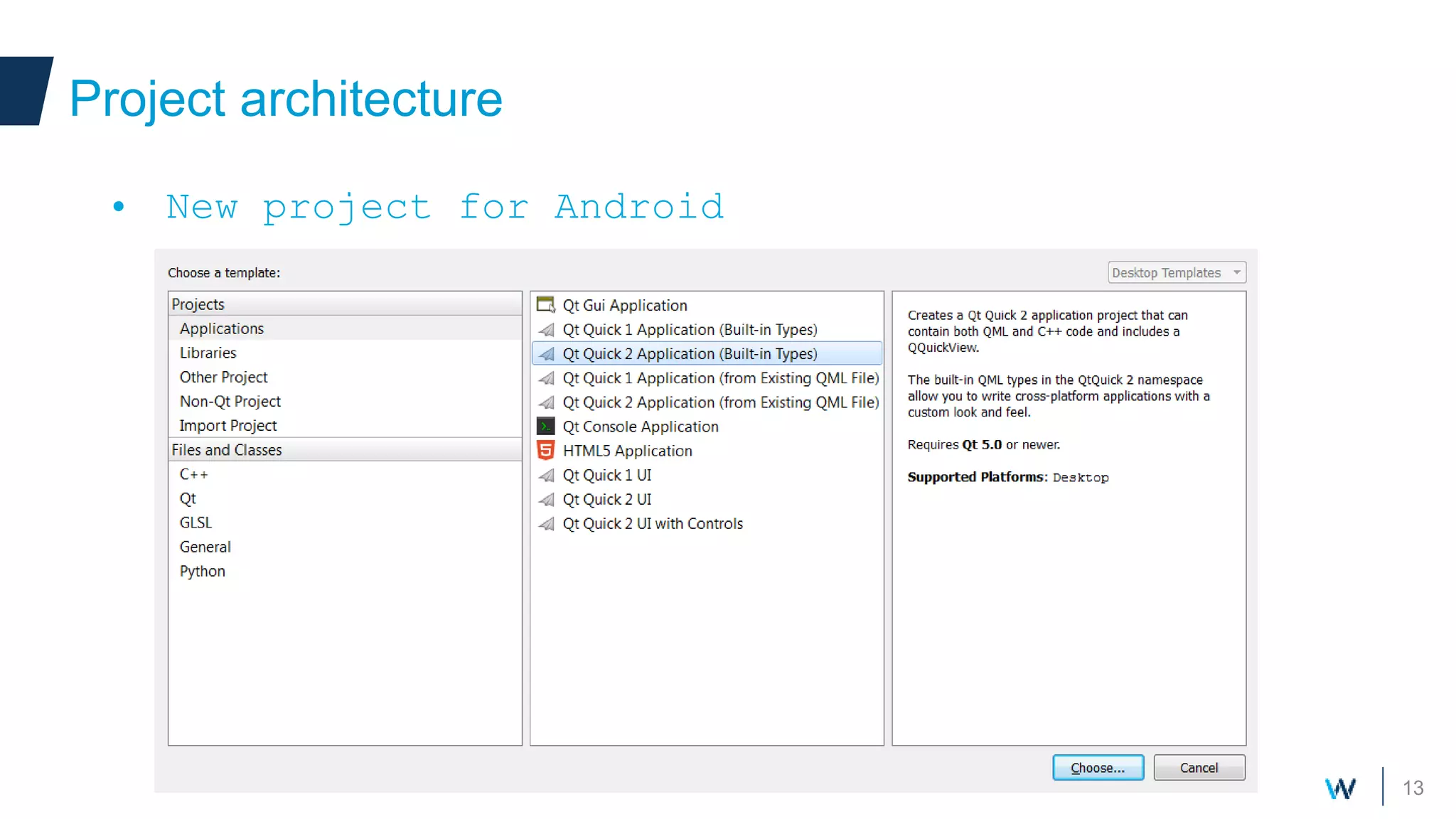
• New project for Android
– Several projects available: console, native
widgets, Qt Quick graphical application
• Qt Widgets
– No OpenGL hardware acceleration
– Certification needed for your application
– Desktop-only application, leverage all available
widgets
• Qt Quick 2 is preferred, being made
for modern devices
– Gestures, animations
– Design oriented
– Very easy to use
13
Project architecture
• New project for Android
14
Project architecture
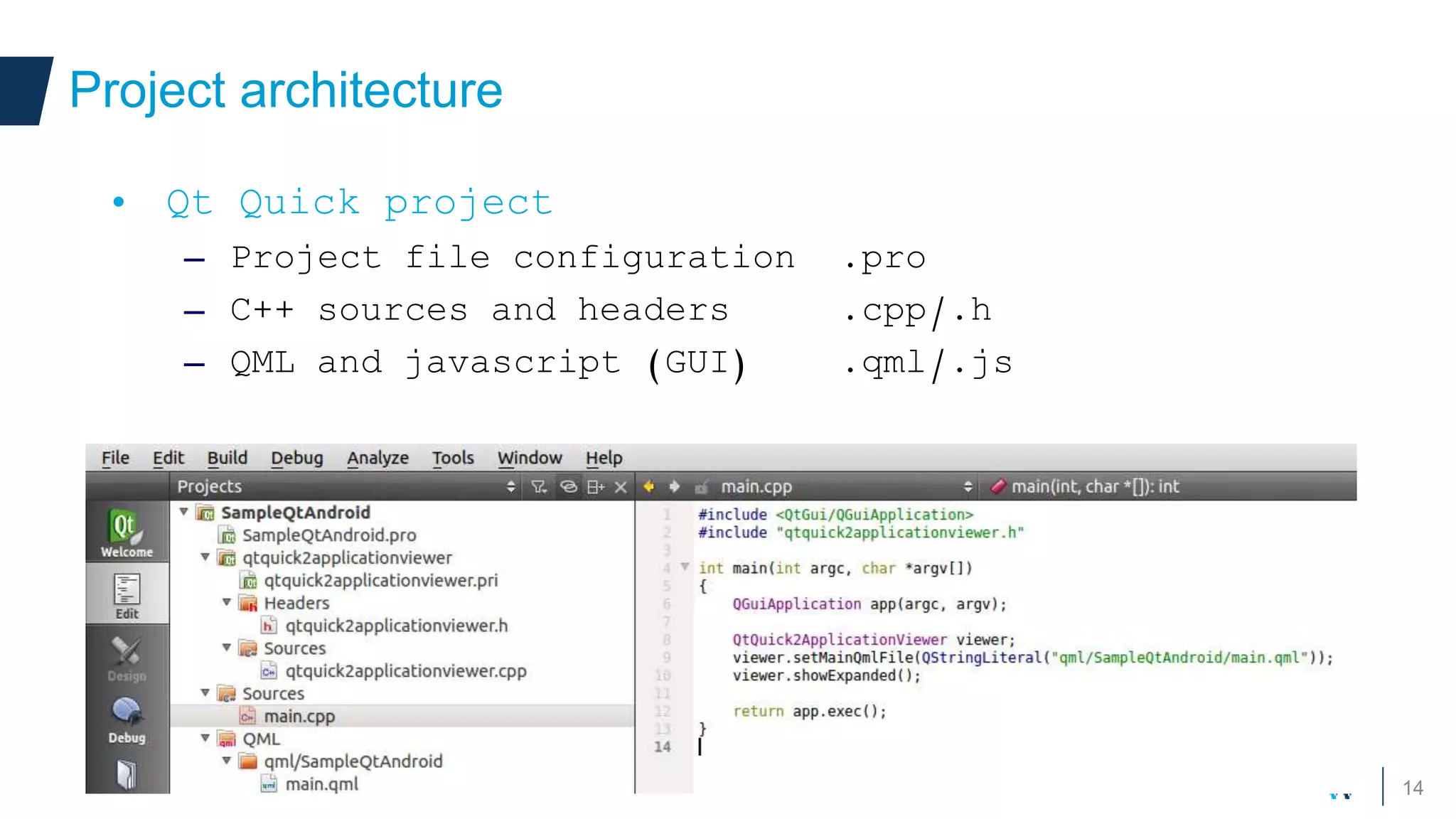
• Qt Quick project
– Project file configuration .pro
– C++ sources and headers .cpp/.h
– QML and javascript (GUI) .qml/.js
15
Project architecture
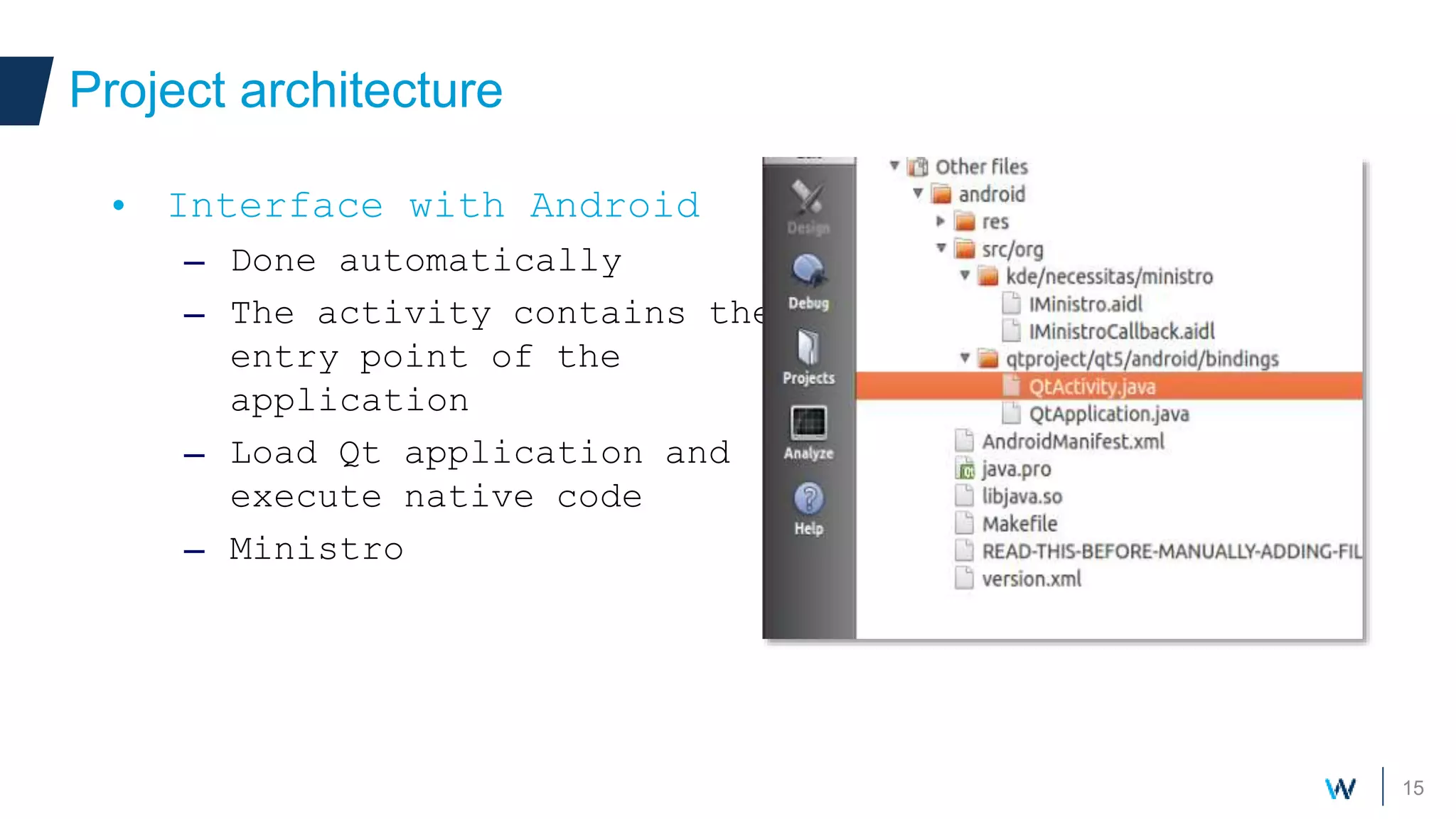
• Interface with Android
– Done automatically
– The activity contains the
entry point of the
application
– Load Qt application and
execute native code
– Ministro
16
Project architecture
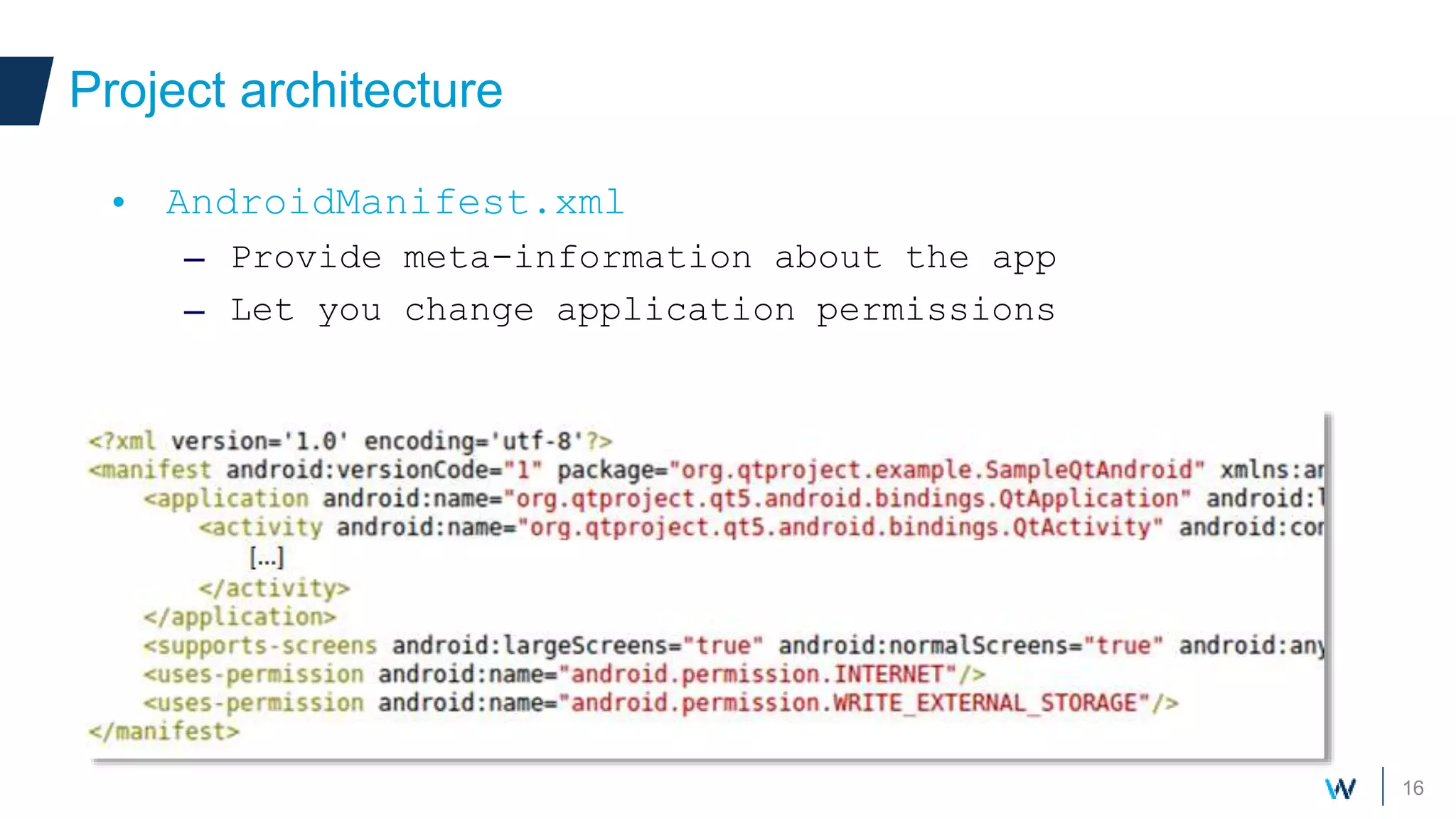
• AndroidManifest.xml
– Provide meta-information about the app
– Let you change application permissions
Polishing with effectsUsing Qt Quick
18
Qt Quick Design
• Perfectly fitted for Android
– Gestures, animations
– Network transparent, sensors
• Design oriented
– GUI conception accessible to designers
– Simples components to create your own UI
– Completely separate UI and logic
19
Qt Quick Design
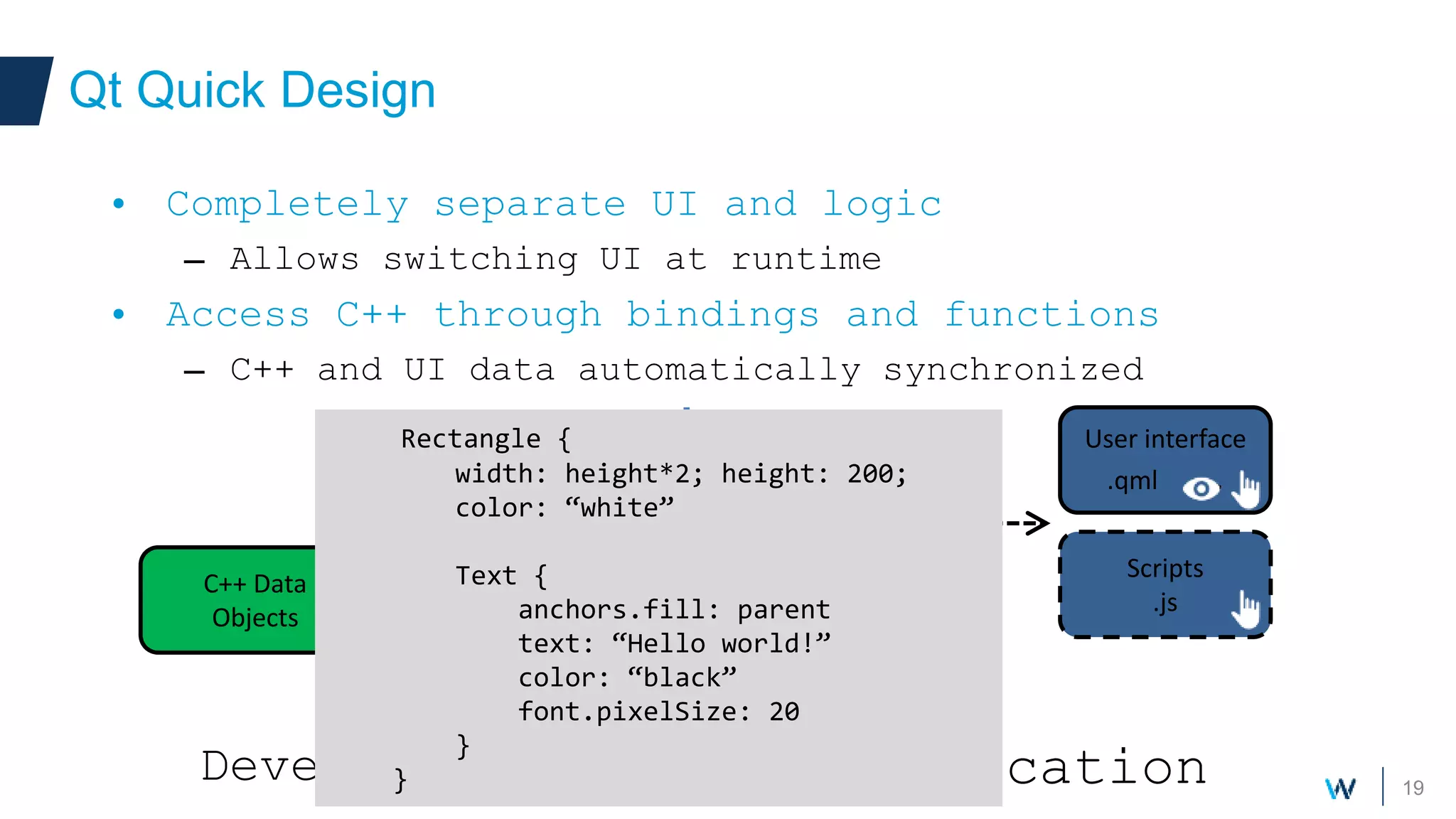
• Completely separate UI and logic
– Allows switching UI at runtime
• Access C++ through bindings and functions
– C++ and UI data automatically synchronized
Development
Source code
.cpp/.h
Application
C++ Data
Objects
User interface
.qml .
Scripts
.js
Application
User interface
.qml .
Scripts
.js
Rectangle {
width: height*2; height: 200;
color: “white”
Text {
anchors.fill: parent
text: “Hello world!”
color: “black”
font.pixelSize: 20
}
}
20
Sensors and Gestures
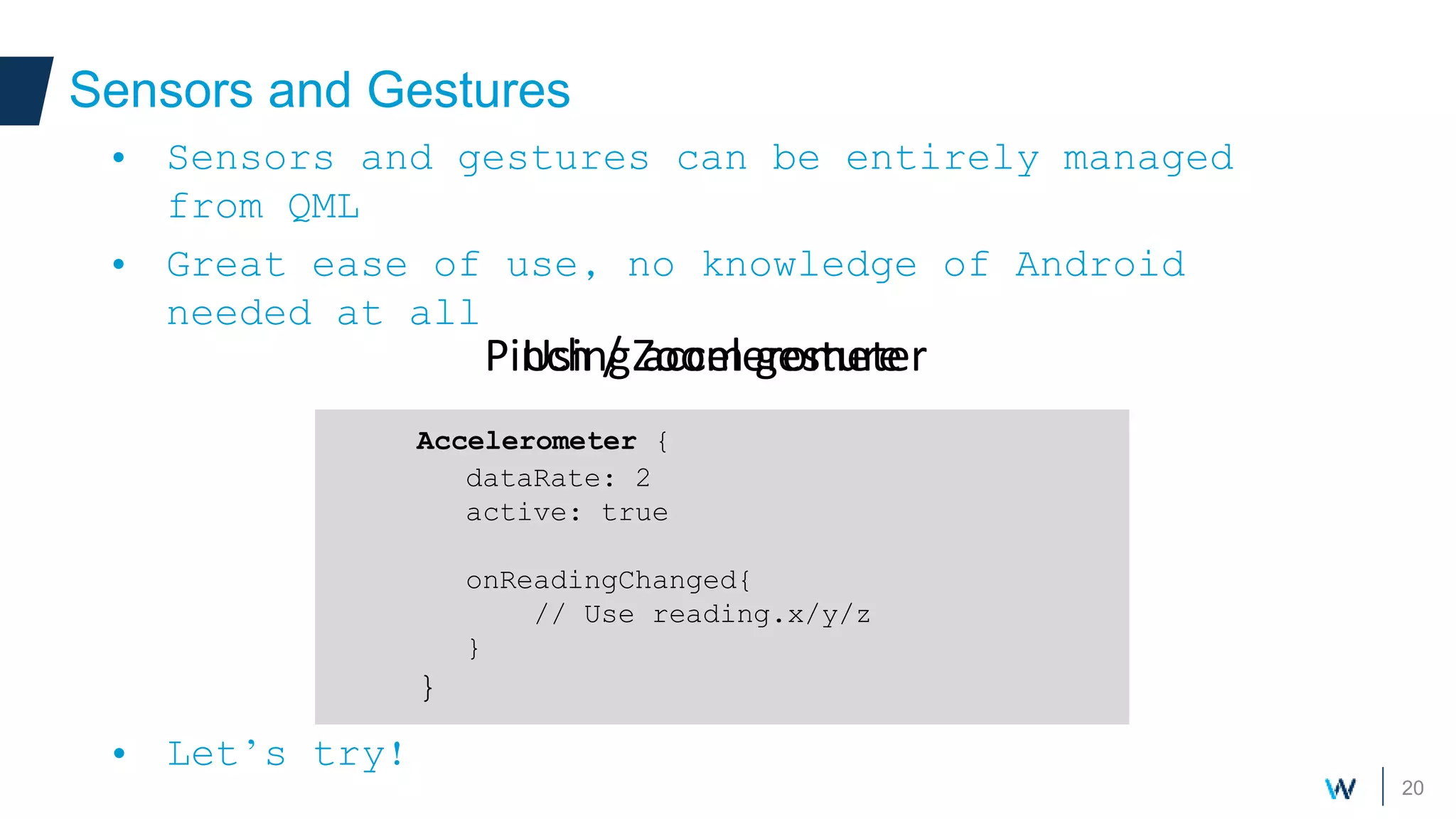
• Sensors and gestures can be entirely managed
from QML
• Great ease of use, no knowledge of Android
needed at all
• Let’s try!
PinchArea {
width:200
height: 200
GridView {
// Some large content
}
}
Pinch / Zoom gesture
Accelerometer {
dataRate: 2
active: true
onReadingChanged{
// Use reading.x/y/z
}
}
Using accelerometer
21
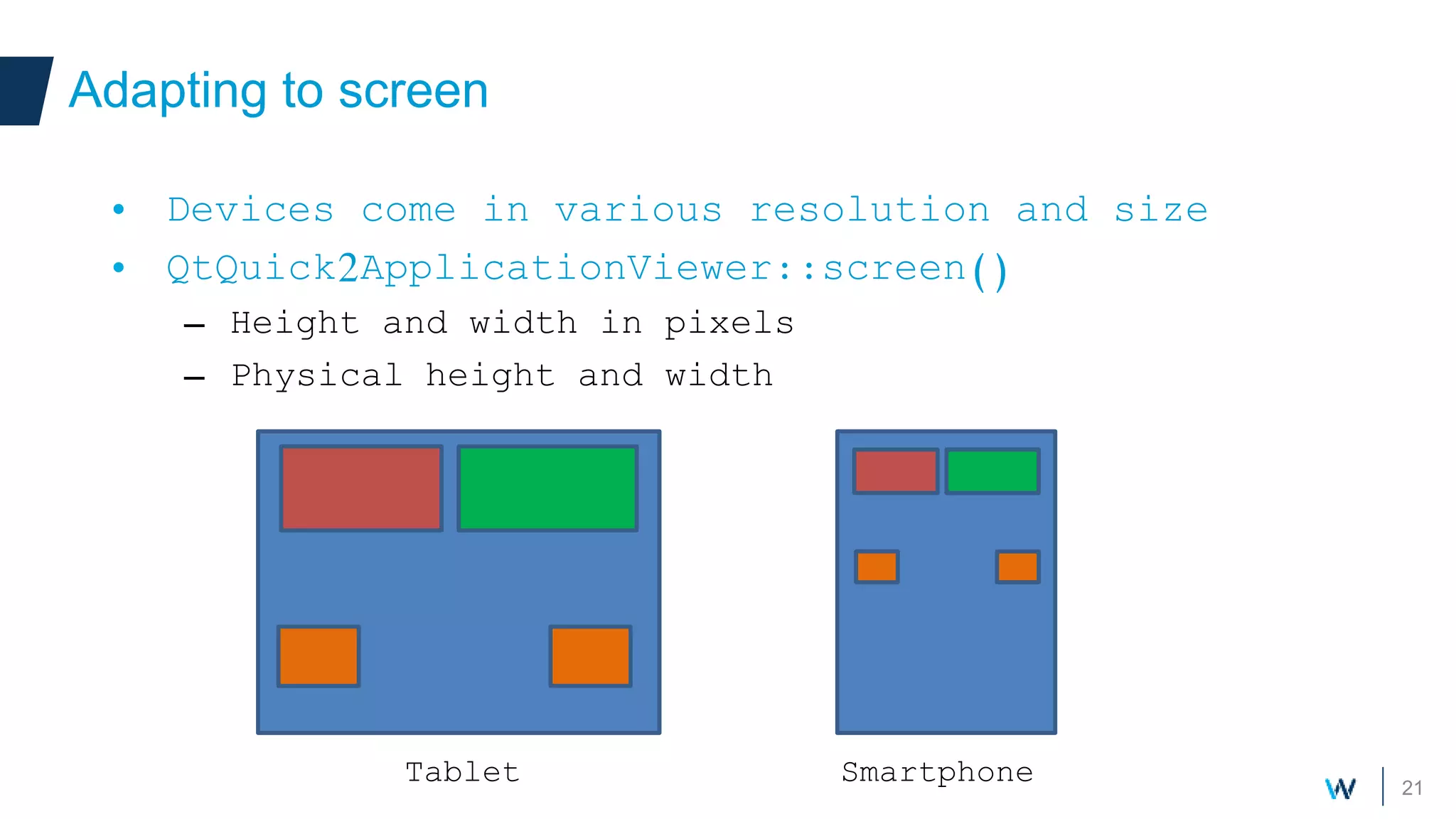
Adapting to screen
• Devices come in various resolution and size
• QtQuick2ApplicationViewer::screen()
– Height and width in pixels
– Physical height and width
SmartphoneTablet
22
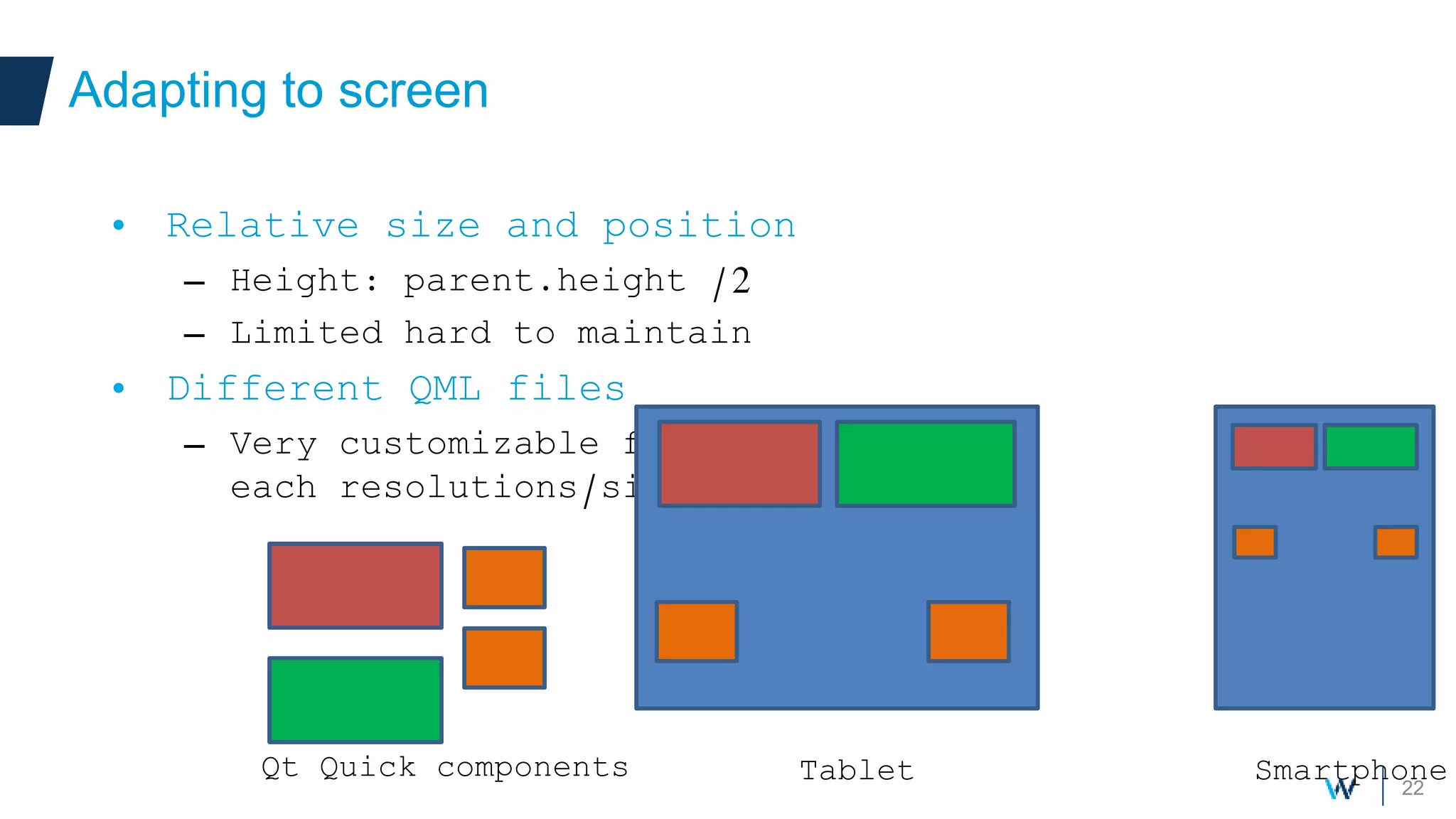
Adapting to screen
• Relative size and position
– Height: parent.height /2
– Limited hard to maintain
• Different QML files
– Very customizable for
each resolutions/size
SmartphoneTabletQt Quick components
23
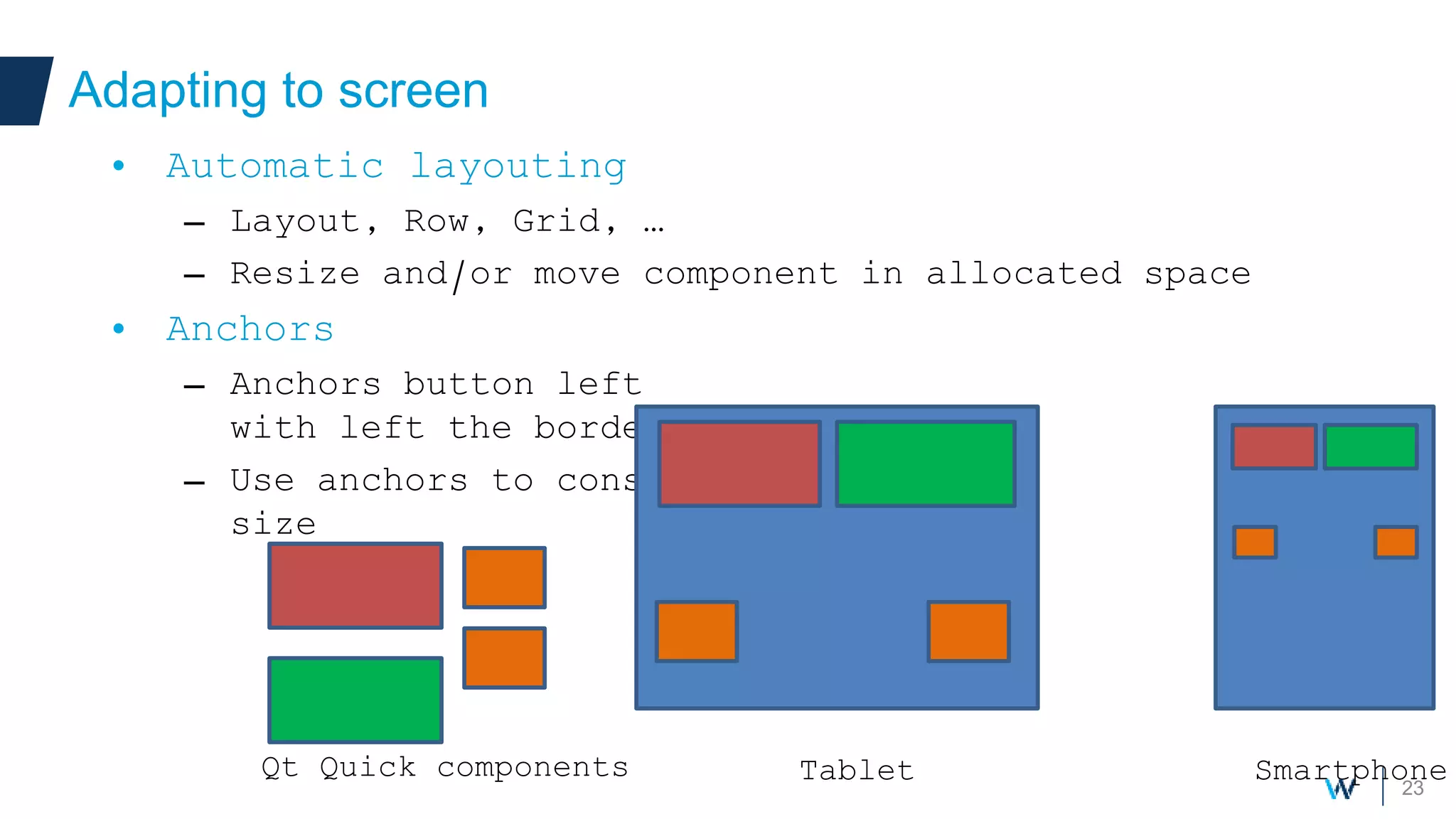
Adapting to screen
• Automatic layouting
– Layout, Row, Grid, …
– Resize and/or move component in allocated space
• Anchors
– Anchors button left
with left the border
– Use anchors to constrain
size
SmartphoneTabletQt Quick components
Deployment
25
Deployment
• Deploying your application on Android
– Direct deployment to device
• Most convenient for development
• Needs the device to be connected (USB)
– Simulator
– Bundle Qt libraries and files into the apk
• Stand-alone and distributable application package
– Using Ministro
• Minimize the size of the APK
26
Deployment
• Ministro
– Available on Google Play
– Application asks Ministro for Qt components
– Ministro download components
• If not installed
• If newer versions exist
– Qt Open Source
• GPLv3+ license for the APK
• BSD License for the API
• Install LGPLv2.1 / GPLV3 Qt libraries
27
Deployment
• Simulator
– Let’s you create and simulate various Android
devices
– Simulate different screen size
– Very convenient for development
28
Deployment
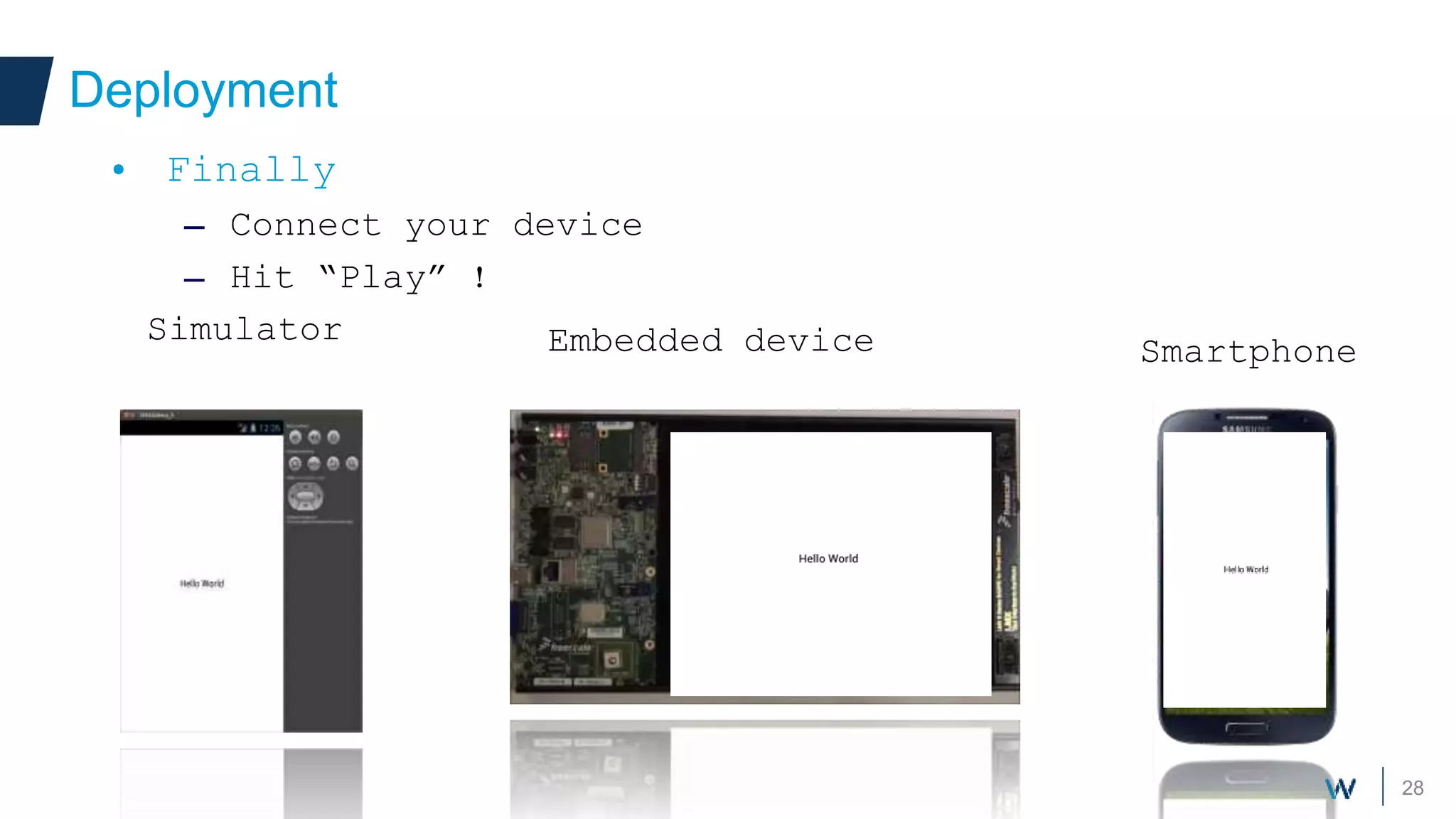
• Finally
– Connect your device
– Hit “Play” !
Embedded device Smartphone
Simulator
29
Conclusion
• Qt is a powerful technology, covering more and
more devices and Oses
• Opens new opportunity and ways of doing
software development
• Became an interesting and powerful alternative
to native Android

Witekio Qt and Android

  • 1.
    Qt on Android Createa cross-platform application with Qt
  • 2.
    2 • Adrien Leravat •Embedded Software Engineer Introduction • Witekio • French company, German, USA, Taiwan • BSP / OS porting to ARM (Linux, Windows, Android, QNX) • Embedded software architecture and development • Mobile expertise (cloud, internet of things)
  • 3.
    3 Context • Creating anew application or service – Multiple targets and OSes. • Desktop • Web • Mobile and touch devices – Your smartphones, fridge, … – Android, iOS, WinRT/WP, Embedded OSes • Meaning: a lot of time !
  • 4.
    4 Qt answer Your owncomponents • With Qt 5 – Desktop/Server • Windows, Linux, Mac • Smartphones – Android, iOS, WinRT (preview) • Embedded devices – Windows CE, Linux, QNX
  • 5.
    5 Qt answer Your owncomponents • Why choose Qt for Android – Build once, runs on multiple targets • Less development, More maintainable – No Android knowledge needed • Big Qt features – Databases, Threads, Networking, … • Long living framework, large community • Each 6 months: New major release !
  • 6.
    6 Qt for Android Yourown components • Two way to build Qt applications with Android • Boot to Qt: Dedicated device running Android – Android system without all unnecessary features (Home, Dalvik, …) – Make us of Android drivers (accelerometer, camera,…) • Qt Android application – Regular application – Can be published to Android Play Store – Can be run on a dedicated Android device
  • 7.
    7 Qt for Android Yourown components • Android versions 2.3.3 (API 10) or later • Download from free at : http://qt-project.org/downloads • Qt 5 • Qt Creator – Unified IDE for developing Qt applications – Build, deploy and debug • Qt Creator – Toolchain for ARMv7 and x86 platforms, Qt Linguist
  • 8.
    8 Installation requirements • Externaltools needed – The Android SDK • Java Development kit for Android • The Android NDK – Native code development kit for Android • Apache Ant v1.8 or later – Java code compilation • JDK v6 or later – Java development kit
  • 9.
    9 Installation requirements • Externaltools needed – The Android SDK – The Android NDK – Apache Ant v1.8 or later – JDK v6 or later • Integration to Qt Creator – Tools > Options >Android – Let’s see !
  • 10.
    10 Supported Items • Qt5 key features, and more ! – Widgets and Qt Quick graphical user interfaces – Gestures – Media player, video input – Sensors: Accelerometer, Gyroscope, Light sensor, … – Databases, threads, networking,… • Not supported: Webkit
  • 11.
  • 12.
    12 Project architecture • Newproject for Android – Several projects available: console, native widgets, Qt Quick graphical application • Qt Widgets – No OpenGL hardware acceleration – Certification needed for your application – Desktop-only application, leverage all available widgets • Qt Quick 2 is preferred, being made for modern devices – Gestures, animations – Design oriented – Very easy to use
  • 13.
  • 14.
    14 Project architecture • QtQuick project – Project file configuration .pro – C++ sources and headers .cpp/.h – QML and javascript (GUI) .qml/.js
  • 15.
    15 Project architecture • Interfacewith Android – Done automatically – The activity contains the entry point of the application – Load Qt application and execute native code – Ministro
  • 16.
    16 Project architecture • AndroidManifest.xml –Provide meta-information about the app – Let you change application permissions
  • 17.
  • 18.
    18 Qt Quick Design •Perfectly fitted for Android – Gestures, animations – Network transparent, sensors • Design oriented – GUI conception accessible to designers – Simples components to create your own UI – Completely separate UI and logic
  • 19.
    19 Qt Quick Design •Completely separate UI and logic – Allows switching UI at runtime • Access C++ through bindings and functions – C++ and UI data automatically synchronized Development Source code .cpp/.h Application C++ Data Objects User interface .qml . Scripts .js Application User interface .qml . Scripts .js Rectangle { width: height*2; height: 200; color: “white” Text { anchors.fill: parent text: “Hello world!” color: “black” font.pixelSize: 20 } }
  • 20.
    20 Sensors and Gestures •Sensors and gestures can be entirely managed from QML • Great ease of use, no knowledge of Android needed at all • Let’s try! PinchArea { width:200 height: 200 GridView { // Some large content } } Pinch / Zoom gesture Accelerometer { dataRate: 2 active: true onReadingChanged{ // Use reading.x/y/z } } Using accelerometer
  • 21.
    21 Adapting to screen •Devices come in various resolution and size • QtQuick2ApplicationViewer::screen() – Height and width in pixels – Physical height and width SmartphoneTablet
  • 22.
    22 Adapting to screen •Relative size and position – Height: parent.height /2 – Limited hard to maintain • Different QML files – Very customizable for each resolutions/size SmartphoneTabletQt Quick components
  • 23.
    23 Adapting to screen •Automatic layouting – Layout, Row, Grid, … – Resize and/or move component in allocated space • Anchors – Anchors button left with left the border – Use anchors to constrain size SmartphoneTabletQt Quick components
  • 24.
  • 25.
    25 Deployment • Deploying yourapplication on Android – Direct deployment to device • Most convenient for development • Needs the device to be connected (USB) – Simulator – Bundle Qt libraries and files into the apk • Stand-alone and distributable application package – Using Ministro • Minimize the size of the APK
  • 26.
    26 Deployment • Ministro – Availableon Google Play – Application asks Ministro for Qt components – Ministro download components • If not installed • If newer versions exist – Qt Open Source • GPLv3+ license for the APK • BSD License for the API • Install LGPLv2.1 / GPLV3 Qt libraries
  • 27.
    27 Deployment • Simulator – Let’syou create and simulate various Android devices – Simulate different screen size – Very convenient for development
  • 28.
    28 Deployment • Finally – Connectyour device – Hit “Play” ! Embedded device Smartphone Simulator
  • 29.
    29 Conclusion • Qt isa powerful technology, covering more and more devices and Oses • Opens new opportunity and ways of doing software development • Became an interesting and powerful alternative to native Android